目录
你是否曾经为了处理未知结构的JSON而写了一大堆反射代码?是否为了实现灵活的API而让代码变得臃肿不堪?今天我们来聊聊C#中一个被严重低估的特性——动态编程(Dynamic Programming)。
掌握System.Dynamic命名空间,你将告别繁琐的反射操作,让代码变得更加优雅和高效。本文将通过5个实战场景,带你深入理解并应用C#的动态特性。
🎯 为什么需要动态编程?
在实际开发中,我们经常遇到这些痛点:
- JSON数据结构不固定:接口返回的数据格式经常变化
- 配置文件灵活性不够:需要支持动态添加属性
- 插件系统扩展困难:第三方组件接口不统一
- 反射性能问题:大量使用反射导致性能下降
💡 解决方案:System.Dynamic全家桶
🚀 方案一:ExpandoObject - 动态对象的最佳选择
ExpandoObject是动态编程的明星类,它允许我们在运行时动态添加和删除成员。这是个好东西,还没有这个出来前处理这个挺麻烦的。
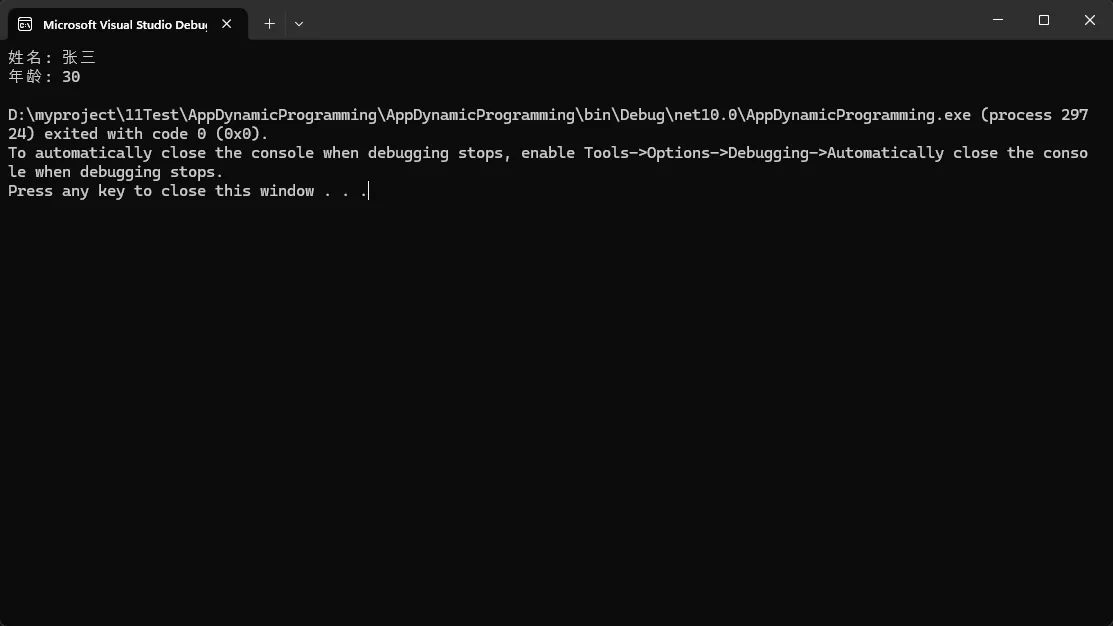
c#// 使用ExpandoObject的优雅方式
public class DynamicApproach
{
    public void ProcessJson(string json)
    {
        dynamic obj = JsonSerializer.Deserialize<ExpandoObject>(json);

        // 直接访问属性,如同静态类型一样自然
        Console.WriteLine($"姓名: {obj.name}");
        Console.WriteLine($"年龄: {obj.age}");

        // 动态添加新属性
        obj.processTime = DateTime.Now;
        obj.status = "已处理";
    }
}
💰 实际应用场景:
- API响应处理
- 配置文件读取
- 临时数据容器
⚠️ 坑点提醒:
- 没有编译时类型检查,拼写错误只能在运行时发现
- 性能略低于静态类型
🔧 方案二:DynamicObject - 自定义动态行为
当ExpandoObject无法满足复杂需求时,继承DynamicObject可以实现完全自定义的动态行为。
c#using System.Dynamic;
using System.Net.Http.Json;
using System.Text.Json;
using System.Text.Json.Serialization;

namespace AppDynamicProgramming
{
    internal class Program
    {
        static void Main(string[] args)
        {
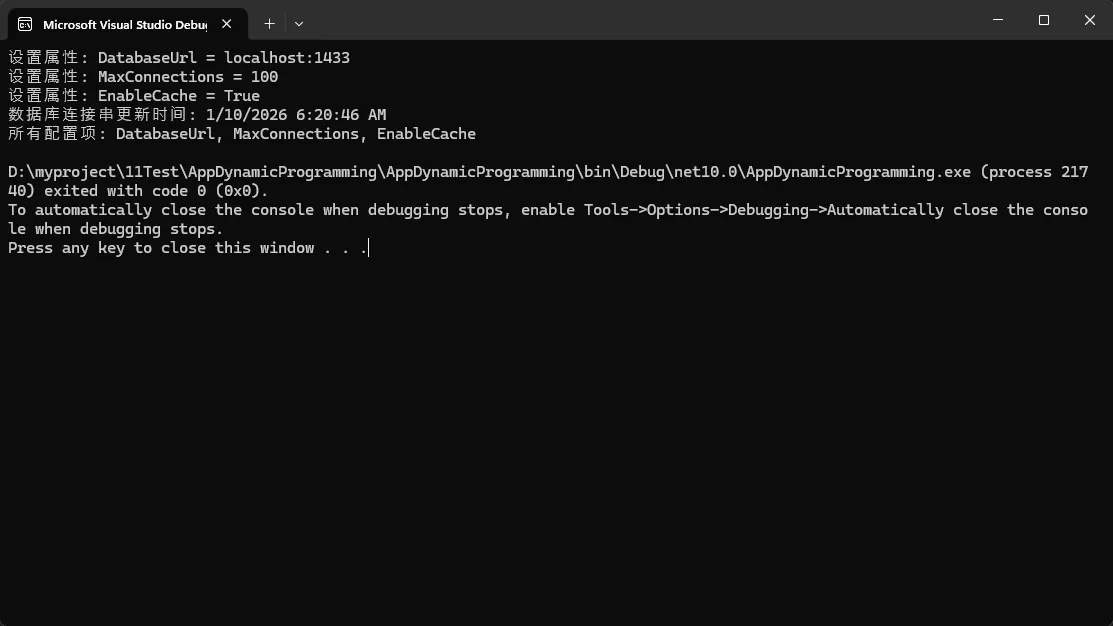
            dynamic config = new SmartConfig();

            // 动态设置属性
            config.DatabaseUrl = "localhost:1433";
            config.MaxConnections = 100;
            config.EnableCache = true;

            // 动态调用方法
            var updateTime = config.GetUpdateTime("DatabaseUrl");
            var allProps = config.GetAllProperties();

            Console.WriteLine($"数据库连接串更新时间: {updateTime}");
            Console.WriteLine($"所有配置项: {string.Join(", ", allProps)}");
        }
    }

    public class SmartConfig : DynamicObject
    {
        private Dictionary<string, object> _properties = new Dictionary<string, object>();
        private Dictionary<string, DateTime> _updateTimes = new Dictionary<string, DateTime>();

        // 重写获取成员的行为
        public override bool TryGetMember(GetMemberBinder binder, out object result)
        {
            string propertyName = binder.Name;

            // 添加日志记录
            Console.WriteLine($"访问属性: {propertyName}");

            return _properties.TryGetValue(propertyName, out result);
        }

        // 重写设置成员的行为
        public override bool TrySetMember(SetMemberBinder binder, object value)
        {
            string propertyName = binder.Name;

            // 自动记录更新时间
            _updateTimes[propertyName] = DateTime.Now;
            _properties[propertyName] = value;

            Console.WriteLine($"设置属性: {propertyName} = {value}");
            return true;
        }

        // 自定义方法调用
        public override bool TryInvokeMember(InvokeMemberBinder binder, object[] args, out object result)
        {
            result = null;

            switch (binder.Name)
            {
                case "GetUpdateTime":
                    if (args.Length == 1 && args[0] is string propName)
                    {
                        result = _updateTimes.TryGetValue(propName, out DateTime time) ? time : (DateTime?)null;
                        return true;
                    }
                    break;

                case "GetAllProperties":
                    result = _properties.Keys.ToList();
                    return true;
            }

            return false;
        }
    }
}
💰 实际应用场景:
- 智能配置系统
- ORM框架
- 插件接口适配器
🌟 方案三:dynamic关键字 - 延迟绑定的魅力
dynamic关键字让我们可以绕过编译时类型检查,实现真正的鸭子类型编程。不过大量用这个dynamic效率肯定会低一些的,这块需要自己把握 。
c#public class DynamicDemo
{
    // 通用的对象处理方法
    public void ProcessAnyObject(dynamic obj)
    {
        // 不管obj是什么类型,只要有这些成员就能正常工作
        try
        {
            Console.WriteLine($"Name: {obj.Name}");
            Console.WriteLine($"Value: {obj.Value}");
            obj.Process();
        }
        catch (RuntimeBinderException ex)
        {
            Console.WriteLine($"动态绑定失败: {ex.Message}");
        }
    }

    // COM组件交互的完美解决方案
    public void WorkWithExcel()
    {
        // 不需要引用Office PIA程序集
        Type excelType = Type.GetTypeFromProgID("Excel.Application");
        dynamic excel = Activator.CreateInstance(excelType);

        excel.Visible = true;
        dynamic workbook = excel.Workbooks.Add();
        dynamic worksheet = workbook.ActiveSheet;

        // 直接操作Excel对象,如同本地对象一样
        worksheet.Cells[1, 1].Value = "Hello Dynamic!";
        worksheet.Cells[1, 2].Value = DateTime.Now;

        // 清理资源
        workbook.Close();
        excel.Quit();
    }
}

// 测试不同类型的对象
public class Person
{
    public string Name { get; set; } = "张三";
    public int Value { get; set; } = 100;
    public void Process() => Console.WriteLine("Person.Process() called");
}

public class Product
{
    public string Name { get; set; } = "iPhone";
    public decimal Value { get; set; } = 9999;
    public void Process() => Console.WriteLine("Product.Process() called");
}
💰 实际应用场景:
- COM组件交互,当年调用excel,word这块还是挺费事的,每个要找接口,用dynamic确定简单不少,不过这些年基本没用过什么com组件了。
- 第三方库封装
- 动态代理实现
🎨 方案四:IDynamicMetaObjectProvider - 高级定制接口
对于需要完全控制动态行为的场景,实现IDynamicMetaObjectProvider接口提供了最大的灵活性。
c#using Microsoft.CSharp.RuntimeBinder;
using System;
using System.Dynamic;
using System.Linq.Expressions;
using System.Reflection;

namespace AppDynamicProgramming
{
    public class Person
    {
        public string Name { get; set; }
        public int Value { get; set; }
    }

    internal class Program
    {
        static void Main(string[] args)
        {
            var person = new Person { Name = "李四", Value = 200 };

            dynamic proxy = new FlexibleProxy(person);
            var flexProxy = (FlexibleProxy)proxy;  // 转换为具体类型
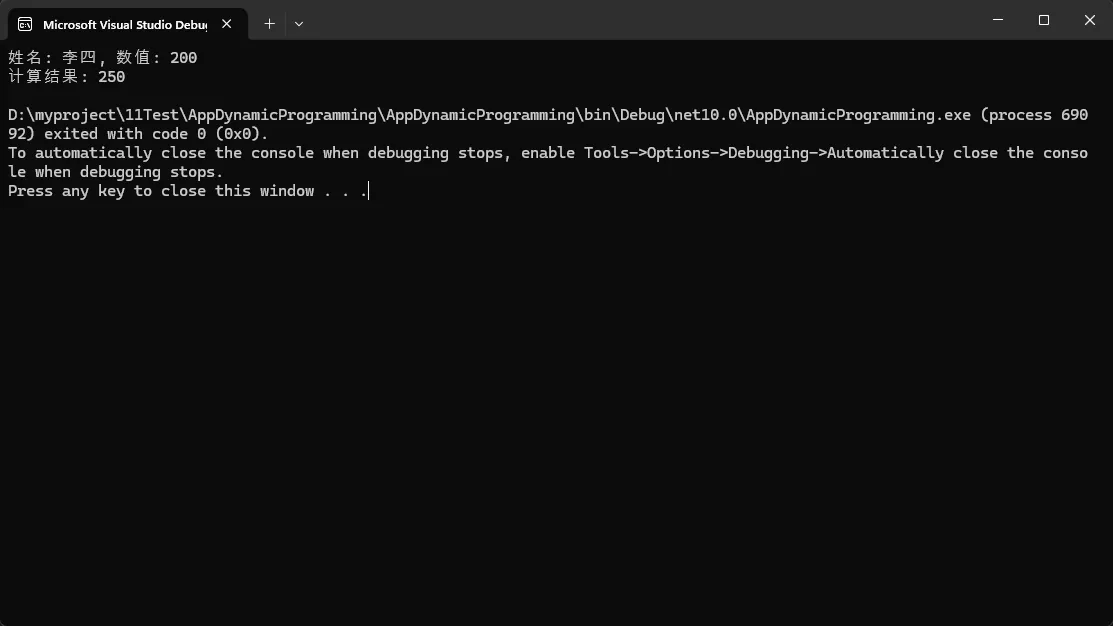
            flexProxy.AddMethod("GetInfo", args => $"姓名: {person.Name}, 数值: {person.Value}");
            flexProxy.AddMethod("Calculate", args => (int)args[0] + person.Value);

            Console.WriteLine(proxy.GetInfo());
            Console.WriteLine($"计算结果: {proxy.Calculate(50)}");
        }
    }

    public class FlexibleProxy : IDynamicMetaObjectProvider
    {
        private readonly object _target;
        private readonly Dictionary<string, Func<object[], object>> _customMethods;

        public FlexibleProxy(object target)
        {
            _target = target;
            _customMethods = new Dictionary<string, Func<object[], object>>();
        }

        // 添加自定义方法
        public void AddMethod(string name, Func<object[], object> method)
        {
            _customMethods[name] = method;
        }

        public DynamicMetaObject GetMetaObject(Expression parameter)
        {
            return new FlexibleProxyMetaObject(parameter, this, _target);
        }

        internal bool TryInvokeCustomMethod(string name, object[] args, out object result)
        {
            if (_customMethods.TryGetValue(name, out var method))
            {
                result = method(args);
                return true;
            }
            result = null;
            return false;
        }
    }

    // 自定义MetaObject实现
    public class FlexibleProxyMetaObject : DynamicMetaObject
    {
        private readonly FlexibleProxy _proxy;
        private readonly object _target;

        public FlexibleProxyMetaObject(Expression expression, FlexibleProxy proxy, object target)
            : base(expression, BindingRestrictions.Empty, proxy)
        {
            _proxy = proxy;
            _target = target;
        }

        public override DynamicMetaObject BindInvokeMember(InvokeMemberBinder binder, DynamicMetaObject[] args)
        {
            var resultVar = Expression.Variable(typeof(object), "result");
            var argExprs = args.Select(a => Expression.Convert(a.Expression, typeof(object)));
            var argsArray = Expression.NewArrayInit(typeof(object), argExprs);
            var tryCustomMethodCall = Expression.Call(
                Expression.Constant(_proxy),
                typeof(FlexibleProxy).GetMethod("TryInvokeCustomMethod", BindingFlags.NonPublic | BindingFlags.Instance),
                Expression.Constant(binder.Name),
                argsArray,
                resultVar
            );

            var condition = Expression.Condition(
                tryCustomMethodCall,
                resultVar,
                Expression.Throw(
                    Expression.New(
                        typeof(MissingMethodException).GetConstructor(new[] { typeof(string) }),
                        Expression.Constant($"Method '{binder.Name}' not found.")
                    ),
                    typeof(object)
                ),
                typeof(object)
            );

            var block = Expression.Block(
                new[] { resultVar },
                condition
            );

            return new DynamicMetaObject(block, BindingRestrictions.GetTypeRestriction(Expression, LimitType));
        }
    }
}
🛡️ 方案五:性能优化与最佳实践,你认为的可能不对?
c#public class PerformanceOptimizedDynamic
{
    // 缓存CallSite以提高性能
    private static readonly ConcurrentDictionary<string, CallSite<Func<CallSite, object, object>>>
        GetMemberSites = new ConcurrentDictionary<string, CallSite<Func<CallSite, object, object>>>();

    private static readonly ConcurrentDictionary<string, CallSite<Func<CallSite, object, object, object>>>
        SetMemberSites = new ConcurrentDictionary<string, CallSite<Func<CallSite, object, object, object>>>();

    public static object GetMember(object target, string memberName)
    {
        var site = GetMemberSites.GetOrAdd(memberName, name =>
            CallSite<Func<CallSite, object, object>>.Create(
                Binder.GetMember(CSharpBinderFlags.None, name, typeof(PerformanceOptimizedDynamic),
                new[] { CSharpArgumentInfo.Create(CSharpArgumentInfoFlags.None, null) })
            )
        );

        return site.Target(site, target);
    }

    public static void SetMember(object target, string memberName, object value)
    {
        var site = SetMemberSites.GetOrAdd(memberName, name =>
            CallSite<Func<CallSite, object, object, object>>.Create(
                Binder.SetMember(CSharpBinderFlags.None, name, typeof(PerformanceOptimizedDynamic),
                new[] {
                    CSharpArgumentInfo.Create(CSharpArgumentInfoFlags.None, null),
                    CSharpArgumentInfo.Create(CSharpArgumentInfoFlags.None, null)
                })
            )
        );

        site.Target(site, target, value);
    }

    // 性能测试对比
    public static void PerformanceTest()
    {
        var obj = new ExpandoObject();
        dynamic dynamicObj = obj;

        // 预热
        for (int i = 0; i < 1000; i++)
        {
            dynamicObj.TestProperty = i;
            var value = dynamicObj.TestProperty;
        }

        // 测试直接dynamic调用
        var sw1 = Stopwatch.StartNew();
        for (int i = 0; i < 100000; i++)
        {
            dynamicObj.TestProperty = i;
            var value = dynamicObj.TestProperty;
        }
        sw1.Stop();

        // 测试缓存CallSite调用
        var sw2 = Stopwatch.StartNew();
        for (int i = 0; i < 100000; i++)
        {
            SetMember(obj, "TestProperty", i);
            var value = GetMember(obj, "TestProperty");
        }
        sw2.Stop();

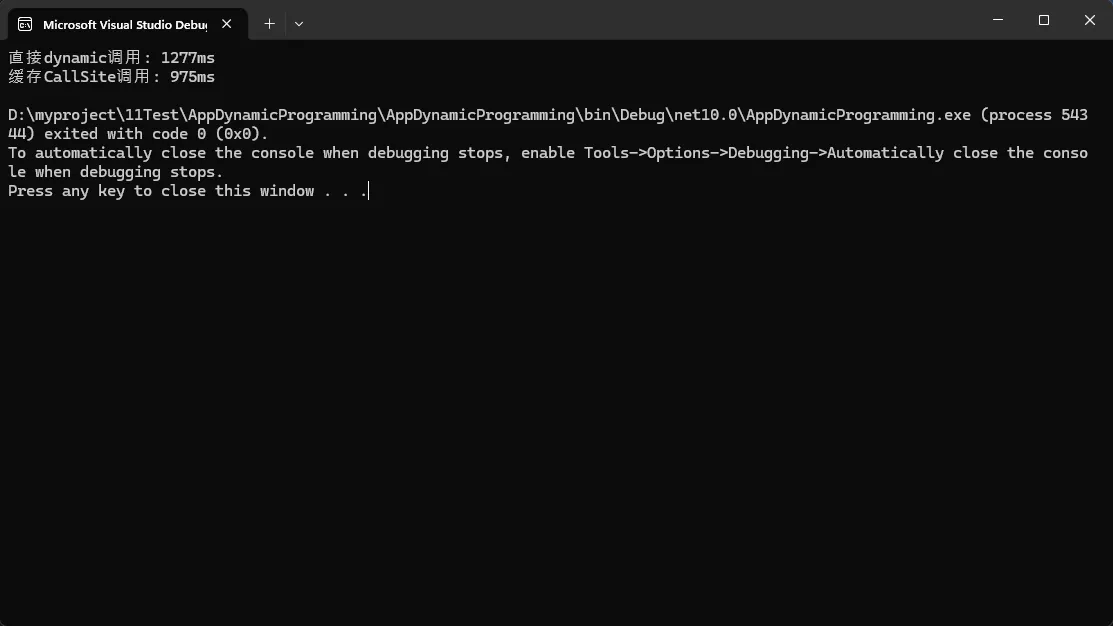
        Console.WriteLine($"直接dynamic调用: {sw1.ElapsedMilliseconds}ms");
        Console.WriteLine($"缓存CallSite调用: {sw2.ElapsedMilliseconds}ms");
    }
}
按一惯逻辑,写一缓存肯定效率上去,实际上dynamic每个调用点生成CallSite,效率更快。
上面版本需要修改一下,缓存版本才会快一些。
c#// 获取缓存的CallSite(避免循环中的字典查找)
var setSite = SetMemberSites.GetOrAdd("TestProperty", name =>
    CallSite<Func<CallSite, object, object, object>>.Create(
        Binder.SetMember(CSharpBinderFlags.None, name, typeof(PerformanceOptimizedDynamic),
        new[] {
    CSharpArgumentInfo.Create(CSharpArgumentInfoFlags.None, null),
    CSharpArgumentInfo.Create(CSharpArgumentInfoFlags.None, null)
        })
    )
);

var getSite = GetMemberSites.GetOrAdd("TestProperty", name =>
    CallSite<Func<CallSite, object, object>>.Create(
        Binder.GetMember(CSharpBinderFlags.None, name, typeof(PerformanceOptimizedDynamic),
        new[] { CSharpArgumentInfo.Create(CSharpArgumentInfoFlags.None, null) })
    )
);


// 测试缓存CallSite调用
var sw2 = Stopwatch.StartNew();
for (int i = 0; i < 10000000; i++)
{
    setSite.Target(setSite, obj, i);
    var value = getSite.Target(getSite, obj);
}
sw2.Stop();
🔍 常见坑点与解决方案
❌ 常犯错误1:过度使用dynamic
c#// 错误示例 - 能用静态类型就别用dynamic
public dynamic ProcessData(dynamic input)
{
    return new { Result = input.Value * 2 };
}

// 正确示例 - 明确输入输出类型
public ProcessResult ProcessData<T>(T input) where T : IProcessable
{
    return new ProcessResult { Value = input.Process() };
}
在属性名固定的情况下,直接使用
dynamic是最优选择;在属性名动态变化时,缓存CallSite才能体现出优势。
❌ 常犯错误2:忽略异常处理
c#// 错误示例 - 没有异常处理
public void BadExample(dynamic obj)
{
    var result = obj.SomeMethod(); // 可能抛出RuntimeBinderException
}

// 正确示例 - 完善的异常处理
public void GoodExample(dynamic obj)
{
    try
    {
        if (HasMethod(obj, "SomeMethod"))
        {
            var result = obj.SomeMethod();
        }
    }
    catch (RuntimeBinderException ex)
    {
        // 记录日志并提供降级方案
        Logger.LogWarning($"动态调用失败: {ex.Message}");
    }
}

private bool HasMethod(object obj, string methodName)
{
    return obj.GetType().GetMethod(methodName) != null;
}
💎 三个收藏级代码模板
1. 通用JSON动态处理器
c#public static class JsonDynamicHelper
{
    public static dynamic ParseAndEnhance(string json)
    {
        dynamic obj = JsonConvert.DeserializeObject<ExpandoObject>(json);
        var dict = (IDictionary<string, object>)obj;

        // 添加元数据
        dict["_parseTime"] = DateTime.Now;
        dict["_hasError"] = false;

        return obj;
    }
}
2. 安全的动态属性访问器
c#public static class SafeDynamic
{
    public static T GetValue<T>(dynamic obj, string propertyName, T defaultValue = default(T))
    {
        try
        {
            var dict = obj as IDictionary<string, object>;
            if (dict?.ContainsKey(propertyName) == true)
            {
                return (T)Convert.ChangeType(dict[propertyName], typeof(T));
            }
            return defaultValue;
        }
        catch
        {
            return defaultValue;
        }
    }
}
3. 动态对象构建器
c#public class DynamicBuilder
{
    private readonly ExpandoObject _obj = new ExpandoObject();

    public DynamicBuilder Set(string key, object value)
    {
        ((IDictionary<string, object>)_obj)[key] = value;
        return this;
    }

    public dynamic Build() => _obj;
}
🎯 总结与展望
通过本文的学习,我们掌握了C#动态编程的精髓:
- ExpandoObject:最简单实用的动态对象解决方案
- DynamicObject:自定义动态行为的强大基类
- dynamic关键字:实现鸭子类型编程的利器
动态编程不是银弹,但在正确的场景下使用,能让我们的代码更加优雅和灵活。记住:能用静态类型就用静态类型,需要灵活性时才考虑动态特性。
🤔 思考题:
- 在你的项目中,有哪些场景可以用动态编程来简化代码?
- 你觉得动态编程的最大优势和劣势分别是什么?
💬 互动时间:
如果你在使用C#动态特性时遇到过什么有趣的问题或有独特的应用场景,欢迎在评论区分享!让我们一起探讨更多动态编程的可能性。
觉得这篇文章对你有帮助吗?请转发给更多需要的C#开发同行,让更多人受益于动态编程的强大威力!
关注我,获取更多C#开发实战技巧和最佳实践分享!
本文作者:技术老小子
本文链接:
版权声明:本博客所有文章除特别声明外,均采用 BY-NC-SA 许可协议。转载请注明出处!