目录
🚀 .NET 8新特性解析:FrozenDictionary让你的应用性能起飞!
你还在为频繁的字典查询拖慢应用性能而头疼吗?还在纠结内存占用过高的问题吗?C#开发者的福音来了!.NET 8引入的FrozenDictionary<TKey,TValue>,专为高频查询场景而生,让你的应用性能瞬间提升30%+!
本文将深度解析这个性能优化神器的使用技巧,带你掌握从入门到精通的完整攻略。无论你是初级开发者还是资深架构师,都能从中获得实用的编程技巧和性能优化方案。
🎯 问题分析:传统Dictionary的性能瓶颈
📊 性能痛点梳理
在企业级应用开发中,我们经常遇到这些场景:
- 配置数据查询:系统启动时加载,运行期间频繁读取
- 枚举映射表:状态码对应关系,查询密集但修改极少
- 缓存数据访问:热点数据反复查询,写入频率极低
- 路由映射表:URL路径匹配,高并发场景下的性能瓶颈
传统的Dictionary<TKey,TValue>虽然功能强大,但在这些 "一次写入,多次读取" 的场景中存在明显短板:
🔥 核心问题分析
- 内存开销过大:为了支持动态修改,预留了大量冗余空间
- 哈希冲突处理:通用哈希策略无法针对特定数据集优化
- 线程安全开销:并发读取时的同步机制影响性能
💡 解决方案:FrozenDictionary的五大核心优势
🎯 1. 极致的查询性能优化
FrozenDictionary在创建时会分析你的数据特征,量身定制最优的哈希策略:
c#using System.Collections.Frozen;
using System.Diagnostics;

namespace AppFrozenDictionary
{
    internal class Program
    {
        static void Main(string[] args)
        {
            var normalDict = new Dictionary<string, int>
            {
                { "Success", 200 },
                { "NotFound", 404 },
                { "ServerError", 500 }
            };

            // 性能优化方式:查询速度提升 30%+(取决于场景与平台)
            var frozenDict = new Dictionary<string, int>
            {
                { "Success", 200 },
                { "NotFound", 404 },
                { "ServerError", 500 }
            }.ToFrozenDictionary();

            const int iterations = 1_000_000;
            // 热身(JIT、缓存)
            for (int i = 0; i < 10000; i++)
            {
                var s1 = normalDict["Success"];
                var s2 = frozenDict["Success"];
            }

            // 测试传统 Dictionary
            var sw = Stopwatch.StartNew();
            int result1 = 0;
            for (int i = 0; i < iterations; i++)
            {
                result1 += normalDict["Success"];
            }
            sw.Stop();
            Console.WriteLine($"Normal Dictionary: {sw.ElapsedMilliseconds} ms, checksum {result1}");

            // 测试 FrozenDictionary
            sw.Restart();
            int result2 = 0;
            for (int i = 0; i < iterations; i++)
            {
                result2 += frozenDict["Success"];
            }
            sw.Stop();
            Console.WriteLine($"FrozenDictionary: {sw.ElapsedMilliseconds} ms, checksum {result2}");
        }
    }
}
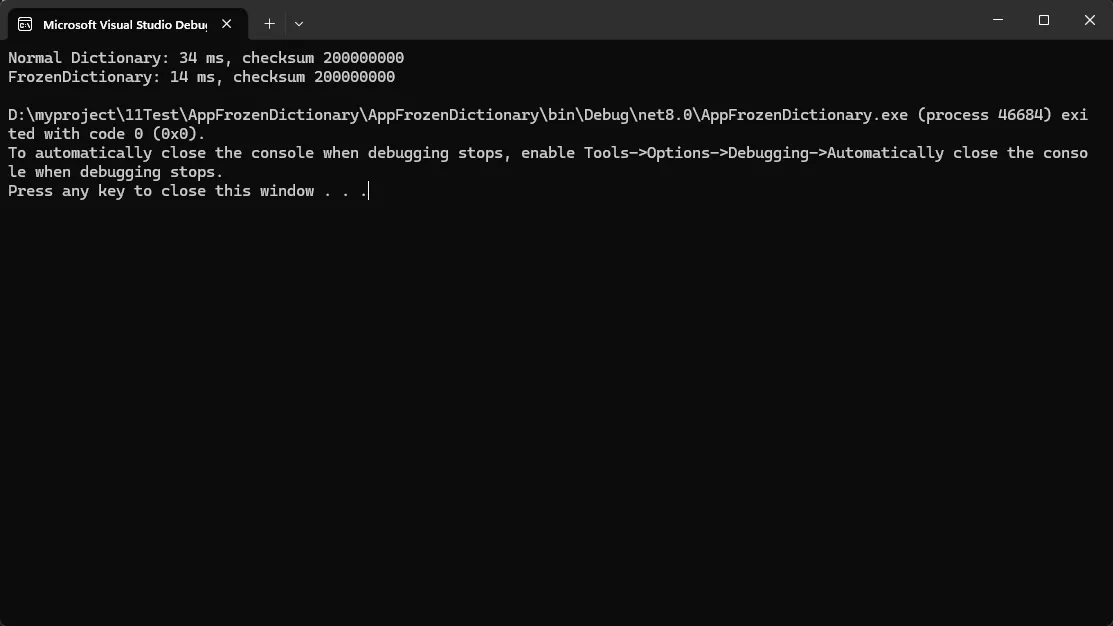
⚡ 性能提升秘密:
- 内部使用完美哈希算法,几乎零冲突
- 针对具体数据集优化的哈希函数
- 内存布局紧凑,CPU缓存友好
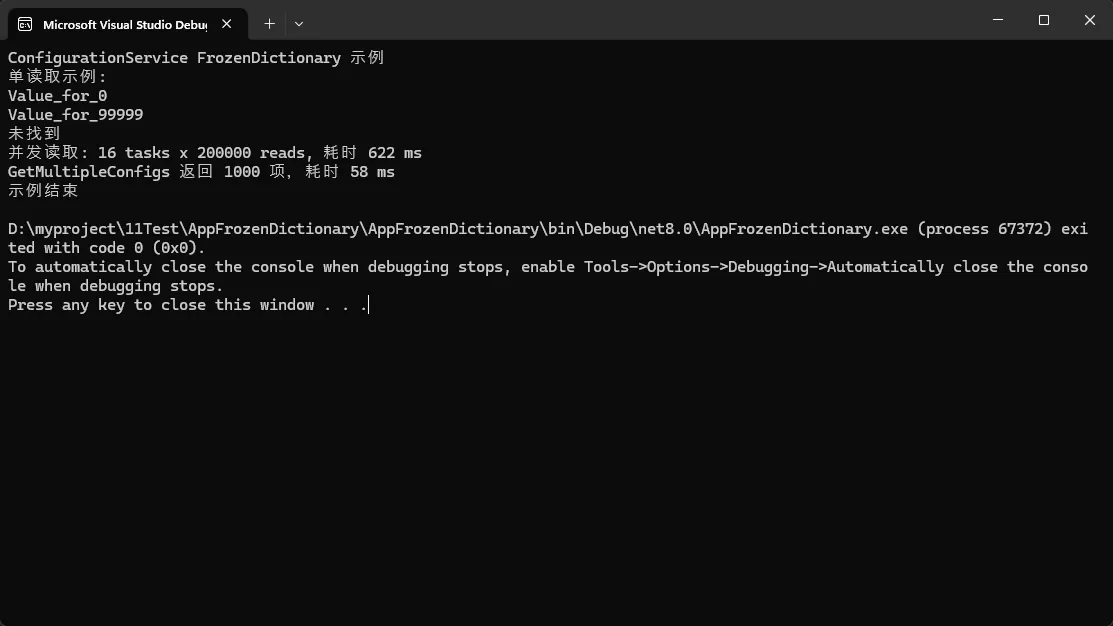
🎯 2. 线程安全的天然优势
c#// 高并发场景的最佳实践
public class ConfigurationService
{
    // 🔒 天然线程安全,无需额外同步机制
    private static readonly FrozenDictionary<string, string> _configs;

    static ConfigurationService()
    {
        // 启动时一次性加载配置(模拟)
        var configDict = LoadConfigFromDatabase();
        // 直接从源字典构建 frozen(避免不必要的多余副本)
        _configs = configDict.ToFrozenDictionary();
    }

    // 高并发访问,零锁开销
    public string GetConfig(string key) =>
        _configs.TryGetValue(key, out var value) ? value : string.Empty;

    // 支持安全的并行查询
    public Dictionary<string, string> GetMultipleConfigs(IEnumerable<string> keys)
    {
        // AsParallel + ToDictionary 的组合适合中等量并行查询并利用多个内核
        return keys
            .AsParallel()
            .Where(key => _configs.ContainsKey(key))
            .ToDictionary(key => key, key => _configs[key]);
    }

    // 此处生成大量配置以模拟真实场景
    private static Dictionary<string, string> LoadConfigFromDatabase(int count = 100_000)
    {
        var dict = new Dictionary<string, string>(count);
        for (int i = 0; i < count; i++)
        {
            dict[$"Key_{i}"] = $"Value_for_{i}";
        }
        return dict;
    }
}
🎯 3. 智能的创建优化策略
c#using System.Collections.Frozen;
using System.Diagnostics;

namespace AppFrozenDictionary
{
    public static class DataMappingFactory
    {
        public static FrozenDictionary<TKey, TValue> CreateOptimized<TKey, TValue>(
            IEnumerable<KeyValuePair<TKey, TValue>> source)
            where TKey : notnull
        {
            var pairs = source is KeyValuePair<TKey, TValue>[] arr ? arr : source.ToArray();

            return pairs.Length switch
            {
                0 => FrozenDictionary<TKey, TValue>.Empty,
                < 10 => pairs.ToFrozenDictionary(),
                _ => pairs.ToFrozenDictionary(EqualityComparer<TKey>.Default)
            };
        }
    }

    class Program
    {
        static async Task Main(string[] args)
        {
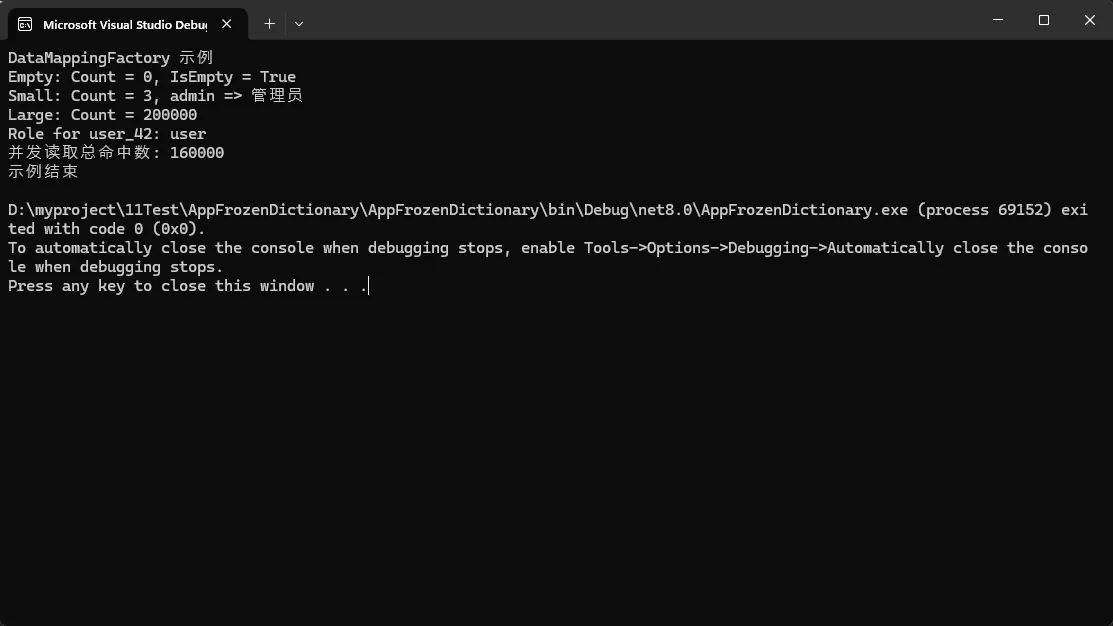
            Console.WriteLine("DataMappingFactory 示例");

            var empty = DataMappingFactory.CreateOptimized<string, string>(Enumerable.Empty<KeyValuePair<string, string>>());
            Console.WriteLine($"Empty: Count = {empty.Count}, IsEmpty = {ReferenceEquals(empty, FrozenDictionary<string, string>.Empty)}");

            var smallSource = new[]
            {
                new KeyValuePair<string,string>("admin", "管理员"),
                new KeyValuePair<string,string>("user", "普通用户"),
                new KeyValuePair<string,string>("guest", "访客")
            };
            var small = DataMappingFactory.CreateOptimized(smallSource);
            Console.WriteLine($"Small: Count = {small.Count}, admin => {small["admin"]}");

            var userRolePairs = await GetUserRolesFromDatabaseAsync(200_000);
            var large = DataMappingFactory.CreateOptimized(userRolePairs);
            Console.WriteLine($"Large: Count = {large.Count}");

            Console.WriteLine($"Role for user_42: {(large.TryGetValue("user_42", out var r) ? r : "未找到")}");

            var tasks = Enumerable.Range(0, Environment.ProcessorCount)
                                  .Select(_ => Task.Run(() =>
                                  {
                                      int hits = 0;
                                      var rnd = new Random();
                                      for (int i = 0; i < 10000; i++)
                                      {
                                          var key = "user_" + rnd.Next(0, large.Count);
                                          if (large.ContainsKey(key)) hits++;
                                      }
                                      return hits;
                                  }))
                                  .ToArray();

            var results = await Task.WhenAll(tasks);
            Console.WriteLine($"并发读取总命中数: {results.Sum()}");

            Console.WriteLine("示例结束");
        }

        private static Task<IEnumerable<KeyValuePair<string, string>>> GetUserRolesFromDatabaseAsync(int count = 1000)
        {
            return Task.Run<IEnumerable<KeyValuePair<string, string>>>(() =>
            {
                var list = new List<KeyValuePair<string, string>>(count);
                for (int i = 0; i < count; i++)
                {
                    var key = $"user_{i}";
                    var role = (i % 100 == 0) ? "admin" : "user";
                    list.Add(new KeyValuePair<string, string>(key, role));
                }
                return list;
            });
        }
    }
}
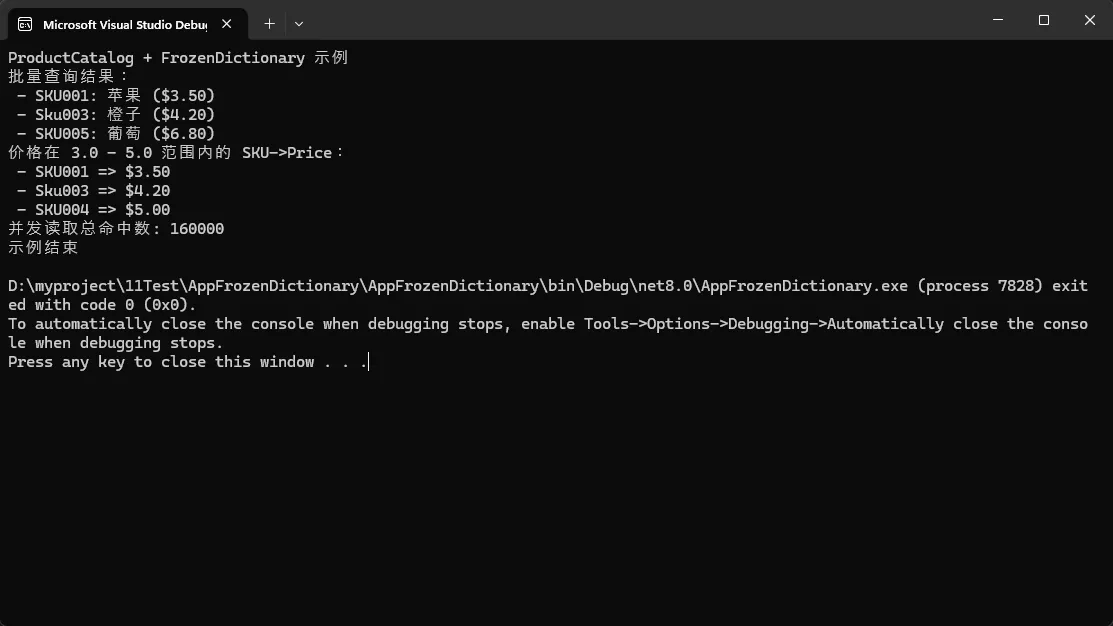
🎯 4. LINQ扩展的完美支持
c#public class Product
{
    public string Sku { get; init; }
    public string Name { get; init; }
    public decimal Price { get; init; }

    public Product(string sku, string name, decimal price)
    {
        Sku = sku ?? throw new ArgumentNullException(nameof(sku));
        Name = name ?? throw new ArgumentNullException(nameof(name));
        Price = price;
    }

    public override string ToString() => $"{Sku}: {Name} ({Price:C})";
}

public class ProductCatalog
{
    private readonly FrozenDictionary<string, Product> _products;

    public ProductCatalog(IEnumerable<Product> products)
    {
        _products = products.ToFrozenDictionary(
               p => p.Sku,
               p => p,
               StringComparer.OrdinalIgnoreCase);
    }

    public IEnumerable<Product> GetProductsBatch(IEnumerable<string> skus)
    {
        return skus.Select(sku => _products.TryGetValue(sku, out var product) ? product : null)
                   .Where(p => p != null)!;
    }

    public FrozenDictionary<string, decimal> GetPricesInRange(decimal minPrice, decimal maxPrice)
    {
        return _products.Where(kvp => kvp.Value.Price >= minPrice && kvp.Value.Price <= maxPrice)
                        .ToFrozenDictionary(kvp => kvp.Key, kvp => kvp.Value.Price);
    }
}
🔥 收藏级代码模板
模板1:高性能配置管理器
c#// 配置源接口
public interface IConfigSource<T> where T : class
{
    Task<IEnumerable<KeyValuePair<string, T>>> LoadAsync(CancellationToken ct = default);
}

public class MemoryConfigSource<T> : IConfigSource<T> where T : class
{
    private readonly Func<int, IEnumerable<KeyValuePair<string, T>>> _factory;
    private int _version;

    public MemoryConfigSource(Func<int, IEnumerable<KeyValuePair<string, T>>> factory, int startVersion = 0)
    {
        _factory = factory ?? throw new ArgumentNullException(nameof(factory));
        _version = startVersion;
    }

    public void BumpVersion() => Interlocked.Increment(ref _version);

    public Task<IEnumerable<KeyValuePair<string, T>>> LoadAsync(CancellationToken ct = default)
    {
        int v = Volatile.Read(ref _version);
        var data = _factory(v);
        return Task.FromResult(data);
    }
}

public sealed class HighPerformanceConfigManager<T> : IDisposable where T : class
{
    private volatile FrozenDictionary<string, T> _configs = FrozenDictionary<string, T>.Empty;
    private readonly ReaderWriterLockSlim _lock = new(LockRecursionPolicy.NoRecursion);
    private readonly IConfigSource<T> _source;
    private readonly CancellationTokenSource _cts = new();
    private readonly Task? _backgroundRefresher;

    public event Action<int>? OnReloaded;

    public HighPerformanceConfigManager(IConfigSource<T> source, TimeSpan? periodicReload = null)
    {
        _source = source ?? throw new ArgumentNullException(nameof(source));
        RefreshConfigsAsync().GetAwaiter().GetResult();
        if (periodicReload.HasValue && periodicReload.Value > TimeSpan.Zero)
        {
            _backgroundRefresher = Task.Run(() => PeriodicReloadLoop(periodicReload.Value, _cts.Token));
        }
    }

    public T? GetConfig(string key) =>
        _configs.TryGetValue(key, out var config) ? config : null;

    public IReadOnlyDictionary<string, T> GetConfigs(IEnumerable<string> keys) =>
        keys.AsParallel()
            .Where(key => _configs.ContainsKey(key))
            .ToDictionary(key => key, key => _configs[key]);

    public void RefreshConfigs()
        => RefreshConfigsAsync().GetAwaiter().GetResult();

    public async Task RefreshConfigsAsync(CancellationToken ct = default)
    {
        var newEntries = await _source.LoadAsync(ct).ConfigureAwait(false);

        var frozen = newEntries.ToFrozenDictionary(StringComparer.OrdinalIgnoreCase);

        _lock.EnterWriteLock();
        try
        {
            _configs = frozen;
        }
        finally
        {
            _lock.ExitWriteLock();
        }

        OnReloaded?.Invoke(frozen.Count);
    }

    private async Task PeriodicReloadLoop(TimeSpan interval, CancellationToken ct)
    {
        try
        {
            while (!ct.IsCancellationRequested)
            {
                await Task.Delay(interval, ct).ConfigureAwait(false);
                try
                {
                    await RefreshConfigsAsync(ct).ConfigureAwait(false);
                }
                catch (OperationCanceledException) when (ct.IsCancellationRequested)
                {
                    break;
                }
                catch (Exception ex)
                {
                    Debug.WriteLine($"Periodic reload failed: {ex}");
                }
            }
        }
        catch (OperationCanceledException) { }
    }

    public void Dispose()
    {
        _cts.Cancel();
        try { _backgroundRefresher?.Wait(); } catch { }
        _lock.Dispose();
        _cts.Dispose();
    }
}
模板2:多级缓存查询优化器
c#/// <summary>
/// 多级缓存查询优化器 - 结合FrozenDictionary实现极致性能
/// </summary>
public class MultiLevelQueryOptimizer<TKey, TValue>
        where TKey : notnull
        where TValue : class
{
    private readonly FrozenDictionary<TKey, TValue> _l1Cache;
    private readonly ConcurrentDictionary<TKey, TValue> _l2Cache;
    private readonly Func<TKey, Task<TValue?>> _dataLoader;

    public MultiLevelQueryOptimizer(
        IEnumerable<KeyValuePair<TKey, TValue>> hotData,
        Func<TKey, Task<TValue?>> dataLoader)
    {
        _l1Cache = hotData.ToFrozenDictionary();  // 热点数据冻结
        _l2Cache = new ConcurrentDictionary<TKey, TValue>();
        _dataLoader = dataLoader;
    }

    public async ValueTask<TValue?> GetAsync(TKey key)
    {
        // L1: 冻结字典查询 - 最快
        if (_l1Cache.TryGetValue(key, out var hotValue))
            return hotValue;

        // L2: 并发字典查询 - 次快
        if (_l2Cache.TryGetValue(key, out var cachedValue))
            return cachedValue;

        // L3: 数据源加载 - 最慢,但会缓存结果
        var loadedValue = await _dataLoader(key).ConfigureAwait(false);
        if (loadedValue != null)
        {
            _l2Cache.TryAdd(key, loadedValue);
        }

        return loadedValue;
    }

    // 批量查询优化
    public async Task<Dictionary<TKey, TValue>> GetBatchAsync(IEnumerable<TKey> keys)
    {
        var keyList = keys.ToList();
        var result = new Dictionary<TKey, TValue>(keyList.Count);

        // 并行处理L1和L2缓存(保持线程安全)
        var cacheResults = keyList.AsParallel()
            .Select(key => new { Key = key, Value = GetFromCache(key) })
            .Where(x => x.Value != null)
            .ToDictionary(x => x.Key, x => x.Value!);

        foreach (var kvp in cacheResults)
            result[kvp.Key] = kvp.Value;

        // 加载缺失的数据(并行发起加载)
        var missingKeys = keyList.Except(result.Keys).ToList();
        if (missingKeys.Count > 0)
        {
            var loadTasks = missingKeys.Select(async key =>
                new { Key = key, Value = await _dataLoader(key).ConfigureAwait(false) });

            var loadResults = await Task.WhenAll(loadTasks).ConfigureAwait(false);

            foreach (var item in loadResults.Where(x => x.Value != null))
            {
                result[item.Key] = item.Value!;
                _l2Cache.TryAdd(item.Key, item.Value!);
            }
        }

        return result;
    }

    private TValue? GetFromCache(TKey key) =>
        _l1Cache.TryGetValue(key, out var l1Value) ? l1Value :
        _l2Cache.TryGetValue(key, out var l2Value) ? l2Value : null;
}
🎯 核心要点总结
三个关键性能提升点:
- 查询速度提升30-50% - 完美哈希算法 + 紧凑内存布局
- 内存占用减少40% - 去除冗余空间 + 优化数据结构
- 并发性能零开销 - 天然不可变 + 无锁读取
最佳使用场景:
- ✅ 配置数据、枚举映射、路由表
- ✅ 缓存热点数据、常量查询表
- ✅ 高并发只读场景、启动时预加载数据
避免使用场景:
- ❌ 频繁修改的动态数据
- ❌ 小数据集(<10项)的临时查询
- ❌ 创建开销敏感的热路径
💬 互动讨论时间
- 你的项目中有哪些高频查询场景可以用FrozenDictionary优化?
- 在实际应用中,你遇到过哪些Dictionary性能瓶颈问题?
欢迎在评论区分享你的使用经验和遇到的问题!如果这篇文章对你有帮助,请转发给更多同行,让我们一起提升.NET应用的性能表现!
🔗 延伸学习建议:
- 深入了解.NET 8的其他集合优化特性
- 学习内存分析工具的使用技巧
- 探索更多LINQ性能优化方案
觉得内容有用请点赞收藏,持续分享更多实用的C#开发技巧!
本文作者:技术老小子
本文链接:
版权声明:本博客所有文章除特别声明外,均采用 BY-NC-SA 许可协议。转载请注明出处!
目录