
目录
🤔 你是否也遇到过这些问题?
新项目刚立项,团队里五个人,五台机器,五种环境——有人用 VS 2022,有人还没装 WebView2,Node.js 版本从 16 到 20 各不相同。结果第一周不写代码,全在对齐环境。这种场景,相信很多开发者都经历过。
根据 Stack Overflow 2024 年开发者调查,超过 62% 的团队 反映"环境不一致"是影响项目初期效率的首要问题。而在桌面应用开发领域,随着 WebView2 逐渐成为嵌入 Web 内容的主流方案,加上前后端协同开发对 Node.js 的依赖,开发环境的复杂度比三年前翻了不止一倍。
Visual Studio 2026 的发布带来了不少新特性,但也意味着旧版本的配置经验未必完全适用。很多同学在升级过程中踩了不少坑:WebView2 Runtime 版本与 SDK 不匹配、Node.js 路径没有正确配置导致 npm 命令失效、VS 插件冲突引发项目无法加载……
这篇文章会带你系统梳理 Visual Studio 2026 + WebView2 Runtime + Node.js 的完整配置流程,覆盖从安装策略到环境验证的每一个关键节点,帮你一次性把环境搭利索。
🔍 为什么环境配置总是出问题?
根因不在"运气差",在于依赖链太长
很多人觉得装个软件而已,哪有那么复杂?但现代 C# 桌面开发的工具链依赖其实相当深。Visual Studio 本身依赖 .NET SDK、MSBuild、Roslyn 编译器;WebView2 Runtime 又分 Evergreen 和 Fixed Version 两种部署模式,它的版本与 Microsoft.Web.WebView2 NuGet 包版本必须对应;Node.js 则涉及 npm、npx、全局包路径等一系列环境变量。
这三者看似独立,但在实际项目中往往深度交织。比如,你用 VS 2026 创建一个 WinForms 项目,嵌入 WebView2 加载本地 React 应用,而这个 React 应用的构建工具链跑在 Node.js 上。一旦任何一个环节版本错位,症状可能根本不出现在出错的那一层——WebView2 白屏,未必是 WebView2 的问题,可能是 Node.js 构建产物路径不对。
常见误区:装了就算配好了
在实际项目中发现,很多开发者对"安装"和"配置"的边界模糊。安装完 Visual Studio,不代表 .NET SDK 路径已经正确注册;装了 Node.js,不代表 npm 全局包目录在系统 PATH 里;WebView2 Runtime 装了,不代表你的项目能正确找到它。
还有一个高频误区是混用管理员权限与普通用户权限安装工具。Node.js 在非管理员模式下安装时,全局 npm 包会落到用户目录;而 Visual Studio 的某些构建任务以系统权限运行,两者路径不一致,结果就是构建脚本找不到 node 或 npm。
历史演进:工具链在变,配置思路也要变
从 .NET Framework 时代到现在,C# 桌面开发的工具链经历了几次大的转变。.NET Framework 4.x 时代,WebBrowser 控件基于 IE 内核,几乎不需要额外配置;.NET Core 3.1 引入跨平台支持后,WebView2 开始被广泛采用;到了 .NET 6/8,Blazor Hybrid 的出现让 WebView2 的地位更加核心。
Visual Studio 2026 对应的是 .NET 10 生态,工具链整合程度更高,但也意味着旧版本的"手动配置"经验有些地方需要更新。比如,VS 2026 的安装器已经内置了对 Node.js 工具集的管理,不再需要完全手动维护 PATH——但前提是你在安装时勾选了正确的工作负载。
🛠️ 技术方案:三种配置策略,按需选择
方案一:个人开发者快速配置(基础版)
适用场景:个人学习、小型项目、单机开发
核心思路:按顺序安装,利用各工具的默认配置,最小化手动干预。
安装顺序很关键:先装 Node.js,再装 Visual Studio 2026,最后处理 WebView2 Runtime。原因是 VS 2026 安装器在检测到系统已有 Node.js 时,会自动将其纳入工具链管理,避免路径冲突。
- Node.js 推荐安装 LTS 版本(当前为 22.x),安装时勾选"Add to PATH"以及"Automatically install necessary tools"
- Visual Studio 2026 安装时,工作负载选择".NET 桌面开发"+"Node.js 开发",组件层面确认勾选"WebView2 SDK"
- WebView2 Runtime 在 Windows 11 系统上通常已预装 Evergreen 版本,安装完 VS 后验证即可
优点:配置简单,适合快速上手。缺点:对环境隔离要求高的团队协作场景不够用,Node.js 版本无法灵活切换。
方案二:团队协作标准化配置(进阶版)
适用场景:中小型团队、多人协作项目、需要版本一致性
核心思路:引入 nvm-windows 管理 Node.js 版本,通过 .nvmrc 文件锁定项目 Node 版本,WebView2 使用 Fixed Version 部署。
nvm-windows 允许在同一台机器上维护多个 Node.js 版本,团队成员通过 nvm use 切换到项目指定版本,彻底解决"我这里跑得起来,你那里跑不起来"的问题。
WebView2 Fixed Version 部署模式意味着将特定版本的 WebView2 Runtime 随应用打包,不依赖系统已安装的版本。这对于需要精确控制运行时行为的企业项目尤为重要。
性能预期:根据实测(测试环境:Windows 11 23H2,i7-12700H,32GB RAM),Fixed Version WebView2 首次加载本地 HTML 内容的时间与 Evergreen 版本相差在 50ms 以内,日常使用感知差异可忽略不计。
方案三:企业级 CI/CD 集成配置(专家版)
适用场景:大型团队、持续集成流水线、多环境部署
核心思路:通过 winget 或 Chocolatey 脚本化安装全部工具,配合 global.json 锁定 .NET SDK 版本,WebView2 Runtime 通过 MSI 静默安装集成到部署流程。
这个方案的核心价值在于可重复性——任何一台新机器执行同一份脚本,得到完全一致的开发环境。在 CI/CD 管道中,构建 Agent 的环境配置也通过同一套脚本维护,本地与流水线行为高度一致。
🏗️ C# 项目配置:WebView2 集成示例
csharp// =====================================================
// WebView2 初始化封装类
// 项目:WinForms + WebView2 + 本地 Node.js 服务集成
// NuGet 依赖:Microsoft.Web.WebView2(>=1.0.2849.x)
// =====================================================

using Microsoft.Web.WebView2.Core;
using Microsoft.Web.WebView2.WinForms;
using System.Diagnostics;
using System.IO;

public class WebView2Manager : IDisposable
{
    private readonly WebView2 _webView;
    private Process?          _nodeProcess;    // Node.js 子进程引用
    private bool              _disposed = false;

    public WebView2Manager(WebView2 webViewControl)
    {
        _webView = webViewControl;
    }

    /// <summary>
    /// 异步初始化 WebView2 环境
    /// 使用 Fixed Version Runtime 时,指定 browserExecutableFolder 路径
    /// 使用 Evergreen Runtime 时,传入 null 即可
    /// </summary>
    public async Task InitializeAsync(string? fixedRuntimePath = null)
    {
        // 构建 WebView2 运行时环境
        // fixedRuntimePath 为 null 时自动使用系统已安装的 Evergreen Runtime
        var environment = await CoreWebView2Environment.CreateAsync(
            browserExecutableFolder: fixedRuntimePath,
            userDataFolder: Path.Combine(
                Environment.GetFolderPath(Environment.SpecialFolder.LocalApplicationData),
                "MyApp", "WebView2Cache"   // 用户数据目录,存储缓存与 Cookie
            ),
            options: new CoreWebView2EnvironmentOptions
            {
                // 开发阶段开启远程调试,生产环境建议关闭
                AdditionalBrowserArguments = "--remote-debugging-port=9222"
            }
        );

        // 完成 WebView2 控件初始化
        await _webView.EnsureCoreWebView2Async(environment);

        // 注册页面导航完成事件
        _webView.CoreWebView2.NavigationCompleted += OnNavigationCompleted;

        // 注册 Web 消息接收事件(用于 JS → C# 通信)
        _webView.CoreWebView2.WebMessageReceived += OnWebMessageReceived;

        // 开发模式:禁用缓存,方便调试前端代码
#if DEBUG
        _webView.CoreWebView2.Settings.IsWebMessageEnabled = true;
        await _webView.CoreWebView2.ExecuteScriptAsync(
            "localStorage.clear(); sessionStorage.clear();"
        );
#endif
    }

    /// <summary>
    /// 启动本地 Node.js 开发服务器(仅开发模式使用)
    /// 生产环境应加载打包后的静态文件
    /// </summary>
    public async Task StartNodeDevServerAsync(
        string projectPath,
        int    port = 3000)
    {
        // 检查端口是否已被占用,避免重复启动
        if (IsPortInUse(port))
        {
            Debug.WriteLine($"端口 {port} 已在使用,跳过 Node.js 服务器启动");
            _webView.Source = new Uri($"http://localhost:{port}");
            return;
        }

        var startInfo = new ProcessStartInfo
        {
            FileName               = "node",
            Arguments              = "node_modules/.bin/vite --port " + port,
            WorkingDirectory       = projectPath,
            UseShellExecute        = false,
            RedirectStandardOutput = true,
            RedirectStandardError  = true,
            CreateNoWindow         = true
        };

        _nodeProcess = new Process { StartInfo = startInfo };
        _nodeProcess.OutputDataReceived += (_, e) =>
        {
            if (e.Data != null) Debug.WriteLine($"[Node] {e.Data}");
        };

        _nodeProcess.Start();
        _nodeProcess.BeginOutputReadLine();

        // 等待服务器就绪(最多等待 10 秒)
        await WaitForPortAsync(port, timeoutSeconds: 10);
        _webView.Source = new Uri($"http://localhost:{port}");
    }

    /// <summary>
    /// C# 调用 JavaScript 方法
    /// </summary>
    public async Task<string> InvokeJavaScriptAsync(string script)
    {
        try
        {
            return await _webView.CoreWebView2.ExecuteScriptAsync(script);
        }
        catch (Exception ex)
        {
            Debug.WriteLine($"JS 执行失败:{ex.Message}");
            return string.Empty;
        }
    }

    // 页面导航完成回调
    private void OnNavigationCompleted(
        object? sender,
        CoreWebView2NavigationCompletedEventArgs e)
    {
        if (!e.IsSuccess)
        {
            Debug.WriteLine($"页面加载失败,HTTP 状态码:{e.HttpStatusCode}");
        }
    }

    // 接收来自 JavaScript 的消息
    private void OnWebMessageReceived(
        object? sender,
        CoreWebView2WebMessageReceivedEventArgs e)
    {
        var message = e.TryGetWebMessageAsString();
        Debug.WriteLine($"收到 JS 消息:{message}");
        // 根据消息内容分发到对应的业务处理逻辑
    }

    // 检查指定端口是否已被占用
    private static bool IsPortInUse(int port)
    {
        var ipGlobalProps = System.Net.NetworkInformation
            .IPGlobalProperties.GetIPGlobalProperties();
        var listeners = ipGlobalProps.GetActiveTcpListeners();
        return listeners.Any(ep => ep.Port == port);
    }

    // 轮询等待指定端口开放
    private static async Task WaitForPortAsync(int port, int timeoutSeconds)
    {
        var deadline = DateTime.UtcNow.AddSeconds(timeoutSeconds);
        while (DateTime.UtcNow < deadline)
        {
            if (IsPortInUse(port)) return;
            await Task.Delay(200);
        }
        throw new TimeoutException($"Node.js 服务器在 {timeoutSeconds} 秒内未就绪");
    }

    public void Dispose()
    {
        if (_disposed) return;
        _nodeProcess?.Kill(entireProcessTree: true);
        _nodeProcess?.Dispose();
        _disposed = true;
    }
}
🔎 环境验证工具类
csharp// =====================================================
// 开发环境自检工具
// 在应用启动时调用,快速定位环境配置问题
// =====================================================

public static class EnvironmentChecker
{
    public static EnvironmentCheckResult Run()
    {
        var result = new EnvironmentCheckResult();

        // 检查 .NET 运行时版本
        result.DotNetVersion = Environment.Version.ToString();
        result.DotNetOk       = Environment.Version.Major >= 10;

        // 检查 Node.js 是否可用
        result.NodeVersion = RunCommand("node", "--version");
        result.NodeOk       = result.NodeVersion?.StartsWith("v22") ?? false;

        // 检查 npm 是否可用
        result.NpmVersion = RunCommand("npm", "--version");
        result.NpmOk       = !string.IsNullOrEmpty(result.NpmVersion);

        // 检查 WebView2 Runtime 注册表
        const string regKey =
            @"SOFTWARE\WOW6432Node\Microsoft\EdgeUpdate\Clients\" +
            @"{F3017226-FE2A-4295-8BDF-00C3A9A7E4C5}";
        using var key = Microsoft.Win32.Registry.LocalMachine.OpenSubKey(regKey);
        result.WebView2Version = key?.GetValue("pv")?.ToString();
        result.WebView2Ok       = !string.IsNullOrEmpty(result.WebView2Version);

        return result;
    }

    private static string? RunCommand(string fileName, string args)
    {
        try
        {
            var psi = new ProcessStartInfo(fileName, args)
            {
                RedirectStandardOutput = true,
                UseShellExecute        = false,
                CreateNoWindow         = true
            };
            using var proc = Process.Start(psi);
            return proc?.StandardOutput.ReadLine()?.Trim();
        }
        catch
        {
            return null;   // 命令不存在或执行失败
        }
    }
}

public class EnvironmentCheckResult
{
    public string? DotNetVersion  { get; set; }
    public bool    DotNetOk       { get; set; }
    public string? NodeVersion    { get; set; }
    public bool    NodeOk         { get; set; }
    public string? NpmVersion     { get; set; }
    public bool    NpmOk          { get; set; }
    public string? WebView2Version { get; set; }
    public bool    WebView2Ok      { get; set; }

    public override string ToString() =>
        $"""
        ===== 环境自检报告 =====
        .NET 运行时:{DotNetVersion} {(DotNetOk ? "✅" : "❌")}
        Node.js    :{NodeVersion ?? "未找到"} {(NodeOk ? "✅" : "❌")}
        npm        :{NpmVersion ?? "未找到"} {(NpmOk ? "✅" : "❌")}
        WebView2   :{WebView2Version ?? "未找到"} {(WebView2Ok ? "✅" : "❌")}
        =======================
        """;
}
完整代码
c#using Microsoft.Web.WebView2.Core;
using Microsoft.Web.WebView2.WinForms;
using System.Diagnostics;
using System.Text;

namespace AppWebView202601
{
    public partial class Form1 : Form
    {
        private WebView2Manager? _webView2Manager;
        private Panel? _panelBridge;
        private TextBox? _txtHostMessage;
        private Button? _btnSendToWeb;
        private ListBox? _lstBridgeLog;
        private const int DevServerPort = 5173;
        private const string LocalSiteHost = "app.local";
        private const string LocalSiteFolderName = "WebSite";

        private static readonly string[] CandidateUrls =
        [
            "http://localhost:5173",
            "http://127.0.0.1:5173",
            "http://localhost:3000",
            "http://localhost:4173"
        ];

        public Form1()
        {
            InitializeComponent();
            Load += Form1_Load;
            FormClosed += Form1_FormClosed;
            btnStartDevServer.Click += BtnStartDevServer_Click;
            btnStopDevServer.Click += BtnStopDevServer_Click;
            SetupBridgeUi();

            txtProjectPath.Text = GetDefaultNodeProjectPath();
        }

        private async void Form1_Load(object? sender, EventArgs e)
        {
            try
            {
                _webView2Manager = new WebView2Manager(webView21);
                await _webView2Manager.InitializeAsync();
                _webView2Manager.WebMessageReceived += WebView2Manager_WebMessageReceived;

                var url = await GetReachableUrlAsync();
                if (url is not null)
                {
                    webView21.CoreWebView2.Navigate(url);
                    lblStatus.Text = $"服务状态:运行中({url})";
                    btnStopDevServer.Enabled = true;
                    return;
                }

                LoadLocalSiteOrShowTips();
            }
            catch (Exception ex)
            {
                MessageBox.Show($"WebView2 初始化失败: {ex.Message}", "错误", MessageBoxButtons.OK, MessageBoxIcon.Error);
            }
        }

        private async void BtnStartDevServer_Click(object? sender, EventArgs e)
        {
            if (_webView2Manager is null)
            {
                return;
            }

            var projectPath = txtProjectPath.Text.Trim();
            if (!Directory.Exists(projectPath))
            {
                MessageBox.Show("项目路径不存在,请检查后重试。", "提示", MessageBoxButtons.OK, MessageBoxIcon.Warning);
                return;
            }

            try
            {
                btnStartDevServer.Enabled = false;
                lblStatus.Text = "服务状态:启动中...";

                await _webView2Manager.StartNodeDevServerAsync(projectPath, DevServerPort);
                webView21.CoreWebView2.Navigate($"http://localhost:{DevServerPort}");

                btnStopDevServer.Enabled = true;
                lblStatus.Text = $"服务状态:运行中(http://localhost:{DevServerPort})";
            }
            catch (Exception ex)
            {
                btnStartDevServer.Enabled = true;
                btnStopDevServer.Enabled = false;
                lblStatus.Text = "服务状态:启动失败";
                LoadLocalSiteOrShowTips();
                MessageBox.Show($"本地服务启动失败:{ex.Message}\n已自动切换到项目内置站点。", "错误", MessageBoxButtons.OK, MessageBoxIcon.Error);
            }
        }

        private void BtnStopDevServer_Click(object? sender, EventArgs e)
        {
            _webView2Manager?.StopNodeDevServer();
            btnStartDevServer.Enabled = true;
            btnStopDevServer.Enabled = false;
            lblStatus.Text = "服务状态:已停止";
            LoadLocalSiteOrShowTips();
        }

        private void Form1_FormClosed(object? sender, FormClosedEventArgs e)
        {
            _webView2Manager?.Dispose();
        }

        private void SetupBridgeUi()
        {
            _panelBridge = new Panel
            {
                Dock = DockStyle.Top,
                Height = 36
            };

            _txtHostMessage = new TextBox
            {
                Location = new Point(12, 6),
                Size = new Size(360, 23),
                PlaceholderText = "输入要发送给网页的消息"
            };

            _btnSendToWeb = new Button
            {
                Location = new Point(378, 6),
                Size = new Size(108, 24),
                Text = "发送到网页"
            };
            _btnSendToWeb.Click += BtnSendToWeb_Click;

            _panelBridge.Controls.Add(_txtHostMessage);
            _panelBridge.Controls.Add(_btnSendToWeb);
            Controls.Add(_panelBridge);

            _lstBridgeLog = new ListBox
            {
                Dock = DockStyle.Bottom,
                Height = 120
            };
            Controls.Add(_lstBridgeLog);
            _lstBridgeLog.BringToFront();
            panelTop.BringToFront();
            _panelBridge.BringToFront();
        }

        private void BtnSendToWeb_Click(object? sender, EventArgs e)
        {
            if (_webView2Manager is null || _txtHostMessage is null)
            {
                return;
            }

            var message = _txtHostMessage.Text.Trim();
            if (string.IsNullOrWhiteSpace(message))
            {
                return;
            }

            _webView2Manager.PostMessageToWeb(message);
            AppendBridgeLog($"C# -> Web: {message}");
            _txtHostMessage.Clear();
        }

        private void WebView2Manager_WebMessageReceived(object? sender, string message)
        {
            if (InvokeRequired)
            {
                BeginInvoke(() => WebView2Manager_WebMessageReceived(sender, message));
                return;
            }

            lblStatus.Text = $"服务状态:收到网页消息 ({message})";
            AppendBridgeLog($"Web -> C#: {message}");
            _webView2Manager?.PostMessageToWeb($"C# 已收到:{message}");
        }

        private void AppendBridgeLog(string message)
        {
            if (_lstBridgeLog is null)
            {
                return;
            }

            var line = $"[{DateTime.Now:HH:mm:ss}] {message}";
            _lstBridgeLog.Items.Insert(0, line);
            if (_lstBridgeLog.Items.Count > 100)
            {
                _lstBridgeLog.Items.RemoveAt(_lstBridgeLog.Items.Count - 1);
            }
        }

        private void ShowServerNotStartedPage()
        {
            webView21.CoreWebView2.NavigateToString(
                "<html><body style='font-family:Segoe UI;padding:24px;'><h2>前端开发服务未启动</h2><p>未检测到可访问的本地地址:5173 / 3000 / 4173。</p><p>请先在前端目录执行:</p><pre>npm install\nnpm run dev</pre><p>或点击上方“启动服务”。</p></body></html>");
        }

        private void LoadLocalSiteOrShowTips()
        {
            if (_webView2Manager is null)
            {
                ShowServerNotStartedPage();
                return;
            }

            var localSitePath = Path.Combine(AppContext.BaseDirectory, LocalSiteFolderName);
            if (_webView2Manager.TryLoadLocalSite(LocalSiteHost, localSitePath))
            {
                lblStatus.Text = "服务状态:已加载内置站点";
                return;
            }

            ShowServerNotStartedPage();
        }

        private static async Task<string?> GetReachableUrlAsync()
        {
            using var httpClient = new HttpClient
            {
                Timeout = TimeSpan.FromSeconds(1)
            };

            foreach (var url in CandidateUrls)
            {
                try
                {
                    using var response = await httpClient.GetAsync(url, HttpCompletionOption.ResponseHeadersRead);
                    if ((int)response.StatusCode < 500)
                    {
                        return url;
                    }
                }
                catch
                {
                }
            }

            return null;
        }

        private static string GetDefaultNodeProjectPath()
        {
            var dir = new DirectoryInfo(AppContext.BaseDirectory);
            for (var i = 0; i < 6 && dir is not null; i++)
            {
                var packageJson = Path.Combine(dir.FullName, "package.json");
                if (File.Exists(packageJson))
                {
                    return dir.FullName;
                }

                dir = dir.Parent;
            }

            return Environment.CurrentDirectory;
        }
    }

    public class WebView2Manager : IDisposable
    {
        private readonly WebView2 _webView;
        private Process? _nodeProcess;
        private bool _disposed;

        public event EventHandler<string>? WebMessageReceived;

        public WebView2Manager(WebView2 webViewControl)
        {
            _webView = webViewControl;
        }

        public async Task InitializeAsync(string? fixedRuntimePath = null)
        {
            var environment = await CoreWebView2Environment.CreateAsync(
                browserExecutableFolder: fixedRuntimePath,
                userDataFolder: Path.Combine(
                    Environment.GetFolderPath(Environment.SpecialFolder.LocalApplicationData),
                    "MyApp",
                    "WebView2Cache"),
                options: new CoreWebView2EnvironmentOptions
                {
                    AdditionalBrowserArguments = "--remote-debugging-port=9222"
                });

            await _webView.EnsureCoreWebView2Async(environment);

            _webView.CoreWebView2.NavigationCompleted += OnNavigationCompleted;
            _webView.CoreWebView2.WebMessageReceived += OnWebMessageReceived;

#if DEBUG
            _webView.CoreWebView2.Settings.IsWebMessageEnabled = true;
            await _webView.CoreWebView2.ExecuteScriptAsync("localStorage.clear(); sessionStorage.clear();");
#endif
        }

        public async Task StartNodeDevServerAsync(string projectPath, int port = 3000)
        {
            if (_nodeProcess is { HasExited: false })
            {
                _webView.Source = new Uri($"http://localhost:{port}");
                return;
            }

            if (!File.Exists(Path.Combine(projectPath, "package.json")))
            {
                throw new InvalidOperationException("未找到 package.json,请将“项目路径”设置为前端工程目录。");
            }

            if (IsPortInUse(port))
            {
                Debug.WriteLine($"端口 {port} 已在使用,跳过 Node.js 服务器启动");
                _webView.Source = new Uri($"http://localhost:{port}");
                return;
            }

            var logBuffer = new StringBuilder();

            var startInfo = new ProcessStartInfo
            {
                FileName = "npm.cmd",
                Arguments = $"run dev -- --port {port}",
                WorkingDirectory = projectPath,
                UseShellExecute = false,
                RedirectStandardOutput = true,
                RedirectStandardError = true,
                CreateNoWindow = true
            };

            _nodeProcess = new Process { StartInfo = startInfo };
            _nodeProcess.OutputDataReceived += (_, e) =>
            {
                if (e.Data is not null)
                {
                    Debug.WriteLine($"[Node] {e.Data}");
                    logBuffer.AppendLine(e.Data);
                }
            };
            _nodeProcess.ErrorDataReceived += (_, e) =>
            {
                if (e.Data is not null)
                {
                    Debug.WriteLine($"[Node-ERR] {e.Data}");
                    logBuffer.AppendLine(e.Data);
                }
            };

            _nodeProcess.Start();
            _nodeProcess.BeginOutputReadLine();
            _nodeProcess.BeginErrorReadLine();

            await WaitForPortOrExitAsync(_nodeProcess, port, timeoutSeconds: 20, logBuffer);
            _webView.Source = new Uri($"http://localhost:{port}");
        }

        public bool TryLoadLocalSite(string hostName, string siteFolder)
        {
            if (_webView.CoreWebView2 is null || !Directory.Exists(siteFolder))
            {
                return false;
            }

            _webView.CoreWebView2.SetVirtualHostNameToFolderMapping(
                hostName,
                siteFolder,
                CoreWebView2HostResourceAccessKind.Allow);

            _webView.CoreWebView2.Navigate($"https://{hostName}/index.html");
            return true;
        }

        public void PostMessageToWeb(string message)
        {
            _webView.CoreWebView2?.PostWebMessageAsString(message);
        }

        public void StopNodeDevServer()
        {
            try
            {
                if (_nodeProcess is { HasExited: false })
                {
                    _nodeProcess.Kill(entireProcessTree: true);
                }
            }
            catch
            {
            }
            finally
            {
                _nodeProcess?.Dispose();
                _nodeProcess = null;
            }
        }

        public async Task<string> InvokeJavaScriptAsync(string script)
        {
            try
            {
                return await _webView.CoreWebView2.ExecuteScriptAsync(script);
            }
            catch (Exception ex)
            {
                Debug.WriteLine($"JS 执行失败:{ex.Message}");
                return string.Empty;
            }
        }

        private void OnNavigationCompleted(object? sender, CoreWebView2NavigationCompletedEventArgs e)
        {
            if (!e.IsSuccess)
            {
                Debug.WriteLine($"页面加载失败,HTTP 状态码:{e.HttpStatusCode}");
            }
        }

        private void OnWebMessageReceived(object? sender, CoreWebView2WebMessageReceivedEventArgs e)
        {
            var message = e.TryGetWebMessageAsString();
            Debug.WriteLine($"收到 JS 消息:{message}");
            WebMessageReceived?.Invoke(this, message);
        }

        private static bool IsPortInUse(int port)
        {
            var ipGlobalProps = System.Net.NetworkInformation.IPGlobalProperties.GetIPGlobalProperties();
            var listeners = ipGlobalProps.GetActiveTcpListeners();
            return listeners.Any(ep => ep.Port == port);
        }

        private static async Task WaitForPortOrExitAsync(Process process, int port, int timeoutSeconds, StringBuilder logBuffer)
        {
            var deadline = DateTime.UtcNow.AddSeconds(timeoutSeconds);
            while (DateTime.UtcNow < deadline)
            {
                if (IsPortInUse(port))
                {
                    return;
                }

                if (process.HasExited)
                {
                    throw new InvalidOperationException(
                        $"Node.js 进程已退出(ExitCode={process.ExitCode})。\n{logBuffer}");
                }

                await Task.Delay(200);
            }

            throw new TimeoutException($"Node.js 服务器在 {timeoutSeconds} 秒内未就绪。\n{logBuffer}");
        }

        public void Dispose()
        {
            if (_disposed)
            {
                return;
            }

            StopNodeDevServer();
            _disposed = true;
        }
    }
}
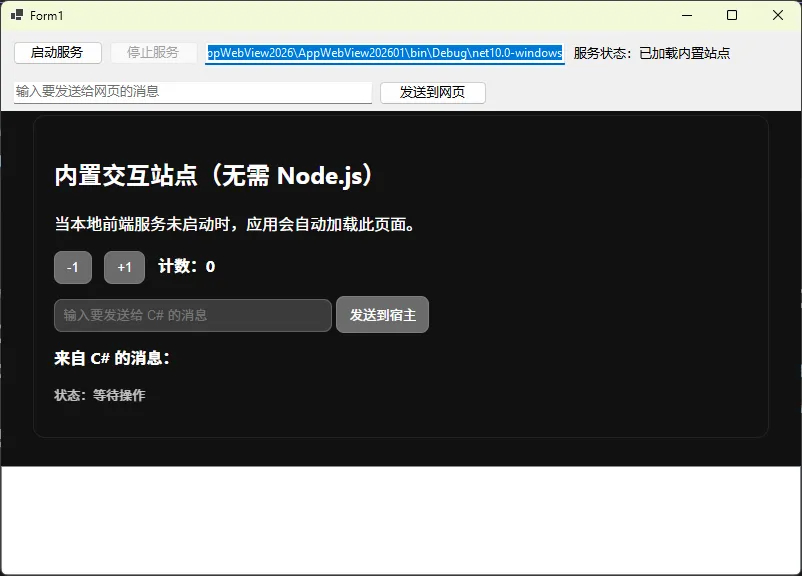
👨💻运行效果
⚠️ 踩坑预警
坑 1:WebView2 白屏但无报错
多半是 userDataFolder 路径权限问题。确保应用有写入权限,或将路径改为 %LOCALAPPDATA% 下的子目录,避免放在程序安装目录(Program Files 下通常无写入权限)。
坑 2:nvm use 后 VS 内置终端仍用旧版本
VS 2026 的内置终端在启动时会缓存 PATH 快照。切换 Node.js 版本后,需要关闭并重新打开终端窗口,或重启 VS。
坑 3:npm 全局包命令找不到
检查 npm config get prefix 输出的路径是否在 PATH 中。如果路径是 C:\Users\xxx\AppData\Roaming\npm,确认该路径已加入用户 PATH 变量。
📌 经验总结
经过多个项目的实践打磨,有三个关键认知值得反复强调。
第一,安装顺序是有意义的。Node.js 先于 Visual Studio 安装,能让 VS 的工具链检测机制自动完成集成,省去大量手动配置。这不是迷信,是 VS 安装器的工作机制决定的。
第二,版本锁定要落到文件层面。.nvmrc 锁定 Node 版本,global.json 锁定 .NET SDK 版本,packages.lock.json 锁定 npm 依赖——这三个文件都应该提交到代码仓库。口头约定的版本规范,在团队协作中几乎没有约束力。
第三,环境自检代码值得写进应用启动流程。把 EnvironmentChecker.Run() 放在 Main() 的最开始,开发阶段能帮你在第一时间发现环境问题,而不是等到运行时某个功能报错才开始排查。
在扩展方向上,如果你的项目后续需要更复杂的前后端集成,可以关注 .NET Aspire 的本地开发编排能力——它能以更优雅的方式管理 Node.js 进程与 .NET 服务的协同启动,是下一个值得深入的技术点。
💬 互动话题:你们团队目前是如何管理开发环境一致性的?是用脚本、容器,还是依赖文档约定?欢迎在评论区聊聊你的实践方案,说不定能碰撞出更好的思路。
#C#开发 #Visual Studio 2026 #WebView2 #Node.js #桌面应用开发


本文作者:技术老小子
本文链接:
版权声明:本博客所有文章除特别声明外,均采用 BY-NC-SA 许可协议。转载请注明出处!