
Press Ctrl+ and K to search
目录
🔥 .NET开发者必知:Keyed Services彻底解决多实现依赖注入难题
你是否曾经为了在同一个接口的多个实现之间进行选择而苦恼?传统的依赖注入只能获取到最后注册的服务实现,或者通过IEnumerable<T>获取所有实现。如果你想精确地获取某个特定实现,就不得不写复杂的工厂模式或条件判断代码。
好消息是:.NET 8引入了Keyed Services(键控服务)功能,在.NET 9中得到进一步完善,这个特性将彻底改变你处理多实现场景的方式!
今天,我们将深入探索这个强大的新特性,通过实际案例让你快速掌握并应用到项目中。
🎯 传统依赖注入的痛点分析
在开发通知系统时,我们经常遇到这样的场景:
c#public interface INotificationService
{
    string SendNotification(string message);
}

// 三种不同的通知实现
public class EmailService : INotificationService
{
    public string SendNotification(string message) => $"[邮件] {message}";
}

public class SmsService : INotificationService
{
    public string SendNotification(string message) => $"[短信] {message}";
}

public class PushService : INotificationService
{
    public string SendNotification(string message) => $"[推送] {message}";
}
传统注册方式的局限性
c#var builder = WebApplication.CreateBuilder(args);
builder.Services.AddSingleton<INotificationService, EmailService>();
builder.Services.AddSingleton<INotificationService, SmsService>();
builder.Services.AddSingleton<INotificationService, PushService>();
问题来了:
- 只能获取最后注册的服务(PushService)
- 无法精确选择需要的实现
- 必须通过
IEnumerable<INotificationService>获取所有实现,然后手动筛选 如下:
c#using AppKeyedServices.Services;
using Microsoft.AspNetCore.Http;
using Microsoft.AspNetCore.Mvc;

namespace AppKeyedServices.Controllers
{
    [Route("api/[controller]")]
    [ApiController]
    public class TestController : ControllerBase
    {
        private readonly IEnumerable<INotificationService> _notifiers;

        public TestController(IEnumerable<INotificationService> notifiers)
        {
            _notifiers = notifiers;
        }

        [HttpGet("all")]
        public ActionResult<IEnumerable<string>> GetAll()
        {
            var results = _notifiers.Select(n => n.SendNotification("测试消息")).ToList();
            return Ok(results);
        }
    }
}
🚀 Keyed Services:优雅的解决方案
什么是Keyed Services?
Keyed Services允许你使用"键"来标识和获取特定的服务实现。 键可以是任何对象类型,通常使用字符串、枚举或常量。
核心注册方法
c#var builder = WebApplication.CreateBuilder(args);

// 使用键注册不同的服务实现
builder.Services.AddKeyedSingleton<INotificationService, EmailService>("email");
builder.Services.AddKeyedSingleton<INotificationService, SmsService>("sms");
builder.Services.AddKeyedSingleton<INotificationService, PushService>("push");
💡 五种实用的应用场景
1️⃣ 构造函数中精确注入
c#using AppKeyedServices.Services;
using Microsoft.AspNetCore.Http;
using Microsoft.AspNetCore.Mvc;

namespace AppKeyedServices.Controllers
{
    [Route("api/[controller]")]
    [ApiController]
    public class TestController : ControllerBase
    {
        private readonly INotificationService _emailService;
        private readonly INotificationService _smsService;

        public TestController([FromKeyedServices("email")] INotificationService emailService,
        [FromKeyedServices("sms")] INotificationService smsService)
        {
            _emailService = emailService;
            _smsService = smsService;
        }

        [HttpPost("send-email")]
        public IActionResult SendEmail([FromBody] object message)
        {
            var result = _emailService.SendNotification(message.ToString());
            return Ok(result);
        }
    }
}
2️⃣ 基于枚举的键管理
c#public enum NotificationType
{
    Email,
    Sms,
    Push
}

// 注册服务
builder.Services.AddKeyedSingleton<INotificationService, EmailService>(NotificationType.Email);
builder.Services.AddKeyedSingleton<INotificationService, SmsService>(NotificationType.Sms);
builder.Services.AddKeyedSingleton<INotificationService, PushService>(NotificationType.Push);

// 使用枚举键注入
public class NotificationManager(
    [FromKeyedServices(NotificationType.Email)] INotificationService emailService,
    [FromKeyedServices(NotificationType.Sms)] INotificationService smsService)
{
    public async Task SendByType(NotificationType type, string message)
    {
        var service = type switch
        {
            NotificationType.Email => emailService,
            NotificationType.Sms => smsService,
            _ => throw new ArgumentException("不支持的通知类型")
        };

        service.SendNotification(message);
    }
}
3️⃣ 运行时动态获取服务
c#namespace AppKeyedServices.Services
{
    public class DynamicNotificationService
    {
        private readonly IServiceProvider _serviceProvider;

        public DynamicNotificationService(IServiceProvider serviceProvider)
        {
            _serviceProvider = serviceProvider;
        }

        public async Task<string> SendNotification(string type, string message)
        {
            // 运行时根据类型动态获取服务
            var service = _serviceProvider.GetRequiredKeyedService<INotificationService>(type);
            return service.SendNotification(message);
        }

        public async Task<IEnumerable<string>> SendToAllProviders(string message)
        {
            var results = new List<string>();
            var providerTypes = new[] { "email", "sms", "push" };

            foreach (var type in providerTypes)
            {
                var service = _serviceProvider.GetKeyedService<INotificationService>(type);
                if (service != null)
                {
                    results.Add(service.SendNotification(message));
                }
            }

            return results;
        }
    }
}
4️⃣ 配置驱动的服务选择
c#namespace AppKeyedServices.Services
{
    public class ConfigurableNotificationService
    {
        private readonly INotificationService _primaryService;
        private readonly INotificationService _fallbackService;

        public ConfigurableNotificationService(
            IConfiguration configuration,
            IServiceProvider serviceProvider)
        {
            var primaryType = configuration["Notifications:Primary"] ?? "email";
            var fallbackType = configuration["Notifications:Fallback"] ?? "sms";

            _primaryService = serviceProvider.GetRequiredKeyedService<INotificationService>(primaryType);
            _fallbackService = serviceProvider.GetRequiredKeyedService<INotificationService>(fallbackType);
        }

        public async Task<bool> SendWithFallback(string message)
        {
            try
            {
                _primaryService.SendNotification(message);
                return true;
            }
            catch (Exception ex)
            {
                // 主服务失败,使用备用服务
                _fallbackService.SendNotification($"备用通道:{message}");
                return false;
            }
        }
    }
}
5️⃣ 获取同键的多个实现
c#// 注册多个相同键的服务(适用于插件架构)
builder.Services.AddKeyedSingleton<INotificationService, EmailService>("batch");
builder.Services.AddKeyedSingleton<INotificationService, SmsService>("batch");

public class BatchNotificationService(
    [FromKeyedServices("batch")] IEnumerable<INotificationService> batchServices)
{
    public async Task SendBatchNotification(string message)
    {
        var tasks = batchServices.Select(service =>
            service.SendNotificationAsync(message));

        await Task.WhenAll(tasks);
    }
}
⚠️ 重要注意事项和最佳实践
1. 版本兼容性
- .NET 8: 基础功能可用,但存在一些限制
- .NET 9: 功能更加完善,推荐使用
2. 当前已知限制(.NET 8)
c#// ❌ .NET 8中暂不支持在Minimal API中直接使用
app.MapGet("/notify", ([FromKeyedServices("email")] INotificationService service)
    => service.SendNotification("Hello"));

// ✅ 需要通过Wrapper类间接使用
public class EmailWrapper([FromKeyedServices("email")] INotificationService service)
{
    public string Send(string message) => service.SendNotification(message);
}
3. 性能考虑
c#// ✅ 推荐:在构造函数中注入,避免重复查找
public class OptimizedService(
    [FromKeyedServices("email")] INotificationService emailService)
{
    // emailService已缓存在字段中,性能最佳
}

// ⚠️ 注意:频繁的动态查找可能影响性能
public class DynamicService(IServiceProvider serviceProvider)
{
    public void Process(string type)
    {
        // 每次调用都会查找服务
        var service = serviceProvider.GetRequiredKeyedService<INotificationService>(type);
    }
}
4. 键的最佳实践
c#// ✅ 推荐:使用常量管理键值
public static class ServiceKeys
{
    public const string EmailNotification = "email";
    public const string SmsNotification = "sms";
    public const string PushNotification = "push";
}

// ✅ 或使用枚举
public enum NotificationProvider
{
    Email,
    Sms,
    Push
}
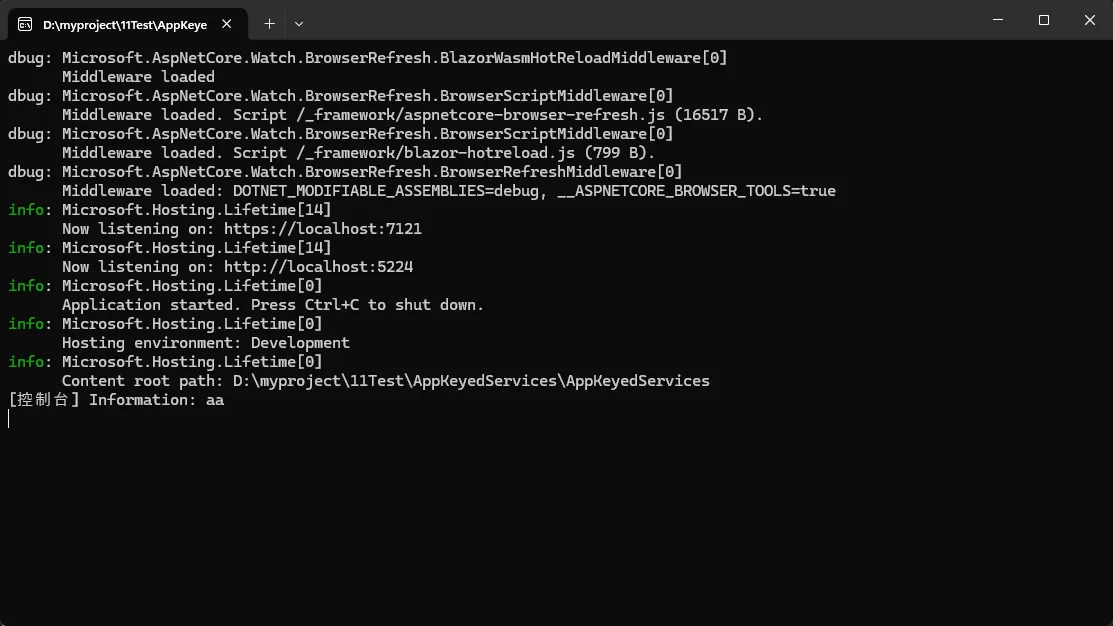
🎯 实战项目:构建灵活的日志系统
让我们通过一个完整的日志系统来展示Keyed Services的威力:
c#// 日志接口
public interface ILogger
{
    Task LogAsync(string message, LogLevel level);
}

// 不同的日志实现
public class ConsoleLogger : ILogger
{
    public Task LogAsync(string message, LogLevel level)
    {
        Console.WriteLine($"[控制台] {level}: {message}");
        return Task.CompletedTask;
    }
}

public class FileLogger : ILogger
{
    public Task LogAsync(string message, LogLevel level)
    {
        // 写入文件逻辑
        File.AppendAllTextAsync("app.log", $"{DateTime.Now} [{level}]: {message}\n");
        return Task.CompletedTask;
    }
}

public class DatabaseLogger : ILogger
{
    public Task LogAsync(string message, LogLevel level)
    {
        // 数据库写入逻辑
        return Task.CompletedTask;
    }
}

// 服务注册
public static class LoggingServiceExtensions
{
    public static IServiceCollection AddLoggingServices(this IServiceCollection services)
    {
        services.AddKeyedSingleton<ILogger, ConsoleLogger>("console");
        services.AddKeyedSingleton<ILogger, FileLogger>("file");
        services.AddKeyedSingleton<ILogger, DatabaseLogger>("database");

        // 注册日志管理器
        services.AddSingleton<LoggerManager>();

        return services;
    }
}

// 日志管理器
public class LoggerManager
{
    private readonly IServiceProvider _serviceProvider;
    private readonly IConfiguration _configuration;

    public LoggerManager(IServiceProvider serviceProvider, IConfiguration configuration)
    {
        _serviceProvider = serviceProvider;
        _configuration = configuration;
    }

    public async Task LogToAll(string message, LogLevel level = LogLevel.Information)
    {
        var enabledLoggers = _configuration.GetSection("Logging:Enabled").Get<string[]>()
                           ?? new[] { "console" };

        var tasks = enabledLoggers.Select(async loggerType =>
        {
            var logger = _serviceProvider.GetKeyedService<ILogger>(loggerType);
            if (logger != null)
            {
                await logger.LogAsync(message, level);
            }
        });

        await Task.WhenAll(tasks);
    }
}

// program
builder.Services.AddSingleton<LoggerManager>();
builder.Services.AddLoggingServices();


// 配置文件 (appsettings.json)
{
  "Logging": {
    "Enabled": ["console", "file", "database"]
  }
}
🔍 深入理解:工作原理
Keyed Services的核心原理是扩展了ServiceDescriptor,增加了ServiceKey属性:
- 非键控服务: 通过
ServiceType标识唯一性 - 键控服务: 通过
ServiceType + ServiceKey组合标识唯一性
这意味着你可以同时拥有键控和非键控的相同服务类型,它们不会冲突。
✨ 总结:三个核心优势
- 🎯 精确控制: 能够准确获取需要的服务实现,告别复杂的条件判断
- 🔧 灵活配置: 支持运行时动态选择,配置驱动的架构设计
- 📈 可维护性: 代码更清晰,减少工厂模式的样板代码,提高开发效率
Keyed Services不仅仅是一个新特性,更是.NET生态系统中依赖注入能力的重要升级。 掌握这项技术,将让你的代码架构更加灵活和优雅。
💬 你在项目中遇到过多实现选择的场景吗?打算如何应用Keyed Services?欢迎在评论区分享你的经验和想法!
📚 如果这篇文章对你有帮助,别忘了转发给团队的小伙伴,让更多.NET开发者了解这个实用特性!
🔗 想了解更多.NET开发技巧和最佳实践,请关注我们的公众号,持续为你带来最新的技术分享!
本文作者:技术老小子
本文链接:
版权声明:本博客所有文章除特别声明外,均采用 BY-NC-SA 许可协议。转载请注明出处!
目录