
目录
从0到1!手把手教你用C#打造工业级TCP客户端
在工业自动化、MES系统、SCADA监控项目中,你是否遇到过这些痛点:TCP通信界面丑陋难用、业务逻辑和UI代码混乱不堪、网络异常处理不完善?今天,我将用一个完整的案例,教你如何用WPF+MVVM打造一个真正具备工业级标准的TCP客户端应用。
作为一名在工业自动化领域摸爬滚打15年的C#架构师,我见过太多开发者在搭建上位机软件时走的弯路。本文将从架构设计到代码实现,带你构建一个可直接用于生产环境的TCP通信系统。
🎯 痛点分析:工业项目中的TCP通信三大难题
难题1:代码耦合严重,维护成本高
很多开发者习惯在窗体的按钮点击事件中直接写Socket代码,导致:
- UI逻辑和业务逻辑混杂
- 单元测试无法进行
- 代码复用率极低
难题2:线程安全问题频发
TCP接收数据在后台线程,直接更新UI控件会抛出异常:
"调用线程无法访问此对象,因为另一个线程拥有该对象"
难题3:异常处理不完善
网络连接断开、超时、服务端异常等情况缺乏统一的错误处理机制,导致程序频繁崩溃。
💡 解决方案:MVVM架构 + 服务分层设计
🏗️ 架构全景图
┌─────────────────────────────────────┐
│           View (XAML)               │  ← UI纯展示
├─────────────────────────────────────┤
│         ViewModel                   │  ← 数据绑定 + 命令
├─────────────────────────────────────┤
│    TcpClientService (服务层)         │  ← 网络通信
├─────────────────────────────────────┤
│      Model (数据模型)                │  ← 实体定义
└─────────────────────────────────────┘
核心优势:
- ✅ View不包含任何业务逻辑
- ✅ ViewModel通过数据绑定驱动UI
- ✅ 服务层独立封装TCP通信
- ✅ 完全符合单一职责原则
先看一下成品
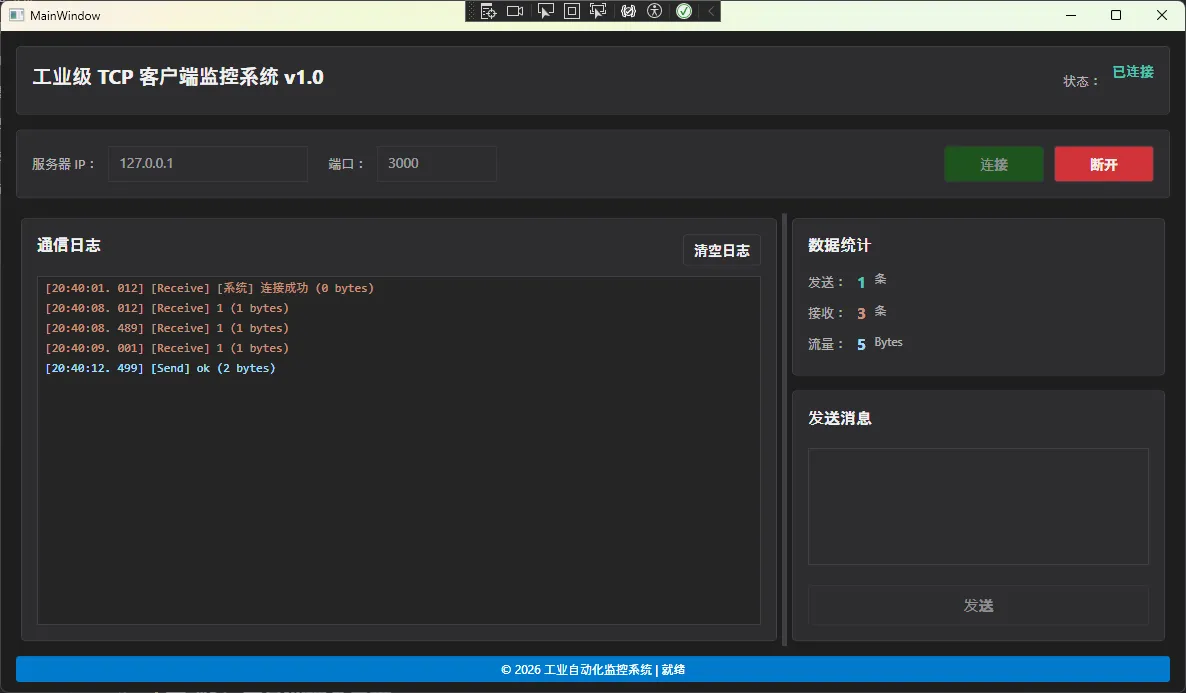
🔥 代码实战:核心模块逐一击破
第一步:定义数据模型(Model层)
工业场景中,我们需要记录每条TCP消息的详细信息:
csharp/// <summary>
/// TCP 消息数据模型
/// </summary>
public class TcpMessage
{
    /// <summary>
    /// 消息时间戳(精确到毫秒,便于故障追溯)
    /// </summary>
    public DateTime Timestamp { get; set; }

    /// <summary>
    /// 消息方向(发送/接收)
    /// </summary>
    public MessageDirection Direction { get; set; }

    /// <summary>
    /// 消息内容(UTF8编码)
    /// </summary>
    public string Content { get; set; }

    /// <summary>
    /// 消息长度(字节数,用于流量统计)
    /// </summary>
    public int Length { get; set; }
}

public enum MessageDirection
{
    Send,    // 发送
    Receive  // 接收
}
💎 设计亮点:
- 时间戳精确到毫秒,满足工业实时性要求
- 枚举类型提升代码可读性
- Length字段便于流量监控和性能分析
第二步:封装TCP服务(Services层)
这是整个系统的核心,处理所有网络通信细节:
csharppublic class TcpClientService :  IDisposable
{
    private TcpClient _client;
    private NetworkStream _stream;
    private CancellationTokenSource _cancellationTokenSource;

    /// <summary>
    /// 连接状态变更事件(重要!通过事件解耦)
    /// </summary>
    public event EventHandler<bool> ConnectionStatusChanged;

    /// <summary>
    /// 数据接收事件
    /// </summary>
    public event EventHandler<TcpMessage> DataReceived;

    /// <summary>
    /// 异步连接到服务器(支持超时控制)
    /// </summary>
    public async Task<bool> ConnectAsync()
    {
        try
        {
            _client = new TcpClient();
            _cancellationTokenSource = new CancellationTokenSource();

            // 使用Task.WhenAny实现超时控制
            var connectTask = _client.ConnectAsync(_config.IpAddress, _config.Port);
            var timeoutTask = Task.Delay(_config.Timeout);

            var completedTask = await Task.WhenAny(connectTask, timeoutTask);

            if (completedTask == timeoutTask)
            {
                throw new TimeoutException("连接超时");
            }

            _stream = _client.GetStream();
            ConnectionStatusChanged?.Invoke(this, true);

            // 启动后台接收线程
            _ = Task.Run(() => ReceiveDataLoop(_cancellationTokenSource.Token));

            return true;
        }
        catch (Exception ex)
        {
            ErrorOccurred?. Invoke(this, $"连接失败: {ex.Message}");
            return false;
        }
    }

    private async Task ReceiveDataLoop(CancellationToken token)
    {
        byte[] buffer = new byte[4096];

        try
        {
            while (!token.IsCancellationRequested && IsConnected)
            {
                int bytesRead = await _stream. ReadAsync(buffer, 0, buffer.Length, token);

                if (bytesRead == 0)
                {
                    ErrorOccurred?.Invoke(this, "服务器已断开连接");
                    break;
                }

                string receivedData = Encoding.UTF8.GetString(buffer, 0, bytesRead);

                DataReceived?.Invoke(this, new TcpMessage
                {
                    Timestamp = DateTime.Now,
                    Direction = MessageDirection.Receive,
                    Content = receivedData,
                    Length = bytesRead
                });
            }
        }
        catch (OperationCanceledException)
        {
            // 正常取消,不处理
        }
        catch (Exception ex)
        {
            ErrorOccurred?.Invoke(this, $"接收数据时出错: {ex.Message}");
        }
    }
}
🔒 关键技术点:
-
超时控制妙招: 使用
Task.WhenAny实现连接超时,比传统的TcpClient. ReceiveTimeout更灵活 -
线程安全: 通过
CancellationToken优雅地停止后台接收线程 -
事件驱动: 用事件而非回调函数,降低耦合度
第三步:实现ViewModel(核心数据绑定层)
csharppublic class MainViewModel : ViewModelBase, IDisposable
{
    private readonly TcpClientService _tcpService;

    private bool _isConnected;
    public bool IsConnected
    {
        get => _isConnected;
        set => SetProperty(ref _isConnected, value);
    }

    private ObservableCollection<TcpMessage> _messageLog = new ObservableCollection<TcpMessage>();
    public ObservableCollection<TcpMessage> MessageLog
    {
        get => _messageLog;
        set => SetProperty(ref _messageLog, value);
    }

    public ICommand ConnectCommand { get; }
    public ICommand SendCommand { get; }

    public MainViewModel()
    {
        // 初始化TCP服务
        _tcpService = new TcpClientService(_config);

        // 订阅事件
        _tcpService. ConnectionStatusChanged += OnConnectionStatusChanged;
        _tcpService.DataReceived += OnDataReceived;

        // 初始化命令
        ConnectCommand = new RelayCommand(
            async _ => await ExecuteConnect(),
            _ => ! IsConnected
        );
    }

    private void OnDataReceived(object sender, TcpMessage message)
    {
        Application.Current.Dispatcher.Invoke(() =>
        {
            MessageLog.Add(message);
            if (MessageLog.Count > 1000)
            {
                MessageLog. RemoveAt(0);
            }
        });
    }
}
⚡ 性能优化要点:
-
日志条数限制: 防止
ObservableCollection数据过多导致内存溢出 -
Dispatcher. Invoke: 完美解决跨线程更新UI的问题
-
命令的 CanExecute: 自动控制按钮的启用/禁用状态
第四步:打造工业级深色主题界面
xaml<!-- 工业级按钮样式 -->
<Style x:Key="IndustrialButtonStyle" TargetType="Button">
    <Setter Property="Background" Value="#FF2D2D30"/>
    <Setter Property="Foreground" Value="#FFF1F1F1"/>
    <Setter Property="BorderBrush" Value="#FF3F3F46"/>
    <Setter Property="FontSize" Value="14"/>
    <Setter Property="Template">
        <Setter.Value>
            <ControlTemplate TargetType="Button">
                <Border Background="{TemplateBinding Background}"
                        BorderBrush="{TemplateBinding BorderBrush}"
                        BorderThickness="1"
                        CornerRadius="3">
                    <ContentPresenter HorizontalAlignment="Center"
                                    VerticalAlignment="Center"/>
                </Border>
                <ControlTemplate.Triggers>
                    <!-- 鼠标悬停效果 -->
                    <Trigger Property="IsMouseOver" Value="True">
                        <Setter Property="Background" Value="#FF007ACC"/>
                    </Trigger>
                    <!-- 禁用状态 -->
                    <Trigger Property="IsEnabled" Value="False">
                        <Setter Property="Opacity" Value="0.5"/>
                    </Trigger>
                </ControlTemplate.Triggers>
            </ControlTemplate>
        </Setter.Value>
    </Setter>
</Style>
界面绑定示例:
xaml<!-- 连接按钮(无需Code-Behind代码) -->
<Button Content="连接"
        Command="{Binding ConnectCommand}"
        Style="{StaticResource ConnectButtonStyle}"/>

<!-- 消息日志列表 -->
<ListBox ItemsSource="{Binding MessageLog}"
         DisplayMemberPath="DisplayText"
         Style="{StaticResource IndustrialListBoxStyle}"/>
🎨 设计亮点:
- 深色主题配色(#1E1E1E背景 + #007ACC强调色)
- 高对比度设计,适合车间环境
- 响应式布局,支持不同分辨率屏幕
完整前端
xaml<Window x:Class="AppTCPClient.MainWindow" xmlns="http://schemas.microsoft.com/winfx/2006/xaml/presentation" xmlns:x="http://schemas.microsoft.com/winfx/2006/xaml" xmlns:d="http://schemas.microsoft.com/expression/blend/2008" xmlns:mc="http://schemas.openxmlformats.org/markup-compatibility/2006" xmlns:local="clr-namespace:AppTCPClient" mc:Ignorable="d" Title="MainWindow" Height="700" Width="1200" MinHeight="600" MinWidth="1000" WindowStartupLocation="CenterScreen" Background="#FF1E1E1E" xmlns:viewmodels="clr-namespace:AppTCPClient.ViewModels" > <Window.DataContext> <viewmodels:MainViewModel/> </Window.DataContext> <Window.Resources> <local:InverseBoolConverter x:Key="InverseBoolConverter" xmlns:local="clr-namespace:AppTCPClient.Converters"/> <Style x:Key="IndustrialButtonStyle" TargetType="Button"> <Setter Property="Background" Value="#FF2D2D30"/> <Setter Property="Foreground" Value="#FFF1F1F1"/> <Setter Property="BorderBrush" Value="#FF3F3F46"/> <Setter Property="BorderThickness" Value="1"/> <Setter Property="Padding" Value="15,8"/> <Setter Property="FontSize" Value="14"/> <Setter Property="FontWeight" Value="Medium"/> <Setter Property="Cursor" Value="Hand"/> <Setter Property="Template"> <Setter.Value> <ControlTemplate TargetType="Button"> <Border Background="{TemplateBinding Background}" BorderBrush="{TemplateBinding BorderBrush}" BorderThickness="{TemplateBinding BorderThickness}" CornerRadius="3"> <ContentPresenter HorizontalAlignment="Center" VerticalAlignment="Center" Margin="{TemplateBinding Padding}"/> </Border> <ControlTemplate.Triggers> <Trigger Property="IsMouseOver" Value="True"> <Setter Property="Background" Value="#FF007ACC"/> <Setter Property="BorderBrush" Value="#FF1C97EA"/> </Trigger> <Trigger Property="IsPressed" Value="True"> <Setter Property="Background" Value="#FF005A9E"/> </Trigger> <Trigger Property="IsEnabled" Value="False"> <Setter Property="Opacity" Value="0.5"/> <Setter Property="Cursor" Value="Arrow"/> </Trigger> </ControlTemplate.Triggers> </ControlTemplate> </Setter.Value> </Setter> </Style> <Style x:Key="ConnectButtonStyle" TargetType="Button" BasedOn="{StaticResource IndustrialButtonStyle}"> <Setter Property="Background" Value="#FF0E7C0E"/> <Style.Triggers> <Trigger Property="IsMouseOver" Value="True"> <Setter Property="Background" Value="#FF10A810"/> </Trigger> </Style.Triggers> </Style> <Style x:Key="DisconnectButtonStyle" TargetType="Button" BasedOn="{StaticResource IndustrialButtonStyle}"> <Setter Property="Background" Value="#FFD13438"/> <Style.Triggers> <Trigger Property="IsMouseOver" Value="True"> <Setter Property="Background" Value="#FFE81123"/> </Trigger> </Style.Triggers> </Style> <Style x:Key="IndustrialTextBoxStyle" TargetType="TextBox"> <Setter Property="Background" Value="#FF2D2D30"/> <Setter Property="Foreground" Value="#FFF1F1F1"/> <Setter Property="BorderBrush" Value="#FF3F3F46"/> <Setter Property="BorderThickness" Value="1"/> <Setter Property="Padding" Value="8,6"/> <Setter Property="FontSize" Value="14"/> <Setter Property="CaretBrush" Value="#FFF1F1F1"/> <Style.Triggers> <Trigger Property="IsFocused" Value="True"> <Setter Property="BorderBrush" Value="#FF007ACC"/> </Trigger> </Style.Triggers> </Style> <Style x:Key="IndustrialLabelStyle" TargetType="TextBlock"> <Setter Property="Foreground" Value="#FFB4B4B4"/> <Setter Property="FontSize" Value="13"/> <Setter Property="VerticalAlignment" Value="Center"/> <Setter Property="Margin" Value="0,0,10,0"/> </Style> <Style x:Key="TitleTextStyle" TargetType="TextBlock"> <Setter Property="Foreground" Value="#FFF1F1F1"/> <Setter Property="FontSize" Value="16"/> <Setter Property="FontWeight" Value="Bold"/> <Setter Property="Margin" Value="0,0,0,10"/> </Style> <Style x:Key="StatusTextStyle" TargetType="TextBlock"> <Setter Property="Foreground" Value="#FF4EC9B0"/> <Setter Property="FontSize" Value="14"/> <Setter Property="FontWeight" Value="Bold"/> </Style> <Style x:Key="IndustrialListBoxStyle" TargetType="ListBox"> <Setter Property="Background" Value="#FF252526"/> <Setter Property="Foreground" Value="#FFF1F1F1"/> <Setter Property="BorderBrush" Value="#FF3F3F46"/> <Setter Property="BorderThickness" Value="1"/> <Setter Property="FontFamily" Value="Consolas, Courier New"/> <Setter Property="FontSize" Value="12"/> <Setter Property="ScrollViewer.HorizontalScrollBarVisibility" Value="Auto"/> <Setter Property="ScrollViewer.VerticalScrollBarVisibility" Value="Auto"/> </Style> <Style x:Key="GroupBorderStyle" TargetType="Border"> <Setter Property="Background" Value="#FF2D2D30"/> <Setter Property="BorderBrush" Value="#FF3F3F46"/> <Setter Property="BorderThickness" Value="1"/> <Setter Property="CornerRadius" Value="4"/> <Setter Property="Padding" Value="15"/> <Setter Property="Margin" Value="5"/> </Style> </Window.Resources> <Grid Margin="10"> <Grid.RowDefinitions> <RowDefinition Height="Auto"/> <RowDefinition Height="Auto"/> <RowDefinition Height="*"/> <RowDefinition Height="Auto"/> </Grid.RowDefinitions> <Border Grid.Row="0" Style="{StaticResource GroupBorderStyle}" Margin="5,5,5,10"> <Grid> <TextBlock Text="工业级 TCP 客户端监控系统 v1.0" Style="{StaticResource TitleTextStyle}" FontSize="20" HorizontalAlignment="Left"/> <StackPanel Orientation="Horizontal" HorizontalAlignment="Right"> <TextBlock Text="状态:" Style="{StaticResource IndustrialLabelStyle}"/> <TextBlock Text="{Binding ConnectionStatus}" Style="{StaticResource StatusTextStyle}"/> </StackPanel> </Grid> </Border> <Border Grid.Row="1" Style="{StaticResource GroupBorderStyle}"> <Grid> <Grid.ColumnDefinitions> <ColumnDefinition Width="Auto"/> <ColumnDefinition Width="200"/> <ColumnDefinition Width="Auto"/> <ColumnDefinition Width="120"/> <ColumnDefinition Width="*"/> <ColumnDefinition Width="Auto"/> </Grid.ColumnDefinitions> <TextBlock Grid.Column="0" Text="服务器 IP:" Style="{StaticResource IndustrialLabelStyle}"/> <TextBox Grid.Column="1" x:Name="tbxIpAddress" Text="{Binding IpAddress, UpdateSourceTrigger=PropertyChanged}" Style="{StaticResource IndustrialTextBoxStyle}" IsEnabled="{Binding IsConnected, Converter={StaticResource InverseBoolConverter}}"/> <TextBlock Grid.Column="2" Text="端口:" Style="{StaticResource IndustrialLabelStyle}" Margin="20,0,10,0"/> <TextBox Grid.Column="3" x:Name="tbxPort" Text="{Binding Port, UpdateSourceTrigger=PropertyChanged}" Style="{StaticResource IndustrialTextBoxStyle}" IsEnabled="{Binding IsConnected, Converter={StaticResource InverseBoolConverter}}"/> <StackPanel Grid.Column="5" Orientation="Horizontal" HorizontalAlignment="Right"> <Button x:Name="btnConnect" Content="连接" Command="{Binding ConnectCommand}" Style="{StaticResource ConnectButtonStyle}" Width="100" Margin="10,0"/> <Button x:Name="btnDisconnect" Content="断开" Command="{Binding DisconnectCommand}" Style="{StaticResource DisconnectButtonStyle}" Width="100"/> </StackPanel> </Grid> </Border> <Grid Grid.Row="2" Margin="5,10,5,5"> <Grid.ColumnDefinitions> <ColumnDefinition Width="2*"/> <ColumnDefinition Width="5"/> <ColumnDefinition Width="*"/> </Grid.ColumnDefinitions> <Border Grid.Column="0" Style="{StaticResource GroupBorderStyle}"> <Grid> <Grid.RowDefinitions> <RowDefinition Height="Auto"/> <RowDefinition Height="*"/> </Grid.RowDefinitions> <Grid Grid.Row="0" Margin="0,0,0,10"> <TextBlock Text="通信日志" Style="{StaticResource TitleTextStyle}"/> <Button x:Name="btnClearLog" Content="清空日志" Command="{Binding ClearLogCommand}" Style="{StaticResource IndustrialButtonStyle}" HorizontalAlignment="Right" Padding="10,5"/> </Grid> <ListBox Grid.Row="1" x:Name="lstMessageLog" ItemsSource="{Binding MessageLog}" DisplayMemberPath="DisplayText" Style="{StaticResource IndustrialListBoxStyle}"> <ListBox.ItemContainerStyle> <Style TargetType="ListBoxItem"> <Setter Property="Padding" Value="5,2"/> <Style.Triggers> <DataTrigger Binding="{Binding Direction}" Value="Send"> <Setter Property="Foreground" Value="#FF9CDCFE"/> </DataTrigger> <DataTrigger Binding="{Binding Direction}" Value="Receive"> <Setter Property="Foreground" Value="#FFCE9178"/> </DataTrigger> </Style.Triggers> </Style> </ListBox.ItemContainerStyle> </ListBox> </Grid> </Border> <!-- 分隔线 --> <GridSplitter Grid.Column="1" Width="5" HorizontalAlignment="Stretch" Background="#FF3F3F46"/> <!-- 右侧:统计信息与发送区 --> <Grid Grid.Column="2"> <Grid.RowDefinitions> <RowDefinition Height="Auto"/> <RowDefinition Height="*"/> </Grid.RowDefinitions> <Border Grid.Row="0" Style="{StaticResource GroupBorderStyle}"> <Grid> <Grid.RowDefinitions> <RowDefinition Height="Auto"/> <RowDefinition Height="Auto"/> <RowDefinition Height="Auto"/> <RowDefinition Height="Auto"/> </Grid.RowDefinitions> <TextBlock Grid.Row="0" Text="数据统计" Style="{StaticResource TitleTextStyle}"/> <StackPanel Grid.Row="1" Orientation="Horizontal" Margin="0,5"> <TextBlock Text="发送:" Style="{StaticResource IndustrialLabelStyle}"/> <TextBlock Text="{Binding SentCount}" Foreground="#FF4EC9B0" FontWeight="Bold" FontSize="16"/> <TextBlock Text=" 条" Foreground="#FFB4B4B4" Margin="5,0"/> </StackPanel> <StackPanel Grid.Row="2" Orientation="Horizontal" Margin="0,5"> <TextBlock Text="接收:" Style="{StaticResource IndustrialLabelStyle}"/> <TextBlock Text="{Binding ReceivedCount}" Foreground="#FFCE9178" FontWeight="Bold" FontSize="16"/> <TextBlock Text=" 条" Foreground="#FFB4B4B4" Margin="5,0"/> </StackPanel> <StackPanel Grid.Row="3" Orientation="Horizontal" Margin="0,5"> <TextBlock Text="流量:" Style="{StaticResource IndustrialLabelStyle}"/> <TextBlock Text="{Binding TotalBytes}" Foreground="#FF9CDCFE" FontWeight="Bold" FontSize="16"/> <TextBlock Text=" Bytes" Foreground="#FFB4B4B4" Margin="5,0"/> </StackPanel> </Grid> </Border> <Border Grid.Row="1" Style="{StaticResource GroupBorderStyle}" Margin="5,10,5,5"> <Grid> <Grid.RowDefinitions> <RowDefinition Height="Auto"/> <RowDefinition Height="*"/> <RowDefinition Height="Auto"/> </Grid.RowDefinitions> <TextBlock Grid.Row="0" Text="发送消息" Style="{StaticResource TitleTextStyle}"/> <TextBox Grid.Row="1" x:Name="tbxSendMessage" Text="{Binding SendMessage, UpdateSourceTrigger=PropertyChanged}" Style="{StaticResource IndustrialTextBoxStyle}" TextWrapping="Wrap" AcceptsReturn="True" VerticalScrollBarVisibility="Auto" Margin="0,10"/> <Button Grid.Row="2" x:Name="btnSend" Content="发送" Command="{Binding SendCommand}" Style="{StaticResource IndustrialButtonStyle}" Height="40" FontSize="15" Margin="0,10,0,0"/> </Grid> </Border> </Grid> </Grid> <Border Grid.Row="3" Background="#FF007ACC" CornerRadius="3" Padding="10,5" Margin="5,5,5,0"> <TextBlock Text="© 2026 工业自动化监控系统 | 就绪" Foreground="White" FontSize="12" HorizontalAlignment="Center"/> </Border> </Grid> </Window>
🚨 常见坑点与避坑指南
坑点1:忘记释放资源导致内存泄漏
错误示范:
csharp// ❌ 窗口关闭时未释放TCP连接
private void Window_Closed(object sender, EventArgs e)
{
    // 什么都没做
}
正确做法:
csharp// ✅ 实现IDisposable接口
public class MainViewModel : IDisposable
{
    public void Dispose()
    {
        _tcpService?.Dispose();
    }
}

// 在窗口关闭时调用
protected override void OnClosed(EventArgs e)
{
    if (DataContext is MainViewModel viewModel)
    {
        viewModel.Dispose();
    }
    base.OnClosed(e);
}
坑点2:未处理服务端主动断开的情况
问题现象: 服务端断开后,客户端仍显示"已连接"状态
解决方案:
csharpint bytesRead = await _stream.ReadAsync(buffer, 0, buffer.Length);

if (bytesRead == 0)
{
    // 关键判断:字节数为0表示连接已断开
    ErrorOccurred?.Invoke(this, "服务器已断开连接");
    ConnectionStatusChanged?.Invoke(this, false);
    break;
}
坑点3:命名空间引用错误
常见错误:
xaml<!-- ❌ 错误的命名空间声明 -->
xmlns:viewmodels="clr-namespace:TCPClientApp.ViewModels"
当出现 找不到类型"MainViewModel" 错误时,检查:
- 命名空间是否与C#代码中的
namespace一致 - 项目是否已成功编译
- XAML设计器是否需要重新加载
正确写法:
xaml<Window xmlns:vm="clr-namespace:TCPClientApp.ViewModels">
    <Window.DataContext>
        <vm:MainViewModel/>
    </Window.DataContext>
</Window>
🏆 收藏级最佳实践
实践1:统一的命名规范
| 控件类型 | 前缀 | 示例 |
|---|---|---|
| Button | btn | btnConnect |
| TextBox | tbx | tbxIpAddress |
| ListBox | lst | lstMessageLog |
| TextBlock | txt | txtStatus |
| Border | bor | borContainer |
好处: 团队协作时一眼识别控件类型,降低沟通成本
实践2:基类抽取减少重复代码
csharp/// <summary>
/// ViewModel基类(所有ViewModel继承它)
/// </summary>
public class ViewModelBase : INotifyPropertyChanged
{
    public event PropertyChangedEventHandler PropertyChanged;

    protected bool SetProperty<T>(ref T storage, T value,
        [CallerMemberName] string propertyName = null)
    {
        if (Equals(storage, value)) return false;

        storage = value;
        OnPropertyChanged(propertyName);
        return true;
    }

    protected void OnPropertyChanged(string propertyName)
    {
        PropertyChanged?.Invoke(this, new PropertyChangedEventArgs(propertyName));
    }
}
优势: 所有属性变更通知的逻辑只需写一次
实践3:配置项集中管理
csharppublic class ConnectionConfig
{
    public string IpAddress { get; set; } = "127.0.0.1";
    public int Port { get; set; } = 8080;
    public int Timeout { get; set; } = 5000;
    public bool AutoReconnect { get; set; } = true;
}
扩展建议: 可结合JSON配置文件或数据库实现动态配置
📊 实际应用场景
场景1:MES系统设备通信
- 采集PLC数据(温度、压力、转速等)
- 实时显示设备运行状态
- 记录生产数据用于报表分析
场景2:SCADA监控系统
- 连接多个工业网关
- 大屏展示实时数据
- 异常告警推送
场景3:AGV调度系统
- 下发任务指令到AGV小车
- 接收小车位置和状态反馈
- 轨迹跟踪与碰撞预警
💡 进阶扩展方向
方向1:支持多客户端并发连接
改造为 List<TcpClientService>,实现多设备同时通信
方向2:集成协议解析
针对Modbus、OPC UA等工业协议,实现专用解析器
方向3:数据持久化
将通信日志保存到SQLite或SQL Server,便于故障分析
方向4:加入心跳机制
定时发送心跳包,检测连接有效性:
csharpprivate async Task HeartbeatLoop()
{
    while (IsConnected)
    {
        await SendDataAsync("HEARTBEAT");
        await Task. Delay(30000); // 每30秒一次
    }
}
🎯 三大核心要点总结
✅ 架构设计
- MVVM模式 确保代码可维护、可测试
- 服务分层 让网络通信逻辑独立封装
- 事件驱动 降低模块间耦合度
✅ 线程安全
- 使用
Dispatcher.Invoke跨线程更新UI CancellationToken优雅管理后台任务async/await避免阻塞主线程
✅ 工业级细节
- 连接超时控制(避免无限等待)
- 异常统一处理(提升系统稳定性)
- 资源正确释放(防止内存泄漏)
💬 互动时间
问题1: 你在实际项目中遇到过哪些TCP通信的难题?欢迎留言分享!
问题2: 你更倾向于用WPF还是WinForms开发工业上位机?说说你的理由。
行动号召: 如果这篇文章帮你解决了实际问题,请:
- 👍 点赞支持
- 🔖 收藏备用
- 📤 转发给正在做工控项目的同事
关注我,持续分享C#工业自动化开发干货!
本文作者:技术老小子
本文链接:
版权声明:本博客所有文章除特别声明外,均采用 BY-NC-SA 许可协议。转载请注明出处!