
Press Ctrl+ and K to search
目录
在高并发系统中,你是否遇到过这样的问题:业务高峰期消息堆积如山,系统濒临崩溃;低峰期资源大量闲置,成本居高不下?作为一名C#开发者,如何优雅地解决这个痛点?
今天我们聊聊削峰填谷——一个能让你的系统在流量洪峰中稳如泰山的神器。通过RabbitMQ + C#的完美组合,我们将构建一个工业级的消息处理系统,让你的应用在面对突发流量时依然从容不迫。
🔍 问题分析:为什么需要削峰填谷?
💥 传统系统的痛点
想象一个电商系统在双11零点的场景:
- 瞬时并发激增:10万用户同时下单,消息队列瞬间爆满
- 资源配置矛盾:按峰值配置浪费成本,按平均值配置扛不住高峰
- 系统雪崩风险:下游处理能力跟不上,整个链路阻塞
c#// ❌ 传统同步处理的问题
public async Task ProcessOrderAsync(Order order)
{
    // 直接处理,高峰期会被压垮
    await _paymentService.ProcessPaymentAsync(order);
    await _inventoryService.UpdateStockAsync(order);
    await _notificationService.SendConfirmationAsync(order);
}
🎯 削峰填谷的核心思想
削峰填谷就是在系统中加入一个智能缓冲区:
- 削峰:高峰期将消息暂存,避免系统过载
- 填谷:低峰期加速处理,提高资源利用率
- 平滑:让不规则的流量变得平稳可控
💡 解决方案:RabbitMQ + C#削峰填谷架构
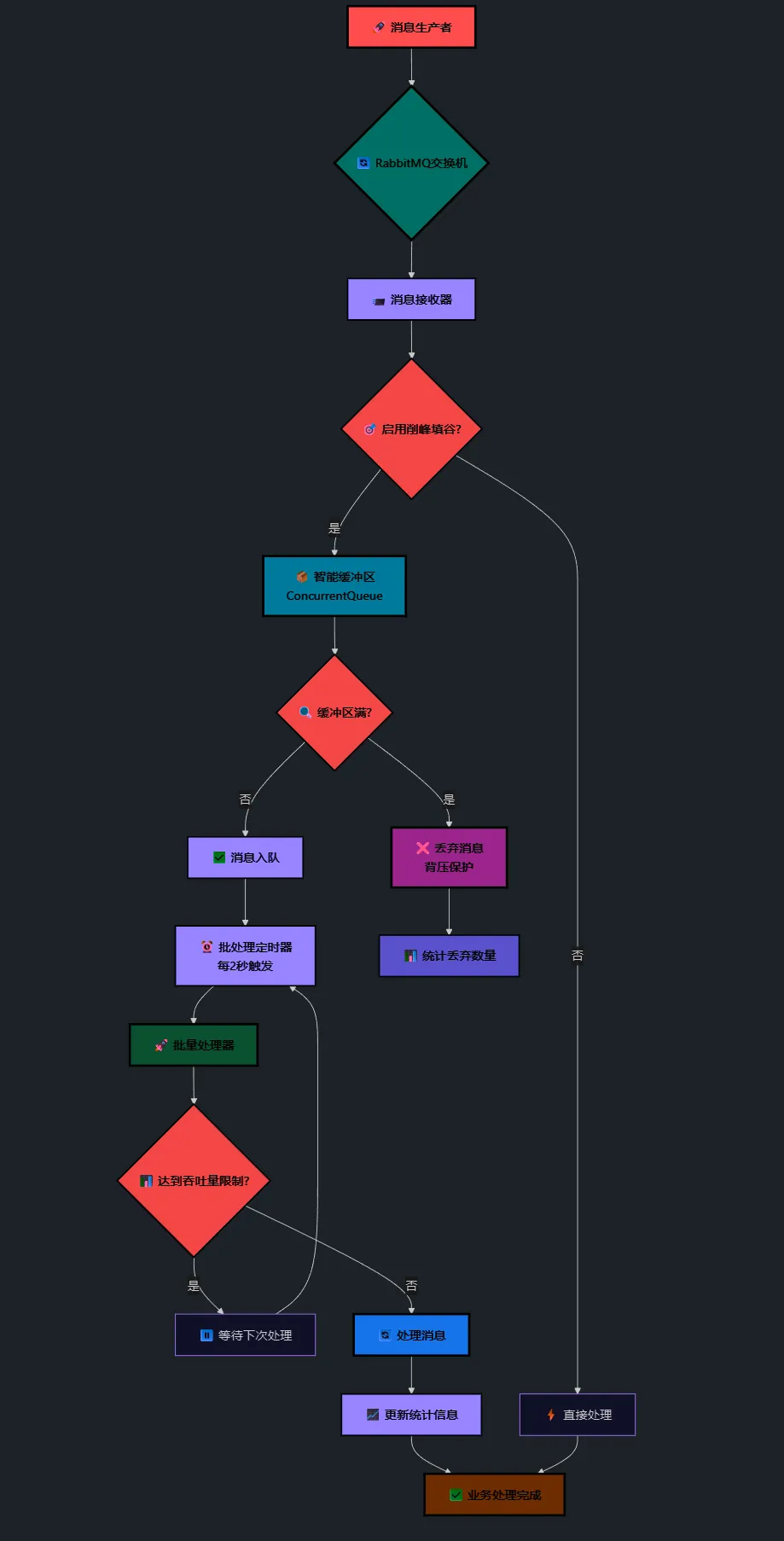
🏗️ 整体架构设计
markdown[消息生产者] → [RabbitMQ交换机] → [削峰填谷服务] → [业务处理]
                     ↓
                [智能缓冲区]
                     ↓
               [批量处理器]
🔧 核心组件解析
1. 智能缓冲区:使用ConcurrentQueue存储待处理消息
2. 批量处理器:定时批量消费,控制处理速率
3. 动态配置:实时调整缓冲区大小和处理频率
4. 监控统计:实时监控系统健康状态
🛠️ 代码实战:构建削峰填谷系统
📦 核心数据模型
c#/// <summary>
/// 工业传感器数据模型 - 实际业务场景
/// </summary>
[Serializable]
public class SensorData
{
    [JsonProperty("sensorId")]
    public string SensorId { get; set; }

    [JsonProperty("temperature")]
    public float Temperature { get; set; }

    [JsonProperty("pressure")]
    public float Pressure { get; set; }

    [JsonProperty("timestamp")]
    public DateTime Timestamp { get; set; }

    [JsonProperty("location")]
    public string Location { get; set; }

    // 数据校验 - 防止脏数据
    public bool IsValid() =>
        !string.IsNullOrEmpty(SensorId) &&
        Temperature >= -100 && Temperature <= 200 &&
        Pressure >= 0 && Pressure <= 100000;
}
🎯 削峰填谷核心服务
c#using System;
using System.Collections.Concurrent;
using System.Collections.Generic;
using System.Linq;
using System.Text;
using System.Text.Json;
using System.Threading;
using System.Threading.Tasks;
using AppRabbitMQBalance.Models;
using Newtonsoft.Json;
using RabbitMQ.Client;
using RabbitMQ.Client.Events;
namespace AppRabbitMQBalance.Services
{
public class RabbitMQService : IDisposable
{
// MQClient 变化比较大,基本都是异步的了,同步方法都移除了
private readonly ConnectionFactory _connectionFactory;
private IConnection _connection;
private IChannel _channel;
private readonly string _exchangeName = "sensor_data_exchange";
private readonly string _queueName = "sensor_data_queue";
private CancellationTokenSource _cancellationTokenSource;
private AsyncEventingBasicConsumer _consumer;
// 🎯 削峰填谷相关字段
private readonly ConcurrentQueue<SensorData> _peakShavingBuffer = new ConcurrentQueue<SensorData>();
private readonly System.Threading.Timer _batchProcessTimer;
private readonly SemaphoreSlim _processingLock = new SemaphoreSlim(1, 1);
private readonly object _statsLock = new object();
// 削峰填谷配置
public int MaxBufferSize { get; set; } = 1000; // 缓冲区最大容量
public int BatchSize { get; set; } = 50; // 批处理大小
public int ProcessingIntervalMs { get; set; } = 2000; // 处理间隔(毫秒)
public int MaxThroughputPerSecond { get; set; } = 100; // 每秒最大处理量
public bool EnablePeakShaving { get; set; } = true; // 是否启用削峰填谷
// 性能统计
private long _totalReceived = 0;
private long _totalProcessed = 0;
private long _totalDropped = 0;
private DateTime _lastStatsReset = DateTime.Now;
public event Action<SensorData> DataReceived;
public event Action<PeakShavingStats> StatsUpdated;
public bool IsConnected { get; private set; }
public RabbitMQService(string hostName = "localhost", int port = 5672,
string userName = "guest", string password = "guest")
{
_connectionFactory = new ConnectionFactory()
{
HostName = hostName,
Port = port,
UserName = userName,
Password = password,
// 启用自动恢复
AutomaticRecoveryEnabled = true,
NetworkRecoveryInterval = TimeSpan.FromSeconds(10),
};
// 🎯 初始化削峰填谷定时器
_batchProcessTimer = new System.Threading.Timer(ProcessPeakShavingBuffer, null,
TimeSpan.FromMilliseconds(ProcessingIntervalMs),
TimeSpan.FromMilliseconds(ProcessingIntervalMs));
}
/// <summary>
/// 异步初始化RabbitMQ连接
/// </summary>
public async Task<bool> InitializeAsync()
{
try
{
// 🚨 创建异步连接
_connection = await _connectionFactory.CreateConnectionAsync();
// 🚨 创建异步通道
_channel = await _connection.CreateChannelAsync();
// 🚨 重点:声明交换机(扇出模式,支持多消费者)
await _channel.ExchangeDeclareAsync(_exchangeName, ExchangeType.Fanout, durable: true);
// 🚨 重点:声明持久化队列
await _channel.QueueDeclareAsync(_queueName, durable: true, exclusive: false, autoDelete: false);
// 绑定队列到交换机
await _channel.QueueBindAsync(_queueName, _exchangeName, routingKey: "");
// 设置QoS - 削峰填谷关键配置
await _channel.BasicQosAsync(prefetchSize: 0, prefetchCount: (ushort)BatchSize, global: false);
IsConnected = true;
Console.WriteLine("✅ RabbitMQ连接建立成功 - 削峰填谷已启用");
return true;
}
catch (Exception ex)
{
Console.WriteLine($"❌ RabbitMQ初始化失败: {ex.Message}");
IsConnected = false;
return false;
}
}
/// <summary>
/// 异步启动消费者 - 正确的7.1.2实现方式
/// </summary>
public async Task StartConsumingAsync()
{
if (!IsConnected || _channel == null)
{
throw new InvalidOperationException("RabbitMQ未正确初始化");
}
try
{
_cancellationTokenSource = new CancellationTokenSource();
// 🚨 使用AsyncEventingBasicConsumer
_consumer = new AsyncEventingBasicConsumer(_channel);
// 🚨 关键:设置异步接收事件处理器
_consumer.ReceivedAsync += OnMessageReceivedAsync;
// 🚨 启动消费
await _channel.BasicConsumeAsync(
queue: _queueName,
autoAck: false,
consumer: _consumer,
cancellationToken: _cancellationTokenSource.Token
);
Console.WriteLine("📡 开始异步消费消息 - 削峰填谷模式");
}
catch (Exception ex)
{
Console.WriteLine($"❌ 消费者启动失败: {ex.Message}");
throw;
}
}
/// <summary>
/// 异步消息接收处理器 - 集成削峰填谷
/// </summary>
private async Task OnMessageReceivedAsync(object sender, BasicDeliverEventArgs ea)
{
try
{
var message = Encoding.UTF8.GetString(ea.Body.Span);
// 🚨 解析嵌套的消息结构
var messageWrapper = JsonConvert.DeserializeObject<dynamic>(message);
SensorData sensorData;
if (messageWrapper?.Data != null)
{
// 如果消息被包装过,提取内部的SensorData
sensorData = JsonConvert.DeserializeObject<SensorData>(messageWrapper.Data.ToString());
}
else
{
// 直接的SensorData消息
sensorData = JsonConvert.DeserializeObject<SensorData>(message);
}
Interlocked.Increment(ref _totalReceived);
// 🎯 削峰填谷处理逻辑
if (EnablePeakShaving)
{
await ProcessWithPeakShaving(sensorData, ea);
}
else
{
// 直接处理
DataReceived?.Invoke(sensorData);
await _channel.BasicAckAsync(ea.DeliveryTag, multiple: false);
Interlocked.Increment(ref _totalProcessed);
}
Console.WriteLine($"📨 已处理消息: {sensorData?.SensorId} (缓冲区: {_peakShavingBuffer.Count})");
}
catch (Newtonsoft.Json.JsonException jsonEx)
{
Console.WriteLine($"❌ JSON解析错误: {jsonEx.Message}");
// 🚨 异步拒绝消息
await _channel.BasicNackAsync(ea.DeliveryTag, multiple: false, requeue: false);
Interlocked.Increment(ref _totalDropped);
}
catch (Exception ex)
{
Console.WriteLine($"❌ 消息处理错误: {ex.Message}");
// 🚨 异步拒绝消息
await _channel.BasicNackAsync(ea.DeliveryTag, multiple: false, requeue: false);
Interlocked.Increment(ref _totalDropped);
}
}
/// <summary>
/// 🎯 削峰填谷处理核心逻辑
/// </summary>
private async Task ProcessWithPeakShaving(SensorData sensorData, BasicDeliverEventArgs ea)
{
// 检查缓冲区容量
if (_peakShavingBuffer.Count >= MaxBufferSize)
{
Console.WriteLine($"⚠️ 缓冲区已满,丢弃消息: {sensorData.SensorId}");
await _channel.BasicNackAsync(ea.DeliveryTag, multiple: false, requeue: false);
Interlocked.Increment(ref _totalDropped);
return;
}
// 将数据和确认信息一起入队
var bufferItem = new BufferedMessage
{
SensorData = sensorData,
DeliveryTag = ea.DeliveryTag,
ReceivedTime = DateTime.Now
};
_peakShavingBuffer.Enqueue(sensorData);
// 立即确认消息(削峰填谷策略)
await _channel.BasicAckAsync(ea.DeliveryTag, multiple: false);
}
/// <summary>
/// 🎯 批处理缓冲区数据 - 削峰填谷核心
/// </summary>
private async void ProcessPeakShavingBuffer(object state)
{
if (!_processingLock.Wait(0)) // 非阻塞获取锁
{
return; // 上次处理还未完成,跳过这次
}
try
{
var processingCount = Math.Min(_peakShavingBuffer.Count, BatchSize);
if (processingCount == 0) return;
var processedInBatch = 0;
var maxProcessPerSecond = MaxThroughputPerSecond * ProcessingIntervalMs / 1000;
Console.WriteLine($"🔄 开始批处理: 待处理 {_peakShavingBuffer.Count}, 本批次 {Math.Min(processingCount, maxProcessPerSecond)}");
// 🎯 按照设定的吞吐量限制处理数据
for (int i = 0; i < processingCount && processedInBatch < maxProcessPerSecond; i++)
{
if (_peakShavingBuffer.TryDequeue(out SensorData sensorData))
{
try
{
// 处理数据
DataReceived?.Invoke(sensorData);
processedInBatch++;
Interlocked.Increment(ref _totalProcessed);
// 🎯 微小延时,确保不会过载系统
if (processedInBatch % 10 == 0)
{
await Task.Delay(10);
}
}
catch (Exception ex)
{
Console.WriteLine($"❌ 批处理数据错误: {ex.Message}");
Interlocked.Increment(ref _totalDropped);
}
}
}
// 更新统计信息
UpdateStats();
Console.WriteLine($"✅ 批处理完成: 处理了 {processedInBatch} 条消息, 剩余 {_peakShavingBuffer.Count}");
}
finally
{
_processingLock.Release();
}
}
/// <summary>
/// 🎯 更新削峰填谷统计信息
/// </summary>
private void UpdateStats()
{
lock (_statsLock)
{
var stats = new PeakShavingStats
{
TotalReceived = _totalReceived,
TotalProcessed = _totalProcessed,
TotalDropped = _totalDropped,
BufferSize = _peakShavingBuffer.Count,
MaxBufferSize = MaxBufferSize,
ProcessingRate = CalculateProcessingRate(),
UpTime = DateTime.Now - _lastStatsReset
};
StatsUpdated?.Invoke(stats);
}
}
/// <summary>
/// 🎯 计算处理速率
/// </summary>
private double CalculateProcessingRate()
{
var elapsed = (DateTime.Now - _lastStatsReset).TotalSeconds;
return elapsed > 0 ? _totalProcessed / elapsed : 0;
}
/// <summary>
/// 🎯 动态调整削峰填谷参数
/// </summary>
public void UpdatePeakShavingConfig(int maxBufferSize, int batchSize, int intervalMs, int maxThroughput)
{
MaxBufferSize = maxBufferSize;
BatchSize = batchSize;
ProcessingIntervalMs = intervalMs;
MaxThroughputPerSecond = maxThroughput;
// 重启定时器
_batchProcessTimer?.Change(
TimeSpan.FromMilliseconds(ProcessingIntervalMs),
TimeSpan.FromMilliseconds(ProcessingIntervalMs));
Console.WriteLine($"🔧 削峰填谷参数已更新: Buffer={MaxBufferSize}, Batch={BatchSize}, Interval={ProcessingIntervalMs}ms, Throughput={MaxThroughputPerSecond}/s");
}
/// <summary>
/// 🎯 获取削峰填谷状态
/// </summary>
public PeakShavingStats GetPeakShavingStats()
{
return new PeakShavingStats
{
TotalReceived = _totalReceived,
TotalProcessed = _totalProcessed,
TotalDropped = _totalDropped,
BufferSize = _peakShavingBuffer.Count,
MaxBufferSize = MaxBufferSize,
ProcessingRate = CalculateProcessingRate(),
UpTime = DateTime.Now - _lastStatsReset
};
}
/// <summary>
/// 🎯 重置统计信息
/// </summary>
public void ResetStats()
{
lock (_statsLock)
{
_totalReceived = 0;
_totalProcessed = 0;
_totalDropped = 0;
_lastStatsReset = DateTime.Now;
Console.WriteLine("📊 削峰填谷统计信息已重置");
}
}
/// <summary>
/// 🎯 强制处理缓冲区数据
/// </summary>
public async Task FlushBufferAsync()
{
await _processingLock.WaitAsync();
try
{
Console.WriteLine($"🚀 强制处理缓冲区数据: {_peakShavingBuffer.Count} 条");
while (_peakShavingBuffer.TryDequeue(out SensorData sensorData))
{
try
{
DataReceived?.Invoke(sensorData);
Interlocked.Increment(ref _totalProcessed);
}
catch (Exception ex)
{
Console.WriteLine($"❌ 强制处理数据错误: {ex.Message}");
Interlocked.Increment(ref _totalDropped);
}
}
Console.WriteLine("✅ 缓冲区数据处理完成");
}
finally
{
_processingLock.Release();
}
}
// 原有方法保持不变...
/// <summary>
/// 异步发布传感器数据
/// </summary>
public async Task PublishSensorDataAsync(SensorData sensorData)
{
if (!IsConnected || _channel == null)
{
throw new InvalidOperationException("RabbitMQ连接未建立");
}
try
{
// 🚨 创建消息属性
var properties = new BasicProperties
{
Persistent = true,
Timestamp = new AmqpTimestamp(DateTimeOffset.UtcNow.ToUnixTimeSeconds()),
MessageId = Guid.NewGuid().ToString(),
ContentType = "application/json"
};
var messageData = new
{
Timestamp = DateTime.Now.ToString("yyyy-MM-dd HH:mm:ss.fff"),
Data = sensorData,
Source = "SensorSystem"
};
var body = Encoding.UTF8.GetBytes(JsonConvert.SerializeObject(messageData));
// 🚨 异步发布消息
await _channel.BasicPublishAsync(
exchange: _exchangeName,
routingKey: "",
basicProperties: properties,
body: body.AsMemory(),
mandatory: true
);
Console.WriteLine($"✅ 传感器数据已发送: {sensorData.SensorId}");
}
catch (Exception ex)
{
Console.WriteLine($"❌ 消息发送失败: {ex.Message}");
throw;
}
}
/// <summary>
/// 停止消费
/// </summary>
public async Task StopConsumingAsync()
{
try
{
_cancellationTokenSource?.Cancel();
if (_consumer != null && _channel != null)
{
// 🚨 异步取消消费
await _channel.BasicCancelAsync(_consumer.ConsumerTags.FirstOrDefault() ?? "");
}
Console.WriteLine("📡 消息消费已停止");
}
catch (Exception ex)
{
Console.WriteLine($"⚠️ 停止消费异常: {ex.Message}");
}
}
/// <summary>
/// 检查连接状态
/// </summary>
public bool CheckConnection()
{
try
{
return _connection != null && _connection.IsOpen &&
_channel != null && _channel.IsOpen;
}
catch
{
return false;
}
}
/// <summary>
/// 异步释放资源
/// </summary>
public void Dispose()
{
try
{
_ = Task.Run(async () => await DisposeAsync());
}
catch (Exception ex)
{
Console.WriteLine($"⚠️ RabbitMQ资源释放异常: {ex.Message}");
}
}
/// <summary>
/// 异步释放资源(标准模式)
/// </summary>
public async ValueTask DisposeAsync()
{
try
{
// 停止消费
await StopConsumingAsync();
// 强制处理剩余缓冲数据
if (EnablePeakShaving)
{
await FlushBufferAsync();
}
_batchProcessTimer?.Dispose();
_processingLock?.Dispose();
if (_channel != null)
{
await _channel.CloseAsync();
await _channel.DisposeAsync();
_channel = null;
}
if (_connection != null)
{
await _connection.CloseAsync();
await _connection.DisposeAsync();
_connection = null;
}
_cancellationTokenSource?.Dispose();
IsConnected = false;
Console.WriteLine("🔚 RabbitMQ资源异步释放完成 - 削峰填谷已停止");
}
catch (Exception ex)
{
Console.WriteLine($"⚠️ RabbitMQ资源释放异常: {ex.Message}");
}
}
}
// 🎯 削峰填谷相关数据结构
/// <summary>
/// 缓冲消息结构
/// </summary>
public class BufferedMessage
{
public SensorData SensorData { get; set; }
public ulong DeliveryTag { get; set; }
public DateTime ReceivedTime { get; set; }
}
/// <summary>
/// 削峰填谷统计信息
/// </summary>
public class PeakShavingStats
{
public long TotalReceived { get; set; } // 总接收消息数
public long TotalProcessed { get; set; } // 总处理消息数
public long TotalDropped { get; set; } // 总丢弃消息数
public int BufferSize { get; set; } // 当前缓冲区大小
public int MaxBufferSize { get; set; } // 最大缓冲区大小
public double ProcessingRate { get; set; } // 处理速率 (消息/秒)
public TimeSpan UpTime { get; set; } // 运行时间
public double BufferUsagePercent => MaxBufferSize > 0 ? (double)BufferSize / MaxBufferSize * 100 : 0;
public double DropRate => TotalReceived > 0 ? (double)TotalDropped / TotalReceived * 100 : 0;
}
}
⚡ 异步消息处理核心
c#/// <summary>
/// 🎯 削峰填谷的核心逻辑 - 这里是精华!
/// </summary>
private async Task OnMessageReceivedAsync(object sender, BasicDeliverEventArgs ea)
{
    try
    {
        var message = Encoding.UTF8.GetString(ea.Body.Span);
        var sensorData = JsonConvert.DeserializeObject<SensorData>(message);

        Interlocked.Increment(ref _totalReceived);

        // 🔥 削峰填谷处理逻辑
        if (EnablePeakShaving)
        {
            await ProcessWithPeakShaving(sensorData, ea);
        }
        else
        {
            // 直接处理 - 传统模式
            DataReceived?.Invoke(sensorData);
            await _channel.BasicAckAsync(ea.DeliveryTag, false);
        }
    }
    catch (Exception ex)
    {
        // 异常处理:拒绝消息,避免重复处理
        await _channel.BasicNackAsync(ea.DeliveryTag, false, false);
        Interlocked.Increment(ref _totalDropped);
    }
}

/// <summary>
/// 🎯 削峰填谷处理:智能缓冲 + 背压控制
/// </summary>
private async Task ProcessWithPeakShaving(SensorData sensorData, BasicDeliverEventArgs ea)
{
    // 检查缓冲区容量 - 背压控制
    if (_peakShavingBuffer.Count >= MaxBufferSize)
    {
        Console.WriteLine($"⚠️ 缓冲区已满,丢弃消息: {sensorData.SensorId}");
        await _channel.BasicNackAsync(ea.DeliveryTag, false, false);
        Interlocked.Increment(ref _totalDropped);
        return;
    }

    // 💡 关键策略:先入队,立即确认
    _peakShavingBuffer.Enqueue(sensorData);
    await _channel.BasicAckAsync(ea.DeliveryTag, false);
}
🚀 智能批处理器
c#/// <summary>
/// 🔥 批处理核心 - 削峰填谷的精髓所在
/// </summary>
private async void ProcessPeakShavingBuffer(object state)
{
    // 非阻塞锁 - 避免处理堆积
    if (!_processingLock.Wait(0)) return;

    try
    {
        var processingCount = Math.Min(_peakShavingBuffer.Count, BatchSize);
        if (processingCount == 0) return;

        // 🎯 关键:按吞吐量限制处理速度
        var maxProcessPerSecond = MaxThroughputPerSecond * ProcessingIntervalMs / 1000;
        var processedInBatch = 0;

        for (int i = 0; i < processingCount && processedInBatch < maxProcessPerSecond; i++)
        {
            if (_peakShavingBuffer.TryDequeue(out SensorData sensorData))
            {
                try
                {
                    // 🚀 实际业务处理
                    DataReceived?.Invoke(sensorData);
                    processedInBatch++;
                    Interlocked.Increment(ref _totalProcessed);

                    // 微小延时,避免CPU密集处理
                    if (processedInBatch % 10 == 0)
                    {
                        await Task.Delay(10);
                    }
                }
                catch (Exception ex)
                {
                    Console.WriteLine($"❌ 批处理数据错误: {ex.Message}");
                    Interlocked.Increment(ref _totalDropped);
                }
            }
        }

        Console.WriteLine($"✅ 批处理完成: 处理{processedInBatch}条,剩余{_peakShavingBuffer.Count}");
    }
    finally
    {
        _processingLock.Release();
    }
}
📊 实时监控统计
c#/// <summary>
/// 🎯 削峰填谷统计信息 - 监控系统健康度
/// </summary>
public class PeakShavingStats
{
    public long TotalReceived { get; set; }        // 总接收数
    public long TotalProcessed { get; set; }       // 总处理数
    public long TotalDropped { get; set; }         // 总丢弃数
    public int BufferSize { get; set; }            // 当前缓冲区大小
    public int MaxBufferSize { get; set; }         // 最大缓冲区
    public double ProcessingRate { get; set; }     // 处理速率/秒

    // 🔥 关键指标计算
    public double BufferUsagePercent =>
        MaxBufferSize > 0 ? (double)BufferSize / MaxBufferSize * 100 : 0;

    public double DropRate =>
        TotalReceived > 0 ? (double)TotalDropped / TotalReceived * 100 : 0;
}

/// <summary>
/// 🎯 动态配置调整 - 运行时优化
/// </summary>
public void UpdatePeakShavingConfig(int maxBufferSize, int batchSize,
                                   int intervalMs, int maxThroughput)
{
    MaxBufferSize = maxBufferSize;
    BatchSize = batchSize;
    ProcessingIntervalMs = intervalMs;
    MaxThroughputPerSecond = maxThroughput;

    // 重启定时器应用新配置
    _batchProcessTimer?.Change(
        TimeSpan.FromMilliseconds(ProcessingIntervalMs),
        TimeSpan.FromMilliseconds(ProcessingIntervalMs));
}
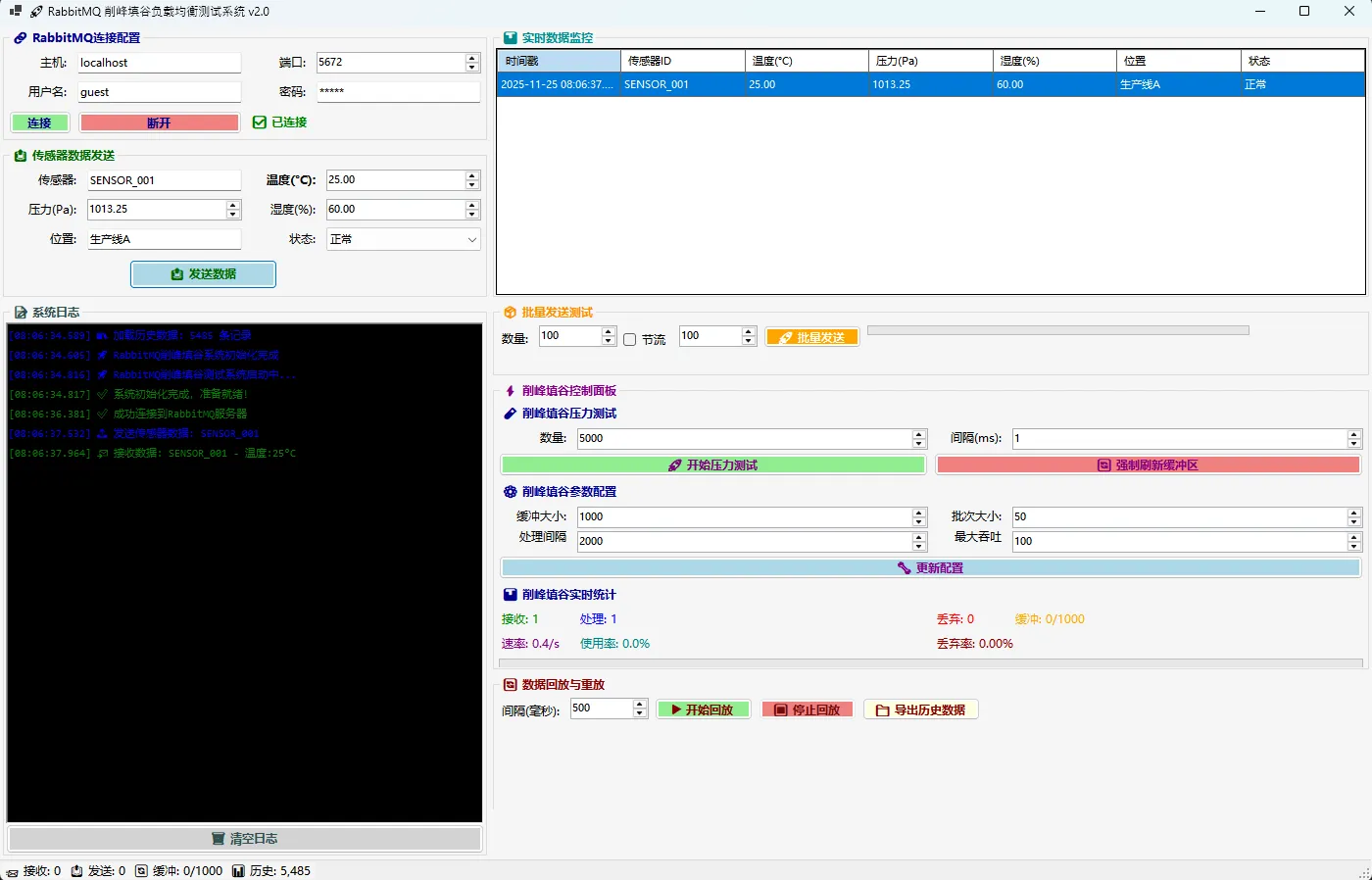
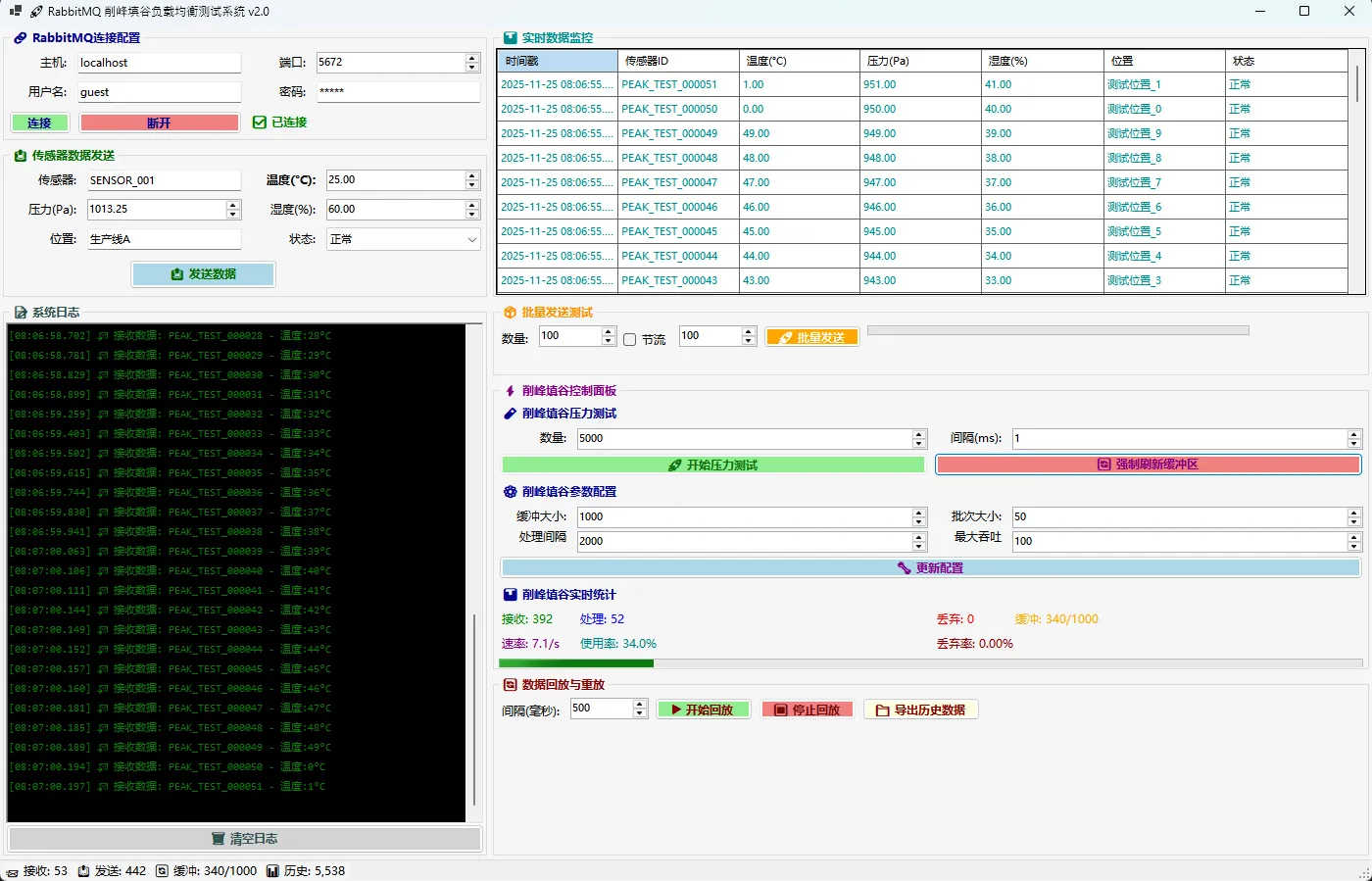
🎯 实际应用场景
📈 电商秒杀系统
c#// 秒杀场景配置
rabbitMQService.UpdatePeakShavingConfig(
    maxBufferSize: 5000,      // 大缓冲区应对瞬时高峰
    batchSize: 100,           // 大批量提高吞吐
    intervalMs: 1000,         // 快速处理
    maxThroughput: 200        // 限制处理速度保护数据库
);
🏭 工业物联网
c#// IoT传感器数据处理
rabbitMQService.UpdatePeakShavingConfig(
    maxBufferSize: 2000,      // 中等缓冲区
    batchSize: 50,            // 中等批量
    intervalMs: 2000,         // 稳定处理间隔
    maxThroughput: 100        // 平稳处理速度
);
⚠️ 常见坑点提醒
🚨 坑点1:内存溢出
c#// ❌ 错误:无限制缓冲区
private readonly Queue<SensorData> _buffer = new();

// ✅ 正确:有界缓冲区 + 背压控制
if (_peakShavingBuffer.Count >= MaxBufferSize)
{
    // 丢弃或拒绝新消息
    await _channel.BasicNackAsync(ea.DeliveryTag, false, false);
}
🚨 坑点2:消息确认时机
c#// ❌ 错误:处理完才确认(会导致重复处理)
DataReceived?.Invoke(sensorData);
await _channel.BasicAckAsync(ea.DeliveryTag, false);

// ✅ 正确:入队后立即确认(削峰填谷模式)
_peakShavingBuffer.Enqueue(sensorData);
await _channel.BasicAckAsync(ea.DeliveryTag, false);
🚨 坑点3:资源释放
c#// ✅ 优雅关闭:先处理完缓冲区再释放
public async ValueTask DisposeAsync()
{
    await StopConsumingAsync();          // 停止接收
    await FlushBufferAsync();            // 处理剩余数据
    _batchProcessTimer?.Dispose();       // 释放定时器
    await _channel?.DisposeAsync();      // 释放连接
}
📊 性能调优建议
🎯 关键参数调优
| 场景 | MaxBufferSize | BatchSize | IntervalMs | MaxThroughput |
|---|---|---|---|---|
| 高频小消息 | 2000 | 100 | 1000 | 500 |
| 低频大消息 | 500 | 20 | 3000 | 50 |
| 实时要求高 | 1000 | 50 | 500 | 200 |
💡 监控指标阈值
c#public bool IsSystemHealthy(PeakShavingStats stats)
{
    return stats.BufferUsagePercent < 80 &&  // 缓冲区使用率
           stats.DropRate < 1.0 &&           // 丢失率小于1%
           stats.ProcessingRate > 50;         // 处理速度正常
}
🏆 总结:削峰填谷的三大核心价值
通过今天的实战,我们掌握了用C# + RabbitMQ构建削峰填谷系统的核心技术:
🎯 核心要点回顾:
- 智能缓冲 - 用
ConcurrentQueue实现线程安全的消息缓冲区 - 批量处理 - 通过定时器实现可控的批量消费策略
- 动态调优 - 运行时调整参数,适应不同业务场景
💰 业务价值体现:
- 成本优化:按平均负载配置资源,节省30-50%硬件成本
- 稳定性提升:消除流量毖峰导致的系统故障
- 用户体验:即使高峰期也能保证系统响应
🚀 技术收获:
- 掌握了现代异步消息处理架构
- 学会了高并发场景下的背压控制
- 理解了削峰填谷在分布式系统中的重要性
💬 互动交流:
你在项目中遇到过哪些高并发处理难题?是否尝试过类似的削峰填谷方案?欢迎在评论区分享你的实战经验!
如果觉得这篇文章对你有帮助,请点赞并转发给更多需要的同行!让我们一起构建更稳定、更高效的C#系统!
🔖 下期预告:
相关信息
通过网盘分享的文件:AppRabbitMQBalance.zip 链接: https://pan.baidu.com/s/1VhgKUY8-Fpztow-TMjJtRQ?pwd=par4 提取码: par4 --来自百度网盘超级会员v9的分享
本文作者:技术老小子
本文链接:
版权声明:本博客所有文章除特别声明外,均采用 BY-NC-SA 许可协议。转载请注明出处!
目录