
目录
在Windows窗体应用程序开发中,自定义控件的设计是展示UI设计能力和提升用户体验的重要方式。本文将详细介绍如何使用SkiaSharp图形库创建一个功能完善、视觉效果精美的时钟控件。我们将从基础实现开始,循序渐进地增加美化元素,最终打造出一个既实用又美观的自定义控件,SkiaSharp比系统自带的drawing要好一少。
SkiaSharp简介
SkiaSharp是Google Skia图形引擎的.NET绑定,提供了强大的2D绘图功能。它具有以下优势:
- 跨平台支持,可在Windows、macOS和Linux上运行
- 高性能渲染,适合实时绘制和动画
- 丰富的绘图API,包括路径、变换、渐变等
- 与.NET无缝集成
在Windows Forms应用程序中,可以通过SKControl控件轻松集成SkiaSharp的绘图能力。
基础时钟控件实现
控件结构设计
我们的时钟控件将继承自SKControl,主要包含以下核心组件:
- 表盘和刻度
- 时针、分针和秒针
- 中心点装饰
- 计时器用于更新时间显示
初始化与计时器设置
C#public ClockControl()
{
    // 设置控件基本属性
    BackColor = Color.White;
    Size = new Size(300, 300);

    // 初始化计时器,每秒更新一次
    _timer = new System.Timers.Timer(1000);
    _timer.Elapsed += OnTimerElapsed;
    _timer.AutoReset = true;
    _timer.Enabled = true;
}

private void OnTimerElapsed(object sender, ElapsedEventArgs e)
{
    // 在UI线程上刷新控件
    if (InvokeRequired)
    {
        BeginInvoke(new Action(() => Invalidate()));
    }
    else
    {
        Invalidate();
    }
}
这段代码创建了一个300x300像素的时钟控件,并设置一个每秒触发一次的计时器,用于更新控件显示。通过Invalidate()方法触发重绘,确保时钟指针根据当前时间实时更新。
绘制表盘和刻度
表盘是时钟的基础部分,包括外圈、刻度线和数字标记:
C#private void DrawClockFace(SKCanvas canvas, float centerX, float centerY, float radius)
{
    // 绘制外圆
    using var paint = new SKPaint
    {
        Style = SKPaintStyle.Stroke,
        Color = SKColors.Black,
        StrokeWidth = 2,
        IsAntialias = true
    };

    canvas.DrawCircle(centerX, centerY, radius, paint);

    // 绘制刻度线和数字
    for (int i = 0; i < 60; i++)
    {
        float angle = i * 6; // 每分钟6度
        bool isHourMark = i % 5 == 0;

        // 根据是否小时刻度设置不同长度和粗细
        float innerRadius = isHourMark ? radius - 15 : radius - 5;
        float strokeWidth = isHourMark ? 3 : 1;

        // 绘制刻度线...

        // 绘制小时数字...
    }
}
这段代码使用SkiaSharp的绘图API绘制表盘和刻度。我们使用三角函数计算每个刻度的位置,并区分小时刻度(更粗、更长)和分钟刻度。
绘制时钟指针
时钟指针是整个控件的核心,我们将使用旋转变换来实现指针随时间转动的效果:
C#private void DrawClockHand(SKCanvas canvas, float angle, float length, SKColor color)
{
    // 保存画布状态
    canvas.Save();

    // 设置画笔
    using var paint = new SKPaint
    {
        Color = color,
        StrokeWidth = 4,
        IsAntialias = true,
        StrokeCap = SKStrokeCap.Round
    };

    // 移动到时钟中心
    float centerX = Width / 2;
    float centerY = Height / 2;

    // 应用旋转
    canvas.Translate(centerX, centerY);
    canvas.RotateDegrees(angle);

    // 绘制指针
    canvas.DrawLine(0, 0, 0, -length, paint);

    // 恢复画布状态
    canvas.Restore();
}
这个方法展示了SkiaSharp中画布变换的强大功能:
- 首先保存当前画布状态
- 将坐标系移动到时钟中心点
- 根据指定角度旋转画布
- 绘制从中心向上的直线(指针)
- 恢复画布状态
这种方式使我们可以轻松地按照不同角度绘制指针,而不必手动计算复杂的三角函数。
高级样式与视觉效果
基础功能实现后,我们可以添加更多视觉效果来美化时钟控件。
阴影效果
C#// 绘制表盘阴影
if (ShowShadows)
{
    using var shadowPaint = new SKPaint
    {
        Color = SKColors.Black.WithAlpha(40),
        IsAntialias = true,
        MaskFilter = SKMaskFilter.CreateBlur(SKBlurStyle.Normal, 10)
    };

    canvas.DrawCircle(centerX + 5, centerY + 5, radius, shadowPaint);
}
添加阴影可以显著提升控件的视觉深度。这里我们使用SKMaskFilter.CreateBlur创建模糊效果,实现柔和的阴影。
风格切换:现代与传统
我们的控件支持两种不同的风格:现代风格和传统风格。现代风格特点包括:
- 粗体数字
- 更复杂的指针设计
- 装饰性内环
- 鲜明的配色方案
通过UseModernStyle属性可以在这两种风格间切换:
C#// 现代风格秒针
if (UseModernStyle)
{
    // 绘制带有尾部的指针
    canvas.DrawLine(0, length * 0.2f, 0, -length, paint);

    // 绘制圆形尾部
    paint.Style = SKPaintStyle.Fill;
    canvas.DrawCircle(0, length * 0.2f, 4, paint);

    // 绘制秒针头部
    SKPath path = new SKPath();
    path.MoveTo(-3, -length + 15);
    path.LineTo(3, -length + 15);
    path.LineTo(0, -length);
    path.Close();
    canvas.DrawPath(path, paint);
}
else
{
    // 传统风格秒针
    canvas.DrawLine(0, 0, 0, -length, paint);
}
这段代码展示了如何使用SKPath绘制复杂形状,为现代风格的秒针创建箭头形状的指针头部。
自定义与定制选项
为了增强控件的可重用性,我们添加了多个自定义属性:
C#// 样式设置
public SKColor BackgroundColor { get; set; } = SKColors.White;
public SKColor FaceColor { get; set; } = SKColors.WhiteSmoke;
public SKColor BorderColor { get; set; } = new SKColor(40, 40, 40);
public SKColor HourHandColor { get; set; } = new SKColor(60, 60, 60);
public SKColor MinuteHandColor { get; set; } = new SKColor(80, 80, 80);
public SKColor SecondHandColor { get; set; } = SKColors.OrangeRed;
public SKColor MarkersColor { get; set; } = new SKColor(40, 40, 40);
public SKColor NumbersColor { get; set; } = new SKColor(40, 40, 40);
public bool ShowShadows { get; set; } = true;
public bool ShowSecondHand { get; set; } = true;
public bool UseModernStyle { get; set; } = true;
这些属性允许用户自定义控件的各个方面,包括颜色、样式和功能特性。例如,用户可以选择隐藏秒针或关闭阴影效果以获得更简洁的外观。
最佳实践与性能考量
资源管理
正确管理SkiaSharp资源对于避免内存泄漏至关重要。在我们的控件中,所有的SKPaint对象都使用using语句确保及时释放:
C#using var paint = new SKPaint
{
    // 属性设置
};
此外,我们在控件的Dispose方法中停止并释放计时器资源:
C#protected override void Dispose(bool disposing)
{
    if (disposing)
    {
        _timer?.Stop();
        _timer?.Dispose();
    }

    base.Dispose(disposing);
}
抗锯齿与流畅绘制
为了获得高质量的视觉效果,我们在所有绘图操作中启用了抗锯齿:
C#IsAntialias = true
这确保了时钟的边缘和指针都能平滑显示,没有锯齿感。
窗口大小调整处理
时钟控件需要响应容器大小的变化,我们通过重写OnResize方法实现:
C#protected override void OnResize(EventArgs e)
{
    base.OnResize(e);
    Invalidate();
}
当控件大小改变时,会触发重绘,确保时钟的所有元素都相应调整。
完整代码实现
完整的时钟控件实现包含了所有上述功能和美化效果。核心绘制逻辑位于OnPaintSurface方法中:
C#using System;
using System.Collections.Generic;
using System.Drawing;
using System.Linq;
using System.Text;
using System.Threading.Tasks;
using SkiaSharp.Views.Desktop;
using SkiaSharp;
using System.Timers;

namespace AppRotate
{
    public class ClockControl : SKControl
    {
        private System.Timers.Timer _timer;
        private float _hourHandLength;
        private float _minuteHandLength;
        private float _secondHandLength;
        private float _clockRadius;

        // 样式设置
        public SKColor BackgroundColor { get; set; } = SKColors.White;
        public SKColor FaceColor { get; set; } = SKColors.WhiteSmoke;
        public SKColor BorderColor { get; set; } = new SKColor(40, 40, 40);
        public SKColor HourHandColor { get; set; } = new SKColor(60, 60, 60);
        public SKColor MinuteHandColor { get; set; } = new SKColor(80, 80, 80);
        public SKColor SecondHandColor { get; set; } = SKColors.OrangeRed;
        public SKColor MarkersColor { get; set; } = new SKColor(40, 40, 40);
        public SKColor NumbersColor { get; set; } = new SKColor(40, 40, 40);
        public bool ShowShadows { get; set; } = true;
        public bool ShowSecondHand { get; set; } = true;
        public bool UseModernStyle { get; set; } = true;

        public ClockControl()
        {
            // 设置控件基本属性
            BackColor = Color.White;
            Size = new Size(300, 300);

            // 初始化计时器,每秒更新一次
            _timer = new System.Timers.Timer(1000);
            _timer.Elapsed += OnTimerElapsed;
            _timer.AutoReset = true;
            _timer.Enabled = true;
        }

        private void OnTimerElapsed(object sender, ElapsedEventArgs e)
        {
            // 在UI线程上刷新控件
            if (InvokeRequired)
            {
                BeginInvoke(new Action(() => Invalidate()));
            }
            else
            {
                Invalidate();
            }
        }

        protected override void OnPaintSurface(SKPaintSurfaceEventArgs e)
        {
            base.OnPaintSurface(e);

            SKSurface surface = e.Surface;
            SKCanvas canvas = surface.Canvas;

            // 清除背景
            canvas.Clear(BackgroundColor);

            // 计算尺寸
            int width = e.Info.Width;
            int height = e.Info.Height;
            float centerX = width / 2f;
            float centerY = height / 2f;
            _clockRadius = Math.Min(width, height) / 2f * 0.85f;

            // 设置指针长度
            _hourHandLength = _clockRadius * 0.5f;
            _minuteHandLength = _clockRadius * 0.7f;
            _secondHandLength = _clockRadius * 0.8f;

            // 绘制时钟表盘
            DrawClockFace(canvas, centerX, centerY, _clockRadius);

            // 获取当前时间
            DateTime now = DateTime.Now;

            // 计算指针角度
            float hourAngle = 30 * (now.Hour % 12) + 0.5f * now.Minute;
            float minuteAngle = 6 * now.Minute + 0.1f * now.Second;
            float secondAngle = 6 * now.Second;

            // 绘制时针
            DrawClockHand(canvas, hourAngle, _hourHandLength, HourHandColor, 6);

            // 绘制分针
            DrawClockHand(canvas, minuteAngle, _minuteHandLength, MinuteHandColor, 4);

            // 绘制秒针
            if (ShowSecondHand)
            {
                DrawSecondHand(canvas, secondAngle, _secondHandLength, SecondHandColor);
            }

            // 绘制中心点
            DrawClockCenter(canvas, centerX, centerY);
        }

        private void DrawClockFace(SKCanvas canvas, float centerX, float centerY, float radius)
        {
            // 绘制表盘背景
            if (ShowShadows)
            {
                // 添加阴影效果
                using var shadowPaint = new SKPaint
                {
                    Color = SKColors.Black.WithAlpha(40),
                    IsAntialias = true,
                    MaskFilter = SKMaskFilter.CreateBlur(SKBlurStyle.Normal, 10)
                };

                canvas.DrawCircle(centerX + 5, centerY + 5, radius, shadowPaint);
            }

            // 绘制表盘
            using (var facePaint = new SKPaint
            {
                Style = SKPaintStyle.Fill,
                Color = FaceColor,
                IsAntialias = true
            })
            {
                canvas.DrawCircle(centerX, centerY, radius, facePaint);
            }

            // 绘制外圆
            using var borderPaint = new SKPaint
            {
                Style = SKPaintStyle.Stroke,
                Color = BorderColor,
                StrokeWidth = UseModernStyle ? 3 : 2,
                IsAntialias = true
            };

            canvas.DrawCircle(centerX, centerY, radius, borderPaint);

            // 绘制刻度
            using var tickPaint = new SKPaint
            {
                Color = MarkersColor,
                StrokeWidth = 1,
                IsAntialias = true
            };

            for (int i = 0; i < 60; i++)
            {
                float angle = i * 6; // 每分钟6度
                bool isHourMark = i % 5 == 0;

                float outerRadius = radius;
                float innerRadius = isHourMark ? radius - 15 : radius - 5;
                float strokeWidth = isHourMark ? 3 : 1;

                tickPaint.StrokeWidth = strokeWidth;

                float x1 = centerX + (float)(outerRadius * Math.Sin(Math.PI * angle / 180));
                float y1 = centerY - (float)(outerRadius * Math.Cos(Math.PI * angle / 180));
                float x2 = centerX + (float)(innerRadius * Math.Sin(Math.PI * angle / 180));
                float y2 = centerY - (float)(innerRadius * Math.Cos(Math.PI * angle / 180));

                canvas.DrawLine(x1, y1, x2, y2, tickPaint);

                // 绘制数字
                if (isHourMark)
                {
                    int hour = i / 5 == 0 ? 12 : i / 5;

                    using var textPaint = new SKPaint
                    {
                        Color = NumbersColor,
                        TextSize = UseModernStyle ? 24 : 20,
                        IsAntialias = true,
                        TextAlign = SKTextAlign.Center,
                        Typeface = SKTypeface.FromFamilyName(
                            UseModernStyle ? "Arial" : "Times New Roman",
                            UseModernStyle ? SKFontStyleWeight.Bold : SKFontStyleWeight.Normal,
                            SKFontStyleWidth.Normal,
                            SKFontStyleSlant.Upright)
                    };

                    float textRadius = radius - 35;
                    float textX = centerX + (float)(textRadius * Math.Sin(Math.PI * angle / 180));
                    float textY = centerY - (float)(textRadius * Math.Cos(Math.PI * angle / 180)) + 8; // 垂直居中调整

                    canvas.DrawText(hour.ToString(), textX, textY, textPaint);
                }
            }

            // 添加装饰环
            if (UseModernStyle)
            {
                using var decorPaint = new SKPaint
                {
                    Style = SKPaintStyle.Stroke,
                    Color = BorderColor.WithAlpha(100),
                    StrokeWidth = 1,
                    IsAntialias = true
                };

                canvas.DrawCircle(centerX, centerY, radius * 0.9f, decorPaint);
            }
        }

        // 绘制时针和分针
        private void DrawClockHand(SKCanvas canvas, float angle, float length, SKColor color, float strokeWidth)
        {
            // 保存画布状态
            canvas.Save();

            // 移动到时钟中心
            float centerX = Width / 2;
            float centerY = Height / 2;
            canvas.Translate(centerX, centerY);

            // 应用旋转
            canvas.RotateDegrees(angle);

            // 绘制阴影
            if (ShowShadows)
            {
                using var shadowPaint = new SKPaint
                {
                    Color = SKColors.Black.WithAlpha(60),
                    StrokeWidth = strokeWidth,
                    IsAntialias = true,
                    StrokeCap = SKStrokeCap.Round,
                    MaskFilter = SKMaskFilter.CreateBlur(SKBlurStyle.Normal, 2)
                };

                canvas.DrawLine(0, 0, 0, -length, shadowPaint);
            }

            // 设置画笔
            using var paint = new SKPaint
            {
                Color = color,
                StrokeWidth = strokeWidth,
                IsAntialias = true,
                StrokeCap = SKStrokeCap.Round
            };

            // 绘制指针
            if (UseModernStyle)
            {
                // 现代风格:绘制带有尾部的指针
                canvas.DrawLine(0, length * 0.2f, 0, -length, paint);

                // 绘制指针头部
                paint.Style = SKPaintStyle.Fill;
                SKPath path = new SKPath();
                path.MoveTo(-strokeWidth / 2, -length + strokeWidth * 2);
                path.LineTo(strokeWidth / 2, -length + strokeWidth * 2);
                path.LineTo(0, -length);
                path.Close();
                canvas.DrawPath(path, paint);
            }
            else
            {
                // 传统风格:简单线条
                canvas.DrawLine(0, 0, 0, -length, paint);
            }

            // 恢复画布状态
            canvas.Restore();
        }

        // 绘制秒针(特殊处理,使其更细长)
        private void DrawSecondHand(SKCanvas canvas, float angle, float length, SKColor color)
        {
            canvas.Save();

            float centerX = Width / 2;
            float centerY = Height / 2;
            canvas.Translate(centerX, centerY);
            canvas.RotateDegrees(angle);

            // 绘制秒针
            using var paint = new SKPaint
            {
                Color = color,
                StrokeWidth = 2,
                IsAntialias = true,
                StrokeCap = SKStrokeCap.Round
            };

            if (UseModernStyle)
            {
                // 现代风格秒针
                canvas.DrawLine(0, length * 0.2f, 0, -length, paint);

                // 绘制圆形尾部
                paint.Style = SKPaintStyle.Fill;
                canvas.DrawCircle(0, length * 0.2f, 4, paint);

                // 绘制秒针头部
                SKPath path = new SKPath();
                path.MoveTo(-3, -length + 15);
                path.LineTo(3, -length + 15);
                path.LineTo(0, -length);
                path.Close();
                canvas.DrawPath(path, paint);
            }
            else
            {
                // 传统风格秒针
                canvas.DrawLine(0, 0, 0, -length, paint);
            }

            canvas.Restore();
        }

        private void DrawClockCenter(SKCanvas canvas, float centerX, float centerY)
        {
            if (ShowShadows)
            {
                // 绘制中心点阴影
                using var shadowPaint = new SKPaint
                {
                    Color = SKColors.Black.WithAlpha(60),
                    Style = SKPaintStyle.Fill,
                    IsAntialias = true,
                    MaskFilter = SKMaskFilter.CreateBlur(SKBlurStyle.Normal, 3)
                };

                canvas.DrawCircle(centerX + 1, centerY + 1, 6, shadowPaint);
            }

            // 绘制中心圆点
            using var paint = new SKPaint
            {
                Color = UseModernStyle ? SecondHandColor : BorderColor,
                Style = SKPaintStyle.Fill,
                IsAntialias = true
            };

            canvas.DrawCircle(centerX, centerY, 6, paint);

            // 绘制内部白色圆点
            paint.Color = FaceColor;
            canvas.DrawCircle(centerX, centerY, 3, paint);
        }

        protected override void OnResize(EventArgs e)
        {
            base.OnResize(e);
            Invalidate();
        }

        protected override void Dispose(bool disposing)
        {
            if (disposing)
            {
                _timer?.Stop();
                _timer?.Dispose();
            }

            base.Dispose(disposing);
        }
    }
}
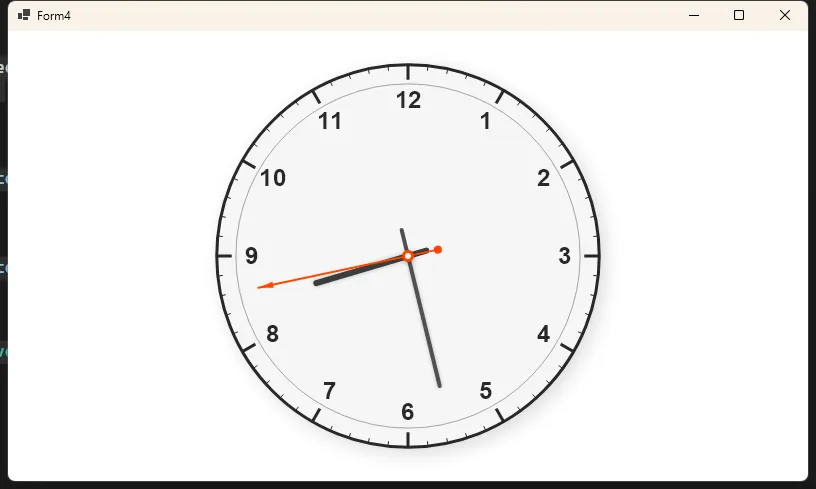
这个方法协调了各个绘制组件,计算正确的尺寸和角度,并按照从底到顶的顺序绘制各个元素。
扩展应用
C#using System;
using System.Collections.Generic;
using System.Drawing;
using System.Linq;
using System.Text;
using System.Threading.Tasks;
using SkiaSharp;
using System.Timers;
using System.ComponentModel;
using System.Windows.Forms;
namespace AppRotate
{
[ToolboxItem(true)]
[DesignerCategory("")]
public class ClockControlEx : Control
{
private System.Timers.Timer _timer;
private float _hourHandLength;
private float _minuteHandLength;
private float _secondHandLength;
private float _clockRadius;
private bool _designMode;
[Category("Appearance")]
public SKColor FaceColor { get; set; } = SKColors.White.WithAlpha(220);
[Category("Appearance")]
public SKColor BorderColor { get; set; } = new SKColor(60, 60, 60);
[Category("Appearance")]
public SKColor HourHandColor { get; set; } = new SKColor(40, 40, 40);
[Category("Appearance")]
public SKColor MinuteHandColor { get; set; } = new SKColor(60, 60, 60);
[Category("Appearance")]
public SKColor SecondHandColor { get; set; } = SKColors.Crimson;
[Category("Appearance")]
public SKColor MarkersColor { get; set; } = new SKColor(80, 80, 80);
[Category("Appearance")]
public SKColor NumbersColor { get; set; } = new SKColor(40, 40, 40);
[Category("Behavior")]
public bool ShowShadows { get; set; } = true;
[Category("Behavior")]
public bool ShowSecondHand { get; set; } = true;
[Category("Behavior")]
public bool UseGlassEffect { get; set; } = true;
public ClockControlEx()
{
// 检查是否在设计模式
_designMode = DesignMode || LicenseManager.UsageMode == LicenseUsageMode.Designtime;
Size = new Size(300, 300);
// 启用透明背景支持
SetStyle(ControlStyles.AllPaintingInWmPaint |
ControlStyles.UserPaint |
ControlStyles.DoubleBuffer |
ControlStyles.ResizeRedraw |
ControlStyles.SupportsTransparentBackColor, true);
// 设置透明背景
BackColor = Color.Transparent;
// 只在运行时创建计时器
if (!_designMode)
{
InitializeTimer();
}
}
private void InitializeTimer()
{
try
{
_timer = new System.Timers.Timer(1000);
_timer.Elapsed += OnTimerElapsed;
_timer.AutoReset = true;
_timer.Enabled = true;
}
catch (Exception ex)
{
System.Diagnostics.Debug.WriteLine($"Timer initialization failed: {ex.Message}");
}
}
private void OnTimerElapsed(object sender, ElapsedEventArgs e)
{
try
{
if (InvokeRequired)
{
BeginInvoke(new Action(() =>
{
try
{
Invalidate();
}
catch (Exception ex)
{
System.Diagnostics.Debug.WriteLine($"Invalidate failed: {ex.Message}");
}
}));
}
else
{
Invalidate();
}
}
catch (Exception ex)
{
System.Diagnostics.Debug.WriteLine($"Timer elapsed error: {ex.Message}");
}
}
protected override void OnPaint(PaintEventArgs e)
{
try
{
base.OnPaint(e);
int width = Width;
int height = Height;
if (width <= 0 || height <= 0) return;
// 创建SKSurface
var info = new SKImageInfo(width, height, SKColorType.Bgra8888, SKAlphaType.Premul);
using (var surface = SKSurface.Create(info))
{
if (surface == null) return;
SKCanvas canvas = surface.Canvas;
canvas.Clear(SKColors.Transparent); // 透明背景
float centerX = width / 2f;
float centerY = height / 2f;
_clockRadius = Math.Min(width, height) / 2f * 0.85f;
_hourHandLength = _clockRadius * 0.5f;
_minuteHandLength = _clockRadius * 0.7f;
_secondHandLength = _clockRadius * 0.8f;
// 绘制时钟表盘
DrawGlass3DClockFace(canvas, centerX, centerY, _clockRadius);
// 在设计模式下使用固定时间,运行时使用当前时间
DateTime displayTime = _designMode ? new DateTime(2024, 1, 1, 10, 10, 30) : DateTime.Now;
float hourAngle = 30 * (displayTime.Hour % 12) + 0.5f * displayTime.Minute;
float minuteAngle = 6 * displayTime.Minute + 0.1f * displayTime.Second;
float secondAngle = 6 * displayTime.Second;
// 绘制3D指针
Draw3DClockHand(canvas, centerX, centerY, hourAngle, _hourHandLength, HourHandColor, 8, true);
Draw3DClockHand(canvas, centerX, centerY, minuteAngle, _minuteHandLength, MinuteHandColor, 6, false);
if (ShowSecondHand)
{
Draw3DSecondHand(canvas, centerX, centerY, secondAngle, _secondHandLength, SecondHandColor);
}
Draw3DClockCenter(canvas, centerX, centerY);
// 将SKSurface绘制到Graphics上
using (var image = surface.Snapshot())
using (var data = image.Encode(SKEncodedImageFormat.Png, 100))
{
var stream = data.AsStream();
using (var bitmap = new Bitmap(stream))
{
e.Graphics.DrawImage(bitmap, 0, 0);
}
}
}
}
catch (Exception ex)
{
System.Diagnostics.Debug.WriteLine($"Paint error: {ex.Message}");
DrawFallbackClock(e.Graphics, Width, Height);
}
}
private void DrawFallbackClock(Graphics g, int width, int height)
{
try
{
g.Clear(Color.Transparent);
float centerX = width / 2f;
float centerY = height / 2f;
float radius = Math.Min(width, height) / 3f;
using (var pen = new Pen(Color.Black, 2))
{
g.DrawEllipse(pen, centerX - radius, centerY - radius, radius * 2, radius * 2);
}
using (var brush = new SolidBrush(Color.Black))
using (var font = new Font("Arial", 12))
{
var size = g.MeasureString("Clock", font);
g.DrawString("Clock", font, brush, centerX - size.Width / 2, centerY - size.Height / 2);
}
}
catch
{
}
}
private void DrawGlass3DClockFace(SKCanvas canvas, float centerX, float centerY, float radius)
{
try
{
// 绘制外部阴影
if (ShowShadows)
{
using var outerShadowPaint = new SKPaint
{
Color = SKColors.Black.WithAlpha(60),
IsAntialias = true,
MaskFilter = SKMaskFilter.CreateBlur(SKBlurStyle.Normal, 15)
};
canvas.DrawCircle(centerX + 6, centerY + 6, radius + 5, outerShadowPaint);
}
// 绘制3D外圈 - 金属边框效果
using (var metalRingPaint = new SKPaint
{
Style = SKPaintStyle.Stroke,
StrokeWidth = 8,
IsAntialias = true
})
{
var colors = new SKColor[]
{
new SKColor(180, 180, 180),
new SKColor(220, 220, 220),
new SKColor(160, 160, 160),
new SKColor(200, 200, 200)
};
var positions = new float[] { 0f, 0.3f, 0.7f, 1f };
metalRingPaint.Shader = SKShader.CreateSweepGradient(
new SKPoint(centerX, centerY), colors, positions);
canvas.DrawCircle(centerX, centerY, radius + 4, metalRingPaint);
}
// 绘制玻璃表盘背景
if (UseGlassEffect)
{
using var glassPaint = new SKPaint
{
Style = SKPaintStyle.Fill,
IsAntialias = true
};
var glassColors = new SKColor[]
{
FaceColor,
FaceColor.WithAlpha(180),
FaceColor.WithAlpha(220)
};
var glassPositions = new float[] { 0f, 0.7f, 1f };
glassPaint.Shader = SKShader.CreateRadialGradient(
new SKPoint(centerX - radius * 0.3f, centerY - radius * 0.3f),
radius * 1.2f,
glassColors,
glassPositions,
SKShaderTileMode.Clamp);
canvas.DrawCircle(centerX, centerY, radius, glassPaint);
// 玻璃高光效果
using var highlightPaint = new SKPaint
{
Style = SKPaintStyle.Fill,
IsAntialias = true
};
var highlightColors = new SKColor[]
{
SKColors.White.WithAlpha(100),
SKColors.White.WithAlpha(0)
};
highlightPaint.Shader = SKShader.CreateRadialGradient(
new SKPoint(centerX - radius * 0.4f, centerY - radius * 0.4f),
radius * 0.6f,
highlightColors,
new float[] { 0f, 1f },
SKShaderTileMode.Clamp);
canvas.DrawCircle(centerX, centerY, radius, highlightPaint);
}
else
{
using var simpleFacePaint = new SKPaint
{
Style = SKPaintStyle.Fill,
Color = FaceColor,
IsAntialias = true
};
canvas.DrawCircle(centerX, centerY, radius, simpleFacePaint);
}
// 绘制内边框
using var innerBorderPaint = new SKPaint
{
Style = SKPaintStyle.Stroke,
Color = BorderColor.WithAlpha(150),
StrokeWidth = 2,
IsAntialias = true
};
canvas.DrawCircle(centerX, centerY, radius - 1, innerBorderPaint);
// 绘制3D刻度
Draw3DMarkers(canvas, centerX, centerY, radius);
}
catch (Exception ex)
{
System.Diagnostics.Debug.WriteLine($"DrawGlass3DClockFace error: {ex.Message}");
}
}
private void Draw3DMarkers(SKCanvas canvas, float centerX, float centerY, float radius)
{
try
{
for (int i = 0; i < 60; i++)
{
float angle = i * 6;
bool isHourMark = i % 5 == 0;
float outerRadius = radius - 8;
float innerRadius = isHourMark ? radius - 25 : radius - 15;
float x1 = centerX + (float)(outerRadius * Math.Sin(Math.PI * angle / 180));
float y1 = centerY - (float)(outerRadius * Math.Cos(Math.PI * angle / 180));
float x2 = centerX + (float)(innerRadius * Math.Sin(Math.PI * angle / 180));
float y2 = centerY - (float)(innerRadius * Math.Cos(Math.PI * angle / 180));
using var tickPaint = new SKPaint
{
Color = MarkersColor,
StrokeWidth = isHourMark ? 4 : 2,
IsAntialias = true,
StrokeCap = SKStrokeCap.Round
};
if (ShowShadows)
{
using var shadowPaint = new SKPaint
{
Color = SKColors.Black.WithAlpha(60),
StrokeWidth = tickPaint.StrokeWidth,
IsAntialias = true,
StrokeCap = SKStrokeCap.Round
};
canvas.DrawLine(x1 + 1, y1 + 1, x2 + 1, y2 + 1, shadowPaint);
}
canvas.DrawLine(x1, y1, x2, y2, tickPaint);
if (isHourMark)
{
int hour = i / 5 == 0 ? 12 : i / 5;
Draw3DNumber(canvas, centerX, centerY, hour, angle, radius - 40);
}
}
}
catch (Exception ex)
{
System.Diagnostics.Debug.WriteLine($"Draw3DMarkers error: {ex.Message}");
}
}
private void Draw3DNumber(SKCanvas canvas, float centerX, float centerY, int number, float angle, float textRadius)
{
try
{
float textX = centerX + (float)(textRadius * Math.Sin(Math.PI * angle / 180));
float textY = centerY - (float)(textRadius * Math.Cos(Math.PI * angle / 180)) + 8;
if (ShowShadows)
{
using var shadowTextPaint = new SKPaint
{
Color = SKColors.Black.WithAlpha(100),
TextSize = 28,
IsAntialias = true,
TextAlign = SKTextAlign.Center,
Typeface = SKTypeface.FromFamilyName("Arial", SKFontStyleWeight.Bold, SKFontStyleWidth.Normal, SKFontStyleSlant.Upright)
};
canvas.DrawText(number.ToString(), textX + 2, textY + 2, shadowTextPaint);
}
using var textPaint = new SKPaint
{
Color = NumbersColor,
TextSize = 28,
IsAntialias = true,
TextAlign = SKTextAlign.Center,
Typeface = SKTypeface.FromFamilyName("Arial", SKFontStyleWeight.Bold, SKFontStyleWidth.Normal, SKFontStyleSlant.Upright)
};
canvas.DrawText(number.ToString(), textX, textY, textPaint);
}
catch (Exception ex)
{
System.Diagnostics.Debug.WriteLine($"Draw3DNumber error: {ex.Message}");
}
}
private void Draw3DClockHand(SKCanvas canvas, float centerX, float centerY, float angle, float length, SKColor color, float strokeWidth, bool isHourHand)
{
try
{
canvas.Save();
canvas.Translate(centerX, centerY);
canvas.RotateDegrees(angle);
SKPath handPath = new SKPath();
float baseWidth = strokeWidth;
float tipWidth = strokeWidth * 0.3f;
handPath.MoveTo(-baseWidth, length * 0.2f);
handPath.LineTo(baseWidth, length * 0.2f);
handPath.LineTo(tipWidth, -length * 0.9f);
handPath.LineTo(0, -length);
handPath.LineTo(-tipWidth, -length * 0.9f);
handPath.Close();
if (ShowShadows)
{
using var shadowPaint = new SKPaint
{
Color = SKColors.Black.WithAlpha(120),
Style = SKPaintStyle.Fill,
IsAntialias = true,
MaskFilter = SKMaskFilter.CreateBlur(SKBlurStyle.Normal, 3)
};
canvas.DrawPath(handPath, shadowPaint);
}
using var handPaint = new SKPaint
{
Style = SKPaintStyle.Fill,
IsAntialias = true
};
var handColors = new SKColor[]
{
color.WithAlpha(255),
color.WithRed((byte)Math.Min(255, color.Red + 40)).WithGreen((byte)Math.Min(255, color.Green + 40)).WithBlue((byte)Math.Min(255, color.Blue + 40)),
color.WithRed((byte)Math.Max(0, color.Red - 30)).WithGreen((byte)Math.Max(0, color.Green - 30)).WithBlue((byte)Math.Max(0, color.Blue - 30))
};
handPaint.Shader = SKShader.CreateLinearGradient(
new SKPoint(-baseWidth, 0),
new SKPoint(baseWidth, 0),
handColors,
new float[] { 0f, 0.5f, 1f },
SKShaderTileMode.Clamp);
canvas.DrawPath(handPath, handPaint);
using var highlightPaint = new SKPaint
{
Color = SKColors.White.WithAlpha(80),
StrokeWidth = 1,
IsAntialias = true
};
canvas.DrawLine(-baseWidth * 0.3f, length * 0.2f, -tipWidth * 0.3f, -length * 0.9f, highlightPaint);
canvas.Restore();
}
catch (Exception ex)
{
System.Diagnostics.Debug.WriteLine($"Draw3DClockHand error: {ex.Message}");
canvas.Restore();
}
}
private void Draw3DSecondHand(SKCanvas canvas, float centerX, float centerY, float angle, float length, SKColor color)
{
try
{
canvas.Save();
canvas.Translate(centerX, centerY);
canvas.RotateDegrees(angle);
if (ShowShadows)
{
using var shadowPaint = new SKPaint
{
Color = SKColors.Black.WithAlpha(100),
StrokeWidth = 3,
IsAntialias = true,
StrokeCap = SKStrokeCap.Round,
MaskFilter = SKMaskFilter.CreateBlur(SKBlurStyle.Normal, 2)
};
canvas.DrawLine(0, length * 0.3f, 0, -length, shadowPaint);
}
using var secondPaint = new SKPaint
{
Color = color,
StrokeWidth = 2,
IsAntialias = true,
StrokeCap = SKStrokeCap.Round
};
canvas.DrawLine(0, length * 0.3f, 0, -length, secondPaint);
using var circlePaint = new SKPaint
{
Style = SKPaintStyle.Fill,
Color = color,
IsAntialias = true
};
if (ShowShadows)
{
using var shadowCirclePaint = new SKPaint
{
Style = SKPaintStyle.Fill,
Color = SKColors.Black.WithAlpha(100),
IsAntialias = true
};
canvas.DrawCircle(1, length * 0.3f + 1, 6, shadowCirclePaint);
}
canvas.DrawCircle(0, length * 0.3f, 6, circlePaint);
using var highlightPaint = new SKPaint
{
Style = SKPaintStyle.Fill,
Color = SKColors.White.WithAlpha(150),
IsAntialias = true
};
canvas.DrawCircle(-2, length * 0.3f - 2, 2, highlightPaint);
canvas.Restore();
}
catch (Exception ex)
{
System.Diagnostics.Debug.WriteLine($"Draw3DSecondHand error: {ex.Message}");
canvas.Restore();
}
}
private void Draw3DClockCenter(SKCanvas canvas, float centerX, float centerY)
{
try
{
if (ShowShadows)
{
using var shadowPaint = new SKPaint
{
Color = SKColors.Black.WithAlpha(120),
Style = SKPaintStyle.Fill,
IsAntialias = true,
MaskFilter = SKMaskFilter.CreateBlur(SKBlurStyle.Normal, 4)
};
canvas.DrawCircle(centerX + 2, centerY + 2, 10, shadowPaint);
}
using var outerPaint = new SKPaint
{
Style = SKPaintStyle.Fill,
IsAntialias = true
};
var centerColors = new SKColor[]
{
SecondHandColor,
SecondHandColor.WithRed((byte)Math.Max(0, SecondHandColor.Red - 50)),
SecondHandColor
};
outerPaint.Shader = SKShader.CreateRadialGradient(
new SKPoint(centerX - 3, centerY - 3),
8,
centerColors,
new float[] { 0f, 0.7f, 1f },
SKShaderTileMode.Clamp);
canvas.DrawCircle(centerX, centerY, 8, outerPaint);
using var innerPaint = new SKPaint
{
Style = SKPaintStyle.Fill,
Color = FaceColor,
IsAntialias = true
};
canvas.DrawCircle(centerX, centerY, 4, innerPaint);
using var highlightPaint = new SKPaint
{
Style = SKPaintStyle.Fill,
Color = SKColors.White.WithAlpha(200),
IsAntialias = true
};
canvas.DrawCircle(centerX - 2, centerY - 2, 2, highlightPaint);
}
catch (Exception ex)
{
System.Diagnostics.Debug.WriteLine($"Draw3DClockCenter error: {ex.Message}");
}
}
protected override void OnResize(EventArgs e)
{
base.OnResize(e);
try
{
Invalidate();
}
catch (Exception ex)
{
System.Diagnostics.Debug.WriteLine($"OnResize error: {ex.Message}");
}
}
protected override void Dispose(bool disposing)
{
if (disposing)
{
try
{
_timer?.Stop();
_timer?.Dispose();
}
catch (Exception ex)
{
System.Diagnostics.Debug.WriteLine($"Dispose error: {ex.Message}");
}
}
base.Dispose(disposing);
}
}
}
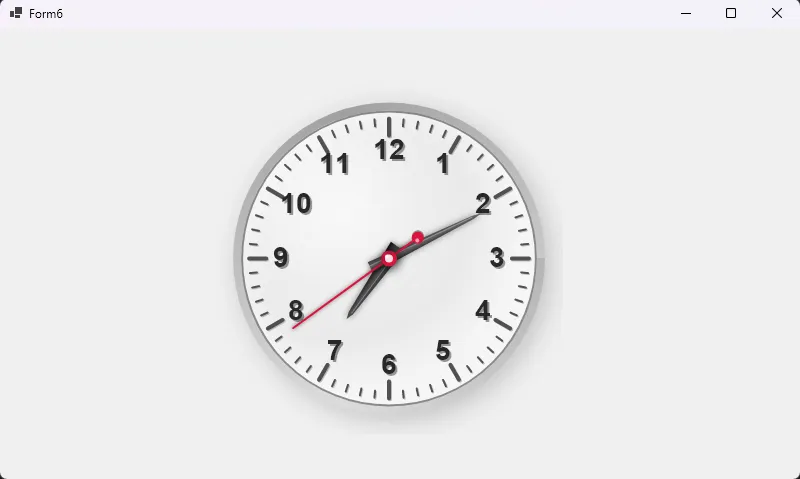
总结与展望
通过本文,我们详细介绍了如何使用SkiaSharp创建一个功能完善、视觉精美的时钟控件。主要亮点包括:
- 基础结构:使用
SKControl和计时器实现基本框架 - 核心绘图技术:利用SkiaSharp的画布变换实现旋转指针
- 视觉美化:添加阴影、装饰元素和多种样式选项
- 可定制性:提供丰富的自定义属性满足不同需求
- 最佳实践:正确管理资源和处理控件生命周期
这个时钟控件展示了SkiaSharp在自定义控件开发中的强大能力。您可以将这些技术应用到其他需要复杂绘图功能的控件中,如仪表盘、图表或自定义进度指示器。
相关信息
通过网盘分享的文件:AppClockControlEx.zip 链接: https://pan.baidu.com/s/1bDf9vrVaKhRluKc_lT6fcg?pwd=vm23 提取码: vm23 --来自百度网盘超级会员v9的分享
本文作者:技术老小子
本文链接:
版权声明:本博客所有文章除特别声明外,均采用 BY-NC-SA 许可协议。转载请注明出处!