
目录
在网络安全日益重要的今天,你是否遇到过这样的困扰:网络异常时无法快速定位问题源头?想要监控应用程序的网络流量却无从下手?
作为一名C#开发者,掌握网络数据包捕获技术不仅能提升你的技术实力,更能在实际项目中发挥重要作用。无论是网络故障排查、性能监控,还是安全分析,数据包监控都是必备技能。
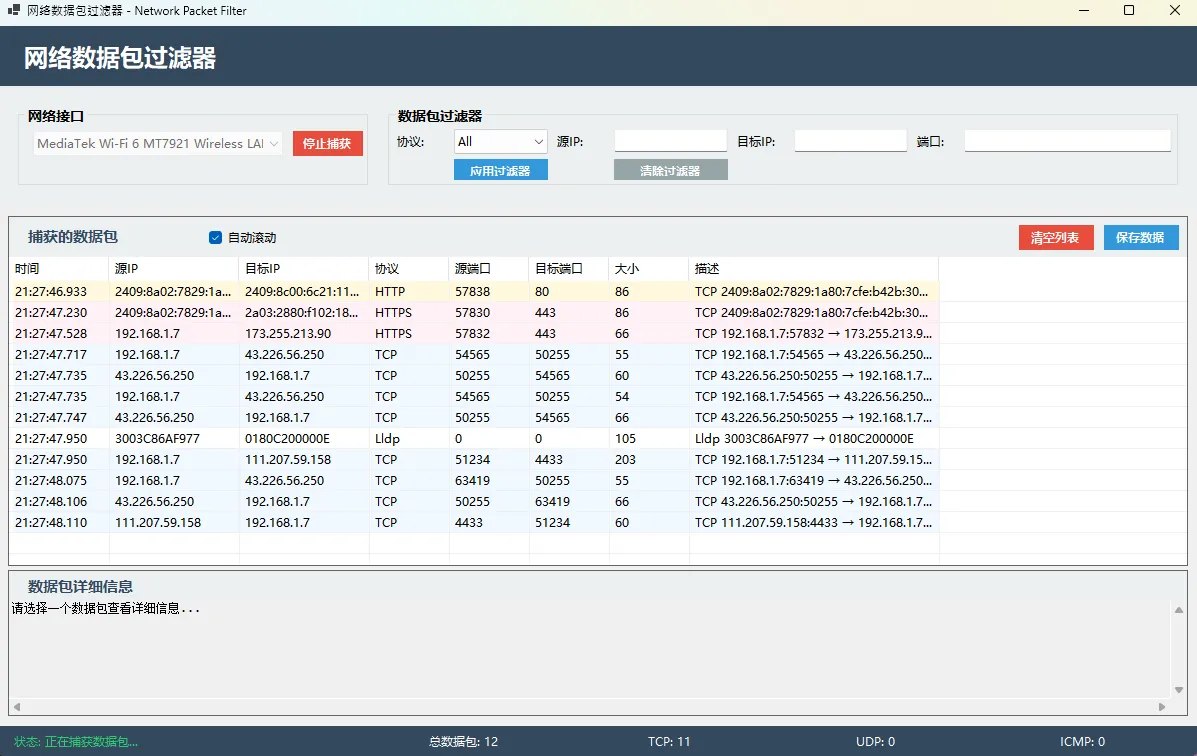
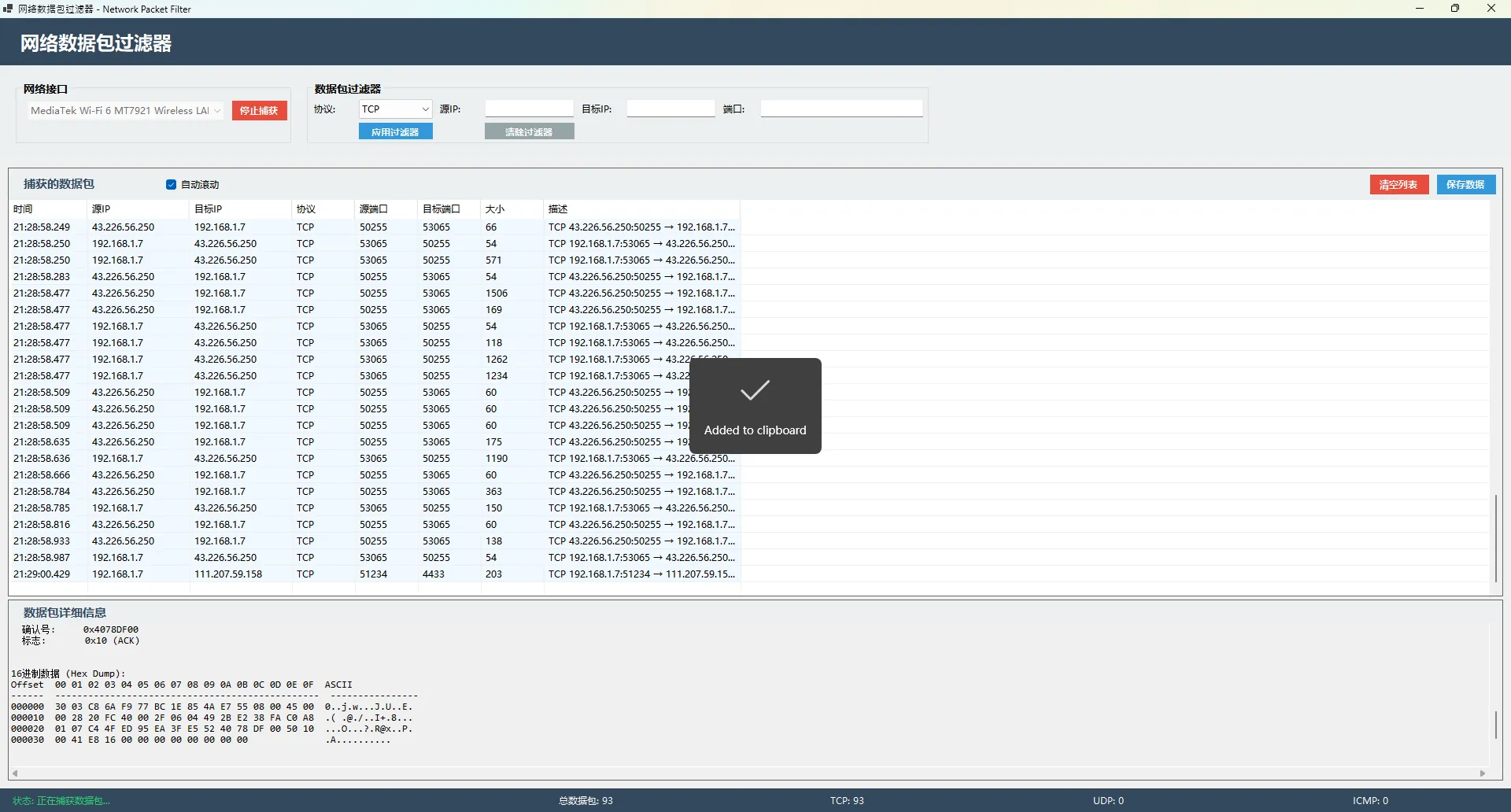
今天,我将带你用C#从零构建一个专业级的网络数据包过滤器,不仅界面美观、功能完整,还支持实时捕获、智能过滤、16进制分析等高级功能。学会这套技术,你就能轻松应对各种网络监控需求!
💡 问题分析:为什么需要自己开发数据包监控工具?
🔍 市面工具的局限性
- Wireshark:功能强大但对普通用户过于复杂
- Fiddler:仅支持HTTP/HTTPS协议
- 商业软件:成本高昂且不够灵活
🎯 自研优势
- 定制化:完全按业务需求设计
- 集成性:可无缝集成到现有系统
- 扩展性:后续功能迭代更加灵活
- 成本控制:一次开发长期使用
🚀 解决方案架构设计
我们将使用以下技术栈构建这个工具:
核心组件
- SharpPcap:网络数据包捕获库
- PacketDotNet:数据包解析引擎
- WinForms:用户界面框架
- Npcap:底层数据包捕获驱动
功能模块
- 网络接口管理:自动识别网卡设备
- 数据包捕获:实时抓取网络流量
- 协议解析:支持TCP/UDP/ICMP/HTTP等
- 智能过滤:多维度数据筛选
- 数据分析:16进制与文本双重展示
💻 代码实战:核心功能实现
🔧 环境准备
首先安装必要的NuGet包:
Bash<PackageReference Include="PacketDotNet" Version="1.4.8" />
<PackageReference Include="SharpPcap" Version="6.3.1" />
重要提醒:必须以管理员权限运行,并确保安装了Npcap驱动。
🏗️ 核心数据结构设计
C#public class PacketInfo
{
    public DateTime Timestamp { get; set; }
    public string SourceIP { get; set; } = "";
    public string DestinationIP { get; set; } = "";
    public string Protocol { get; set; } = "";
    public int SourcePort { get; set; }
    public int DestinationPort { get; set; }
    public int Size { get; set; }
    public string Description { get; set; } = "";
    public byte[] RawData { get; set; } = new byte[0]; // 原始数据存储
}
🔥 网络设备管理模块
C#private void LoadNetworkDevices()
{
    try
    {
        var devices = LibPcapLiveDeviceList.Instance;

        if (devices.Count < 1)
        {
            MessageBox.Show("未找到网络设备!请确保已安装Npcap。\n\n下载地址:https://npcap.com/",
                "错误", MessageBoxButtons.OK, MessageBoxIcon.Error);
            return;
        }

        foreach (var device in devices)
        {
            string description = !string.IsNullOrEmpty(device.Description) ?
                device.Description : device.Name;

            try
            {
                if (device.Addresses.Count > 0)
                {
                    foreach (var addr in device.Addresses)
                    {
                        if (addr?.Addr?.ipAddress != null)
                        {
                            comboBoxInterface.Items.Add($"{description} - {addr.Addr.ipAddress}");
                            break;
                        }
                    }
                }
                else
                {
                    comboBoxInterface.Items.Add(description);
                }
            }
            catch
            {
                comboBoxInterface.Items.Add(description);
            }
        }

        if (comboBoxInterface.Items.Count > 0)
            comboBoxInterface.SelectedIndex = 0;
    }
    catch (Exception ex)
    {
        MessageBox.Show($"加载网络设备失败: {ex.Message}", "错误",
            MessageBoxButtons.OK, MessageBoxIcon.Error);
    }
}
⚡ 数据包捕获引擎
C#private async Task StartCapture()
{
    try
    {
        if (comboBoxInterface.SelectedIndex < 0)
        {
            MessageBox.Show("请选择一个网络接口", "提示",
                MessageBoxButtons.OK, MessageBoxIcon.Warning);
            return;
        }

        var devices = LibPcapLiveDeviceList.Instance;
        captureDevice = devices[comboBoxInterface.SelectedIndex];

        // 打开设备进行捕获
        captureDevice.Open();

        // 开始捕获
        captureDevice.OnPacketArrival += OnPacketArrival;
        captureDevice.StartCapture();

        isCapturing = true;
        buttonStartCapture.Text = "停止捕获";
        buttonStartCapture.BackColor = Color.FromArgb(231, 76, 60);
        labelStatus.Text = "状态: 正在捕获数据包...";
        labelStatus.ForeColor = Color.FromArgb(46, 204, 113);

        comboBoxInterface.Enabled = false;
    }
    catch (Exception ex)
    {
        MessageBox.Show($"启动捕获失败: {ex.Message}\n\n请确保:\n1. 以管理员权限运行\n2. 已安装Npcap",
            "错误", MessageBoxButtons.OK, MessageBoxIcon.Error);
    }
}
🔍 智能数据包解析
C#private PacketInfo ParsePacket(Packet packet, RawCapture rawPacket)
{
    try
    {
        var packetInfo = new PacketInfo
        {
            Timestamp = rawPacket.Timeval.Date,
            Size = rawPacket.Data.Length,
            RawData = rawPacket.Data // 保存原始数据
        };

        var ethernetPacket = packet.Extract<EthernetPacket>();
        if (ethernetPacket != null)
        {
            var ipPacket = ethernetPacket.Extract<IPPacket>();
            if (ipPacket != null)
            {
                packetInfo.SourceIP = ipPacket.SourceAddress.ToString();
                packetInfo.DestinationIP = ipPacket.DestinationAddress.ToString();

                var tcpPacket = ipPacket.Extract<TcpPacket>();
                var udpPacket = ipPacket.Extract<UdpPacket>();
                var icmpPacket = ipPacket.Extract<IcmpV4Packet>();

                if (tcpPacket != null)
                {
                    packetInfo.Protocol = "TCP";
                    packetInfo.SourcePort = tcpPacket.SourcePort;
                    packetInfo.DestinationPort = tcpPacket.DestinationPort;

                    // 智能识别HTTP/HTTPS
                    if (tcpPacket.DestinationPort == 80 || tcpPacket.SourcePort == 80)
                        packetInfo.Protocol = "HTTP";
                    else if (tcpPacket.DestinationPort == 443 || tcpPacket.SourcePort == 443)
                        packetInfo.Protocol = "HTTPS";

                    packetInfo.Description = $"TCP {packetInfo.SourceIP}:{packetInfo.SourcePort} → {packetInfo.DestinationIP}:{packetInfo.DestinationPort}";
                }
                // UDP和ICMP处理逻辑...
            }
        }

        return packetInfo;
    }
    catch (Exception ex)
    {
        System.Diagnostics.Debug.WriteLine($"解析数据包失败: {ex.Message}");
        return null;
    }
}
🎨 高级16进制显示功能
C#private string BytesToHexString(byte[] bytes, int maxLength = 1000)
{
    if (bytes == null || bytes.Length == 0)
        return "无数据";

    StringBuilder sb = new StringBuilder();
    int length = Math.Min(bytes.Length, maxLength);

    sb.AppendLine("16进制数据 (Hex Dump):");
    sb.AppendLine("Offset  00 01 02 03 04 05 06 07 08 09 0A 0B 0C 0D 0E 0F  ASCII");
    sb.AppendLine("------  ------------------------------------------------  ----------------");

    for (int i = 0; i < length; i += 16)
    {
        sb.AppendFormat("{0:X6}  ", i);

        StringBuilder hexPart = new StringBuilder();
        StringBuilder asciiPart = new StringBuilder();

        for (int j = 0; j < 16; j++)
        {
            if (i + j < length)
            {
                byte b = bytes[i + j];
                hexPart.AppendFormat("{0:X2} ", b);

                // ASCII 部分 - 只显示可打印字符
                if (b >= 32 && b <= 126)
                    asciiPart.Append((char)b);
                else
                    asciiPart.Append('.');
            }
            else
            {
                hexPart.Append("   ");
                asciiPart.Append(' ');
            }
        }

        sb.AppendFormat("{0} {1}", hexPart.ToString(), asciiPart.ToString());
        sb.AppendLine();
    }

    return sb.ToString();
}
🏳️🌈 完整代码
C#using System;
using System.Collections.Generic;
using System.Drawing;
using System.Linq;
using System.Net;
using System.Net.NetworkInformation;
using System.Net.Sockets;
using System.Text;
using System.Threading.Tasks;
using System.Windows.Forms;
using SharpPcap;
using PacketDotNet;
using SharpPcap.LibPcap;
namespace AppNetworkPacketFilter
{
public partial class Form1 : Form
{
private ILiveDevice captureDevice;
private bool isCapturing = false;
private List<PacketInfo> capturedPackets = new List<PacketInfo>();
private string filterProtocol = "All";
private string filterSourceIP = "";
private string filterDestIP = "";
private int filterPort = 0;
public Form1()
{
InitializeComponent();
InitializeApplication();
}
private void InitializeApplication()
{
// 获取网络设备
LoadNetworkDevices();
// 初始化协议过滤器
comboBoxProtocol.Items.AddRange(new string[] { "All", "TCP", "UDP", "ICMP", "HTTP", "HTTPS", "ARP" });
comboBoxProtocol.SelectedIndex = 0;
// 设置ListView
SetupPacketListView();
// 初始化统计
UpdateStatistics();
}
private void LoadNetworkDevices()
{
try
{
var devices = LibPcapLiveDeviceList.Instance;
if (devices.Count < 1)
{
MessageBox.Show("未找到网络设备!请确保已安装Npcap。\n\n下载地址:https://npcap.com/",
"错误", MessageBoxButtons.OK, MessageBoxIcon.Error);
return;
}
foreach (var device in devices)
{
string description = !string.IsNullOrEmpty(device.Description) ?
device.Description : device.Name;
try
{
// 获取设备地址信息
if (device.Addresses.Count > 0)
{
foreach (var addr in device.Addresses)
{
if (addr?.Addr?.ipAddress != null)
{
comboBoxInterface.Items.Add($"{description} - {addr.Addr.ipAddress}");
break;
}
}
}
else
{
comboBoxInterface.Items.Add(description);
}
}
catch
{
comboBoxInterface.Items.Add(description);
}
}
if (comboBoxInterface.Items.Count > 0)
comboBoxInterface.SelectedIndex = 0;
}
catch (Exception ex)
{
MessageBox.Show($"加载网络设备失败: {ex.Message}\n\n请确保:\n1. 以管理员权限运行\n2. 已安装Npcap\n3. 网络服务正常运行",
"错误", MessageBoxButtons.OK, MessageBoxIcon.Error);
}
}
private void SetupPacketListView()
{
listViewPackets.View = View.Details;
listViewPackets.FullRowSelect = true;
listViewPackets.GridLines = true;
listViewPackets.Columns.Add("时间", 100);
listViewPackets.Columns.Add("源IP", 130);
listViewPackets.Columns.Add("目标IP", 130);
listViewPackets.Columns.Add("协议", 80);
listViewPackets.Columns.Add("源端口", 80);
listViewPackets.Columns.Add("目标端口", 80);
listViewPackets.Columns.Add("大小", 80);
listViewPackets.Columns.Add("描述", 250);
}
private async void ButtonStartCapture_Click(object sender, EventArgs e)
{
if (!isCapturing)
{
await StartCapture();
}
else
{
StopCapture();
}
}
private async Task StartCapture()
{
try
{
if (comboBoxInterface.SelectedIndex < 0)
{
MessageBox.Show("请选择一个网络接口", "提示", MessageBoxButtons.OK, MessageBoxIcon.Warning);
return;
}
var devices = LibPcapLiveDeviceList.Instance;
captureDevice = devices[comboBoxInterface.SelectedIndex];
// 打开设备进行捕获
captureDevice.Open();
// 设置过滤器(如果需要)
// captureDevice.Filter = "ip";
// 开始捕获
captureDevice.OnPacketArrival += OnPacketArrival;
captureDevice.StartCapture();
isCapturing = true;
buttonStartCapture.Text = "停止捕获";
buttonStartCapture.BackColor = Color.FromArgb(231, 76, 60);
labelStatus.Text = "状态: 正在捕获数据包...";
labelStatus.ForeColor = Color.FromArgb(46, 204, 113);
// 禁用接口选择
comboBoxInterface.Enabled = false;
}
catch (Exception ex)
{
MessageBox.Show($"启动捕获失败: {ex.Message}\n\n请确保:\n1. 以管理员权限运行\n2. 已安装Npcap\n3. 选择的网络接口有效",
"错误", MessageBoxButtons.OK, MessageBoxIcon.Error);
}
}
private void StopCapture()
{
try
{
isCapturing = false;
if (captureDevice != null)
{
captureDevice.StopCapture();
captureDevice.Close();
captureDevice.OnPacketArrival -= OnPacketArrival;
}
buttonStartCapture.Text = "开始捕获";
buttonStartCapture.BackColor = Color.FromArgb(46, 204, 113);
labelStatus.Text = "状态: 已停止";
labelStatus.ForeColor = Color.FromArgb(149, 165, 166);
// 重新启用控件
comboBoxInterface.Enabled = true;
}
catch (Exception ex)
{
MessageBox.Show($"停止捕获时出错: {ex.Message}", "错误", MessageBoxButtons.OK, MessageBoxIcon.Warning);
}
}
private void OnPacketArrival(object sender, PacketCapture e)
{
try
{
var rawPacket = e.GetPacket();
var packet = Packet.ParsePacket(rawPacket.LinkLayerType, rawPacket.Data);
var packetInfo = ParsePacket(packet, rawPacket);
if (packetInfo != null && ApplyFilters(packetInfo))
{
// 使用Invoke确保线程安全
if (this.InvokeRequired)
{
this.Invoke(new Action(() =>
{
AddPacketToList(packetInfo);
UpdateStatistics();
}));
}
else
{
AddPacketToList(packetInfo);
UpdateStatistics();
}
}
}
catch (Exception ex)
{
// 记录错误但不中断捕获
System.Diagnostics.Debug.WriteLine($"解析数据包时出错: {ex.Message}");
}
}
private PacketInfo ParsePacket(Packet packet, RawCapture rawPacket)
{
try
{
var packetInfo = new PacketInfo
{
Timestamp = rawPacket.Timeval.Date,
Size = rawPacket.Data.Length,
RawData = rawPacket.Data // 保存原始数据
};
// 解析以太网帧
var ethernetPacket = packet.Extract<EthernetPacket>();
if (ethernetPacket != null)
{
// 解析IP包
var ipPacket = ethernetPacket.Extract<IPPacket>();
if (ipPacket != null)
{
packetInfo.SourceIP = ipPacket.SourceAddress.ToString();
packetInfo.DestinationIP = ipPacket.DestinationAddress.ToString();
// 解析传输层协议
var tcpPacket = ipPacket.Extract<TcpPacket>();
var udpPacket = ipPacket.Extract<UdpPacket>();
var icmpPacket = ipPacket.Extract<IcmpV4Packet>();
if (tcpPacket != null)
{
packetInfo.Protocol = "TCP";
packetInfo.SourcePort = tcpPacket.SourcePort;
packetInfo.DestinationPort = tcpPacket.DestinationPort;
// 识别HTTP/HTTPS
if (tcpPacket.DestinationPort == 80 || tcpPacket.SourcePort == 80)
packetInfo.Protocol = "HTTP";
else if (tcpPacket.DestinationPort == 443 || tcpPacket.SourcePort == 443)
packetInfo.Protocol = "HTTPS";
packetInfo.Description = $"TCP {packetInfo.SourceIP}:{packetInfo.SourcePort} → {packetInfo.DestinationIP}:{packetInfo.DestinationPort}";
}
else if (udpPacket != null)
{
packetInfo.Protocol = "UDP";
packetInfo.SourcePort = udpPacket.SourcePort;
packetInfo.DestinationPort = udpPacket.DestinationPort;
packetInfo.Description = $"UDP {packetInfo.SourceIP}:{packetInfo.SourcePort} → {packetInfo.DestinationIP}:{packetInfo.DestinationPort}";
}
else if (icmpPacket != null)
{
packetInfo.Protocol = "ICMP";
packetInfo.Description = $"ICMP {packetInfo.SourceIP} → {packetInfo.DestinationIP} (Type: {icmpPacket.TypeCode})";
}
else
{
packetInfo.Protocol = ipPacket.Protocol.ToString();
packetInfo.Description = $"{packetInfo.Protocol} {packetInfo.SourceIP} → {packetInfo.DestinationIP}";
}
}
else
{
// 处理ARP等非IP协议
var arpPacket = ethernetPacket.Extract<ArpPacket>();
if (arpPacket != null)
{
packetInfo.Protocol = "ARP";
packetInfo.SourceIP = arpPacket.SenderProtocolAddress.ToString();
packetInfo.DestinationIP = arpPacket.TargetProtocolAddress.ToString();
packetInfo.Description = $"ARP {arpPacket.Operation} {packetInfo.SourceIP} → {packetInfo.DestinationIP}";
}
else
{
packetInfo.Protocol = ethernetPacket.Type.ToString();
packetInfo.SourceIP = ethernetPacket.SourceHardwareAddress.ToString();
packetInfo.DestinationIP = ethernetPacket.DestinationHardwareAddress.ToString();
packetInfo.Description = $"{packetInfo.Protocol} {packetInfo.SourceIP} → {packetInfo.DestinationIP}";
}
}
}
return packetInfo;
}
catch (Exception ex)
{
System.Diagnostics.Debug.WriteLine($"解析数据包失败: {ex.Message}");
return null;
}
}
private bool ApplyFilters(PacketInfo packet)
{
// 协议过滤
if (filterProtocol != "All" && packet.Protocol != filterProtocol)
return false;
// IP过滤
if (!string.IsNullOrEmpty(filterSourceIP) && !packet.SourceIP.Contains(filterSourceIP))
return false;
if (!string.IsNullOrEmpty(filterDestIP) && !packet.DestinationIP.Contains(filterDestIP))
return false;
// 端口过滤
if (filterPort > 0 && packet.SourcePort != filterPort && packet.DestinationPort != filterPort)
return false;
return true;
}
private void AddPacketToList(PacketInfo packet)
{
capturedPackets.Add(packet);
ListViewItem item = new ListViewItem(packet.Timestamp.ToString("HH:mm:ss.fff"));
item.SubItems.Add(packet.SourceIP);
item.SubItems.Add(packet.DestinationIP);
item.SubItems.Add(packet.Protocol);
item.SubItems.Add(packet.SourcePort.ToString());
item.SubItems.Add(packet.DestinationPort.ToString());
item.SubItems.Add(packet.Size.ToString());
item.SubItems.Add(packet.Description);
// 根据协议设置颜色
switch (packet.Protocol)
{
case "TCP":
item.BackColor = Color.FromArgb(240, 248, 255);
break;
case "UDP":
item.BackColor = Color.FromArgb(240, 255, 240);
break;
case "HTTP":
item.BackColor = Color.FromArgb(255, 248, 220);
break;
case "HTTPS":
item.BackColor = Color.FromArgb(255, 240, 245);
break;
case "ICMP":
item.BackColor = Color.FromArgb(248, 248, 255);
break;
case "ARP":
item.BackColor = Color.FromArgb(255, 245, 238);
break;
}
item.Tag = packet;
listViewPackets.Items.Add(item);
// 自动滚动到最新项
if (checkBoxAutoScroll.Checked)
{
listViewPackets.EnsureVisible(listViewPackets.Items.Count - 1);
}
// 限制显示的数据包数量
if (listViewPackets.Items.Count > 1000)
{
listViewPackets.Items.RemoveAt(0);
capturedPackets.RemoveAt(0);
}
}
private void UpdateStatistics()
{
int totalPackets = capturedPackets.Count;
int tcpPackets = capturedPackets.Count(p => p.Protocol == "TCP" || p.Protocol == "HTTP" || p.Protocol == "HTTPS");
int udpPackets = capturedPackets.Count(p => p.Protocol == "UDP");
int icmpPackets = capturedPackets.Count(p => p.Protocol == "ICMP");
labelTotalPackets.Text = $"总数据包: {totalPackets}";
labelTCPPackets.Text = $"TCP: {tcpPackets}";
labelUDPPackets.Text = $"UDP: {udpPackets}";
labelICMPPackets.Text = $"ICMP: {icmpPackets}";
}
private void ButtonApplyFilter_Click(object sender, EventArgs e)
{
filterProtocol = comboBoxProtocol.SelectedItem?.ToString() ?? "All";
filterSourceIP = textBoxSourceIP.Text.Trim();
filterDestIP = textBoxDestIP.Text.Trim();
int.TryParse(textBoxPort.Text, out filterPort);
MessageBox.Show("过滤器已应用", "提示", MessageBoxButtons.OK, MessageBoxIcon.Information);
}
private void ButtonClearFilter_Click(object sender, EventArgs e)
{
comboBoxProtocol.SelectedIndex = 0;
textBoxSourceIP.Clear();
textBoxDestIP.Clear();
textBoxPort.Clear();
filterProtocol = "All";
filterSourceIP = "";
filterDestIP = "";
filterPort = 0;
MessageBox.Show("过滤器已清除", "提示", MessageBoxButtons.OK, MessageBoxIcon.Information);
}
private void ButtonClearPackets_Click(object sender, EventArgs e)
{
listViewPackets.Items.Clear();
capturedPackets.Clear();
UpdateStatistics();
}
private void ButtonSavePackets_Click(object sender, EventArgs e)
{
SaveFileDialog saveDialog = new SaveFileDialog
{
Filter = "CSV files (*.csv)|*.csv|Text files (*.txt)|*.txt",
FileName = $"packets_{DateTime.Now:yyyyMMdd_HHmmss}.csv"
};
if (saveDialog.ShowDialog() == DialogResult.OK)
{
try
{
StringBuilder sb = new StringBuilder();
sb.AppendLine("时间,源IP,目标IP,协议,源端口,目标端口,大小,描述");
foreach (PacketInfo packet in capturedPackets)
{
sb.AppendLine($"{packet.Timestamp:yyyy-MM-dd HH:mm:ss.fff},{packet.SourceIP},{packet.DestinationIP},{packet.Protocol},{packet.SourcePort},{packet.DestinationPort},{packet.Size},\"{packet.Description}\"");
}
System.IO.File.WriteAllText(saveDialog.FileName, sb.ToString(), Encoding.UTF8);
MessageBox.Show($"数据包已保存到: {saveDialog.FileName}", "保存成功", MessageBoxButtons.OK, MessageBoxIcon.Information);
}
catch (Exception ex)
{
MessageBox.Show($"保存失败: {ex.Message}", "错误", MessageBoxButtons.OK, MessageBoxIcon.Error);
}
}
}
private void ListViewPackets_SelectedIndexChanged(object sender, EventArgs e)
{
if (listViewPackets.SelectedItems.Count > 0)
{
PacketInfo packet = (PacketInfo)listViewPackets.SelectedItems[0].Tag;
StringBuilder detailsText = new StringBuilder();
// 基本信息
detailsText.AppendLine("数据包基本信息:");
detailsText.AppendLine("================");
detailsText.AppendLine($"时间: {packet.Timestamp:yyyy-MM-dd HH:mm:ss.fff}");
detailsText.AppendLine($"源IP: {packet.SourceIP}");
detailsText.AppendLine($"目标IP: {packet.DestinationIP}");
detailsText.AppendLine($"协议: {packet.Protocol}");
detailsText.AppendLine($"源端口: {packet.SourcePort}");
detailsText.AppendLine($"目标端口: {packet.DestinationPort}");
detailsText.AppendLine($"大小: {packet.Size} 字节");
detailsText.AppendLine($"描述: {packet.Description}");
detailsText.AppendLine();
// 数据包结构分析
detailsText.AppendLine(ParsePacketStructure(packet.RawData));
detailsText.AppendLine();
// 16进制显示
detailsText.AppendLine(BytesToHexString(packet.RawData, 500)); // 限制显示前500字节
detailsText.AppendLine();
// UTF-8 文本显示
detailsText.AppendLine(BytesToUtf8String(packet.RawData, 500)); // 限制显示前500字节
textBoxPacketDetails.Text = detailsText.ToString();
}
else
{
textBoxPacketDetails.Text = "请选择一个数据包查看详细信息...";
}
}
protected override void OnFormClosing(FormClosingEventArgs e)
{
if (isCapturing)
{
StopCapture();
}
base.OnFormClosing(e);
}
/// <summary>
/// 将字节数组转换为16进制字符串显示
/// </summary>
private string BytesToHexString(byte[] bytes, int maxLength = 1000)
{
if (bytes == null || bytes.Length == 0)
return "无数据";
StringBuilder sb = new StringBuilder();
int length = Math.Min(bytes.Length, maxLength);
sb.AppendLine("16进制数据 (Hex Dump):");
sb.AppendLine("Offset 00 01 02 03 04 05 06 07 08 09 0A 0B 0C 0D 0E 0F ASCII");
sb.AppendLine("------ ------------------------------------------------ ----------------");
for (int i = 0; i < length; i += 16)
{
// 偏移量
sb.AppendFormat("{0:X6} ", i);
// 16进制字节
StringBuilder hexPart = new StringBuilder();
StringBuilder asciiPart = new StringBuilder();
for (int j = 0; j < 16; j++)
{
if (i + j < length)
{
byte b = bytes[i + j];
hexPart.AppendFormat("{0:X2} ", b);
// ASCII 部分 - 只显示可打印字符
if (b >= 32 && b <= 126)
asciiPart.Append((char)b);
else
asciiPart.Append('.');
}
else
{
hexPart.Append(" ");
asciiPart.Append(' ');
}
}
sb.AppendFormat("{0} {1}", hexPart.ToString(), asciiPart.ToString());
sb.AppendLine();
}
if (bytes.Length > maxLength)
{
sb.AppendLine($"\n... 还有 {bytes.Length - maxLength} 字节数据未显示 ...");
}
return sb.ToString();
}
/// <summary>
/// 尝试将字节数组转换为UTF-8字符串
/// </summary>
private string BytesToUtf8String(byte[] bytes, int maxLength = 1000)
{
if (bytes == null || bytes.Length == 0)
return "无数据";
try
{
int length = Math.Min(bytes.Length, maxLength);
byte[] truncatedBytes = new byte[length];
Array.Copy(bytes, truncatedBytes, length);
StringBuilder sb = new StringBuilder();
sb.AppendLine("UTF-8 文本内容:");
sb.AppendLine("================");
string utf8Text = Encoding.UTF8.GetString(truncatedBytes);
// 过滤控制字符,只保留可打印字符
StringBuilder cleanText = new StringBuilder();
foreach (char c in utf8Text)
{
if (char.IsControl(c))
{
if (c == '\r') cleanText.Append("\\r");
else if (c == '\n') cleanText.Append("\\n\r\n");
else if (c == '\t') cleanText.Append("\\t");
else cleanText.Append($"\\x{(int)c:X2}");
}
else
{
cleanText.Append(c);
}
}
sb.AppendLine(cleanText.ToString());
if (bytes.Length > maxLength)
{
sb.AppendLine($"\n... 还有 {bytes.Length - maxLength} 字节数据未显示 ...");
}
return sb.ToString();
}
catch (Exception ex)
{
return $"UTF-8 解码失败: {ex.Message}";
}
}
/// <summary>
/// 解析数据包结构信息
/// </summary>
private string ParsePacketStructure(byte[] rawData)
{
if (rawData == null || rawData.Length < 14)
return "数据包太小,无法解析结构";
StringBuilder sb = new StringBuilder();
sb.AppendLine("数据包结构分析:");
sb.AppendLine("================");
try
{
// 以太网头部 (14字节)
if (rawData.Length >= 14)
{
sb.AppendLine("以太网头部 (Ethernet Header):");
sb.AppendLine($" 目标MAC: {BitConverter.ToString(rawData, 0, 6).Replace("-", ":")}");
sb.AppendLine($" 源MAC: {BitConverter.ToString(rawData, 6, 6).Replace("-", ":")}");
sb.AppendLine($" 类型: 0x{BitConverter.ToUInt16(rawData, 12):X4}");
sb.AppendLine();
}
// 检查是否为IP数据包
if (rawData.Length >= 34 && rawData[12] == 0x08 && rawData[13] == 0x00)
{
// IP头部分析
sb.AppendLine("IP头部 (IP Header):");
sb.AppendLine($" 版本: {(rawData[14] >> 4)}");
sb.AppendLine($" 头部长度: {(rawData[14] & 0x0F) * 4} 字节");
sb.AppendLine($" 服务类型: 0x{rawData[15]:X2}");
sb.AppendLine($" 总长度: {BitConverter.ToUInt16(new byte[] { rawData[17], rawData[16] }, 0)} 字节");
sb.AppendLine($" 标识: 0x{BitConverter.ToUInt16(new byte[] { rawData[19], rawData[18] }, 0):X4}");
sb.AppendLine($" 协议: {rawData[23]} ({GetProtocolName(rawData[23])})");
sb.AppendLine($" 源IP: {rawData[26]}.{rawData[27]}.{rawData[28]}.{rawData[29]}");
sb.AppendLine($" 目标IP: {rawData[30]}.{rawData[31]}.{rawData[32]}.{rawData[33]}");
int ipHeaderLength = (rawData[14] & 0x0F) * 4;
// TCP/UDP 分析
if (rawData[23] == 6 && rawData.Length >= 14 + ipHeaderLength + 20) // TCP
{
int tcpOffset = 14 + ipHeaderLength;
sb.AppendLine();
sb.AppendLine("TCP头部 (TCP Header):");
sb.AppendLine($" 源端口: {BitConverter.ToUInt16(new byte[] { rawData[tcpOffset + 1], rawData[tcpOffset] }, 0)}");
sb.AppendLine($" 目标端口: {BitConverter.ToUInt16(new byte[] { rawData[tcpOffset + 3], rawData[tcpOffset + 2] }, 0)}");
sb.AppendLine($" 序列号: 0x{BitConverter.ToUInt32(new byte[] { rawData[tcpOffset + 7], rawData[tcpOffset + 6], rawData[tcpOffset + 5], rawData[tcpOffset + 4] }, 0):X8}");
sb.AppendLine($" 确认号: 0x{BitConverter.ToUInt32(new byte[] { rawData[tcpOffset + 11], rawData[tcpOffset + 10], rawData[tcpOffset + 9], rawData[tcpOffset + 8] }, 0):X8}");
sb.AppendLine($" 标志: 0x{rawData[tcpOffset + 13]:X2} ({GetTcpFlags(rawData[tcpOffset + 13])})");
}
else if (rawData[23] == 17 && rawData.Length >= 14 + ipHeaderLength + 8) // UDP
{
int udpOffset = 14 + ipHeaderLength;
sb.AppendLine();
sb.AppendLine("UDP头部 (UDP Header):");
sb.AppendLine($" 源端口: {BitConverter.ToUInt16(new byte[] { rawData[udpOffset + 1], rawData[udpOffset] }, 0)}");
sb.AppendLine($" 目标端口: {BitConverter.ToUInt16(new byte[] { rawData[udpOffset + 3], rawData[udpOffset + 2] }, 0)}");
sb.AppendLine($" 长度: {BitConverter.ToUInt16(new byte[] { rawData[udpOffset + 5], rawData[udpOffset + 4] }, 0)} 字节");
sb.AppendLine($" 校验和: 0x{BitConverter.ToUInt16(new byte[] { rawData[udpOffset + 7], rawData[udpOffset + 6] }, 0):X4}");
}
}
return sb.ToString();
}
catch (Exception ex)
{
return $"解析数据包结构时出错: {ex.Message}";
}
}
private string GetProtocolName(byte protocol)
{
switch (protocol)
{
case 1: return "ICMP";
case 6: return "TCP";
case 17: return "UDP";
default: return $"Unknown({protocol})";
}
}
private string GetTcpFlags(byte flags)
{
List<string> flagList = new List<string>();
if ((flags & 0x01) != 0) flagList.Add("FIN");
if ((flags & 0x02) != 0) flagList.Add("SYN");
if ((flags & 0x04) != 0) flagList.Add("RST");
if ((flags & 0x08) != 0) flagList.Add("PSH");
if ((flags & 0x10) != 0) flagList.Add("ACK");
if ((flags & 0x20) != 0) flagList.Add("URG");
return string.Join(", ", flagList);
}
}
}
🛠️ 实际应用场景
场景一:Web应用性能分析
监控HTTP请求响应时间,识别性能瓶颈
场景二:安全审计
检测异常网络流量,发现潜在安全威胁
场景三:API调试
实时查看API请求参数和响应内容
场景四:网络故障排查
快速定位网络连接问题和数据传输异常
⚠️ 常见坑点提醒
权限问题
必须以管理员身份运行,否则无法访问网络接口
性能优化
C#// 限制显示的数据包数量,避免内存溢出
if (listViewPackets.Items.Count > 1000)
{
    listViewPackets.Items.RemoveAt(0);
    capturedPackets.RemoveAt(0);
}
线程安全
C#// 确保UI更新在主线程中执行
if (this.InvokeRequired)
{
    this.Invoke(new Action(() =>
    {
        AddPacketToList(packetInfo);
        UpdateStatistics();
    }));
}
🏆 金句总结
- "网络编程的本质是数据的艺术,掌握数据包分析就掌握了网络的语言"
- "好的工具不是功能最多的,而是最适合解决具体问题的"
- "在网络世界中,每一个字节都承载着信息,每一个数据包都诉说着故事"
🎯 总结与展望
通过本文的学习,我们成功实现了:
- 专业级数据包捕获引擎:支持多种协议的实时监控
- 智能化数据分析:16进制与文本双重解析能力
- 用户友好的操作界面:降低了网络分析的技术门槛
这套解决方案不仅展示了C#在系统级编程方面的强大能力,更为我们打开了网络编程的新世界。无论你是网络工程师、安全研究员,还是.NET开发者,这个工具都将成为你技术工具箱中的利器。
下一步你可以考虑加入:数据包录制回放、网络拓扑图生成、告警通知等更多高级功能。
💬 互动时间
- 你在项目中遇到过哪些网络调试难题?这个工具能否帮你解决?
- 除了监控功能,你觉得还可以在此基础上开发什么有趣的应用?
觉得这篇技术分享对你有帮助吗?请转发给更多需要的同行,让更多开发者受益!关注我,获取更多C#实战技巧和最佳实践。
相关信息
通过网盘分享的文件:AppNetworkPacketFilter.zip 链接: https://pan.baidu.com/s/17Udw3nyHsChHlZE-_sNJEw?pwd=6dgg 提取码: 6dgg --来自百度网盘超级会员v9的分享
本文作者:技术老小子
本文链接:
版权声明:本博客所有文章除特别声明外,均采用 BY-NC-SA 许可协议。转载请注明出处!