
Press Ctrl+ and K to search
目录
还在用StringBuilder拼接HTML?是时候升级你的代码了!
想象一下这个场景:产品经理突然说要修改邮件模板的样式,你打开代码一看,满屏都是这样的代码:
C#var html = new StringBuilder();
html.Append("<html><head><title>");
html.Append(title);
html.Append("</title></head><body>");
html.Append("<h1>Hello ");
html.Append(userName);
html.Append("!</h1>");
// ... 无穷无尽的Append
是不是瞬间想要重构?据调查,超过70%的.NET开发者仍在使用StringBuilder拼接HTML,但这种方式不仅难以维护,还容易出错。
今天分享一个让HTML生成变得优雅、可测试、设计师友好的方案——Stubble模板引擎。
💡 为什么StringBuilder让人头疼?
🔸 问题分析
传统的StringBuilder方式存在以下痛点:
- 代码可读性差:HTML结构完全被C#代码淹没
- 难以测试:逻辑和展示耦合严重
- 维护成本高:每次改样式都要找开发
- 易出错:标签闭合、转义等问题频发
- 团队协作困难:设计师无法直接参与
🚀 Stubble:现代化的HTML生成方案
🔸 什么是Stubble?
Stubble是.NET平台上的Mustache模板引擎实现,它提供了:
- ✅ 零依赖:无需ASP.NET或Razor
- ✅ 逻辑分离:HTML模板与C#代码完全分离
- ✅ 易于测试:纯函数式的模板渲染
- ✅ 设计师友好:标准HTML语法
🔸 快速上手
第一步:安装NuGet包
BashInstall-Package Stubble.Core
第二步:创建HTML模板
HTML<!-- email-template.mustache -->
<!DOCTYPE html>
<html>
<head>
    <title>{{title}}</title>
</head>
<body>
    <h1>Hello {{userName}}!</h1>
    <p>Your order #{{orderNumber}} has been {{status}}.</p>

    {{#items}}
    <div class="item">
        <h3>{{name}}</h3>
        <p>Price: ${{price}}</p>
    </div>
    {{/items}}

    {{#hasDiscount}}
    <p class="discount">You saved ${{discountAmount}}!</p>
    {{/hasDiscount}}
</body>
</html>
第三步:C#代码渲染
C#using Stubble.Core.Builders;
using System.Text;

namespace AppStubble
{
    public class EmailData
    {
        public string Title { get; set; } = string.Empty;
        public string UserName { get; set; } = string.Empty;
        public string OrderNumber { get; set; } = string.Empty;
        public string Status { get; set; } = string.Empty;
        public List<OrderItem> Items { get; set; } = new List<OrderItem>();
        public bool HasDiscount { get; set; }
        public decimal DiscountAmount { get; set; }
    }

    public class OrderItem
    {
        public string Name { get; set; } = string.Empty;
        public decimal Price { get; set; }
    }

    internal class Program
    {
        static async Task Main(string[] args)
        {
            Console.OutputEncoding = Encoding.UTF8;
            Console.WriteLine("=== Stubble.Core 邮件模板测试程序 ===\n");

            try
            {
                // 初始化 Stubble 渲染器
                var stubble = new StubbleBuilder()
                    .Configure(settings =>
                    {
                        settings.SetIgnoreCaseOnKeyLookup(true);
                        settings.SetMaxRecursionDepth(256);
                    })
                    .Build();

                // 读取模板文件
                string templatePath = Path.Combine("email-template.mustache");
                if (!File.Exists(templatePath))
                {
                    Console.WriteLine($"❌ 模板文件不存在: {templatePath}");
                    Console.WriteLine("请确保模板文件在正确的路径下。");
                    return;
                }

                string template = await File.ReadAllTextAsync(templatePath);
                Console.WriteLine("✅ 成功读取模板文件\n");

                // 运行测试用例
                await RunTestCases(stubble, template);
            }
            catch (Exception ex)
            {
                Console.WriteLine($"❌ 程序运行出错: {ex.Message}");
            }

            Console.WriteLine("\n按任意键退出...");
            Console.ReadKey();
        }

        static async Task RunTestCases(dynamic stubble, string template)
        {
            // 测试用例 1: 有折扣的订单
            Console.WriteLine("=== 测试用例 1: 有折扣的订单 ===");
            var testData1 = CreateTestData1();
            await RenderAndDisplay(stubble, template, testData1, "output1.html");

            Console.WriteLine("\n" + new string('-', 50) + "\n");

            // 测试用例 2: 无折扣的订单
            Console.WriteLine("=== 测试用例 2: 无折扣的订单 ===");
            var testData2 = CreateTestData2();
            await RenderAndDisplay(stubble, template, testData2, "output2.html");

            Console.WriteLine("\n" + new string('-', 50) + "\n");

            // 测试用例 3: 空订单
            Console.WriteLine("=== 测试用例 3: 空订单 ===");
            var testData3 = CreateTestData3();
            await RenderAndDisplay(stubble, template, testData3, "output3.html");
        }

        static async Task RenderAndDisplay(dynamic stubble, string template, EmailData data, string outputFileName)
        {
            try
            {
                // 渲染模板
                string result = await stubble.RenderAsync(template, data);

                // 保存到文件
                await File.WriteAllTextAsync(outputFileName, result);
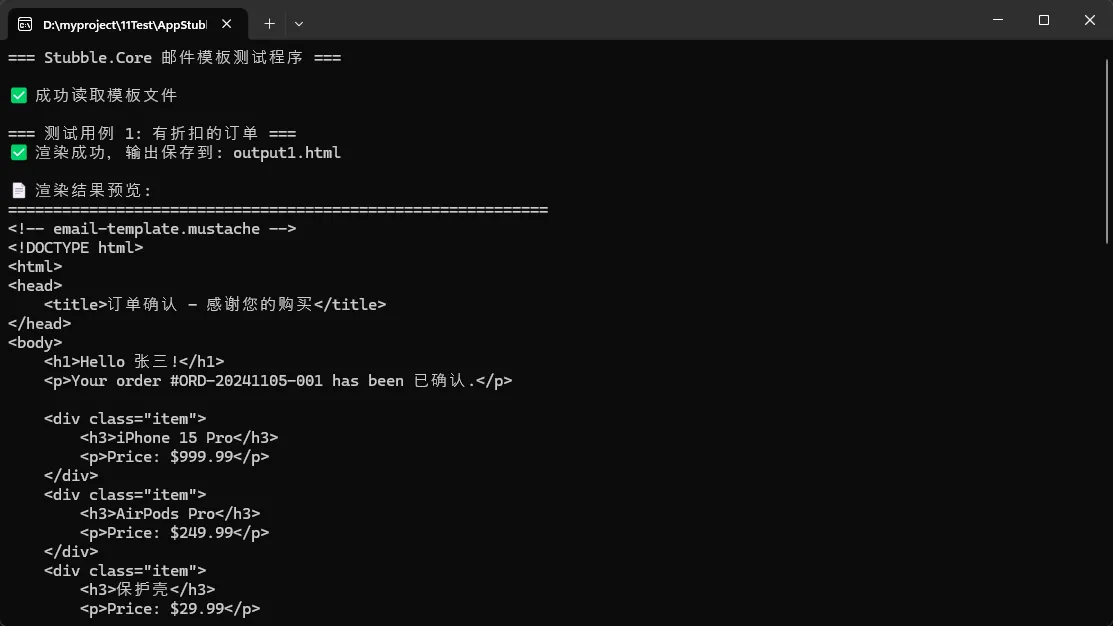
                Console.WriteLine($"✅ 渲染成功,输出保存到: {outputFileName}");

                // 显示渲染结果预览
                Console.WriteLine("\n📄 渲染结果预览:");
                Console.WriteLine(new string('=', 60));
                Console.WriteLine(result);
                Console.WriteLine(new string('=', 60));
            }
            catch (Exception ex)
            {
                Console.WriteLine($"❌ 渲染失败: {ex.Message}");
            }
        }

        static EmailData CreateTestData1()
        {
            return new EmailData
            {
                Title = "订单确认 - 感谢您的购买",
                UserName = "张三",
                OrderNumber = "ORD-20241105-001",
                Status = "已确认",
                Items = new List<OrderItem>
                {
                    new OrderItem { Name = "iPhone 15 Pro", Price = 999.99m },
                    new OrderItem { Name = "AirPods Pro", Price = 249.99m },
                    new OrderItem { Name = "保护壳", Price = 29.99m }
                },
                HasDiscount = true,
                DiscountAmount = 50.00m
            };
        }

        static EmailData CreateTestData2()
        {
            return new EmailData
            {
                Title = "订单处理中",
                UserName = "李四",
                OrderNumber = "ORD-20241105-002",
                Status = "处理中",
                Items = new List<OrderItem>
                {
                    new OrderItem { Name = "MacBook Air M2", Price = 1199.99m }
                },
                HasDiscount = false,
                DiscountAmount = 0m
            };
        }

        static EmailData CreateTestData3()
        {
            return new EmailData
            {
                Title = "订单取消通知",
                UserName = "王五",
                OrderNumber = "ORD-20241105-003",
                Status = "已取消",
                Items = new List<OrderItem>(),
                HasDiscount = false,
                DiscountAmount = 0m
            };
        }
    }
}
🛠️ 条件渲染与循环
HTML<!DOCTYPE html>
<html>
<head>
    <title>{{storeName}} - Product Catalog</title>
    <style>
        body { font-family: Arial, sans-serif; margin: 20px; }
        .vip-badge { background: gold; color: black; padding: 5px 10px; border-radius: 5px; }
        .regular-badge { background: gray; color: white; padding: 5px 10px; border-radius: 5px; }
        .product { border: 1px solid #ddd; padding: 15px; margin: 10px 0; border-radius: 5px; }
        .sale-price { color: red; font-weight: bold; font-size: 1.2em; }
        .original-price { text-decoration: line-through; color: gray; margin-left: 10px; }
        .price { font-weight: bold; font-size: 1.1em; }
        .no-products { text-align: center; color: #666; font-style: italic; }
    </style>
</head>
<body>
    <h1>Welcome to {{storeName}}</h1>

    <!-- 客户类型条件渲染 -->
    <div class="customer-info">
        <h2>Customer: {{customerName}}</h2>
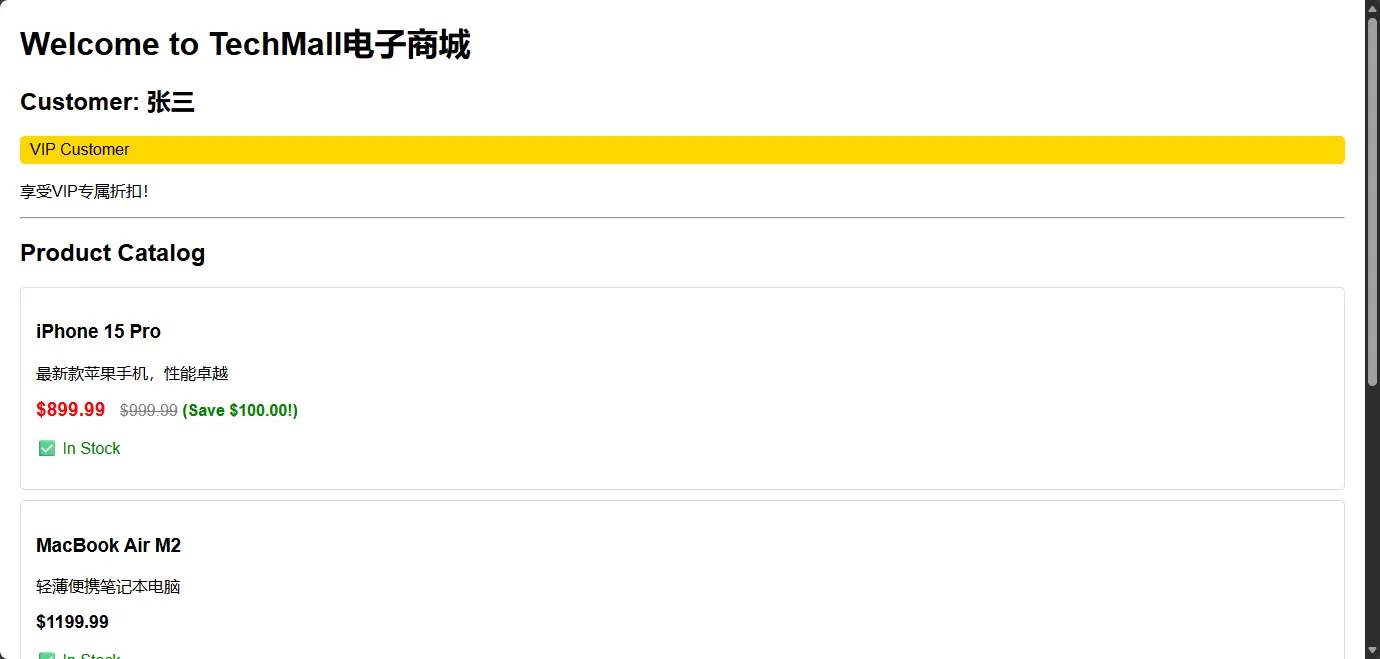
        {{#isVip}}
        <div class="vip-badge">VIP Customer</div>
        <p>享受VIP专属折扣!</p>
        {{/isVip}}

        {{^isVip}}
        <div class="regular-badge">Regular Customer</div>
        <p>升级为VIP享受更多优惠!</p>
        {{/isVip}}
    </div>

    <hr>

    <!-- 产品列表循环渲染 -->
    <h2>Product Catalog</h2>
    {{#products}}
    <div class="product">
        <h3>{{name}}</h3>
        <p>{{description}}</p>

        <!-- 价格条件渲染 -->
        {{#onSale}}
        <div class="pricing">
            <span class="sale-price">${{salePrice}}</span>
            <span class="original-price">${{originalPrice}}</span>
            <span style="color: green; font-weight: bold;"> (Save ${{savings}}!)</span>
        </div>
        {{/onSale}}

        {{^onSale}}
        <div class="pricing">
            <span class="price">${{price}}</span>
        </div>
        {{/onSale}}

        <!-- 库存状态 -->
        {{#inStock}}
        <p style="color: green;">✅ In Stock</p>
        {{/inStock}}

        {{^inStock}}
        <p style="color: red;">❌ Out of Stock</p>
        {{/inStock}}
    </div>
    {{/products}}

    <!-- 空集合处理 -->
    {{^products}}
    <div class="no-products">
        <h3>No products available.</h3>
        <p>Please check back later for new arrivals!</p>
    </div>
    {{/products}}

    <!-- VIP客户特殊信息 -->
    {{#isVip}}
    <hr>
    <div style="background: #f0f8ff; padding: 15px; border-radius: 5px;">
        <h3>VIP Exclusive Offers</h3>
        <ul>
            <li>Free shipping on all orders</li>
            <li>Early access to new products</li>
            <li>Special birthday discounts</li>
        </ul>
    </div>
    {{/isVip}}
</body>
</html>
C#using Stubble.Core.Builders;
using System.Text;

namespace AppStubble
{
    public class CatalogData
    {
        // 匹配模板中的变量名
        public string storeName { get; set; } = string.Empty;
        public string customerName { get; set; } = string.Empty;
        public bool isVip { get; set; }
        public List<Product> products { get; set; } = new List<Product>();
    }

    public class Product
    {
        public string name { get; set; } = string.Empty;
        public string description { get; set; } = string.Empty;
        public bool onSale { get; set; }
        public decimal price { get; set; }
        public decimal salePrice { get; set; }
        public decimal originalPrice { get; set; }
        public decimal savings => originalPrice - salePrice;
        public bool inStock { get; set; }
    }

    internal class Program
    {
        static async Task Main(string[] args)
        {
            Console.OutputEncoding = Encoding.UTF8;
            Console.WriteLine("=== Stubble 条件渲染和循环渲染示例 ===\n");

            try
            {
                // 初始化 Stubble
                var stubble = new StubbleBuilder().Build();

                // 读取模板
                string templatePath = "if-template.mustache";
                if (!File.Exists(templatePath))
                {
                    Console.WriteLine($"❌ 模板文件不存在: {templatePath}");
                    return;
                }

                string template = await File.ReadAllTextAsync(templatePath, Encoding.UTF8);
                Console.WriteLine("✅ 模板加载成功");
                Console.WriteLine($"模板长度: {template.Length} 字符\n");

                // 运行不同的测试场景
                await RunScenario1(stubble, template);
                await RunScenario2(stubble, template);
                await RunScenario3(stubble, template);
            }
            catch (Exception ex)
            {
                Console.WriteLine($"❌ 错误: {ex.Message}");
            }

            Console.WriteLine("\n按任意键退出...");
            Console.ReadKey();
        }

        static async Task RunScenario1(dynamic stubble, string template)
        {
            Console.WriteLine("=== 场景 1: VIP客户 - 有产品在售 ===");

            var data = new CatalogData
            {
                storeName = "TechMall电子商城",
                customerName = "张三",
                isVip = true,
                products = new List<Product>
                {
                    new Product
                    {
                        name = "iPhone 15 Pro",
                        description = "最新款苹果手机,性能卓越",
                        onSale = true,
                        salePrice = 899.99m,
                        originalPrice = 999.99m,
                        inStock = true
                    },
                    new Product
                    {
                        name = "MacBook Air M2",
                        description = "轻薄便携笔记本电脑",
                        onSale = false,
                        price = 1199.99m,
                        inStock = true
                    },
                    new Product
                    {
                        name = "AirPods Pro",
                        description = "主动降噪无线耳机",
                        onSale = true,
                        salePrice = 199.99m,
                        originalPrice = 249.99m,
                        inStock = false
                    }
                }
            };

            await RenderAndSave(stubble, template, data, "vip-with-products.html");
        }

        static async Task RunScenario2(dynamic stubble, string template)
        {
            Console.WriteLine("\n=== 场景 2: 普通客户 - 有产品在售 ===");

            var data = new CatalogData
            {
                storeName = "TechMall电子商城",
                customerName = "李四",
                isVip = false,
                products = new List<Product>
                {
                    new Product
                    {
                        name = "Samsung Galaxy S24",
                        description = "安卓旗舰手机",
                        onSale = false,
                        price = 799.99m,
                        inStock = true
                    },
                    new Product
                    {
                        name = "Dell XPS 13",
                        description = "商务笔记本电脑",
                        onSale = true,
                        salePrice = 999.99m,
                        originalPrice = 1299.99m,
                        inStock = true
                    }
                }
            };

            await RenderAndSave(stubble, template, data, "regular-with-products.html");
        }

        static async Task RunScenario3(dynamic stubble, string template)
        {
            Console.WriteLine("\n=== 场景 3: VIP客户 - 暂无产品 ===");

            var data = new CatalogData
            {
                storeName = "TechMall电子商城",
                customerName = "王五",
                isVip = true,
                products = new List<Product>() // 空产品列表
            };

            await RenderAndSave(stubble, template, data, "vip-no-products.html");
        }

        static async Task RenderAndSave(dynamic stubble, string template, CatalogData data, string fileName)
        {
            try
            {
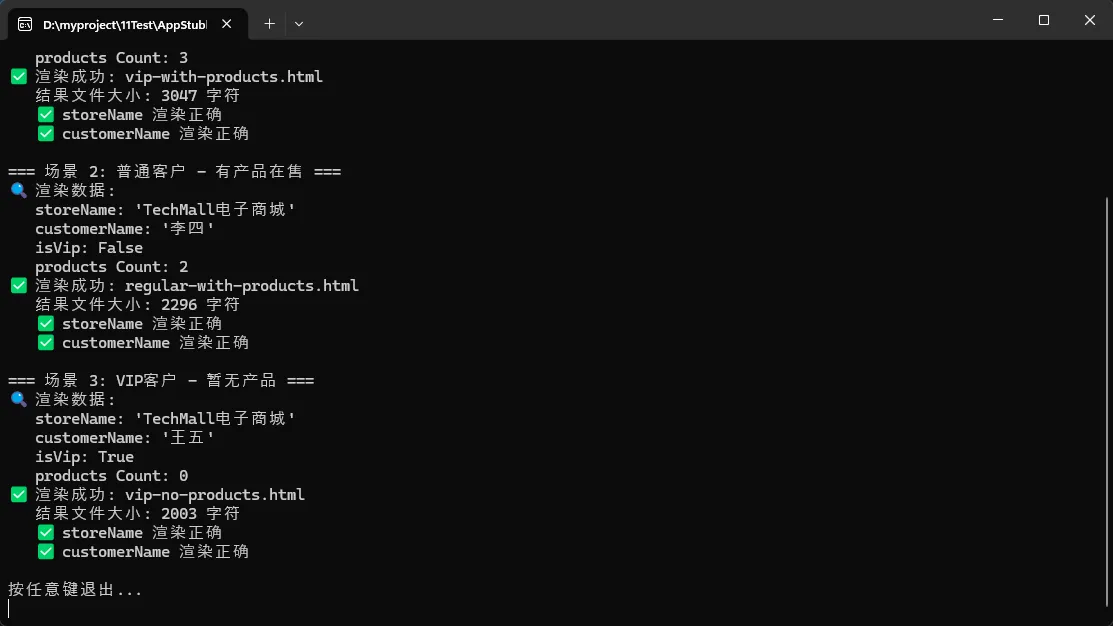
                Console.WriteLine($"🔍 渲染数据:");
                Console.WriteLine($"   storeName: '{data.storeName}'");
                Console.WriteLine($"   customerName: '{data.customerName}'");
                Console.WriteLine($"   isVip: {data.isVip}");
                Console.WriteLine($"   products Count: {data.products.Count}");

                string result = await stubble.RenderAsync(template, data);
                await File.WriteAllTextAsync(fileName, result, Encoding.UTF8);

                Console.WriteLine($"✅ 渲染成功: {fileName}");
                Console.WriteLine($"   结果文件大小: {result.Length} 字符");

                // 检查关键内容是否存在
                if (result.Contains(data.storeName))
                {
                    Console.WriteLine($"   ✅ storeName 渲染正确");
                }
                else
                {
                    Console.WriteLine($"   ❌ storeName 渲染失败");
                }

                if (result.Contains(data.customerName))
                {
                    Console.WriteLine($"   ✅ customerName 渲染正确");
                }
                else
                {
                    Console.WriteLine($"   ❌ customerName 渲染失败");
                }
            }
            catch (Exception ex)
            {
                Console.WriteLine($"❌ 渲染失败: {ex.Message}");
            }
        }
    }
}
🆚 Stubble vs 其他方案对比
| 特性 | StringBuilder | Razor Views | Stubble | Scriban |
|---|---|---|---|---|
| 学习成本 | 低 | 中 | 低 | 中 |
| 性能 | 高 | 中 | 高 | 高 |
| 可维护性 | 差 | 好 | 优秀 | 好 |
| 设计师友好 | 差 | 中 | 优秀 | 中 |
| 依赖性 | 无 | ASP.NET | 无 | 无 |
| 模板语法 | N/A | C# | 简单 | 复杂 |
🎯 适用场景
✅ 推荐使用Stubble的场景:
- 邮件模板生成:营销邮件、通知邮件
- 报告生成:PDF、Excel报告的HTML部分
- 微服务架构:独立的模板渲染服务
- 批量处理:大量HTML文档生成
- 多语言支持:国际化模板管理
❌ 不推荐的场景:
- Web页面渲染:建议使用Razor Pages
- 实时交互:需要JavaScript重度交互的页面
- 复杂业务逻辑:模板中需要复杂计算的场景
🎯 总结:三个关键要点
✨ 关键点1:分离关注点 - HTML模板与C#逻辑完全分离,提升代码可维护性
✨ 关键点2:提升协作效率 - 设计师可直接编辑HTML模板,开发人员专注业务逻辑
✨ 关键点3:增强可测试性 - 纯函数式的模板渲染让单元测试变得简单可靠
🤝 互动交流
问题1:你在项目中是如何处理HTML生成的?遇到过哪些坑?
问题2:对于Stubble模板引擎,你最关心哪个方面的性能或功能?
如果这篇文章对你有帮助,请转发给更多需要优化HTML生成代码的同行!让我们一起告别StringBuilder,拥抱更优雅的编程方式!
关注我,获取更多C#开发实战技巧和最佳实践分享!
本文作者:技术老小子
本文链接:
版权声明:本博客所有文章除特别声明外,均采用 BY-NC-SA 许可协议。转载请注明出处!
目录