
工厂车间里,一台设备每秒吐出20条传感器数据。程序员小李盯着屏幕——界面卡死了。SQLite写入堵塞了Tkinter主线程,整个GUI像中了定身咒。这种场景,做过工业上位机的朋友应该不陌生。
我在做一个产线质检系统的时候,第一版就翻了这个车。数据写入一多,界面就抽风,客户那边直接打电话投诉。后来花了两周时间把架构推倒重来,才算真正搞明白这套组合的正确打开方式。
本文总结的七个实践,不是从文档里抄来的——是真实项目里一个坑一个坑踩出来的。读完之后,你能拿到:防界面卡死的线程模型、批量写入的性能提升方案、数据库连接的正确管理姿势,以及几个可以直接拿去用的代码模板。
🧱 实践一:绝对不要在主线程里写数据库
这是最根本的一条,也是最容易被忽视的一条。
Tkinter的事件循环是单线程的。你在按钮回调里直接conn.execute(),哪怕只是一条INSERT,只要磁盘稍微抖一下,主线程就会卡住,界面就会失去响应。用户一看,以为程序崩了,直接关掉重开——你的数据也没了。
正确做法是把数据库操作完全移到独立线程。 主线程只负责界面,数据线程只负责存储,两者通过队列通信。
pythonimport tkinter as tk
import sqlite3
import threading
import queue
import time

class DataStorageWorker(threading.Thread):
    """专职数据库写入的工作线程"""

    def __init__(self, db_path: str, task_queue: queue.Queue):
        super().__init__(daemon=True)  # 守护线程,主程序退出时自动结束
        self.db_path = db_path
        self.task_queue = task_queue
        self._stop_event = threading.Event()

    def run(self):
        # 注意:连接必须在本线程内创建,不能跨线程共享
        conn = sqlite3.connect(self.db_path)
        conn.execute("PRAGMA journal_mode=WAL")  # WAL模式,读写互不阻塞
        conn.execute("PRAGMA synchronous=NORMAL") # 性能与安全的平衡点

        try:
            while not self._stop_event.is_set():
                try:
                    task = self.task_queue.get(timeout=0.1)
                    if task is None:  # 毒丸信号,优雅退出
                        break
                    conn.execute(
                        "INSERT INTO sensor_data(device_id, value, ts) VALUES(?,?,?)",
                        task
                    )
                    conn.commit()
                    self.task_queue.task_done()
                except queue.Empty:
                    continue
        finally:
            conn.close()

    def stop(self):
        self.task_queue.put(None)  # 发送毒丸
        self._stop_event.set()


class IndustrialApp(tk.Tk):
    def __init__(self):
        super().__init__()
        self.title("工业数据采集")
        self.db_queue = queue.Queue(maxsize=10000)

        # 启动工作线程
        self.worker = DataStorageWorker("industrial.db", self.db_queue)
        self.worker.start()

        self._build_ui()
        self.protocol("WM_DELETE_WINDOW", self._on_close)

    def _build_ui(self):
        btn = tk.Button(self, text="采集数据", command=self._collect)
        btn.pack(pady=20)
        self.label = tk.Label(self, text="等待采集...")
        self.label.pack()

    def _collect(self):
        # 主线程只是把任务扔进队列,立刻返回,绝不等待
        task = ("device_001", 98.6, time.time())
        try:
            self.db_queue.put_nowait(task)
            self.label.config(text=f"已入队: {task[1]}")
        except queue.Full:
            self.label.config(text="⚠️ 队列满,数据丢弃!请检查写入速度")

    def _on_close(self):
        self.worker.stop()
        self.worker.join(timeout=3)
        self.destroy()
踩坑预警:sqlite3.Connection对象不能跨线程使用,这是SQLite的硬限制。很多人在主线程创建连接然后传给子线程,结果报ProgrammingError: SQLite objects created in a thread can only be used in that same thread。记住,连接在哪个线程里用,就在哪个线程里建。
🎬 说句实话
那天凌晨两点。我盯着一堆用户行为数据,老板要的"数据分布报告"明早就得交。Excel?太low。Matplotlib的plot()画折线图?完全不对路子啊!
直方图才是答案。
但这玩意儿的门道,远比你想的复杂。bins参数设错,整个分析结论全毁;密度图画不好,看着像心电图异常……我在那个项目里踩的坑,够写本血泪史的。后来发现:掌握直方图和密度估计,基本就摸到了数据分析的任督二脉。今天咱们就把这两个"硬茬"彻底拿下,从hist()的细节魔鬼,到KDE的数学美学。
准备好了吗?开整!
📊 直方图的"真面目":hist()深度解剖
先搞清楚一件事
很多人以为直方图就是"柱状图的另一个名字"。错!大错特错!
柱状图(Bar Chart):展示分类数据,比如各部门销售额。
直方图(Histogram):展示连续数据的分布,比如员工年龄分布。
看着都是"柱子",本质���全不同。直方图的每个柱子代表一个区间的频数,柱子之间没有间隙——这是连续性的视觉体现。
🔧 基础用法:从零开始
pythonimport matplotlib
import matplotlib.pyplot as plt
import numpy as np
matplotlib.use('TkAgg')

# 模拟1000个用户的响应时间数据(毫秒)
np.random.seed(42)
response_times = np.random.normal(200, 50, 1000)  # 均值200ms,标准差50ms

plt.rcParams['font.sans-serif'] = ['Microsoft YaHei']  # Windows下显示中文
plt.rcParams['axes.unicode_minus'] = False

# 最简单的直方图
plt.figure(figsize=(10, 6))
plt.hist(response_times, bins=30, color='steelblue', alpha=0.7, edgecolor='black')
plt.xlabel('响应时间 (ms)', fontsize=12)
plt.ylabel('频数', fontsize=12)
plt.title('API响应时间分布', fontsize=14, fontweight='bold')
plt.grid(axis='y', alpha=0.3)
plt.show()
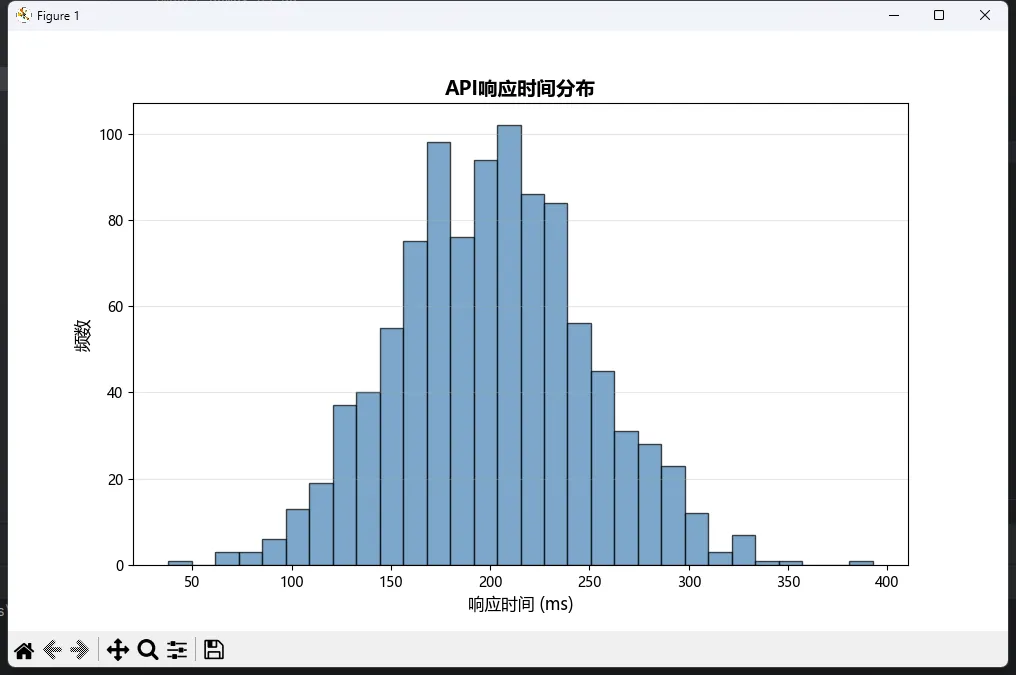 简单吧?但魔鬼在细节里。
**你是否遇过这种窘境?**新版本发布了,却得让用户手动下载安装——不仅麻烦,还容易出岔子。或者说,你想给自己的 Windows 桌面应用加上自动升级功能,但对这块儿一头雾水?
别急。今天咱们就深扒一套成熟的应用升级解决方案。这不仅是代码层面的教学,更重要的是——我会把这类项目在实战中的那些坑和方案一股脑倒出来。
🎯 为什么应用升级这么要命?
很多开发者觉得升级是个"锦上添花"的功能,其实不然。根据我在企业级应用开发中的观察:
- 用户体验断层:没有升级机制,意味着 bug 修复要等人手动更新,客户不爽,投诉蜂拥而至
- 版本混乱成灾:用户装的版本五花八门,测试和支持成本直线飙升
- 信任度大打折扣:频繁要求手动升级,跟"不专业"没两样
所以说,一套可靠、高效、用户友好的升级系统,已经成了现代应用的标配。
💡 这套方案的核心亮点
咱们待会儿解析的代码,采用了一个经典的三层架构:
┌─────────────────────────────┐
│   Tkinter GUI 前端          │  ← 用户交互层
├─────────────────────────────┤
│   Queue + Threading         │  ← 并发处理层
├─────────────────────────────┤
│   urllib 网络通信           │  ← 数据交互层
└─────────────────────────────┘
关键卖点?完全零依赖(没有 requests)、天然避免界面卡顿、错误处理贼全面。
🔍 设计原理拆解
01. 为什么选 urllib 而不是 requests?
这是个有意思的选择。requests 确实好用,但在企业发版的应用中,我的经验是:
python# ❌ requests 风险
- 引入第三方依赖,安装包体积增大
- 用户环境缺少依赖,程序直接崩
- 版本冲突(比如别的库也用 requests 但版本不同)

# ✅ urllib 优势
- Python 内置库,零额外依赖
- 轻量化,特别适合升级工具这种"单一职责"的应用
02. Queue 和 Threading 的配合妙用
最容易踩的坑就是:网络请求在主线程执行。结果?用户看着界面一动不动,鼠标转圈,最后心想"这软件死了"。
这份代码的做法:
pythondef _on_check(self):
    # 立即禁用按钮,反馈给用户
    self.check_btn.config(state=tk.DISABLED)

    # 丢到后台线程去搞
    threading.Thread(
        target=self._task_check_version,
        daemon=True
    ).start()
然后通过 queue.Queue() 来"传送消息"——这是个经典的线程间通信范式。为啥不直接修改 UI?因为 Tkinter 不是线程安全的。直接在后台线程改 UI,轻则闪瞎眼,重则段错误。
03. 版本比对的小细节
pythonif version.parse(rv) > version.parse(LOCAL_VERSION):
这里用 packaging.version 库(通常 pip 装过了,属于"广泛存在"的依赖)。为啥不直接字符串比对?试试:
python"2.0.0" > "10.0.0" # Python: True(错!字符串按字典序)
反面案例太多了。这就是为什么版本管理得用专业工具。
你有没有遇到过这种情况——程序跑得好好的,突然网断了,界面一片死寂,用户完全不知道发生了什么?
🤔 先聊聊这个痛点从哪儿来
做桌面工具的同学大概都踩过这个坑。你写了个挺漂亮的Tkinter应用,能联网查数据、能实时同步,用户用起来也顺手。但有一天,网络抖了一下——程序没崩,但请求卡住了,按钮点了没反应,整个界面像"冻住了"一样。用户第一反应:这软件有bug。
说实话,这不是bug,是体验设计上的缺失。
我在一个内网监控工具的项目里就吃过这个亏。当时程序每隔5秒向服务器拉一次数据,网络一断,主线程直接被socket阻塞,UI卡死,用户以为程序崩了,强行关掉重启,结果数据丢了一截。后来我加了连接状态显示,这类投诉直接降了八成。
网络状态可视化,本质上是在用户和程序之间建立一条"信任通道"。用户看得见状态,就不会慌;程序说得清楚,就不会被误解。
接下来咱们就从浅到深,把这件事做扎实。
🔍 问题根源:Tkinter的单线程困局
Tkinter有个"先天缺陷"——它是单线程模型,所有UI操作都必须在主线程里跑。
这意味着什么?一旦你在主线程里做网络请求(哪怕只是ping一下),UI就会停止响应。mainloop()在等你,你在等网络,用户在等你,谁都动不了。
很多初学者的第一反应是:那我加个time.sleep()循环检测不就行了?
python# ❌ 错误示范——别这么干
while True:
    check_network()
    time.sleep(2)  # 主线程直接卡死,UI冻住
这玩意儿会让你的窗口直接变成"未响应"。
还有人用after()轮询,思路对了一半,但如果检测函数本身有阻塞(比如socket.connect()默认超时很长),还是会卡。
正确姿势是:把网络检测扔进子线程,用线程安全的方式把结果传回主线程更新UI。 Tkinter提供了after()方法用于在主线程调度任务,配合queue.Queue做线程间通信,是目前最稳的方案。
🛠️ 方案一:基础版——状态指示灯
先从最简单的场景入手。我们做一个"小绿灯"——连接正常就绿,断了就红,检测中就黄。
pythonimport tkinter as tk
import threading
import queue
import socket
import time

class NetworkStatusApp:
    def __init__(self, root):
        self.root = root
        self.root.title("网络状态监控")
        self.root.geometry("300x150")

        self.status_queue = queue.Queue()  # 线程间通信的桥梁

        # 状态指示区域
        self.canvas = tk.Canvas(root, width=20, height=20)
        self.canvas.pack(pady=20)
        self.indicator = self.canvas.create_oval(2, 2, 18, 18, fill="gray")

        self.label = tk.Label(root, text="检测中...", font=("微软雅黑", 12))
        self.label.pack()

        self.detail_label = tk.Label(root, text="", fg="gray", font=("微软雅黑", 9))
        self.detail_label.pack()

        # 启动后台检测线程
        self.running = True
        self.check_thread = threading.Thread(target=self._network_check_loop, daemon=True)
        self.check_thread.start()

        # 主线程定期从队列取结果并更新UI
        self.root.after(500, self._poll_status)

    def _check_connection(self, host="8.8.8.8", port=53, timeout=3):
        """尝试TCP连接来判断网络是否可达"""
        try:
            start = time.time()
            sock = socket.socket(socket.AF_INET, socket.SOCK_STREAM)
            sock.settimeout(timeout)
            sock.connect((host, port))
            sock.close()
            latency = (time.time() - start) * 1000  # 毫秒
            return True, f"延迟 {latency:.1f}ms"
        except (socket.timeout, socket.error):
            return False, "连接失败"

    def _network_check_loop(self):
        """子线程:持续检测网络,结果放入队列"""
        while self.running:
            connected, detail = self._check_connection()
            self.status_queue.put((connected, detail))
            time.sleep(3)  # 每3秒检测一次

    def _poll_status(self):
        """主线程:从队列取结果,更新UI(这里才能操作界面)"""
        try:
            connected, detail = self.status_queue.get_nowait()
            if connected:
                self.canvas.itemconfig(self.indicator, fill="#4CAF50")  # 绿
                self.label.config(text="网络正常", fg="#4CAF50")
            else:
                self.canvas.itemconfig(self.indicator, fill="#F44336")  # 红
                self.label.config(text="网络断开", fg="#F44336")
            self.detail_label.config(text=detail)
        except queue.Empty:
            pass  # 队列为空就跳过,不阻塞

        if self.running:
            self.root.after(500, self._poll_status)  # 500ms后再来一次

    def on_close(self):
        self.running = False
        self.root.destroy()

if __name__ == "__main__":
    root = tk.Tk()
    app = NetworkStatusApp(root)
    root.protocol("WM_DELETE_WINDOW", app.on_close)
    root.mainloop()
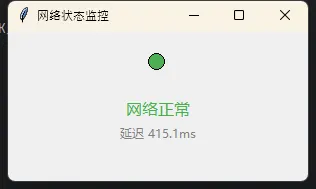
踩坑预警:daemon=True这个参数一定要加。不加的话,主窗口关了子线程还在跑,程序无法正常退出,任务管理器里会看到僵尸进程。另外,socket连接8.8.8.8:53(Google DNS的TCP端口)是个不错的检测方式,比ping更通用,也不需要管理员权限。
这篇文章能让你学到啥? 一套完整可运行的工业配方管理界面、模块化的GUI设计思路,以及如何在Windows下打包成可执行文件。不仅仅是代码堆砌,更多是实战中怎样让界面用起来顺手、数据不易丢失的那些讲究。
🔍 为什么要自己造这个轮子?
工业生产现场的痛点其实很扎心:
问题一:数据管理混乱
配方改版后,谁都不清楚哪个版本是当前用的,Excel里"配方v1""配方v1.1"堆了一地。生产线上出了问题,翻半天历史记录,效率低到爆炸。
问题二:输入错误频繁
手工录入温度、时间这些参数,一个小数点的差别就能废掉整批产品。没有数据校验,这风险简直防不胜防。
问题三:缺乏版本追溯
改了一个参数后,没人记得之前是多少。遇上质量问题要追根溯源?别想了,数据里根本找不到痕迹。
Tkinter的妙处在于——它轻量级、跨平台,Windows/Linux/Mac都能跑,最关键的是不用额外装啥复杂框架,自带的库就够用。
💡 核心设计思路
🎯 架构三层划分
我这次设计的系统遵循"界面层 + 业务层 + 数据层"的经典模式:
- 界面层:Tkinter的Canvas、Frame、Entry各种控件负责展示
- 业务层:配方的增删改查逻辑,参数校验都在这儿
- 数据层:用SQLite存数据,省得配个数据库,开箱即用
这样分开的好处是啥?改界面不用动业务代码,加新功能也不会影响原有逻辑。这在企业项目里特别重要——因为需求总是变的。
🎪 用户流程设计
启动程序
    ↓
选择操作(查看/新建/编辑)
    ↓
配方信息展示/输入
    ↓
参数校验
    ↓
保存到数据库
    ↓
刷新界面
很直白对不对?但细节决定成败——每个环节都要防御。