
在Python开发的世界里,当我们需要为脚本添加图形界面时,很多开发者会陷入选择困难:PyQt太重、Web框架太复杂、第三方库兼容性难保证。其实,Python自带了一个轻量级但功能完整的GUI工具包——Tkinter,它能够帮助我们快速构建桌面应用程序,特别适合Windows环境下的上位机开发。本文将从零开始,带你掌握Tkinter的核心概念、安装配置以及实战应用,让你的Python程序拥有专业的图形界面。
🔍 什么是Tkinter?为什么选择它?
📋 Tkinter基本概念
Tkinter(Tool Kit Interface)是Python的标准GUI库,基于Tcl/Tk图形工具包。它最大的优势在于:
- 内置标准库:Python安装即可使用,无需额外下载
- 跨平台兼容:Windows、macOS、Linux全支持
- 轻量高效:资源占用小,启动速度快
- 学习成本低:API简洁,文档完善
💪 Tkinter的核心优势
- 零依赖部署:打包后的应用无需担心用户环境问题
- 原生外观:界面风格贴合操作系统原生设计
- 稳定可靠:经过数十年验证,bug极少
- 扩展性强:可与ttk模块结合,实现现代化界面
🛠️ Tkinter安装与环境配置
✅ 检查Tkinter是否已安装
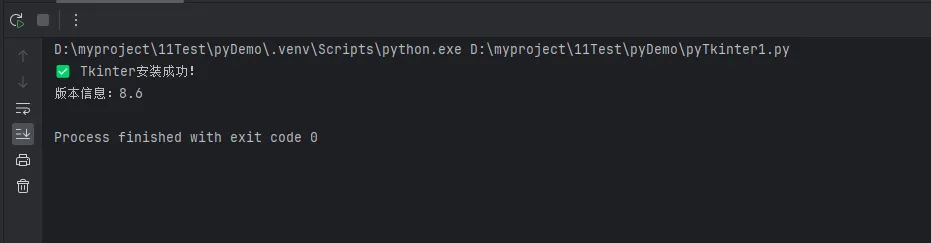
大部分Python安装版本都自带Tkinter,我们先检查一下:
Python# 测试Tkinter是否可用
try:
    import tkinter as tk
    print("✅ Tkinter安装成功!")
    print(f"版本信息:{tk.TkVersion}")
except ImportError:
    print("❌ Tkinter未安装")
在Python开发中,字典(dict)是我们最常用的数据结构之一,无论是配置文件解析、数据缓存还是API响应处理,字典都扮演着重要角色。然而,很多开发者对字典的认知还停留在基础的增删改查上,错过了许多高效的操作技巧。
本文将从实战角度出发,系统梳理Python字典的核心操作方法,涵盖常用方法、性能优化技巧以及实际应用场景。无论你是Python新手还是有经验的开发者,都能从中获得有价值的编程技巧,让你的代码更加优雅高效。
🔍 问题分析:字典操作的常见痛点
📊 开发中的典型场景
在日常的Python开发工作中,我们经常遇到以下场景:
- 配置管理:需要灵活处理各种配置参数
- 数据转换:JSON数据与Python对象之间的转换
- 缓存优化:使用字典实现高效的数据缓存
- 统计分析:对数据进行分组统计和聚合操作
⚡ 性能瓶颈识别
许多开发者在使用字典时容易陷入以下误区:
- 频繁使用
if key in dict进行存在性检查 - 不合理的嵌套字典操作
- 缺乏对字典方法的深入理解,导致代码冗余
💡 解决方案:字典操作的核心方法详解
🏗️ 基础创建与初始化
Python# 多种创建方式
user_info = {}  # 空字典,这种更习惯
user_info = dict()  # 使用构造函数

# 字面量创建
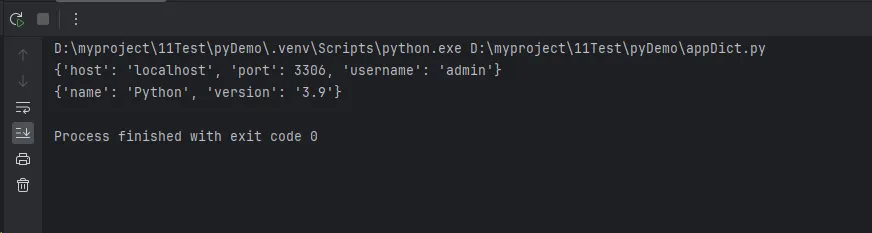
config = {
    'host': 'localhost',
    'port': 3306,
    'username': 'admin'
}

# 使用dict()构造函数
settings = dict(debug=True, timeout=30)

# 从键值对列表创建
pairs = [('name', 'Python'), ('version', '3.9')]
info = dict(pairs)
你是否在Python开发中遇到过这样的困惑:什么时候该用列表,什么时候该用元组?元组看似简单,但在实际的上位机开发和数据处理项目中,它却承担着重要角色。很多开发者只知道元组"不可变",却不知道如何充分利用这一特性来提升程序性能和代码质量。
本文将从实战角度深入剖析元组的核心特性,通过具体的Windows应用开发场景,带你掌握元组在配置管理、数据传递、性能优化等方面的最佳实践。无论你是Python初学者还是有经验的开发者,都能从中获得实用的编程技巧。
🔍 问题分析:为什么元组如此重要?
📊 性能对比实测
在Python开发中,数据结构的选择直接影响程序性能。让我们通过实际测试来看看元组的优势:
Pythonimport timeit
import sys

# 创建包含相同数据的列表和元组
list_data = [1, 2, 3, 4, 5] * 1000
tuple_data = tuple(list_data)

# 内存占用对比
print(f"列表内存占用: {sys.getsizeof(list_data)} 字节")
print(f"元组内存占用: {sys.getsizeof(tuple_data)} 字节")

# 访问速度对比
list_time = timeit.timeit(lambda: list_data[2500], number=1000000)
tuple_time = timeit.timeit(lambda: tuple_data[2500], number=1000000)

print(f"列表访问时间: {list_time:.6f}秒")
print(f"元组访问时间: {tuple_time:.6f}秒")

在Python开发中,列表(list)无疑是最常用的数据结构之一。无论你是在开发桌面应用、数据分析工具,还是上位机系统,都离不开对列表的熟练操作。
很多初学者虽然会基本的列表使用,但往往不了解列表的高级特性和性能优化技巧,导致代码效率低下。更有甚者,在处理大量数据时因为不当的列表操作而造成程序卡顿。
本文将从实战角度出发,系统性地介绍Python列表的操作与方法,包括基础操作、进阶技巧和性能优化,帮助你在实际项目中写出更优雅、更高效的代码。
🔍 问题分析
在Windows平台的Python开发中,我们经常遇到以下列表操作难题:
- 数据处理效率低:不知道如何选择合适的列表方法
- 内存占用过大:列表操作不当导致内存泄漏
- 代码可读性差:复杂的列表操作逻辑混乱
💡 解决方案
🚀 基础操作篇
列表创建与初始化
Python# 基础创建方式
numbers = [1, 2, 3, 4, 5]
mixed_list = [1, "hello", 3.14, True]

# 高效初始化技巧
# 创建指定长度的零列表
zeros = [0] * 10

# 使用列表推导式创建
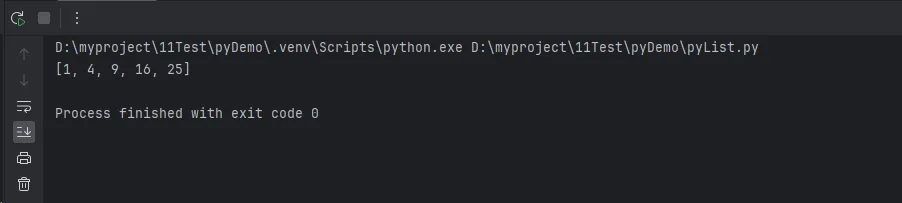
squares = [x**2 for x in range(1, 6)]
print(squares)

# 创建二维列表(注意深拷贝)
matrix = [[0 for _ in range(3)] for _ in range(3)]
在SQL Server中,查询存储(Query Store)是一个强大的性能监控和调优工具,它能够跟踪并存储不同时间点的查询执行统计信息和历史计划。自动调优功能则能够自动识别潜在的性能问题,并在某些情况下自动修正问题。在本文中,我们将探讨查询存储的使用,以及如何利用自动调优功能来优化SQL Server性能。
查询存储(Query Store)
查询存储收集关于查询执行的数据,包括运行时间统计信息、执行计划等。这些信息有助于识别性能问题并分析查询执行的历史趋势。
启用查询存储
首先,我们需要启用Query Store功能。这可以在数据库级别通过SSMS或使用T-SQL来完成。
SQLALTER DATABASE [SalesDB] SET QUERY_STORE = ON;
查询存储可能没有启用,或者没有收集到任何数据。您可以通过以下查询来检查查询存储是否启用:
C#SELECT actual_state_desc, desired_state_desc, current_storage_size_mb, max_storage_size_mb
FROM sys.database_query_store_options;