
Canny边缘检测是一种广泛使用的图像处理技术,它能够有效地提取图像中的边缘信息,从而在许多计算机视觉任务中发挥重要作用。在本文中,我们将探讨Canny边缘检测的原理、特点、应用场景,并提供使用OpenCvSharp进行Canny边缘检测的代码示例。
Canny 边缘检测原理
Canny 边缘检测算法由John F. Canny在1986年开发,是一种多级边缘检测算法。该算法主要分为以下几个步骤:
- 噪声去除:使用高斯滤波器平滑图像以去除噪声。
- 梯度计算:计算图像梯度的幅值和方向。通常使用Sobel算子。
- 非极大值抑制:消除不是边缘的像素点,仅保留潜在的边缘。
- 双阈值检测:应用两个不同的阈值来检测强边缘和弱边缘。
- 边缘连接:通过边缘连接将弱边缘连接到强边缘。
该算法保证了检测到的边缘有较好的连续性,同时对噪声保持一定的鲁棒性。
特点
- 定位准确:Canny检测可以准确地在位置上检测到真实的边缘。
- 多级检测:通过双阈值可以区分图像中的强边缘与弱边缘,加强边缘保持能力。
- 对噪声鲁棒:先进行高斯滤波处理,有效减少图像中的噪声影响。
应用场景
Canny边缘检测广泛应用于以下场景:
- 边缘提取与形状识别:在图像中提取轮廓用于目标识别和形状描述。
- 图像分割:作为图像分割的预处理步骤,以识别和分割区域。
- 运动检测:在视频序列中检测运动物体的边缘。
- 计算机视觉任务:如特征检测、物体检测等。
使用 OpenCvSharp 进行 Canny 边缘检测
OpenCvSharp 是一个 .NET 封装库,旨在使 OpenCV 易于在 C# 应用程序中使用。下面是一个使用 OpenCvSharp 实现 Canny 边缘检测的示例代码。
C#static void Main()
{
    // 加载输入图像,以彩色模式读取
    Mat src = Cv2.ImRead("1.jpg", ImreadModes.Color);
    if (src.Empty())
    {
        Console.WriteLine("图像加载失败!");
        return;
    }

    // 转换为灰度图像
    Mat gray = new Mat();
    Cv2.CvtColor(src, gray, ColorConversionCodes.BGR2GRAY);

    // 高斯模糊:去噪
    Mat blurred = new Mat();
    Cv2.GaussianBlur(gray, blurred, new Size(5, 5), 1.4);

    // 应用 Canny 边缘检测器
    Mat edges = new Mat();
    double threshold1 = 100;
    double threshold2 = 200;
    Cv2.Canny(blurred, edges, threshold1, threshold2);

    // 将边缘转换为彩色以便叠加在原始图像上
    Mat colorEdges = new Mat();
    Cv2.CvtColor(edges, colorEdges, ColorConversionCodes.GRAY2BGR);

    // 用红色 (BGR: 0, 0, 255) 绘制边缘
    src.SetTo(new Scalar(0, 0, 255), edges);

    // 显示结果
    Cv2.ImShow("Edges in Red", src);
    Cv2.WaitKey(0);

    // 释放资源
    gray.Dispose();
    blurred.Dispose();
    edges.Dispose();
    colorEdges.Dispose();
    src.Dispose();
    Cv2.DestroyAllWindows();
}

你是否遇到过这样的困扰:SQLite数据库在处理大量数据时变得异常缓慢,明明硬件配置不错,但查询一个几万条记录的表却要等好几秒?作为C#开发者,我们经常需要在本地应用或小型系统中使用SQLite,但很多人忽略了一个关键的性能优化参数:cache_size。
今天这篇文章将深入剖析SQLite的缓存机制,通过一个简单的PRAGMA cache_size设置,让你的数据库查询性能瞬间提升数倍。无论你是SQLite新手还是有经验的开发者,这个技巧都能让你的应用获得显著的性能提升!
🔍 问题分析:为什么SQLite查询这么慢?
📊 缓存机制的重要性
SQLite默认的cache_size仅为2000页(约8MB),这对于现代应用来说明显不足。当数据量增大时,频繁的磁盘I/O操作成为性能瓶颈:
- 频繁的磁盘读写:缓存不足导致数据页频繁从磁盘加载
- 索引效率低下:索引页无法有效缓存,查询优化失效
- 事务性能差:大事务需要反复读取相同的数据页
💡 cache_size的工作原理
Python默认配置:cache_size = 2000 (约8MB)
推荐配置:cache_size = 10000 (约40MB) 或 cache_size = -40000 (40MB)
关键知识点:
- 正数:表示页数(每页约4KB)
- 负数:表示KB数,更直观!
🛠️ 解决方案:配置合适的cache_size
🔥 核心优化策略
C#using System;
using System.Collections.Generic;
using System.Data.SQLite;
using System.Linq;
using System.Text;
using System.Threading.Tasks;

namespace AppSqliteCacheSize
{
    public class SQLiteOptimizer
    {
        private string connectionString;

        public SQLiteOptimizer(string dbPath)
        {
            connectionString = $"Data Source={dbPath};Version=3;";
        }

        /// <summary>
        /// 设置SQLite缓存大小
        /// </summary>
        /// <param name="cacheSize">缓存大小(负数表示KB,正数表示页数)</param>
        public void SetCacheSize(int cacheSize = -40000) // 默认40MB
        {
            using (var connection = new SQLiteConnection(connectionString))
            {
                connection.Open();

                // 设置缓存大小
                using (var command = new SQLiteCommand($"PRAGMA cache_size = {cacheSize}", connection))
                {
                    command.ExecuteNonQuery();
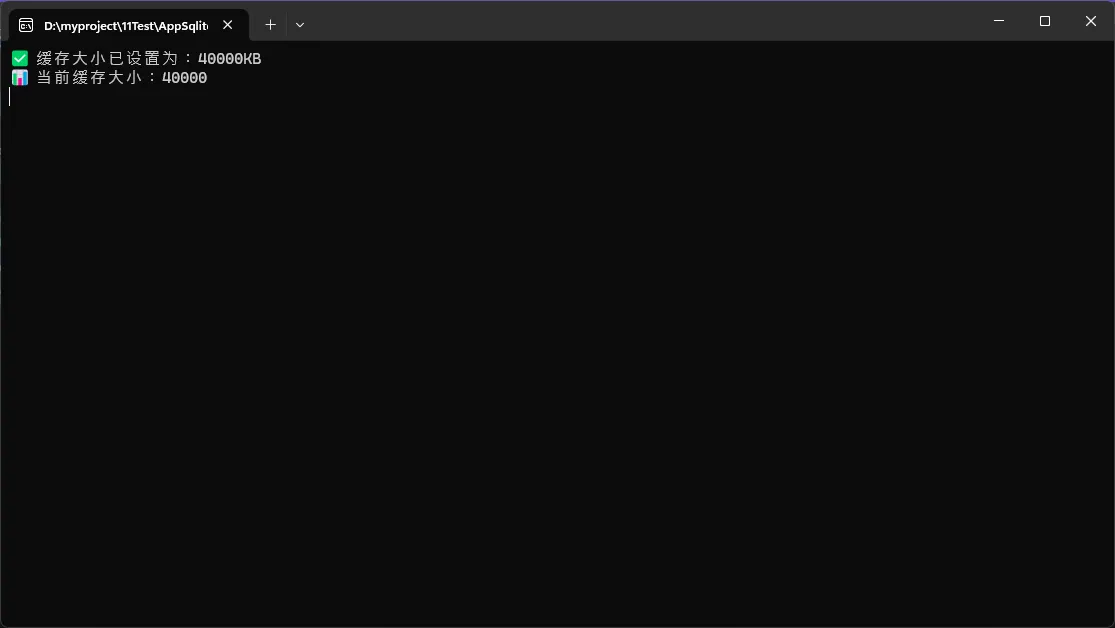
                    Console.WriteLine($"✅ 缓存大小已设置为:{Math.Abs(cacheSize)}KB");
                }

                // 验证设置是否生效
                using (var command = new SQLiteCommand("PRAGMA cache_size", connection))
                {
                    var result = command.ExecuteScalar();
                    Console.WriteLine($"📊 当前缓存大小:{result}");
                }
            }
        }
    }
}
C#namespace AppSqliteCacheSize
{
    internal class Program
    {
        static void Main(string[] args)
        {
            Console.OutputEncoding = System.Text.Encoding.UTF8;
            SQLiteOptimizer optimizer = new SQLiteOptimizer("my.db");
            optimizer.SetCacheSize(40000);
            Console.ReadKey();
        }
    }
}
相信很多做上位机开发、数据采集系统的同行都遇到过类似问题:SQLite在高并发场景下的读写性能瓶颈。传统的回滚日志模式(DELETE模式)在面对频繁的并发操作时,往往力不从心。
今天我就来分享一个立竿见影的性能优化秘籍:启用SQLite的WAL模式,仅需一行代码 PRAGMA journal_mode=WAL,就能让你的数据库并发性能飞跃式提升!
官方说法,WAL(Write-Ahead Logging)模式通过将写操作记录到独立的预写日志文件中,实现了读写操作的并发执行,显著提升了多线程环境下的数据库性能和并发处理能力。
🔍 问题深度分析:为什么SQLite会成为性能瓶颈?
传统DELETE模式的痛点
SQLite默认使用DELETE日志模式,这种模式的工作原理是:
- 排他性写锁:写操作时会锁定整个数据库
- 读写互斥:读操作无法与写操作并发执行
- 频繁磁盘I/O:每次事务都需要多次磁盘读写
这就像一条单车道的桥梁,同一时刻只能允许一个方向通行,效率可想而知。
实际场景中的表现
C#// 典型的工业数据采集场景
// 10个线程同时读写数据,性能表现:
// DELETE模式:平均200ms/操作,频繁锁表
// WAL模式:平均65ms/操作,并发流畅
你是否在学习Python面向对象编程时感到困惑?类的定义、实例化、属性和方法这些概念看起来抽象难懂?本文将用最通俗易懂的方式,结合Windows开发环境下的实战案例,带你彻底掌握Python类的核心概念。无论你是初学者还是想巩固基础的开发者,这篇文章都将为你的Python开发之路打下坚实基础。我们将从问题分析开始,逐步深入到代码实战,让你在实际项目中灵活运用面向对象编程思想。
🔍 问题分析:为什么需要类?
在Windows应用开发中,我们经常需要处理相似的对象。比如开发一个文件管理器,需要管理多个文件;开发上位机软件,需要管理多个传感器设备。如果用传统的函数式编程:
Python# 传统方式 - 管理多个文件的属性
file1_name = "data.txt"
file1_size = 1024
file1_path = "C:/Users/rick/Documents/"

file2_name = "config.ini"
file2_size = 512
file2_path = "C:/Program Files/MyApp/"

def get_file_info(name, size, path):
    return f"文件:{name},大小:{size}字节,路径:{path}"
这种方式存在明显问题:
- 代码重复:每个文件都要定义相同的属性
- 数据分散:文件属性分散在不同变量中
- 维护困难:添加新属性需要修改多处代码
- 逻辑混乱:相关功能无法有效组织
💡 解决方案:类的威力
**类(Class)**就像一个模板或蓝图,定义了对象应该具备的属性和行为。**实例化(Instantiation)**则是根据这个模板创建具体对象的过程。
🏗️ 类的基本定义语法
Pythonclass ClassName:
    """类的文档字符串"""

    def __init__(self, 参数):
        """构造方法 - 初始化对象属性"""
        self.属性名 = 参数

    def method_name(self):
        """实例方法"""
        pass
核心要点:
class关键字定义类__init__方法是构造函数,创建对象时自动调用self代表实例本身,必须作为方法的第一个参数- 类名建议使用大驼峰命名法(PascalCase)
🔥 代码实战:文件管理器案例
📁 基础版本:简单的文件类
Pythonimport os
from datetime import datetime


class FileManager:
    """文件管理类 - 用于Windows环境下的文件操作"""

    def __init__(self, file_path):
        """初始化文件对象"""
        self.file_path = file_path
        self.file_name = os.path.basename(file_path)
        self.directory = os.path.dirname(file_path)
        self._update_file_info()

    def _update_file_info(self):
        """私有方法:更新文件信息"""
        if os.path.exists(self.file_path):
            stat = os.stat(self.file_path)
            self.size = stat.st_size
            self.modified_time = datetime.fromtimestamp(stat.st_mtime)
            self.exists = True
        else:
            self.size = 0
            self.modified_time = None
            self.exists = False

    def get_info(self):
        """获取文件详细信息"""
        if self.exists:
            return f"""
文件名:{self.file_name}
路径:{self.directory}
大小:{self._format_size(self.size)}
修改时间:{self.modified_time.strftime('%Y-%m-%d %H:%M:%S')}
            """.strip()
        else:
            return f"文件不存在:{self.file_path}"

    def _format_size(self, size_bytes):
        """私有方法:格式化文件大小"""
        if size_bytes == 0:
            return "0 B"
        size_names = ["B", "KB", "MB", "GB"]
        i = 0
        while size_bytes >= 1024.0 and i < len(size_names) - 1:
            size_bytes /= 1024.0
            i += 1
        return f"{size_bytes:.1f} {size_names[i]}"

    def copy_to(self, destination):
        """复制文件到指定位置"""
        if not self.exists:
            return False, "源文件不存在"

        try:
            import shutil
            shutil.copy2(self.file_path, destination)
            return True, f"文件已复制到:{destination}"
        except Exception as e:
            return False, f"复制失败:{str(e)}"


# 实例化示例
if __name__ == "__main__":
    # 创建文件对象
    doc_file = FileManager("project.docx")
    config_file = FileManager("C:/Windows/System32/drivers/etc/hosts")

    # 使用对象方法
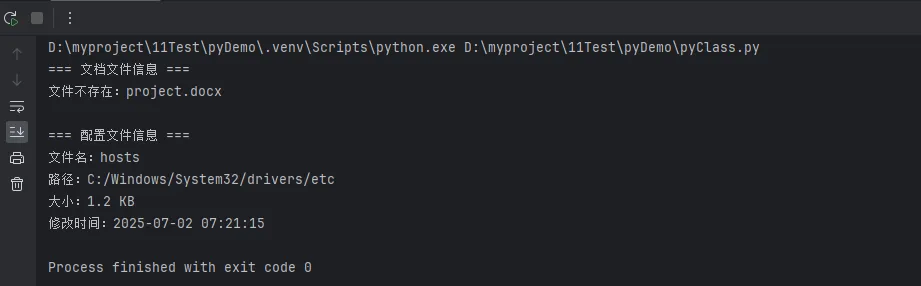
    print("=== 文档文件信息 ===")
    print(doc_file.get_info())

    print("\n=== 配置文件信息 ===")
    print(config_file.get_info())
在 SQL Server 中,死锁是指两个或更多事务永久地阻塞彼此,因为每个事务都持有对方需要的锁。这可能导致系统性能下降,甚至停止工作。幸运的是,SQL Server 提供了动态管理视图(DMVs)和死锁图,这些工具可以帮助我们分析和解决死锁问题。
在本文中,我们将通过一个实例来演示如何使用锁定动态管理视图和死锁图来分析死锁。
表结构和测试数据
为了演示死锁的产生和分析,我们首先创建两个表 Accounts 和 Orders,并插入一些测试数据。
SQLCREATE TABLE Accounts (
    AccountID INT PRIMARY KEY,
    AccountBalance DECIMAL(18, 2)
);

CREATE TABLE Orders (
    OrderID INT PRIMARY KEY,
    AccountID INT,
    OrderAmount DECIMAL(18, 2),
    FOREIGN KEY (AccountID) REFERENCES Accounts(AccountID)
);

INSERT INTO Accounts (AccountID, AccountBalance) VALUES (1, 1000.00), (2, 2000.00);

INSERT INTO Orders (OrderID, AccountID, OrderAmount) VALUES (101, 1, 100.00), (102, 2, 200.00);
死锁的产生
现在,我们将通过两个并发的事务来模拟一个死锁的场景。
事务 1:
SQLBEGIN TRANSACTION;
UPDATE Accounts SET AccountBalance = AccountBalance - 100 WHERE AccountID = 1;
WAITFOR DELAY '00:00:05';
UPDATE Orders SET OrderAmount = OrderAmount + 100 WHERE OrderID = 101;
COMMIT TRANSACTION;
事务 2:
SQLBEGIN TRANSACTION;
UPDATE Orders SET OrderAmount = OrderAmount - 100 WHERE OrderID = 102;
WAITFOR DELAY '00:00:05';
UPDATE Accounts SET AccountBalance = AccountBalance + 100 WHERE AccountID = 2;
COMMIT TRANSACTION;
如果这两个事务同时执行,它们可能会产生死锁。事务 1 在 Accounts 表上持有锁,而事务 2 在 Orders 表上持有锁。当它们尝试获取对方已经持有的锁时,就会产生死锁。
使用锁定动态管理视图分析死锁
当怀疑系统中存在死锁时,可以使用以下动态管理视图来分析当前的锁定情况:
sys.dm_tran_locks:提供当前 SQL Server 实例中的锁信息。sys.dm_os_waiting_tasks:提供等待任务的信息,包括等待的资源和等待的类型。
通过查询这些视图,我们可以获得有关当前锁定和等待的详细信息。
SQLSELECT
    tl.resource_type,
    tl.resource_database_id,
    tl.resource_associated_entity_id,
    tl.request_mode,
    tl.request_status,
    wt.session_id,
    wt.wait_duration_ms,
    wt.blocking_session_id
FROM
    sys.dm_tran_locks AS tl
INNER JOIN
    sys.dm_os_waiting_tasks AS wt ON tl.lock_owner_address = wt.resource_address;
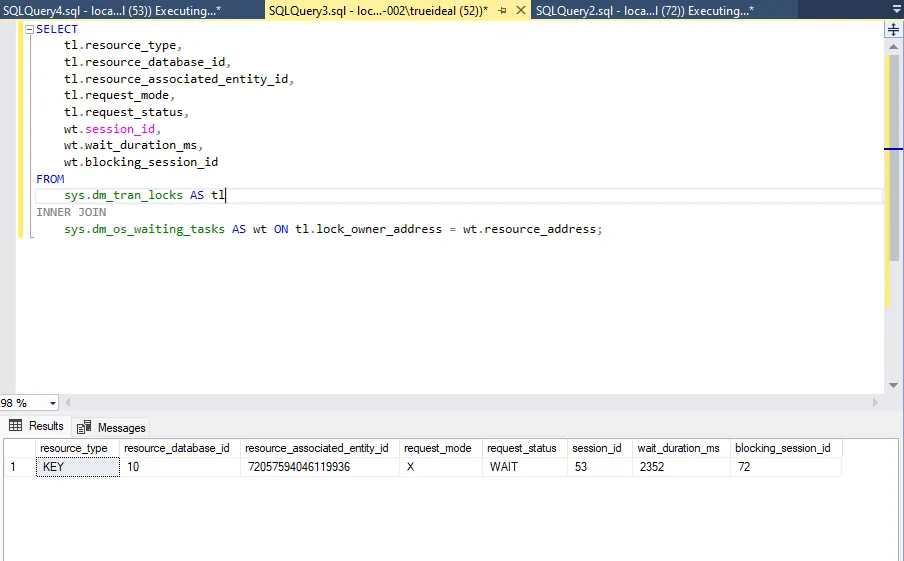 这个查询会返回当前的锁请求、等待时间以及阻塞的会话信息,有助于我们确定死锁的来源。