目录
作为一名C#开发者,你是否还在为WinForms的绘制性能和过时的API而烦恼?当你尝试使用最新版SkiaSharp时,是否遇到了DrawText方法过期的警告?别担心,今天我将手把手教你如何用现代化的SkiaSharp API构建一个完整的2D游戏精灵引擎,不仅解决API过期问题,还能完美支持中文显示!
这不仅仅是一次API升级,更是一次性能革命。我们将从零开始构建一个包含碰撞检测、动画系统和精灵管理的完整游戏引擎,让你的WinForms应用焕发新生。
🔥 痛点分析:老旧API的困扰
常见问题清单
在使用SkiaSharp进行WinForms开发时,开发者经常遇到这些问题:
- API过期警告:
SKCanvas.DrawText(string, float, float, SKPaint)方法被标记为过期 - 中文显示异常:默认字体无法正确渲染中文字符
- 性能瓶颈:频繁的对象创建导致GC压力
- 资源泄漏:SkiaSharp对象未正确释放
核心问题
最大的痛点在于:新版SkiaSharp要求使用SKFont对象,而不是直接在SKPaint中设置字体属性。
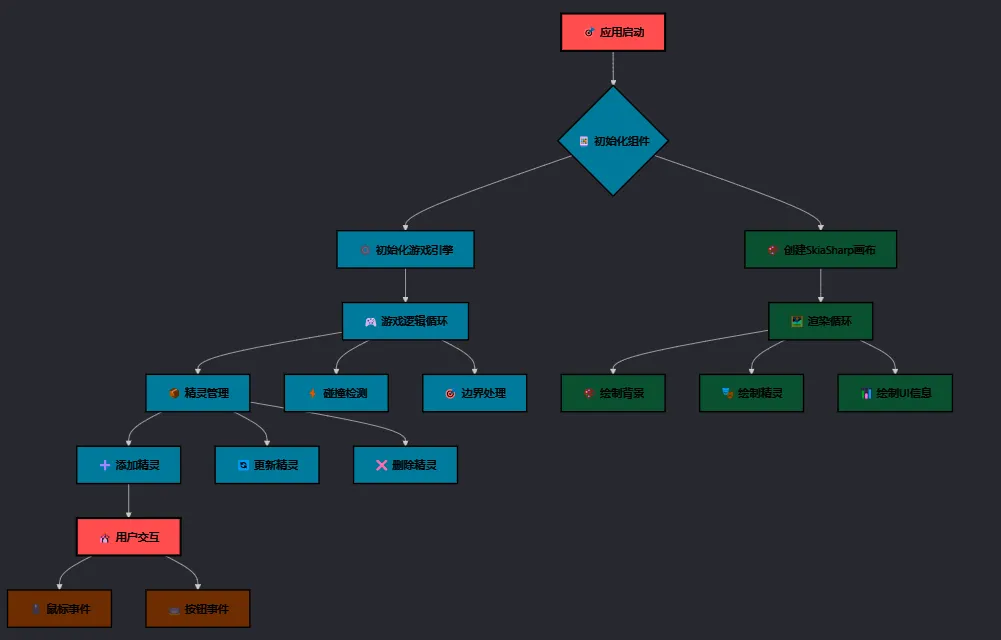
🚩 整体架构
💡 现代化解决方案
🎯 新API使用模式
c#// ❌ 过期写法
canvas.DrawText("Hello World", 10, 30, paint);

// ✅ 现代写法
var font = new SKFont(typeface, 16);
canvas.DrawText("Hello World", 10, 30, SKTextAlign.Left, font, paint);
过期的方法不少。。。
🚀 完整的字体管理方案
c#private void InitializeFontsAndPaints()
{
    // 创建支持中文的字体 - 多层备用方案
    var typeface = SKTypeface.FromFamilyName("Microsoft YaHei",
        SKFontStyleWeight.Normal, SKFontStyleWidth.Normal, SKFontStyleSlant.Upright)
        ?? SKTypeface.FromFamilyName("SimHei")
        ?? SKTypeface.FromFamilyName("Arial Unicode MS")
        ?? SKTypeface.Default;

    infoFont = new SKFont(typeface, 16);

    infoPaint = new SKPaint
    {
        Color = SKColors.White,
        IsAntialias = true,
        FilterQuality = SKFilterQuality.High // 高质量渲染
    };
}
💎 最佳实践要点:
- 使用字体备用链确保跨平台兼容性
- 开启抗锯齿和高质量渲染
- 字体对象复用避免频繁创建
🎮 实战:构建游戏精灵引擎
🔧 核心架构设计
c#public partial class FrmMain : Form
{
    private List<Sprite> sprites;
    private Timer gameTimer;
    private SKFont infoFont;
    private SKPaint infoPaint;
    private float currentFps;

    // 资源缓存 - 避免重复创建
    private SKBitmap backgroundBitmap;
}
🎨 高性能绘制实现
c#private void DrawInfo(SKCanvas canvas)
{
    if (infoFont == null || infoPaint == null) return;

    // 绘制半透明背景
    var backgroundPaint = new SKPaint
    {
        Color = SKColors.Black.WithAlpha(120),
        Style = SKPaintStyle.Fill
    };

    canvas.DrawRect(5, 5, 200, 120, backgroundPaint);
    backgroundPaint.Dispose();

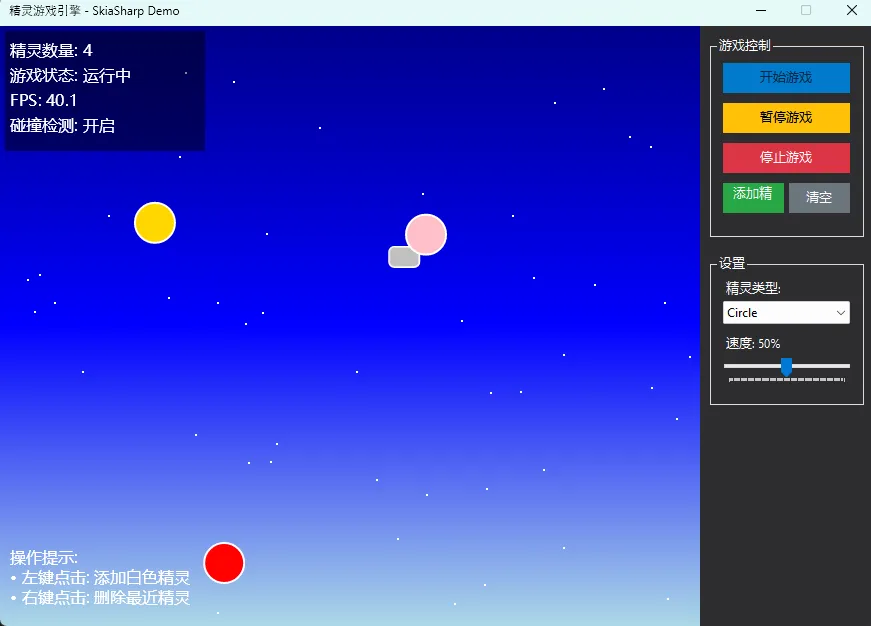
    canvas.DrawText($"精灵数量: {sprites.Count}", 10, 30, SKTextAlign.Left, infoFont, infoPaint);
    canvas.DrawText($"游戏状态: {(isPlaying ? "运行中" : "暂停")}", 10, 55, SKTextAlign.Left, infoFont, infoPaint);
    canvas.DrawText($"FPS: {CalculateFPS():F1}", 10, 80, SKTextAlign.Left, infoFont, infoPaint);
    canvas.DrawText($"碰撞检测: 开启", 10, 105, SKTextAlign.Left, infoFont, infoPaint);

    var canvasHeight = canvas.LocalClipBounds.Height;
    canvas.DrawText("操作提示:", 10, canvasHeight - 65, SKTextAlign.Left, infoFont, infoPaint);
    canvas.DrawText("• 左键点击: 添加白色精灵", 10, canvasHeight - 45, SKTextAlign.Left, infoFont, infoPaint);
    canvas.DrawText("• 右键点击: 删除最近精灵", 10, canvasHeight - 25, SKTextAlign.Left, infoFont, infoPaint);
}
⚡ 精灵碰撞检测优化
c#private void UpdateSprites()
{
    foreach (var sprite in sprites.ToList())
    {
        sprite.Update();

        // 边界检查 - 让精灵在边界反弹而不是消失
        if (sprite.X <= 0 || sprite.X >= skiaCanvas.Width)
        {
            sprite.VelocityX = -sprite.VelocityX;
            sprite.X = Math.Max(0, Math.Min(skiaCanvas.Width, sprite.X));
        }

        if (sprite.Y <= 0 || sprite.Y >= skiaCanvas.Height)
        {
            sprite.VelocityY = -sprite.VelocityY;
            sprite.Y = Math.Max(0, Math.Min(skiaCanvas.Height, sprite.Y));
        }
    }

    // 碰撞检测
    CheckCollisions();
}

private void CheckCollisions()
{
    for (int i = 0; i < sprites.Count; i++)
    {
        for (int j = i + 1; j < sprites.Count; j++)
        {
            if (sprites[i].CollidesWith(sprites[j]))
            {
                sprites[i].OnCollision(sprites[j]);
                sprites[j].OnCollision(sprites[i]);
            }
        }
    }
}
🛡️ 内存管理最佳实践
正确的资源释放
c#protected override void OnClosed(EventArgs e)
{
    gameTimer?.Stop();
    gameTimer?.Dispose();
    backgroundBitmap?.Dispose();
    infoFont?.Dispose();
    infoPaint?.Dispose();
    base.OnClosed(e);
}
🔍 常见坑点提醒
- 字体对象泄漏:SKFont必须手动释放
- 画笔重复创建:在绘制循环中创建SKPaint对象
- 中文乱码:未指定支持中文的字体
🎪 完整的精灵类实现
c#using SkiaSharp;
using System;
using System.Collections.Generic;
using System.Drawing;
using System.Linq;
using System.Text;
using System.Threading.Tasks;

namespace AppSpriteGameEngine
{
    public class CircleSprite : Sprite
    {
        public float Radius { get; private set; }

        public CircleSprite(float x, float y, float velocityX, float velocityY, SKColor color, float radius)
            : base(x, y, velocityX, velocityY, color)
        {
            Radius = radius;
            Width = Height = radius * 2;
        }

        public override void Draw(SKCanvas canvas)
        {
            var paint = new SKPaint
            {
                Color = Color,
                IsAntialias = true,
                Style = SKPaintStyle.Fill
            };

            // 绘制主体
            canvas.DrawCircle(X, Y, Radius, paint);

            // 绘制边框
            paint.Style = SKPaintStyle.Stroke;
            paint.Color = SKColors.White;
            paint.StrokeWidth = 2;
            canvas.DrawCircle(X, Y, Radius, paint);

            // 绘制光效
            paint.Style = SKPaintStyle.Fill;
            paint.Color = Color.WithAlpha(100);
            canvas.DrawCircle(X - Radius / 3, Y - Radius / 3, Radius / 3, paint);
        }
    }
}
📊 性能优化技巧
FPS监控实现
c#private void UpdateFPS()
{
    frameCount++;
    var now = DateTime.Now;
    var elapsed = (now - lastFpsUpdate).TotalSeconds;

    if (elapsed >= 1.0)
    {
        currentFps = frameCount / (float)elapsed;
        frameCount = 0;
        lastFpsUpdate = now;
    }
}
🎯 总结:现代化开发的三个关键点
通过这次实战,我们成功解决了SkiaSharp API过期和中文显示问题,构建了一个高性能的2D游戏引擎。
🔑 三个核心要点:
- API现代化:使用SKFont + SKTextAlign的新模式替代过期方法
- 中文支持:建立字体备用链确保跨平台中文显示
- 资源管理:proper dispose模式防止内存泄漏
💡 金句总结:
- "字体对象复用,性能提升一倍"
- "资源及时释放,应用运行如飞"
- "API与时俱进,代码才能长青"
🎮 收藏级代码模板已在文中提供,直接复制即可在项目中使用!
你在使用SkiaSharp时还遇到过哪些坑?或者你有更好的性能优化方案?欢迎在评论区分享你的实战经验!
觉得这篇文章对你有帮助,请转发给更多正在做WinForms开发的同行,让大家一起告别过时API,拥抱现代化开发!
本文作者:技术老小子
本文链接:
版权声明:本博客所有文章除特别声明外,均采用 BY-NC-SA 许可协议。转载请注明出处!
目录