目录
🔥 告别Excel痛苦!这个C#神器让数据映射变得超简单
还在为Excel和对象之间的转换而头疼吗?据统计,80%的C#开发者在处理Excel数据时都遇过这些痛点:手写繁琐的读取代码、复杂的格式转换、错误处理困难...
今天给大家分享一个开源神器 - ExcelMapper,让Excel与C#对象的双向映射变得像写Hello World一样简单!
🎯 为什么选择ExcelMapper?
在实际项目中,我们经常需要:
- 📊 从Excel导入用户数据
- 📋 将系统数据导出为Excel报表;
- 🔄 Excel模板填充和数据更新
传统做法需要大量代码处理单元格读写、格式转换、异常处理等,ExcelMapper一行代码搞定!
💐 Nuget 安装
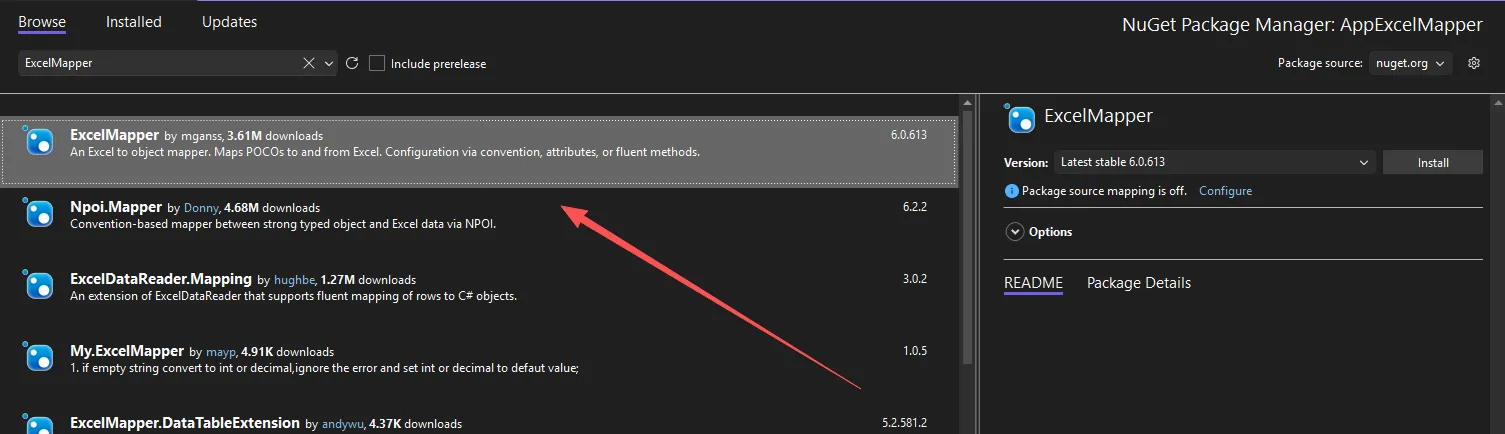
⚡ 快速上手:一行代码读取Excel
🚀 最简单的数据读取
c#// 仅需一行代码,Excel秒变对象集合!
var products = new ExcelMapper("products.xlsx").Fetch<Product>();
核心原理:ExcelMapper自动匹配Excel列名与C#属性名(忽略大小写),无需额外配置!
📝 定义数据模型
c#public class Product
{
    public int id { get; set; }          // 产品编号
    public string Name { get; set; }          // 产品名称
    public string category { get; set; }    // 类型
    public int qty { get; set; }  // 数量
    public decimal Price { get; set; }        // 价格

    [Column("创建日期")]
    public DateTime createdate { get; set; }  // 创建日期

    public override string ToString()
    {
        return $"{Name},{category},{Price},{qty},{createdate}";
    }
}
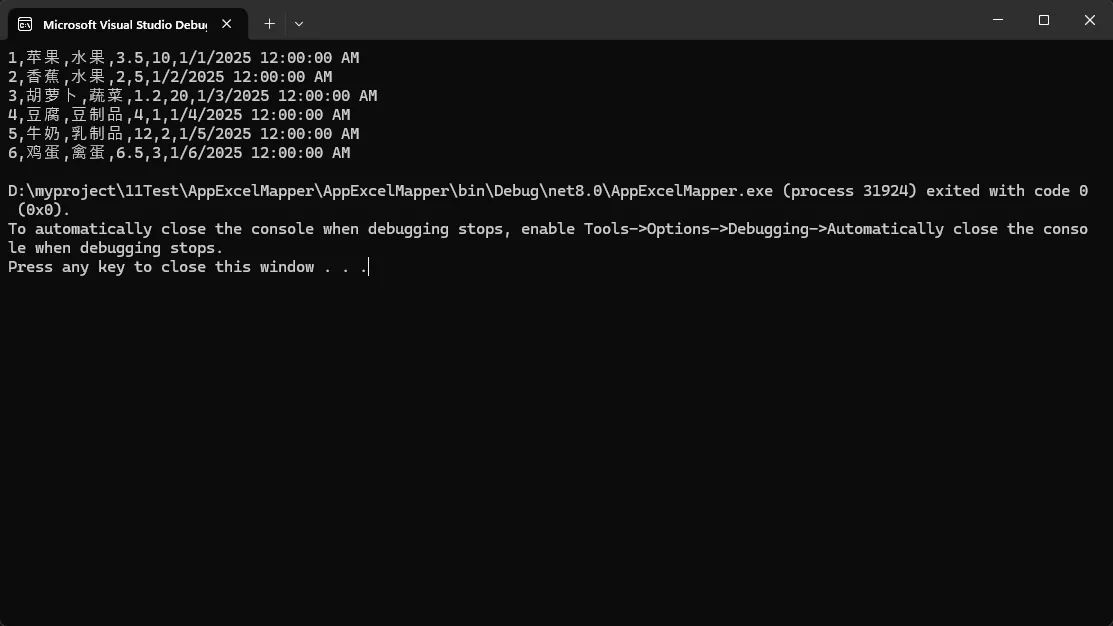
注意:对于日志类型,一定在excel中设置为datetime
💡 进阶技巧:灵活映射配置
🎨 自定义列名映射
c#[Column("价格")]
public decimal Price { get; set; }        // 价格

[Column("创建日期")]
public DateTime createdate { get; set; }  // 创建日期
实战提醒:当Excel列名与属性名不一致时,Column特性是最佳选择!
📍 按列索引映射(无表头模式)
c#public class Product
{
    [Column(1)]
    public int id { get; set; }          // 产品编号
    public string Name { get; set; }          // 产品名称

    [Column(Letter = "C")]
    public string category { get; set; }    // 类型
    public int qty { get; set; }  // 数量

    [Column("价格")]
    public decimal Price { get; set; }        // 价格

    [Column("创建日期")]
    public DateTime createdate { get; set; }  // 创建日期

    public override string ToString()
    {
        return $"{id},{Name},{category},{Price},{qty},{createdate}";
    }
}


// 设置无表头模式
var products = new ExcelMapper("products.xlsx")
{
    HeaderRow = false
}.Fetch<Product>();
🔧 代码方式灵活映射
c#static void Main(string[] args)
{
    var excel = new ExcelMapper("products.xlsx");
    excel.AddMapping<Product>("价格", p => p.Price);
    var data = excel.Fetch<Product>();
    foreach (var item in data)
    {
        Console.WriteLine(item.Price);
    }
}

// 多种映射方式任选
excel.AddMapping<Product>("价格", p => p.Price);
excel.AddMapping<Product>(5, p => p.Price);
🎪 高级特性:解决复杂场景
📊 数据格式化
c#public class Product
{
    // 自定义日期格式
    [DataFormat(0xf)]  // 内置格式
    public DateTime Date { get; set; }

    // 百分比格式
    [DataFormat("0%")]
    public decimal Percentage { get; set; }

    // 货币格式
    [DataFormat("¥#,##0.00")]
    public decimal Price { get; set; }
}
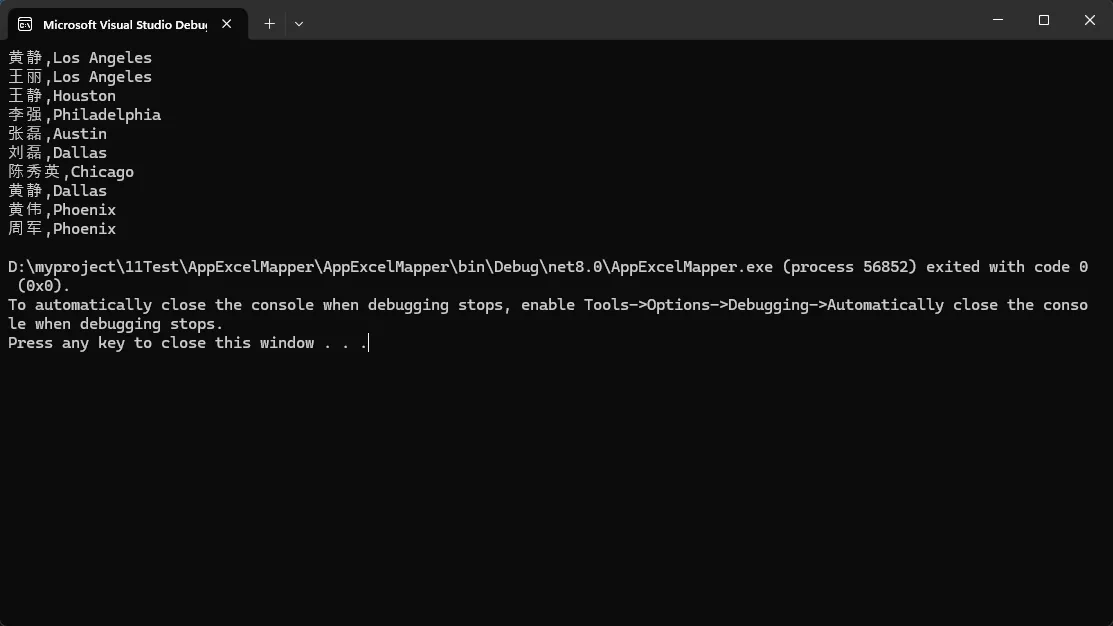
🏗️ 嵌套对象映射
c#using Ganss.Excel;
using NPOI.SS.Formula.Functions;

namespace AppExcelMapper
{
    public class Person
    {
        public string Name { get; set; }
        public DateTime Birthday { get; set; }
        public Address Address { get; set; }  // 嵌套对象
    }

    public class Address
    {
        public string Street { get; set; }
        public string City { get; set; }
        public string Zip { get; set; }
    }

    internal class Program
    {
        static void Main(string[] args)
        {
            var customers = new ExcelMapper("user.xlsx").Fetch<Person>();
            foreach (var item in customers)
            {
                Console.WriteLine(item.Name+","+item.Address.City);
            }
        }
    }
}
🎭 动态对象处理
c#// 不定义具体类型,直接获取动态对象
var products = new ExcelMapper("products.xlsx").Fetch(); // -> IEnumerable<dynamic>

// 直接访问属性
foreach (var product in products)
{
    Console.WriteLine($"{product.name}: {product.价格}");
    product.价格 += 1.0; // 动态修改
}
这个比较好用了。。
📤 数据导出:对象秒变Excel
💾 一键保存
c#static void Main(string[] args)
{
    var products = new List<Product>
    {
        new Product { Name = "iPhone 15",qty = 60, Price = 6999m },
        new Product { Name = "MacBook Pro", qty = 33, Price = 18999m },
        new Product { Name = "AirPods", qty = 100, Price = 1299m }
    };
    new ExcelMapper().Save("n_products.xlsx", products, "产品清单");
}
🔄 模板填充(保留格式)
c#static void Main(string[] args)
{
    // 先读取模板,保留原有样式
    var excel = new ExcelMapper("products.xlsx");
    var data = excel.Fetch<Product>().ToList();

    // 修改数据
    data.ForEach(p => p.Price *= 1.1m); // 统一涨价10%

    // 保存时保留原有格式
    excel.Save("updated.xlsx");
}
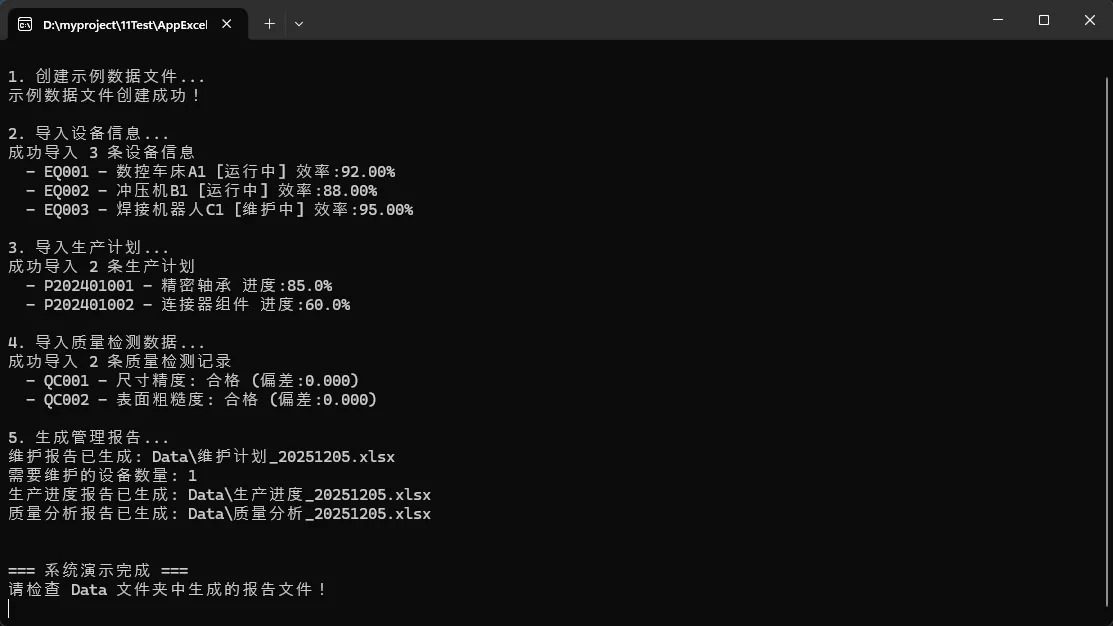
🚨 实战避坑指南
c#using System;
using System.Collections.Generic;
using System.ComponentModel.DataAnnotations;
using System.Linq;
using Ganss.Excel;

namespace AppExcelMapper
{
    /// <summary>
    /// 生产设备信息模型
    /// </summary>
    public class ProductionEquipment
    {
        public int Id { get; set; }

        [Column("设备编号")]
        public string EquipmentCode { get; set; }

        [Column("设备名称")]
        public string EquipmentName { get; set; }

        [Column("设备类型")]
        public string Type { get; set; }

        [Column("生产线")]
        public string ProductionLine { get; set; }

        [Column("运行状态")]
        public string Status { get; set; }

        [Column("生产效率")]
        [DataFormat("0.00%")]
        public decimal Efficiency { get; set; }

        [Column("最后维护日期")]
        public DateTime LastMaintenanceDate { get; set; }

        [Column("下次维护日期")]
        public DateTime NextMaintenanceDate { get; set; }

        [Column("设备价值")]
        [DataFormat("¥#,##0.00")]
        public decimal Value { get; set; }

        public override string ToString()
        {
            return $"{EquipmentCode} - {EquipmentName} [{Status}] 效率:{Efficiency:P2}";
        }
    }

    /// <summary>
    /// 生产计划模型
    /// </summary>
    public class ProductionPlan
    {
        [Column("计划编号")]
        public string PlanId { get; set; }

        [Column("产品编码")]
        public string ProductCode { get; set; }

        [Column("产品名称")]
        public string ProductName { get; set; }

        [Column("计划数量")]
        public int PlannedQuantity { get; set; }

        [Column("已完成数量")]
        public int CompletedQuantity { get; set; }

        [Column("开始日期")]
        public DateTime StartDate { get; set; }

        [Column("预计完成日期")]
        public DateTime ExpectedEndDate { get; set; }

        [Column("实际完成日期")]
        public DateTime? ActualEndDate { get; set; }

        [Column("负责人")]
        public string Supervisor { get; set; }

        [Column("优先级")]
        public string Priority { get; set; }

        public override string ToString()
        {
            bool IsOverdue = DateTime.Now > ExpectedEndDate && ActualEndDate == null;
            return $"{PlanId} - {ProductName} 进度:{(PlannedQuantity > 0 ? (decimal)CompletedQuantity / PlannedQuantity : 0):P1} " +
                   $"{(IsOverdue ? "[已延期]" : "")}";
        }
    }

    /// <summary>
    /// 质量检测记录模型
    /// </summary>
    public class QualityInspection
    {
        [Column("检测编号")]
        public string InspectionId { get; set; }

        [Column("产品批次")]
        public string BatchNumber { get; set; }

        [Column("检测项目")]
        public string InspectionItem { get; set; }

        [Column("标准值")]
        public decimal StandardValue { get; set; }

        [Column("实测值")]
        public decimal ActualValue { get; set; }

        [Column("偏差")]
        [DataFormat("0.000")]
        public decimal Deviation { get; set; }

        [Column("检测结果")]
        public string Result { get; set; }

        [Column("检测员")]
        public string Inspector { get; set; }

        [Column("检测时间")]
        public DateTime InspectionTime { get; set; }

        [Column("备注")]
        public string Remarks { get; set; }

        public override string ToString()
        {
            return $"{InspectionId} - {InspectionItem}: {Result} (偏差:{Deviation:F3})";
        }
    }

    /// <summary>
    /// 工业生产管理服务类
    /// </summary>
    public class IndustrialManagementService
    {
        private readonly string _dataPath;

        public IndustrialManagementService(string dataPath = "Data")
        {
            _dataPath = dataPath;
        }

        /// <summary>
        /// 导入设备信息
        /// </summary>
        public List<ProductionEquipment> ImportEquipmentData()
        {
            try
            {
                var filePath = Path.Combine(_dataPath, "设备清单.xlsx");
                var equipments = new ExcelMapper(filePath).Fetch<ProductionEquipment>().ToList();

                Console.WriteLine($"成功导入 {equipments.Count} 条设备信息");
                return equipments;
            }
            catch (Exception ex)
            {
                Console.WriteLine($"设备数据导入失败: {ex.Message}");
                return new List<ProductionEquipment>();
            }
        }

        /// <summary>
        /// 导入生产计划
        /// </summary>
        public List<ProductionPlan> ImportProductionPlans()
        {
            try
            {
                var filePath = Path.Combine(_dataPath, "生产计划.xlsx");
                var plans = new ExcelMapper(filePath).Fetch<ProductionPlan>().ToList();

                Console.WriteLine($"成功导入 {plans.Count} 条生产计划");
                return plans;
            }
            catch (Exception ex)
            {
                Console.WriteLine($"生产计划导入失败: {ex.Message}");
                return new List<ProductionPlan>();
            }
        }

        /// <summary>
        /// 导入质量检测数据
        /// </summary>
        public List<QualityInspection> ImportQualityInspections()
        {
            try
            {
                var filePath = Path.Combine(_dataPath, "质量检测.xlsx");
                var inspections = new ExcelMapper(filePath).Fetch<QualityInspection>().ToList();

                Console.WriteLine($"成功导入 {inspections.Count} 条质量检测记录");
                return inspections;
            }
            catch (Exception ex)
            {
                Console.WriteLine($"质量检测数据导入失败: {ex.Message}");
                return new List<QualityInspection>();
            }
        }

        /// <summary>
        /// 生成设备维护报告
        /// </summary>
        public void GenerateMaintenanceReport(List<ProductionEquipment> equipments)
        {
            try
            {
                // 筛选需要维护的设备
                var maintenanceNeeded = equipments
                    .Where(e => e.NextMaintenanceDate <= DateTime.Now.AddDays(7))
                    .OrderBy(e => e.NextMaintenanceDate)
                    .ToList();

                var reportPath = Path.Combine(_dataPath, $"维护计划_{DateTime.Now:yyyyMMdd}.xlsx");
                new ExcelMapper().Save(reportPath, maintenanceNeeded, "设备维护计划");

                Console.WriteLine($"维护报告已生成: {reportPath}");
                Console.WriteLine($"需要维护的设备数量: {maintenanceNeeded.Count}");
            }
            catch (Exception ex)
            {
                Console.WriteLine($"维护报告生成失败: {ex.Message}");
            }
        }

        /// <summary>
        /// 生成生产进度报告
        /// </summary>
        public void GenerateProgressReport(List<ProductionPlan> plans)
        {
            try
            {
                // 添加进度分析
                var progressReport = plans.Select(p => new
                {
                    p.PlanId,
                    p.ProductName,
                    p.PlannedQuantity,
                    p.CompletedQuantity,
                    p.Supervisor,
                    p.Priority
                }).ToList();

                var reportPath = Path.Combine(_dataPath, $"生产进度_{DateTime.Now:yyyyMMdd}.xlsx");
                new ExcelMapper().Save(reportPath, progressReport, "生产进度报告");

                Console.WriteLine($"生产进度报告已生成: {reportPath}");
            }
            catch (Exception ex)
            {
                Console.WriteLine($"生产进度报告生成失败: {ex.Message}");
            }
        }

        /// <summary>
        /// 生成质量分析报告
        /// </summary>
        public void GenerateQualityReport(List<QualityInspection> inspections)
        {
            try
            {
                // 质量统计分析
                var qualityStats = inspections
                    .GroupBy(i => i.InspectionItem)
                    .Select(g => new
                    {
                        检测项目 = g.Key,
                        总检测次数 = g.Count(),
                        平均偏差 = g.Average(i => Math.Abs(i.Deviation)),
                        最大偏差 = g.Max(i => Math.Abs(i.Deviation))
                    }).ToList();

                var reportPath = Path.Combine(_dataPath, $"质量分析_{DateTime.Now:yyyyMMdd}.xlsx");
                new ExcelMapper().Save(reportPath, qualityStats, "质量统计分析");

                Console.WriteLine($"质量分析报告已生成: {reportPath}");

            }
            catch (Exception ex)
            {
                Console.WriteLine($"质量分析报告生成失败: {ex.Message}");
            }
        }

        /// <summary>
        /// 创建示例数据文件
        /// </summary>
        public void CreateSampleDataFiles()
        {
            try
            {
                Directory.CreateDirectory(_dataPath);

                // 创建示例设备数据
                var sampleEquipments = new List<ProductionEquipment>
                {
                    new ProductionEquipment
                    {
                        Id = 1, EquipmentCode = "EQ001", EquipmentName = "数控车床A1",
                        Type = "数控设备", ProductionLine = "A线", Status = "运行中",
                        Efficiency = 0.92m, LastMaintenanceDate = DateTime.Now.AddDays(-30),
                        NextMaintenanceDate = DateTime.Now.AddDays(60), Value = 850000m
                    },
                    new ProductionEquipment
                    {
                        Id = 2, EquipmentCode = "EQ002", EquipmentName = "冲压机B1",
                        Type = "冲压设备", ProductionLine = "B线", Status = "运行中",
                        Efficiency = 0.88m, LastMaintenanceDate = DateTime.Now.AddDays(-45),
                        NextMaintenanceDate = DateTime.Now.AddDays(5), Value = 620000m
                    },
                    new ProductionEquipment
                    {
                        Id = 3, EquipmentCode = "EQ003", EquipmentName = "焊接机器人C1",
                        Type = "自动化设备", ProductionLine = "C线", Status = "维护中",
                        Efficiency = 0.95m, LastMaintenanceDate = DateTime.Now.AddDays(-2),
                        NextMaintenanceDate = DateTime.Now.AddDays(88), Value = 1200000m
                    }
                };

                new ExcelMapper().Save(Path.Combine(_dataPath, "设备清单.xlsx"), sampleEquipments, "设备信息");

                // 创建示例生产计划数据
                var samplePlans = new List<ProductionPlan>
                {
                    new ProductionPlan
                    {
                        PlanId = "P202401001", ProductCode = "PRD001", ProductName = "精密轴承",
                        PlannedQuantity = 1000, CompletedQuantity = 850,
                        StartDate = DateTime.Now.AddDays(-15), ExpectedEndDate = DateTime.Now.AddDays(5),
                        Supervisor = "张工", Priority = "高"
                    },
                    new ProductionPlan
                    {
                        PlanId = "P202401002", ProductCode = "PRD002", ProductName = "连接器组件",
                        PlannedQuantity = 2000, CompletedQuantity = 1200,
                        StartDate = DateTime.Now.AddDays(-20), ExpectedEndDate = DateTime.Now.AddDays(10),
                        Supervisor = "李工", Priority = "中"
                    }
                };

                new ExcelMapper().Save(Path.Combine(_dataPath, "生产计划.xlsx"), samplePlans, "生产计划");

                // 创建示例质量检测数据
                var sampleInspections = new List<QualityInspection>
                {
                    new QualityInspection
                    {
                        InspectionId = "QC001", BatchNumber = "B20240101", InspectionItem = "尺寸精度",
                        StandardValue = 10.000m, ActualValue = 10.002m, Result = "合格",
                        Inspector = "质检员A", InspectionTime = DateTime.Now.AddHours(-2)
                    },
                    new QualityInspection
                    {
                        InspectionId = "QC002", BatchNumber = "B20240102", InspectionItem = "表面粗糙度",
                        StandardValue = 1.600m, ActualValue = 1.580m, Result = "合格",
                        Inspector = "质检员B", InspectionTime = DateTime.Now.AddHours(-1)
                    }
                };

                new ExcelMapper().Save(Path.Combine(_dataPath, "质量检测.xlsx"), sampleInspections, "质量检测");

                Console.WriteLine("示例数据文件创建成功!");
            }
            catch (Exception ex)
            {
                Console.WriteLine($"示例数据创建失败: {ex.Message}");
            }
        }
    }

    /// <summary>
    /// 主程序入口
    /// </summary>
    class Program
    {
        static void Main(string[] args)
        {
            Console.WriteLine("=== 工业生产管理系统 - ExcelMapper 示例 ===\n");

            var service = new IndustrialManagementService();

            // 创建示例数据
            Console.WriteLine("1. 创建示例数据文件...");
            service.CreateSampleDataFiles();
            Console.WriteLine();

            // 导入各类数据
            Console.WriteLine("2. 导入设备信息...");
            var equipments = service.ImportEquipmentData();
            foreach (var equipment in equipments.Take(3))
            {
                Console.WriteLine($"  - {equipment}");
            }
            Console.WriteLine();

            Console.WriteLine("3. 导入生产计划...");
            var plans = service.ImportProductionPlans();
            foreach (var plan in plans)
            {
                Console.WriteLine($"  - {plan}");
            }
            Console.WriteLine();

            Console.WriteLine("4. 导入质量检测数据...");
            var inspections = service.ImportQualityInspections();
            foreach (var inspection in inspections)
            {
                Console.WriteLine($"  - {inspection}");
            }
            Console.WriteLine();

            // 生成各种报告
            Console.WriteLine("5. 生成管理报告...");
            service.GenerateMaintenanceReport(equipments);
            service.GenerateProgressReport(plans);
            service.GenerateQualityReport(inspections);
            Console.WriteLine();

            Console.WriteLine("\n=== 系统演示完成 ===");
            Console.WriteLine("请检查 Data 文件夹中生成的报告文件!");
            Console.ReadLine();
        }


    }
}
⚠️ 性能优化
c#// 大文件处理:设置行范围
var excel = new ExcelMapper("big-file.xlsx")
{
    MinRowNumber = 1,      // 起始行
    MaxRowNumber = 10000,  // 结束行
    HeaderRowNumber = 0    // 表头行
};
🛡️ 异常处理
c#try
{
    var products = new ExcelMapper("products.xlsx").Fetch<Product>();
}
catch (Exception ex)
{
    // 常见异常:文件不存在、格式错误、列映射失败
    Logger.Error($"Excel读取失败: {ex.Message}");
}
🎯 总结要点
ExcelMapper三大核心优势:
- 🚀 零配置启动 - 约定优于配置,自动映射同名属性
- 🎨 灵活可扩展 - 支持特性、代码、索引等多种映射方式
- ⚡ 性能卓越 - 基于NPOI纯托管库,无需Office环境
最佳实践建议:
- 优先使用约定映射,减少配置代码
- 大文件处理时设定行范围限制
- 生产环境务必加上异常处理
💬 互动时间
你在项目中是如何处理Excel数据的?遇到过哪些坑?ExcelMapper还有哪些使用技巧想了解?
欢迎评论区分享你的经验! 觉得有用请转发给更多同行,让更多开发者告别Excel处理的烦恼!
#C#开发 #编程技巧 #Excel处理 #开源工具
本文作者:技术老小子
本文链接:
版权声明:本博客所有文章除特别声明外,均采用 BY-NC-SA 许可协议。转载请注明出处!
目录