目录
🔥 C#继承链中的构造函数调用顺序:从混乱到清晰
你是否曾经在调试继承相关的代码时,发现构造函数的执行顺序与你预期的完全不同?或者在面试中被问到:"子类构造函数是先执行还是父类构造函数先执行?"时感到困惑?
这个看似简单的问题,实际上涉及C#面向对象编程的核心机制。掌握构造函数调用顺序不仅能帮你避免初始化相关的Bug,还能让你更好地设计类的继承结构。
本文将通过实际代码示例,深入剖析C#继承链中构造函数的调用机制,让你彻底理解这个关键概念。
🎯 问题分析:为什么构造函数调用顺序如此重要?
在日常开发中,构造函数调用顺序混乱会导致以下问题:
- 初始化依赖问题:子类依赖的父类成员未正确初始化
- 调试困难:执行顺序不明确,难以追踪程序流程
- 设计缺陷:不理解调用顺序会导致类设计不合理
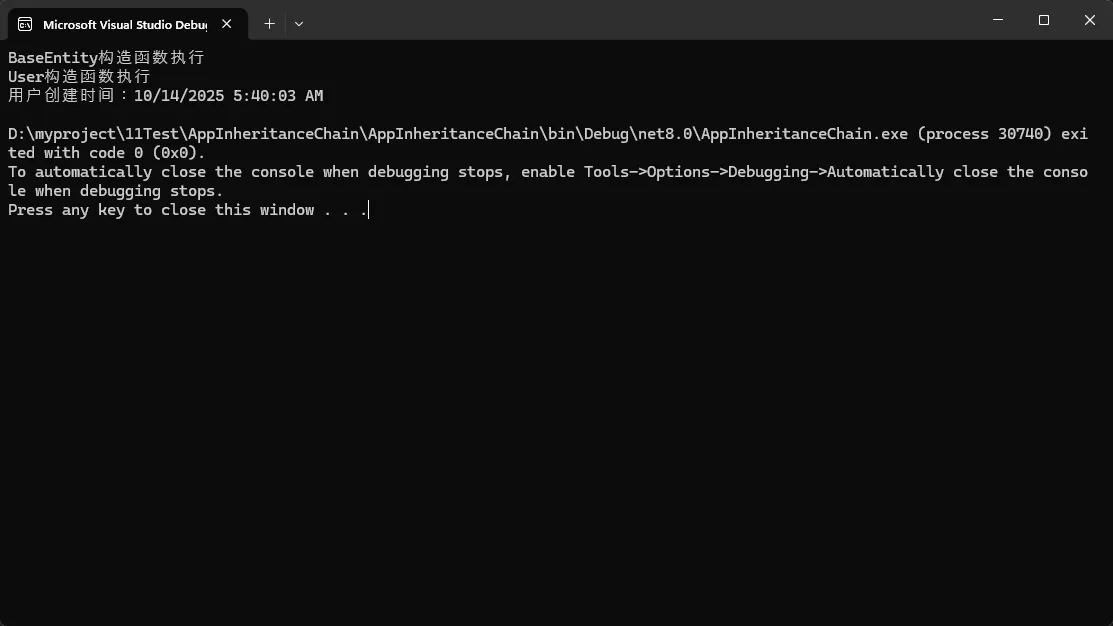
让我们通过一个常见的业务场景来说明:
c#// 错误的设计示例
public class BaseEntity
{
    public int Id { get; set; }
    public DateTime CreatedTime { get; set; }

    public BaseEntity()
    {
        Console.WriteLine("BaseEntity构造函数执行");
        CreatedTime = DateTime.Now;
    }
}

public class User : BaseEntity
{
    public string Name { get; set; }

    public User(string name)
    {
        Console.WriteLine("User构造函数执行");
        Name = name;
        Console.WriteLine($"用户创建时间:{CreatedTime}");
    }
}
🔧 解决方案1:理解基本调用顺序
📋 核心原理
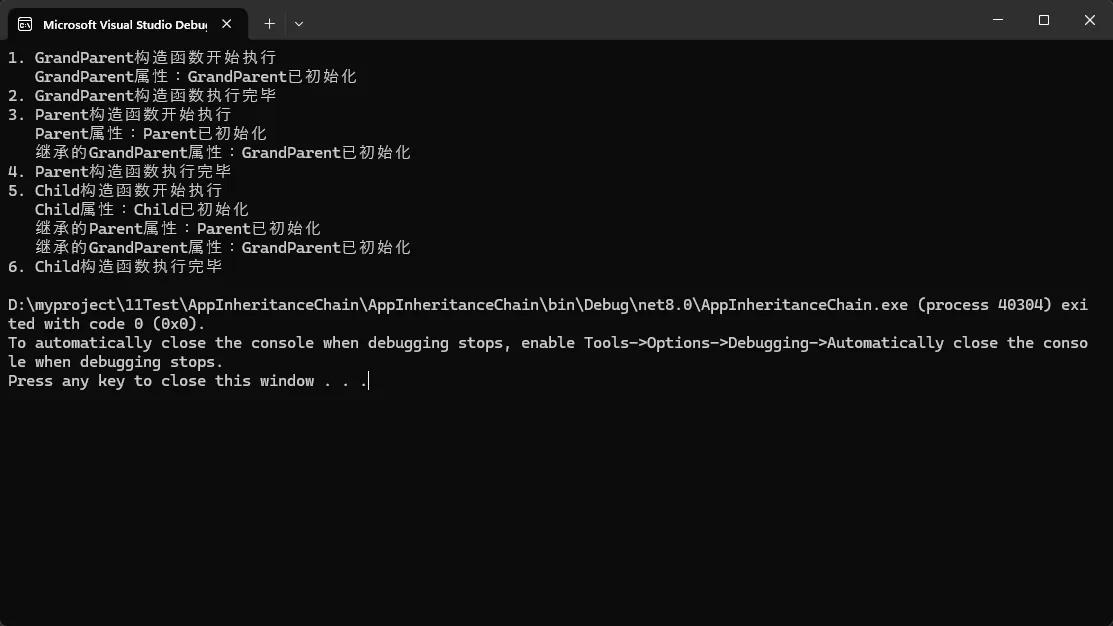
C#中构造函数的调用顺序遵循"从父到子"的原则:
- 最顶层父类构造函数先执行
- 逐级向下执行到子类构造函数
- 但是对象的实际类型在整个过程中都是子类类型
c#namespace AppInheritanceChain
{
    public class GrandParent
    {
        public string GrandParentProperty { get; set; }

        public GrandParent()
        {
            Console.WriteLine("1. GrandParent构造函数开始执行");
            GrandParentProperty = "GrandParent已初始化";
            Console.WriteLine($"   GrandParent属性:{GrandParentProperty}");
            Console.WriteLine("2. GrandParent构造函数执行完毕");
        }
    }

    public class Parent : GrandParent
    {
        public string ParentProperty { get; set; }

        public Parent()
        {
            Console.WriteLine("3. Parent构造函数开始执行");
            ParentProperty = "Parent已初始化";
            Console.WriteLine($"   Parent属性:{ParentProperty}");
            Console.WriteLine($"   继承的GrandParent属性:{GrandParentProperty}");
            Console.WriteLine("4. Parent构造函数执行完毕");
        }
    }

    public class Child : Parent
    {
        public string ChildProperty { get; set; }

        public Child()
        {
            Console.WriteLine("5. Child构造函数开始执行");
            ChildProperty = "Child已初始化";
            Console.WriteLine($"   Child属性:{ChildProperty}");
            Console.WriteLine($"   继承的Parent属性:{ParentProperty}");
            Console.WriteLine($"   继承的GrandParent属性:{GrandParentProperty}");
            Console.WriteLine("6. Child构造函数执行完毕");
        }
    }

    internal class Program
    {
        static void Main(string[] args)
        {
            var child = new Child();
        }
    }
}
⚠️ 常见坑点提醒
- 子类构造函数总是最后执行,但可以访问父类已初始化的成员
- 在父类构造函数中调用虚方法可能导致意外行为
🔧 解决方案2:带参数的构造函数调用
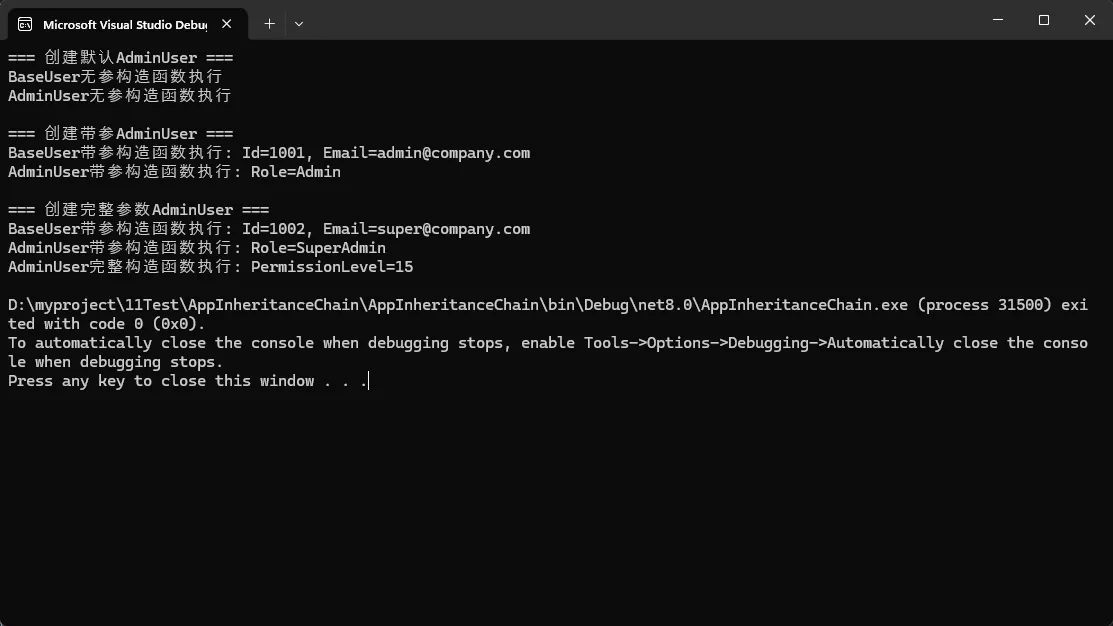
📋 使用base关键字控制调用
当需要向父类构造函数传递参数时,使用base关键字:
c#namespace AppInheritanceChain
{
    public class BaseUser
    {
        public int Id { get; private set; }
        public string Email { get; private set; }
        public DateTime CreatedTime { get; private set; }

        // 无参构造函数
        public BaseUser()
        {
            Console.WriteLine("BaseUser无参构造函数执行");
            Id = 0;
            Email = "default@example.com";
            CreatedTime = DateTime.Now;
        }

        // 带参构造函数
        public BaseUser(int id, string email)
        {
            Console.WriteLine($"BaseUser带参构造函数执行: Id={id}, Email={email}");
            Id = id;
            Email = email;
            CreatedTime = DateTime.Now;
        }
    }

    public class AdminUser : BaseUser
    {
        public string AdminRole { get; private set; }
        public int PermissionLevel { get; private set; }

        // 调用父类无参构造函数(默认行为)
        public AdminUser() : base()
        {
            Console.WriteLine("AdminUser无参构造函数执行");
            AdminRole = "SuperAdmin";
            PermissionLevel = 10;
        }

        // 调用父类带参构造函数
        public AdminUser(int id, string email, string role) : base(id, email)
        {
            Console.WriteLine($"AdminUser带参构造函数执行: Role={role}");
            AdminRole = role;
            PermissionLevel = role == "SuperAdmin" ? 10 : 5;
        }

        // 多个构造函数的链式调用
        public AdminUser(int id, string email, string role, int permissionLevel)
            : this(id, email, role)  // 调用本类的另一个构造函数
        {
            Console.WriteLine($"AdminUser完整构造函数执行: PermissionLevel={permissionLevel}");
            PermissionLevel = permissionLevel;
        }
    }


    internal class Program
    {
        static void Main(string[] args)
        {
            // 使用示例
            Console.WriteLine("=== 创建默认AdminUser ===");
            var admin1 = new AdminUser();

            Console.WriteLine("\n=== 创建带参AdminUser ===");
            var admin2 = new AdminUser(1001, "admin@company.com", "Admin");

            Console.WriteLine("\n=== 创建完整参数AdminUser ===");
            var admin3 = new AdminUser(1002, "super@company.com", "SuperAdmin", 15);
        }
    }
}
💡 实际应用场景
这种模式特别适用于:
- 实体类设计:基类处理通用属性(ID、创建时间等)
- 配置类继承:子类扩展特定配置项
- 工厂模式:不同类型对象的统一创建流程
🔧 解决方案3:虚方法在构造函数中的风险
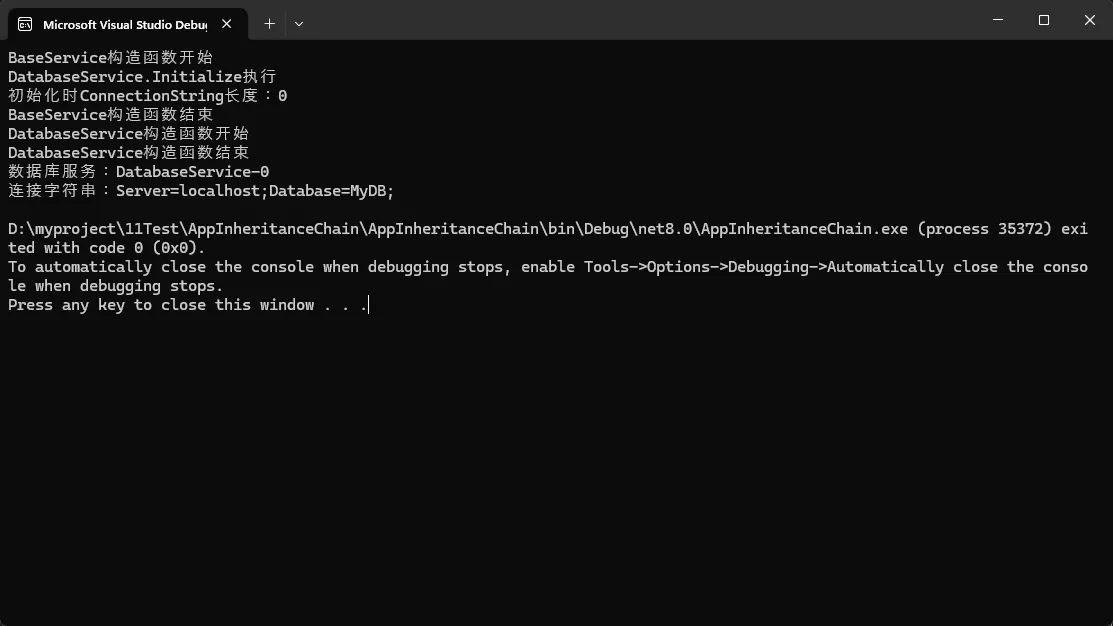
⚠️ 危险示例:构造函数中调用虚方法
c#namespace AppInheritanceChain
{
    public class BaseService
    {
        public string ServiceName { get; protected set; }

        public BaseService()
        {
            Console.WriteLine("BaseService构造函数开始");
            // 危险:在构造函数中调用虚方法
            Initialize();
            Console.WriteLine("BaseService构造函数结束");
        }

        protected virtual void Initialize()
        {
            Console.WriteLine("BaseService.Initialize执行");
            ServiceName = "BaseService";
        }

        public virtual void ShowInfo()
        {
            Console.WriteLine($"服务名称:{ServiceName}");
        }
    }

    public class DatabaseService : BaseService
    {
        public string ConnectionString { get; private set; }

        public DatabaseService()
        {
            Console.WriteLine("DatabaseService构造函数开始");
            ConnectionString = "Server=localhost;Database=MyDB;";
            Console.WriteLine("DatabaseService构造函数结束");
        }

        protected override void Initialize()
        {
            Console.WriteLine("DatabaseService.Initialize执行");
            // 危险:此时ConnectionString还未初始化!
            ServiceName = $"DatabaseService-{ConnectionString?.Length ?? 0}";
            Console.WriteLine($"初始化时ConnectionString长度:{ConnectionString?.Length ?? 0}");
        }

        public override void ShowInfo()
        {
            Console.WriteLine($"数据库服务:{ServiceName}");
            Console.WriteLine($"连接字符串:{ConnectionString}");
        }
    }


    internal class Program
    {
        static void Main(string[] args)
        {
            // 危险的使用方式
            var dbService = new DatabaseService();
            dbService.ShowInfo();
        }
    }
}
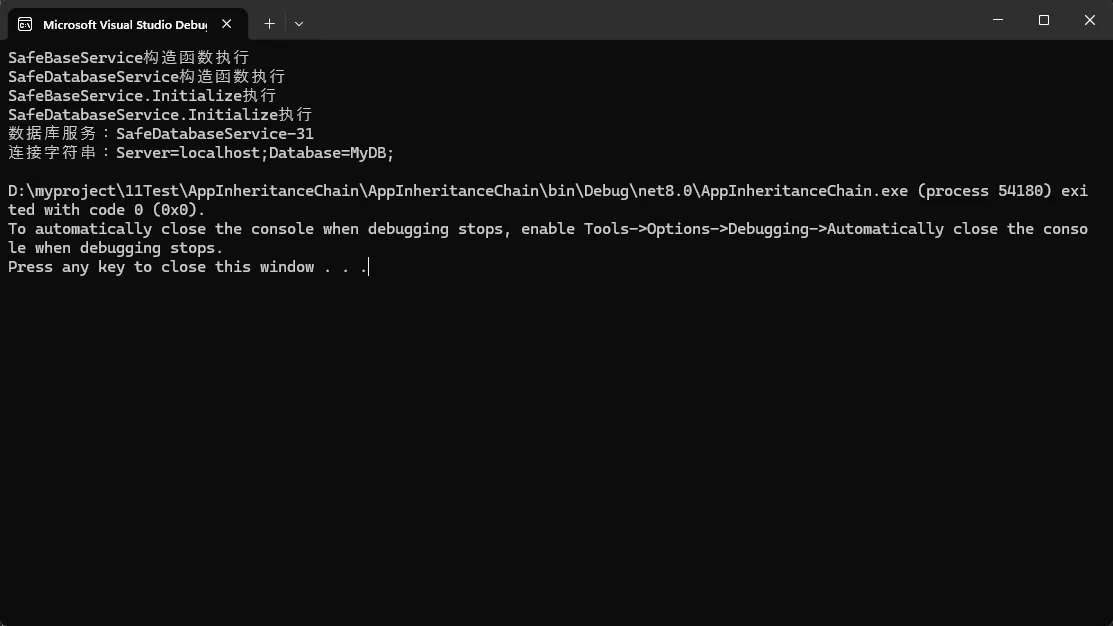
✅ 安全的解决方案:延迟初始化模式
c#namespace AppInheritanceChain
{
    public class SafeBaseService
    {
        public string ServiceName { get; protected set; }
        private bool _initialized = false;

        public SafeBaseService()
        {
            Console.WriteLine("SafeBaseService构造函数执行");
            ServiceName = "SafeBaseService";
            // 不在构造函数中调用虚方法
        }

        protected virtual void Initialize()
        {
            if (_initialized) return;

            Console.WriteLine("SafeBaseService.Initialize执行");
            _initialized = true;
        }

        public virtual void ShowInfo()
        {
            EnsureInitialized();
            Console.WriteLine($"服务名称:{ServiceName}");
        }

        protected void EnsureInitialized()
        {
            if (!_initialized)
            {
                Initialize();
            }
        }
    }

    public class SafeDatabaseService : SafeBaseService
    {
        public string ConnectionString { get; private set; }

        public SafeDatabaseService()
        {
            Console.WriteLine("SafeDatabaseService构造函数执行");
            ConnectionString = "Server=localhost;Database=MyDB;";
        }

        protected override void Initialize()
        {
            base.Initialize();
            Console.WriteLine("SafeDatabaseService.Initialize执行");
            ServiceName = $"SafeDatabaseService-{ConnectionString.Length}";
        }

        public override void ShowInfo()
        {
            EnsureInitialized();
            Console.WriteLine($"数据库服务:{ServiceName}");
            Console.WriteLine($"连接字符串:{ConnectionString}");
        }
    }
    internal class Program
    {
        static void Main(string[] args)
        {

            // 安全的使用方式
            var safeDbService = new SafeDatabaseService();
            safeDbService.ShowInfo();
        }
    }
}
🔧 解决方案4:静态构造函数的调用时机
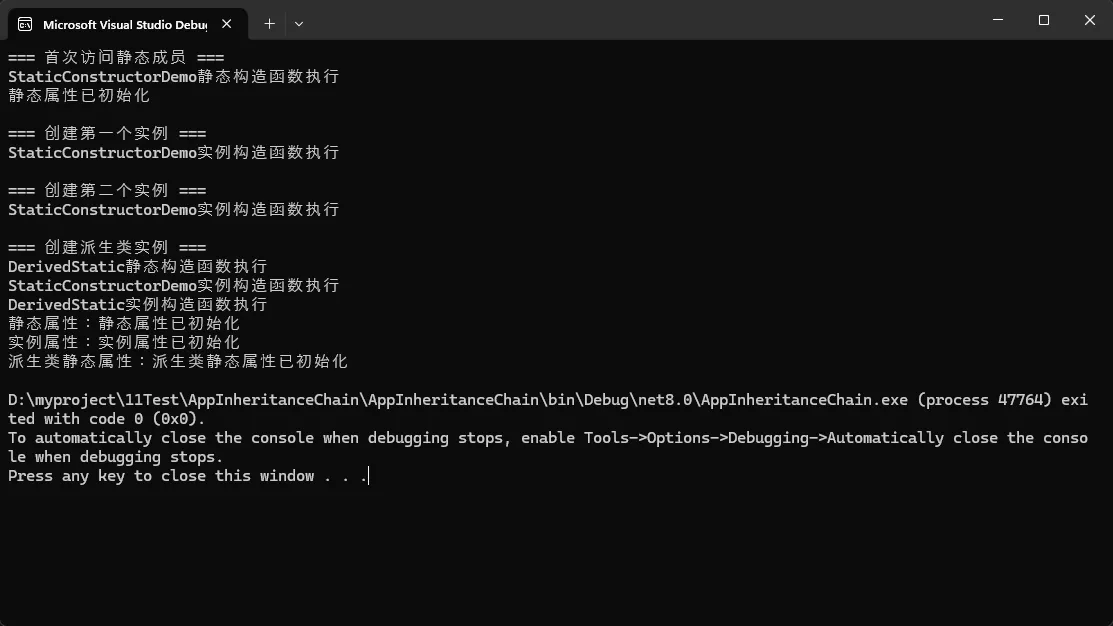
📋 静态构造函数的特殊规则
c#public class StaticConstructorDemo
{
    public static string StaticProperty { get; private set; }
    public string InstanceProperty { get; private set; }

    // 静态构造函数:类首次被引用时执行,且只执行一次
    static StaticConstructorDemo()
    {
        Console.WriteLine("StaticConstructorDemo静态构造函数执行");
        StaticProperty = "静态属性已初始化";
    }

    // 实例构造函数:每次创建对象时执行
    public StaticConstructorDemo()
    {
        Console.WriteLine("StaticConstructorDemo实例构造函数执行");
        InstanceProperty = "实例属性已初始化";
    }

    public void ShowInfo()
    {
        Console.WriteLine($"静态属性:{StaticProperty}");
        Console.WriteLine($"实例属性:{InstanceProperty}");
    }
}

public class DerivedStatic : StaticConstructorDemo
{
    public static string DerivedStaticProperty { get; private set; }

    static DerivedStatic()
    {
        Console.WriteLine("DerivedStatic静态构造函数执行");
        DerivedStaticProperty = "派生类静态属性已初始化";
    }

    public DerivedStatic()
    {
        Console.WriteLine("DerivedStatic实例构造函数执行");
    }

    public new void ShowInfo()
    {
        base.ShowInfo();
        Console.WriteLine($"派生类静态属性:{DerivedStaticProperty}");
    }
}

// 使用示例
Console.WriteLine("=== 首次访问静态成员 ===");
Console.WriteLine(StaticConstructorDemo.StaticProperty);

Console.WriteLine("\n=== 创建第一个实例 ===");
var obj1 = new StaticConstructorDemo();

Console.WriteLine("\n=== 创建第二个实例 ===");
var obj2 = new StaticConstructorDemo();

Console.WriteLine("\n=== 创建派生类实例 ===");
var derivedObj = new DerivedStatic();
derivedObj.ShowInfo();
🔧 解决方案5:实际项目中的最佳实践
💡 实体类设计模式
c#namespace AppInheritanceChain
{
    public abstract class BaseEntity
    {
        public int Id { get; protected set; }
        public DateTime CreatedTime { get; protected set; }
        public DateTime? UpdatedTime { get; protected set; }
        public bool IsDeleted { get; protected set; }

        protected BaseEntity()
        {
            CreatedTime = DateTime.Now;
            IsDeleted = false;
        }

        protected BaseEntity(int id) : this()
        {
            Id = id;
        }

        public virtual void MarkAsDeleted()
        {
            IsDeleted = true;
            UpdatedTime = DateTime.Now;
        }

        public virtual void Update()
        {
            UpdatedTime = DateTime.Now;
        }
    }

    public class Product : BaseEntity
    {
        public string Name { get; private set; }
        public decimal Price { get; private set; }
        public string Category { get; private set; }

        // 禁止使用无参构造函数
        private Product() { }

        public Product(string name, decimal price, string category) : base()
        {
            Name = name ?? throw new ArgumentNullException(nameof(name));
            Price = price;
            Category = category ?? throw new ArgumentNullException(nameof(category));
        }

        public Product(int id, string name, decimal price, string category) : base(id)
        {
            Name = name ?? throw new ArgumentNullException(nameof(name));
            Price = price;
            Category = category ?? throw new ArgumentNullException(nameof(category));
        }

        public void UpdatePrice(decimal newPrice)
        {
            if (newPrice < 0)
                throw new ArgumentException("价格不能为负数");

            Price = newPrice;
            Update(); // 调用父类方法更新时间
        }

        public override string ToString()
        {
            return $"产品:{Name},价格:{Price:C},类别:{Category}";
        }
    }

    internal class Program
    {
        static void Main(string[] args)
        {
            // 使用示例
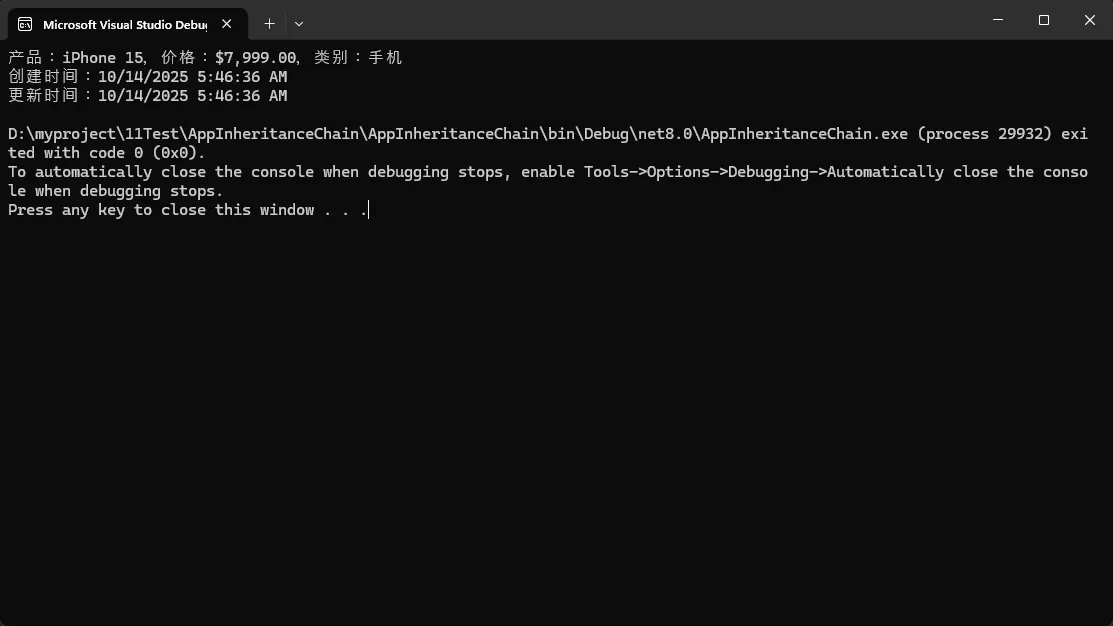
            var product = new Product("iPhone 15", 7999m, "手机");
            Console.WriteLine(product);
            Console.WriteLine($"创建时间:{product.CreatedTime}");

            product.UpdatePrice(7599m);
            Console.WriteLine($"更新时间:{product.UpdatedTime}");
        }
    }
}
💡 服务层设计模式
c#namespace AppInheritanceChain
{
    public abstract class BaseService
    {
        protected ILogger Logger { get; private set; }
        protected string ServiceName { get; private set; }

        protected BaseService(ILogger logger, string serviceName)
        {
            Logger = logger ?? throw new ArgumentNullException(nameof(logger));
            ServiceName = serviceName ?? throw new ArgumentNullException(nameof(serviceName));

            Logger.Info($"{ServiceName} 服务初始化完成");
        }

        public virtual void Start()
        {
            Logger.Info($"{ServiceName} 服务启动");
            OnStart();
        }

        public virtual void Stop()
        {
            Logger.Info($"{ServiceName} 服务停止");
            OnStop();
        }

        protected abstract void OnStart();
        protected abstract void OnStop();
    }

    public class EmailService : BaseService
    {
        private readonly string _smtpServer;
        private readonly int _port;

        public EmailService(ILogger logger, string smtpServer, int port)
            : base(logger, "EmailService")
        {
            _smtpServer = smtpServer ?? throw new ArgumentNullException(nameof(smtpServer));
            _port = port;

            Logger.Info($"邮件服务配置:{_smtpServer}:{_port}");
        }

        protected override void OnStart()
        {
            Logger.Info($"连接到SMTP服务器:{_smtpServer}:{_port}");
            // 实际的服务启动逻辑
        }

        protected override void OnStop()
        {
            Logger.Info("断开SMTP连接");
            // 实际的服务停止逻辑
        }

        public void SendEmail(string to, string subject, string body)
        {
            Logger.Info($"发送邮件到:{to},主题:{subject}");
            // 实际的邮件发送逻辑
        }
    }

    // 简单的日志接口实现
    public interface ILogger
    {
        void Info(string message);
    }

    public class ConsoleLogger : ILogger
    {
        public void Info(string message)
        {
            Console.WriteLine($"[INFO] {DateTime.Now:yyyy-MM-dd HH:mm:ss} - {message}");
        }
    }

    internal class Program
    {
        static void Main(string[] args)
        {
            // 使用示例
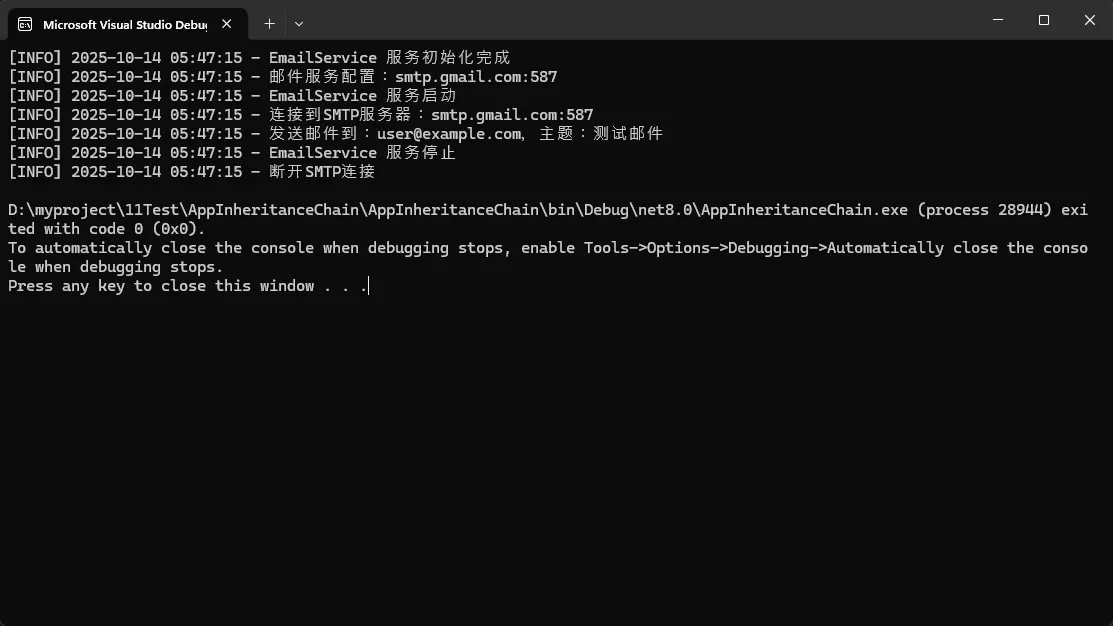
            var logger = new ConsoleLogger();
            var emailService = new EmailService(logger, "smtp.gmail.com", 587);
            emailService.Start();
            emailService.SendEmail("user@example.com", "测试邮件", "这是一封测试邮件");
            emailService.Stop();
        }
    }
}
🎯 总结与思考
通过本文的深入分析,我们掌握了C#继承链中构造函数调用的三个核心要点:
- 调用顺序是固定的:始终遵循"从父到子"的执行顺序,这确保了父类成员在子类使用前已正确初始化
- base关键字的重要性:合理使用base关键字可以精确控制父类构造函数的调用,避免不必要的默认调用
- 虚方法调用的风险:在构造函数中调用虚方法可能导致子类成员未初始化的问题,应采用延迟初始化模式
收藏级代码模板:
c#// 标准继承构造函数模板
public class BaseClass
{
    protected BaseClass(/* 必需参数 */) { /* 初始化逻辑 */ }
}

public class DerivedClass : BaseClass
{
    public DerivedClass(/* 参数 */) : base(/* 传递给父类的参数 */)
    {
        /* 子类特有的初始化逻辑 */
    }
}
掌握这些知识点不仅能让你的代码更加稳定可靠,还能在面试中展现出扎实的C#基础功底。
互动问题:
- 你在实际项目中遇到过因为构造函数调用顺序导致的Bug吗?是如何解决的?
- 除了文中提到的场景,你还能想到哪些需要特别注意构造函数调用顺序的情况?
觉得这篇文章对你有帮助吗?请分享给更多的C#开发同行,让我们一起提升代码质量!
关注我们,获取更多C#开发技巧和最佳实践!
本文作者:技术老小子
本文链接:
版权声明:本博客所有文章除特别声明外,均采用 BY-NC-SA 许可协议。转载请注明出处!
目录