
Press Ctrl+ and K to search
目录
你是否经常为写大量的样板代码而烦恼?创建一个简单的数据类,却要写几十行的构造函数、属性、Equals、GetHashCode等方法?或者担心内部工具类被外部误用,想要更精确的访问控制?
**今天我们来探索C#中两个强大却容易被忽视的特性:Record类型和File修饰符。**这两个特性能够显著减少样板代码,提升代码的可维护性和安全性。本文将通过完整的实战示例,带你掌握这两个现代C#开发的必备技能。
🔍 问题分析:传统代码的痛点
样板代码泛滥的困扰
在传统的C#开发中,我们经常遇到这些问题:
- 数据类冗长:一个简单的数据传输对象需要大量样板代码
- 值比较复杂:实现正确的相等性比较需要重写多个方法
- 不可变性难实现:创建不可变对象需要很多额外工作
- 访问控制粗糙:只有public、private等,缺乏文件级别的精确控制
C#// 传统方式:大量样板代码
public class TraditionalPerson
{
    public string Name { get; }
    public int Age { get; }
    public string Email { get; }

    public TraditionalPerson(string name, int age, string email)
    {
        Name = name;
        Age = age;
        Email = email;
    }

    public override bool Equals(object obj) { /* 复杂实现 */ }
    public override int GetHashCode() { /* 复杂实现 */ }
    public override string ToString() { /* 自定义实现 */ }
    // ... 更多样板代码
}
💡 解决方案:现代C#的优雅实现
🎯 Record类型:告别样板代码
Record类型是C# 9.0引入的革命性特性,专门用于创建不可变的数据载体。
核心优势:
- 自动生成:构造函数、属性、
Equals、GetHashCode、ToString - 值相等性:基于内容而非引用进行比较
- 不可变更新:通过
with表达式优雅地创建修改版本 - 解构支持:自动支持解构语法
🔒 File修饰符:精确的访问控制
File修饰符是C# 11.0的新特性,提供文件级别的访问控制。
核心优势:
- 文件级封装:类型只在当前文件中可见
- 更好的组织:相关的工具类可以就近定义
- 避免污染:防止内部实现泄露到公共API
🛠️ 代码实战:完整示例解析
让我们通过一个完整的示例来看看这些特性的强大之处:
📋 Record类型实战
C#public record Person(string Name, int Age, string Email)
{
    public string DisplayName => $"{Name} ({Age}岁)";

    public override string ToString()
    {
        return $"姓名: {Name}, 年龄: {Age}, 邮箱: {Email}";
    }
    public bool IsAdult => Age >= 18;
}

public record Employee(string Name, int Age, string Email,
                      string Department, decimal Salary)
    : Person(Name, Age, Email)
{
    public string JobInfo => $"{Department} - ¥{Salary:N0}";
}
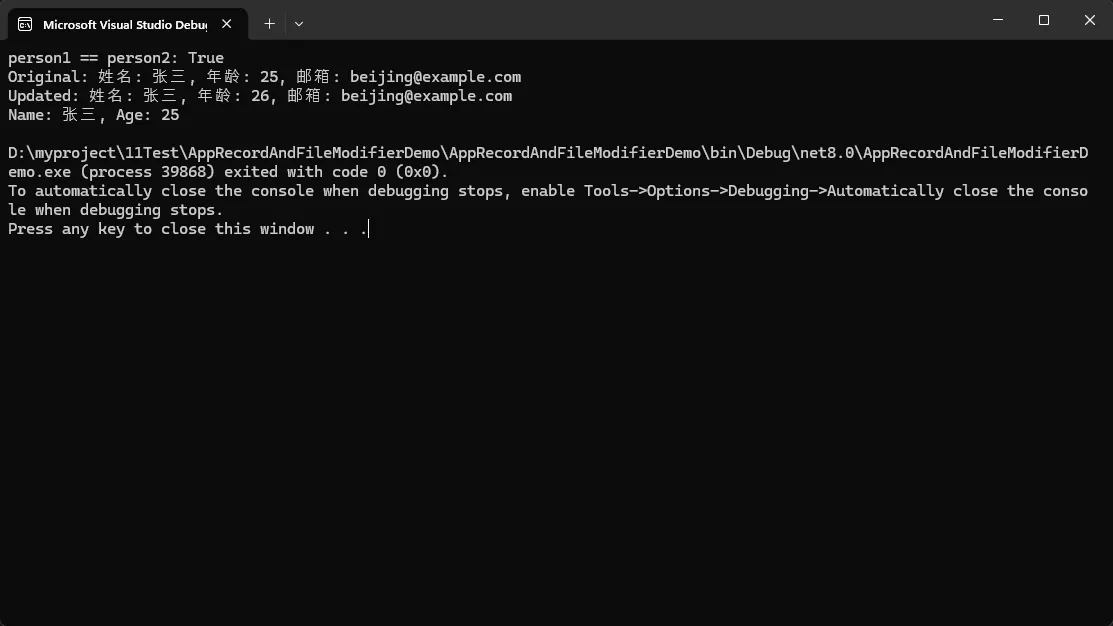
使用示例:
C#public class Program
{
    public static void Main(string[] args)
    {
        // 创建实例 - 构造函数自动生成
        var person1 = new Person("张三", 25, "beijing@example.com");
        var person2 = new Person("张三", 25, "beijing@example.com");

        // 值相等性比较 - 自动实现
        Console.WriteLine($"person1 == person2: {person1 == person2}");

        // 不可变更新 - with表达式
        var updatedPerson = person1 with { Age = 26 };
        Console.WriteLine($"Original: {person1}"); // 原对象未改变
        Console.WriteLine($"Updated: {updatedPerson}");

        var (name, age, email) = person1;
        Console.WriteLine($"Name: {name}, Age: {age}");
    }
}
🔐 File修饰符实战
C#// File级别的工具类 - 只在当前文件中可见
file class FileHelper
{
    private readonly string _prefix = "[FileHelper]";

    public void ProcessData(string data)
    {
        Console.WriteLine($"{_prefix} 处理数据: {data}");
        InternalProcess(data);
    }

    private void InternalProcess(string data)
    {
        Console.WriteLine($"{_prefix} 内部处理: {data.ToUpper()}");
    }
}

// File级别的接口和实现
file interface IFileService
{
    void Execute(string command);
}

file class FileServiceImpl : IFileService
{
    public void Execute(string command)
    {
        Console.WriteLine($"[FileService] 执行命令: {command}");
    }
}

// File级别的枚举
file enum FileProcessStatus
{
    Idle, Processing, Completed, Failed
}
🧮 复杂场景:文件级计算器
C#file class FileCalculator
{
    private static readonly double Pi = Math.PI;

    public double Add(double a, double b) => a + b;
    public double Subtract(double a, double b) => a - b;
    public double Multiply(double a, double b) => a * b;

    public double Divide(double a, double b)
    {
        if (Math.Abs(b) < double.Epsilon)
            throw new DivideByZeroException("除数不能为零");
        return a / b;
    }

    public static double GetPi() => Pi;
}
📊 特殊Record类型
C#// 只读记录结构体 - 高性能的值类型
public readonly record struct Temperature(double Celsius)
{
    public double Fahrenheit => Celsius * 9.0 / 5.0 + 32;
    public double Kelvin => Celsius + 273.15;

    public override string ToString()
    {
        return $"{Celsius:F1}°C ({Fahrenheit:F1}°F)";
    }
}

// 位置记录 - 几何计算
public record Point(double X, double Y)
{
    public double DistanceFromOrigin => Math.Sqrt(X * X + Y * Y);
    public static Point Origin => new(0, 0);
}
🏳️🌈 完整代码
C#namespace AppRecordAndFileModifierDemo;

public class Program
{
    public static void Main(string[] args)
    {
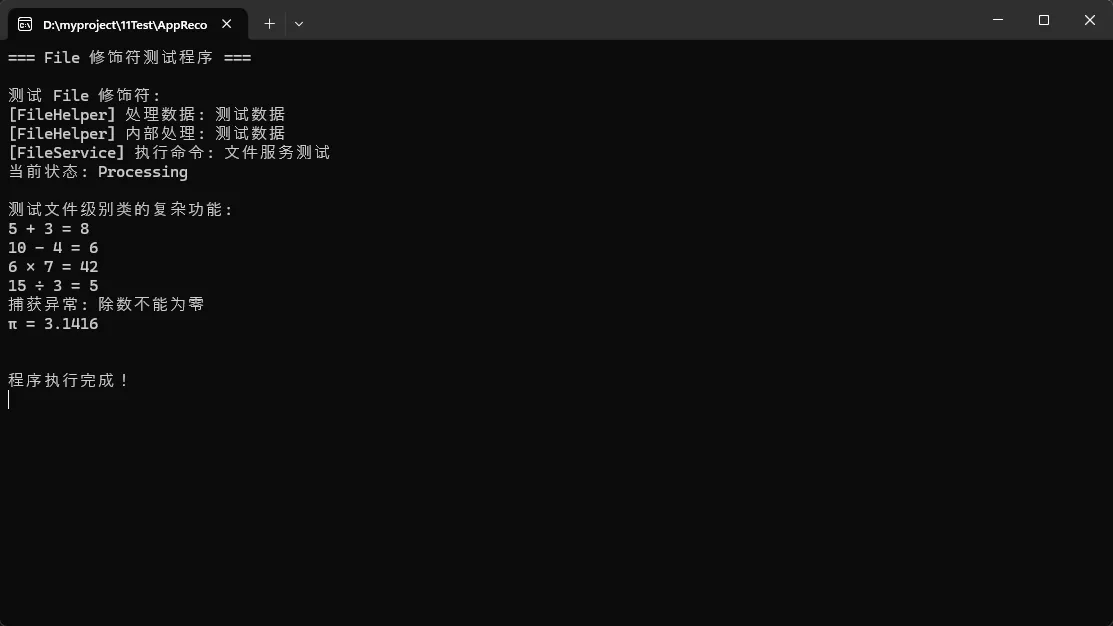
        Console.WriteLine("=== File 修饰符测试程序 ===\n");

        // 测试 File 修饰符
        TestFileModifier();

        // 测试文件级别类的功能
        TestFileClassFeatures();

        Console.WriteLine("\n程序执行完成!");
        Console.ReadKey();
    }
    private static void TestFileModifier()
    {
        Console.WriteLine("测试 File 修饰符:");

        // 使用文件级别的类
        var fileHelper = new FileHelper();
        fileHelper.ProcessData("测试数据");

        // 使用文件级别的接口
        IFileService service = new FileServiceImpl();
        service.Execute("文件服务测试");

        // 使用文件级别的枚举
        var status = FileProcessStatus.Processing;
        Console.WriteLine($"当前状态: {status}");

        Console.WriteLine();
    }

    private static void TestFileClassFeatures()
    {
        Console.WriteLine("测试文件级别类的复杂功能:");

        var calculator = new FileCalculator();

        Console.WriteLine($"5 + 3 = {calculator.Add(5, 3)}");
        Console.WriteLine($"10 - 4 = {calculator.Subtract(10, 4)}");
        Console.WriteLine($"6 × 7 = {calculator.Multiply(6, 7)}");
        Console.WriteLine($"15 ÷ 3 = {calculator.Divide(15, 3)}");

        try
        {
            calculator.Divide(10, 0);
        }
        catch (DivideByZeroException ex)
        {
            Console.WriteLine($"捕获异常: {ex.Message}");
        }

        // 测试静态方法
        Console.WriteLine($"π = {FileCalculator.GetPi():F4}");

        Console.WriteLine();
    }
}

// File 修饰符示例 - 只能在当前文件中访问
file class FileHelper
{
    private readonly string _prefix = "[FileHelper]";

    public void ProcessData(string data)
    {
        Console.WriteLine($"{_prefix} 处理数据: {data}");
        InternalProcess(data);
    }

    private void InternalProcess(string data)
    {
        Console.WriteLine($"{_prefix} 内部处理: {data.ToUpper()}");
    }
}

file interface IFileService
{
    void Execute(string command);
}

file class FileServiceImpl : IFileService
{
    public void Execute(string command)
    {
        Console.WriteLine($"[FileService] 执行命令: {command}");
    }
}

file enum FileProcessStatus
{
    Idle,
    Processing,
    Completed,
    Failed
}

// 更复杂的 file 类示例
file class FileCalculator
{
    private static readonly double Pi = Math.PI;

    public double Add(double a, double b) => a + b;

    public double Subtract(double a, double b) => a - b;

    public double Multiply(double a, double b) => a * b;

    public double Divide(double a, double b)
    {
        if (Math.Abs(b) < double.Epsilon)
            throw new DivideByZeroException("除数不能为零");
        return a / b;
    }

    public static double GetPi() => Pi;
}
⚠️ 常见坑点提醒
Record类型注意事项
- 引用类型属性:Record的相等性比较是递归的,但要注意引用类型的处理
- 继承限制:Record可以继承Record,但不能继承class,反之亦然
- 性能考虑:虽然简洁,但相等性比较和哈希计算有一定开销
File修饰符注意事项
- 编译单元限制:只在单个文件中可见,跨文件无法访问
- 命名冲突:不同文件可以有同名的file类,不会冲突
- 调试体验:某些调试工具可能对file类型的支持不够完善
🎯 实际应用场景
Record类型适用场景
- API数据传输:DTO、响应模型
- 配置对象:应用配置、选项类
- 值对象:坐标、颜色、货币等
- 事件数据:事件溯源、消息传递
File修饰符适用场景
- 内部工具类:文件内专用的辅助类
- 实现细节:不希望暴露给外部的实现类
- 测试辅助:测试文件中的辅助类型
- 算法实现:复杂算法的内部数据结构
🌟 最佳实践建议
Record设计原则
C#// ✅ 好的实践:简洁明确
public record UserProfile(string Username, string Email, DateTime CreatedAt);

// ✅ 好的实践:添加验证
public record ProductInfo(string Name, decimal Price, string Category)
{
    public ProductInfo : this(Name, Price, Category)
    {
        if (Price < 0) throw new ArgumentException("价格不能为负数");
    }
}

// ❌ 避免:过于复杂的Record
// Record应该保持简单,复杂业务逻辑考虑使用class
File修饰符使用建议
C#// ✅ 好的实践:工具类组织
file static class ValidationHelpers
{
    public static bool IsValidEmail(string email) => /* 实现 */;
    public static bool IsValidPhone(string phone) => /* 实现 */;
}

// ✅ 好的实践:内部状态管理
file class ProcessingState
{
    private readonly Dictionary<string, object> _state = new();
    // 内部实现...
}
🎉 总结与展望
通过本文的深入探索,我们掌握了C#中两个强大的现代特性:
🔑 三个核心要点:
- Record类型是数据建模的首选:自动生成样板代码,提供值相等性和不可变性,让数据类变得简洁优雅
- File修饰符提供精确的访问控制:文件级别的封装让代码组织更合理,避免内部实现泄露
- 两者结合使用效果更佳:在实际项目中,合理运用这两个特性可以显著提升代码质量和开发效率
这些特性不仅减少了样板代码,更重要的是让我们的代码表达更清晰、结构更合理。随着.NET生态的持续发展,掌握这些现代语言特性将成为高效C#开发的必备技能。
🤔 互动时间:
- 你在项目中是否遇到过样板代码过多的困扰?Record类型能解决你的哪些痛点?
- 对于访问控制,你还有哪些精细化的需求?File修饰符是否满足你的场景?
如果觉得这篇文章对你有帮助,请转发给更多的C#同行,让我们一起拥抱现代C#开发的最佳实践!
关注我,获取更多C#高阶开发技巧和最佳实践分享!
本文作者:技术老小子
本文链接:
版权声明:本博客所有文章除特别声明外,均采用 BY-NC-SA 许可协议。转载请注明出处!
目录