Windows 用户界面 (UI) API 是一组用于创建和管理 Windows 窗口、控件以及处理用户输入的函数和数据结构。这些 API 可以通过 C# 中的 Platform Invocation Services (P/Invoke) 来调用。下面是一些常用的 Windows 用户界面 API,以及它们在 C# 中的使用示例。
MessageBox: 显示一个消息框
C#[DllImport("user32.dll", CharSet = CharSet.Auto)]
public static extern int MessageBox(IntPtr hWnd, string text, string caption, uint type);
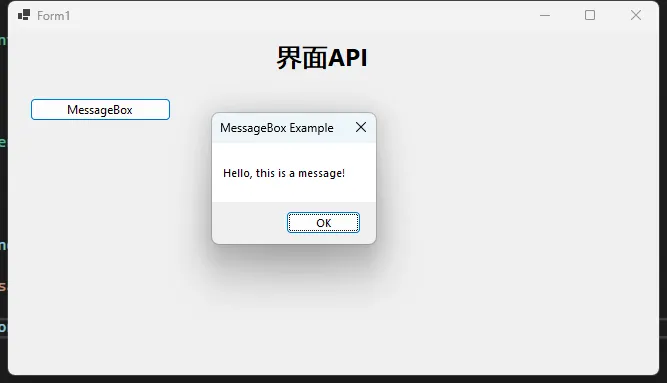
private void btnMessageBox_Click(object sender, EventArgs e)
{
    string message = "Hello, this is a message!";
    string caption = "MessageBox Example";
    MessageBox(IntPtr.Zero, message, caption, 0);
}
- hWnd: 父窗口的句柄,如果为 IntPtr.Zero,则消息框将显示在屏幕中央。
- text: 要显示的消息文本。
- caption: 消息框的标题。
- type: 消息框的类型,例如可以是 0 表示普通消息框。
- 0: 显示一个包含“确定”按钮的消息框。
- 1: 显示一个包含“确定”和“取消”按钮的消息框。
- 2: 显示一个包含“中止”、“重试”和“忽略”按钮的消息框。
- 3: 显示一个包含“是”、“否”和“取消”按钮的消息框。
- 4: 显示一个包含“是”和“否”按钮的消息框。
- 5: 显示一个包含“重试”和“取消”按钮的消息框。
- 6: 显示一个包含“取消”、“重试”和“继续”按钮的消息框。
SetWindowText: 设置窗口文本
C#[DllImport("user32.dll", CharSet = CharSet.Auto, SetLastError = true)]
public static extern bool SetWindowText(IntPtr hWnd, string lpString);

private void btnSetWindowText_Click(object sender, EventArgs e)
{
    IntPtr hwnd = this.Handle; // 获取窗口句柄
    SetWindowText(hwnd, "New Window Text");
}
在C#中,我们可以使用系统的Windows API来进行文件操作,例如创建、读取、写入、删除文件等。下面将介绍如何使用C#调用系统的Windows API来实现文件操作,并提供一些示例代码来说明具体的用法。
创建文件
我们可以使用CreateFile函数来创建一个新的文件。下面是一个示例代码:
CreateFile 是 Windows API 中用于创建或打开文件或 I/O 设备的函数。它的具体参数说明如下:
C#[DllImport("kernel32.dll", SetLastError = true)]
static extern IntPtr CreateFile(string lpFileName, uint dwDesiredAccess, uint dwShareMode, IntPtr lpSecurityAttributes, uint dwCreationDisposition, uint dwFlagsAndAttributes, IntPtr hTemplateFile);
在C#中,我们可以使用Windows API来获取系统信息,例如获取CPU信息、内存信息、磁盘信息等。下面我们将演示如何使用C#调用系统Windows API来读取系统信息。
获取CPU信息
processorArchitecture: 表示处理器架构,例如 x86、x64 等pageSize: 表示页面大小,通常是内存页面的大小,以字节为单位minimumApplicationAddress: 表示应用程序可以使用的最小内存地址maximumApplicationAddress: 表示应用程序可以使用的最大内存地址activeProcessorMask: 表示活动处理器的位掩码numberOfProcessors: 表示系统中的处理器数量processorType: 表示处理器类型allocationGranularity: 表示内存分配的粒度processorLevel: 表示处理器级别processorRevision: 表示处理器修订版本
在C#中,我们可以使用Windows Win32 API来对系统注册表进行操作。注册表是Windows操作系统中用来存储配置信息的重要数据库,我们可以通过C#来读取、写入和删除注册表中的键和值。
下面是一些使用C#调用系统Windows Win32 API注册表操作的示例:
读取注册表键值
RegOpenKeyEx
用于打开指定的注册表键。它的参数说明如下:
- hKey:指定要打开的注册表键的句柄。可以是以下值之一:
- HKEY_CLASSES_ROOT
- HKEY_CURRENT_USER
- HKEY_LOCAL_MACHINE
- HKEY_USERS
- HKEY_CURRENT_CONFIG
- 或者其他通过RegCreateKeyEx或RegOpenKeyEx打开的注册表键的句柄。
- lpSubKey:要打开的注册表键的名称。例如:"SOFTWARE\MyApp"。
- ulOptions:保留参数,通常设置为0。
- samDesired:指定打开注册表键的访问权限和选项。可以是以下值之一或它们的组合:
- KEY_READ(只读)
- KEY_WRITE(写入)
- KEY_ALL_ACCESS(完全访问权限)
- phkResult:用于接收打开的注册表键的句柄。
函数返回值为整型,表示操作的结果。
RegQueryValueEx
用于检索指定注册表键的值。它的参数说明如下:
- hKey:指定要查询的注册表键的句柄。
- lpValueName:要查询的注册表值的名称。
- lpReserved:保留参数,通常设置为0。
- lpType:用于接收键值数据的类型。例如,REG_SZ、REG_DWORD等。
- lpData:用于接收键值数据的缓冲区的指针。
- lpcbData:指定lpData缓冲区的大小,以字节为单位。在调用函数之前,它指定lpData缓冲区的大小。在函数返回时,它包含实际写入lpData缓冲区的字节数。
函数返回值为整型,表示操作的结果。
在许多应用程序中,特别是在需要快速访问或激活特定功能的情况下,全局热键(即在操作系统的任何地方都可以使用的快捷键)变得非常有用。在C#中实现这一功能可能看起来有些复杂,但通过正确的步骤和Windows API的帮助,这实际上是完全可行的。本文将指导你如何在C#应用程序中创建和使用全局热键。
步骤1:定义API函数
首先,我们需要定义一些Windows API函数,这些函数将帮助我们注册和注销全局热键。通过使用DllImport属性,我们可以在C#中调用这些本地方法。
C#using System;
using System.Runtime.InteropServices;
using System.Windows.Forms;

public class HotKeyManager
{
    // 导入user32.dll中的RegisterHotKey函数,用于注册全局热键
    [DllImport("user32.dll", SetLastError = true)]
    private static extern bool RegisterHotKey(IntPtr hWnd, int id, uint fsModifiers, uint vk);

    // 导入user32.dll中的UnregisterHotKey函数,用于注销全局热键
    [DllImport("user32.dll", SetLastError = true)]
    private static extern bool UnregisterHotKey(IntPtr hWnd, int id);

    // 定义WM_HOTKEY消息的消息ID,当注册的热键被按下时,系统发送此消息
    private const int WM_HOTKEY = 0x0312;

    // 定义修饰键的常量,用于指定热键中包含的修饰键
    public const uint MOD_ALT = 0x1;       // Alt键
    public const uint MOD_CONTROL = 0x2;   // Ctrl键
    public const uint MOD_SHIFT = 0x4;     // Shift键
    public const uint MOD_WIN = 0x8;       // Windows键
}
