最近在Reddit上看到一个引起千万程序员共鸣的帖子:一位仅有2年经验的C#开发者独自维护着一家公司的核心系统,面对百万级数据查询时束手无策。他的困惑让我想起了自己的成长经历——谁没有在LINQ的性能陷阱里跌过跟头呢?
据统计,70%的C#开发者在处理大数据量时都遇到过性能问题,而其中60%的问题源于LINQ使用不当。今天,我将结合实际案例,分享5个立竿见影的LINQ性能优化技巧,让你从此告别查询超时!
🔥 问题分析:为什么你的LINQ查询这么慢?
常见痛点梳理
许多开发者面临的核心问题包括:
- 物化陷阱:不理解
.ToList()的后果 - 过度获取:拉取不需要的数据
- 延迟加载:造成N+1查询问题
- 盲目使用Include:加载无关数据
让我们看看这个真实案例:
C#// ❌ 危险操作 - 会导致内存溢出
var allCustomers = db.Customers.ToList();
var filteredCustomers = allCustomers.Where(c => c.Country == "China");
问题分析:这段代码会将整个Customers表加载到内存中,如果表中有百万条记录,直接导致内存溢出。
💡 解决方案:5个实战优化技巧
🎯 技巧1:善用Select投影,只取所需
核心原则:永远不要获取超过需求的数据
C#namespace AppLinq5
{
    // Customer 实体类
    public class Customer
    {
        public int Id { get; set; }
        public string Name { get; set; }
        public string Email { get; set; }
        public string Phone { get; set; }
        public string Address { get; set; }
        public bool IsActive { get; set; }
        public string Description { get; set; }  // 大文本字段
    }

    // DTO 类 - 只包含需要的字段
    public class CustomerDto
    {
        public int Id { get; set; }
        public string Name { get; set; }
        public string Email { get; set; }
    }


    public class CustomerRepository
    {
        private readonly List<Customer> _customers;

        public CustomerRepository()
        {
            // 模拟数据
            _customers = new List<Customer>
        {
            new Customer { Id = 1, Name = "张三", Email = "zhang@email.com", Phone = "123456", Address = "北京市", IsActive = true, Description = "很长的描述文本..." },
            new Customer { Id = 2, Name = "李四", Email = "li@email.com", Phone = "789012", Address = "上海市", IsActive = true, Description = "另一个很长的描述..." },
            new Customer { Id = 3, Name = "王五", Email = "wang@email.com", Phone = "345678", Address = "广州市", IsActive = false, Description = "第三个长描述..." }
        };
        }

        public IQueryable<Customer> GetCustomers()
        {
            return _customers.AsQueryable();
        }
    }

    public class CustomerService
    {
        private readonly CustomerRepository _repository;

        public CustomerService(CustomerRepository repository)
        {
            _repository = repository;
        }

        // ❌ 错误做法 - 查询所有字段
        public List<Customer> GetAllCustomersBad()
        {
            return _repository.GetCustomers()
                .Where(c => c.IsActive)
                .ToList();  // 返回所有字段,包括不需要的大文本字段
        }

        // ✅ 正确做法 - 只选择需要的字段
        public List<CustomerDto> GetCustomerSummary()
        {
            return _repository.GetCustomers()
                .Where(c => c.IsActive)
                .Select(c => new CustomerDto
                {
                    Id = c.Id,
                    Name = c.Name,
                    Email = c.Email  // 只选择需要的字段
                })
                .ToList();
        }
    }

    internal class Program
    {
        static void Main(string[] args)
        {
            var repository = new CustomerRepository();
            var customerService = new CustomerService(repository);

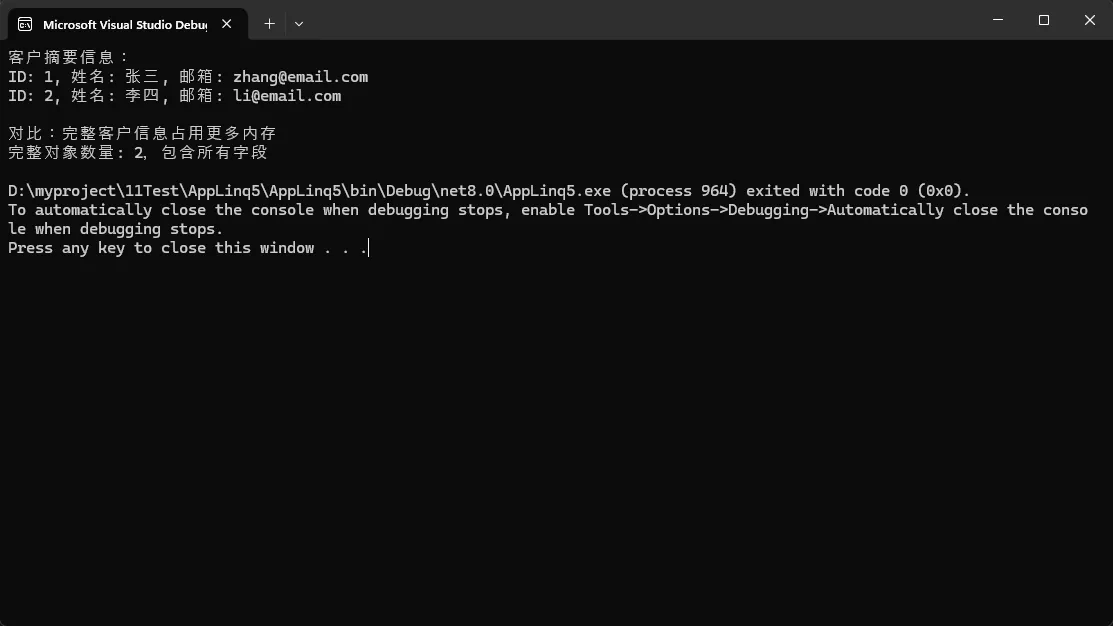
            // ✅ 获取客户摘要信息 - 只包含需要的字段
            var customerSummaries = customerService.GetCustomerSummary();

            Console.WriteLine("客户摘要信息:");
            foreach (var customer in customerSummaries)
            {
                Console.WriteLine($"ID: {customer.Id}, 姓名: {customer.Name}, 邮箱: {customer.Email}");
            }

            Console.WriteLine("\n对比:完整客户信息占用更多内存");
            var fullCustomers = customerService.GetAllCustomersBad();
            Console.WriteLine($"完整对象数量: {fullCustomers.Count},包含所有字段");
        }
    }
}
你是否遇到过这样的场景:需要定时更新界面数据、实现倒计时功能,或者创建自动保存机制?作为C#开发者,这些需求在WinForms开发中几乎每天都会碰到。今天我们就来深入探讨System.Windows.Forms.Timer这个"小而美"的控件,让你彻底掌握定时任务的开发技巧。
本文将通过实战案例,教你如何用Timer控件解决常见的定时任务问题,避开开发中的常见陷阱,让你的应用更加专业和稳定。
🎯 Timer控件核心原理解析
在深入实战之前,我们先理解Timer的核心机制。WinForms中的Timer并不是"真正"的多线程定时器,而是基于Windows消息循环的组件。
🔧 三大核心属性
- Enabled:控制定时器启停状态(true/false)
- Interval:时间间隔,单位毫秒,最小值通常为15-55ms
- Tag:存储自定义数据的万能属性
⚡ 核心事件与方法
- Tick事件:定时触发的核心事件处理器
- Start()/Stop():编程式启停控制
💡 实战应用1:打造专业数字时钟
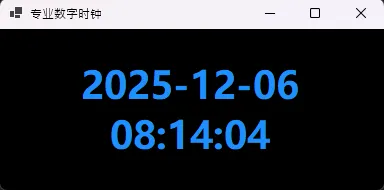
这是Timer最经典的应用场景。让我们创建一个高颜值的实时时钟:
C#using Timer = System.Windows.Forms.Timer;

namespace AppWinformTimer
{
    public partial class FrmClock : Form
    {
        private Label timeLabel;
        private Timer clockTimer;
        public FrmClock()
        {
            InitializeComponent();
            InitializeUI();
            SetupTimer();
        }
        private void InitializeUI()
        {
            this.Text = "专业数字时钟";
            this.Size = new Size(400, 200);
            this.StartPosition = FormStartPosition.CenterScreen;

            timeLabel = new Label
            {
                Dock = DockStyle.Fill,
                TextAlign = ContentAlignment.MiddleCenter,
                Font = new Font("Microsoft YaHei", 28F, FontStyle.Bold),
                ForeColor = Color.DodgerBlue,
                BackColor = Color.Black
            };

            this.Controls.Add(timeLabel);
        }

        private void SetupTimer()
        {
            clockTimer = new Timer
            {
                Interval = 1000  // 1秒更新一次
            };
            clockTimer.Tick += ClockTimer_Tick;
            clockTimer.Start();

            // 立即显示当前时间
            UpdateTimeDisplay();
        }

        private void ClockTimer_Tick(object sender, EventArgs e)
        {
            UpdateTimeDisplay();
        }

        private void UpdateTimeDisplay()
        {
            timeLabel.Text = DateTime.Now.ToString("yyyy-MM-dd HH:mm:ss");
        }

        protected override void OnFormClosed(FormClosedEventArgs e)
        {
            // 🚨 重要:记得释放资源
            clockTimer?.Dispose();
            base.OnFormClosed(e);
        }
    }
}
你是否在WPF开发中遇到过这样的困惑:为什么有些属性支持数据绑定,而有些却不行?为什么WPF控件的属性看起来如此"神奇",能够自动响应变化?这背后的秘密就在于WPF的依赖属性系统。
作为WPF的核心特性之一,依赖属性(Dependency Property)与传统的CLR属性有着本质的不同。理解这两者的区别,不仅能帮你解决数据绑定、样式设置等常见问题,更能让你的WPF应用程序性能更优、功能更强大。
本文将通过实战代码和深度分析,带你彻底搞懂依赖属性系统的工作原理与应用场景。
🔍 问题分析:为什么需要依赖属性?
传统CLR属性的局限性
传统的C#属性本质上是对字段的封装,存在以下限制:
- 无法支持数据绑定:WPF的双向绑定机制需要属性具备变化通知能力
- 缺乏值优先级:无法处理样式、模板、继承等多种值来源的优先级
- 内存占用大:每个对象都需要存储所有属性的值
- 缺乏元数据支持:无法提供验证、强制转换等扩展功能
WPF的解决方案:依赖属性系统
依赖属性通过以下机制解决了这些问题:
- 属性系统:统一管理属性值的存储和获取
- 值优先级:支持本地值、样式、模板等多层级值源
- 变化通知:内置PropertyChanged机制
- 内存优化:稀疏存储,只存储被设置的属性值
💡 核心区别深度解析
🔥 1. 定义方式的根本不同
传统CLR属性定义:
C#public class TraditionalControl : Control
{
    private string _title;

    public string Title
    {
        get { return _title; }
        set
        {
            _title = value;
            // 需要手动触发PropertyChanged
        }
    }
}
依赖属性定义:
C#public class ModernControl : Control
{
    // 1. 注册依赖属性
    public static readonly DependencyProperty TitleProperty =
        DependencyProperty.Register(
            nameof(Title),                    // 属性名
            typeof(string),                   // 属性类型
            typeof(ModernControl),           // 所有者类型
            new PropertyMetadata(            // 元数据
                string.Empty,               // 默认值
                OnTitleChanged,             // 变化回调
                CoerceTitle                 // 值强制转换
            ));

    // 2. 提供CLR包装器
    public string Title
    {
        get { return (string)GetValue(TitleProperty); }
        set { SetValue(TitleProperty, value); }
    }

    // 3. 属性变化回调
    private static void OnTitleChanged(DependencyObject d,
        DependencyPropertyChangedEventArgs e)
    {
        var control = (ModernControl)d;
        // 处理属性变化逻辑
        control.OnTitleChanged((string)e.OldValue, (string)e.NewValue);
    }

    // 4. 值强制转换
    private static object CoerceTitle(DependencyObject d, object value)
    {
        // 确保Title不为null
        return value ?? string.Empty;
    }

    protected virtual void OnTitleChanged(string oldValue, string newValue)
    {
        // 子类可重写此方法
    }
}
🚀 2. 数据绑定支持
传统属性的绑定问题:
C#public class StudentViewModel : INotifyPropertyChanged
{
    private string _name;

    public string Name
    {
        get { return _name; }
        set
        {
            if (_name != value)
            {
                _name = value;
                // 必须手动实现PropertyChanged
                PropertyChanged?.Invoke(this,
                    new PropertyChangedEventArgs(nameof(Name)));
            }
        }
    }

    public event PropertyChangedEventHandler PropertyChanged;
}
依赖属性的自动绑定:
XML<Window x:Class="AppDependentPropertiesThan.MainWindow"
        xmlns="http://schemas.microsoft.com/winfx/2006/xaml/presentation"
        xmlns:x="http://schemas.microsoft.com/winfx/2006/xaml"
        xmlns:d="http://schemas.microsoft.com/expression/blend/2008"
        xmlns:mc="http://schemas.openxmlformats.org/markup-compatibility/2006"
        xmlns:local="clr-namespace:AppDependentPropertiesThan"
        mc:Ignorable="d"
        Title="MainWindow" Height="450" Width="800">
    <Window.Resources>
        <Style TargetType="{x:Type local:ModernControl}">
            <Setter Property="Template">
                <Setter.Value>
                    <ControlTemplate TargetType="{x:Type local:ModernControl}">
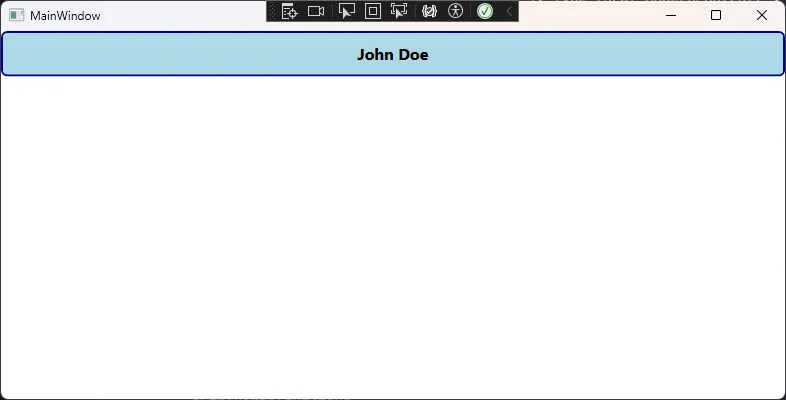
                        <Border Background="LightBlue"
                        BorderBrush="DarkBlue"
                        BorderThickness="2"
                        CornerRadius="5"
                        Padding="10">
                            <TextBlock Text="{TemplateBinding Title}"
                               FontSize="16"
                               FontWeight="Bold"
                               HorizontalAlignment="Center"
                               VerticalAlignment="Center"/>
                        </Border>
                    </ControlTemplate>
                </Setter.Value>
            </Setter>
        </Style>
    </Window.Resources>
    <Grid>
        <Grid.RowDefinitions>
            <RowDefinition Height="Auto"></RowDefinition>
            <RowDefinition Height="Auto"></RowDefinition>
        </Grid.RowDefinitions>
        <local:ModernControl Title="{Binding Name}" Grid.Row="0" />
    </Grid>
</Window>
在工业4.0浪潮下,设备数字化转型已成为制造业的核心竞争力。想象一下,如果你的工厂设备能像"钢铁侠"的贾维斯一样智能,24小时监控每一个传感器,预测故障,优化维护时间,这将为企业节省多少成本?
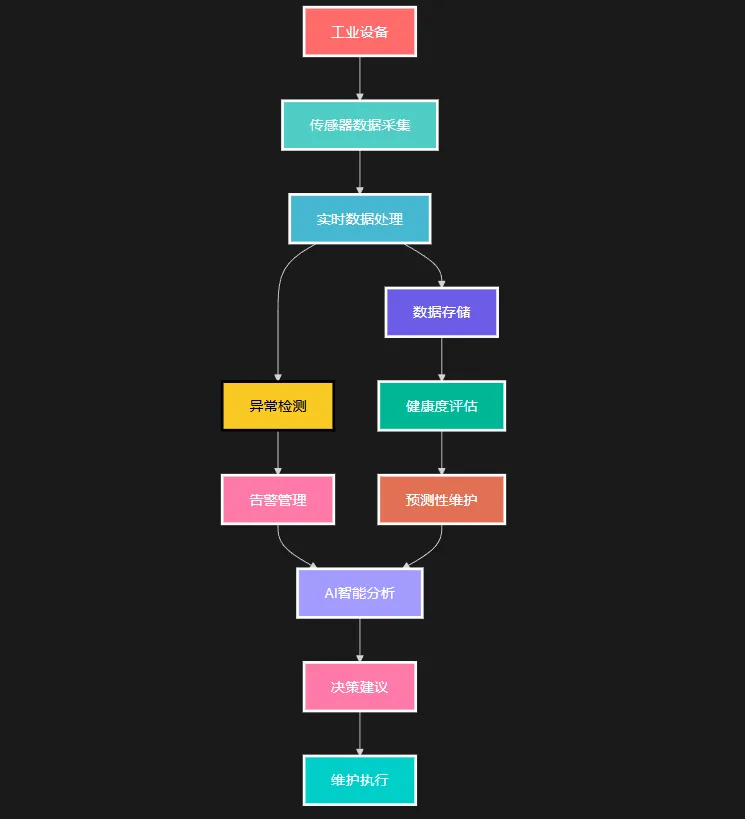
今天,我们将用C#从零构建一套完整的工业传感器智能分析系统,涵盖实时数据采集、智能异常检测、预测性维护和AI对话分析。
🎯 为什么选择C#构建工业物联网系统?
💪 C#在工业场景的天然优势
强类型安全:工业数据不容错误,C#的编译时类型检查为数据安全提供了第一道防线。
丰富生态:从底层硬件通信到上层AI分析,.NET生态提供了完整的解决方案。
跨平台部署:支持Windows、Linux部署,适应不同工业环境需求。
🏗️ 系统架构设计:五层架构保证可扩展性
我们的系统采用经典的分层架构:
Markdown┌─────────────────────────────────────┐
│        AI智能分析层                    │  ← Semantic Kernel + OpenAI
├─────────────────────────────────────┤
│        业务逻辑层                      │  ← 告警管理、预测性维护
├─────────────────────────────────────┤
│        数据处理层                      │  ← 实时分析、异常检测
├─────────────────────────────────────┤
│        数据模型层                      │  ← 设备、传感器抽象
├─────────────────────────────────────┤
│        数据采集层                      │  ← 模拟真实传感器数据
└─────────────────────────────────────┘
在工业控制、物联网设备通信中,你是否遇到过这样的场景:向设备发送一个简单的查询指令,却发现返回的数据总是"分批到达"?明明应该收到完整的20字节响应,却只能收到几个零散的数据包?
别急,这不是你的代码有问题!
这是串口通信中最常见的"分包接收"现象。设备可能一次发送10字节,下一次发送剩余的10字节,而我们的程序却不知道什么时候才算接收完成。
今天我们就来彻底解决这个让无数C#开发者头疼的问题!
🤔 问题分析:为什么会分包接收?
根本原因
串口通信是异步的,数据传输会受到以下因素影响:
- 硬件缓冲区大小限制
- 设备处理速度差异
- 网络延迟(对于串口转以太网设备)
- 系统调度
传统方案的痛点
C#// ❌ 错误示例:只能收到第一包数据
serialPort.Write(command, 0, command.Length);
Thread.Sleep(100); // 固定等待时间
byte[] buffer = new byte[1024];
int count = serialPort.Read(buffer, 0, 1024); // 可能只读到部分数据
这种写法的问题:
- 固定等待时间不可靠
- 无法判断数据是否接收完整
- 容易丢失后续数据包
💡 解决方案:四种策略任你选择
基于不同应用场景,我设计了四种接收策略:
🚀 方案一:数据间隔超时判断(⭐推荐)
适用场景:不知道数据长度,但设备发送完毕后会有明显时间间隔
C#public byte[] SendQueryWithGapTimeout(byte[] command, int gapTimeoutMs = 100, int maxWaitMs = 3000)
{
    // 清空缓冲区并开始接收
    lock (bufferLock)
    {
        receivedBuffer.Clear();
        isWaitingForResponse = true;
        lastReceiveTime = DateTime.Now;
    }

    // 发送指令
    serialPort.Write(command, 0, command.Length);

    DateTime startTime = DateTime.Now;

    while ((DateTime.Now - startTime).TotalMilliseconds < maxWaitMs)
    {
        Thread.Sleep(10);

        lock (bufferLock)
        {
            // 🔥 关键逻辑:有数据且间隔超时则认为接收完成
            if (receivedBuffer.Count > 0 &&
                (DateTime.Now - lastReceiveTime).TotalMilliseconds > gapTimeoutMs)
            {
                isWaitingForResponse = false;
                return receivedBuffer.ToArray();
            }
        }
    }

    return null;
}