
目录
🤔 你是否也遇到过这个问题?
在做桌面端项目的时候,越来越多的团队开始尝试用 Vue3 来写 UI 界面——毕竟前端生态太香了,组件库丰富、开发效率高。但问题来了:Winform + WebView2 加载本地 Vue3 项目,路子走错了就是一堆报错。
常见的踩坑路径大概是这样的:打包好 Vue3 的 dist 目录,直接用 file:// 协议加载 index.html,结果页面一片空白,控制台疯狂报跨域错误;或者资源路径全部 404,vite.config.ts 里的 base 没配对,白忙活半天。
更头疼的是,有些项目里用到了 localStorage、fetch 请求本地接口,file:// 协议下这些东西要么受限要么直接不可用。
本文会把两种主流方案——file:// 协议直接加载和虚拟域名映射——从原理到代码完整走一遍,踩坑点逐一标出,读完你可以直接拿去用。
🧩 问题深度剖析
为什么 file:// 加载 Vue3 会出问题?
Vue3 用 Vite 打包后,dist 目录里的资源引用路径默认是绝对路径(/assets/index.xxx.js)。在浏览器里用 file:// 打开,这个 / 会被解析成文件系统根目录,路径完全对不上。
除此之外,file:// 协议本身有几个硬伤:
- 同源策略限制:
file://下不同文件之间被视为不同源,fetch、XMLHttpRequest跨文件请求直接被拦截 - Service Worker 不可用:
file://协议不支持 Service Worker 注册 - Cookie / localStorage 行为异常:部分浏览器内核对
file://下的存储 API 有额外限制 - CORS 请求受阻:如果 Vue3 项目里有调用本地 HTTP 接口的逻辑,
file://下的跨域请求会被直接拒绝
WebView2 底层是 Chromium,上述限制同样存在。所以 file:// 方案能用,但适用场景有限,只适合纯静态、无接口调用的轻量页面。
虚拟域名方案解决了什么?
WebView2 提供了一个非常实用的 API:SetVirtualHostNameToFolderMapping,可以把一个虚拟域名(如 app.local)映射到本地文件夹。这样 Vue3 项目就能以 https://app.local/ 的形式加载,彻底绕开 file:// 的各种限制,同源策略正常工作,fetch 请求也不再受阻。
🛠️ 方案一:file:// 协议加载
Winform 端代码
csharp// Form1.cs
using Microsoft.Web.WebView2.Core;
using System;
using System.IO;
using System.Windows.Forms;

public partial class Form1 : Form
{
    private Microsoft.Web.WebView2.WinForms.WebView2 webView2;

    public Form1()
    {
        InitializeComponent();
        InitializeWebView2();
    }

    private async void InitializeWebView2()
    {
        webView2 = new Microsoft.Web.WebView2.WinForms.WebView2();
        webView2.Dock = DockStyle.Fill;
        this.Controls.Add(webView2);

        // 初始化 WebView2 环境
        // 指定用户数据目录,避免多实例冲突
        var userDataFolder = Path.Combine(
            Environment.GetFolderPath(Environment.SpecialFolder.LocalApplicationData),
            "MyApp", "WebView2Data"
        );

        var env = await CoreWebView2Environment.CreateAsync(
            browserExecutableFolder: null,
            userDataFolder: userDataFolder
        );

        await webView2.EnsureCoreWebView2Async(env);

        // 构建 Vue3 dist 目录的 file:// 路径
        // 推荐将 dist 目录放在应用程序目录下
        string distPath = Path.Combine(
            AppDomain.CurrentDomain.BaseDirectory,
            "wwwroot", "dist", "index.html"
        );

        string fileUrl = new Uri(distPath).AbsoluteUri;
        // 结果类似:file:///C:/MyApp/wwwroot/dist/index.html

        webView2.CoreWebView2.Navigate(fileUrl);
    }
}
踩坑预警 ⚠️
路径中含中文或空格:Uri 类会自动做 URL 编码,但建议把 dist 目录放在纯英文路径下,避免潜在的编码问题。
file:// 下 fetch 本地 JSON 文件失败:Chromium 默认阻止 file:// 下的跨文件 fetch。
适用场景总结:纯展示型页面、无接口调用、无 Service Worker 需求的轻量项目,file:// 方案足够用,配置简单,部署也方便,说明了就是一个简单的HTML页面。
🚀 方案二:虚拟域名映射(推荐)
这是更稳健的方案,尤其适合有接口调用、需要完整浏览器特性支持的项目。
Vue3 项目配置
虚拟域名方案下,Vue3 的 base 可以保持默认(/),因为加载方式已经是标准的 HTTP 形式:
typescript// vite.config.ts
import { defineConfig } from 'vite'
import vue from '@vitejs/plugin-vue'

export default defineConfig({
  plugins: [vue()],
  base: '/',  // 保持默认,或根据实际路由需求调整
  build: {
    outDir: 'dist',
  }
})
如果用了 Vue Router 的 history 模式,还需要注意路由配置,后面会提到。
Winform 端代码
csharp// Form1.cs
using Microsoft.Web.WebView2.Core;
using System;
using System.IO;
using System.Windows.Forms;

public partial class Form1 : Form
{
    private Microsoft.Web.WebView2.WinForms.WebView2 webView2;

    // 虚拟域名,可以自定义,建议用 .local 后缀
    private const string VirtualHost = "app.local";

    public Form1()
    {
        InitializeComponent();
        InitializeWebView2Async();
    }

    private async void InitializeWebView2Async()
    {
        webView2 = new Microsoft.Web.WebView2.WinForms.WebView2();
        webView2.Dock = DockStyle.Fill;
        this.Controls.Add(webView2);

        var userDataFolder = Path.Combine(
            Environment.GetFolderPath(Environment.SpecialFolder.LocalApplicationData),
            "MyApp", "WebView2Data"
        );

        var env = await CoreWebView2Environment.CreateAsync(
            browserExecutableFolder: null,
            userDataFolder: userDataFolder
        );

        await webView2.EnsureCoreWebView2Async(env);

        // 获取 Vue3 dist 目录的绝对路径
        string distFolder = Path.Combine(
            AppDomain.CurrentDomain.BaseDirectory,
            "wwwroot", "dist"
        );

        // 核心 API:将虚拟域名映射到本地文件夹
        // CoreWebView2HostResourceAccessKind.Allow:允许从该虚拟主机访问资源
        webView2.CoreWebView2.SetVirtualHostNameToFolderMapping(
            VirtualHost,
            distFolder,
            CoreWebView2HostResourceAccessKind.Allow
        );

        // 导航到虚拟域名下的 index.html
        webView2.CoreWebView2.Navigate($"https://{VirtualHost}/index.html");
    }
}
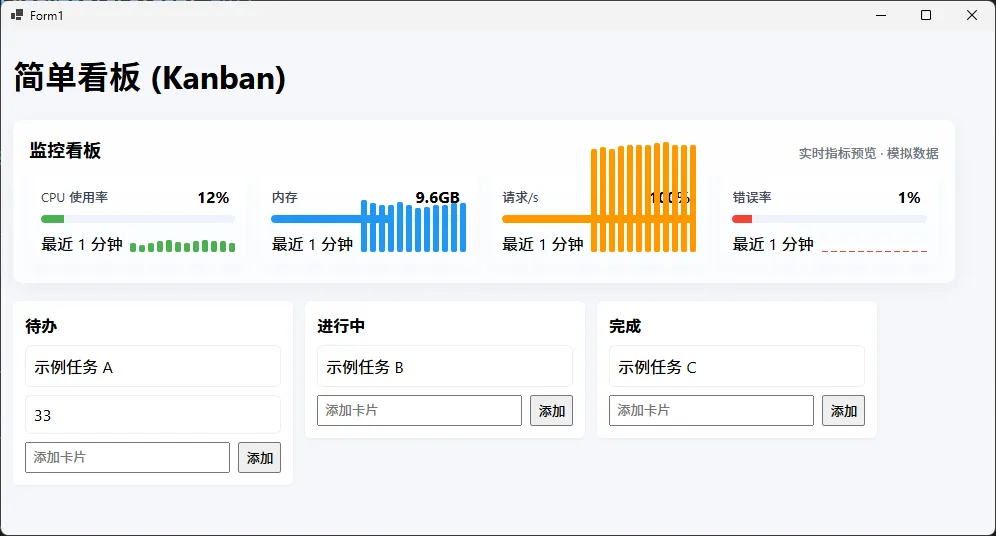
处理 Vue Router history 模式
如果 Vue3 项目用了 createWebHistory,刷新页面或直接访问子路由时会出现 404,因为 WebView2 找不到对应的物理文件。需要拦截导航请求,将所有非资源请求重定向到 index.html:
csharp// 在 EnsureCoreWebView2Async 完成后添加
webView2.CoreWebView2.NavigationStarting += (sender, args) =>
{
    var uri = new Uri(args.Uri);

    // 只处理虚拟域名下的请求
    if (uri.Host == VirtualHost)
    {
        string localPath = uri.LocalPath;

        // 判断是否是静态资源请求(有扩展名的文件)
        string extension = Path.GetExtension(localPath);
        bool isStaticAsset = !string.IsNullOrEmpty(extension);

        if (!isStaticAsset && localPath != "/index.html")
        {
            // 非静态资源、非 index.html 的请求,重定向到 index.html
            // 由 Vue Router 接管路由处理
            args.Cancel = true;
            webView2.CoreWebView2.Navigate($"https://{VirtualHost}/index.html");
        }
    }
};
C# 与 Vue3 双向通信
虚拟域名方案下,WebView2 的消息通信机制可以完整使用:
csharp// C# 端:接收来自 Vue3 的消息
webView2.CoreWebView2.WebMessageReceived += (sender, args) =>
{
    string message = args.TryGetWebMessageAsString();
    Console.WriteLine($"收到前端消息:{message}");

    // 处理完成后,回传消息给前端
    webView2.CoreWebView2.PostWebMessageAsString("操作已完成");
};

// C# 端主动向前端发送消息
private void SendMessageToVue(string message)
{
    webView2.CoreWebView2.PostWebMessageAsString(message);
}
javascript// Vue3 端:发送消息给 C#
window.chrome.webview.postMessage('来自Vue的消息');

// Vue3 端:接收 C# 回传的消息
window.chrome.webview.addEventListener('message', (event) => {
  console.log('收到C#消息:', event.data);
});
踩坑预警 ⚠️
SetVirtualHostNameToFolderMapping 必须在 EnsureCoreWebView2Async 完成后调用,否则 CoreWebView2 对象为 null,直接报空引用异常。
虚拟域名不要使用真实存在的域名(如 app.com),会影响正常的网络请求。推荐用 .local、.internal 等不会被 DNS 解析的后缀。
CoreWebView2HostResourceAccessKind 的选择:
Allow:允许所有来源访问该虚拟主机资源DenyCors:拒绝跨域请求(更安全,适合生产环境)Deny:完全拒绝外部访问
生产环境建议用 DenyCors,只允许同源访问:
csharpwebView2.CoreWebView2.SetVirtualHostNameToFolderMapping(
    VirtualHost,
    distFolder,
    CoreWebView2HostResourceAccessKind.DenyCors  // 生产环境推荐
);
📊 两种方案对比
| 对比维度 | file:// 协议 | 虚拟域名映射 |
|---|---|---|
| 配置复杂度 | 低 | 中 |
| 同源策略 | 受限 | 正常 |
| fetch / XHR | 受限 | 完整支持 |
| localStorage | 部分受限 | 完整支持 |
| Service Worker | 不支持 | 支持 |
| Vue Router history 模式 | 需要额外处理 | 需要额外处理 |
| 适用场景 | 纯静态展示页 | 完整 Web 应用 |
测试环境:Windows 11、.NET 6、WebView2 Runtime 120.x、Vue3 + Vite 5.x
🗂️ 项目目录结构建议
MyApp/
├── MyApp.sln
├── MyApp/
│   ├── Form1.cs
│   ├── Program.cs
│   ├── MyApp.csproj
│   └── wwwroot/
│       └── dist/          ← Vue3 打包输出目录
│           ├── index.html
│           └── assets/
│               ├── index.xxx.js
│               └── index.xxx.css
在 .csproj 中配置 dist 目录随编译输出:
xml<ItemGroup>
  <!-- 将 wwwroot/dist 目录复制到输出目录 -->
  <Content Include="wwwroot\dist\**\*">
    <CopyToOutputDirectory>PreserveNewest</CopyToOutputDirectory>
  </Content>
</ItemGroup>
💬 写在最后
两种方案各有适用场景,不存在绝对的优劣之分。如果项目只是把 Vue3 当成一个纯 UI 渲染层,页面逻辑简单,file:// 方案配置成本低,够用。但凡项目里有接口调用、状态管理、路由跳转这些需求,虚拟域名方案从一开始就能省掉大量排查跨域问题的时间。
实际项目里,我见过不少团队在 file:// 方案上卡了很久,最后还是切回虚拟域名——倒不如一开始就选对路子。
本文核心要点回顾:
file://方案的关键是vite.config.ts里把base改成'./',不然资源路径全部 404。
虚拟域名方案的核心 API 是
SetVirtualHostNameToFolderMapping,必须在EnsureCoreWebView2Async完成后调用。
Vue Router history 模式需要拦截
NavigationStarting事件,将非资源请求重定向到index.html。
相关信息
我用夸克网盘给你分享了「AppWebView202605.zip」,点击链接或复制整段内容,打开「夸克APP」即可获取。
/b3503YaSro:/
链接:https://pan.quark.cn/s/2f6bf7652cd5
提取码:2GHq
💬 互动话题
你在项目里用 WebView2 嵌入前端页面时,遇到过哪些奇怪的问题?欢迎在评论区聊聊,说不定你的踩坑经历正好是别人需要的答案。
另外,如果你的项目里 C# 和 Vue3 之间有复杂的通信需求(比如传大文件、实时推送数据),你现在用的是什么方案?
#C#开发 #Winform #WebView2 #Vue3 #桌面端开发
本文作者:技术老小子
本文链接:
版权声明:本博客所有文章除特别声明外,均采用 BY-NC-SA 许可协议。转载请注明出处!