
目录
你有没有遇到过这样的情况:API密钥直接写死在代码里,某天不小心推到了公开仓库,然后收到一封账单邮件……这种事在开发圈里并不罕见。
配置管理,看起来是个"小问题",实际上是很多项目的定时炸弹。
在构建 Semantic Kernel 应用时,我们需要管理的敏感信息不少:AI服务的API密钥、模型端点、Temperature参数、Token限制……一旦管理混乱,不是泄露密钥,就是生产环境用了开发配置,问题排查起来特别头疼。
读完这篇文章,你将掌握:
- appsettings.json 的分层配置技巧
- User Secrets 在开发环境中保护敏感信息
- 环境变量的正确使用姿势
- IConfiguration 的高级用法与类型绑定
- 一套可直接复用的生产级配置管理模板
1️⃣ 问题深度剖析:配置管理的三大"坑"
坑一:硬编码配置,改动牵一发动全身
见过太多这样的代码:
csharp// ❌ 典型错误:硬编码所有配置
var kernel = Kernel.CreateBuilder()
    .AddOpenAIChatCompletion(
        modelId: "deepseek-chat",
        apiKey: "sk-1234567890abcdef",  // 密钥裸奔
        endpoint: new Uri("https://api.deepseek.com/v1")
    )
    .Build();
问题不只是密钥泄露风险。想象一下,生产和测试用不同的模型,你得在十几个地方手动改——改漏一个,线上就出问题。
坑二:配置文件混乱,环境区分失效
没有分层的配置结构,开发环境和生产环境配置混在一起。Temperature用了0.9(创意写作模式),结果生产环境技术问答也变得"天马行空",用户反馈AI"说话不靠谱"。
坑三:缺乏类型安全,运行时才报错
直接用字符串读取配置,MaxTokens写成了"两千"而不是2000,编译期毫无感知,运行时才崩溃。这种问题在大型项目里排查成本极高。
2️⃣ 核心要点提炼:配置管理的底层逻辑
分层覆盖原则
.NET的配置系统遵循"后加载覆盖先加载"的原则,优先级从低到高依次为:
appsettings.json(基础配置)
    ↓
appsettings.{Environment}.json(环境特定配置)
    ↓
User Secrets(开发敏感信息)
    ↓
环境变量(生产敏感信息)
    ↓
命令行参数(最高优先级)
这个机制让我们可以把公共配置放在基础文件里,把差异化配置放在对应层,敏感信息永远不进版本控制。
强类型绑定的价值
把配置绑定到C#类,编译期就能发现拼写错误,还能用IDE自动补全,维护成本至少降低30%。
3️⃣ 解决方案设计
方案一:基础配置结构搭建
第一步:定义配置类
csharpusing System;
using System.Collections.Generic;
using System.Linq;
using System.Text;
using System.Threading.Tasks;

namespace AppAppSemanticKernel04
{
    /// <summary>
    /// Semantic Kernel 核心配置
    /// </summary>
    public class SemanticKernelConfig
    {
        public const string SectionName = "SemanticKernel";

        /// <summary>AI服务提供商配置</summary>
        public AIServiceConfig AIService { get; set; } = new();

        /// <summary>对话参数配置</summary>
        public ChatConfig Chat { get; set; } = new();

        /// <summary>性能配置</summary>
        public PerformanceConfig Performance { get; set; } = new();
    }

    public class AIServiceConfig
    {
        /// <summary>模型ID,如 deepseek-chat / qwen-vl-plus</summary>
        public string ModelId { get; set; } = "deepseek-chat";

        /// <summary>API端点</summary>
        public string Endpoint { get; set; } = "https://api.deepseek.com/v1";

        /// <summary>API密钥(生产环境通过环境变量注入,不在此处填写)</summary>
        public string ApiKey { get; set; } = string.Empty;
    }

    public class ChatConfig
    {
        /// <summary>Temperature: 0-1,越高越有创造力</summary>
        public float Temperature { get; set; } = 0.7f;

        /// <summary>最大Token数</summary>
        public int MaxTokens { get; set; } = 2000;

        /// <summary>保留对话历史的最大轮数</summary>
        public int MaxHistoryTurns { get; set; } = 10;
    }

    public class PerformanceConfig
    {
        /// <summary>请求超时(秒)</summary>
        public int TimeoutSeconds { get; set; } = 60;

        /// <summary>是否启用流式响应</summary>
        public bool EnableStreaming { get; set; } = true;
    }
}
第二步:配置 appsettings.json
json// appsettings.json(基础配置,提交到版本控制)
{
  "SemanticKernel": {
    "AIService": {
      "ModelId": "deepseek-chat",
      "Endpoint": "https://api.deepseek.com/v1",
      "ApiKey": ""
    },
    "Chat": {
      "Temperature": 0.7,
      "MaxTokens": 2000,
      "MaxHistoryTurns": 10
    },
    "Performance": {
      "TimeoutSeconds": 60,
      "EnableStreaming": true
    }
  }
}
json// appsettings.Development.json(开发环境覆盖,提交到版本控制)
{
  "SemanticKernel": {
    "AIService": {
      "ModelId": "qwen-vl-plus",
      "Endpoint": "https://dashscope.aliyuncs.com/compatible-mode/v1"
    },
    "Chat": {
      "Temperature": 0.9,
      "MaxTokens": 1000
    }
  }
}
json// appsettings.Production.json(生产环境配置,提交到版本控制)
{
  "SemanticKernel": {
    "Chat": {
      "Temperature": 0.3,
      "MaxTokens": 4000
    },
    "Performance": {
      "TimeoutSeconds": 30
    }
  }
}
注意:ApiKey 在所有配置文件中保持为空字符串,密钥通过更高优先级的方式注入。
方案二:User Secrets 保护开发密钥
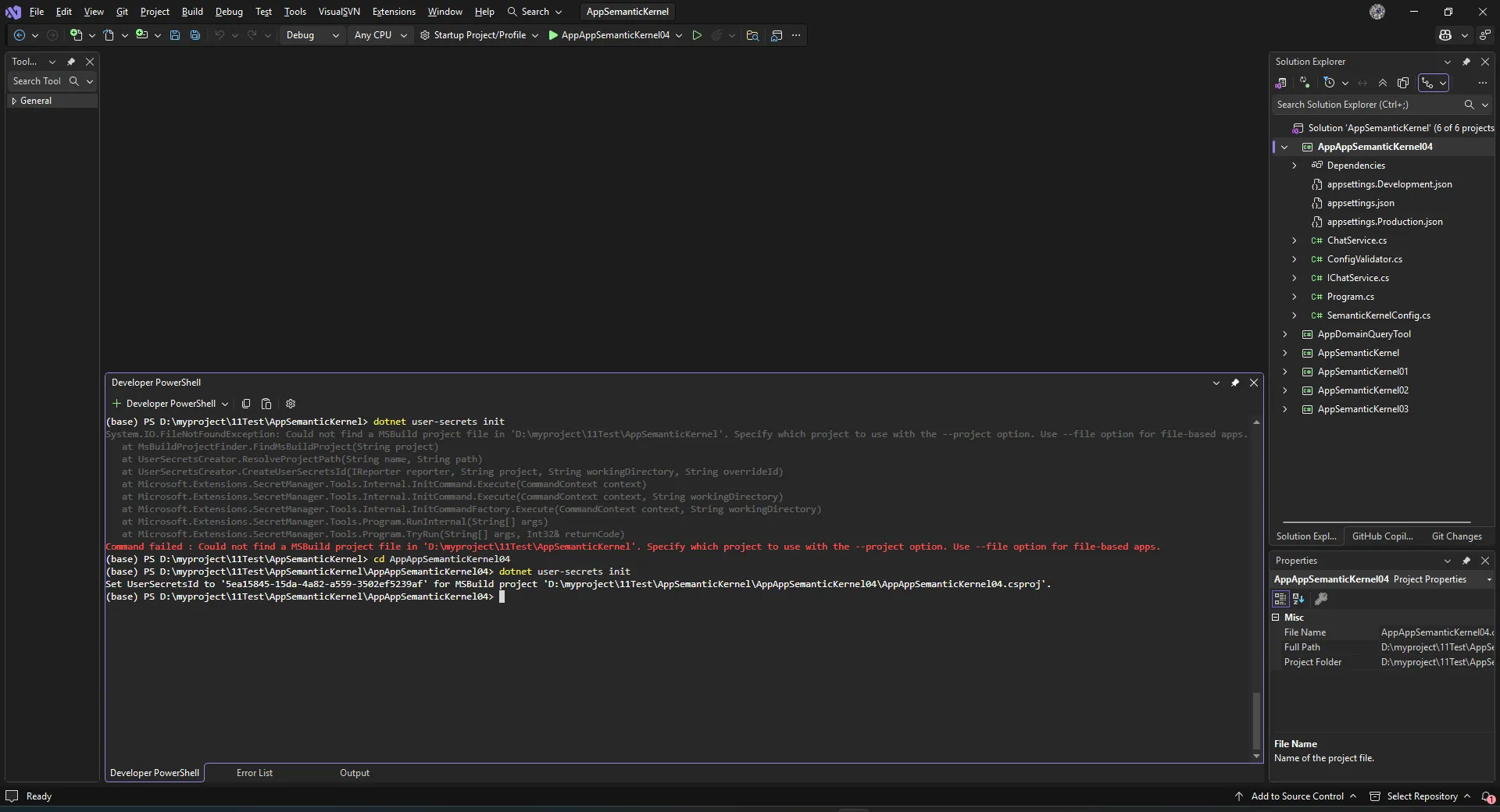
User Secrets 是开发阶段的最佳实践,密钥存储在本机用户目录下,不会进入项目目录,不会被 Git 追踪。
初始化 User Secrets:
bash# 在项目目录下执行
dotnet user-secrets init
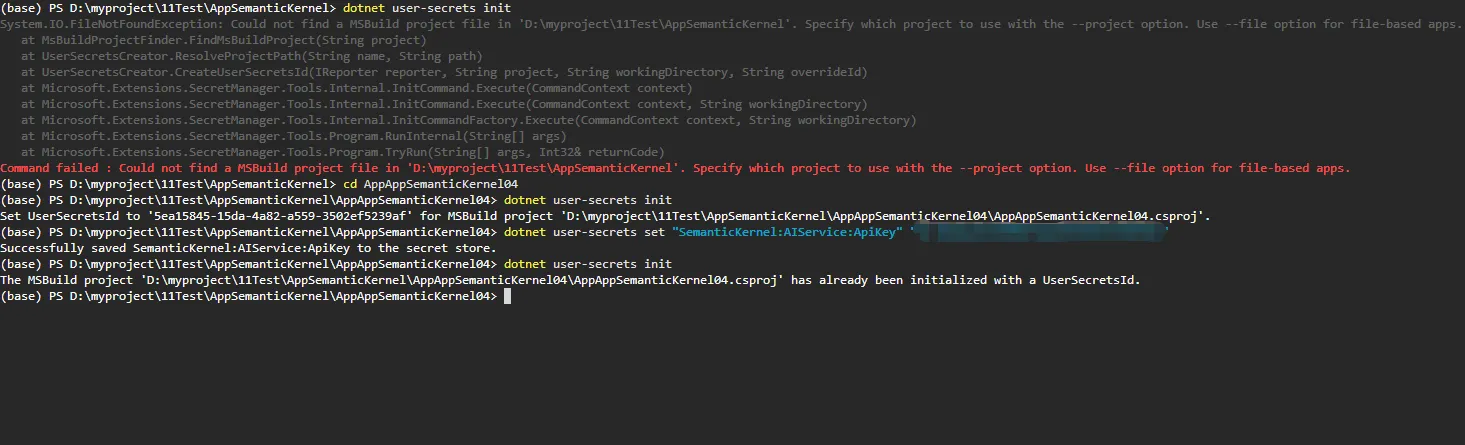
设置密钥:
bashdotnet user-secrets set "SemanticKernel:AIService:ApiKey" "sk-你的开发密钥"
验证是否生效:
bashdotnet user-secrets list
密钥实际存储在:
- Windows:
%APPDATA%\Microsoft\UserSecrets\<user_secrets_id>\secrets.json - Mac/Linux:
~/.microsoft/usersecrets/<user_secrets_id>/secrets.json
这个文件不在项目目录里,永远不会被误提交。
方案三:生产级配置管理系统(完整实现)
这是把前面所有知识整合起来的生产可用版本:
csharpusing Microsoft.Extensions.Configuration;
using Microsoft.Extensions.DependencyInjection;
using Microsoft.Extensions.Hosting;
using Microsoft.Extensions.Logging;
using Microsoft.SemanticKernel;
using System.Text;

namespace AppAppSemanticKernel04
{
    internal class Program
    {
        static async Task Main(string[] args)
        {
            Console.OutputEncoding = Encoding.UTF8;

            // ========== 构建配置系统 ==========
            var host = Host.CreateApplicationBuilder(args);

            // 配置加载顺序(优先级从低到高)
            host.Configuration
                .AddJsonFile("appsettings.json", optional: false, reloadOnChange: true)
                .AddJsonFile($"appsettings.{host.Environment.EnvironmentName}.json",
                             optional: true, reloadOnChange: true)
                .AddUserSecrets<Program>(optional: true)     // 开发环境:User Secrets
                .AddEnvironmentVariables();                   // 生产环境:环境变量

            // ========== 绑定强类型配置 ==========
            var skConfig = host.Configuration
                .GetSection(SemanticKernelConfig.SectionName)
                .Get<SemanticKernelConfig>()
                ?? throw new InvalidOperationException("SemanticKernel 配置节缺失");

            // ========== 验证关键配置 ==========
            ConfigValidator.Validate(skConfig);

            // ========== 注册服务 ==========
            host.Services.Configure<SemanticKernelConfig>(
                host.Configuration.GetSection(SemanticKernelConfig.SectionName));

            // 构建 Semantic Kernel
            var kernelBuilder = Kernel.CreateBuilder();
            kernelBuilder.AddOpenAIChatCompletion(
                modelId: skConfig.AIService.ModelId,
                apiKey: skConfig.AIService.ApiKey,
                endpoint: new Uri(skConfig.AIService.Endpoint)
            );
            kernelBuilder.Services.AddLogging(b =>
                b.AddConsole().SetMinimumLevel(LogLevel.Warning));

            var kernel = kernelBuilder.Build();
            host.Services.AddSingleton(kernel);
            host.Services.AddSingleton<IChatService, ChatService>();

            var app = host.Build();

            // ========== 启动对话循环 ==========
            var chatService = app.Services.GetRequiredService<IChatService>();
            await chatService.RunAsync(skConfig);
        }
    }
}
csharpusing System;
using System.Collections.Generic;
using System.Linq;
using System.Text;
using System.Threading.Tasks;

namespace AppAppSemanticKernel04
{
    /// <summary>
    /// 配置验证器:启动时快速发现配置问题
    /// </summary>
    public static class ConfigValidator
    {
        public static void Validate(SemanticKernelConfig config)
        {
            var errors = new List<string>();

            if (string.IsNullOrWhiteSpace(config.AIService.ApiKey))
                errors.Add("AIService:ApiKey 未配置,请通过环境变量或 User Secrets 设置");

            if (string.IsNullOrWhiteSpace(config.AIService.Endpoint))
                errors.Add("AIService:Endpoint 未配置");

            if (config.Chat.Temperature < 0 || config.Chat.Temperature > 1)
                errors.Add($"Chat:Temperature 值 {config.Chat.Temperature} 超出范围 [0, 1]");

            if (config.Chat.MaxTokens < 100 || config.Chat.MaxTokens > 32000)
                errors.Add($"Chat:MaxTokens 值 {config.Chat.MaxTokens} 超出合理范围");

            if (errors.Any())
            {
                Console.ForegroundColor = ConsoleColor.Red;
                Console.WriteLine("配置验证失败:");
                errors.ForEach(e => Console.WriteLine($"  ✗ {e}"));
                Console.ResetColor();
                throw new InvalidOperationException("配置验证未通过,程序终止");
            }

            Console.ForegroundColor = ConsoleColor.Green;
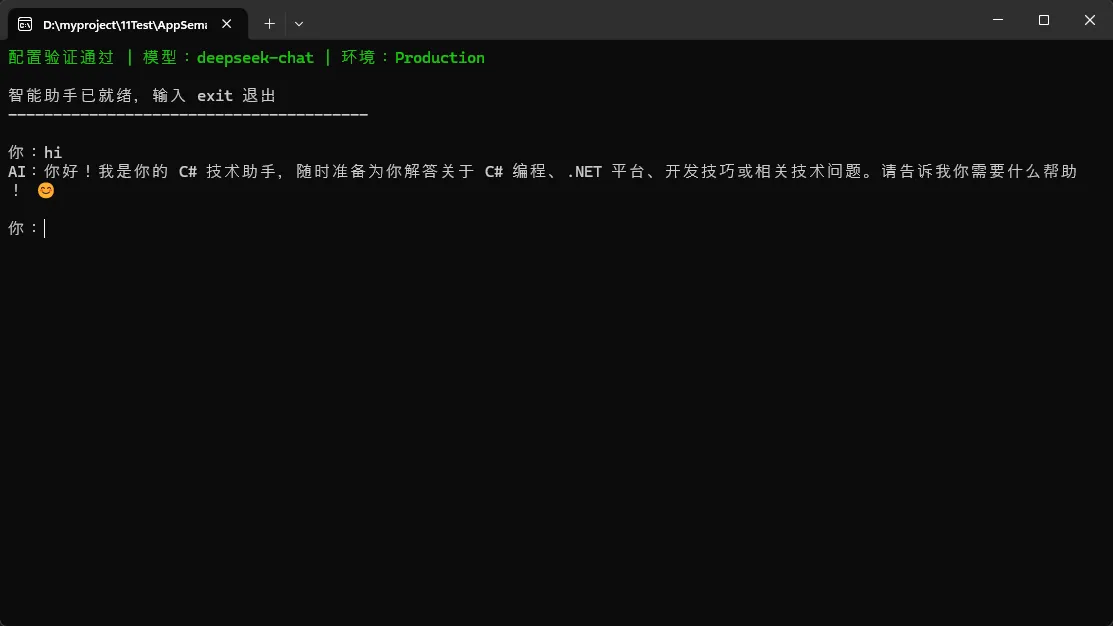
            Console.WriteLine($"配置验证通过 | 模型:{config.AIService.ModelId} " +
                              $"| 环境:{Environment.GetEnvironmentVariable("ASPNETCORE_ENVIRONMENT") ?? "Production"}");
            Console.ResetColor();
        }
    }
}
c#using System;
using System.Collections.Generic;
using System.Linq;
using System.Text;
using System.Threading.Tasks;

namespace AppAppSemanticKernel04
{
    public interface IChatService
    {
        Task RunAsync(SemanticKernelConfig config);
    }
}
csharpusing Microsoft.SemanticKernel;
using Microsoft.SemanticKernel.ChatCompletion;
using Microsoft.SemanticKernel.Connectors.OpenAI;
using System;
using System.Collections.Generic;
using System.Linq;
using System.Text;
using System.Threading.Tasks;

namespace AppAppSemanticKernel04
{
    public class ChatService : IChatService
    {
        private readonly Kernel _kernel;

        public ChatService(Kernel kernel)
        {
            _kernel = kernel;
        }

        public async Task RunAsync(SemanticKernelConfig config)
        {
            var chatService = _kernel.GetRequiredService<IChatCompletionService>();
            var chatHistory = new ChatHistory();
            chatHistory.AddSystemMessage("你是一个专业的 C# 技术助手,用中文回答问题。");

            var settings = new OpenAIPromptExecutionSettings
            {
                Temperature = config.Chat.Temperature,
                MaxTokens = config.Chat.MaxTokens
            };

            Console.WriteLine("\n智能助手已就绪,输入 exit 退出");
            Console.WriteLine(new string('-', 40));

            while (true)
            {
                Console.Write("\n你:");
                var input = Console.ReadLine()?.Trim();

                if (string.IsNullOrEmpty(input)) continue;
                if (input.Equals("exit", StringComparison.OrdinalIgnoreCase)) break;

                // 对话历史管理:防止无限增长
                ManageHistory(chatHistory, config.Chat.MaxHistoryTurns);
                chatHistory.AddUserMessage(input);

                Console.Write("AI:");
                var fullResponse = new StringBuilder();

                try
                {
                    if (config.Performance.EnableStreaming)
                    {
                        // 流式响应
                        await foreach (var chunk in chatService
                            .GetStreamingChatMessageContentsAsync(
                                chatHistory, settings, _kernel))
                        {
                            Console.Write(chunk.Content);
                            fullResponse.Append(chunk.Content);
                        }
                    }
                    else
                    {
                        var response = await chatService
                            .GetChatMessageContentAsync(chatHistory, settings, _kernel);
                        Console.Write(response.Content);
                        fullResponse.Append(response.Content);
                    }

                    Console.WriteLine();
                    chatHistory.AddAssistantMessage(fullResponse.ToString());
                }
                catch (Exception ex)
                {
                    Console.ForegroundColor = ConsoleColor.Red;
                    Console.WriteLine($"\n请求失败:{ex.Message}");
                    Console.ResetColor();
                }
            }
        }

        private static void ManageHistory(ChatHistory history, int maxTurns)
        {
            // 保留系统消息 + 最近 maxTurns 轮对话
            while (history.Count > maxTurns * 2 + 1)
            {
                history.RemoveAt(1); // 移除最早的用户消息
                if (history.Count > 1)
                    history.RemoveAt(1); // 移除对应的助手回复
            }
        }
    }
}
🛡️ 踩坑预警清单
| 坑点 | 错误做法 | 正确做法 |
|---|---|---|
| 密钥泄露 | 硬编码在代码里 | User Secrets(开发)/ 环境变量(生产) |
| 环境混乱 | 手动修改代码切换配置 | ASPNETCORE_ENVIRONMENT 控制配置层 |
| 验证缺失 | 运行时才发现配置错误 | 启动时统一验证,快速失败 |
| 历史无限增长 | 不清理ChatHistory | 滑动窗口保留最近N轮 |
| 类型不安全 | config["MaxTokens"] 直接用字符串 | 强类型绑定,编译期检查 |
生产环境设置环境变量示例:
bash# Linux / Docker
export SemanticKernel__AIService__ApiKey="sk-生产密钥"
export SemanticKernel__AIService__ModelId="gpt-4"
export ASPNETCORE_ENVIRONMENT="Production"

# Windows PowerShell
$env:SemanticKernel__AIService__ApiKey = "sk-生产密钥"
注意:.NET 环境变量中,配置节层级用双下划线
__分隔,对应 JSON 中的:分隔符。
📊 配置方案对比
| 方式 | 适用环境 | 安全性 | 维护成本 | 推荐指数 |
|---|---|---|---|---|
| 硬编码 | ❌ 任何环境 | 极低 | 低 | ⭐ |
| appsettings.json | 公共配置 | 中 | 低 | ⭐⭐⭐⭐ |
| User Secrets | 本地开发 | 高 | 低 | ⭐⭐⭐⭐⭐ |
| 环境变量 | 生产部署 | 高 | 中 | ⭐⭐⭐⭐⭐ |
| Azure Key Vault | 企业生产 | 极高 | 高 | ⭐⭐⭐⭐⭐ |
🎯 总结:三个核心收获
1. 分层配置是架构基础
基础配置 → 环境配置 → User Secrets → 环境变量,四层覆盖机制让开发、测试、生产环境各走各的,互不干扰。
2. 强类型绑定是质量保障
把配置映射到 C# 类,把运行时错误提前到编译期,加上启动验证,配置问题在上线前就能暴露。
3. 密钥管理是底线原则
开发用 User Secrets,生产用环境变量,任何情况下密钥都不进代码库——这是不可逾越的底线。
📚 持续学习路径
- 基础完善:掌握本文的配置分层体系
- 进阶实践:学习
IOptionsMonitor<T>实现运行时配置热重载 - 企业方向:探索 Azure Key Vault、HashiCorp Vault 的集成
- 可观测性:结合 Serilog 实现配置变更的结构化日志追踪
💬 开放讨论
话题一:你的项目中是否遇到过配置管理引发的生产事故?是密钥泄露、环境配置混用,还是其他情况?
话题二:在容器化部署(Docker/K8s)场景下,你是如何管理 Semantic Kernel 的多环境配置的?有没有更优雅的方案?
欢迎在评论区分享实践经验,相互学习。
相关标签:#C#开发 #SemanticKernel #配置管理 #.NET最佳实践 #AI应用开发
本文作者:技术老小子
本文链接:
版权声明:本博客所有文章除特别声明外,均采用 BY-NC-SA 许可协议。转载请注明出处!