
Press Ctrl+ and K to search
目录
你是否厌倦了在C#项目中一遍遍地写那些重复的DTO映射代码?每次修改实体类就要同步更新一堆DTO?Entity Framework查询中手写复杂的Select投影表达式?如果你正在为这些问题苦恼,那么今天介绍的 Facet 源生成器将彻底解放你的双手!
这个GitHub上已获得1k+星标的开源项目,能够在编译时自动生成DTO、映射方法和EF Core投影,真正实现零运行时成本的高性能映射方案。
🎯 痛点分析:DTO开发的三大难题
😩 难题一:重复的样板代码
c#// 实体类
public class User
{
    public int Id { get; set; }
    public string FirstName { get; set; }
    public string LastName { get; set; }
    public string Email { get; set; }
    public string PasswordHash { get; set; }  // 敏感信息
    public decimal Salary { get; set; }       // 敏感信息
}

// 手动创建API响应DTO
public class UserPublicDto
{
    public int Id { get; set; }
    public string FirstName { get; set; }
    public string LastName { get; set; }
    public string Email { get; set; }
    // 故意排除敏感字段
}

// 手动写映射逻辑
public static UserPublicDto ToDto(User user)
{
    return new UserPublicDto
    {
        Id = user.Id,
        FirstName = user.FirstName,
        LastName = user.LastName,
        Email = user.Email
    };
}
😤 难题二:维护成本高
当实体类新增字段时,你需要:
- 检查所有相关DTO是否需要更新
- 手动修改映射方法
- 容易遗漏导致数据丢失或安全问题
😫 难题三:EF Core投影复杂
c#// 复杂的手写投影
var users = await context.Users
    .Select(u => new UserPublicDto
    {
        Id = u.Id,
        FirstName = u.FirstName,
        LastName = u.LastName,
        Email = u.Email,
        // 嵌套对象投影更加复杂...
        AddressCity = u.HomeAddress.City,
        CompanyName = u.Employer.Name
    })
    .ToListAsync();
💡 解决方案:Facet源生成器的五大绝技
🔥 绝技一:一键生成多种DTO场景
c#using Facet;
using System;
using System.Collections.Generic;

namespace AppFacet
{
    // 地址模型
    public class Address
    {
        public string Street { get; set; }
        public string City { get; set; }
        public string Country { get; set; }
    }

    // 项目模型
    public class Project
    {
        public int Id { get; set; }
        public string Name { get; set; }
        public DateTime StartDate { get; set; }
    }

    // 定义领域模型
    public class User
    {
        public int Id { get; set; }
        public string FirstName { get; set; }
        public string LastName { get; set; }
        public string Email { get; set; }
        public string PasswordHash { get; set; }
        public decimal Salary { get; set; }
        public string Department { get; set; }
        public bool IsActive { get; set; }
        public Address HomeAddress { get; set; }
        public List<Project> Projects { get; set; }
    }

    // 场景1:公开API - 排除敏感数据
    [Facet(typeof(User),
        exclude: [nameof(User.PasswordHash), nameof(User.Salary)])]
    public partial record UserPublicDto;

    // 场景2:管理后台 - 包含所有字段
    [Facet(typeof(User))]
    public partial record UserAdminDto;

    // 场景3:查询过滤 - 只包含特定字段,所有属性可空
    [Facet(typeof(User),
        Include = [nameof(User.FirstName), nameof(User.Department), nameof(User.IsActive)],
        NullableProperties = true)]
    public partial record UserFilterDto;

    // 场景4:用户注册 - 只包含必要字段
    [Facet(typeof(User),
        Include = [nameof(User.FirstName), nameof(User.LastName), nameof(User.Email)])]
    public partial record UserRegistrationDto;

    internal class Program
    {
        static void Main(string[] args)
        {
            Console.OutputEncoding = System.Text.Encoding.UTF8;
            Console.WriteLine("=== Facet 示例测试 ===\n");

            // 创建原始用户数据
            var user = new User
            {
                Id = 1,
                FirstName = "张",
                LastName = "三",
                Email = "zhangsan@example.com",
                PasswordHash = "hashed_password_123",
                Salary = 10000m,
                Department = "开发部",
                IsActive = true,
                HomeAddress = new Address
                {
                    Street = "中山路123号",
                    City = "北京",
                    Country = "中国"
                },
                Projects = new List<Project>
                {
                    new Project { Id = 1, Name = "项目A", StartDate = DateTime.Now.AddDays(-30) },
                    new Project { Id = 2, Name = "项目B", StartDate = DateTime.Now.AddDays(-10) }
                }
            };

            // 测试场景1:公开API DTO - 排除敏感信息
            TestPublicApi(user);

            // 测试场景2:管理后台 DTO - 包含所有信息
            TestAdminView(user);

            // 测试场景3:查询过滤 DTO - 部分字段可空
            TestFilterQuery();

            // 测试场景4:用户注册 DTO - 只包含注册必要字段
            TestUserRegistration();

            Console.WriteLine("\n测试完成!");
        }

        static void TestPublicApi(User user)
        {
            Console.WriteLine("1. 公开API场景测试:");
            Console.WriteLine("   - 排除敏感字段:PasswordHash, Salary");

            var publicDto = new UserPublicDto
            {
                Id = user.Id,
                FirstName = user.FirstName,
                LastName = user.LastName,
                Email = user.Email,
                Department = user.Department,
                IsActive = user.IsActive,
                HomeAddress = user.HomeAddress,
                Projects = user.Projects
            };

            Console.WriteLine($"   ID: {publicDto.Id}");
            Console.WriteLine($"   姓名: {publicDto.FirstName} {publicDto.LastName}");
            Console.WriteLine($"   邮箱: {publicDto.Email}");
            Console.WriteLine($"   部门: {publicDto.Department}");
            Console.WriteLine($"   状态: {(publicDto.IsActive ? "激活" : "未激活")}");
            Console.WriteLine($"   地址: {publicDto.HomeAddress?.City}");
            Console.WriteLine($"   项目数: {publicDto.Projects?.Count ?? 0}");
            // 注意:publicDto 没有 PasswordHash 和 Salary 属性
            Console.WriteLine("   ✓ 敏感信息已排除\n");
        }

        static void TestAdminView(User user)
        {
            Console.WriteLine("2. 管理后台场景测试:");
            Console.WriteLine("   - 包含所有字段");

            var adminDto = new UserAdminDto
            {
                Id = user.Id,
                FirstName = user.FirstName,
                LastName = user.LastName,
                Email = user.Email,
                PasswordHash = user.PasswordHash,
                Salary = user.Salary,
                Department = user.Department,
                IsActive = user.IsActive,
                HomeAddress = user.HomeAddress,
                Projects = user.Projects
            };

            Console.WriteLine($"   ID: {adminDto.Id}");
            Console.WriteLine($"   姓名: {adminDto.FirstName} {adminDto.LastName}");
            Console.WriteLine($"   邮箱: {adminDto.Email}");
            Console.WriteLine($"   密码哈希: {adminDto.PasswordHash}");
            Console.WriteLine($"   薪资: {adminDto.Salary:C}");
            Console.WriteLine($"   部门: {adminDto.Department}");
            Console.WriteLine($"   状态: {(adminDto.IsActive ? "激活" : "未激活")}");
            Console.WriteLine("   ✓ 包含所有敏感信息\n");
        }

        static void TestFilterQuery()
        {
            Console.WriteLine("3. 查询过滤场景测试:");
            Console.WriteLine("   - 只包含:FirstName, Department, IsActive");
            Console.WriteLine("   - 属性可空,用于过滤条件");

            // 创建过滤条件
            var filter1 = new UserFilterDto
            {
                Department = "开发部",
                IsActive = true,
                FirstName = null  // 不过滤姓名
            };

            var filter2 = new UserFilterDto
            {
                FirstName = "张",
                Department = null,  // 不过滤部门
                IsActive = null     // 不过滤状态
            };

            Console.WriteLine($"   过滤条件1 - 部门: {filter1.Department}, 状态: {filter1.IsActive}");
            Console.WriteLine($"   过滤条件2 - 姓名: {filter2.FirstName}");
            Console.WriteLine("   ✓ 灵活的查询过滤\n");
        }

        static void TestUserRegistration()
        {
            Console.WriteLine("4. 用户注册场景测试:");
            Console.WriteLine("   - 只包含:FirstName, LastName, Email");

            var registrationDto = new UserRegistrationDto
            {
                FirstName = "李",
                LastName = "四",
                Email = "lisi@example.com"
            };

            Console.WriteLine($"   姓名: {registrationDto.FirstName} {registrationDto.LastName}");
            Console.WriteLine($"   邮箱: {registrationDto.Email}");
            Console.WriteLine("   ✓ 只包含注册必要信息\n");
        }
    }
}
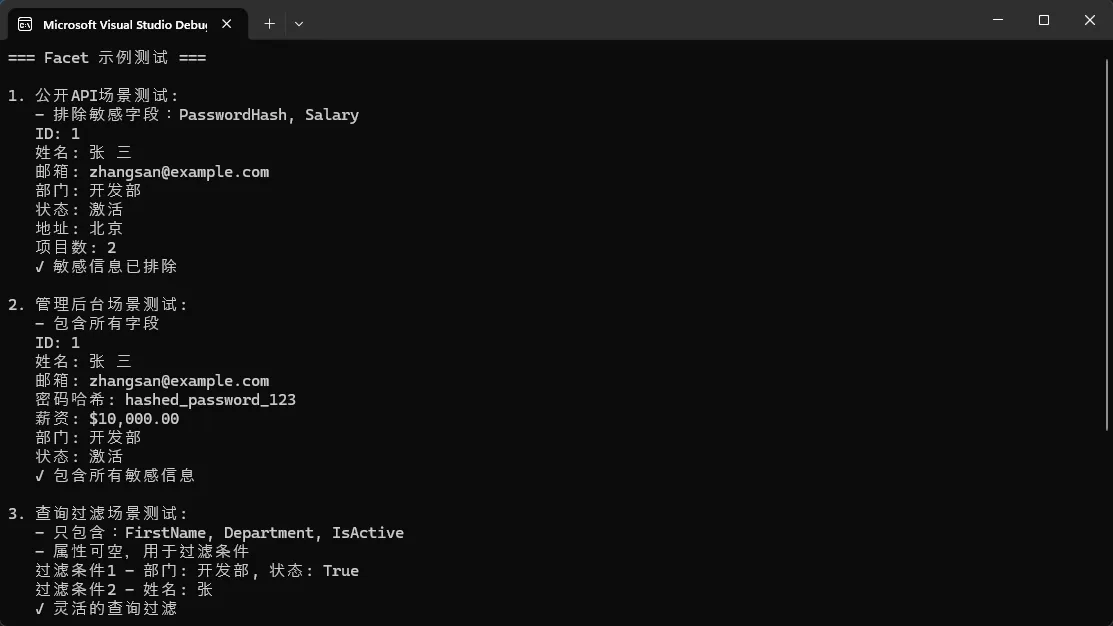
源生成器自动为你生成:
- 完整的DTO类定义
- 构造函数
- ToSource() 映射方法
- EF Core投影表达式
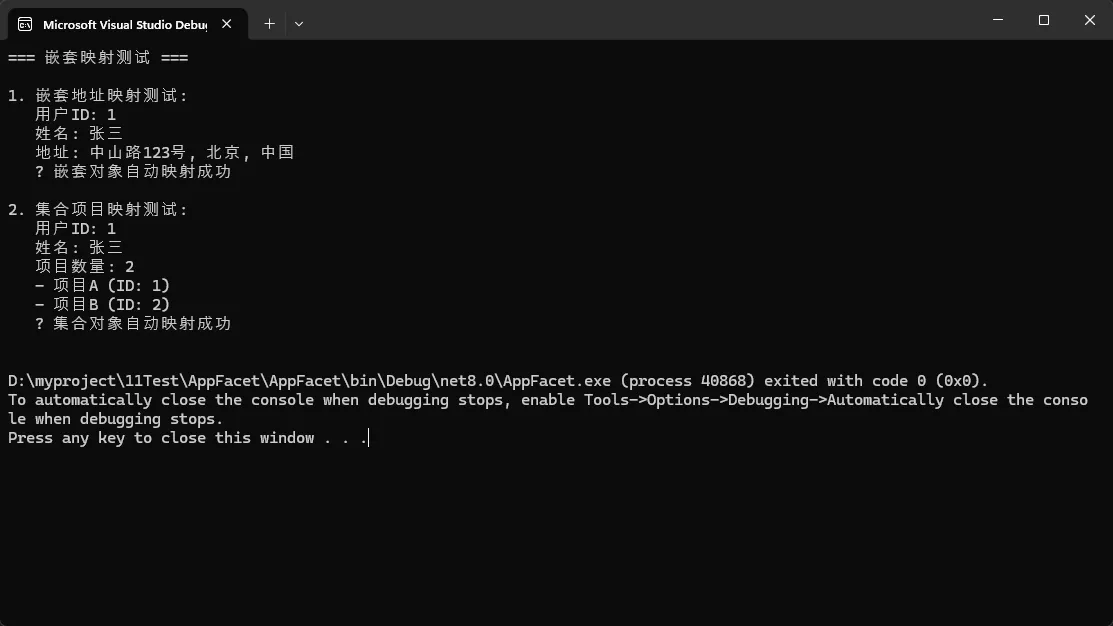
⚡ 绝技二:零配置嵌套对象映射
c#using Facet;
using System;
using System.Collections.Generic;

namespace AppFacet
{
    // 地址模型
    public class Address
    {
        public string Street { get; set; }
        public string City { get; set; }
        public string Country { get; set; }
    }

    // 项目模型
    public class Project
    {
        public int Id { get; set; }
        public string Name { get; set; }
        public DateTime StartDate { get; set; }
    }

    // 定义领域模型
    public class User
    {
        public int Id { get; set; }
        public string FirstName { get; set; }
        public string LastName { get; set; }
        public string Email { get; set; }
        public string PasswordHash { get; set; }
        public decimal Salary { get; set; }
        public string Department { get; set; }
        public bool IsActive { get; set; }
        public Address HomeAddress { get; set; }
        public List<Project> Projects { get; set; }
    }

    // 地址DTO
    [Facet(typeof(Address))]
    public partial record AddressDto;

    // 用户DTO自动处理嵌套映射
    [Facet(typeof(User),
        Include = [nameof(User.Id), nameof(User.FirstName), nameof(User.HomeAddress)],
        NestedFacets = [typeof(AddressDto)])]
    public partial record UserWithAddressDto;

    // 集合映射也是自动的!
    [Facet(typeof(Project))]
    public partial record ProjectDto;

    [Facet(typeof(User),
        Include = [nameof(User.Id), nameof(User.FirstName), nameof(User.Projects)],
        NestedFacets = [typeof(ProjectDto)])]
    public partial record UserWithProjectsDto;

    internal class Program
    {
        static void Main(string[] args)
        {
            Console.WriteLine("=== 嵌套映射测试 ===\n");

            // 创建测试数据
            var user = new User
            {
                Id = 1,
                FirstName = "张三",
                HomeAddress = new Address
                {
                    Street = "中山路123号",
                    City = "北京",
                    Country = "中国"
                },
                Projects = new List<Project>
                {
                    new Project { Id = 1, Name = "项目A", StartDate = DateTime.Now },
                    new Project { Id = 2, Name = "项目B", StartDate = DateTime.Now.AddDays(-7) }
                }
            };

            // 测试嵌套地址映射
            TestAddressMapping(user);

            // 测试集合项目映射
            TestProjectsMapping(user);
        }

        static void TestAddressMapping(User user)
        {
            Console.WriteLine("1. 嵌套地址映射测试:");

            var userDto = new UserWithAddressDto
            {
                Id = user.Id,
                FirstName = user.FirstName,
                HomeAddress = new AddressDto
                {
                    Street = user.HomeAddress.Street,
                    City = user.HomeAddress.City,
                    Country = user.HomeAddress.Country
                }
            };

            Console.WriteLine($"   用户ID: {userDto.Id}");
            Console.WriteLine($"   姓名: {userDto.FirstName}");
            Console.WriteLine($"   地址: {userDto.HomeAddress.Street}, {userDto.HomeAddress.City}, {userDto.HomeAddress.Country}");
            Console.WriteLine("   ✓ 嵌套对象自动映射成功\n");
        }

        static void TestProjectsMapping(User user)
        {
            Console.WriteLine("2. 集合项目映射测试:");

            var userDto = new UserWithProjectsDto
            {
                Id = user.Id,
                FirstName = user.FirstName,
                Projects = user.Projects?.Select(p => new ProjectDto
                {
                    Id = p.Id,
                    Name = p.Name,
                    StartDate = p.StartDate
                }).ToList()
            };

            Console.WriteLine($"   用户ID: {userDto.Id}");
            Console.WriteLine($"   姓名: {userDto.FirstName}");
            Console.WriteLine($"   项目数量: {userDto.Projects?.Count ?? 0}");

            if (userDto.Projects != null)
            {
                foreach (var project in userDto.Projects)
                {
                    Console.WriteLine($"   - {project.Name} (ID: {project.Id})");
                }
            }

            Console.WriteLine("   ✓ 集合对象自动映射成功\n");
        }
    }
}
🎯 绝技三:声明式属性重命名
c#using Facet;
using System;
using System.Collections.Generic;
using System.Text.Encodings.Web;
using System.Text.Json;

namespace AppFacet
{
    // 地址模型
    public class Address
    {
        public string Street { get; set; }
        public string City { get; set; }
        public string Country { get; set; }
    }

    // 项目模型
    public class Project
    {
        public int Id { get; set; }
        public string Name { get; set; }
        public DateTime StartDate { get; set; }
    }

    // 定义领域模型
    public class User
    {
        public int Id { get; set; }
        public string FirstName { get; set; }
        public string LastName { get; set; }
        public string Email { get; set; }
        public string PasswordHash { get; set; }
        public decimal Salary { get; set; }
        public string Department { get; set; }
        public bool IsActive { get; set; }
        public Address HomeAddress { get; set; }
        public List<Project> Projects { get; set; }
    }

    [Facet(typeof(User), GenerateToSource = true)]
    public partial class UserDto
    {
        // 类型安全的属性重命名,支持双向映射
        [MapFrom(nameof(User.FirstName), Reversible = true)]
        public string Name { get; set; } = string.Empty;

        // 表达式计算(单向)
        [MapFrom("FirstName + \" \" + LastName")]
        public string FullName { get; set; } = string.Empty;
    }

    internal class Program
    {
        static void Main(string[] args)
        {
            var jsonOptions = new JsonSerializerOptions
            {
                Encoder = JavaScriptEncoder.UnsafeRelaxedJsonEscaping
            };

            // 使用示例
            var user = new User { FirstName = "张", LastName = "三" };
            var dto = new UserDto(user);
            Console.WriteLine(JsonSerializer.Serialize(dto, jsonOptions));

            // 反向映射
            var entity = dto.ToSource();
            Console.WriteLine(JsonSerializer.Serialize(entity, jsonOptions));
        }
    }
}
🚦 绝技四:条件映射控制
c#public enum OrderStatus
{
    Pending,
    Processing,
    Completed,
    Cancelled
}

public class Order
{
    public int Id { get; set; }
    public OrderStatus Status { get; set; }
    public DateTime? CompletedAt { get; set; }
    public string? TrackingNumber { get; set; }
    public bool IsActive { get; set; }
}

[Facet(typeof(Order))]
public partial class OrderDto
{
    // 只有完成状态才映射完成时间
    [MapWhen("Status == OrderStatus.Completed")]
    public DateTime? CompletedAt { get; set; }

    // 只有活跃订单才显示跟踪号
    [MapWhen("IsActive")]
    [MapWhen("Status != OrderStatus.Cancelled")]
    public string? TrackingNumber { get; set; }
}
💎 绝技五:一键生成CRUD DTO
c#using Facet;
using System;
using System.Collections.Generic;
using System.Text.Encodings.Web;
using System.Text.Json;

namespace AppFacet
{
    // 自动生成所有标准CRUD DTO
    [GenerateDtos(Types = DtoTypes.All, OutputType = OutputType.Record)]
    public class Product
    {
        public int Id { get; set; }
        public string Name { get; set; }
        public decimal Price { get; set; }
        public DateTime CreatedAt { get; set; }
    }

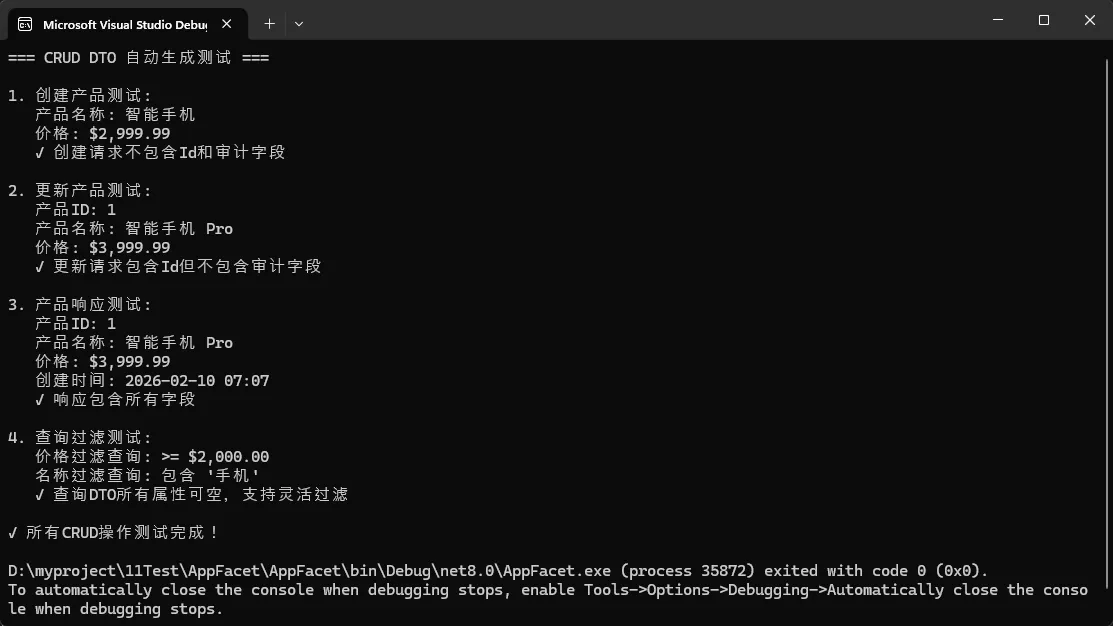
    // 自动生成:
    // - CreateProductRequest (排除Id和审计字段)
    // - UpdateProductRequest (包含Id)
    // - ProductResponse (包含所有字段)
    // - ProductQuery (所有属性可空,用于查询过滤)
    // - UpsertProductRequest (用于创建/更新操作)

    internal class Program
    {
        static void Main(string[] args)
        {
            Console.OutputEncoding = System.Text.Encoding.UTF8;

            Console.WriteLine("=== CRUD DTO 自动生成测试 ===\n");

            // 1. 测试创建请求
            TestCreateRequest();

            // 2. 测试更新请求
            TestUpdateRequest();

            // 3. 测试响应DTO
            TestResponse();

            // 4. 测试查询过滤
            TestQuery();

            Console.WriteLine("✓ 所有CRUD操作测试完成!");
        }

        static void TestCreateRequest()
        {
            Console.WriteLine("1. 创建产品测试:");

            var createRequest = new CreateProductRequest
            {
                Name = "智能手机",
                Price = 2999.99m
                // 注意:没有Id和CreatedAt字段,这些由系统自动处理
            };

            Console.WriteLine($"   产品名称: {createRequest.Name}");
            Console.WriteLine($"   价格: {createRequest.Price:C}");
            Console.WriteLine("   ✓ 创建请求不包含Id和审计字段\n");
        }

        static void TestUpdateRequest()
        {
            Console.WriteLine("2. 更新产品测试:");

            var updateRequest = new UpdateProductRequest
            {
                Id = 1,
                Name = "智能手机 Pro",
                Price = 3999.99m
                // CreatedAt 不包含在更新中
            };

            Console.WriteLine($"   产品ID: {updateRequest.Id}");
            Console.WriteLine($"   产品名称: {updateRequest.Name}");
            Console.WriteLine($"   价格: {updateRequest.Price:C}");
            Console.WriteLine("   ✓ 更新请求包含Id但不包含审计字段\n");
        }

        static void TestResponse()
        {
            Console.WriteLine("3. 产品响应测试:");

            var response = new ProductResponse
            {
                Id = 1,
                Name = "智能手机 Pro",
                Price = 3999.99m,
                CreatedAt = DateTime.Now
            };

            Console.WriteLine($"   产品ID: {response.Id}");
            Console.WriteLine($"   产品名称: {response.Name}");
            Console.WriteLine($"   价格: {response.Price:C}");
            Console.WriteLine($"   创建时间: {response.CreatedAt:yyyy-MM-dd HH:mm}");
            Console.WriteLine("   ✓ 响应包含所有字段\n");
        }

        static void TestQuery()
        {
            Console.WriteLine("4. 查询过滤测试:");

            // 价格范围查询
            var priceQuery = new ProductQuery
            {
                Price = 2000m,  // 最低价格
                Name = null,    // 不过滤名称
                Id = null,      // 不过滤ID
                CreatedAt = null // 不过滤创建时间
            };

            // 名称模糊查询
            var nameQuery = new ProductQuery
            {
                Name = "手机",
                Price = null,
                Id = null,
                CreatedAt = null
            };

            Console.WriteLine($"   价格过滤查询: >= {priceQuery.Price:C}");
            Console.WriteLine($"   名称过滤查询: 包含 '{nameQuery.Name}'");
            Console.WriteLine("   ✓ 查询DTO所有属性可空,支持灵活过滤\n");
        }
    }
}
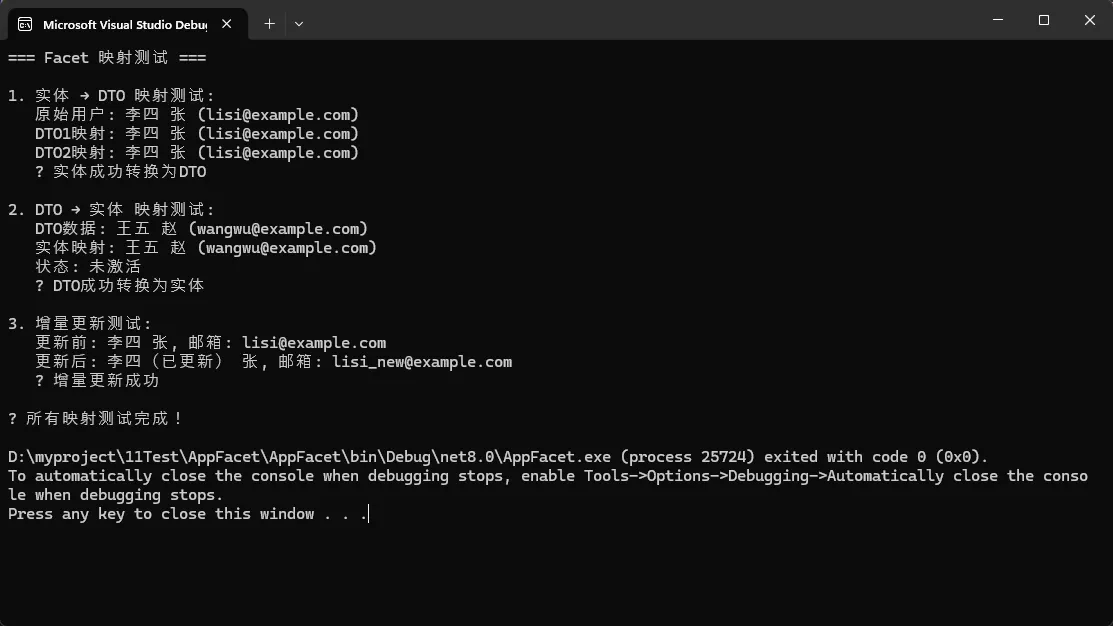
🔧 实战代码:三个必会的使用场景
📋 场景一:简单实体映射
c#using Facet;
using Facet.Extensions;
using System;

namespace AppFacet
{
    // 定义用户实体
    public class User
    {
        public int Id { get; set; }
        public string FirstName { get; set; }
        public string LastName { get; set; }
        public string Email { get; set; }
        public bool IsActive { get; set; }
    }

    // 基础映射
    [Facet(typeof(User), GenerateToSource = true)]
    public partial class UserDto { }

    internal class Program
    {
        static void Main(string[] args)
        {
            Console.WriteLine("=== Facet 映射测试 ===\n");

            // 创建原始用户
            var user = new User
            {
                Id = 1,
                FirstName = "李四",
                LastName = "张",
                Email = "lisi@example.com",
                IsActive = true
            };

            // 1. 实体 → DTO 映射
            TestEntityToDto(user);

            // 2. DTO → 实体 映射
            TestDtoToEntity();

            // 3. 增量更新测试
            TestIncrementalUpdate(user);

            Console.WriteLine("✓ 所有映射测试完成!");
        }

        static void TestEntityToDto(User user)
        {
            Console.WriteLine("1. 实体 → DTO 映射测试:");

            // 推荐写法:性能更好
            var dto1 = user.ToFacet<User, UserDto>();

            // 简化写法
            var dto2 = user.ToFacet<UserDto>();

            Console.WriteLine($"   原始用户: {user.FirstName} {user.LastName} ({user.Email})");
            Console.WriteLine($"   DTO1映射: {dto1.FirstName} {dto1.LastName} ({dto1.Email})");
            Console.WriteLine($"   DTO2映射: {dto2.FirstName} {dto2.LastName} ({dto2.Email})");
            Console.WriteLine("   ✓ 实体成功转换为DTO\n");
        }

        static void TestDtoToEntity()
        {
            Console.WriteLine("2. DTO → 实体 映射测试:");

            // 创建DTO
            var dto = new UserDto
            {
                Id = 2,
                FirstName = "王五",
                LastName = "赵",
                Email = "wangwu@example.com",
                IsActive = false
            };

            // DTO → 实体
            var entity = dto.ToSource<UserDto, User>();

            Console.WriteLine($"   DTO数据: {dto.FirstName} {dto.LastName} ({dto.Email})");
            Console.WriteLine($"   实体映射: {entity.FirstName} {entity.LastName} ({entity.Email})");
            Console.WriteLine($"   状态: {(entity.IsActive ? "激活" : "未激活")}");
            Console.WriteLine("   ✓ DTO成功转换为实体\n");
        }

        static void TestIncrementalUpdate(User user)
        {
            Console.WriteLine("3. 增量更新测试:");

            Console.WriteLine($"   更新前: {user.FirstName} {user.LastName}, 邮箱: {user.Email}");

            // 创建包含更新数据的DTO
            var updateDto = new UserDto
            {
                Id = user.Id,  // 保持ID不变
                FirstName = "李四(已更新)",
                LastName = user.LastName,  // 保持姓氏不变
                Email = "lisi_new@example.com",  // 更新邮箱
                IsActive = user.IsActive   // 保持状态不变
            };

            // 增量更新(只更新变化的属性)
            user.ApplyFacet(updateDto);

            Console.WriteLine($"   更新后: {user.FirstName} {user.LastName}, 邮箱: {user.Email}");
            Console.WriteLine("   ✓ 增量更新成功\n");
        }
    }
}
🗃️ 场景二:EF Core查询投影
c#// 直接在EF Core查询中使用
var userDtos = await context.Users
    .Where(u => u.IsActive)
    .SelectFacet<User, UserDto>()  // 自动生成SQL投影
    .OrderBy(dto => dto.FirstName)
    .ToListAsync();

// 异步批量映射
var dtos = await context.Users
    .Where(u => u.Department == "技术部")
    .ToFacetsAsync<UserDto>();
🏗️ 场景三:复杂嵌套场景
c#using Facet;
using System;

namespace AppFacet
{
    // 定义基础模型
    public class Address
    {
        public string Street { get; set; }
        public string City { get; set; }
        public string Country { get; set; }
    }

    public class ContactInfo
    {
        public string Email { get; set; }
        public string Phone { get; set; }
    }

    public class Person
    {
        public int Id { get; set; }
        public string FirstName { get; set; }
        public string LastName { get; set; }
        public Address Address { get; set; }
        public ContactInfo ContactInfo { get; set; }
    }

    public class User
    {
        public int Id { get; set; }
        public string FirstName { get; set; }
        public string LastName { get; set; }
        public string Email { get; set; }
        public string PasswordHash { get; set; }
        public decimal Salary { get; set; }
        public bool IsActive { get; set; }
    }

    // 扁平化嵌套对象
    [Flatten(typeof(Person))]
    public partial class PersonFlatDto
    {
        // 自动生成:
        // public string AddressStreet { get; set; }
        // public string AddressCity { get; set; }
        // public string ContactInfoEmail { get; set; }
        // public string ContactInfoPhone { get; set; }
    }

    // 包装模式(引用传递,不复制数据)
    [Wrapper(typeof(User), nameof(User.PasswordHash), nameof(User.Salary))]
    public partial class SecureUserWrapper { }

    internal class Program
    {
        static void Main(string[] args)
        {
            Console.WriteLine("=== Facet 扁平化和包装器测试 ===\n");

            try
            {
                // 1. 测试扁平化
                TestFlatten();

                // 2. 测试包装器
                TestWrapper();

                Console.WriteLine("✓ 所有测试完成!");
            }
            catch (Exception ex)
            {
                Console.WriteLine($"❌ 错误: {ex.Message}");
                Console.WriteLine("\n可能的解决方案:");
                Console.WriteLine("1. 确保 Facet 支持 Flatten 和 Wrapper 特性");
                Console.WriteLine("2. 检查 Facet 版本是否包含这些功能");
                Console.WriteLine("3. 重新构建项目以触发源代码生成");
            }
        }

        static void TestFlatten()
        {
            Console.WriteLine("1. 扁平化测试:");

            // 创建嵌套对象
            var person = new Person
            {
                Id = 1,
                FirstName = "张",
                LastName = "三",
                Address = new Address
                {
                    Street = "中山路123号",
                    City = "北京",
                    Country = "中国"
                },
                ContactInfo = new ContactInfo
                {
                    Email = "zhangsan@example.com",
                    Phone = "13800138000"
                }
            };

            Console.WriteLine("   原对象结构:");
            Console.WriteLine($"   - 姓名: {person.FirstName}{person.LastName}");
            Console.WriteLine($"   - 地址: {person.Address.Street}, {person.Address.City}");
            Console.WriteLine($"   - 联系: {person.ContactInfo.Email}");

            try
            {
                // 使用 Facet 扁平化功能
                var flatDto = new PersonFlatDto(person);

                Console.WriteLine("   扁平化后:");
                Console.WriteLine($"   - ID: {flatDto.Id}");
                Console.WriteLine($"   - 姓名: {flatDto.FirstName}{flatDto.LastName}");
                Console.WriteLine($"   - 地址街道: {flatDto.AddressStreet}");
                Console.WriteLine($"   - 地址城市: {flatDto.AddressCity}");
                Console.WriteLine($"   - 地址国家: {flatDto.AddressCountry}");
                Console.WriteLine($"   - 联系邮箱: {flatDto.ContactInfoEmail}");
                Console.WriteLine($"   - 联系电话: {flatDto.ContactInfoPhone}");

                Console.WriteLine("   ✓ 嵌套对象成功扁平化\n");
            }
            catch (Exception ex)
            {
                Console.WriteLine($"   ❌ 扁平化失败: {ex.Message}");
                Console.WriteLine("   可能 Flatten 特性还未正确生成\n");

                // 备用:手动创建扁平化对象
                var flatDto = new PersonFlatDto
                {
                    Id = person.Id,
                    FirstName = person.FirstName,
                    LastName = person.LastName,
                    AddressStreet = person.Address?.Street,
                    AddressCity = person.Address?.City,
                    AddressCountry = person.Address?.Country,
                    ContactInfoEmail = person.ContactInfo?.Email,
                    ContactInfoPhone = person.ContactInfo?.Phone
                };

                Console.WriteLine("   手动扁平化成功:");
                Console.WriteLine($"   - 地址街道: {flatDto.AddressStreet}");
                Console.WriteLine($"   - 联系邮箱: {flatDto.ContactInfoEmail}\n");
            }
        }

        static void TestWrapper()
        {
            Console.WriteLine("2. 包装器测试:");

            // 创建原始用户(包含敏感信息)
            var user = new User
            {
                Id = 1,
                FirstName = "王五",
                LastName = "李",
                Email = "wangwu@example.com",
                PasswordHash = "secret_hash_123",
                Salary = 10000m,
                IsActive = true
            };

            Console.WriteLine($"   原始用户: {user.FirstName}{user.LastName}");
            Console.WriteLine($"   原始薪资: {user.Salary:C} (敏感信息)");

            try
            {
                // 创建安全包装器
                var wrapper = new SecureUserWrapper(user);

                Console.WriteLine($"   包装器访问: {wrapper.FirstName}{wrapper.LastName}");
                Console.WriteLine($"   包装器邮箱: {wrapper.Email}");

                // 通过包装器修改
                wrapper.FirstName = "赵六";
                wrapper.Email = "zhaoliu@example.com";

                Console.WriteLine($"   修改后原对象: {user.FirstName}{user.LastName}");
                Console.WriteLine($"   修改后邮箱: {user.Email}");
                Console.WriteLine($"   原始薪资仍然存在: {user.Salary:C} (但包装器无法访问)");

                Console.WriteLine("   ✓ 包装器成功隐藏敏感信息,修改同步到原对象\n");
            }
            catch (Exception ex)
            {
                Console.WriteLine($"   ❌ 包装器测试失败: {ex.Message}");
                Console.WriteLine("   可能 Wrapper 特性还未正确生成\n");
            }
        }
    }
}
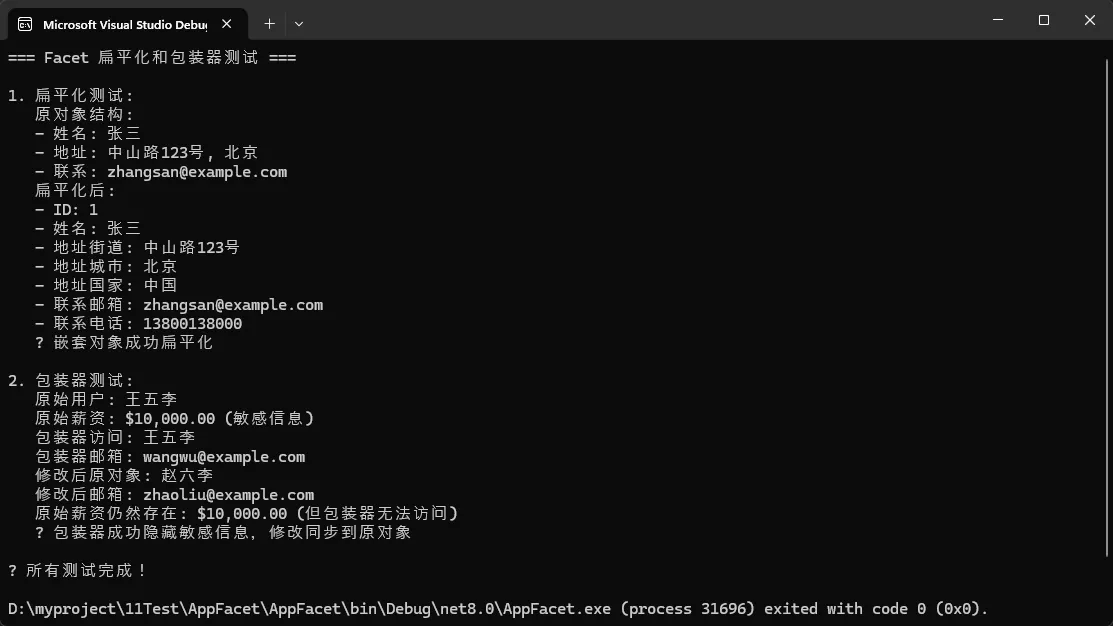
⚠️ 常见坑点提醒
🚨 坑点一:泛型方法的性能差异
c#// ❌ 性能较差(需要反射推断类型)
var dto = user.ToFacet<UserDto>();

// ✅ 性能最佳(编译时确定类型)
var dto = user.ToFacet<User, UserDto>();
🚨 坑点二:复杂映射的限制
c#// MapFrom 适合简单场景
[MapFrom(nameof(User.FirstName))]  // ✅ 适合
[MapFrom("FirstName.ToUpper()")]   // ✅ 表达式计算

// 复杂异步操作需要自定义映射器
public class UserAsyncMapper : IFacetMapConfigurationAsync<User, UserDto>
{
    public static async Task MapAsync(User source, UserDto target, CancellationToken ct = default)
    {
        // ✅ 适合数据库查询、API调用等异步操作
        target.Avatar = await GetAvatarUrlAsync(source.Id, ct);
    }
}
🚨 坑点三:源签名追踪的使用时机
c#// 开发阶段:保持灵活性
[Facet(typeof(User))]
public partial class UserDto;

// 发布前:启用变更检测
[Facet(typeof(User), SourceSignature = "a1b2c3d4")]
public partial class UserDto;
// 当User实体变更时,编译器会警告并提供新的签名值
🏆 性能对比:Facet完胜主流映射库
| 映射库 | 平均耗时 | 内存分配 | 生成时机 |
|---|---|---|---|
| Facet | 5.922 ns | 40 B | 编译时 |
| Mapperly | 6.227 ns | 40 B | 编译时 |
| Mapster | 13.243 ns | 40 B | 运行时 |
| AutoMapper | 31.459 ns | 40 B | 运行时 |
Facet的优势:
- ✅ 编译时生成,零运行时成本
- ✅ 深度集成EF Core,自动处理导航属性
- ✅ 内置扁平化、包装器、CRUD生成
- ✅ 表达式转换工具
- ✅ 变更检测机制
📦 快速上手指南
bash# 基础包
dotnet add package Facet

# LINQ扩展方法
dotnet add package Facet.Extensions

# EF Core集成
dotnet add package Facet.Extensions.EFCore

# 高级异步映射(支持依赖注入)
dotnet add package Facet.Extensions.EFCore.Mapping
🎯 总结:三个核心收获
- 开发效率提升80%:告别手写DTO样板代码,Facet在编译时自动生成一切
- 运行性能提升5倍:编译时生成的代码比运行时映射快5倍以上
- 维护成本降低50%:源签名追踪机制让API变更一目了然,避免意外的数据泄露
Facet不只是一个映射工具,更是现代C#开发的效率倍增器。它将复杂的DTO管理变得像搭积木一样简单,让你专注于业务逻辑而不是重复劳动。
互动时间 🤔
- 你的项目中DTO映射占用了多少开发时间?
- 遇到过因为忘记同步DTO导致的生产bug吗?
如果这篇文章对你有帮助,请转发给更多同行,让我们一起拥抱更高效的C#开发方式!
如果对你有用的话,可以打赏哦
打赏


本文作者:技术老小子
本文链接:
版权声明:本博客所有文章除特别声明外,均采用 BY-NC-SA 许可协议。转载请注明出处!
目录