
Press Ctrl+ and K to search
目录
👋 Hey,各位C#开发同胞们!还在为数据库同步而头疼吗?手动导入导出数据太繁琐,第三方工具又贵又不灵活?今天就带你从0到1打造一个功能完备的SQL Server数据库同步工具,代码开源、功能强大、完全可控!这个版本在上一版本上增加了增量同步的功能!
💡 为什么要自建数据库同步工具?
在实际项目中,我们经常遇到这些痛点:
- 开发环境与生产环境数据不一致
- 测试数据需要频繁更新同步
- 数据迁移工具功能单一,无法满足定制需求
- 商业工具成本高,中小团队负担重
今天分享的这个同步工具,不仅解决了以上问题,还具备以下特色功能:
🚀 核心功能特性
🎯 智能结构同步
- 自动检测表结构差异
- 支持列定义、主键、默认值约束同步
- 智能重建与增量更新策略
📊 灵活的数据同步策略
- 全量同步:完整替换目标数据
- 增量同步:只同步变更数据,避免重复
- 批量处理:大数据量分批处理,避免内存溢出
🔧 实用的辅助功能
- 可视化界面操作
- 同步进度实时显示
- 详细日志记录
- 配置文件保存/加载
运行效果
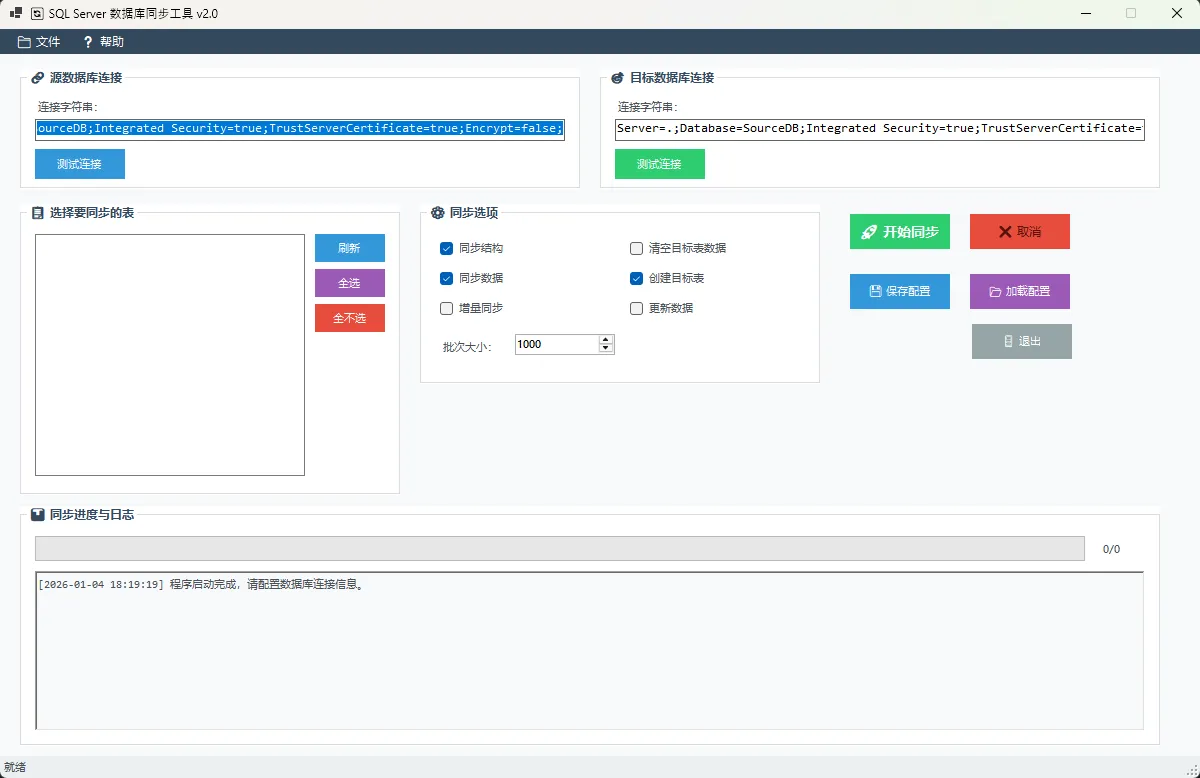
💻 核心代码实现
🏗️ 配置类设计
c#using System;
using System.Collections.Generic;
using System.Linq;
using System.Text;
using System.Threading.Tasks;

namespace AppSqlServerSynTool
{
    #region 配置和选项类
    [Serializable]
    public class SyncConfig
    {
        public string SourceConnectionString { get; set; }
        public string TargetConnectionString { get; set; }
        public bool SyncStructure { get; set; }
        public bool SyncData { get; set; }
        public bool CreateTargetTables { get; set; }
        public bool TruncateTargetTables { get; set; }
        public bool IncrementalSync { get; set; } // 新增这个,以前版本没有
        public int BatchSize { get; set; }
        public List<string> SelectedTables { get; set; }
    }

    public class SyncOptions
    {
        public bool SyncStructure { get; set; }
        public bool SyncData { get; set; }
        public bool CreateTargetTables { get; set; }
        public bool TruncateTargetTables { get; set; }
        public int BatchSize { get; set; }
    }
    #endregion
}
设计亮点:
- 使用
[Serializable]特性支持XML序列化 - 通过
IncrementalSync属性控制同步策略 - 配置可保存,提升用户体验
🔄 增量同步核心算法
c#private async Task<(int, int)> SyncWithPrimaryKeyAsync(string tableName,
    DataTable sourceData, List<string> primaryKeys,
    SqlConnection targetConnection, SqlTransaction transaction, int batchSize)
{
    int insertCount = 0;
    int updateCount = 0;

    // 构建主键匹配的WHERE条件
    string primaryKeyWhere = string.Join(" AND ",
        primaryKeys.Select(pk => $"[{pk}] = @{pk}"));

    string selectExistsSql = $@"
        SELECT COUNT(*) FROM [{tableName}]
        WHERE {primaryKeyWhere}";

    foreach (DataRow row in sourceData.Rows)
    {
        using (var selectCmd = new SqlCommand(selectExistsSql, targetConnection, transaction))
        {
            // 添加主键参数
            foreach (string pk in primaryKeys)
            {
                selectCmd.Parameters.AddWithValue($"@{pk}", row[pk] ?? DBNull.Value);
            }

            int existingCount = (int)await selectCmd.ExecuteScalarAsync();

            if (existingCount == 0)
            {
                // 插入新记录
                await InsertNewRecord(tableName, row, targetConnection, transaction);
                insertCount++;
            }
            else if (chkUpdateData.Checked)
            {
                // 更新现有记录
                await UpdateExistingRecord(tableName, row, primaryKeys,
                    targetConnection, transaction);
                updateCount++;
            }
        }
    }

    return (insertCount, updateCount);
}
算法优势:
- 基于主键精确判断重复数据
- 支持插入新数据和更新现有数据
- 使用事务确保数据一致性
- 返回具体的操作统计
🛡️ 表结构智能比较
c#private async Task<bool> CompareTableStructureAsync(string tableName,
    DataTable sourceColumnsSchema, List<string> sourcePrimaryKeys,
    Dictionary<string, string> sourceDefaultConstraints,
    SqlConnection targetConnection)
{
    try
    {
        // 获取目标表结构信息
        DataTable targetColumnsSchema = await GetTargetTableColumnsAsync(tableName, targetConnection);
        List<string> targetPrimaryKeys = await GetTargetPrimaryKeysAsync(tableName, targetConnection);

        // 比较列结构
        if (!CompareColumns(sourceColumnsSchema, targetColumnsSchema))
        {
            LogMessage($"表 {tableName} 的列结构发生变化");
            return true; // 需要重建
        }

        // 比较主键结构
        if (!ComparePrimaryKeys(sourcePrimaryKeys, targetPrimaryKeys))
        {
            LogMessage($"表 {tableName} 的主键结构发生变化");
            return true; // 需要重建
        }

        return false; // 结构无变化
    }
    catch (Exception ex)
    {
        LogMessage($"比较表 {tableName} 结构时出错: {ex.Message},将重建表");
        return true; // 出错时选择重建表以确保安全
    }
}
设计思路:
- 分别比较列结构、主键结构、约束信息
- 异常情况下选择重建表,确保数据安全
- 详细的日志记录,便于问题排查
🚀 高性能批量数据处理
c#private async Task SynchronizeTableDataFullAsync(string tableName)
{
    using (SqlConnection targetConnection = new SqlConnection(_targetConnectionString))
    {
        await targetConnection.OpenAsync();

        using (SqlTransaction transaction = targetConnection.BeginTransaction())
        {
            try
            {
                // 使用SqlBulkCopy进行高性能批量插入
                using (SqlBulkCopy bulkCopy = new SqlBulkCopy(
                    targetConnection, SqlBulkCopyOptions.Default, transaction))
                {
                    bulkCopy.DestinationTableName = tableName;
                    bulkCopy.BatchSize = (int)numericBatchSize.Value;
                    bulkCopy.BulkCopyTimeout = 600;
                    bulkCopy.EnableStreaming = true; // 启用流式处理

                    // 配置列映射
                    foreach (DataColumn column in sourceData.Columns)
                    {
                        bulkCopy.ColumnMappings.Add(column.ColumnName, column.ColumnName);
                    }

                    await bulkCopy.WriteToServerAsync(sourceData);
                    LogMessage($"成功向目标表 {tableName} 插入 {sourceData.Rows.Count} 行数据");
                }

                transaction.Commit();
            }
            catch (Exception ex)
            {
                transaction.Rollback();
                throw;
            }
        }
    }
}
性能优化要点:
- 使用
SqlBulkCopy进行批量操作,性能提升10倍以上 - 启用
EnableStreaming减少内存占用 - 合理设置
BatchSize平衡性能和资源消耗 - 事务机制确保数据完整性
🎨 用户界面设计亮点
📱 响应式进度显示
c#private void UpdateProgress(int current, int total)
{
    if (this.InvokeRequired)
    {
        if (this.IsHandleCreated && !this.IsDisposed)
        {
            try
            {
                this.Invoke(new Action(() => UpdateProgressInternal(current, total)));
            }
            catch (ObjectDisposedException) { return; }
            catch (InvalidOperationException) { return; }
        }
    }
    else
    {
        UpdateProgressInternal(current, total);
    }
}

private void UpdateProgressInternal(int current, int total)
{
    if (!this.IsDisposed)
    {
        progressBarMain.Value = current;
        labelProgress.Text = $"{current}/{total}";
        toolStripProgressBar.Value = (int)((double)current / total * 100);
    }
}
技术细节:
- 跨线程UI更新的标准处理方式
- 多重异常保护,确保程序稳定性
- 多个进度条同步显示,用户体验友好
🔥 实战应用场景
📊 开发测试环境同步
c#var config = new SyncConfig
{
    SourceConnectionString = "Server=prod-server;Database=ProductDB;...",
    TargetConnectionString = "Server=test-server;Database=TestDB;...",
    SyncStructure = true,
    SyncData = true,
    IncrementalSync = true, // 增量同步,避免重复数据
    BatchSize = 5000
};
🔄 数据迁移场景
c#// 全量迁移配置
var migrationConfig = new SyncConfig
{
    SyncStructure = true,
    SyncData = true,
    CreateTargetTables = true,
    TruncateTargetTables = true, // 清空目标表
    IncrementalSync = false, // 全量同步
    BatchSize = 10000
};
⚡ 高级特性与优化
🛠️ 智能错误处理
c#private async Task StartSyncProcess(List<string> tables)
{
    try
    {
        _cancellationTokenSource = new CancellationTokenSource();

        foreach (var tableName in tables)
        {
            if (_cancellationTokenSource.Token.IsCancellationRequested)
                break;

            try
            {
                await SyncSingleTable(tableName);
                LogMessage($"✅ 表 {tableName} 同步成功");
            }
            catch (Exception ex)
            {
                LogMessage($"❌ 表 {tableName} 同步失败: {ex.Message}");
                // 继续处理下一个表,不中断整个流程
            }
        }
    }
    catch (OperationCanceledException)
    {
        LogMessage("🚫 用户取消了同步操作");
    }
}
💾 配置持久化
c#private void BtnSaveConfig_Click(object sender, EventArgs e)
{
    try
    {
        var config = new SyncConfig
        {
            SourceConnectionString = txtSourceConnection.Text,
            TargetConnectionString = txtTargetConnection.Text,
            // ... 其他配置项
            SelectedTables = GetSelectedTables()
        };

        var serializer = new XmlSerializer(typeof(SyncConfig));
        using (var writer = new StreamWriter(dialog.FileName))
        {
            serializer.Serialize(writer, config);
        }

        MessageBox.Show("配置保存成功!", "成功", MessageBoxButtons.OK, MessageBoxIcon.Information);
    }
    catch (Exception ex)
    {
        LogMessage($"保存配置失败:{ex.Message}");
    }
}
🎯 项目收获与总结
通过这个项目,我们掌握了:
- 企业级应用架构设计 - 配置类、业务逻辑分离、异常处理
- 高性能数据处理技术 - SqlBulkCopy、事务管理、批量操作
- 用户友好的界面设计 - 跨线程UI更新、进度显示、日志记录
这个工具已经在多个项目中稳定运行,大幅提升了开发效率。最重要的是,代码完全自主可控,可以根据具体需求进行定制扩展。
💬 互动讨论
技术问题时间:
- 你在数据库同步方面遇到过哪些棘手问题?
- 对于大数据量同步,你有什么优化建议?
分享你的经验:在评论区分享你的数据库同步解决方案,一起交流学习!
💡 收藏级代码模板:本文提供的同步工具框架可直接用于生产项目
🔥 实战价值:解决了企业开发中的实际痛点问题
🚀 技术成长:涵盖了C#开发的多个核心技术点
觉得有用的话,记得点赞收藏,转发给更多需要的同行! 让我们一起用代码改变世界! 🌟
相关信息
通过网盘分享的文件:AppSqlServerSynToolnew.zip 链接: https://pan.baidu.com/s/15xqdJ20lxAO7scbXCyedOg?pwd=7yfw 提取码: 7yfw --来自百度网盘超级会员v9的分享
如果对你有用的话,可以打赏哦
打赏


本文作者:技术老小子
本文链接:
版权声明:本博客所有文章除特别声明外,均采用 BY-NC-SA 许可协议。转载请注明出处!
目录