
Press Ctrl+ and K to search
目录
在Python开发中,字符串(str)操作是每位开发者都必须掌握的基础技能,特别是在Windows环境下开发桌面应用程序时。无论你是在处理用户输入、文件操作,还是数据解析,字符串操作都扮演着关键角色。
很多初学者在面对字符串拼接、切片、索引等操作时常感困惑:为什么有时候字符串拼接很慢?切片操作到底是怎么工作的?转义字符什么时候使用?本文将从实战角度出发,通过丰富的代码示例,帮你彻底掌握Python字符串的核心操作技巧,让你的代码更高效、更优雅。
🔍 问题分析:字符串操作的常见痛点
在实际开发中,我们经常遇到以下字符串操作难题:
- 性能问题:频繁的字符串拼接导致程序卡顿
- 索引错误:负数索引和切片边界处理不当
- 转义困扰:路径分隔符、特殊字符处理混乱
- 编码问题:中英文混合字符串长度计算错误
💡 解决方案:系统掌握字符串四大核心操作
🚀 字符串拼接:选择最佳性能方案
方法一:+ 操作符(适合少量拼接)
Python# 基础拼接
name = "张三"
age = 25
message = "用户姓名:" + name + ",年龄:" + str(age)
print(message)

方法二:format()方法(推荐用于复杂格式化)
Python# 位置参数
template = "用户{}的年龄是{}岁,来自{}"
message = template.format("李四", 30, "北京")

# 关键字参数(更清晰)
user_info = "用户{name}的年龄是{age}岁,来自{city}"
message = user_info.format(name="王五", age=28, city="上海")
print(message)
方法三:f-string(Python 3.6+,性能最佳)
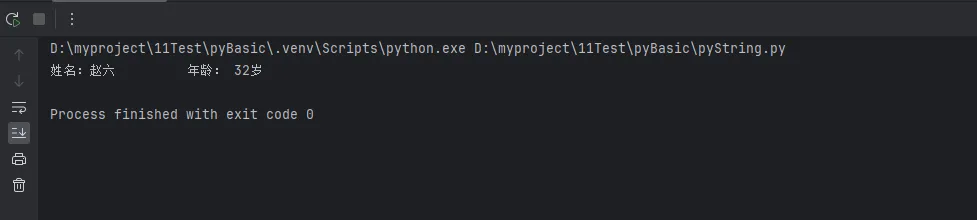
Pythonname = "赵六"
age = 32
city = "深圳"
salary = 15000.5

# 基础用法
message = f"用户{name}的年龄是{age}岁,来自{city}"

# 表达式计算
message = f"税后收入:{salary * 0.8:.2f}元"

# 格式化控制
message = f"姓名:{name:<10} 年龄:{age:>3}岁"  # 左对齐和右对齐
print(message)
🔥 性能优化技巧:join()方法处理大量拼接
Python# 错误示例:性能差
def bad_join(items):
    result = ""
    for item in items:
        result += str(item) + ","
    return result[:-1]  # 去掉最后一个逗号

# 正确示例:高性能
def good_join(items):
    return ",".join(str(item) for item in items)

# 实战测试
data_list = range(10000)
# 使用join方法,性能提升数十倍
result = good_join(data_list)
🎯 字符串切片:灵活提取数据片段
基础切片语法:[start:stop]
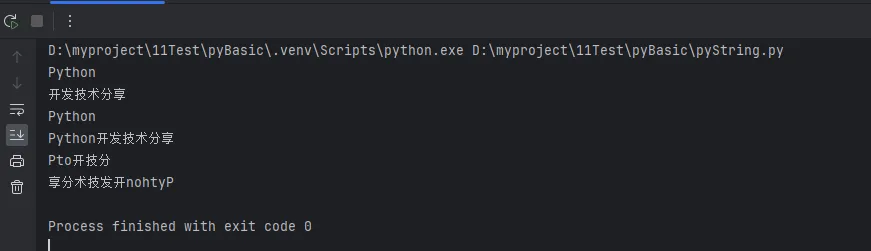
Pythontext = "Python开发技术分享"

# 基础切片
print(text[0:6])
print(text[6:])
print(text[:6])
print(text[:])

# 步长切片
print(text[::2])
print(text[::-1])
🎪 负数索引的实战应用
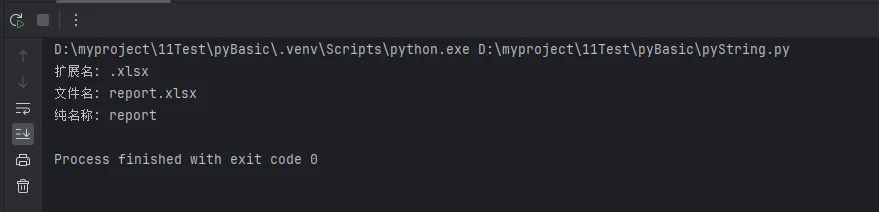
Pythonfile_path = "C:\\Users\\Documents\\report.xlsx"

# 获取文件扩展名
extension = file_path[-5:]

# 获取文件名(不含路径)
filename = file_path.split("\\")[-1]

# 获取文件名(不含扩展名)
name_only = file_path.split("\\")[-1].split(".")[0]

print(f"扩展名: {extension}")
print(f"文件名: {filename}")
print(f"纯名称: {name_only}")
🔧 切片边界处理技巧
Pythondef safe_slice(text, start, end):
    """安全的字符串切片,自动处理边界"""
    length = len(text)
    start = max(0, min(start, length))
    end = max(0, min(end, length))
    return text[start:end]

# 实战应用
long_text = "这是一个很长的文本内容示例"
# 即使索引超出范围也不会报错
result = safe_slice(long_text, 5, 100)
print(result)
📍 字符串索引:精确定位字符位置
单字符访问与查找
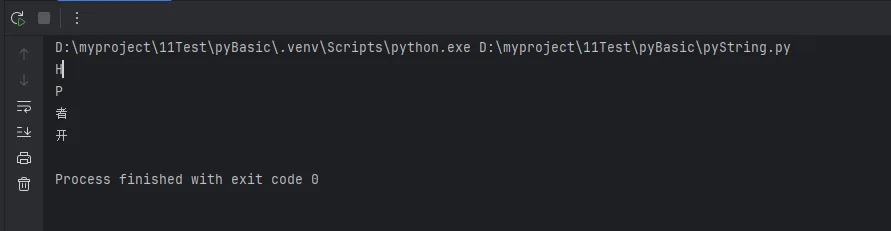
Pythontext = "Hello Python 开发者"

# 正向索引
print(text[0])
print(text[6])

# 负向索引
print(text[-1])
print(text[-3])

# 查找字符位置
pos = text.find('P')
pos2 = text.index('P')

# 统计字符出现次数
count = text.count('o')
🔍 高级索引应用:中英文混合处理
Pythondef get_char_positions(text, target_char):
    """获取字符在字符串中的所有位置"""
    positions = []
    start = 0
    while True:
        pos = text.find(target_char, start)
        if pos == -1:
            break
        positions.append(pos)
        start = pos + 1
    return positions

# 实战示例
content = "Python开发Python应用Python编程"
positions = get_char_positions(content, 'P')
print(f"字符'P'的位置:{positions}")
🎯 索引安全检查
Pythondef safe_get_char(text, index):
    """安全获取字符,避免索引越界"""
    try:
        return text[index]
    except IndexError:
        return None

# 或者使用更pythonic的方式
def safe_get_char_v2(text, index):
    """使用条件判断的安全获取"""
    if -len(text) <= index < len(text):
        return text[index]
    return None

# 实际应用
text = "短文本"
char = safe_get_char(text, 10)  # 返回None而不是报错
🛡️ 转义字符:处理特殊字符的利器
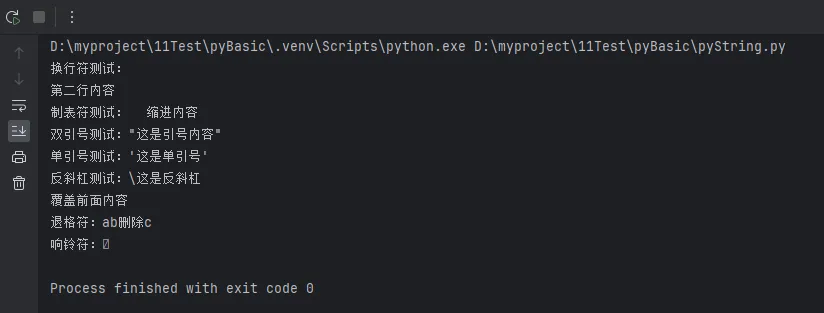
常用转义字符大全
Python# 基础转义字符
print("换行符测试:\n第二行内容")
print("制表符测试:\t缩进内容")
print("双引号测试:\"这是引号内容\"")
print("单引号测试:\'这是单引号\'")
print("反斜杠测试:\\这是反斜杠")

# 特殊字符
print("回车符:\r覆盖前面内容")
print("退格符:abc\b删除c")
print("响铃符:\a")
🖥️ Windows路径处理专题
Python# 方法一:使用转义字符
path1 = "C:\\Users\\Documents\\project\\main.py"

# 方法二:使用原始字符串(推荐)
path2 = r"C:\Users\Documents\project\main.py"

# 方法三:使用正斜杠(Python自动转换)
path3 = "C:/Users/Documents/project/main.py"

# 方法四:使用pathlib(最佳实践)
from pathlib import Path
path4 = Path("C") / "Users" / "Documents" / "project" / "main.py"

print("方法一:", path1)
print("方法二:", path2)
print("方法三:", path3)
print("方法四:", str(path4))

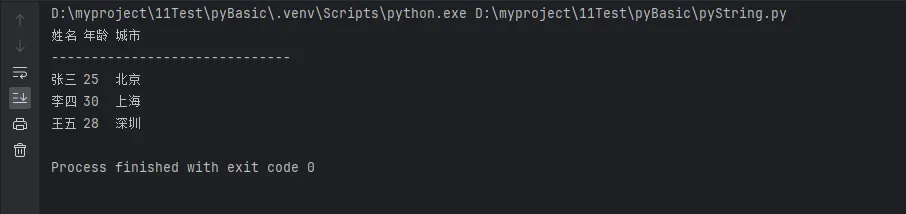
🎨 格式化输出中的转义应用
Python# 创建表格式输出
def create_table(data):
    """创建简单的表格输出"""
    header = "姓名\t年龄\t城市"
    separator = "-" * 30

    result = [header, separator]
    for item in data:
        row = f"{item['name']}\t{item['age']}\t{item['city']}"
        result.append(row)

    return "\n".join(result)

# 使用示例
users = [
    {"name": "张三", "age": 25, "city": "北京"},
    {"name": "李四", "age": 30, "city": "上海"},
    {"name": "王五", "age": 28, "city": "深圳"}
]

table = create_table(users)
print(table)
🛠️ 代码实战:综合应用案例
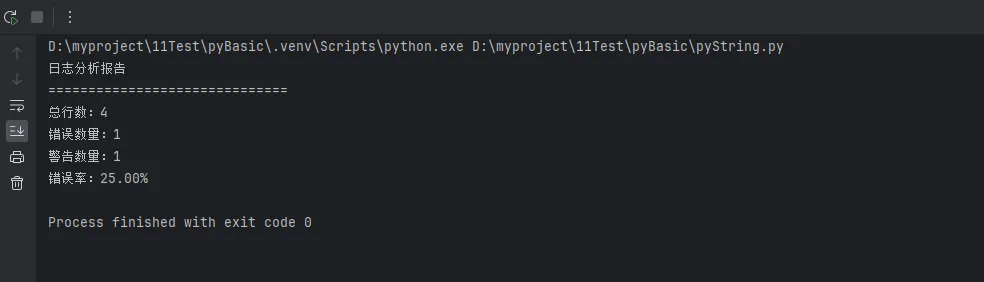
📋 案例一:日志分析器
Pythonclass LogAnalyzer:
    """简单的日志分析工具"""

    def __init__(self, log_content):
        self.log_content = log_content
        self.lines = log_content.split('\n')

    def extract_errors(self):
        """提取错误日志"""
        error_lines = []
        for i, line in enumerate(self.lines):
            if 'ERROR' in line.upper():
                # 使用切片获取上下文
                start = max(0, i-1)
                end = min(len(self.lines), i+2)
                context = self.lines[start:end]
                error_lines.extend(context)
                error_lines.append('-' * 50)  # 分隔符
        return '\n'.join(error_lines)

    def get_summary(self):
        """生成摘要报告"""
        total_lines = len(self.lines)
        error_count = sum(1 for line in self.lines if 'ERROR' in line.upper())
        warning_count = sum(1 for line in self.lines if 'WARNING' in line.upper())

        # 使用f-string格式化报告
        summary = f"""
日志分析报告
{'='*30}
总行数:{total_lines}
错误数量:{error_count}
警告数量:{warning_count}
错误率:{error_count/total_lines*100:.2f}%
        """
        return summary.strip()

# 使用示例
sample_log = """2024-01-01 10:00:01 INFO 系统启动成功
2024-01-01 10:00:05 WARNING 内存使用率较高
2024-01-01 10:00:10 ERROR 数据库连接失败
2024-01-01 10:00:15 INFO 重试连接中"""

analyzer = LogAnalyzer(sample_log)
print(analyzer.get_summary())
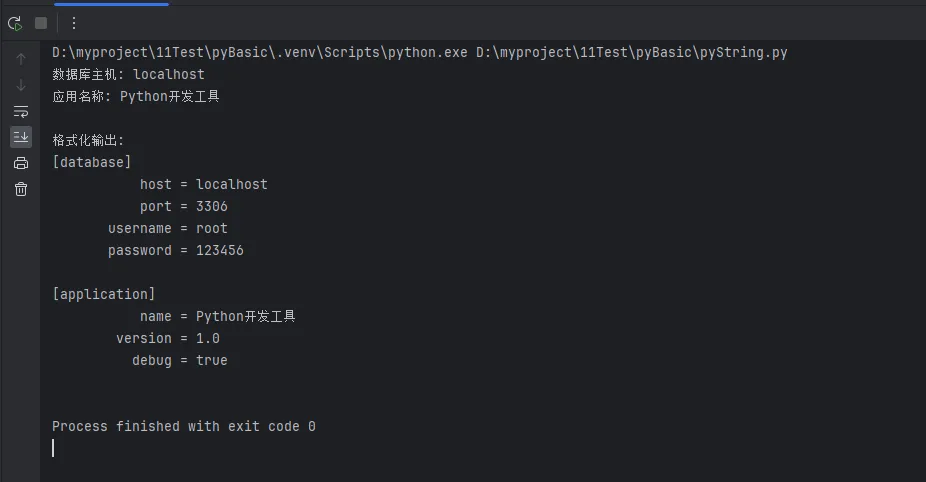
🎯 案例二:配置文件解析器
Pythonclass ConfigParser:
    """简单的配置文件解析器"""

    def __init__(self, config_text):
        self.config_text = config_text
        self.config_dict = {}
        self.parse()

    def parse(self):
        """解析配置内容"""
        lines = self.config_text.split('\n')
        current_section = 'default'

        for line in lines:
            line = line.strip()
            # 跳过注释和空行
            if not line or line.startswith('#'):
                continue

            # 检查是否是节标题
            if line.startswith('[') and line.endswith(']'):
                current_section = line[1:-1]  # 使用切片去掉方括号
                self.config_dict[current_section] = {}
                continue

            # 解析键值对
            if '=' in line:
                key, value = line.split('=', 1)  # 只分割第一个等号
                key = key.strip()
                value = value.strip()

                # 处理引号
                if (value.startswith('"') and value.endswith('"')) or \
                   (value.startswith("'") and value.endswith("'")):
                    value = value[1:-1]  # 去掉引号

                if current_section not in self.config_dict:
                    self.config_dict[current_section] = {}

                self.config_dict[current_section][key] = value

    def get_value(self, section, key, default=None):
        """获取配置值"""
        return self.config_dict.get(section, {}).get(key, default)

    def get_formatted_output(self):
        """生成格式化的配置输出"""
        output = []
        for section, values in self.config_dict.items():
            output.append(f"[{section}]")
            for key, value in values.items():
                # 使用字符串格式化
                output.append(f"{key:>15} = {value}")
            output.append("")  # 空行分隔
        return '\n'.join(output)

# 使用示例
config_content = """
# 数据库配置
[database]
host = "localhost"
port = 3306
username = root
password = "123456"

[application]
name = "Python开发工具"
version = 1.0
debug = true
"""

parser = ConfigParser(config_content)
print("数据库主机:", parser.get_value('database', 'host'))
print("应用名称:", parser.get_value('application', 'name'))
print("\n格式化输出:")
print(parser.get_formatted_output())
🎯 核心要点总结
通过本文的学习,我们深入掌握了Python字符串操作的四大核心技能。在实际的Python开发和上位机开发项目中,正确运用这些技巧能显著提升代码质量和程序性能。
三个关键要点:
- 性能优化:大量字符串拼接使用join()方法,格式化优先选择f-string,避免频繁的+操作
- 安全编程:切片和索引操作要做好边界检查,使用异常处理或条件判断防止越界错误
- 最佳实践:Windows路径使用原始字符串或pathlib,转义字符要根据实际需求选择合适的处理方式
掌握这些编程技巧不仅能让你的Python代码更加健壮,还能在处理文件操作、数据解析、用户界面开发等场景中游刃有余。继续深入学习,建议接下来关注字符串的高级方法如正则表达式、编码处理等主题,让你的Python开发技能更上一层楼!
本文作者:技术老小子
本文链接:
版权声明:本博客所有文章除特别声明外,均采用 BY-NC-SA 许可协议。转载请注明出处!
目录