
Press Ctrl+ and K to search
目录
在现代移动应用开发中,SkiaSharp 作为跨平台2D图形库,为C#开发者提供了强大的图形绘制能力。其中,复合变换(Composite Transform) 是实现复杂图形效果的核心技术,掌握它能让你的应用界面更加生动和专业。
本文将深入讲解SkiaSharp中的复合变换技术,通过丰富的实例帮助你快速掌握这一重要技能。
什么是复合变换?
复合变换 是指将多个基础变换(平移、旋转、缩放、倾斜等)组合使用,创造出更复杂的视觉效果。在SkiaSharp中,这些变换通过矩阵运算实现,可以让图形元素产生丰富的动态效果。
基础变换类型
- 平移变换(Translation) - 移动图形位置
- 旋转变换(Rotation) - 围绕某点旋转图形
- 缩放变换(Scale) - 改变图形大小
- 倾斜变换(Skew) - 使图形产生倾斜效果
核心概念:变换矩阵
SkiaSharp使用 SKMatrix 来表示变换矩阵。理解矩阵的组合规则是掌握复合变换的关键:
C#// 变换矩阵的基本结构
// [ScaleX  SkewX   TransX]
// [SkewY   ScaleY  TransY]
// [Persp0  Persp1  Persp2]
实战案例详解
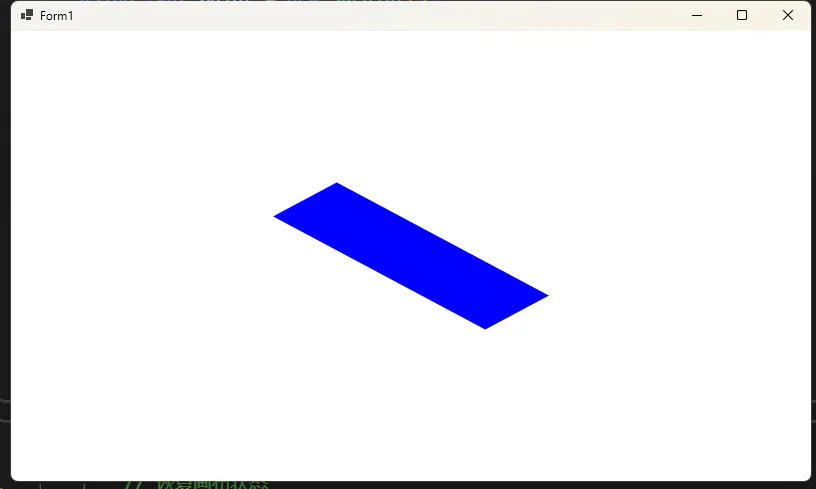
案例1:旋转缩放组合效果
这个例子展示如何创建一个既旋转又缩放的矩形:
C#using SkiaSharp;
using SkiaSharp.Views.Desktop;

namespace AppTransforms
{
    public partial class Form1 : Form
    {
        private SKGLControl skControl;
        public Form1()
        {
            InitializeComponent();

            skControl = new SKGLControl();
            skControl.Dock = DockStyle.Fill;
            skControl.PaintSurface += SkControl_PaintSurface;

            this.Controls.Add(skControl);
            this.BackColor = System.Drawing.Color.Black;

        }

        private void SkControl_PaintSurface(object? sender, SKPaintGLSurfaceEventArgs e)
        {
             DrawRotateScaleComposite(e.Surface.Canvas, e.Info);
        }

        public void DrawRotateScaleComposite(SKCanvas canvas, SKImageInfo info)
        {
            // 清空画布背景
            canvas.Clear(SKColors.White);

            // 创建画笔
            using (var paint = new SKPaint())
            {
                paint.Color = SKColors.Blue;
                paint.Style = SKPaintStyle.Fill;
                paint.IsAntialias = true; // 开启抗锯齿

                // 保存当前画布状态
                canvas.Save();

                // 移动到画布中心
                canvas.Translate(info.Width / 2, info.Height / 2);

                // 先缩放再旋转(注意顺序很重要)
                canvas.Scale(1.5f, 0.8f);     // X轴放大1.5倍,Y轴缩小到0.8倍
                canvas.RotateDegrees(45);      // 顺时针旋转45度

                // 绘制矩形(以原点为中心)
                var rect = new SKRect(-100, -30, 100, 30);
                canvas.DrawRect(rect, paint);

                // 恢复画布状态
                canvas.Restore();
            }
        }
    }
}
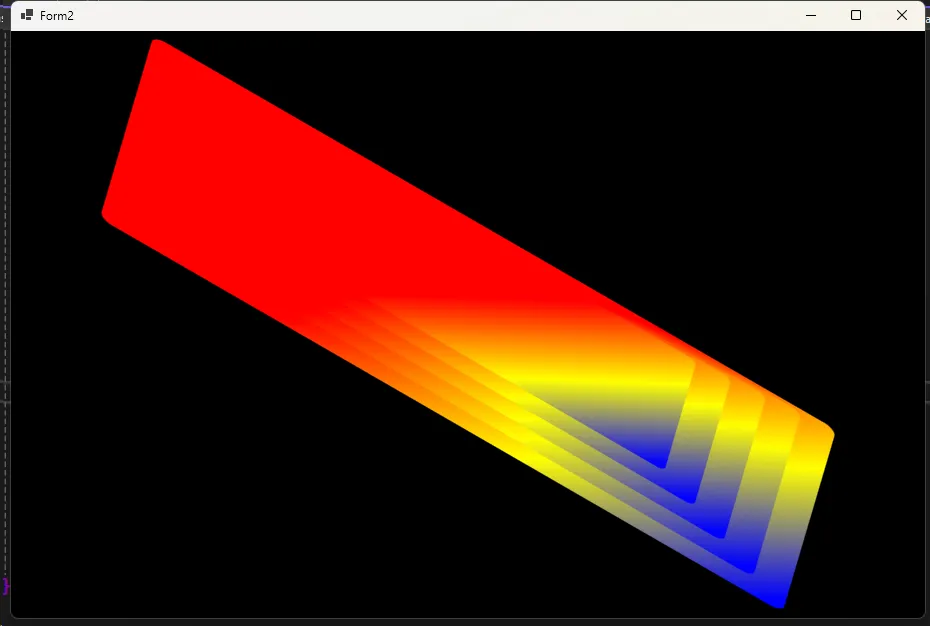
案例2:创建3D透视效果
通过复合变换实现伪3D透视效果:
C#using System;
using System.Collections.Generic;
using System.ComponentModel;
using System.Data;
using System.Drawing;
using System.Linq;
using System.Text;
using System.Threading.Tasks;
using System.Windows.Forms;
using SkiaSharp;
using SkiaSharp.Views.Desktop;

namespace AppTransforms
{
    public partial class Form2 : Form
    {
        private SKGLControl skControl;
        public Form2()
        {
            InitializeComponent();
            skControl = new SKGLControl();
            skControl.Dock = DockStyle.Fill;
            skControl.PaintSurface += SkControl_PaintSurface;

            this.Controls.Add(skControl);
            this.BackColor = System.Drawing.Color.Black;
        }

        private void SkControl_PaintSurface(object? sender, SKPaintGLSurfaceEventArgs e)
        {
            Draw3DPerspectiveEffect(e.Surface.Canvas, e.Info);
        }

        public void Draw3DPerspectiveEffect(SKCanvas canvas, SKImageInfo info)
        {
            canvas.Clear(SKColors.Black);

            using (var paint = new SKPaint())
            {
                paint.IsAntialias = true;

                // 创建渐变色
                var colors = new SKColor[] { SKColors.Red, SKColors.Yellow, SKColors.Blue };
                var positions = new float[] { 0f, 0.5f, 1f };

                using (var shader = SKShader.CreateLinearGradient(
                    new SKPoint(0, 0),
                    new SKPoint(200, 200),
                    colors,
                    positions,
                    SKShaderTileMode.Clamp))
                {
                    paint.Shader = shader;

                    canvas.Save();

                    // 移动到画布中心
                    canvas.Translate(info.Width / 2, info.Height / 2);

                    // 创建透视变换矩阵
                    var matrix = SKMatrix.CreateIdentity();

                    // 组合多个变换:先倾斜,再旋转,最后缩放
                    matrix = matrix.PreConcat(SKMatrix.CreateSkew(0.3f, 0.1f));  // 倾斜变换
                    matrix = matrix.PreConcat(SKMatrix.CreateRotationDegrees(30)); // 旋转30度
                    matrix = matrix.PreConcat(SKMatrix.CreateScale(1.2f, 0.8f));   // 非等比缩放

                    // 应用复合变换
                    canvas.Concat(ref matrix);

                    // 绘制多个图形创建层次感
                    for (int i = 0; i < 5; i++)
                    {
                        canvas.Save();
                        canvas.Translate(0, i * -10); // 每层向上偏移
                        canvas.Scale(1 - i * 0.1f);   // 每层逐渐缩小

                        var rect = new SKRect(-280, -140, 280, 140);
                        canvas.DrawRoundRect(rect, 10, 10, paint);

                        canvas.Restore();
                    }

                    canvas.Restore();
                }
            }
        }
    }
}
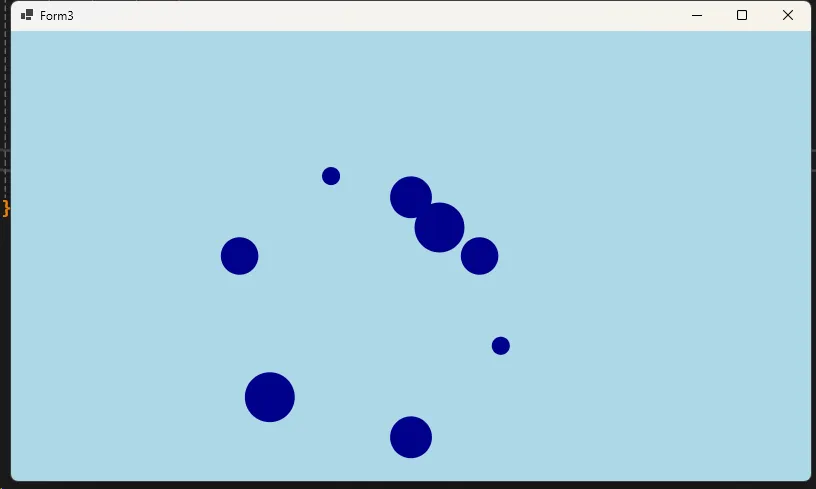
案例3:动态波浪效果
创建具有动态感的波浪形复合变换:
C#using System;
using System.Collections.Generic;
using System.ComponentModel;
using System.Data;
using System.Drawing;
using System.Linq;
using System.Text;
using System.Threading.Tasks;
using System.Windows.Forms;
using SkiaSharp;
using SkiaSharp.Views.Desktop;
using Timer = System.Windows.Forms.Timer;

namespace AppTransforms
{
    public partial class Form3 : Form
    {
        private SKGLControl skControl;
        private Timer animationTimer;
        private float currentTime = 0f;

        public Form3()
        {
            InitializeComponent();

            skControl = new SKGLControl();
            skControl.Dock = DockStyle.Fill;
            skControl.PaintSurface += SkControl_PaintSurface;

            this.Controls.Add(skControl);
            this.BackColor = System.Drawing.Color.Black;

            // 添加动画定时器
            animationTimer = new Timer();
            animationTimer.Interval = 16; // 约60FPS
            animationTimer.Tick += AnimationTimer_Tick;
            animationTimer.Start();
        }

        private void AnimationTimer_Tick(object sender, EventArgs e)
        {
            currentTime += 2f; // 增加时间
            skControl.Invalidate(); // 触发重绘
        }

        private void SkControl_PaintSurface(object? sender, SKPaintGLSurfaceEventArgs e)
        {
            DrawWaveEffect(e.Surface.Canvas, e.Info, currentTime);
        }

        public void DrawWaveEffect(SKCanvas canvas, SKImageInfo info, float time)
        {
            canvas.Clear(SKColors.LightBlue);

            using (var paint = new SKPaint())
            {
                paint.Color = SKColors.DarkBlue;
                paint.Style = SKPaintStyle.Fill;
                paint.IsAntialias = true;

                var centerX = info.Width / 2f;
                var centerY = info.Height / 2f;

                // 创建多个圆形,每个都应用不同的复合变换
                for (int i = 0; i < 8; i++)
                {
                    canvas.Save();

                    // 移动到中心点
                    canvas.Translate(centerX, centerY);

                    // 创建波浪式的复合变换
                    var angle = (time + i * 45) * Math.PI / 180; // 时间相关的角度
                    var waveOffset = (float)(Math.Sin(angle) * 80); // 增大波浪偏移

                    // 复合变换组合
                    canvas.RotateDegrees(i * 45);                    // 每个元素旋转不同角度
                    canvas.Translate(120 + waveOffset, 0);           // 带波浪的径向位移
                    canvas.Scale(0.3f + (float)Math.Abs(Math.Sin(angle)) * 0.7f); // 动态缩放
                    canvas.RotateDegrees((float)(time * 3));         // 加快自身旋转

                    // 绘制圆形
                    canvas.DrawCircle(0, 0, 25, paint);

                    canvas.Restore();
                }
            }
        }

    }
}
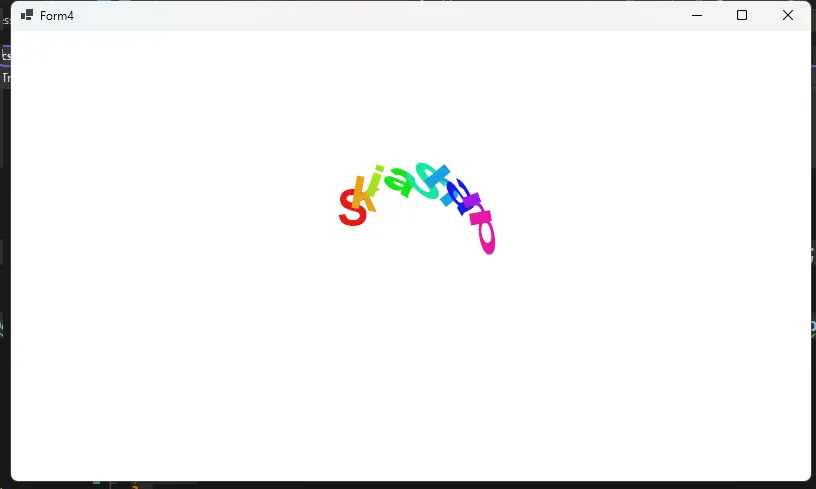
案例4:文字特效变换
对文字应用复合变换创建艺术字效果:
C#using System;
using System.Collections.Generic;
using System.ComponentModel;
using System.Data;
using System.Drawing;
using System.Linq;
using System.Text;
using System.Threading.Tasks;
using System.Windows.Forms;
using SkiaSharp;
using SkiaSharp.Views.Desktop;

namespace AppTransforms
{
    public partial class Form4 : Form
    {
        private SKGLControl skControl;
        public Form4()
        {
            InitializeComponent();
            skControl = new SKGLControl();
            skControl.Dock = DockStyle.Fill;
            skControl.PaintSurface += SkControl_PaintSurface;

            this.Controls.Add(skControl);
            this.BackColor = System.Drawing.Color.Black;
        }

        private void SkControl_PaintSurface(object? sender, SKPaintGLSurfaceEventArgs e)
        {
             DrawTextWithCompositeTransform(e.Surface.Canvas, e.Info);
        }

        public void DrawTextWithCompositeTransform(SKCanvas canvas, SKImageInfo info)
        {
            canvas.Clear(SKColors.White);

            string text = "SkiaSharp";

            using (var paint = new SKPaint())
            {
                paint.TextSize = 48;
                paint.IsAntialias = true;
                paint.Typeface = SKTypeface.FromFamilyName("Arial", SKFontStyle.Bold);

                // 测量文字尺寸
                var textBounds = new SKRect();
                paint.MeasureText(text, ref textBounds);

                var centerX = info.Width / 2f;
                var centerY = info.Height / 2f;

                // 为每个字符应用不同的复合变换
                for (int i = 0; i < text.Length; i++)
                {
                    canvas.Save();

                    // 移动到基准位置
                    canvas.Translate(centerX, centerY);

                    // 字符间距和弧形排列
                    var charAngle = (i - text.Length / 2f) * 15; // 每个字符的角度
                    var radius = 80; // 弧形半径

                    // 复合变换:弧形排列 + 个性化旋转 + 缩放
                    canvas.RotateDegrees(charAngle);              // 弧形排列旋转
                    canvas.Translate(0, -radius);                 // 向外移动到弧形位置
                    canvas.RotateDegrees(-charAngle + i * 10);    // 字符个性化旋转
                    canvas.Scale(1 + i * 0.1f, 1 - i * 0.05f);   // 渐变缩放效果

                    // 设置字符颜色(彩虹效果)
                    var hue = (i * 360f / text.Length) % 360;
                    paint.Color = SKColor.FromHsl(hue, 80, 50);

                    // 绘制单个字符
                    canvas.DrawText(text[i].ToString(), 0, 0, paint);

                    canvas.Restore();
                }
            }
        }
    }
}
常见问题与解决方案
Q1: 复合变换后图形位置不准确?
A: 检查变换顺序,特别是平移操作的时机。建议先设置旋转和缩放,最后设置平移。
Q2: 性能问题?
A: 避免在绘制循环中重复创建变换矩阵,预计算并重用矩阵对象。
Q3: 动画不流畅?
A: 使用增量时间而非绝对时间,确保动画帧率稳定。
总结
SkiaSharp的复合变换为C#开发者提供了强大的图形处理能力。通过合理组合基础变换,可以创造出丰富多彩的视觉效果。关键要点:
- 理解变换顺序的重要性
- 善用矩阵预计算优化性能
- 结合动画创造动态效果
- 注意资源管理和内存优化
掌握这些技巧,你就能在移动应用开发中创造出专业级的图形界面效果!
相关关键词: SkiaSharp教程、C#图形编程、复合变换、移动开发、跨平台图形库、矩阵变换、动画效果、UI设计
技术标签: #SkiaSharp #C# #图形编程 #移动开发 #跨平台 #UI动画
本文作者:技术老小子
本文链接:
版权声明:本博客所有文章除特别声明外,均采用 BY-NC-SA 许可协议。转载请注明出处!
目录