
目录
在Windows应用开发中,注册表操作是一项必不可少的技能。无论是存储应用配置、获取系统信息,还是实现开机自启动功能,注册表都扮演着重要角色。很多初学者对注册表操作望而却步,认为这是系统底层的复杂技术。
其实不然!Python凭借其强大的标准库,让注册表操作变得简单直观。本文将从实际项目需求出发,详细讲解如何使用Python安全高效地读写Windows注册表,让你的应用程序具备系统级软件的专业特性。
🎯 问题分析:为什么需要操作注册表?
在Windows开发中,注册表操作的应用场景非常广泛:
配置管理场景
- 保存应用程序设置(窗口位置、用户偏好等)
- 存储license信息和激活状态
- 记录软件版本和安装路径
系统集成场景
- 实现开机自启动功能
- 注册文件关联(双击文件用你的程序打开)
- 获取系统硬件信息
企业级应用场景
- 部署策略配置
- 安全设置管理
- 多用户环境配置
传统的ini文件或json配置文件容易被用户误操作,而注册表提供了更安全、更专业的配置存储方案。
💡 解决方案:Python的winreg模块
Python内置的winreg模块(在Python 2中叫_winreg)提供了完整的注册表操作功能。这个模块封装了Windows API,让我们能用Python的方式优雅地操作注册表。
🔑 注册表基础知识
Windows注册表采用树形结构,主要包含以下根键:
- HKEY_CURRENT_USER (HKCU): 当前用户配置
- HKEY_LOCAL_MACHINE (HKLM): 本机配置
- HKEY_CLASSES_ROOT (HKCR): 文件类型关联
- HKEY_USERS (HKU): 所有用户配置
- HKEY_CURRENT_CONFIG (HKCC): 当前硬件配置
每个键可以包含子键和值,值有不同的数据类型(字符串、整数、二进制等)。
🚀 代码实战:从入门到精通
📖 基础操作:读取注册表值
让我们从最简单的读取操作开始:
Pythonimport winreg
import sys

def read_registry_value(root_key, sub_key, value_name):
    """
    读取注册表值的通用函数

    Args:
        root_key: 根键(如winreg.HKEY_CURRENT_USER)
        sub_key: 子键路径
        value_name: 值名称

    Returns:
        tuple: (值, 类型) 或 None
    """
    try:
        # 打开注册表键
        key = winreg.OpenKey(root_key, sub_key)

        # 读取指定值
        value, reg_type = winreg.QueryValueEx(key, value_name)

        # 关闭键
        winreg.CloseKey(key)

        return value, reg_type

    except FileNotFoundError:
        print(f"注册表键不存在: {sub_key}")
        return None
    except Exception as e:
        print(f"读取注册表失败: {e}")
        return None

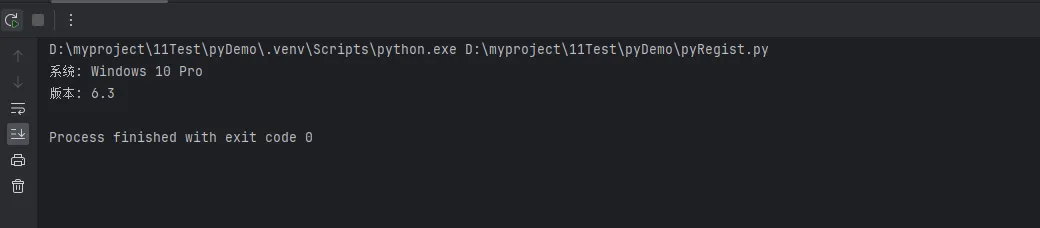
# 实际应用示例:获取Windows版本信息
def get_windows_version():
    """获取Windows版本信息"""
    version_key = r"SOFTWARE\Microsoft\Windows NT\CurrentVersion"

    # 获取产品名称
    product_name = read_registry_value(
        winreg.HKEY_LOCAL_MACHINE,
        version_key,
        "ProductName"
    )

    # 获取版本号
    current_version = read_registry_value(
        winreg.HKEY_LOCAL_MACHINE,
        version_key,
        "CurrentVersion"
    )

    if product_name and current_version:
        print(f"系统: {product_name[0]}")
        print(f"版本: {current_version[0]}")

    return product_name, current_version

# 测试代码
if __name__ == "__main__":
    get_windows_version()
✏️ 进阶操作:写入和创建注册表项
写入操作需要适当的权限,通常需要以管理员身份运行:
Pythonimport winreg

def write_registry_value(root_key, sub_key, value_name, value, value_type=winreg.REG_SZ):
    """
    写入注册表值的通用函数

    Args:
        root_key: 根键
        sub_key: 子键路径
        value_name: 值名称
        value: 要写入的值
        value_type: 值类型(默认为字符串)

    Returns:
        bool: 是否成功
    """
    try:
        # 创建或打开键(如果不存在会自动创建)
        key = winreg.CreateKeyEx(root_key, sub_key)

        # 设置值
        winreg.SetValueEx(key, value_name, 0, value_type, value)

        # 关闭键
        winreg.CloseKey(key)

        print(f"成功写入注册表: {sub_key}\\{value_name} = {value}")
        return True

    except PermissionError:
        print("权限不足,请以管理员身份运行")
        return False
    except Exception as e:
        print(f"写入注册表失败: {e}")
        return False

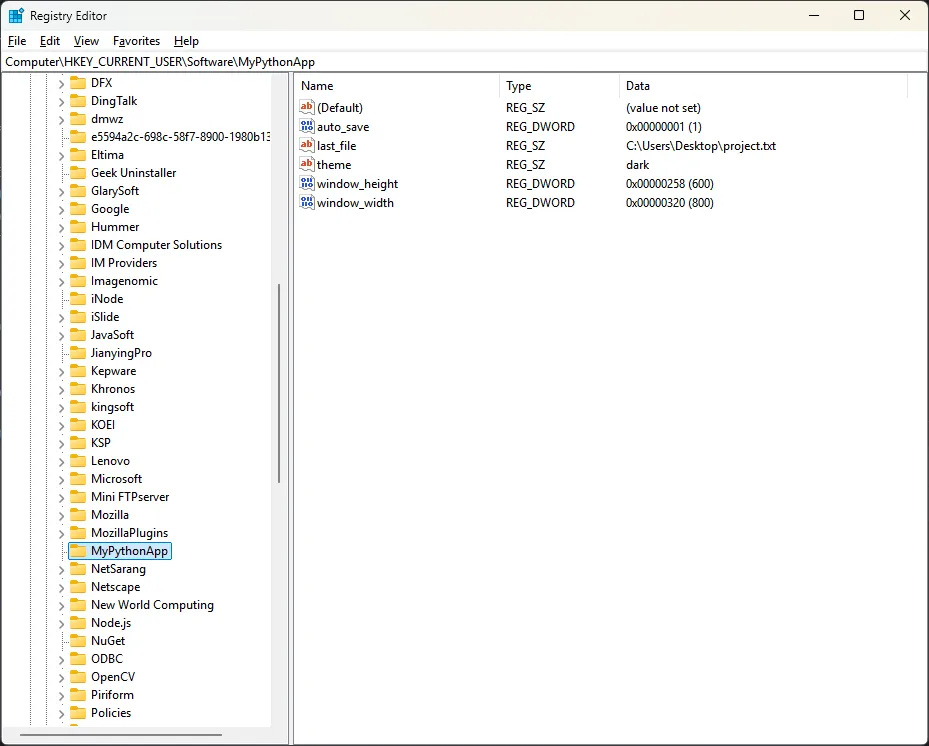
class AppConfig:
    """应用程序配置管理类"""

    def __init__(self, app_name):
        self.app_name = app_name
        self.config_key = f"SOFTWARE\\{app_name}"

    def save_config(self, config_dict):
        """保存配置到注册表"""
        for key, value in config_dict.items():
            # 根据值类型选择注册表数据类型
            if isinstance(value, int):
                reg_type = winreg.REG_DWORD
            elif isinstance(value, bool):
                reg_type = winreg.REG_DWORD
                value = int(value)  # 转换布尔值为整数
            else:
                reg_type = winreg.REG_SZ
                value = str(value)  # 确保是字符串

            write_registry_value(
                winreg.HKEY_CURRENT_USER,
                self.config_key,
                key,
                value,
                reg_type
            )

    def load_config(self):
        """从注册表加载配置"""
        config = {}
        try:
            key = winreg.OpenKey(winreg.HKEY_CURRENT_USER, self.config_key)

            # 遍历所有值
            i = 0
            while True:
                try:
                    name, value, reg_type = winreg.EnumValue(key, i)
                    config[name] = value
                    i += 1
                except OSError:
                    break  # 没有更多值了

            winreg.CloseKey(key)

        except FileNotFoundError:
            print("配置不存在,使用默认设置")

        return config

# 使用示例
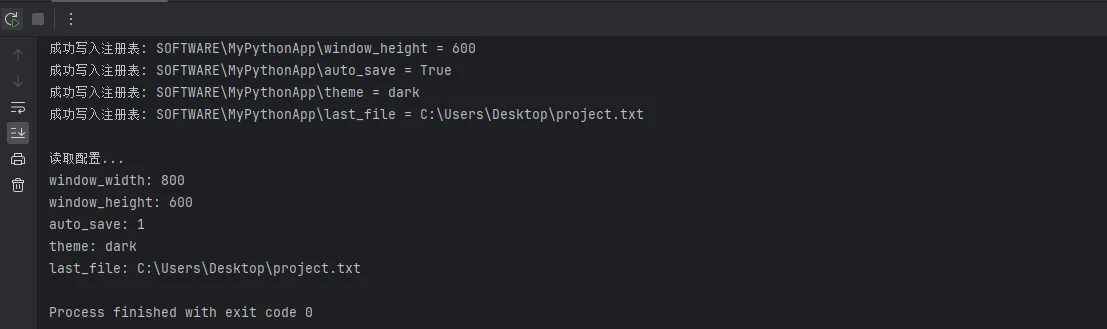
def demo_app_config():
    """演示应用配置管理"""
    app = AppConfig("MyPythonApp")

    # 保存配置
    config = {
        "window_width": 800,
        "window_height": 600,
        "auto_save": True,
        "theme": "dark",
        "last_file": "C:\\Users\\Desktop\\project.txt"
    }

    print("保存配置...")
    app.save_config(config)

    # 读取配置
    print("\n读取配置...")
    loaded_config = app.load_config()
    for key, value in loaded_config.items():
        print(f"{key}: {value}")

if __name__ == "__main__":
    demo_app_config()
🎯 高级应用:开机自启动管理
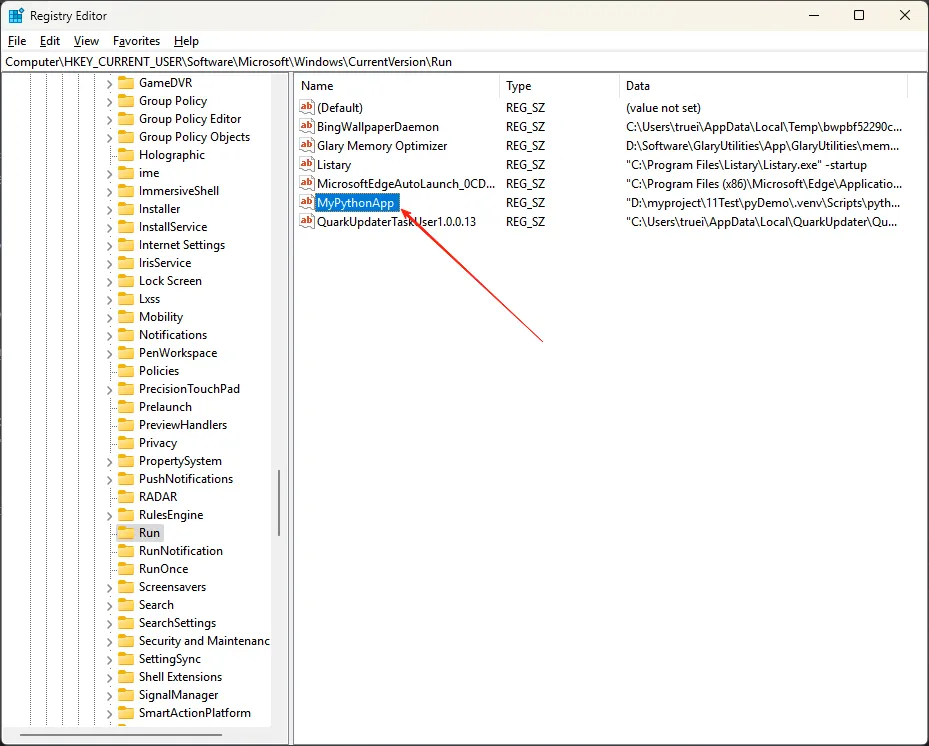
开机自启动是很多应用程序的常见需求:
Pythonimport winreg
import os
import sys


def read_registry_value(root_key, sub_key, value_name):
    """
    读取注册表值的通用函数

    Args:
        root_key: 根键(如winreg.HKEY_CURRENT_USER)
        sub_key: 子键路径
        value_name: 值名称

    Returns:
        tuple: (值, 类型) 或 None
    """
    try:
        # 打开注册表键
        key = winreg.OpenKey(root_key, sub_key)

        # 读取指定值
        value, reg_type = winreg.QueryValueEx(key, value_name)

        # 关闭键
        winreg.CloseKey(key)

        return value, reg_type

    except FileNotFoundError:
        print(f"注册表键不存在: {sub_key}")
        return None
    except Exception as e:
        print(f"读取注册表失败: {e}")
        return None


def write_registry_value(root_key, sub_key, value_name, value, value_type=winreg.REG_SZ):
    """
    写入注册表值的通用函数

    Args:
        root_key: 根键
        sub_key: 子键路径
        value_name: 值名称
        value: 要写入的值
        value_type: 值类型(默认为字符串)

    Returns:
        bool: 是否成功
    """
    try:
        # 创建或打开键(如果不存在会自动创建)
        key = winreg.CreateKeyEx(root_key, sub_key)

        # 设置值
        winreg.SetValueEx(key, value_name, 0, value_type, value)

        # 关闭键
        winreg.CloseKey(key)

        print(f"成功写入注册表: {sub_key}\\{value_name} = {value}")
        return True

    except PermissionError:
        print("权限不足,请以管理员身份运行")
        return False
    except Exception as e:
        print(f"写入注册表失败: {e}")
        return False

class AutoStartManager:
    """开机自启动管理器"""

    # 注册表路径
    AUTO_START_KEY = r"SOFTWARE\Microsoft\Windows\CurrentVersion\Run"

    @staticmethod
    def add_to_startup(app_name, app_path=None):
        """
        添加程序到开机自启动

        Args:
            app_name: 应用程序名称
            app_path: 程序路径(默认为当前脚本路径)
        """
        if app_path is None:
            # 获取当前脚本的完整路径
            if getattr(sys, 'frozen', False):
                # 如果是打包后的exe文件
                app_path = sys.executable
            else:
                # 如果是python脚本
                app_path = f'"{sys.executable}" "{os.path.abspath(sys.argv[0])}"'

        try:
            # 写入注册表
            success = write_registry_value(
                winreg.HKEY_CURRENT_USER,
                AutoStartManager.AUTO_START_KEY,
                app_name,
                app_path
            )

            if success:
                print(f"✅ 已添加 {app_name} 到开机自启动")
                print(f"   路径: {app_path}")

            return success

        except Exception as e:
            print(f"❌ 添加自启动失败: {e}")
            return False

    @staticmethod
    def remove_from_startup(app_name):
        """从开机自启动中移除程序"""
        try:
            key = winreg.OpenKey(
                winreg.HKEY_CURRENT_USER,
                AutoStartManager.AUTO_START_KEY,
                0,
                winreg.KEY_SET_VALUE
            )

            winreg.DeleteValue(key, app_name)
            winreg.CloseKey(key)

            print(f"✅ 已从开机自启动中移除 {app_name}")
            return True

        except FileNotFoundError:
            print(f"⚠️  {app_name} 不在开机自启动列表中")
            return False
        except Exception as e:
            print(f"❌ 移除自启动失败: {e}")
            return False

    @staticmethod
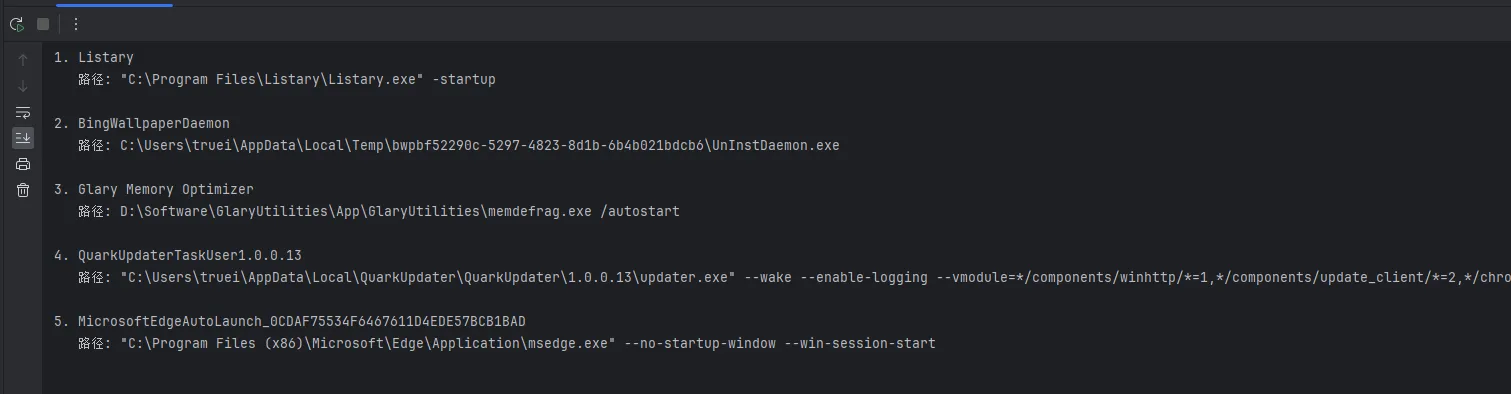
    def list_startup_programs():
        """列出所有开机自启动程序"""
        try:
            key = winreg.OpenKey(
                winreg.HKEY_CURRENT_USER,
                AutoStartManager.AUTO_START_KEY
            )

            print("📋 当前开机自启动程序:")
            print("-" * 50)

            i = 0
            while True:
                try:
                    name, value, reg_type = winreg.EnumValue(key, i)
                    print(f"{i + 1}. {name}")
                    print(f"   路径: {value}")
                    print()
                    i += 1
                except OSError:
                    break

            winreg.CloseKey(key)

            if i == 0:
                print("   (暂无自启动程序)")

        except Exception as e:
            print(f"❌ 获取自启动列表失败: {e}")

    @staticmethod
    def is_in_startup(app_name):
        """检查程序是否在开机自启动中"""
        result = read_registry_value(
            winreg.HKEY_CURRENT_USER,
            AutoStartManager.AUTO_START_KEY,
            app_name
        )
        return result is not None


# 使用示例和测试函数
def demo_autostart():
    """演示自启动管理功能"""
    app_name = "MyPythonApp"

    print("🔧 Python开机自启动管理演示")
    print("=" * 40)

    # 检查当前状态
    if AutoStartManager.is_in_startup(app_name):
        print(f"📍 {app_name} 已在开机自启动中")
    else:
        print(f"📍 {app_name} 不在开机自启动中")

    print("\n选择操作:")
    print("1. 添加到开机自启动")
    print("2. 从开机自启动移除")
    print("3. 查看所有自启动程序")
    print("4. 退出")

    choice = input("\n请输入选项 (1-4): ").strip()

    if choice == '1':
        AutoStartManager.add_to_startup(app_name)
    elif choice == '2':
        AutoStartManager.remove_from_startup(app_name)
    elif choice == '3':
        AutoStartManager.list_startup_programs()
    elif choice == '4':
        print("👋 再见!")
    else:
        print("⚠️  无效选项")


if __name__ == "__main__":
    demo_autostart()
🛡️ 安全最佳实践
在实际开发中,安全性是至关重要的:
Pythonimport winreg
import contextlib

class SafeRegistryManager:
    """安全的注册表管理器"""

    @staticmethod
    @contextlib.contextmanager
    def safe_key(root_key, sub_key, access=winreg.KEY_READ):
        """
        安全的注册表键管理上下文管理器
        确保键总是被正确关闭
        """
        key = None
        try:
            key = winreg.OpenKey(root_key, sub_key, 0, access)
            yield key
        except Exception as e:
            print(f"注册表操作失败: {e}")
            yield None
        finally:
            if key:
                winreg.CloseKey(key)

    @staticmethod
    def safe_read(root_key, sub_key, value_name, default=None):
        """安全读取注册表值"""
        with SafeRegistryManager.safe_key(root_key, sub_key) as key:
            if key is None:
                return default

            try:
                value, _ = winreg.QueryValueEx(key, value_name)
                return value
            except FileNotFoundError:
                return default
            except Exception as e:
                print(f"读取值失败: {e}")
                return default

    @staticmethod
    def safe_write(root_key, sub_key, value_name, value, value_type=winreg.REG_SZ):
        """安全写入注册表值"""
        try:
            # 使用CreateKeyEx确保键存在
            with winreg.CreateKeyEx(root_key, sub_key) as key:
                winreg.SetValueEx(key, value_name, 0, value_type, value)
                return True
        except PermissionError:
            print("❌ 权限不足,请以管理员身份运行程序")
            return False
        except Exception as e:
            print(f"❌ 写入失败: {e}")
            return False

    @staticmethod
    def backup_key(root_key, sub_key, backup_file):
        """备份注册表键到文件"""
        try:
            # 这里可以实现备份逻辑
            # 实际项目中建议使用reg export命令
            command = f'reg export "{winreg.HKEY_CURRENT_USER}\\{sub_key}" "{backup_file}"'
            print(f"备份命令: {command}")
            return True
        except Exception as e:
            print(f"备份失败: {e}")
            return False

# 实用工具函数
def check_admin_rights():
    """检查是否有管理员权限"""
    try:
        # 尝试写入HKLM,需要管理员权限
        test_key = r"SOFTWARE\Python_Registry_Test"
        key = winreg.CreateKeyEx(winreg.HKEY_LOCAL_MACHINE, test_key)
        winreg.CloseKey(key)

        # 清理测试键
        winreg.DeleteKey(winreg.HKEY_LOCAL_MACHINE, test_key)
        return True
    except PermissionError:
        return False
    except Exception:
        return False

def get_system_info():
    """获取系统信息示例"""
    info = {}

    # CPU信息
    cpu_info = SafeRegistryManager.safe_read(
        winreg.HKEY_LOCAL_MACHINE,
        r"HARDWARE\DESCRIPTION\System\CentralProcessor\0",
        "ProcessorNameString",
        "未知CPU"
    )
    info['CPU'] = cpu_info

    # 内存信息(需要其他方法获取,这里仅作示例)
    info['系统'] = SafeRegistryManager.safe_read(
        winreg.HKEY_LOCAL_MACHINE,
        r"SOFTWARE\Microsoft\Windows NT\CurrentVersion",
        "ProductName",
        "未知系统"
    )

    return info
🎯 总结:掌握注册表操作的三个关键点
通过本文的详细讲解和实战演练,我们系统学习了Python读写Windows注册表的完整技术栈。让我来总结三个核心要点:
🔑 第一点:安全为先,权限意识
注册表操作涉及系统底层,必须具备权限意识。写入HKLM需要管理员权限,而HKCU相对安全。始终使用异常处理和上下文管理器确保资源正确释放,避免系统不稳定。
⚡ 第二点:实用至上,场景导向
不要为了技术而技术。注册表操作的价值在于解决实际问题:配置持久化、开机自启动、系统信息获取等。每个功能都要考虑用户体验和维护成本。
🚀 第三点:代码复用,工具思维
将常用操作封装成工具类,建立自己的注册表操作库。SafeRegistryManager、AppConfig、AutoStartManager这样的封装让复杂操作变得简单可靠,提升开发效率。
掌握了这些技能,你的Python应用将具备真正的系统级特性,无论是企业软件还是个人工具,都能提供更专业的用户体验。在Python开发的道路上,注册表操作是连接应用程序与操作系统的重要桥梁,值得每个Windows开发者深入掌握!
本文作者:技术老小子
本文链接:
版权声明:本博客所有文章除特别声明外,均采用 BY-NC-SA 许可协议。转载请注明出处!