
目录
你是否在开发过程中遇到过这样的痛点:操作繁多、业务逻辑耦合严重、撤销功能难以实现?特别是在工业控制、游戏开发或复杂业务系统中,每一个操作都可能需要记录、撤销,甚至批量执行。
今天,我们通过一个完整的工业设备控制系统案例,深入解析**命令模式(Command Pattern)**的实际应用。这不仅仅是一个设计模式的讲解,更是一套可以直接应用到你项目中的完整解决方案!
🎯 问题分析:为什么需要命令模式?
在传统的设备控制系统中,我们经常会看到这样的代码:
C#// 传统做法 - 紧耦合的噩梦
private void StartMotor()
{
    motor.Start();
    logService.Log("启动电机");
    // 如果需要撤销怎么办?
    // 如果需要批量操作怎么办?
    // 如果需要延迟执行怎么办?
}
核心痛点:
- 📌 操作与对象紧耦合:直接调用对象方法,难以扩展
- 📌 无法撤销操作:执行后无法回滚到之前状态
- 📌 难以记录历史:无法追踪操作序列
- 📌 扩展性差:新增操作类型需要修改大量代码
🎯 命令执行流程图
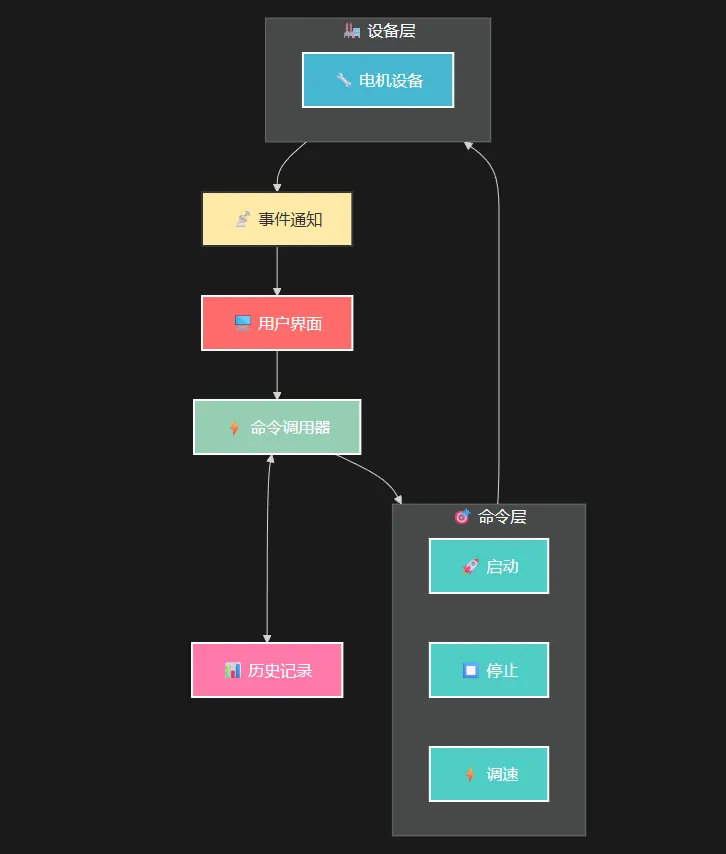
💡 解决方案:命令模式的五大核心优势
🚀 优势1:解耦请求者与接收者
命令模式通过将请求封装为对象,实现了调用者和执行者的完全解耦:
C#// 命令接口 - 统一的执行规范
public interface ICommand
{
    void Execute();    // 执行操作
    void Undo();      // 撤销操作
    string Description { get; } // 操作描述
}

// 具体命令实现
public class StartCommand : ICommand
{
    private readonly Device _device;
    private DeviceStatus _previousStatus;

    public StartCommand(Device device)
    {
        _device = device ?? throw new ArgumentNullException(nameof(device));
    }

    public string Description => $"启动 {_device.Name}";

    public void Execute()
    {
        _previousStatus = _device.Status; // 记录前置状态
        _device.Start();
    }

    public void Undo()
    {
        if (_previousStatus == DeviceStatus.Stopped)
        {
            _device.Stop(); // 智能回滚
        }
    }
}
实战应用场景: GUI应用中的菜单操作、工业控制系统中的设备指令、游戏中的角色行为控制。
⚡ 优势2:强大的撤销/重做功能
通过堆栈结构,轻松实现撤销功能:
C#public class CommandInvoker
{
    private readonly Stack<ICommand> _executedCommands;
    private readonly List<ICommand> _commandHistory;

    public void ExecuteCommand(ICommand command)
    {
        if (command == null) return;

        try
        {
            command.Execute();
            _executedCommands.Push(command); // 入栈用于撤销
            _commandHistory.Add(command);    // 记录历史

            CommandExecuted?.Invoke(this, new CommandExecutedEventArgs(command));
        }
        catch (Exception ex)
        {
            throw new InvalidOperationException($"执行命令失败: {command.Description}", ex);
        }
    }

    public void UndoLastCommand()
    {
        if (_executedCommands.Count == 0) return;

        var command = _executedCommands.Pop();
        try
        {
            command.Undo();
            CommandUndone?.Invoke(this, new CommandUndoneEventArgs(command));
        }
        catch (Exception ex)
        {
            _executedCommands.Push(command); // 撤销失败,重新入栈
            throw new InvalidOperationException($"撤销命令失败: {command.Description}", ex);
        }
    }

    public bool CanUndo => _executedCommands.Count > 0;
}
关键技巧: 使用栈存储已执行命令,用列表维护完整历史记录。
🎯 优势3:类型安全的设备控制
针对不同设备类型,实现专用命令:
C#// 电机专用调速命令
public class SetSpeedCommand : ICommand
{
    private readonly Motor _motor;
    private readonly int _newSpeed;
    private int _previousSpeed;

    public SetSpeedCommand(Motor motor, int speed)
    {
        _motor = motor ?? throw new ArgumentNullException(nameof(motor));
        _newSpeed = speed;
    }

    public string Description => $"设置 {_motor.Name} 速度为 {_newSpeed} RPM";

    public void Execute()
    {
        _previousSpeed = _motor.Speed; // 备份当前速度
        _motor.SetSpeed(_newSpeed);
    }

    public void Undo()
    {
        _motor.SetSpeed(_previousSpeed); // 恢复之前速度
    }
}
常见坑点提醒:
- ⚠️ 在Execute()中必须先保存状态再执行操作
- ⚠️ Undo()操作要考虑设备当前状态的合理性
- ⚠️ 异步操作的命令需要特别处理状态同步
📊 优势4:实时状态监控与事件驱动
结合事件机制,实现状态实时更新:
C#using System;
using System.Collections.Generic;
using System.Linq;
using System.Text;
using System.Threading.Tasks;

namespace AppCommandIndustrialControlSystem
{
    /// <summary>
    /// 工业设备基类
    /// </summary>
    public abstract class Device: IDisposable
    {
        public string Name { get; protected set; }
        public DeviceStatus Status { get; protected set; }
        public event EventHandler<DeviceStatusChangedEventArgs> StatusChanged;

        protected Device(string name)
        {
            Name = name;
            Status = DeviceStatus.Stopped;
        }

        protected virtual void OnStatusChanged(DeviceStatus oldStatus, DeviceStatus newStatus)
        {
            StatusChanged?.Invoke(this, new DeviceStatusChangedEventArgs(oldStatus, newStatus));
        }

        protected bool disposed = false;

        protected virtual void Dispose(bool disposing)
        {
            if (!disposed)
            {
                if (disposing)
                {
                    // 释放托管资源
                }
                disposed = true;
            }
        }

        public void Dispose()
        {
            Dispose(true);
            GC.SuppressFinalize(this);
        }

        public abstract void Start();
        public abstract void Stop();
        public abstract void Reset();
        public abstract void SetSpeed(int speed);
    }

    public enum DeviceStatus
    {
        Stopped,
        Starting,
        Running,
        Stopping,
        Error,
        Maintenance
    }

    public class DeviceStatusChangedEventArgs : EventArgs
    {
        public DeviceStatus OldStatus { get; }
        public DeviceStatus NewStatus { get; }

        public DeviceStatusChangedEventArgs(DeviceStatus oldStatus, DeviceStatus newStatus)
        {
            OldStatus = oldStatus;
            NewStatus = newStatus;
        }
    }
}
实战技巧: 使用async/await模拟真实设备的异步操作,通过事件机制实现UI的实时更新。
🔄 优势5:UI层的响应式更新
在WinForms中实现命令与界面的双向绑定:
C#namespace AppCommandIndustrialControlSystem
{
    public partial class FrmMain : Form
    {
        private readonly CommandInvoker _commandInvoker;
        private readonly Dictionary<string, Device> _devices;
        private Device _currentDevice;

        public FrmMain()
        {
            InitializeComponent();

            _commandInvoker = new CommandInvoker();
            _devices = new Dictionary<string, Device>();

            InitializeDevices();
            InitializeEventHandlers();
            InitializeUI();
        }
        private void InitializeDevices()
        {
            // 创建示例设备
            var motor1 = new Motor("主传动电机", 3000);
            var motor2 = new Motor("辅助电机", 1500);
            var motor3 = new Motor("冷却泵电机", 1800);

            _devices.Add(motor1.Name, motor1);
            _devices.Add(motor2.Name, motor2);
            _devices.Add(motor3.Name, motor3);

            // 为每个设备订阅状态变化事件
            foreach (var device in _devices.Values)
            {
                device.StatusChanged += OnDeviceStatusChanged;
            }

            // 填充设备下拉列表
            cmbDevice.DataSource = _devices.Keys.ToArray();
            cmbDevice.SelectedIndex = 0;
            _currentDevice = _devices.Values.First();
        }

        private void InitializeEventHandlers()
        {
            // 设备选择事件
            cmbDevice.SelectedIndexChanged += OnDeviceSelectionChanged;

            // 控制按钮事件
            btnStart.Click += OnStartButtonClick;
            btnStop.Click += OnStopButtonClick;
            btnReset.Click += OnResetButtonClick;
            btnSetSpeed.Click += OnSetSpeedButtonClick;

            // 命令历史按钮事件
            btnUndo.Click += OnUndoButtonClick;
            btnClearHistory.Click += OnClearHistoryButtonClick;

            // 命令调用器事件
            _commandInvoker.CommandExecuted += OnCommandExecuted;
            _commandInvoker.CommandUndone += OnCommandUndone;

            // 定时器事件
            timerStatus.Tick += OnTimerTick;
        }

        private void InitializeUI()
        {
            UpdateDeviceStatusDisplay();
            UpdateCommandHistoryDisplay();
            UpdateButtonStates();

            // 设置状态指示器初始颜色
            pbStatusIndicator.BackColor = GetStatusColor(DeviceStatus.Stopped);
        }

        private void OnDeviceSelectionChanged(object sender, EventArgs e)
        {
            if (cmbDevice.SelectedItem != null)
            {
                _currentDevice = _devices[cmbDevice.SelectedItem.ToString()];
                UpdateDeviceStatusDisplay();
                UpdateButtonStates();
            }
        }

        private void OnStartButtonClick(object sender, EventArgs e)
        {
            if (_currentDevice != null)
            {
                var command = new StartCommand(_currentDevice);
                _commandInvoker.ExecuteCommand(command);
            }
        }

        private void OnStopButtonClick(object sender, EventArgs e)
        {
            if (_currentDevice != null)
            {
                var command = new StopCommand(_currentDevice);
                _commandInvoker.ExecuteCommand(command);
            }
        }

        private void OnResetButtonClick(object sender, EventArgs e)
        {
            if (_currentDevice != null)
            {
                var command = new ResetCommand(_currentDevice);
                _commandInvoker.ExecuteCommand(command);
            }
        }

        private void OnSetSpeedButtonClick(object sender, EventArgs e)
        {
            if (_currentDevice is Motor motor)
            {
                var speed = (int)nudSpeed.Value;
                var command = new SetSpeedCommand(motor, speed);
                _commandInvoker.ExecuteCommand(command);
            }
        }

        private void OnUndoButtonClick(object sender, EventArgs e)
        {
            try
            {
                _commandInvoker.UndoLastCommand();
            }
            catch (InvalidOperationException ex)
            {
                MessageBox.Show($"撤销操作失败:{ex.Message}", "错误",
                    MessageBoxButtons.OK, MessageBoxIcon.Error);
            }
        }

        private void OnClearHistoryButtonClick(object sender, EventArgs e)
        {
            if (MessageBox.Show("确定要清空命令历史吗?", "确认",
                MessageBoxButtons.YesNo, MessageBoxIcon.Question) == DialogResult.Yes)
            {
                lstCommandHistory.Items.Clear();
                UpdateButtonStates();
            }
        }

        private void OnDeviceStatusChanged(object sender, DeviceStatusChangedEventArgs e)
        {
            if (InvokeRequired)
            {
                Invoke(new Action(() => OnDeviceStatusChanged(sender, e)));
                return;
            }

            if (sender == _currentDevice)
            {
                UpdateDeviceStatusDisplay();
            }

            UpdateButtonStates();

            UpdateStatusMessage($"{((Device)sender).Name} 状态变更: {GetStatusText(e.OldStatus)} → {GetStatusText(e.NewStatus)}");
        }

        private void OnCommandExecuted(object sender, CommandExecutedEventArgs e)
        {
            UpdateCommandHistoryDisplay();
            UpdateButtonStates();
            UpdateStatusMessage($"执行命令: {e.Command.Description}");
        }

        private void OnCommandUndone(object sender, CommandUndoneEventArgs e)
        {
            UpdateCommandHistoryDisplay();
            UpdateButtonStates();
            UpdateStatusMessage($"撤销命令: {e.Command.Description}");
        }

        private void OnTimerTick(object sender, EventArgs e)
        {
            tslblTime.Text = DateTime.Now.ToString("yyyy-MM-dd HH:mm:ss");
        }

        private void UpdateDeviceStatusDisplay()
        {
            if (_currentDevice == null) return;

            lblStatusValue.Text = GetStatusText(_currentDevice.Status);
            lblStatusValue.ForeColor = GetStatusColor(_currentDevice.Status);

            if (_currentDevice is Motor motor)
            {
                lblCurrentSpeedValue.Text = $"{motor.Speed} RPM";
                nudSpeed.Maximum = motor.MaxSpeed;
            }

            pbStatusIndicator.BackColor = GetStatusColor(_currentDevice.Status);
        }

        private void UpdateCommandHistoryDisplay()
        {
            lstCommandHistory.Items.Clear();
            var history = _commandInvoker.CommandHistory.Reverse().ToArray();

            for (int i = 0; i < history.Length; i++)
            {
                var timestamp = DateTime.Now.AddSeconds(-i).ToString("HH:mm:ss");
                lstCommandHistory.Items.Add($"[{timestamp}] {history[i].Description}");
            }

            if (lstCommandHistory.Items.Count > 0)
            {
                lstCommandHistory.SelectedIndex = 0;
            }
        }

        private void UpdateButtonStates()
        {
            btnUndo.Enabled = _commandInvoker.CanUndo;
            btnClearHistory.Enabled = lstCommandHistory.Items.Count > 0;

            if (_currentDevice != null)
            {
                btnStart.Enabled = _currentDevice.Status == DeviceStatus.Stopped;
                btnStop.Enabled = _currentDevice.Status == DeviceStatus.Running ||
                                 _currentDevice.Status == DeviceStatus.Starting;
                btnReset.Enabled = _currentDevice.Status != DeviceStatus.Starting &&
                                  _currentDevice.Status != DeviceStatus.Stopping;
                btnSetSpeed.Enabled = _currentDevice.Status == DeviceStatus.Running &&
                                     _currentDevice is Motor;
            }
        }

        private void UpdateStatusMessage(string message)
        {
            tslblStatus.Text = message;
        }

        private string GetStatusText(DeviceStatus status)
        {
            switch (status)
            {
                case DeviceStatus.Stopped: return "停止";
                case DeviceStatus.Starting: return "启动中";
                case DeviceStatus.Running: return "运行中";
                case DeviceStatus.Stopping: return "停止中";
                case DeviceStatus.Error: return "故障";
                case DeviceStatus.Maintenance: return "维护";
                default: return "未知";
            }
        }

        private Color GetStatusColor(DeviceStatus status)
        {
            switch (status)
            {
                case DeviceStatus.Stopped:
                    return Color.FromArgb(244, 67, 54); // 红色
                case DeviceStatus.Starting:
                    return Color.FromArgb(255, 152, 0); // 橙色
                case DeviceStatus.Running:
                    return Color.FromArgb(76, 175, 80); // 绿色
                case DeviceStatus.Stopping:
                    return Color.FromArgb(255, 193, 7); // 黄色
                case DeviceStatus.Error:
                    return Color.FromArgb(156, 39, 176); // 紫色
                case DeviceStatus.Maintenance:
                    return Color.FromArgb(96, 125, 139); // 蓝灰色
                default:
                    return Color.Gray;
            }
        }
    }
}
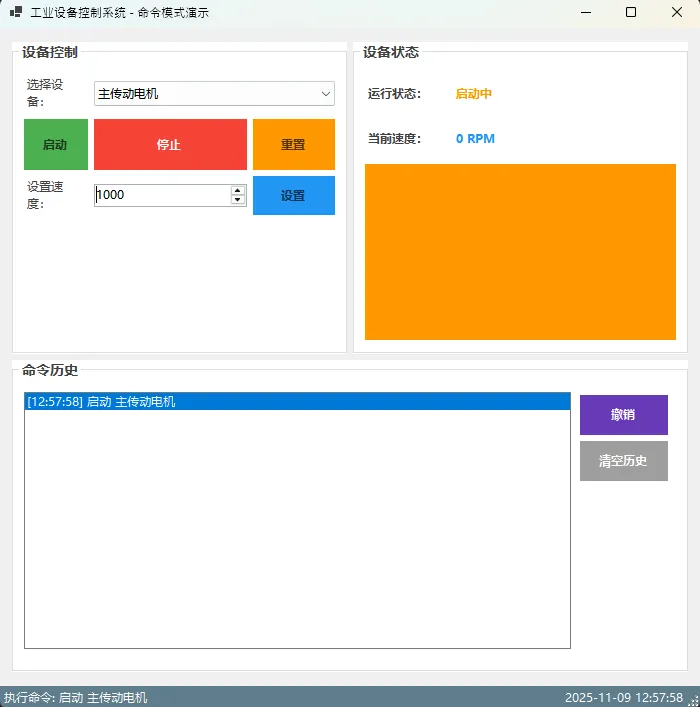
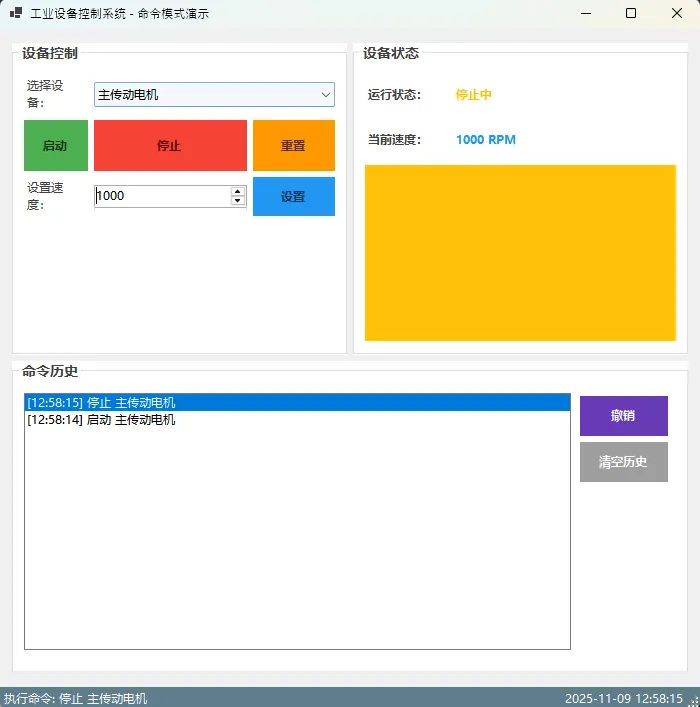
UI设计要点:
- 🎨 使用颜色直观表示设备状态
- 🔘 按钮状态根据设备状态动态调整
- 📝 实时显示命令执行历史
🏆 最佳实践总结
✨ 三个"收藏级"代码模板
- 通用命令基类模板:
C#public abstract class BaseCommand : ICommand
{
    protected readonly string _description;
    protected bool _isExecuted = false;

    protected BaseCommand(string description)
    {
        _description = description ?? throw new ArgumentNullException(nameof(description));
    }

    public string Description => _description;

    public void Execute()
    {
        if (_isExecuted) return;

        DoExecute();
        _isExecuted = true;
    }

    public void Undo()
    {
        if (!_isExecuted) return;

        DoUndo();
        _isExecuted = false;
    }

    protected abstract void DoExecute();
    protected abstract void DoUndo();
}
- 批量命令执行器模板:
C#public class BatchCommand : ICommand
{
    private readonly List<ICommand> _commands = new List<ICommand>();

    public void AddCommand(ICommand command) => _commands.Add(command);

    public void Execute()
    {
        foreach (var command in _commands)
            command.Execute();
    }

    public void Undo()
    {
        // 逆序撤销
        for (int i = _commands.Count - 1; i >= 0; i--)
            _commands[i].Undo();
    }
}
- 异步命令模板:
C#public interface IAsyncCommand
{
    Task ExecuteAsync();
    Task UndoAsync();
    string Description { get; }
}
🎯 三个核心金句总结
💎 "封装请求,解耦系统" - 命令模式将操作请求封装成对象,实现调用者与执行者的完全分离
💎 "状态记录,轻松撤销" - 通过保存执行前状态,让复杂操作的撤销变得简单优雅
💎 "事件驱动,响应式UI" - 结合事件机制,实现命令执行与界面更新的自动同步
🔥 结语
命令模式不仅仅是一个设计模式,更是构建可维护、可扩展系统的重要工具。通过本文的工业控制系统实例,我们看到了它在实际项目中的强大威力:
- 解耦性:请求者无需了解接收者的具体实现
- 可撤销:每个操作都能精确回滚到执行前状态
- 可扩展:新增命令类型无需修改现有代码
这套完整的解决方案已经在多个工业项目中得到验证,你可以直接将其应用到自己的C#项目中。
你在项目中遇到过类似的解耦需求吗?或者对异步命令的实现有什么好的想法? 欢迎在评论区分享你的经验,让我们一起探讨更多C#开发的最佳实践!
觉得这篇文章对你有帮助,请转发给更多需要的同行朋友!🚀
关注我,获取更多C#开发实战技巧和项目经验分享!
相关信息
通过网盘分享的文件:AppCommandIndustrialControlSystem.zip 链接: https://pan.baidu.com/s/1LW1WLXaQu-zP6QkDTwLSlw?pwd=9hku 提取码: 9hku --来自百度网盘超级会员v9的分享
本文作者:技术老小子
本文链接:
版权声明:本博客所有文章除特别声明外,均采用 BY-NC-SA 许可协议。转载请注明出处!