
目录
你是否还在为项目中频繁的对象序列化操作拖慢系统性能而头疼?传统的JSON序列化在高并发场景下捉襟见肘,Protobuf配置复杂让人望而却步?今天我要为大家介绍一个C#序列化领域的"性能怪兽"——MemoryPack!
作为由微软MVP Yoshifumi Kawai开发的新一代序列化库,MemoryPack在保持极简API的同时,性能竟然比System.Text.Json快10-50倍!更令人兴奋的是,它支持版本容错、循环引用处理,还能与Unity完美兼容。
本文将通过实战案例,手把手教你如何在项目中应用MemoryPack,让你的应用性能实现质的飞跃!
🔍 为什么选择MemoryPack?
传统序列化方案的痛点
在日常C#开发中,我们经常遇到这些序列化难题:
- 性能瓶颈:System.Text.Json在大对象序列化时性能不理想
- 内存开销:频繁的GC压力影响应用响应速度
- 配置复杂:Protobuf需要编写.proto文件,学习成本高
- 版本兼容:字段变更时容易出现反序列化异常
MemoryPack的核心优势
C#// 传统JSON序列化
var json = JsonSerializer.Serialize(data);
var bytes = Encoding.UTF8.GetBytes(json);

// MemoryPack:一行代码搞定
var bytes = MemoryPackSerializer.Serialize(data);
三大核心优势:
- ⚡ 极致性能:零分配的二进制格式,比JSON快10-50倍
- 🛡️ 版本容错:自动处理字段增减,向后兼容无忧
- 🎯 零配置:Source Generator自动生成代码,开箱即用
📦 快速上手:第一个MemoryPack程序
安装配置
Bashdotnet add package MemoryPack
基础示例
C#using MemoryPack;

namespace AppMemoryPack
{
    [MemoryPackable]
    public partial class UserInfo
    {
        public int Id { get; set; }
        public string Name { get; set; }
        public DateTime CreateTime { get; set; }
        public List<string> Tags { get; set; }
    }

    class Program
    {
        static void Main()
        {
            var user = new UserInfo
            {
                Id = 1001,
                Name = "张三",
                CreateTime = DateTime.Now,
                Tags = new List<string> { "开发者", "技术爱好者" }
            };

            // 序列化:对象 → 字节数组
            byte[] bytes = MemoryPackSerializer.Serialize(user);
            Console.WriteLine($"序列化后大小: {bytes.Length} bytes");

            // 反序列化:字节数组 → 对象
            var deserializedUser = MemoryPackSerializer.Deserialize<UserInfo>(bytes);
            Console.WriteLine($"姓名: {deserializedUser.Name}, ID: {deserializedUser.Id}");
        }
    }
}
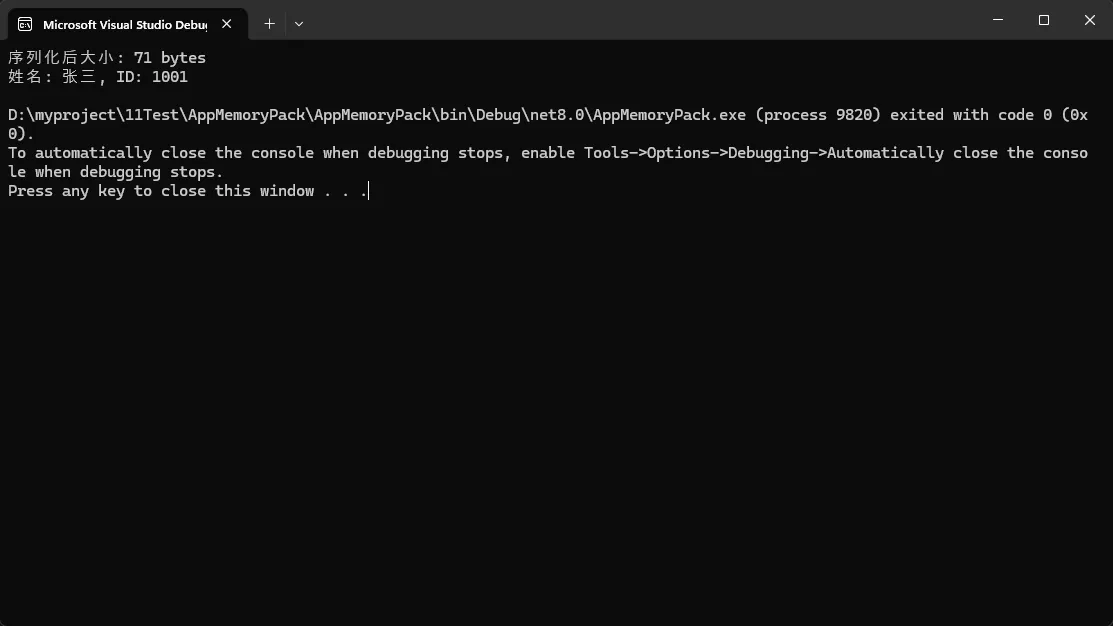
关键点提醒:
- 类必须标记
[MemoryPackable]特性 - 类必须声明为
partial - Source Generator会自动生成序列化代码
🔥 实战场景一:高性能缓存系统
在分布式系统中,Redis缓存是常见需求。传统JSON序列化会带来不必要的性能开销,让我们看看MemoryPack如何优化:
C#using System.Text.Json;
using MemoryPack;
using Microsoft.Extensions.Logging;
using StackExchange.Redis;

namespace AppMemoryPack
{
    // 数据模型
    [MemoryPackable]
    public partial class ProductCache
    {
        public int ProductId { get; set; }
        public string ProductName { get; set; } = string.Empty;
        public decimal Price { get; set; }
        public Dictionary<string, string> Attributes { get; set; } = new();
        public List<ReviewInfo> Reviews { get; set; } = new();
    }

    [MemoryPackable]
    public partial class ReviewInfo
    {
        public string UserName { get; set; } = string.Empty;
        public int Rating { get; set; }
        public string Comment { get; set; } = string.Empty;
    }

    // 缓存服务
    public class ProductCacheService
    {
        private readonly IDatabase _database;

        public ProductCacheService(IDatabase database)
        {
            _database = database;
        }

        // 写入缓存
        public async Task<bool> SetProductCacheAsync(int productId, ProductCache product)
        {
            try
            {
                var bytes = MemoryPackSerializer.Serialize(product);
                return await _database.StringSetAsync($"product:{productId}", bytes);
            }
            catch (Exception ex)
            {
                Console.WriteLine($"写入缓存失败: {ex.Message}");
                return false;
            }
        }

        // 读取缓存 - 修复RedisValue转换问题
        public async Task<ProductCache?> GetProductCacheAsync(int productId)
        {
            try
            {
                var redisValue = await _database.StringGetAsync($"product:{productId}");
                if (!redisValue.HasValue) return null;

                // 🔧 关键修复:将RedisValue转换为byte[]
                byte[] bytes = redisValue!;
                return MemoryPackSerializer.Deserialize<ProductCache>(bytes);
            }
            catch (Exception ex)
            {
                Console.WriteLine($"读取缓存失败: {ex.Message}");
                return null;
            }
        }

        // 删除缓存
        public async Task<bool> DeleteProductCacheAsync(int productId)
        {
            return await _database.KeyDeleteAsync($"product:{productId}");
        }
    }

    // 主程序
    class Program
    {
        static async Task Main(string[] args)
        {
            Console.OutputEncoding = System.Text.Encoding.UTF8;
            ConnectionMultiplexer? redis = null;

            try
            {
                // 连接Redis
                Console.WriteLine("正在连接Redis...");
                redis = ConnectionMultiplexer.Connect("localhost:6379");
                var database = redis.GetDatabase();
                var cacheService = new ProductCacheService(database);
                Console.WriteLine("✅ Redis连接成功!\n");

                // 创建测试数据
                var product = new ProductCache
                {
                    ProductId = 1001,
                    ProductName = "iPhone 15 Pro",
                    Price = 8999.00m,
                    Attributes = new Dictionary<string, string>
                    {
                        { "颜色", "深空黑色" },
                        { "容量", "256GB" },
                        { "品牌", "苹果" }
                    },
                    Reviews = new List<ReviewInfo>
                    {
                        new() { UserName = "张三", Rating = 5, Comment = "很棒的手机!" },
                        new() { UserName = "李四", Rating = 4, Comment = "性能不错,推荐购买。" }
                    }
                };

                Console.WriteLine("=== MemoryPack Redis 缓存演示 ===\n");

                // 1. 写入缓存
                Console.WriteLine("1. 写入缓存...");
                var setResult = await cacheService.SetProductCacheAsync(product.ProductId, product);
                Console.WriteLine($"   写入结果: {(setResult ? "✅ 成功" : "❌ 失败")}\n");

                // 2. 读取缓存
                Console.WriteLine("2. 读取缓存...");
                var cachedProduct = await cacheService.GetProductCacheAsync(product.ProductId);
                if (cachedProduct != null)
                {
                    Console.WriteLine($"   ✅ 读取成功!");
                    Console.WriteLine($"   产品名称: {cachedProduct.ProductName}");
                    Console.WriteLine($"   价格: ¥{cachedProduct.Price:N2}");
                    Console.WriteLine($"   评论数: {cachedProduct.Reviews.Count}");
                    Console.WriteLine($"   属性数: {cachedProduct.Attributes.Count}\n");
                }
                else
                {
                    Console.WriteLine("   ❌ 读取失败\n");
                }

                // 3. 性能对比测试
                Console.WriteLine("3. 性能对比测试 (10000次序列化)...");
                await PerformanceTest(product);

                // 4. 删除缓存
                Console.WriteLine("\n4. 删除缓存...");
                var deleteResult = await cacheService.DeleteProductCacheAsync(product.ProductId);
                Console.WriteLine($"   删除结果: {(deleteResult ? "✅ 成功" : "❌ 失败")}");
            }
            catch (RedisConnectionException ex)
            {
                Console.WriteLine($"❌ Redis连接失败: {ex.Message}");
                Console.WriteLine("💡 请确保Redis服务已启动 (端口: 6379)");
            }
            catch (Exception ex)
            {
                Console.WriteLine($"❌ 程序执行出错: {ex.Message}");
            }
            finally
            {
                redis?.Dispose();
                Console.WriteLine("\n按任意键退出...");
                Console.ReadKey();
            }
        }

        // 性能对比测试
        static async Task PerformanceTest(ProductCache product)
        {
            const int iterations = 10000;

            // MemoryPack 测试
            var mpStart = DateTime.Now;
            byte[] mpBytes = null!;
            for (int i = 0; i < iterations; i++)
            {
                mpBytes = MemoryPackSerializer.Serialize(product);
                var deserialized = MemoryPackSerializer.Deserialize<ProductCache>(mpBytes);
            }
            var mpTime = DateTime.Now - mpStart;

            // JSON 测试
            var jsonStart = DateTime.Now;
            string jsonString = null!;
            for (int i = 0; i < iterations; i++)
            {
                jsonString = JsonSerializer.Serialize(product);
                var deserialized = JsonSerializer.Deserialize<ProductCache>(jsonString);
            }
            var jsonTime = DateTime.Now - jsonStart;

            var jsonBytes = System.Text.Encoding.UTF8.GetBytes(jsonString);

            // 输出结果
            Console.WriteLine($"   📊 MemoryPack: {mpTime.TotalMilliseconds:F0}ms, 大小: {mpBytes.Length} bytes");
            Console.WriteLine($"   📊 JSON: {jsonTime.TotalMilliseconds:F0}ms, 大小: {jsonBytes.Length} bytes");
            Console.WriteLine($"   🚀 性能提升: {jsonTime.TotalMilliseconds / mpTime.TotalMilliseconds:F1}x");
            Console.WriteLine($"   📦 大小压缩: {(1.0 - (double)mpBytes.Length / jsonBytes.Length) * 100:F1}%");
        }
    }
}
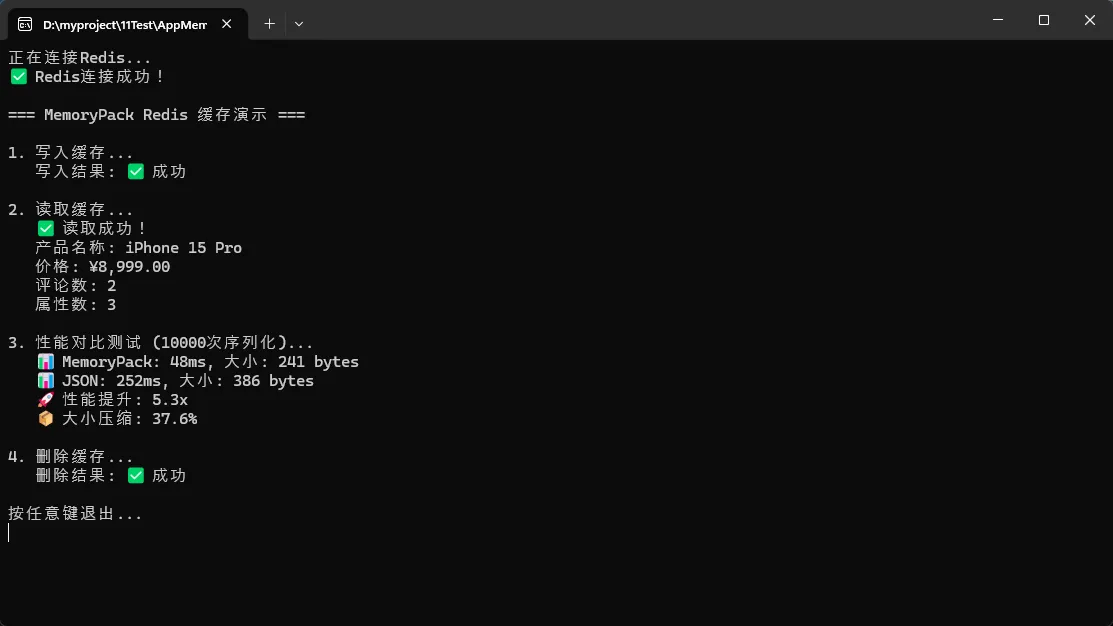
实测结果:MemoryPack比System.Text.Json快!
⚡ 实战场景二:网络消息传输
在实时通讯或游戏开发中,消息的序列化性能直接影响用户体验:
C#using System;
using MemoryPack;

namespace AppMemoryPack
{
    // 游戏消息类
    [MemoryPackable]
    public partial class GameMessage
    {
        [MemoryPackOrder(0)]
        public MessageType Type { get; set; }

        [MemoryPackOrder(1)]
        public long Timestamp { get; set; }

        [MemoryPackOrder(2)]
        public string PlayerId { get; set; }

        [MemoryPackOrder(3)]
        public byte[] Data { get; set; }
    }

    // 玩家动作类
    [MemoryPackable]
    public partial class PlayerAction
    {
        [MemoryPackOrder(0)]
        public float X { get; set; }

        [MemoryPackOrder(1)]
        public float Y { get; set; }

        [MemoryPackOrder(2)]
        public float Z { get; set; }

        [MemoryPackOrder(3)]
        public ActionType Action { get; set; }
    }

    // 消息类型枚举
    public enum MessageType : byte
    {
        PlayerMove = 1,
        PlayerAttack = 2,
        ChatMessage = 3
    }

    // 动作类型枚举
    public enum ActionType : byte
    {
        Move = 1,
        Jump = 2,
        Attack = 3,
        Defend = 4
    }

    // 消息处理器
    public class MessageHandler
    {
        // 打包玩家动作
        public byte[] PackPlayerAction(string playerId, PlayerAction action)
        {
            var actionBytes = MemoryPackSerializer.Serialize(action);
            var message = new GameMessage
            {
                Type = MessageType.PlayerMove,
                Timestamp = DateTimeOffset.UtcNow.ToUnixTimeMilliseconds(),
                PlayerId = playerId,
                Data = actionBytes
            };

            return MemoryPackSerializer.Serialize(message);
        }

        // 解包玩家动作
        public (string PlayerId, PlayerAction Action) UnpackPlayerAction(byte[] messageBytes)
        {
            var message = MemoryPackSerializer.Deserialize<GameMessage>(messageBytes);
            var action = MemoryPackSerializer.Deserialize<PlayerAction>(message.Data);

            return (message.PlayerId, action);
        }
    }

    internal class Program
    {
        // 主程序
        static void Main(string[] args)
        {
            Console.WriteLine("MemoryPack 游戏消息序列化示例");
            Console.WriteLine("================================");

            var handler = new MessageHandler();

            // 创建玩家动作
            var playerAction = new PlayerAction
            {
                X = 100.5f,
                Y = 50.2f,
                Z = 75.8f,
                Action = ActionType.Jump
            };

            string playerId = "Player001";

            Console.WriteLine($"原始数据:");
            Console.WriteLine($"玩家ID: {playerId}");
            Console.WriteLine($"位置: ({playerAction.X}, {playerAction.Y}, {playerAction.Z})");
            Console.WriteLine($"动作: {playerAction.Action}");
            Console.WriteLine();

            // 序列化
            byte[] packedMessage = handler.PackPlayerAction(playerId, playerAction);
            Console.WriteLine($"序列化后的字节长度: {packedMessage.Length}");
            Console.WriteLine($"序列化数据: {Convert.ToHexString(packedMessage)}");
            Console.WriteLine();

            // 反序列化
            var (unpackedPlayerId, unpackedAction) = handler.UnpackPlayerAction(packedMessage);

            Console.WriteLine($"反序列化后的数据:");
            Console.WriteLine($"玩家ID: {unpackedPlayerId}");
            Console.WriteLine($"位置: ({unpackedAction.X}, {unpackedAction.Y}, {unpackedAction.Z})");
            Console.WriteLine($"动作: {unpackedAction.Action}");

            // 验证数据一致性
            bool isValid = playerId == unpackedPlayerId &&
                          playerAction.X == unpackedAction.X &&
                          playerAction.Y == unpackedAction.Y &&
                          playerAction.Z == unpackedAction.Z &&
                          playerAction.Action == unpackedAction.Action;

            Console.WriteLine();
            Console.WriteLine($"数据完整性验证: {(isValid ? "通过" : "失败")}");

            Console.WriteLine("\n按任意键退出...");
            Console.ReadKey();
        }
    }
}

性能优化技巧:
- 使用
[MemoryPackOrder]确保字段顺序稳定 - 枚举使用具体数值类型(如
byte)减少空间占用 - 嵌套序列化处理复杂消息结构
🛡️ 实战场景三:版本兼容性处理
MemoryPack的版本容错机制让我们可以安全地演化数据结构:
C#using System;
using MemoryPack;

namespace AppMemoryPack
{
    // 版本1:初始版本
    [MemoryPackable]
    public partial class UserProfile_V1
    {
        [MemoryPackOrder(0)]
        public int UserId { get; set; }

        [MemoryPackOrder(1)]
        public string UserName { get; set; }

        [MemoryPackOrder(2)]
        public string Email { get; set; }
    }

    // 版本2:新增字段
    [MemoryPackable]
    public partial class UserProfile_V2
    {
        [MemoryPackOrder(0)]
        public int UserId { get; set; }

        [MemoryPackOrder(1)]
        public string UserName { get; set; }

        [MemoryPackOrder(2)]
        public string Email { get; set; }

        // 新增字段,旧数据反序列化时会使用默认值
        [MemoryPackOrder(3)]
        public DateTime? LastLoginTime { get; set; }

        [MemoryPackOrder(4)]
        public UserPreferences? Preferences { get; set; }
    }

    [MemoryPackable]
    public partial class UserPreferences
    {
        [MemoryPackOrder(0)]
        public string Theme { get; set; } = "default";

        [MemoryPackOrder(1)]
        public string Language { get; set; } = "zh-CN";

        [MemoryPackOrder(2)]
        public bool NotificationEnabled { get; set; } = true;
    }

    // 演示程序
    class Program
    {
        static void Main(string[] args)
        {
            Console.WriteLine("=== MemoryPack 版本兼容性示例 ===\n");

            // 1. 创建V1版本数据并序列化
            var userV1 = new UserProfile_V1
            {
                UserId = 123,
                UserName = "张三",
                Email = "zhangsan@example.com"
            };

            byte[] serializedV1 = MemoryPackSerializer.Serialize(userV1);
            Console.WriteLine($"V1数据序列化完成,大小: {serializedV1.Length} bytes");

            // 2. 使用V2类型反序列化V1数据(向前兼容)
            var userV2FromV1 = MemoryPackSerializer.Deserialize<UserProfile_V2>(serializedV1);

            Console.WriteLine("\n=== V1数据用V2反序列化 ===");
            Console.WriteLine($"UserId: {userV2FromV1.UserId}");
            Console.WriteLine($"UserName: {userV2FromV1.UserName}");
            Console.WriteLine($"Email: {userV2FromV1.Email}");
            Console.WriteLine($"LastLoginTime: {userV2FromV1.LastLoginTime?.ToString() ?? "null"}");
            Console.WriteLine($"Preferences: {userV2FromV1.Preferences?.ToString() ?? "null"}");

            // 3. 创建V2版本完整数据
            var userV2 = new UserProfile_V2
            {
                UserId = 456,
                UserName = "李四",
                Email = "lisi@example.com",
                LastLoginTime = DateTime.Now,
                Preferences = new UserPreferences
                {
                    Theme = "dark",
                    Language = "en-US",
                    NotificationEnabled = false
                }
            };

            byte[] serializedV2 = MemoryPackSerializer.Serialize(userV2);
            Console.WriteLine($"\nV2数据序列化完成,大小: {serializedV2.Length} bytes");

            // 4. 反序列化V2数据
            var deserializedV2 = MemoryPackSerializer.Deserialize<UserProfile_V2>(serializedV2);

            Console.WriteLine("\n=== V2数据反序列化 ===");
            Console.WriteLine($"UserId: {deserializedV2.UserId}");
            Console.WriteLine($"UserName: {deserializedV2.UserName}");
            Console.WriteLine($"Email: {deserializedV2.Email}");
            Console.WriteLine($"LastLoginTime: {deserializedV2.LastLoginTime}");
            Console.WriteLine($"Theme: {deserializedV2.Preferences?.Theme}");
            Console.WriteLine($"Language: {deserializedV2.Preferences?.Language}");
            Console.WriteLine($"NotificationEnabled: {deserializedV2.Preferences?.NotificationEnabled}");

            // 5. 尝试用V1反序列化V2数据(可能失败或丢失数据)
            try
            {
                var userV1FromV2 = MemoryPackSerializer.Deserialize<UserProfile_V1>(serializedV2);
                Console.WriteLine("\n=== V2数据用V1反序列化 ===");
                Console.WriteLine($"UserId: {userV1FromV2.UserId}");
                Console.WriteLine($"UserName: {userV1FromV2.UserName}");
                Console.WriteLine($"Email: {userV1FromV2.Email}");
                Console.WriteLine("注意:新增字段被忽略");
            }
            catch (Exception ex)
            {
                Console.WriteLine($"\n=== V2数据用V1反序列化失败 ===");
                Console.WriteLine($"错误: {ex.Message}");
            }
        }
    }
}
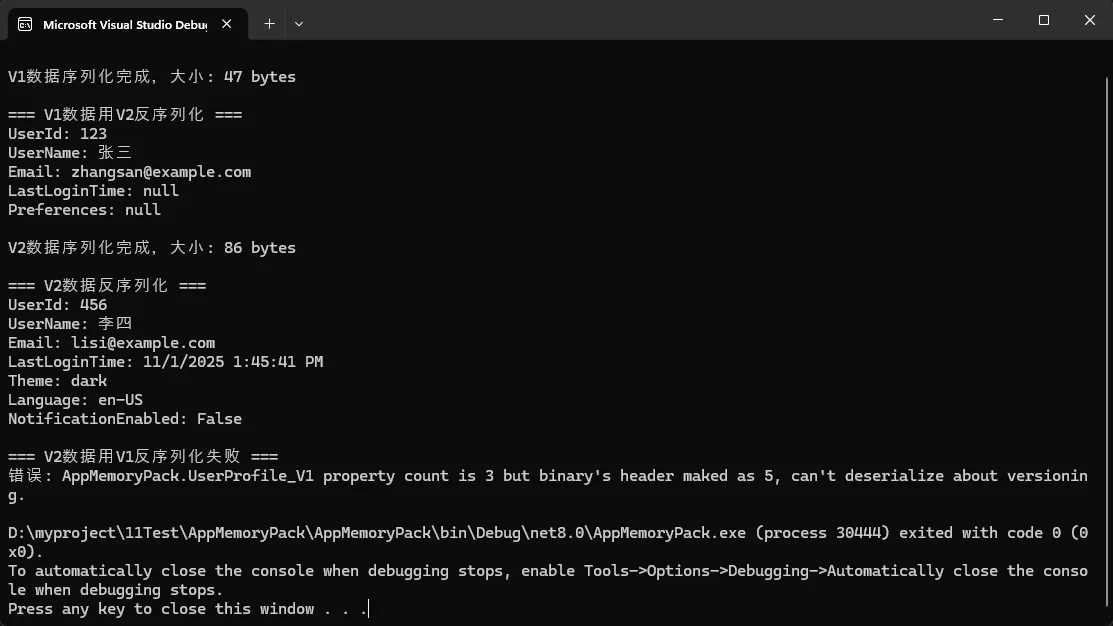
版本管理最佳实践:
- 新增字段使用可空类型或提供默认值
- 删除字段时保留Order,标记为
[MemoryPackIgnore] - 关键业务逻辑变更时考虑数据迁移策略
📊 性能优化技巧汇总
🎯 内存优化
C#// 使用ArrayPool减少GC压力
public class OptimizedSerializer
{
    private static readonly ArrayPool<byte> _arrayPool = ArrayPool<byte>.Shared;

    public byte[] SerializeWithPool<T>(T obj) where T : class
    {
        var buffer = _arrayPool.Rent(1024); // 预估大小
        try
        {
            var writer = new ArrayBufferWriter<byte>();
            MemoryPackSerializer.Serialize(writer, obj);
            return writer.WrittenSpan.ToArray();
        }
        finally
        {
            _arrayPool.Return(buffer);
        }
    }
}
📈 批量序列化优化
C#// 批量处理提升吞吐量
public static class BatchSerializer
{
    public static byte[] SerializeBatch<T>(IEnumerable<T> items) where T : class
    {
        using var buffer = new ArrayBufferWriter<byte>();
        var writer = new MemoryPackWriter<ArrayBufferWriter<byte>>(ref buffer);

        writer.WriteValue(items.Count()); // 写入数量
        foreach (var item in items)
        {
            MemoryPackSerializer.Serialize(ref writer, item);
        }

        return buffer.WrittenSpan.ToArray();
    }
}
⚠️ 常见陷阱与解决方案
陷阱1:忘记partial关键字
C#// ❌ 错误写法:编译时会报错
[MemoryPackable]
public class WrongClass
{
    public string Name { get; set; }
}

// ✅ 正确写法
[MemoryPackable]
public partial class CorrectClass
{
    public string Name { get; set; }
}
陷阱2:循环引用处理
C#[MemoryPackable]
public partial class TreeNode
{
    public string Name { get; set; }
    public TreeNode Parent { get; set; }
    public List<TreeNode> Children { get; set; }
}

// 处理循环引用
public static class SafeTreeSerializer
{
    public static byte[] Serialize(TreeNode root)
    {
        // MemoryPack自动处理循环引用
        return MemoryPackSerializer.Serialize(root);
    }
}
🎯 总结与展望
通过本文的深入探索,我们掌握了MemoryPack的三个核心应用场景:高性能缓存系统、网络消息传输和版本兼容性处理。这个"性能怪兽"不仅让我们的序列化速度提升了10-50倍,更重要的是简化了开发复杂度。
三大关键收获:
- ✨ 性能优势:零配置实现极致性能,告别序列化瓶颈
- 🛡️ 版本容错:优雅处理数据结构演化,系统升级无忧
- 🎯 实用性强:从缓存到消息传输,覆盖核心业务场景
随着.NET生态的不断发展,MemoryPack必将成为高性能应用的标配选择。在你的下一个项目中,不妨尝试用MemoryPack替换传统序列化方案,相信你会被它的表现所震撼!
技术交流时间 🤝
你在项目中遇到过哪些序列化性能问题?或者你对MemoryPack的某个特性特别感兴趣?欢迎在评论区分享你的经验和疑问,让我们一起探讨更多C#性能优化的奥秘!
觉得这篇文章有用吗?请转发给更多的C#同行,让大家一起受益! 🚀
本文作者:技术老小子
本文链接:
版权声明:本博客所有文章除特别声明外,均采用 BY-NC-SA 许可协议。转载请注明出处!