
目录
你是否还在为异步方法的性能瓶颈而头疼?明明使用了async/await,但应用响应速度还是不尽人意?作为一名C#开发者,你可能已经掌握了基础的异步编程,但面对高并发场景时,Task 和 ValueTask 的选择、ConfigureAwait 的正确使用,往往成为性能优化的关键分水岭。
本文将深入剖析这三大异步编程利器的性能差异,通过实战代码和基准测试,帮你在项目中做出最优选择。无论你是想突破性能瓶颈的资深开发者,还是希望提升异步编程水平的进阶学习者,这篇文章都将为你带来实用的技术洞察。
🔍 问题分析:异步编程的性能陷阱
常见的性能痛点
在日常开发中,我们经常遇到这些异步编程问题:
- 内存分配过多:频繁的Task对象创建导致GC压力增大
- 上下文切换开销:不当的线程池使用造成性能损失
- 死锁风险:UI线程和异步方法的上下文冲突
- 缓存命中率低:重复的异步操作没有得到优化
这些问题的根源往往在于对 Task、ValueTask 和 ConfigureAwait 的理解不够深入。
💡 解决方案:三大性能优化策略
🎯 策略一:Task vs ValueTask - 选择最适合的返回类型
核心原理:ValueTask 是 .NET Core 2.1 引入的结构体,专门用于减少异步方法的内存分配。
c#using System;
using System.Collections.Generic;
using System.Linq;
using System.Text;
using System.Threading.Tasks;

namespace AppAsyncPerformance
{
    public class AsyncPerformanceDemo
    {
        private readonly Dictionary<int, string> _cache = new();

        // 传统 Task 方式
        public async Task<string> GetDataWithTaskAsync(int id)
        {
            if (_cache.TryGetValue(id, out var cachedResult))
            {
                return cachedResult;
            }

            await Task.Delay(1); // 缩短延迟以加速测试
            var result = $"Data_{id}";
            _cache[id] = result;
            return result;
        }

        // ValueTask 方式
        public async ValueTask<string> GetDataWithValueTaskAsync(int id)
        {
            if (_cache.TryGetValue(id, out var cachedResult))
            {
                return cachedResult;
            }

            await Task.Delay(1);
            var result = $"Data_{id}";
            _cache[id] = result;
            return result;
        }

        // 辅助:清空缓存
        public void ClearCache() => _cache.Clear();

        // 预热缓存:给一组 id 填充缓存
        public void WarmCache(IEnumerable<int> ids)
        {
            foreach (var id in ids)
            {
                _cache[id] = $"Data_{id}";
            }
        }
    }
}

using System;
using System.Collections.Generic;
using System.Diagnostics;
using System.Threading.Tasks;

namespace AppAsyncPerformance
{
    internal class Program
    {
        private static async Task MeasureAsync(
                    string label,
                    Func<int, Task<string>> taskFunc,
                    int iterations,
                    int uniqueIds)
        {
            // 记录起始分配(使用全局分配计数更可靠)
            GC.Collect();
            GC.WaitForPendingFinalizers();
            GC.Collect();
            long beforeAlloc = GC.GetTotalAllocatedBytes(true);

            var sw = Stopwatch.StartNew();
            for (int i = 0; i < iterations; i++)
            {
                int id = i % uniqueIds;
                await taskFunc(id);
            }
            sw.Stop();

            long afterAlloc = GC.GetTotalAllocatedBytes(true);
            Console.WriteLine($"{label}: Time = {sw.ElapsedMilliseconds} ms, Allocated = {afterAlloc - beforeAlloc} bytes");
        }

        private static async Task MeasureValueTaskAsync(
            string label,
            Func<int, ValueTask<string>> vtFunc,
            int iterations,
            int uniqueIds)
        {
            GC.Collect();
            GC.WaitForPendingFinalizers();
            GC.Collect();
            long beforeAlloc = GC.GetTotalAllocatedBytes(true);

            var sw = Stopwatch.StartNew();
            for (int i = 0; i < iterations; i++)
            {
                int id = i % uniqueIds;
                await vtFunc(id);
            }
            sw.Stop();

            long afterAlloc = GC.GetTotalAllocatedBytes(true);
            Console.WriteLine($"{label}: Time = {sw.ElapsedMilliseconds} ms, Allocated = {afterAlloc - beforeAlloc} bytes");
        }

        static async Task Main(string[] args)
        {
            var demo = new AsyncPerformanceDemo();

            const int iterations = 2000;
            const int uniqueIdsCached = 100; // 命中率高
            const int uniqueIdsMiss = iterations; // 几乎不命中

            Console.WriteLine("---- Cached path (should favor ValueTask) ----");
            demo.WarmCache(GetRange(0, uniqueIdsCached));
            await MeasureAsync("Task Cached", demo.GetDataWithTaskAsync, iterations, uniqueIdsCached);
            demo.ClearCache();
            demo.WarmCache(GetRange(0, uniqueIdsCached));
            await MeasureValueTaskAsync("ValueTask Cached", demo.GetDataWithValueTaskAsync, iterations, uniqueIdsCached);

            Console.WriteLine();
            Console.WriteLine("---- Missed path (both do async work) ----");
            demo.ClearCache();
            await MeasureAsync("Task Miss", demo.GetDataWithTaskAsync, iterations, uniqueIdsMiss);
            demo.ClearCache();
            await MeasureValueTaskAsync("ValueTask Miss", demo.GetDataWithValueTaskAsync, iterations, uniqueIdsMiss);

            Console.WriteLine();
            Console.WriteLine("Done. Note: results vary by runtime and machine.");
        }

        static IEnumerable<int> GetRange(int start, int count)
        {
            for (int i = start; i < start + count; i++) yield return i;
        }
    }
}
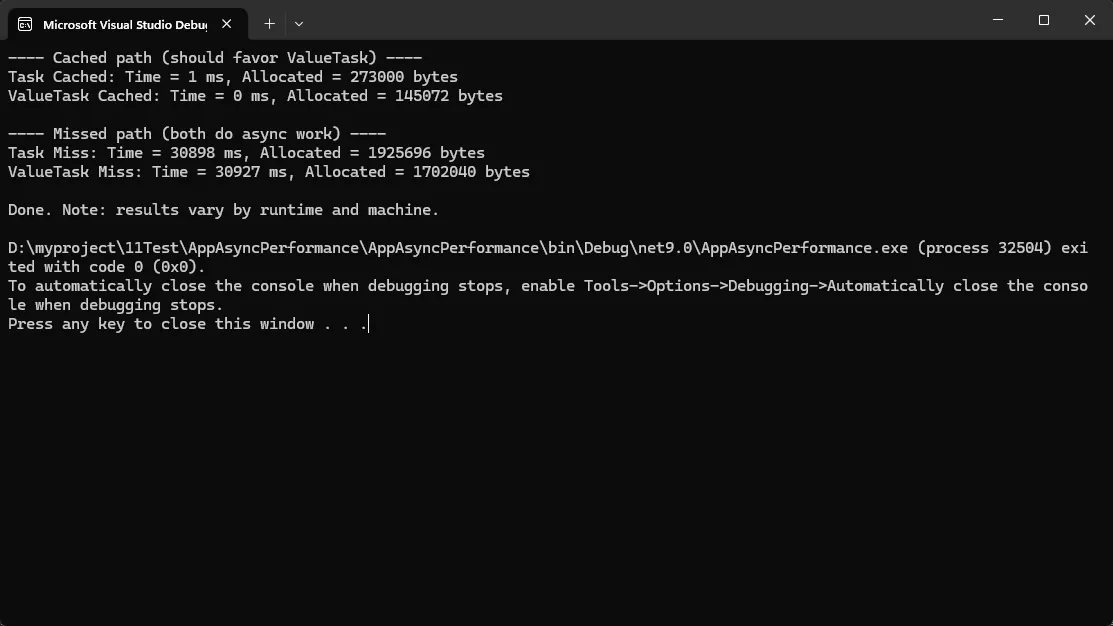
使用场景:
- ✅ 高频调用且经常走缓存路径的方法
- ✅ 简单的计算型异步方法
- ❌ 复杂的异步工作流(Task组合更灵活)
🔧 策略二:ConfigureAwait(false) - 避免死锁和性能损失
核心原理:ConfigureAwait(false) 告诉异步方法不需要回到原始上下文继续执行。
c#public class ConfigureAwaitDemo
{
    private readonly HttpClient _httpClient = new();

    // ❌ 错误示例:可能导致死锁
    public async Task<string> BadHttpCallAsync()
    {
        var response = await _httpClient.GetStringAsync("https://api.xx.com/data");
        // 默认情况下会尝试回到原始上下文
        return ProcessData(response);
    }

    // ✅ 正确示例:使用 ConfigureAwait(false)
    public async Task<string> GoodHttpCallAsync()
    {
        var response = await _httpClient.GetStringAsync("https://api.xx.com/data")
                                      .ConfigureAwait(false);
        // 不回到原始上下文,避免死锁和性能损失
        return ProcessData(response);
    }

    // ✅ 库方法的最佳实践
    public async Task<UserData> GetUserDataAsync(int userId)
    {
        var userData = await FetchUserFromDatabaseAsync(userId).ConfigureAwait(false);
        var permissions = await GetUserPermissionsAsync(userId).ConfigureAwait(false);

        return new UserData
        {
            User = userData,
            Permissions = permissions
        };
    }

    private async Task<User> FetchUserFromDatabaseAsync(int userId)
    {
        // 数据库调用模拟
        await Task.Delay(50).ConfigureAwait(false);
        return new User { Id = userId, Name = $"User_{userId}" };
    }

    private async Task<List<string>> GetUserPermissionsAsync(int userId)
    {
        await Task.Delay(30).ConfigureAwait(false);
        return new List<string> { "Read", "Write" };
    }

    private string ProcessData(string data) => data.ToUpper();
}
黄金法则:
- ✅ 库代码中永远使用 ConfigureAwait(false)
- ✅ 不需要访问UI控件的异步方法使用 ConfigureAwait(false)
- ❌ 需要更新UI的方法不要使用 ConfigureAwait(false)
⚡ 策略三:高性能异步模式组合
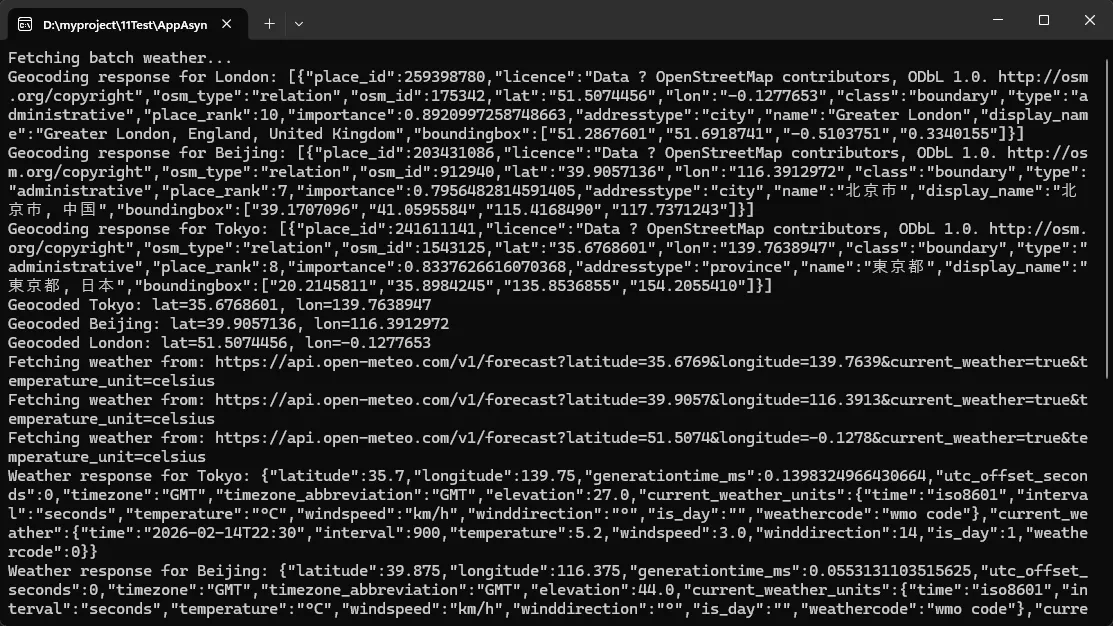
将Task、ValueTask和ConfigureAwait结合使用,实现最佳性能:
c#using System;
using System.Collections.Concurrent;
using System.Collections.Generic;
using System.Globalization;
using System.Linq;
using System.Net.Http;
using System.Text.Json;
using System.Threading;
using System.Threading.Tasks;
namespace AppAsyncPerformance
{
// 简单的 WeatherData POCO
public class WeatherData
{
public string City { get; set; }
public string Summary { get; set; }
public double TemperatureC { get; set; }
public override string ToString() =>
$"{City}: {Summary}, {TemperatureC:F1}°C";
}
public class HighPerformanceAsyncService : IDisposable
{
private readonly ConcurrentDictionary<string, (DateTime ExpireTime, object Data)> _cache = new();
private readonly ConcurrentDictionary<string, SemaphoreSlim> _locks = new();
private readonly HttpClient _httpClient;
private bool _disposed;
public HighPerformanceAsyncService(HttpClient httpClient = null)
{
_httpClient = httpClient ?? new HttpClient();
_httpClient.Timeout = TimeSpan.FromSeconds(15);
// Nominatim 要求设置 User-Agent
if (!_httpClient.DefaultRequestHeaders.UserAgent.Any())
{
_httpClient.DefaultRequestHeaders.UserAgent.ParseAdd("AppAsyncPerformance/1.0 (+https://example.com)");
}
}
public async ValueTask<T> GetCachedDataAsync<T>(string key, Func<ValueTask<T>> factory,
TimeSpan cacheDuration = default)
{
if (cacheDuration == default) cacheDuration = TimeSpan.FromMinutes(5);
if (_cache.TryGetValue(key, out var cached) && cached.ExpireTime > DateTime.UtcNow)
return (T)cached.Data!;
var sem = _locks.GetOrAdd(key, _ => new SemaphoreSlim(1, 1));
await sem.WaitAsync().ConfigureAwait(false);
try
{
if (_cache.TryGetValue(key, out cached) && cached.ExpireTime > DateTime.UtcNow)
return (T)cached.Data!;
T data = await factory().ConfigureAwait(false);
var expire = DateTime.UtcNow.Add(cacheDuration);
_cache[key] = (expire, (object)data!);
return data;
}
finally
{
sem.Release();
if (_locks.TryGetValue(key, out var existing) && existing.CurrentCount == 1)
{
_locks.TryRemove(key, out _);
existing.Dispose();
}
}
}
// 修正:Nominatim 返回的 lat/lon 是字符串
private class NominatimResult
{
public string display_name { get; set; }
public string lat { get; set; } // 字符串格式
public string lon { get; set; } // 字符串格式
}
private async Task<(double lat, double lon)> GeocodeCityAsync(string city)
{
try
{
var url = $"https://nominatim.openstreetmap.org/search?format=json&q={Uri.EscapeDataString(city)}&limit=1";
// 添加延迟以遵守 Nominatim 使用政策(建议每秒不超过1次请求)
await Task.Delay(1000).ConfigureAwait(false);
var resp = await _httpClient.GetAsync(url).ConfigureAwait(false);
resp.EnsureSuccessStatusCode();
var json = await resp.Content.ReadAsStringAsync().ConfigureAwait(false);
Console.WriteLine($"Geocoding response for {city}: {json}");
var options = new JsonSerializerOptions { PropertyNameCaseInsensitive = true };
var arr = JsonSerializer.Deserialize<NominatimResult[]>(json, options);
if (arr == null || arr.Length == 0)
throw new InvalidOperationException($"Geocoding failed for city '{city}' - no results found");
var result = arr[0];
// 将字符串转换为 double
if (!double.TryParse(result.lat, NumberStyles.Float, CultureInfo.InvariantCulture, out var lat) ||
!double.TryParse(result.lon, NumberStyles.Float, CultureInfo.InvariantCulture, out var lon))
{
throw new InvalidOperationException($"Invalid coordinates received for city '{city}': lat={result.lat}, lon={result.lon}");
}
Console.WriteLine($"Geocoded {city}: lat={lat}, lon={lon}");
return (lat, lon);
}
catch (Exception ex)
{
Console.WriteLine($"Geocoding error for {city}: {ex.Message}");
throw;
}
}
// Open-Meteo 的响应结构
private class OpenMeteoCurrentResponse
{
public CurrentWeather current_weather { get; set; }
public class CurrentWeather
{
public double temperature { get; set; }
public int weathercode { get; set; }
}
}
// 将 weathercode 转换为简单描述
private static string MapWeatherCode(int code) => code switch
{
0 => "Clear sky",
1 => "Mainly clear",
2 => "Partly cloudy",
3 => "Overcast",
>= 45 and <= 48 => "Fog",
>= 51 and <= 57 => "Drizzle",
>= 61 and <= 67 => "Rain",
>= 71 and <= 77 => "Snow",
>= 80 and <= 86 => "Rain showers",
>= 95 and <= 99 => "Thunderstorm",
_ => $"Weather code {code}"
};
// 从 Open-Meteo 获取当前天气
private async Task<WeatherData> FetchWeatherByCoordinatesAsync(string city, double lat, double lon)
{
try
{
var url = $"https://api.open-meteo.com/v1/forecast?latitude={lat:F4}&longitude={lon:F4}¤t_weather=true&temperature_unit=celsius";
Console.WriteLine($"Fetching weather from: {url}");
var resp = await _httpClient.GetAsync(url).ConfigureAwait(false);
resp.EnsureSuccessStatusCode();
var json = await resp.Content.ReadAsStringAsync().ConfigureAwait(false);
Console.WriteLine($"Weather response for {city}: {json}");
var options = new JsonSerializerOptions { PropertyNameCaseInsensitive = true };
var om = JsonSerializer.Deserialize<OpenMeteoCurrentResponse>(json, options);
if (om?.current_weather == null)
throw new InvalidOperationException($"Open-Meteo returned no current weather data for {city}");
var cw = om.current_weather;
return new WeatherData
{
City = city,
TemperatureC = cw.temperature,
Summary = MapWeatherCode(cw.weathercode)
};
}
catch (Exception ex)
{
Console.WriteLine($"Weather fetch error for {city}: {ex.Message}");
throw;
}
}
public ValueTask<WeatherData> GetWeatherAsync(string city)
{
if (string.IsNullOrWhiteSpace(city))
throw new ArgumentException("city required", nameof(city));
return GetCachedDataAsync(
$"weather_{city.ToLowerInvariant()}",
async () =>
{
// 首先地理编码(缓存地理编码结果)
var geoKey = $"geocode_{city.ToLowerInvariant()}";
var coords = await GetCachedDataAsync(geoKey, async () =>
{
return await GeocodeCityAsync(city).ConfigureAwait(false);
}, TimeSpan.FromDays(7)).ConfigureAwait(false); // 地理编码结果缓存7天
// 然后用坐标调用 Open-Meteo
var weather = await FetchWeatherByCoordinatesAsync(city, coords.lat, coords.lon).ConfigureAwait(false);
return weather;
},
TimeSpan.FromMinutes(10)
);
}
public async ValueTask<Dictionary<string, WeatherData>> GetBatchWeatherAsync(IEnumerable<string> cities)
{
if (cities == null) throw new ArgumentNullException(nameof(cities));
var cityList = cities.Distinct().ToList(); // 去重
if (cityList.Count == 0) return new Dictionary<string, WeatherData>();
// 限制并发以遵守外部API的使用政策
var throttle = new SemaphoreSlim(3); // 减少并发数
var results = new ConcurrentDictionary<string, WeatherData>();
var tasks = cityList.Select(async city =>
{
await throttle.WaitAsync().ConfigureAwait(false);
try
{
try
{
var weather = await GetWeatherAsync(city).AsTask().ConfigureAwait(false);
results.TryAdd(city, weather);
}
catch (Exception ex)
{
Console.WriteLine($"Failed to get weather for {city}: {ex.Message}");
// 可选:添加默认值或跳过失败的城市
results.TryAdd(city, new WeatherData
{
City = city,
Summary = "Unavailable",
TemperatureC = double.NaN
});
}
}
finally
{
throttle.Release();
}
}).ToArray();
await Task.WhenAll(tasks).ConfigureAwait(false);
return results.ToDictionary(kv => kv.Key, kv => kv.Value);
}
public void Dispose()
{
if (_disposed) return;
_disposed = true;
_httpClient?.Dispose();
foreach (var sem in _locks.Values) sem.Dispose();
}
}
class Program
{
static async Task Main(string[] args)
{
using var service = new HighPerformanceAsyncService();
// 减少城市数量以避免过度请求 Nominatim
var cities = new[] { "Beijing", "London", "Tokyo" };
try
{
Console.WriteLine("Fetching batch weather...");
var batch = await service.GetBatchWeatherAsync(cities);
Console.WriteLine("\nResults:");
foreach (var kv in batch)
{
Console.WriteLine($" {kv.Value}");
}
Console.WriteLine("\nFetching single city (should hit cache)...");
var beijing = await service.GetWeatherAsync("Beijing");
Console.WriteLine($" {beijing}");
Console.WriteLine("\nFetching again to demonstrate cache hit...");
var beijing2 = await service.GetWeatherAsync("Beijing");
Console.WriteLine($" {beijing2}");
}
catch (Exception ex)
{
Console.WriteLine($"Unhandled exception: {ex}");
Console.WriteLine($"Stack trace: {ex.StackTrace}");
}
Console.WriteLine("\nDone. Press any key to exit.");
Console.ReadKey();
}
}
}
🛡️ 常见坑点提醒
⚠️ ValueTask 使用注意事项
c#// ❌ 错误:多次await同一个ValueTask
var valueTask = GetDataAsync();
var result1 = await valueTask;
var result2 = await valueTask; // 可能导致异常或未定义行为

// ✅ 正确:只await一次,或转换为Task
var valueTask = GetDataAsync();
var task = valueTask.AsTask(); // 转换为Task以支持多次await
var result1 = await task;
var result2 = await task;
⚠️ ConfigureAwait 的边界情况
c#public async Task UIUpdateMethodAsync()
{
    var data = await GetDataAsync().ConfigureAwait(false);

    // ❌ 错误:在非UI线程上更新UI
    // this.Text = data; // 可能抛出异常

    // ✅ 正确:回到UI线程
    await Task.Run(() => { /* 后台处理 */ }).ConfigureAwait(false);
    this.Invoke(() => this.Text = data);
}
💎 收藏级代码模板
通用异步缓存模板
c#public class AsyncCache<TKey, TValue>
{
    private readonly ConcurrentDictionary<TKey, (DateTime Expiry, ValueTask<TValue> Task)> _cache = new();

    public ValueTask<TValue> GetOrCreateAsync(TKey key, Func<TKey, ValueTask<TValue>> factory,
                                            TimeSpan? expiry = null)
    {
        var expiryTime = DateTime.UtcNow.Add(expiry ?? TimeSpan.FromMinutes(5));

        return _cache.AddOrUpdate(key,
            k => (expiryTime, factory(k)),
            (k, existing) => existing.Expiry > DateTime.UtcNow
                ? existing
                : (expiryTime, factory(k))
        ).Task;
    }
}
🎯 结尾呼应
通过深入解析Task、ValueTask和ConfigureAwait的性能特性,我们得出三个核心要点:
- 内存优化为王:在高频调用场景下,ValueTask能显著减少GC压力,特别是在缓存命中率高的情况下
- 上下文管理至关重要:合理使用ConfigureAwait(false)不仅能避免死锁,还能提升并发性能
- 组合使用效果最佳:将三者结合使用,配合适当的缓存策略,能够实现显著的性能提升
在现代C#开发中,异步编程已经从"可选"变为"必需"。掌握这些高级技巧,不仅能让你的代码运行得更快,更能在面对高并发挑战时游刃有余。
技术成长金句:
- "性能优化不是过早优化,而是在正确的地方做正确的事"
- "异步编程的艺术在于平衡:内存、线程和复杂度的完美平衡"
觉得这些异步编程技巧对你有帮助吗?你在项目中遇到过哪些异步性能问题?欢迎在评论区分享你的经验,让我们一起讨论更多C#性能优化的实战技巧!
觉得有用请转发给更多同行,让优雅的异步代码成为我们的共同追求! 🚀
本文作者:技术老小子
本文链接:
版权声明:本博客所有文章除特别声明外,均采用 BY-NC-SA 许可协议。转载请注明出处!