
目录
🔥 从零开始打造C#可视化IDE:不过是个玩具!
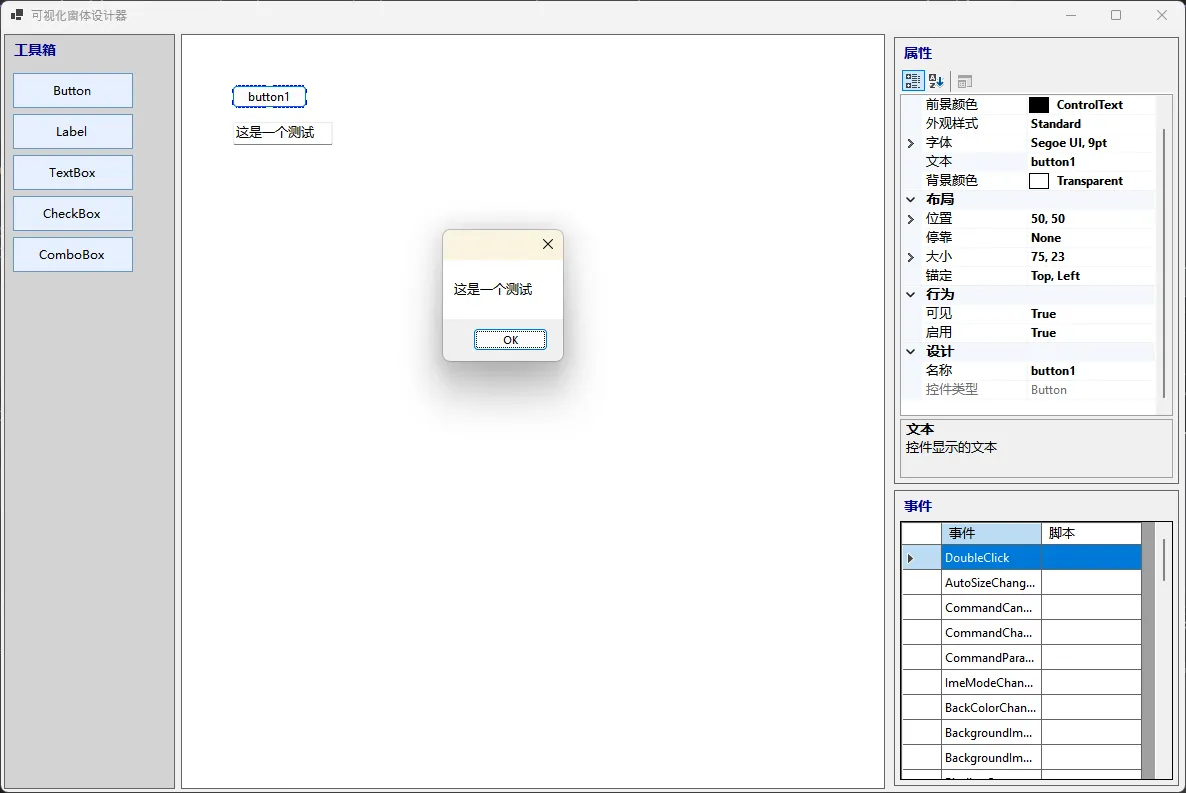
你是否曾经羡慕过Visual Studio的拖拽设计器?是否想过自己也能开发一个类似的可视化开发工具?闲来无事,今天我们就来从头开始,用C#打造一个完整的可视化IDE,让你体验从工具箱拖拽控件、属性面板编辑、到脚本化事件处理的全过程!
这不仅仅是一个Demo项目,更是一次深入理解WinForms架构、动态编译技术和设计模式应用的实战之旅。无论你是想提升技术水平的C#开发者,还是对IDE开发感兴趣的技术爱好者,这篇文章都能给你满满的收获!
🎯 问题分析:为什么要自己造轮子?
在日常开发中,我们经常遇到这样的场景:
- 业务定制化需求:现有IDE功能无法满足特定业务场景
- 学习成本控制:团队需要更简化的开发工具
- 技术深度理解:想要掌握IDE底层实现原理
传统的解决方案要么成本高昂,要么学习曲线陡峭。而通过自主开发,我们不仅能获得完全可控的工具,更能在过程中深度理解控件系统、属性绑定、动态编译等核心技术。
💡 核心架构设计
🏗️ 整体架构图
graph TB
    A[工具箱面板<br/>Toolbox] --> D[控件管理器<br/>ControlManager]
    B[设计面板<br/>Design Surface] --> D
    B --> E[脚本引擎<br/>ScriptEngine]
    C[属性面板<br/>PropertyGrid] --> D
    C --> E

    D --> B
    E --> D

    style A fill:#0277bd,stroke:#01579b,stroke-width:2px,color:#fff
    style B fill:#7b1fa2,stroke:#4a148c,stroke-width:2px,color:#fff
    style C fill:#2e7d32,stroke:#1b5e20,stroke-width:2px,color:#fff
    style D fill:#ef6c00,stroke:#e65100,stroke-width:2px,color:#fff
    style E fill:#c2185b,stroke:#880e4f,stroke-width:2px,color:#fff
🔧 代码实战:核心组件实现
🚀 第一步:设计时控件封装
设计时控件是整个系统的基础,它需要支持拖拽、调整大小、选择等交互功能:
c#using System;
using System.Collections.Generic;
using System.Drawing;
using System.Linq;
using System.Windows.Forms;

namespace AppBasicIDE
{
    public class DesignTimeControl : UserControl
    {
        private Control _innerControl;
        private bool _isSelected;
        private bool _isDragging;
        private Point _dragStartPoint;
        private Rectangle[] _resizeHandles = new Rectangle[8];
        private int _selectedHandle = -1;
        private bool _isResizing = false;
        private Rectangle _originalBounds;

        public Control InnerControl
        {
            get => _innerControl;
            set
            {
                if (_innerControl != null)
                {
                    Controls.Remove(_innerControl);
                    _innerControl.LocationChanged -= InnerControl_PropertyChanged;
                    _innerControl.SizeChanged -= InnerControl_PropertyChanged;
                }

                _innerControl = value;
                if (_innerControl != null)
                {
                    _innerControl.Location = new Point(0, 0);
                    Controls.Add(_innerControl);

                    // 监听内部控件属性变化
                    _innerControl.LocationChanged += InnerControl_PropertyChanged;
                    _innerControl.SizeChanged += InnerControl_PropertyChanged;

                    // 同步尺寸
                    this.Size = _innerControl.Size;

                    // 阻止内部控件的鼠标事件,让外部控件处理
                    _innerControl.MouseDown += InnerControl_MouseDown;
                    _innerControl.MouseMove += InnerControl_MouseMove;
                    _innerControl.MouseUp += InnerControl_MouseUp;
                }
            }
        }

        public bool IsSelected
        {
            get => _isSelected;
            set
            {
                _isSelected = value;
                Invalidate();
            }
        }

        public Dictionary<string, string> EventScripts { get; set; } = new Dictionary<string, string>();

        public DesignTimeControl()
        {
            SetStyle(ControlStyles.AllPaintingInWmPaint | ControlStyles.UserPaint |
                    ControlStyles.DoubleBuffer | ControlStyles.ResizeRedraw, true);
        }

        // 监听内部控件属性变化,同步到外部容器
        private void InnerControl_PropertyChanged(object sender, EventArgs e)
        {
            if (_innerControl != null && !_isResizing)
            {
                // 同步尺寸和位置
                if (this.Size != _innerControl.Size)
                {
                    this.Size = _innerControl.Size;
                }

                // 确保内部控件位置正确
                if (_innerControl.Location != Point.Empty)
                {
                    _innerControl.Location = Point.Empty;
                }
            }
        }

        protected override void OnSizeChanged(EventArgs e)
        {
            base.OnSizeChanged(e);

            // 当外部容器尺寸改变时,同步内部控件
            if (_innerControl != null)
            {
                _innerControl.Size = this.Size;
            }
        }

        protected override void OnPaint(PaintEventArgs e)
        {
            base.OnPaint(e);

            if (IsSelected)
            {
                // 绘制选择框
                using (var pen = new Pen(Color.Blue, 1))
                {
                    pen.DashStyle = System.Drawing.Drawing2D.DashStyle.Dash;
                    e.Graphics.DrawRectangle(pen, 0, 0, Width - 1, Height - 1);
                }

                // 绘制调整点
                DrawResizeHandles(e.Graphics);
            }
        }

        private void DrawResizeHandles(Graphics g)
        {
            var handleSize = 8;
            var brush = Brushes.White;
            var pen = new Pen(Color.Blue, 1);

            // 计算8个调整点的位置
            _resizeHandles[0] = new Rectangle(-handleSize / 2, -handleSize / 2, handleSize, handleSize); // 左上
            _resizeHandles[1] = new Rectangle(Width / 2 - handleSize / 2, -handleSize / 2, handleSize, handleSize); // 上中
            _resizeHandles[2] = new Rectangle(Width - handleSize / 2, -handleSize / 2, handleSize, handleSize); // 右上
            _resizeHandles[3] = new Rectangle(Width - handleSize / 2, Height / 2 - handleSize / 2, handleSize, handleSize); // 右中
            _resizeHandles[4] = new Rectangle(Width - handleSize / 2, Height - handleSize / 2, handleSize, handleSize); // 右下
            _resizeHandles[5] = new Rectangle(Width / 2 - handleSize / 2, Height - handleSize / 2, handleSize, handleSize); // 下中
            _resizeHandles[6] = new Rectangle(-handleSize / 2, Height - handleSize / 2, handleSize, handleSize); // 左下
            _resizeHandles[7] = new Rectangle(-handleSize / 2, Height / 2 - handleSize / 2, handleSize, handleSize); // 左中

            for (int i = 0; i < _resizeHandles.Length; i++)
            {
                g.FillRectangle(brush, _resizeHandles[i]);
                g.DrawRectangle(pen, _resizeHandles[i]);
            }

            pen.Dispose();
        }

        private int GetHandleAtPoint(Point point)
        {
            for (int i = 0; i < _resizeHandles.Length; i++)
            {
                if (_resizeHandles[i].Contains(point))
                    return i;
            }
            return -1;
        }

        private void InnerControl_MouseDown(object sender, MouseEventArgs e)
        {
            // 将内部控件的鼠标事件转发到外部容器
            var newArgs = new MouseEventArgs(e.Button, e.Clicks, e.X, e.Y, e.Delta);
            OnMouseDown(newArgs);
        }

        private void InnerControl_MouseMove(object sender, MouseEventArgs e)
        {
            var newArgs = new MouseEventArgs(e.Button, e.Clicks, e.X, e.Y, e.Delta);
            OnMouseMove(newArgs);
        }

        private void InnerControl_MouseUp(object sender, MouseEventArgs e)
        {
            var newArgs = new MouseEventArgs(e.Button, e.Clicks, e.X, e.Y, e.Delta);
            OnMouseUp(newArgs);
        }

        protected override void OnMouseDown(MouseEventArgs e)
        {
            if (e.Button == MouseButtons.Left)
            {
                BringToFront();
                OnControlSelected?.Invoke(this);

                if (IsSelected)
                {
                    _selectedHandle = GetHandleAtPoint(e.Location);
                    if (_selectedHandle >= 0)
                    {
                        _isResizing = true;
                        _originalBounds = this.Bounds;
                        Cursor = GetResizeCursor(_selectedHandle);
                    }
                    else
                    {
                        _isDragging = true;
                        _dragStartPoint = e.Location;
                        Cursor = Cursors.SizeAll;
                    }
                }
            }
            base.OnMouseDown(e);
        }

        protected override void OnMouseMove(MouseEventArgs e)
        {
            if (_isResizing && e.Button == MouseButtons.Left)
            {
                ResizeControl(e.Location);
            }
            else if (_isDragging && e.Button == MouseButtons.Left)
            {
                var deltaX = e.X - _dragStartPoint.X;
                var deltaY = e.Y - _dragStartPoint.Y;
                var newLocation = new Point(Location.X + deltaX, Location.Y + deltaY);

                // 确保不会拖出设计面板
                if (Parent != null)
                {
                    newLocation.X = Math.Max(0, Math.Min(newLocation.X, Parent.Width - Width));
                    newLocation.Y = Math.Max(0, Math.Min(newLocation.Y, Parent.Height - Height));
                }

                Location = newLocation;
            }
            else if (IsSelected)
            {
                // 根据鼠标位置改变光标
                var handle = GetHandleAtPoint(e.Location);
                if (handle >= 0)
                {
                    Cursor = GetResizeCursor(handle);
                }
                else
                {
                    Cursor = Cursors.SizeAll;
                }
            }

            base.OnMouseMove(e);
        }

        private Cursor GetResizeCursor(int handle)
        {
            switch (handle)
            {
                case 0: // 左上
                case 4: // 右下
                    return Cursors.SizeNWSE;
                case 1: // 上中
                case 5: // 下中
                    return Cursors.SizeNS;
                case 2: // 右上
                case 6: // 左下
                    return Cursors.SizeNESW;
                case 3: // 右中
                case 7: // 左中
                    return Cursors.SizeWE;
                default:
                    return Cursors.Default;
            }
        }

        private void ResizeControl(Point currentPoint)
        {
            var newBounds = _originalBounds;
            var parentPoint = Parent.PointToClient(this.PointToScreen(currentPoint));

            switch (_selectedHandle)
            {
                case 0: // 左上
                    var newWidth0 = _originalBounds.Right - parentPoint.X;
                    var newHeight0 = _originalBounds.Bottom - parentPoint.Y;
                    if (newWidth0 >= 20 && newHeight0 >= 20)
                    {
                        newBounds.X = parentPoint.X;
                        newBounds.Y = parentPoint.Y;
                        newBounds.Width = newWidth0;
                        newBounds.Height = newHeight0;
                    }
                    break;

                case 1: // 上中
                    var newHeight1 = _originalBounds.Bottom - parentPoint.Y;
                    if (newHeight1 >= 20)
                    {
                        newBounds.Y = parentPoint.Y;
                        newBounds.Height = newHeight1;
                    }
                    break;

                case 2: // 右上
                    var newWidth2 = parentPoint.X - _originalBounds.X;
                    var newHeight2 = _originalBounds.Bottom - parentPoint.Y;
                    if (newWidth2 >= 20 && newHeight2 >= 20)
                    {
                        newBounds.Y = parentPoint.Y;
                        newBounds.Width = newWidth2;
                        newBounds.Height = newHeight2;
                    }
                    break;

                case 3: // 右中
                    var newWidth3 = parentPoint.X - _originalBounds.X;
                    if (newWidth3 >= 20)
                    {
                        newBounds.Width = newWidth3;
                    }
                    break;

                case 4: // 右下
                    var newWidth4 = parentPoint.X - _originalBounds.X;
                    var newHeight4 = parentPoint.Y - _originalBounds.Y;
                    if (newWidth4 >= 20 && newHeight4 >= 20)
                    {
                        newBounds.Width = newWidth4;
                        newBounds.Height = newHeight4;
                    }
                    break;

                case 5: // 下中
                    var newHeight5 = parentPoint.Y - _originalBounds.Y;
                    if (newHeight5 >= 20)
                    {
                        newBounds.Height = newHeight5;
                    }
                    break;

                case 6: // 左下
                    var newWidth6 = _originalBounds.Right - parentPoint.X;
                    var newHeight6 = parentPoint.Y - _originalBounds.Y;
                    if (newWidth6 >= 20 && newHeight6 >= 20)
                    {
                        newBounds.X = parentPoint.X;
                        newBounds.Width = newWidth6;
                        newBounds.Height = newHeight6;
                    }
                    break;

                case 7: // 左中
                    var newWidth7 = _originalBounds.Right - parentPoint.X;
                    if (newWidth7 >= 20)
                    {
                        newBounds.X = parentPoint.X;
                        newBounds.Width = newWidth7;
                    }
                    break;
            }

            // 确保不会超出父容器边界
            if (Parent != null)
            {
                newBounds.X = Math.Max(0, Math.Min(newBounds.X, Parent.Width - newBounds.Width));
                newBounds.Y = Math.Max(0, Math.Min(newBounds.Y, Parent.Height - newBounds.Height));
            }

            this.Bounds = newBounds;
        }

        protected override void OnMouseUp(MouseEventArgs e)
        {
            if (_isResizing)
            {
                _isResizing = false;
                _selectedHandle = -1;
            }

            if (_isDragging)
            {
                _isDragging = false;
            }

            Cursor = Cursors.Default;
            base.OnMouseUp(e);
        }

        public event Action<DesignTimeControl> OnControlSelected;
    }
}
💡 技术要点:
- 使用复合模式包装原生控件,保持原有功能的同时增加设计时特性
- 通过事件转发机制确保鼠标交互的正确处理
- 自定义绘制实现选择状态和调整手柄的可视化反馈
🎛️ 第二步:智能控件管理器
控件管理器负责控件的创建、选择、命名和生命周期管理:
c#using System;
using System.Collections.Generic;
using System.Drawing;
using System.Linq;
using System.Windows.Forms;

namespace AppBasicIDE
{
    public class ControlManager
    {
        private Panel _designSurface;
        private DesignTimeControl _selectedControl;
        private List<DesignTimeControl> _designControls = new List<DesignTimeControl>();
        private PropertyGrid _propertyGrid;
        private Dictionary<string, DesignTimeControl> _controlsByName = new Dictionary<string, DesignTimeControl>();

        public ControlManager(Panel designSurface)
        {
            _designSurface = designSurface;
            _designSurface.AllowDrop = true;
            _designSurface.Click += OnDesignSurfaceClick;
        }

        public void SetPropertyGrid(PropertyGrid propertyGrid)
        {
            _propertyGrid = propertyGrid;
        }

        public DesignTimeControl AddControl(Type controlType, Point location)
        {
            try
            {
                var control = Activator.CreateInstance(controlType) as Control;
                if (control == null) return null;

                // 生成唯一的控件名称
                var baseName = controlType.Name.ToLower();
                var controlName = GenerateUniqueName(baseName);

                // 设置控件的基本属性
                control.Name = controlName;
                control.Text = controlName;

                if (control.Size.IsEmpty || (control.Size.Width == 0 && control.Size.Height == 0))
                {
                    control.Size = GetDefaultSize(controlType);
                }

                var designControl = new DesignTimeControl
                {
                    InnerControl = control,
                    Size = control.Size,
                    Location = location,
                    BackColor = Color.Transparent,
                    Name = controlName + "_design" // 设计时控件的名称
                };

                designControl.OnControlSelected += OnControlSelected;
                _designSurface.Controls.Add(designControl);
                _designControls.Add(designControl);

                // 将控件添加到名称字典中
                _controlsByName[controlName] = designControl;

                // 自动选择新添加的控件
                OnControlSelected(designControl);

                return designControl;
            }
            catch (Exception ex)
            {
                MessageBox.Show($"创建控件时出错: {ex.Message}", "错误", MessageBoxButtons.OK, MessageBoxIcon.Error);
                return null;
            }
        }

        private string GenerateUniqueName(string baseName)
        {
            int counter = 1;
            string name;

            do
            {
                name = $"{baseName}{counter}";
                counter++;
            }
            while (_controlsByName.ContainsKey(name));

            return name;
        }

        private Size GetDefaultSize(Type controlType)
        {
            if (controlType == typeof(Button))
                return new Size(75, 25);
            else if (controlType == typeof(Label))
                return new Size(100, 23);
            else if (controlType == typeof(TextBox))
                return new Size(100, 23);
            else if (controlType == typeof(CheckBox))
                return new Size(104, 24);
            else if (controlType == typeof(ComboBox))
                return new Size(121, 24);
            else
                return new Size(100, 25);
        }

        public void DeleteSelectedControl()
        {
            if (_selectedControl != null)
            {
                // 从名称字典中移除
                var controlName = _selectedControl.InnerControl.Name;
                if (!string.IsNullOrEmpty(controlName))
                {
                    _controlsByName.Remove(controlName);
                }

                _designSurface.Controls.Remove(_selectedControl);
                _designControls.Remove(_selectedControl);
                _selectedControl = null;
                OnSelectionChanged?.Invoke(null);
            }
        }

        private void OnControlSelected(DesignTimeControl control)
        {
            // 清除之前的选择
            if (_selectedControl != null)
            {
                _selectedControl.IsSelected = false;
                UnsubscribeFromPropertyChanges(_selectedControl);
            }

            _selectedControl = control;
            if (control != null)
            {
                control.IsSelected = true;
                SubscribeToPropertyChanges(control);

                // 创建控件包装器并设置到 PropertyGrid
                SetPropertyGridObject(control);
            }

            OnSelectionChanged?.Invoke(control);
        }

        private void SetPropertyGridObject(DesignTimeControl control)
        {
            if (_propertyGrid == null || control?.InnerControl == null) return;

            ControlWrapper wrapper = null;

            // 根据控件类型创建相应的包装器
            switch (control.InnerControl)
            {
                case Button _:
                    wrapper = new ButtonWrapper(control);
                    break;
                case TextBox _:
                    wrapper = new TextBoxWrapper(control);
                    break;
                case CheckBox _:
                    wrapper = new CheckBoxWrapper(control);
                    break;
                default:
                    wrapper = new ControlWrapper(control);
                    break;
            }

            if (wrapper != null)
            {
                // 订阅属性更改事件
                wrapper.OnPropertyChanged += (propertyName) =>
                {
                    if (propertyName == "Name")
                    {
                        // 处理名称更改
                        UpdateControlName(control);
                    }
                };

                _propertyGrid.SelectedObject = wrapper;
            }
        }

        private void UpdateControlName(DesignTimeControl control)
        {
            // 这里可以添加名称更改的处理逻辑
            // 比如更新控件字典等
            var oldName = _controlsByName.FirstOrDefault(kvp => kvp.Value == control).Key;
            var newName = control.InnerControl.Name;

            if (!string.IsNullOrEmpty(oldName) && oldName != newName)
            {
                _controlsByName.Remove(oldName);
                if (!string.IsNullOrEmpty(newName))
                {
                    _controlsByName[newName] = control;
                }
            }
        }

        // 修改点击空白区域的处理
        private void OnDesignSurfaceClick(object sender, EventArgs e)
        {
            // 点击空白区域取消选择
            if (_selectedControl != null)
            {
                _selectedControl.IsSelected = false;
                UnsubscribeFromPropertyChanges(_selectedControl);
                _selectedControl = null;

                // 清空 PropertyGrid
                if (_propertyGrid != null)
                {
                    _propertyGrid.SelectedObject = null;
                }

                OnSelectionChanged?.Invoke(null);
            }
        }

        private void SubscribeToPropertyChanges(DesignTimeControl control)
        {
            if (control?.InnerControl != null && _propertyGrid != null)
            {
                // 监听内部控件的属性变化
                control.InnerControl.LocationChanged += (s, e) => SyncDesignControlLocation(control);
                control.InnerControl.SizeChanged += (s, e) => SyncDesignControlSize(control);

                // 监听 PropertyGrid 的属性值变化
                _propertyGrid.PropertyValueChanged += (s, e) => OnPropertyValueChanged(control, e);
            }
        }

        private void UnsubscribeFromPropertyChanges(DesignTimeControl control)
        {
            // 通常在控件销毁时会自动处理
        }

        private void SyncDesignControlLocation(DesignTimeControl designControl)
        {
            if (designControl.InnerControl != null)
            {
                // 当内部控件位置改变时,同步外部容器
                var newLocation = designControl.InnerControl.Location;
                if (designControl.Location != newLocation && newLocation != Point.Empty)
                {
                    designControl.Location = newLocation;
                    designControl.InnerControl.Location = Point.Empty; // 重置内部控件位置
                }
            }
        }

        private void SyncDesignControlSize(DesignTimeControl designControl)
        {
            if (designControl.InnerControl != null)
            {
                // 当内部控件尺寸改变时,同步外部容器
                var newSize = designControl.InnerControl.Size;
                if (designControl.Size != newSize)
                {
                    designControl.Size = newSize;
                }
            }
        }

        private void OnPropertyValueChanged(DesignTimeControl control, PropertyValueChangedEventArgs e)
        {
            if (control?.InnerControl != null)
            {
                // 当通过属性面板修改属性时,确保设计时控件同步
                if (e.ChangedItem.PropertyDescriptor.Name == "Size")
                {
                    var newSize = (Size)e.ChangedItem.Value;
                    if (control.Size != newSize)
                    {
                        control.Size = newSize;
                    }
                }
                else if (e.ChangedItem.PropertyDescriptor.Name == "Location")
                {
                    var newLocation = (Point)e.ChangedItem.Value;
                    if (control.Location != newLocation)
                    {
                        control.Location = newLocation;
                        control.InnerControl.Location = Point.Empty;
                    }
                }
                else if (e.ChangedItem.PropertyDescriptor.Name == "Name")
                {
                    // 处理名称变更
                    var oldName = e.OldValue?.ToString();
                    var newName = e.ChangedItem.Value?.ToString();

                    if (!string.IsNullOrEmpty(oldName) && _controlsByName.ContainsKey(oldName))
                    {
                        _controlsByName.Remove(oldName);
                    }

                    if (!string.IsNullOrEmpty(newName))
                    {
                        _controlsByName[newName] = control;
                    }
                }
            }
        }

        // 通过名称查找控件
        public DesignTimeControl FindControlByName(string name)
        {
            _controlsByName.TryGetValue(name, out var control);
            return control;
        }

        // 获取所有控件的名称
        public IEnumerable<string> GetAllControlNames()
        {
            return _controlsByName.Keys;
        }

        // 检查名称是否已存在
        public bool IsNameExists(string name)
        {
            return _controlsByName.ContainsKey(name);
        }

        public event Action<DesignTimeControl> OnSelectionChanged;
        public DesignTimeControl SelectedControl => _selectedControl;
        public IEnumerable<DesignTimeControl> AllControls => _designControls;
        public IReadOnlyDictionary<string, DesignTimeControl> ControlsByName =>
            new Dictionary<string, DesignTimeControl>(_controlsByName);
    }
}
🔥 亮点功能:
- 自动命名机制:避免控件名称冲突,确保脚本访问的可靠性
- 强类型管理:通过泛型和反射实现类型安全的控件创建
- 内存管理:妥善处理控件的创建、销毁和资源回收
🎨 第三步:属性包装器设计
为了让PropertyGrid能够友好地显示和编辑控件属性,我们需要创建专门的包装器:
c#using System;
using System.ComponentModel;
using System.Drawing;
using System.Windows.Forms;

namespace AppBasicIDE
{
    /// <summary>
    /// 控件属性包装器,用于在PropertyGrid中显示和编辑控件属性
    /// </summary>
    public class ControlWrapper
    {
        private Control _control;
        private DesignTimeControl _designControl;

        public ControlWrapper(DesignTimeControl designControl)
        {
            _designControl = designControl;
            _control = designControl.InnerControl;
        }

        [Category("设计")]
        [Description("控件的名称,用于在脚本中访问控件")]
        [DisplayName("名称")]
        public string Name
        {
            get => _control.Name;
            set
            {
                if (!string.IsNullOrEmpty(value) && value != _control.Name)
                {
                    _control.Name = value;
                    // 触发名称更改事件,让ControlManager更新字典
                    OnPropertyChanged?.Invoke("Name");
                }
            }
        }

        [Category("布局")]
        [Description("控件在设计面板上的位置")]
        [DisplayName("位置")]
        public Point Location
        {
            get => _designControl.Location;
            set
            {
                _designControl.Location = value;
                _control.Location = Point.Empty;
            }
        }

        [Category("布局")]
        [Description("控件的大小")]
        [DisplayName("大小")]
        public Size Size
        {
            get => _control.Size;
            set
            {
                _control.Size = value;
                _designControl.Size = value;
            }
        }

        [Category("外观")]
        [Description("控件显示的文本")]
        [DisplayName("文本")]
        public string Text
        {
            get => _control.Text;
            set => _control.Text = value;
        }

        [Category("外观")]
        [Description("控件的背景颜色")]
        [DisplayName("背景颜色")]
        public Color BackColor
        {
            get => _control.BackColor;
            set => _control.BackColor = value;
        }

        [Category("外观")]
        [Description("控件的前景颜色")]
        [DisplayName("前景颜色")]
        public Color ForeColor
        {
            get => _control.ForeColor;
            set => _control.ForeColor = value;
        }

        [Category("外观")]
        [Description("控件使用的字体")]
        [DisplayName("字体")]
        public Font Font
        {
            get => _control.Font;
            set => _control.Font = value;
        }

        [Category("行为")]
        [Description("控件是否可见")]
        [DisplayName("可见")]
        public bool Visible
        {
            get => _control.Visible;
            set => _control.Visible = value;
        }

        [Category("行为")]
        [Description("控件是否启用")]
        [DisplayName("启用")]
        public bool Enabled
        {
            get => _control.Enabled;
            set => _control.Enabled = value;
        }

        [Category("布局")]
        [Description("控件的锚定方式")]
        [DisplayName("锚定")]
        public AnchorStyles Anchor
        {
            get => _control.Anchor;
            set => _control.Anchor = value;
        }

        [Category("布局")]
        [Description("控件的停靠方式")]
        [DisplayName("停靠")]
        public DockStyle Dock
        {
            get => _control.Dock;
            set => _control.Dock = value;
        }

        // Button 特有属性
        [Category("外观")]
        [Description("按钮的外观样式")]
        [DisplayName("外观样式")]
        [Browsable(false)] // 默认隐藏,在子类中显示
        public virtual FlatStyle FlatStyle
        {
            get => _control is Button btn ? btn.FlatStyle : FlatStyle.Standard;
            set { if (_control is Button btn) btn.FlatStyle = value; }
        }

        // TextBox 特有属性
        [Category("行为")]
        [Description("文本框是否为多行")]
        [DisplayName("多行")]
        [Browsable(false)] // 默认隐藏,在子类中显示
        public virtual bool Multiline
        {
            get => _control is TextBox txt ? txt.Multiline : false;
            set { if (_control is TextBox txt) txt.Multiline = value; }
        }

        [Category("行为")]
        [Description("文本框是否只读")]
        [DisplayName("只读")]
        [Browsable(false)] // 默认隐藏,在子类中显示
        public virtual bool ReadOnly
        {
            get => _control is TextBox txt ? txt.ReadOnly : false;
            set { if (_control is TextBox txt) txt.ReadOnly = value; }
        }

        // CheckBox 特有属性
        [Category("外观")]
        [Description("复选框的选中状态")]
        [DisplayName("选中")]
        [Browsable(false)] // 默认隐藏,在子类中显示
        public virtual bool Checked
        {
            get => _control is CheckBox chk ? chk.Checked : false;
            set { if (_control is CheckBox chk) chk.Checked = value; }
        }

        // 获取控件类型信息
        [Category("设计")]
        [Description("控件的类型")]
        [DisplayName("控件类型")]
        [ReadOnly(true)]
        public string ControlType => _control.GetType().Name;

        public event Action<string> OnPropertyChanged;
    }

    /// <summary>
    /// Button 控件包装器
    /// </summary>
    public class ButtonWrapper : ControlWrapper
    {
        public ButtonWrapper(DesignTimeControl designControl) : base(designControl) { }

        [Category("外观")]
        [Description("按钮的外观样式")]
        [DisplayName("外观样式")]
        [Browsable(true)]
        public override FlatStyle FlatStyle
        {
            get => base.FlatStyle;
            set => base.FlatStyle = value;
        }
    }

    /// <summary>
    /// TextBox 控件包装器
    /// </summary>
    public class TextBoxWrapper : ControlWrapper
    {
        public TextBoxWrapper(DesignTimeControl designControl) : base(designControl) { }

        [Category("行为")]
        [Description("文本框是否为多行")]
        [DisplayName("多行")]
        [Browsable(true)]
        public override bool Multiline
        {
            get => base.Multiline;
            set => base.Multiline = value;
        }

        [Category("行为")]
        [Description("文本框是否只读")]
        [DisplayName("只读")]
        [Browsable(true)]
        public override bool ReadOnly
        {
            get => base.ReadOnly;
            set => base.ReadOnly = value;
        }
    }

    /// <summary>
    /// CheckBox 控件包装器
    /// </summary>
    public class CheckBoxWrapper : ControlWrapper
    {
        public CheckBoxWrapper(DesignTimeControl designControl) : base(designControl) { }

        [Category("外观")]
        [Description("复选框的选中状态")]
        [DisplayName("选中")]
        [Browsable(true)]
        public override bool Checked
        {
            get => base.Checked;
            set => base.Checked = value;
        }
    }
}
⚡ 设计优势:
- 类型特化:针对不同控件类型提供专门的属性包装器
- 友好界面:使用Attribute提供中文显示名称和分类
- 双向绑定:属性修改能够实时反映到设计器中
🔬 第四步:动态脚本编译引擎
这是整个系统最具技术含量的部分,实现运行时C#代码编译和执行:
c#using System;
using System.Collections.Generic;
using System.Linq;
using System.Reflection;
using System.Text;
using System.Threading.Tasks;
using System.IO;
using System.Windows.Forms;
using Microsoft.CodeAnalysis;
using Microsoft.CodeAnalysis.CSharp;
using Microsoft.CodeAnalysis.Emit;

namespace AppBasicIDE
{
    public class ScriptEngine
    {
        private Dictionary<string, Assembly> _compiledScripts = new Dictionary<string, Assembly>();
        private ControlManager _controlManager;

        public ScriptEngine(ControlManager controlManager = null)
        {
            _controlManager = controlManager;
        }

        public void SetControlManager(ControlManager controlManager)
        {
            _controlManager = controlManager;
        }

        public bool CompileScript(string scriptId, string code, out string error)
        {
            error = null;

            try
            {
                // 生成控件访问代码
                var controlAccessCode = GenerateControlAccessCode();

                // 包装代码到一个类中,包含控件访问功能
                var wrappedCode = $@"
using System;
using System.Windows.Forms;
using System.Drawing;

public class ScriptClass
{{
    private System.Collections.Generic.Dictionary<string, Control> _controls;

    public void SetControls(System.Collections.Generic.Dictionary<string, Control> controls)
    {{
        _controls = controls;
    }}

    {controlAccessCode}

    public void Execute(Control sender, EventArgs e)
    {{
        {code}
    }}
}}";

                var syntaxTree = CSharpSyntaxTree.ParseText(wrappedCode);

                // 获取所有必要的引用程序集
                var references = GetMetadataReferences();

                var compilation = CSharpCompilation.Create(
                    assemblyName: $"Script_{scriptId}_{Guid.NewGuid():N}",
                    syntaxTrees: new[] { syntaxTree },
                    references: references,
                    options: new CSharpCompilationOptions(OutputKind.DynamicallyLinkedLibrary));

                using (var ms = new MemoryStream())
                {
                    EmitResult result = compilation.Emit(ms);

                    if (!result.Success)
                    {
                        var failures = result.Diagnostics.Where(diagnostic =>
                            diagnostic.IsWarningAsError ||
                            diagnostic.Severity == DiagnosticSeverity.Error);

                        error = string.Join("\n", failures.Select(f => f.GetMessage()));
                        return false;
                    }

                    ms.Seek(0, SeekOrigin.Begin);
                    var assembly = Assembly.Load(ms.ToArray());
                    _compiledScripts[scriptId] = assembly;

                    return true;
                }
            }
            catch (Exception ex)
            {
                error = ex.Message;
                return false;
            }
        }

        private string GenerateControlAccessCode()
        {
            if (_controlManager == null) return "";

            var sb = new StringBuilder();

            // 生成每个控件的访问属性
            foreach (var controlName in _controlManager.GetAllControlNames())
            {
                var designControl = _controlManager.FindControlByName(controlName);
                if (designControl?.InnerControl != null)
                {
                    var controlType = designControl.InnerControl.GetType().Name;
                    sb.AppendLine($@"
    public {controlType} {controlName}
    {{
        get
        {{
            if (_controls != null && _controls.ContainsKey(""{controlName}""))
                return _controls[""{controlName}""] as {controlType};
            return null;
        }}
    }}");
                }
            }

            // 添加通用的查找方法
            sb.AppendLine(@"
    public Control FindControl(string name)
    {
        if (_controls != null && _controls.ContainsKey(name))
            return _controls[name];
        return null;
    }

    public T FindControl<T>(string name) where T : Control
    {
        return FindControl(name) as T;
    }");

            return sb.ToString();
        }

        private MetadataReference[] GetMetadataReferences()
        {
            var references = new List<MetadataReference>();
            var addedAssemblies = new HashSet<string>();

            try
            {
                // 核心程序集列表
                var coreAssemblies = new[]
                {
            typeof(object),                           // System.Private.CoreLib
            typeof(Console),                          // System.Console
            typeof(Control),                          // System.Windows.Forms
            typeof(MessageBox),                       // System.Windows.Forms
            typeof(System.Drawing.Color),             // System.Drawing
            typeof(System.Drawing.Point),             // System.Drawing.Primitives
            typeof(Dictionary<,>),                    // System.Collections
            typeof(Enumerable),                       // System.Linq
            typeof(System.ComponentModel.Component),  // System.ComponentModel.Primitives
            typeof(System.ComponentModel.TypeConverter), // System.ComponentModel.TypeConverter
            typeof(Encoding),                         // System.Text.Encoding.Extensions
            typeof(System.Text.RegularExpressions.Regex) // System.Text.RegularExpressions
        };

                // 添加核心程序集
                foreach (var type in coreAssemblies)
                {
                    try
                    {
                        var location = type.Assembly.Location;
                        if (!string.IsNullOrEmpty(location) && File.Exists(location) && !addedAssemblies.Contains(location))
                        {
                            references.Add(MetadataReference.CreateFromFile(location));
                            addedAssemblies.Add(location);
                        }
                    }
                    catch { }
                }

                // 添加当前程序集
                var currentAssembly = Assembly.GetExecutingAssembly();
                if (!string.IsNullOrEmpty(currentAssembly.Location) && !addedAssemblies.Contains(currentAssembly.Location))
                {
                    references.Add(MetadataReference.CreateFromFile(currentAssembly.Location));
                    addedAssemblies.Add(currentAssembly.Location);
                }

                // 尝试通过名称加载必要的程序集
                var requiredAssemblyNames = new[]
                {
            "System.Runtime",
            "System.Private.CoreLib",
            "mscorlib",
            "System.ComponentModel.Primitives",
            "System.ComponentModel.TypeConverter",
            "System.ComponentModel",
            "System.Drawing.Primitives",
            "System.Collections",
            "System.Collections.Concurrent",
            "System.Text.Encoding.Extensions",
            "System.Text.RegularExpressions",
            "netstandard"
        };

                foreach (var assemblyName in requiredAssemblyNames)
                {
                    try
                    {
                        var assembly = Assembly.Load(assemblyName);
                        var location = assembly.Location;
                        if (!string.IsNullOrEmpty(location) && File.Exists(location) && !addedAssemblies.Contains(location))
                        {
                            references.Add(MetadataReference.CreateFromFile(location));
                            addedAssemblies.Add(location);
                        }
                    }
                    catch { }
                }

                // 从当前 AppDomain 加载的程序集中查找
                foreach (var assembly in AppDomain.CurrentDomain.GetAssemblies())
                {
                    try
                    {
                        if (!assembly.IsDynamic &&
                            !string.IsNullOrEmpty(assembly.Location) &&
                            File.Exists(assembly.Location) &&
                            !addedAssemblies.Contains(assembly.Location))
                        {
                            var name = assembly.GetName().Name;
                            if (name.StartsWith("System.") ||
                                name.StartsWith("Microsoft.") ||
                                name.Equals("mscorlib") ||
                                name.Equals("netstandard"))
                            {
                                references.Add(MetadataReference.CreateFromFile(assembly.Location));
                                addedAssemblies.Add(assembly.Location);
                            }
                        }
                    }
                    catch { }
                }

                Console.WriteLine($"Added {references.Count} assembly references for script compilation.");

            }
            catch (Exception ex)
            {
                Console.WriteLine($"Error getting metadata references: {ex.Message}");

                // 最小引用集作为后备
                references.Clear();
                addedAssemblies.Clear();

                var fallbackAssemblies = new[]
                {
            typeof(object).Assembly.Location,
            typeof(Control).Assembly.Location,
            typeof(MessageBox).Assembly.Location
        };

                foreach (var location in fallbackAssemblies)
                {
                    if (!string.IsNullOrEmpty(location) && File.Exists(location))
                    {
                        references.Add(MetadataReference.CreateFromFile(location));
                    }
                }
            }

            return references.ToArray();
        }

        public void ExecuteScript(string scriptId, Control sender, EventArgs e)
        {
            if (_compiledScripts.TryGetValue(scriptId, out var assembly))
            {
                try
                {
                    var type = assembly.GetType("ScriptClass");
                    if (type == null)
                    {
                        MessageBox.Show("无法找到脚本类", "错误", MessageBoxButtons.OK, MessageBoxIcon.Error);
                        return;
                    }

                    var instance = Activator.CreateInstance(type);

                    // 设置控件字典
                    if (_controlManager != null)
                    {
                        var controlDict = new Dictionary<string, Control>();
                        foreach (var kvp in _controlManager.ControlsByName)
                        {
                            controlDict[kvp.Key] = kvp.Value.InnerControl;
                        }

                        var setControlsMethod = type.GetMethod("SetControls");
                        setControlsMethod?.Invoke(instance, new object[] { controlDict });
                    }

                    var method = type.GetMethod("Execute");
                    if (method == null)
                    {
                        MessageBox.Show("无法找到Execute方法", "错误", MessageBoxButtons.OK, MessageBoxIcon.Error);
                        return;
                    }

                    method.Invoke(instance, new object[] { sender, e });
                }
                catch (Exception ex)
                {
                    MessageBox.Show($"脚本执行错误: {ex.Message}\n\n详细信息:\n{ex.StackTrace}",
                        "错误", MessageBoxButtons.OK, MessageBoxIcon.Error);
                }
            }
            else
            {
                MessageBox.Show($"未找到脚本: {scriptId}", "错误", MessageBoxButtons.OK, MessageBoxIcon.Error);
            }
        }

        // 清理编译缓存的方法
        public void ClearCompiledScripts()
        {
            _compiledScripts.Clear();
        }

        // 获取所有已编译脚本的ID
        public IEnumerable<string> GetCompiledScriptIds()
        {
            return _compiledScripts.Keys;
        }

        // 测试编译功能
        public bool TestCompilation(out string error)
        {
            var testCode = @"MessageBox.Show(""Test compilation successful!"");";
            return CompileScript("test", testCode, out error);
        }
    }
}
🎯 技术突破:
- Roslyn编译器集成:使用微软官方编译器API实现动态编译
- 智能代码生成:根据当前控件自动生成访问代码
- 沙盒执行:通过Assembly隔离确保脚本执行的安全性
🎨 其它:事件绑定
c#using System;
using System.Collections.Generic;
using System.Reflection;
using System.Windows.Forms;

namespace AppBasicIDE
{
    public class EventBindingManager
    {
        private ScriptEngine _scriptEngine;
        private Dictionary<Control, Dictionary<string, string>> _eventBindings =
            new Dictionary<Control, Dictionary<string, string>>();

        public EventBindingManager(ScriptEngine scriptEngine)
        {
            _scriptEngine = scriptEngine;
        }

        public void BindEvent(DesignTimeControl designControl, string eventName, string script)
        {
            var control = designControl.InnerControl;
            var scriptId = $"{control.GetHashCode()}_{eventName}";

            // 编译脚本
            if (!_scriptEngine.CompileScript(scriptId, script, out var error))
            {
                MessageBox.Show($"脚本编译失败:\n{error}", "错误", MessageBoxButtons.OK, MessageBoxIcon.Error);
                return;
            }

            // 保存脚本
            if (!_eventBindings.ContainsKey(control))
                _eventBindings[control] = new Dictionary<string, string>();

            _eventBindings[control][eventName] = script;
            designControl.EventScripts[eventName] = script;

            // 绑定事件处理程序
            BindEventHandler(control, eventName, scriptId);
        }

        private void BindEventHandler(Control control, string eventName, string scriptId)
        {
            var eventInfo = control.GetType().GetEvent(eventName);
            if (eventInfo == null) return;

            // 简化实现:只处理 Click 事件
            if (eventName == "Click" && control is Button button)
            {
                button.Click += (sender, e) => _scriptEngine.ExecuteScript(scriptId, control, e);
            }
        }
    }
}
🎨 其它:窗体
c#namespace AppBasicIDE
{
    public partial class Form1 : Form
    {
        private ControlManager _controlManager;
        private EventBindingManager _eventManager;
        private ScriptEngine _scriptEngine;

        private Panel pnlDesignSurface;
        private Panel pnlToolbox;
        private Panel pnlProperties;
        private PropertyGrid propertyGrid;
        private DataGridView dgvEvents;


        public Form1()
        {
            InitializeComponent();
            CreateControls();          // 只调用一次
            InitializeManagers();
            SetupUI();

        }
        private void CreateControls()
        {
            // 设置窗体属性
            this.Text = "可视化窗体设计器";
            this.Size = new Size(1200, 800);
            this.StartPosition = FormStartPosition.CenterScreen;

            // 创建主布局
            var mainContainer = new TableLayoutPanel
            {
                Dock = DockStyle.Fill,
                ColumnCount = 3,
                RowCount = 1
            };

            mainContainer.ColumnStyles.Add(new ColumnStyle(SizeType.Percent, 15F));
            mainContainer.ColumnStyles.Add(new ColumnStyle(SizeType.Percent, 60F));
            mainContainer.ColumnStyles.Add(new ColumnStyle(SizeType.Percent, 25F));

            this.Controls.Add(mainContainer);

            // 创建工具箱面板 - 使用 FlowLayoutPanel 来自动布局按钮
            pnlToolbox = new Panel
            {
                Dock = DockStyle.Fill,
                BorderStyle = BorderStyle.FixedSingle,
                BackColor = Color.LightGray,
                AutoScroll = true
            };

            var toolboxLabel = new Label
            {
                Text = "工具箱",
                Font = new Font("Microsoft YaHei", 10, FontStyle.Bold),
                ForeColor = Color.DarkBlue,
                Location = new Point(5, 5),
                Size = new Size(100, 25)
            };
            pnlToolbox.Controls.Add(toolboxLabel);

            // 创建按钮容器 - 使用 FlowLayoutPanel 自动排列按钮
            var buttonContainer = new FlowLayoutPanel
            {
                Location = new Point(5, 35),
                Size = new Size(pnlToolbox.Width - 10, pnlToolbox.Height - 40),
                Anchor = AnchorStyles.Top | AnchorStyles.Bottom | AnchorStyles.Left | AnchorStyles.Right,
                FlowDirection = FlowDirection.TopDown,
                WrapContents = false,
                AutoScroll = true,
                BackColor = Color.Transparent
            };
            pnlToolbox.Controls.Add(buttonContainer);

            mainContainer.Controls.Add(pnlToolbox, 0, 0);

            // 创建设计面板
            pnlDesignSurface = new Panel
            {
                Dock = DockStyle.Fill,
                BorderStyle = BorderStyle.FixedSingle,
                BackColor = Color.White,
                AutoScroll = true
            };
            mainContainer.Controls.Add(pnlDesignSurface, 1, 0);

            // 创建右侧属性面板容器
            var rightPanel = new TableLayoutPanel
            {
                Dock = DockStyle.Fill,
                RowCount = 2,
                ColumnCount = 1
            };
            rightPanel.RowStyles.Add(new RowStyle(SizeType.Percent, 60F));
            rightPanel.RowStyles.Add(new RowStyle(SizeType.Percent, 40F));

            // 创建属性面板
            pnlProperties = new Panel
            {
                Dock = DockStyle.Fill,
                BorderStyle = BorderStyle.FixedSingle
            };

            var propLabel = new Label
            {
                Text = "属性",
                Font = new Font("Microsoft YaHei", 10, FontStyle.Bold),
                ForeColor = Color.DarkBlue,
                Location = new Point(5, 5),
                Size = new Size(100, 25)
            };
            pnlProperties.Controls.Add(propLabel);

            propertyGrid = new PropertyGrid
            {
                Location = new Point(5, 30),
                Size = new Size(pnlProperties.Width - 10, pnlProperties.Height - 35),
                Anchor = AnchorStyles.Top | AnchorStyles.Bottom | AnchorStyles.Left | AnchorStyles.Right
            };
            pnlProperties.Controls.Add(propertyGrid);

            rightPanel.Controls.Add(pnlProperties, 0, 0);

            // 创建事件面板
            var eventPanel = new Panel
            {
                Dock = DockStyle.Fill,
                BorderStyle = BorderStyle.FixedSingle
            };

            var eventLabel = new Label
            {
                Text = "事件",
                Font = new Font("Microsoft YaHei", 10, FontStyle.Bold),
                ForeColor = Color.DarkBlue,
                Location = new Point(5, 5),
                Size = new Size(100, 25)
            };
            eventPanel.Controls.Add(eventLabel);

            dgvEvents = new DataGridView
            {
                Location = new Point(5, 30),
                Size = new Size(eventPanel.Width - 10, eventPanel.Height - 35),
                Anchor = AnchorStyles.Top | AnchorStyles.Bottom | AnchorStyles.Left | AnchorStyles.Right,
                AllowUserToAddRows = false,
                AllowUserToDeleteRows = false,
                SelectionMode = DataGridViewSelectionMode.FullRowSelect,
                ReadOnly = false
            };
            eventPanel.Controls.Add(dgvEvents);

            rightPanel.Controls.Add(eventPanel, 0, 1);
            mainContainer.Controls.Add(rightPanel, 2, 0);
        }

        private void InitializeManagers()
        {
            _controlManager = new ControlManager(pnlDesignSurface);
            _scriptEngine = new ScriptEngine(_controlManager);
            _eventManager = new EventBindingManager(_scriptEngine);

            _controlManager.SetPropertyGrid(propertyGrid);
            _controlManager.OnSelectionChanged += OnControlSelectionChanged;
        }

        // 添加这个缺失的方法
        private void SetupUI()
        {
            // 创建工具箱按钮
            CreateToolboxButton("Button", typeof(Button));
            CreateToolboxButton("Label", typeof(Label));
            CreateToolboxButton("TextBox", typeof(TextBox));
            CreateToolboxButton("CheckBox", typeof(CheckBox));
            CreateToolboxButton("ComboBox", typeof(ComboBox));

            // 设置事件列表
            SetupEventGrid();
        }

        // 修改按钮创建方法
        private void CreateToolboxButton(string name, Type controlType)
        {
            var btn = new Button
            {
                Text = name,
                Size = new Size(120, 35),
                Tag = controlType,
                BackColor = Color.FromArgb(230, 240, 255),
                FlatStyle = FlatStyle.Flat,
                UseVisualStyleBackColor = false,
                Margin = new Padding(3, 3, 3, 3),
                Font = new Font("Microsoft YaHei", 9)
            };

            btn.FlatAppearance.BorderColor = Color.FromArgb(100, 150, 200);
            btn.FlatAppearance.MouseOverBackColor = Color.FromArgb(200, 220, 240);

            btn.Click += (s, e) =>
            {
                try
                {
                    var button = s as Button;
                    var type = button.Tag as Type;

                    Console.WriteLine($"Creating control: {type.Name}");

                    if (_controlManager != null)
                    {
                        _controlManager.AddControl(type, new Point(50, 50));
                    }
                    else
                    {
                        MessageBox.Show("ControlManager 未初始化!");
                    }
                }
                catch (Exception ex)
                {
                    MessageBox.Show($"创建控件时出错: {ex.Message}");
                }
            };

            var buttonContainer = pnlToolbox.Controls.OfType<FlowLayoutPanel>().FirstOrDefault();
            if (buttonContainer != null)
            {
                buttonContainer.Controls.Add(btn);
                Console.WriteLine($"Added button: {name} to container");
            }
            else
            {
                // 如果没有找到容器,直接添加
                pnlToolbox.Controls.Add(btn);
                Console.WriteLine($"Added button: {name} directly to toolbox");
            }
        }

        private void SetupEventGrid()
        {
            dgvEvents.Columns.Add("EventName", "事件");
            dgvEvents.Columns.Add("Script", "脚本");
            dgvEvents.CellDoubleClick += OnEventCellDoubleClick;
        }

        private void OnControlSelectionChanged(DesignTimeControl control)
        {
            if (control != null)
            {
                LoadControlEvents(control);
            }
            else
            {
                dgvEvents.Rows.Clear();
            }
        }

        private void LoadControlEvents(DesignTimeControl control)
        {
            dgvEvents.Rows.Clear();

            // 获取控件支持的事件
            var events = control.InnerControl.GetType().GetEvents()
                .Where(e => e.EventHandlerType == typeof(EventHandler))
                .Select(e => e.Name);

            foreach (var eventName in events)
            {
                var script = control.EventScripts.ContainsKey(eventName) ?
                    control.EventScripts[eventName] : "";
                dgvEvents.Rows.Add(eventName, script);
            }
        }

        private void OnEventCellDoubleClick(object sender, DataGridViewCellEventArgs e)
        {
            if (e.ColumnIndex == 1 && _controlManager.SelectedControl != null && e.RowIndex >= 0) // Script列
            {
                var eventName = dgvEvents.Rows[e.RowIndex].Cells[0].Value?.ToString();
                var currentScript = dgvEvents.Rows[e.RowIndex].Cells[1].Value?.ToString() ?? "";

                using (var editor = new CodeEditor(currentScript))
                {
                    if (editor.ShowDialog() == DialogResult.OK)
                    {
                        _eventManager.BindEvent(_controlManager.SelectedControl, eventName, editor.Code);
                        dgvEvents.Rows[e.RowIndex].Cells[1].Value = editor.Code;
                    }
                }
            }
        }
    }
}
c#using System;
using System.Collections.Generic;
using System.ComponentModel;
using System.Data;
using System.Drawing;
using System.Linq;
using System.Text;
using System.Threading.Tasks;
using System.Windows.Forms;

namespace AppBasicIDE
{
    public partial class CodeEditor : Form
    {
        private TextBox txtCode;
        private Button btnOK;
        private Button btnCancel;

        public string Code => txtCode.Text;

        public CodeEditor(string initialCode = "")
        {
            InitializeComponent();
            SetupControls();
            txtCode.Text = initialCode;
        }

        private void SetupControls()
        {
            this.Text = "代码编辑器";
            this.Size = new Size(600, 400);
            this.StartPosition = FormStartPosition.CenterParent;
            this.ShowIcon = false;
            this.MaximizeBox = false;
            this.MinimizeBox = false;

            // 创建文本框
            txtCode = new TextBox
            {
                Multiline = true,
                ScrollBars = ScrollBars.Both,
                Font = new Font("Consolas", 10),
                Location = new Point(10, 10),
                Size = new Size(this.ClientSize.Width - 20, this.ClientSize.Height - 60),
                Anchor = AnchorStyles.Top | AnchorStyles.Bottom | AnchorStyles.Left | AnchorStyles.Right
            };
            this.Controls.Add(txtCode);

            // 创建确定按钮
            btnOK = new Button
            {
                Text = "确定",
                DialogResult = DialogResult.OK,
                Location = new Point(this.ClientSize.Width - 170, this.ClientSize.Height - 40),
                Size = new Size(75, 30),
                Anchor = AnchorStyles.Bottom | AnchorStyles.Right
            };
            btnOK.Click += (s, e) => { this.DialogResult = DialogResult.OK; this.Close(); };
            this.Controls.Add(btnOK);

            // 创建取消按钮
            btnCancel = new Button
            {
                Text = "取消",
                DialogResult = DialogResult.Cancel,
                Location = new Point(this.ClientSize.Width - 85, this.ClientSize.Height - 40),
                Size = new Size(75, 30),
                Anchor = AnchorStyles.Bottom | AnchorStyles.Right
            };
            btnCancel.Click += (s, e) => { this.DialogResult = DialogResult.Cancel; this.Close(); };
            this.Controls.Add(btnCancel);

            this.AcceptButton = btnOK;
            this.CancelButton = btnCancel;
        }
    }
}
⚠️ 常见坑点与解决方案
🐛 问题1:程序集引用缺失
现象: 编译时提示"未引用System.ComponentModel.Primitives"
c#// ❌ 错误做法:只添加基础引用
references.Add(MetadataReference.CreateFromFile(typeof(object).Assembly.Location));

// ✅ 正确做法:完整的程序集引用
private MetadataReference[] GetMetadataReferences()
{
    var references = new List<MetadataReference>();

    // 核心程序集
    references.Add(MetadataReference.CreateFromFile(typeof(object).Assembly.Location));
    references.Add(MetadataReference.CreateFromFile(typeof(Control).Assembly.Location));
    references.Add(MetadataReference.CreateFromFile(typeof(Component).Assembly.Location));

    // 尝试加载系统程序集
    var requiredAssemblies = new[] {
        "System.ComponentModel.Primitives",
        "System.ComponentModel.TypeConverter",
        "System.Drawing.Primitives"
    };

    foreach (var assemblyName in requiredAssemblies)
    {
        try
        {
            var assembly = Assembly.Load(assemblyName);
            references.Add(MetadataReference.CreateFromFile(assembly.Location));
        }
        catch { /* 忽略加载失败 */ }
    }

    return references.ToArray();
}
🐛 问题2:控件事件穿透
现象: 点击控件无法选中,拖拽功能失效
c#// ❌ 错误做法:直接处理内部控件事件
_innerControl.MouseDown += (s, e) => { /* 处理逻辑 */ };

// ✅ 正确做法:事件转发机制
private void InnerControl_MouseDown(object sender, MouseEventArgs e)
{
    // 将内部控件事件转发到设计时控件
    var newArgs = new MouseEventArgs(e.Button, e.Clicks, e.X, e.Y, e.Delta);
    this.OnMouseDown(newArgs);
}
🐛 问题3:属性同步问题
现象: PropertyGrid修改属性后,设计器显示不同步
c#// ✅ 解决方案:双向属性绑定
private void OnPropertyValueChanged(object sender, PropertyValueChangedEventArgs e)
{
    if (e.ChangedItem.PropertyDescriptor.Name == "Size")
    {
        var newSize = (Size)e.ChangedItem.Value;
        // 同步到设计控件
        _selectedControl.Size = newSize;
        // 同步到内部控件
        _selectedControl.InnerControl.Size = newSize;
    }
}
📈 性能优化技巧
🚀 优化1:控件查找性能
c#// ❌ 低效做法:每次遍历查找
public DesignTimeControl FindControl(string name)
{
    return _allControls.FirstOrDefault(c => c.InnerControl.Name == name);
}

// ✅ 高效做法:哈希表快速查找
private Dictionary<string, DesignTimeControl> _controlsByName = new();

public DesignTimeControl FindControlByName(string name)
{
    _controlsByName.TryGetValue(name, out var control);
    return control;
}
🚀 优化2:脚本编译缓存
c#// 避免重复编译相同脚本
public bool CompileScript(string scriptId, string code, out string error)
{
    var codeHash = code.GetHashCode().ToString();
    if (_compiledScripts.ContainsKey(codeHash))
    {
        _compiledScripts[scriptId] = _compiledScripts[codeHash];
        error = null;
        return true;
    }

    // 执行实际编译...
}
🎊 实际应用场景
🏢 企业内部工具开发
很多企业需要快速开发内部管理工具,传统开发周期长、成本高。使用这套可视化IDE,业务人员可以通过拖拽快速搭建界面,程序员只需关注核心业务逻辑。
🎓 教学演示工具
计算机专业的界面设计课程中,学生可以通过这个工具直观理解MVC架构、事件驱动编程、组件化开发等重要概念。
🔧 原型设计工具
产品经理和UI设计师可以用它快速制作可交互的原型,比传统的图片原型更能展现真实的交互效果。
💎 核心要点总结
通过这个完整的可视化IDE项目,我们掌握了三个核心要点:
- 🏗️ 架构设计思维:学会了如何运用设计模式(装饰器、观察者、工厂模式)构建可扩展的系统架构
- ⚡ 高级技术应用:深度实践了Roslyn编译器API、反射机制、动态代理等C#高级特性
- 🎯 工程化开发:掌握了大型项目中的模块划分、接口设计、异常处理和性能优化策略
这不仅仅是一个技术Demo,更是一次完整的软件工程实践。无论你是要提升架构设计能力,还是深入理解IDE开发原理,这个项目都能给你带来实实在在的收获!
🤔 互动讨论
- 你在实际开发中遇到过哪些可视化开发的痛点?
- 对于动态编译技术,你还想到了哪些应用场景?
💪 如果这篇文章对你有帮助,欢迎分享给更多需要的同行!让我们一起在C#技术道路上越走越远!
🔖 想获取完整源码和更多C#进阶内容?关注公众号回复「IDE源码」即可获取!
相关信息
通过网盘分享的文件:AppBasicIDE.zip 链接: https://pan.baidu.com/s/1YAphk0EnIahKjfXYgi2_kw?pwd=ip3g 提取码: ip3g --来自百度网盘超级会员v9的分享
本文作者:技术老小子
本文链接:
版权声明:本博客所有文章除特别声明外,均采用 BY-NC-SA 许可协议。转载请注明出处!