
Press Ctrl+ and K to search
目录
🔥 C#内存管理双雄:GC.Collect vs GC.SuppressFinalize 深度解析
你是否在C#开发中遇到过内存泄漏问题?是否困惑于何时使用GC.Collect(),何时使用GC.SuppressFinalize()?作为.NET开发者,掌握垃圾回收机制的核心方法至关重要。今天我们深入剖析这两个关键方法,通过实战代码示例,帮你彻底理解它们的区别和最佳使用场景。本文将解决你在内存管理中遇到的实际问题,让你的应用性能更上一层楼!
🎯 问题分析:内存管理的常见痛点
在C#开发中,开发者经常面临以下困扰:
- 何时手动触发垃圾回收? 很多开发者误认为频繁调用
GC.Collect()能提升性能 - 如何正确实现Dispose模式? 不知道为什么要调用
GC.SuppressFinalize(this) - 内存泄漏难以定位 非托管资源没有被正确释放
这些问题的根源在于对.NET垃圾回收机制理解不深,让我们逐一击破!
💡 核心概念解析
🔍 GC.Collect() - 强制垃圾回收
GC.Collect()是一个强制触发垃圾回收的方法,但99%的情况下你不应该使用它。
核心作用:
- 立即启动垃圾回收过程
- 回收所有代的内存(0代、1代、2代)
- 暂停应用程序执行
🛡️ GC.SuppressFinalize() - 抑制终结器调用
GC.SuppressFinalize()告诉垃圾回收器:这个对象已经被正确清理,不需要调用终结器了。
核心作用:
- 提升性能,避免不必要的终结器调用
- 配合IDisposable模式使用
- 防止对象进入终结队列
🚀 实战解决方案
方案一:正确的资源释放模式
c#using System;
using System.Collections.Generic;
using System.Linq;
using System.Text;
using System.Threading.Tasks;

namespace AppGCCollect
{
    public class FileManager : IDisposable
    {
        private FileStream _fileStream;
        private bool _disposed = false;

        public FileManager(string filePath)
        {
            _fileStream = new FileStream(filePath, FileMode.Create);
        }

        // 公共的Dispose方法
        public void Dispose()
        {
            Dispose(true);
            // 🔥 关键:告诉GC不要调用终结器
            GC.SuppressFinalize(this);
        }

        // 受保护的Dispose方法
        protected virtual void Dispose(bool disposing)
        {
            if (!_disposed)
            {
                if (disposing)
                {
                    // 释放托管资源
                    _fileStream?.Dispose();
                }

                // 释放非托管资源(如果有的话)
                _disposed = true;
            }
        }

        // 终结器(析构函数)
        ~FileManager()
        {
            Dispose(false);
        }
    }
}

// 调用
using var fileManager = new FileManager("example.txt");
应用场景: 处理文件、数据库连接、网络流等需要显式释放的资源
性能提升: 避免对象进入终结队列,减少GC压力
方案二:内存密集型操作的GC优化
c#using System;
using System.Collections.Generic;
using System.Linq;
using System.Text;
using System.Threading.Tasks;

namespace AppGCCollect
{
    public class DataProcessor
    {
        public void ProcessLargeDataSet()
        {
            // 处理大量数据前检查内存状态
            long memoryBefore = GC.GetTotalMemory(false);
            Console.WriteLine($"处理前内存: {memoryBefore / 1024 / 1024} MB");

            // 处理大量临时对象
            ProcessData();

            // ⚠️ 特殊情况:只在真正需要时才调用
            if (ShouldForceGC())
            {
                GC.Collect();
                GC.WaitForPendingFinalizers();
                GC.Collect(); // 二次回收确保彻底清理
            }

            long memoryAfter = GC.GetTotalMemory(true);
            Console.WriteLine($"处理后内存: {memoryAfter / 1024 / 1024} MB");
        }

        private bool ShouldForceGC()
        {
            // 🎯 只在以下情况考虑手动GC:
            // 1. 刚完成大量内存分配
            // 2. 即将进入空闲期
            // 3. 需要精确的内存测量
            return GC.GetTotalMemory(false) > 100 * 1024 * 1024; // 超过100MB
        }

        private void ProcessData()
        {
            // 模拟大量数据处理
            for (int i = 0; i < 10000; i++)
            {
                var largeArray = new byte[1024 * 1024]; // 1MB数组
                                                        // 处理数据...
            }
        }
    }
}
应用场景: 科学计算、图像处理、大数据分析等内存密集型应用
注意事项: 只在确实需要时使用,过度使用会降低性能
方案三:高性能的对象池实现
c#using System;
using System.Collections.Concurrent;
using System.Collections.Generic;
using System.Linq;
using System.Text;
using System.Threading.Tasks;

namespace AppGCCollect
{
    public class ObjectPool<T> : IDisposable where T : class, new()
    {
        private readonly ConcurrentQueue<T> _objects = new();
        private readonly Func<T> _objectGenerator;
        private bool _disposed = false;

        public ObjectPool(Func<T> objectGenerator = null)
        {
            _objectGenerator = objectGenerator ?? (() => new T());
        }

        public T GetObject()
        {
            if (_objects.TryDequeue(out T item))
            {
                return item;
            }
            return _objectGenerator();
        }

        public void ReturnObject(T item)
        {
            if (item != null && !_disposed)
            {
                _objects.Enqueue(item);
            }
        }

        public void Dispose()
        {
            if (!_disposed)
            {
                // 清理池中的对象
                while (_objects.TryDequeue(out T item))
                {
                    if (item is IDisposable disposable)
                    {
                        disposable.Dispose();
                    }
                }

                _disposed = true;
                // 🔥 关键:抑制终结器
                GC.SuppressFinalize(this);
            }
        }
    }

    // 使用示例
    public class PoolExample
    {
        ObjectPool<StringBuilder> pool = new ObjectPool<StringBuilder>();
        public PoolExample(ObjectPool<StringBuilder> pool)
        {
            this.pool = pool;
        }

        public string ProcessStrings(string[] inputs)
        {
            var sb = pool.GetObject();
            try
            {
                foreach (var input in inputs)
                {
                    sb.AppendLine(input.ToUpper());
                }
                return sb.ToString();
            }
            finally
            {
                sb.Clear(); // 重置状态
                pool.ReturnObject(sb);
            }
        }
    }
}

// 调用
using var pool = new ObjectPool<StringBuilder>(() => new StringBuilder(1024));
var example = new PoolExample(pool);

string[] inputs = { "Hello", "from", "the", "other", "side" };
string result = example.ProcessStrings(inputs);
应用场景: 高并发Web应用、游戏开发、实时系统
性能优势: 减少对象分配,降低GC压力
方案四:内存监控和诊断工具
c#using System;
using System.Collections.Generic;
using System.Diagnostics;
using System.Linq;
using System.Text;
using System.Threading.Tasks;

namespace AppGCCollect
{
    public static class MemoryDiagnostics
    {
        public static void PrintMemoryInfo(string operation = "")
        {
            var gc0 = GC.CollectionCount(0);
            var gc1 = GC.CollectionCount(1);
            var gc2 = GC.CollectionCount(2);
            var memory = GC.GetTotalMemory(false);

            Console.WriteLine($"=== {operation} 内存状态 ===");
            Console.WriteLine($"内存使用: {memory / 1024.0 / 1024.0:F2} MB");
            Console.WriteLine($"GC次数 - Gen0: {gc0}, Gen1: {gc1}, Gen2: {gc2}");
            Console.WriteLine($"是否有待处理的终结器: {GC.GetTotalMemory(false) != GC.GetTotalMemory(true)}");
        }

        public static void MonitorGCActivity(Action action, string description)
        {
            PrintMemoryInfo($"执行前 - {description}");

            var stopwatch = Stopwatch.StartNew();
            action();
            stopwatch.Stop();

            PrintMemoryInfo($"执行后 - {description}");
            Console.WriteLine($"执行时间: {stopwatch.ElapsedMilliseconds} ms\n");
        }

        // 🎯 实用的内存压力测试
        public static void MemoryPressureTest()
        {
            MonitorGCActivity(() =>
            {
                var objects = new List<byte[]>();
                for (int i = 0; i < 1000; i++)
                {
                    objects.Add(new byte[1024 * 1024]); // 1MB
                }
                // 对象超出作用域,等待GC回收
            }, "大量内存分配测试");
        }
    }
}
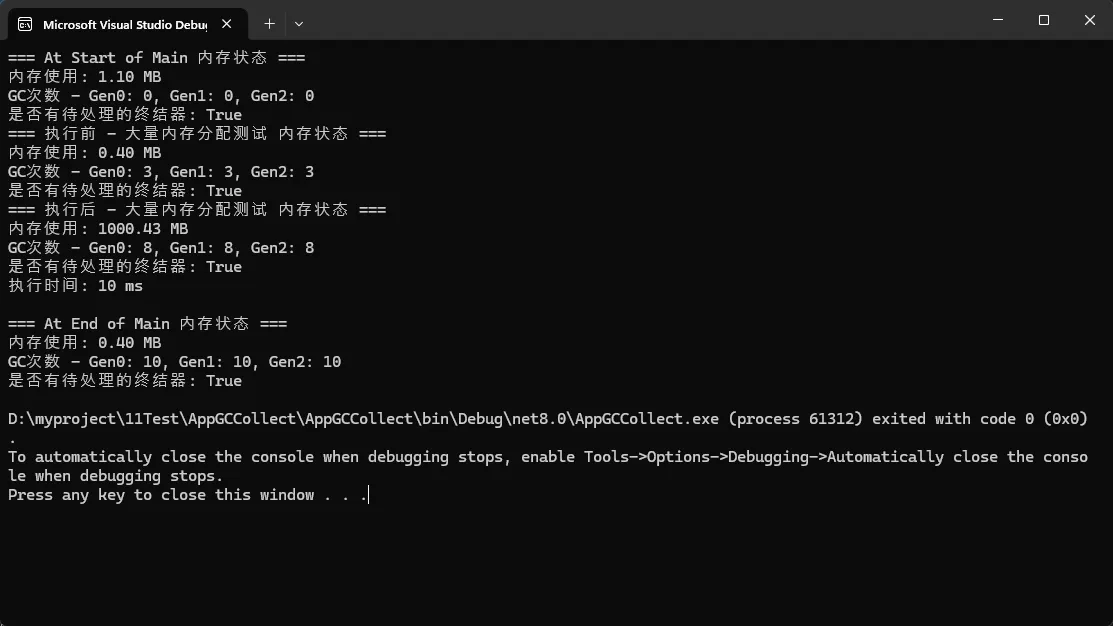
应用场景: 性能调优、内存泄漏诊断、系统监控
实用价值: 快速定位内存问题,验证优化效果
⚠️ 常见陷阱与解决方案
陷阱1:滥用GC.Collect()
c#// ❌ 错误做法
public void BadExample()
{
    for (int i = 0; i < 1000; i++)
    {
        ProcessData();
        GC.Collect(); // 严重影响性能!
    }
}

// ✅ 正确做法
public void GoodExample()
{
    for (int i = 0; i < 1000; i++)
    {
        ProcessData();
    }
    // 让GC自动管理,或在确实需要时才调用
}
陷阱2:忘记调用SuppressFinalize
c#// ❌ 错误的Dispose实现
public void Dispose()
{
    _resource?.Dispose();
    // 忘记调用SuppressFinalize,对象仍会进入终结队列
}

// ✅ 正确的Dispose实现
public void Dispose()
{
    _resource?.Dispose();
    GC.SuppressFinalize(this); // 🔥 关键步骤
}
🎯 最佳实践总结
基于实战经验,这里是三个核心要点:
- GC.SuppressFinalize是必需品 - 在实现IDisposable时必须调用,这能显著提升性能并避免内存泄漏[ref:14,16]
- GC.Collect是危险品 - 99%的情况下不要使用,让.NET的GC自动管理内存。只在特定场景(如内存测试、空闲期优化)才考虑使用[ref:15,18]
- 监控胜过猜测 - 使用内存诊断工具实际测量,而不是凭感觉优化内存管理[ref:18]
掌握这两个方法的正确使用方式,你的C#应用将在内存管理方面更加高效和稳定。记住:合理的资源管理设计比手动优化更重要!
💬 互动话题:
- 你在项目中遇到过哪些内存管理的棘手问题?
- 是否使用过其他内存优化技巧?欢迎在评论区分享经验!
觉得这篇文章对你有帮助?点赞收藏并转发给更多同行,让我们一起提升C#开发技能!
如果对你有用的话,可以打赏哦
打赏


本文作者:技术老小子
本文链接:
版权声明:本博客所有文章除特别声明外,均采用 BY-NC-SA 许可协议。转载请注明出处!
目录