
Press Ctrl+ and K to search
目录
🔥 SkiaSharp + WinForms:打造工业级动画系统的完整指南
你是否曾经被客户要求开发一个酷炫的工业监控界面?或者想要在WinForms应用中实现流畅的动画效果?传统的GDI+绘图性能有限,而WPF又显得过于重量级。今天我们来探索一个完美的解决方案:SkiaSharp + WinForms,它能让你轻松实现60FPS的工业级动画效果。
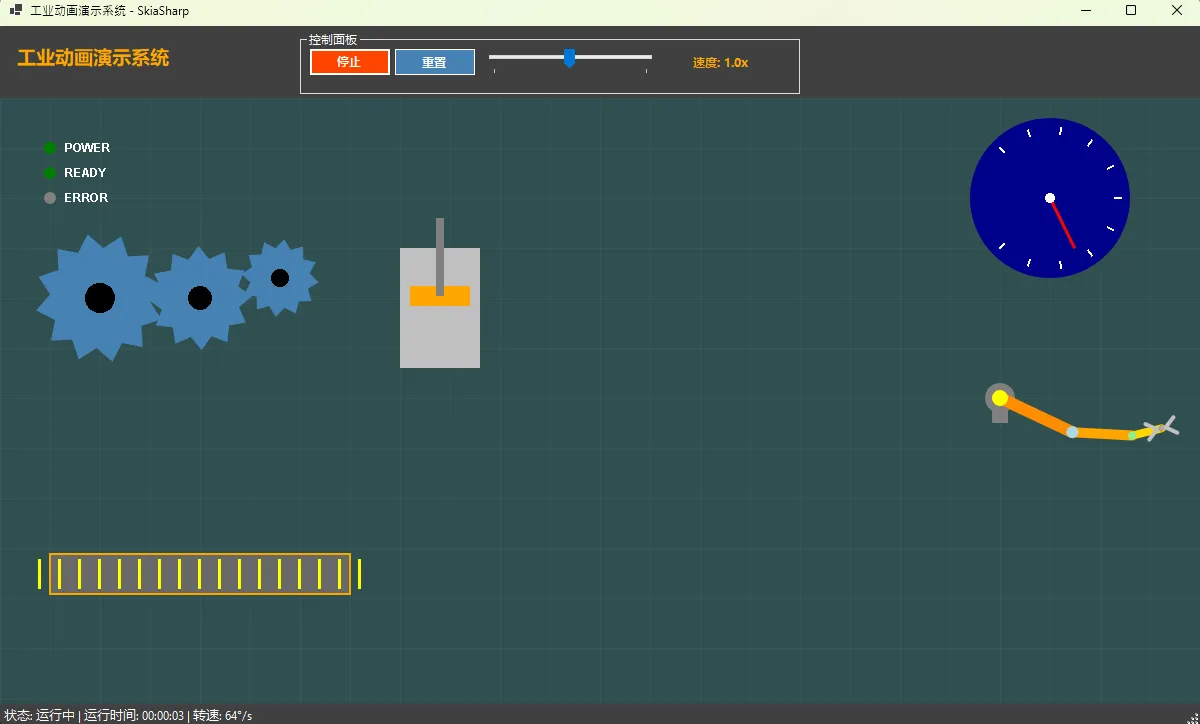
本文将手把手教你构建一个完整的工业动画演示系统,包含齿轮转动、传送带、机械臂等多种动画效果,代码开箱即用!
🎯 为什么选择SkiaSharp?
传统绘图方案的痛点
在WinForms开发中,我们经常遇到这些问题:
- GDI+性能瓶颈:复杂动画卡顿明显
- WPF过度设计:简单项目引入复杂度过高
- 第三方控件昂贵:商业动画控件价格不菲
SkiaSharp的优势
c#// SkiaSharp:硬件加速 + 跨平台 + 开源免费
using SkiaSharp;
using SkiaSharp.Views.Desktop;

// 60FPS丝滑动画,告别卡顿
private Timer animationTimer = new Timer { Interval = 16 };
核心优势:
- 🚀 硬件加速:GPU渲染,性能强劲
- 🎨 丰富API:路径、渐变、滤镜应有尽有
- 💰 开源免费:Google出品,质量保证
- 🔧 易于集成:几行代码即可在WinForms中使用
🏗️ 项目架构设计
核心组件结构
c#// 主窗体:FrmMain
public partial class FrmMain : Form
{
    private SKControl skiaCanvas;        // 绘图画布
    private Timer animationTimer;        // 动画定时器
    private float rotationAngle = 0f;    // 旋转角度
    private float animationSpeed = 1.0f; // 动画速度
}
控件命名规范
遵循工业项目标准,提升代码可维护性:
c#// 按钮:btn + 功能描述
private Button btnStart, btnReset;

// 标签:lbl + 用途
private Label lblSpeed, lblStatus;

// 面板:pnl + 区域
private Panel pnlControls;

// 轨迹栏:trk + 作用
private TrackBar trkSpeed;
💻 核心代码实现
🎮 动画控制器
c#private void InitializeAnimation()
{
    // 初始化定时器
    animationTimer = new Timer();
    animationTimer.Interval = 16; // ~60 FPS
    animationTimer.Tick += AnimationTimer_Tick;

    // 设置起始时间
    startTime = DateTime.Now;

    // 初始化速度
    trkSpeed.Value = 50;
    UpdateSpeedLabel();
}


private void AnimationTimer_Tick(object sender, EventArgs e)
{
    if (isRunning)
    {
        // 更新动画参数
        rotationAngle += 2.0f * animationSpeed;
        if (rotationAngle > 360) rotationAngle -= 360;

        pistonOffset = (float)(Math.Sin(rotationAngle * Math.PI / 180.0) * 20);
        beltOffset += 1.0f * animationSpeed;
        if (beltOffset > 20) beltOffset = 0;

        // 模拟仪表数据变化
        gaugeValue = 50 + (float)(Math.Sin(rotationAngle * Math.PI / 90.0) * 30);

        // 更新显示
        skiaCanvas.Invalidate();
        UpdateStatusInfo();
    }
}
⚙️ 齿轮绘制核心算法
c#private void DrawGear(SKCanvas canvas, float centerX, float centerY, float radius, float angle)
{
    using (var gearPaint = new SKPaint())
    {
        gearPaint.Color = SKColors.SteelBlue;
        gearPaint.Style = SKPaintStyle.Fill;
        gearPaint.IsAntialias = true;

        canvas.Save();
        canvas.Translate(centerX, centerY);
        canvas.RotateRadians(angle * (float)Math.PI / 180f);

        var path = new SKPath();
        int teeth = 12;
        float toothHeight = radius * 0.3f;

        for (int i = 0; i < teeth; i++)
        {
            float baseAngle = i * 360f / teeth;
            float nextAngle = (i + 1) * 360f / teeth;

            // 内圆点
            float x1 = (float)(radius * Math.Cos(baseAngle * Math.PI / 180));
            float y1 = (float)(radius * Math.Sin(baseAngle * Math.PI / 180));

            // 外圆点(齿尖)
            float midAngle = baseAngle + (nextAngle - baseAngle) * 0.5f;
            float x2 = (float)((radius + toothHeight) * Math.Cos(midAngle * Math.PI / 180));
            float y2 = (float)((radius + toothHeight) * Math.Sin(midAngle * Math.PI / 180));

            if (i == 0)
                path.MoveTo(x1, y1);
            else
                path.LineTo(x1, y1);

            path.LineTo(x2, y2);
        }

        path.Close();
        canvas.DrawPath(path, gearPaint);

        // 绘制中心孔
        using (var holePaint = new SKPaint())
        {
            holePaint.Color = SKColors.Black;
            holePaint.Style = SKPaintStyle.Fill;
            canvas.DrawCircle(0, 0, radius * 0.3f, holePaint);
        }

        canvas.Restore();
    }
}
🤖 机械臂平滑运动
c#private void DrawRoboticArm(SKCanvas canvas, float baseX, float baseY)
{
    float time = (float)(DateTime.Now - startTime).TotalSeconds;

    // 多段臂协调运动 - 关键算法
    float arm1Angle = (float)(Math.Sin(time * 0.8) * 0.8);
    float arm2RelativeAngle = (float)(Math.Sin(time * 1.2) * 0.6);
    float arm2Angle = arm1Angle + arm2RelativeAngle;

    // 位置计算
    float arm1EndX = 80 * (float)Math.Cos(arm1Angle);
    float arm1EndY = 80 * (float)Math.Sin(arm1Angle);
    float arm2EndX = arm1EndX + 60 * (float)Math.Cos(arm2Angle);
    float arm2EndY = arm1EndY + 60 * (float)Math.Sin(arm2Angle);

    // 渐层绘制效果
    using (var armPaint = new SKPaint())
    {
        armPaint.StrokeWidth = 12;
        armPaint.StrokeCap = SKStrokeCap.Round;
        armPaint.IsAntialias = true;

        // 第一段:深橙色
        armPaint.Color = SKColors.DarkOrange;
        canvas.DrawLine(baseX, baseY, baseX + arm1EndX, baseY + arm1EndY, armPaint);

        // 第二段:浅橙色
        armPaint.Color = SKColors.Orange;
        armPaint.StrokeWidth = 10;
        canvas.DrawLine(baseX + arm1EndX, baseY + arm1EndY,
                       baseX + arm2EndX, baseY + arm2EndY, armPaint);
    }
}
🎨 工业风格UI设计
配色方案
c#// 工业主题配色
private static class IndustrialColors
{
    public static Color DarkBackground = Color.FromArgb(45, 45, 48);
    public static Color ControlPanel = Color.FromArgb(64, 64, 64);
    public static Color AccentOrange = Color.Orange;
    public static Color SafetyGreen = Color.LimeGreen;
    public static Color WarningRed = Color.OrangeRed;
}
Designer.cs关键设置
c#private void InitializeComponent()
{
    // SkiaSharp画布 - 核心控件
    this.skiaCanvas = new SKControl();
    this.skiaCanvas.Dock = DockStyle.Fill;
    this.skiaCanvas.PaintSurface += skiaCanvas_PaintSurface;

    // 控制面板 - 工业风格
    this.pnlControls.BackColor = IndustrialColors.ControlPanel;

    // 启动按钮 - 视觉反馈
    this.btnStart.BackColor = IndustrialColors.SafetyGreen;
    this.btnStart.FlatStyle = FlatStyle.Flat;
    this.btnStart.Font = new Font("微软雅黑", 9F, FontStyle.Bold);
}
⚡ 性能优化技巧
🔧 内存管理最佳实践
c#// ❌ 错误做法:每帧创建新对象
private void BadDraw(SKCanvas canvas)
{
    var paint = new SKPaint(); // 内存泄漏风险
    canvas.DrawCircle(100, 100, 50, paint);
    // 忘记释放资源
}

// ✅ 正确做法:using语句自动释放
private void GoodDraw(SKCanvas canvas)
{
    using (var paint = new SKPaint())
    {
        paint.Color = SKColors.Blue;
        paint.IsAntialias = true;
        canvas.DrawCircle(100, 100, 50, paint);
    } // 自动调用Dispose()
}
🚀 绘制优化策略
c#// 缓存复杂路径,避免重复计算
private SKPath cachedGearPath;

private SKPath GetGearPath(float radius, int teeth)
{
    if (cachedGearPath == null)
    {
        cachedGearPath = CreateGearPath(radius, teeth);
    }
    return cachedGearPath;
}
🛠️ 实际应用场景
工业监控系统
- 设备状态展示:实时动画反映设备运行状态
- 流程可视化:生产线流程的动态演示
- 数据大屏:关键指标的图表动画
教育培训软件
- 机械原理演示:齿轮传动、连杆机构等
- 物理仿真:力学、运动学概念可视化
- 交互式教学:参数调节实时看效果
⚠️ 常见坑点提醒
1. 定时器频率设置
c#// ❌ 错误:频率过高导致CPU占用过大
animationTimer.Interval = 1;

// ✅ 正确:16ms约等于60FPS,平衡性能与流畅度
animationTimer.Interval = 16;
2. 角度计算边界处理
c#// ❌ 错误:角度无限增长,可能导致精度问题
rotationAngle += 2.0f;

// ✅ 正确:保持角度在合理范围内
rotationAngle += 2.0f;
if (rotationAngle > 360) rotationAngle -= 360;
3. 资源释放
c#// 窗体关闭时必须停止定时器
private void Form_FormClosing(object sender, FormClosingEventArgs e)
{
    animationTimer?.Stop();
    animationTimer?.Dispose();
}
📦 完整项目配置
NuGet包引用
xml<PackageReference Include="SkiaSharp" Version="2.88.6" />
<PackageReference Include="SkiaSharp.Views.WindowsForms" Version="2.88.6" />
项目结构
c#AppAnimationDemo/
├── FrmMain.cs      # 主窗体逻辑
├── FrmMain.Designer.cs  # UI设计器代码
├── Program.cs                     # 程序入口
└── AppAnimationDemo.csproj # 项目配置
🎯 核心要点总结
通过本文,我们完成了一个功能完整的工业动画系统:
技术收获:
- SkiaSharp集成:在WinForms中实现高性能图形渲染
- 动画原理:基于定时器的平滑动画实现机制
- 工业UI设计:符合工业软件审美的界面设计规范
这套方案不仅适用于工业软件开发,在游戏开发、数据可视化、教育软件等领域同样大有可为。掌握了SkiaSharp,你就拥有了在.NET生态中创建酷炫视觉效果的强大武器!
💬 互动话题:
- 你在项目中遇到过哪些动画性能问题?
- 还有哪些工业场景的动画效果想要实现?
觉得这篇文章对你有帮助,请转发给更多同行,让更多C#开发者了解SkiaSharp的强大能力!
🔗 延伸学习建议:
- 深入学习SkiaSharp的着色器和滤镜效果
- 探索Canvas 2D图形变换的数学原理
- 了解工业HMI设计的用户体验准则
相关信息
通过网盘分享的文件:AppAnimationDemo.zip 链接: https://pan.baidu.com/s/1yOQjchwtz0wyihoRD8V5Sw?pwd=v5cg 提取码: v5cg --来自百度网盘超级会员v9的分享
如果对你有用的话,可以打赏哦
打赏


本文作者:技术老小子
本文链接:
版权声明:本博客所有文章除特别声明外,均采用 BY-NC-SA 许可协议。转载请注明出处!
目录