
Press Ctrl+ and K to search
目录
🚀 WPF依赖属性实战指南:从零开始构建自定义依赖属性
在WPF开发中,你是否遇到过这样的困扰:想要创建一个可以支持数据绑定、样式设置和动画的自定义控件,但普通属性无法满足需求?或者在开发过程中发现自定义控件的属性无法在XAML中正常绑定?
本文将彻底解决这些问题,通过3个实战案例,带你深入理解WPF依赖属性系统,掌握自定义依赖属性的核心技巧,让你的自定义控件具备原生WPF控件的强大功能。
🎯 为什么需要自定义依赖属性?
普通属性 VS 依赖属性
在WPF中,普通的.NET属性虽然能存储数据,但缺少以下关键特性:
- 数据绑定支持:无法作为绑定目标
- 样式设置:不能通过Style进行统一管理
- 动画支持:无法参与WPF动画系统
- 属性变更通知:缺少强大的变更检测机制
c#// ❌ 普通属性 - 功能有限
public class MyControl : UserControl
{
    public string Title { get; set; } // 无法绑定、无法设置样式
}

// ✅ 依赖属性 - 功能完整
public class MyControl : UserControl
{
    public static readonly DependencyProperty TitleProperty =
        DependencyProperty.Register("Title", typeof(string), typeof(MyControl));

    public string Title
    {
        get { return (string)GetValue(TitleProperty); }
        set { SetValue(TitleProperty, value); }
    }
}
💡 实战案例一:创建带进度显示的按钮
🎨 需求分析
开发一个ProgressButton控件,需要支持:
- 进度值绑定
- 进度条颜色自定义
- 完成状态切换
🛠️ 完整实现代码
c#using System.Windows;
using System.Windows.Controls;
using System.Windows.Media;

public class ProgressButton : Button
{
    #region 进度值属性
    public static readonly DependencyProperty ProgressProperty =
        DependencyProperty.Register(
            "Progress",
            typeof(double),
            typeof(ProgressButton),
            new PropertyMetadata(0.0, OnProgressChanged));

    public double Progress
    {
        get { return (double)GetValue(ProgressProperty); }
        set { SetValue(ProgressProperty, value); }
    }

    private static void OnProgressChanged(DependencyObject d, DependencyPropertyChangedEventArgs e)
    {
        var button = (ProgressButton)d;
        double newValue = (double)e.NewValue;

        // 🔥 关键:属性变更时的业务逻辑
        if (newValue >= 100)
        {
            button.IsCompleted = true;
        }
    }
    #endregion

    #region 进度条颜色属性
    public static readonly DependencyProperty ProgressBrushProperty =
        DependencyProperty.Register(
            "ProgressBrush",
            typeof(Brush),
            typeof(ProgressButton),
            new PropertyMetadata(Brushes.Blue));

    public Brush ProgressBrush
    {
        get { return (Brush)GetValue(ProgressBrushProperty); }
        set { SetValue(ProgressBrushProperty, value); }
    }
    #endregion

    #region 完成状态属性
    public static readonly DependencyProperty IsCompletedProperty =
        DependencyProperty.Register(
            "IsCompleted",
            typeof(bool),
            typeof(ProgressButton),
            new PropertyMetadata(false));

    public bool IsCompleted
    {
        get { return (bool)GetValue(IsCompletedProperty); }
        set { SetValue(IsCompletedProperty, value); }
    }
    #endregion
}
🎯 XAML模板定义
xml<Style TargetType="{x:Type local:ProgressButton}">
    <Setter Property="Template">
        <Setter.Value>
            <ControlTemplate TargetType="{x:Type local:ProgressButton}">
                <Border Background="{TemplateBinding Background}"
                        BorderBrush="{TemplateBinding BorderBrush}"
                        BorderThickness="{TemplateBinding BorderThickness}">
                    <Grid>
                        <!-- 进度条背景 -->
                        <Rectangle Fill="LightGray" Opacity="0.3"/>
                        <!-- 进度条前景 -->
                        <Rectangle Fill="{TemplateBinding ProgressBrush}"
                                   HorizontalAlignment="Left">
                            <Rectangle.Width>
                                <MultiBinding Converter="{StaticResource ProgressToWidthConverter}">
                                    <Binding Path="Progress" RelativeSource="{RelativeSource TemplatedParent}"/>
                                    <Binding Path="ActualWidth" RelativeSource="{RelativeSource TemplatedParent}"/>
                                </MultiBinding>
                            </Rectangle.Width>
                        </Rectangle>
                        <!-- 按钮内容 -->
                        <ContentPresenter HorizontalAlignment="Center" VerticalAlignment="Center"/>
                    </Grid>
                </Border>
            </ControlTemplate>
        </Setter.Value>
    </Setter>
</Style>
c#using System;
using System.Collections.Generic;
using System.Globalization;
using System.Linq;
using System.Text;
using System.Threading.Tasks;
using System.Windows.Data;

namespace AppDependencyCustom
{
    public class ProgressToWidthConverter : IMultiValueConverter
    {
        public object Convert(object[] values, Type targetType, object parameter, CultureInfo culture)
        {
            if (values == null || values.Length != 2) return 0.0;

            if (values[0] is double progress && values[1] is double totalWidth)
            {
                // 确保进度值在0-100范围内
                progress = Math.Max(0, Math.Min(100, progress));
                // 计算进度条宽度
                return (progress / 100.0) * totalWidth;
            }

            return 0.0;
        }

        public object[] ConvertBack(object value, Type[] targetTypes, object parameter, CultureInfo culture)
        {
            throw new NotImplementedException();
        }
    }
}
c#using System;
using System.Collections.Generic;
using System.ComponentModel;
using System.Linq;
using System.Runtime.CompilerServices;
using System.Text;
using System.Threading.Tasks;
using System.Windows.Threading;

namespace AppDependencyCustom
{
    public class MainViewModel : INotifyPropertyChanged
    {
        private double _downloadProgress = 0;
        private bool _isDownloadComplete = false;
        private DispatcherTimer _timer;

        public MainViewModel()
        {
            // 模拟进度更新
            _timer = new DispatcherTimer();
            _timer.Interval = TimeSpan.FromMilliseconds(100);
            _timer.Tick += Timer_Tick;
            _timer.Start();
        }

        private void Timer_Tick(object sender, EventArgs e)
        {
            if (DownloadProgress < 100)
            {
                DownloadProgress += 0.5;
            }
            else
            {
                _timer.Stop();
            }
        }

        public double DownloadProgress
        {
            get => _downloadProgress;
            set
            {
                _downloadProgress = value;
                OnPropertyChanged();
                IsDownloadComplete = value >= 100;
            }
        }

        public bool IsDownloadComplete
        {
            get => _isDownloadComplete;
            set
            {
                _isDownloadComplete = value;
                OnPropertyChanged();
            }
        }

        public event PropertyChangedEventHandler PropertyChanged;

        protected virtual void OnPropertyChanged([CallerMemberName] string propertyName = null)
        {
            PropertyChanged?.Invoke(this, new PropertyChangedEventArgs(propertyName));
        }
    }
}
📖 使用示例
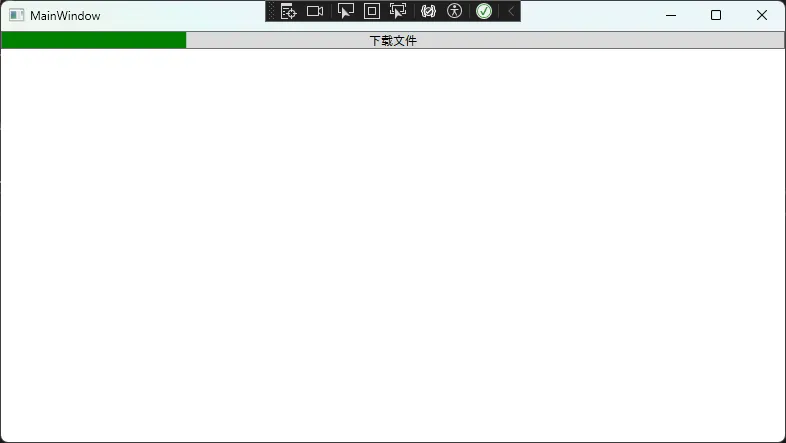
xml<local:ProgressButton Content="下载文件"
                      Progress="{Binding DownloadProgress}"
                      ProgressBrush="Green"
                      IsCompleted="{Binding IsDownloadComplete}"/>
💡 实战案例二:创建评分控件
🎨 需求分析
开发一个RatingControl,支持:
- 星级评分设置
- 最大星级数自定义
- 只读模式切换
🛠️ 核心实现代码
c#public class RatingControl : UserControl
{
    #region 当前评分
    public static readonly DependencyProperty RatingProperty =
        DependencyProperty.Register(
            "Rating",
            typeof(double),
            typeof(RatingControl),
            new FrameworkPropertyMetadata(0.0,
                FrameworkPropertyMetadataOptions.BindsTwoWayByDefault,
                OnRatingChanged));

    public double Rating
    {
        get { return (double)GetValue(RatingProperty); }
        set { SetValue(RatingProperty, value); }
    }

    private static void OnRatingChanged(DependencyObject d, DependencyPropertyChangedEventArgs e)
    {
        var control = (RatingControl)d;
        control.UpdateStarDisplay();
    }
    #endregion

    #region 最大星级数
    public static readonly DependencyProperty MaxRatingProperty =
        DependencyProperty.Register(
            "MaxRating",
            typeof(int),
            typeof(RatingControl),
            new PropertyMetadata(5, OnMaxRatingChanged));

    public int MaxRating
    {
        get { return (int)GetValue(MaxRatingProperty); }
        set { SetValue(MaxRatingProperty, value); }
    }

    private static void OnMaxRatingChanged(DependencyObject d, DependencyPropertyChangedEventArgs e)
    {
        var control = (RatingControl)d;
        control.GenerateStars();
    }
    #endregion

    #region 只读模式
    public static readonly DependencyProperty IsReadOnlyProperty =
        DependencyProperty.Register(
            "IsReadOnly",
            typeof(bool),
            typeof(RatingControl),
            new PropertyMetadata(false));

    public bool IsReadOnly
    {
        get { return (bool)GetValue(IsReadOnlyProperty); }
        set { SetValue(IsReadOnlyProperty, value); }
    }
    #endregion

    private StackPanel starPanel;

    public override void OnApplyTemplate()
    {
        base.OnApplyTemplate();
        InitializeControl();
    }

    private void InitializeControl()
    {
        starPanel = new StackPanel { Orientation = Orientation.Horizontal };
        Content = starPanel;
        GenerateStars();
    }

    private void GenerateStars()
    {
        if (starPanel == null) return;

        starPanel.Children.Clear();

        for (int i = 0; i < MaxRating; i++)
        {
            var star = CreateStar(i);
            starPanel.Children.Add(star);
        }

        UpdateStarDisplay();
    }

    private Button CreateStar(int index)
    {
        var star = new Button
        {
            Content = "★",
            Background = Brushes.Transparent,
            BorderThickness = new Thickness(0),
            FontSize = 20,
            Tag = index
        };

        star.Click += Star_Click;
        return star;
    }

    private void Star_Click(object sender, RoutedEventArgs e)
    {
        if (IsReadOnly) return;

        var star = (Button)sender;
        var index = (int)star.Tag;
        Rating = index + 1;
    }

    private void UpdateStarDisplay()
    {
        if (starPanel == null) return;

        for (int i = 0; i < starPanel.Children.Count; i++)
        {
            var star = (Button)starPanel.Children[i];
            star.Foreground = i < Rating ? Brushes.Gold : Brushes.LightGray;
        }
    }
}
📖 使用示例
xml<Window x:Class="AppDependencyCustom.Window1"
        xmlns="http://schemas.microsoft.com/winfx/2006/xaml/presentation"
        xmlns:x="http://schemas.microsoft.com/winfx/2006/xaml"
        xmlns:d="http://schemas.microsoft.com/expression/blend/2008"
        xmlns:mc="http://schemas.openxmlformats.org/markup-compatibility/2006"
        xmlns:local="clr-namespace:AppDependencyCustom"
        mc:Ignorable="d"
        Title="Window1" Height="450" Width="800">
    <StackPanel>
        <!-- 可编辑评分控件 -->
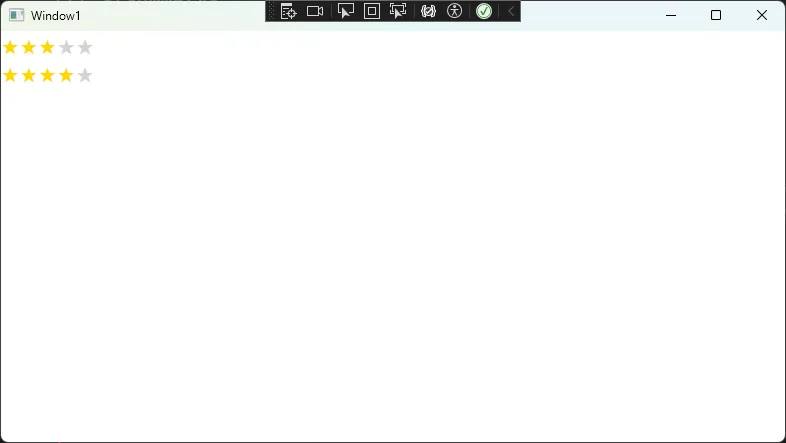
        <local:RatingControl Rating="{Binding UserRating}"
                     MaxRating="5"/>

        <!-- 只读展示控件 -->
        <local:RatingControl Rating="{Binding AverageRating}"
                     MaxRating="5"
                     IsReadOnly="True"/>
    </StackPanel>
</Window>
c#using System;
using System.Collections.Generic;
using System.Linq;
using System.Text;
using System.Threading.Tasks;
using System.Windows;
using System.Windows.Controls;
using System.Windows.Data;
using System.Windows.Documents;
using System.Windows.Input;
using System.Windows.Media;
using System.Windows.Media.Imaging;
using System.Windows.Shapes;

namespace AppDependencyCustom
{
    /// <summary>
    /// Interaction logic for Window1.xaml
    /// </summary>
    public partial class Window1 : Window
    {
        public Window1()
        {
            InitializeComponent();
            this.DataContext = new RatingModel { UserRating = 03, AverageRating = 4 };
            }
    }
    public class RatingModel
    {
        public int UserRating { get; set; }
        public int AverageRating { get; set; }
    }
}
💡 实战案例三:附加属性实现水印功能
🎨 需求分析
为TextBox添加水印功能,要求:
- 支持任意TextBox控件
- 水印文字可自定义
- 自动显示/隐藏逻辑
🛠️ 附加属性实现
c#public static class WatermarkHelper
{
    #region 水印文字附加属性
    public static readonly DependencyProperty WatermarkProperty =
        DependencyProperty.RegisterAttached(
            "Watermark",
            typeof(string),
            typeof(WatermarkHelper),
            new PropertyMetadata(null, OnWatermarkChanged));

    public static string GetWatermark(DependencyObject obj)
    {
        return (string)obj.GetValue(WatermarkProperty);
    }

    public static void SetWatermark(DependencyObject obj, string value)
    {
        obj.SetValue(WatermarkProperty, value);
    }

    private static void OnWatermarkChanged(DependencyObject d, DependencyPropertyChangedEventArgs e)
    {
        if (d is TextBox textBox)
        {
            textBox.Loaded -= TextBox_Loaded;
            textBox.TextChanged -= TextBox_TextChanged;
            textBox.GotFocus -= TextBox_GotFocus;
            textBox.LostFocus -= TextBox_LostFocus;

            if (e.NewValue != null)
            {
                textBox.Loaded += TextBox_Loaded;
                textBox.TextChanged += TextBox_TextChanged;
                textBox.GotFocus += TextBox_GotFocus;
                textBox.LostFocus += TextBox_LostFocus;
            }
        }
    }
    #endregion

    #region 内部状态标记
    private static readonly DependencyProperty IsWatermarkShowingProperty =
        DependencyProperty.RegisterAttached(
            "IsWatermarkShowing",
            typeof(bool),
            typeof(WatermarkHelper),
            new PropertyMetadata(false));

    private static bool GetIsWatermarkShowing(DependencyObject obj)
    {
        return (bool)obj.GetValue(IsWatermarkShowingProperty);
    }

    private static void SetIsWatermarkShowing(DependencyObject obj, bool value)
    {
        obj.SetValue(IsWatermarkShowingProperty, value);
    }
    #endregion

    #region 事件处理
    private static void TextBox_Loaded(object sender, RoutedEventArgs e)
    {
        var textBox = (TextBox)sender;
        UpdateWatermark(textBox);
    }

    private static void TextBox_TextChanged(object sender, TextChangedEventArgs e)
    {
        var textBox = (TextBox)sender;
        UpdateWatermark(textBox);
    }

    private static void TextBox_GotFocus(object sender, RoutedEventArgs e)
    {
        var textBox = (TextBox)sender;
        if (GetIsWatermarkShowing(textBox))
        {
            textBox.Text = "";
            textBox.Foreground = SystemColors.WindowTextBrush;
            SetIsWatermarkShowing(textBox, false);
        }
    }

    private static void TextBox_LostFocus(object sender, RoutedEventArgs e)
    {
        var textBox = (TextBox)sender;
        UpdateWatermark(textBox);
    }

    private static void UpdateWatermark(TextBox textBox)
    {
        var watermark = GetWatermark(textBox);

        if (string.IsNullOrEmpty(watermark)) return;

        if (string.IsNullOrEmpty(textBox.Text) && !textBox.IsFocused)
        {
            // 显示水印
            textBox.Text = watermark;
            textBox.Foreground = Brushes.LightGray;
            SetIsWatermarkShowing(textBox, true);
        }
        else if (GetIsWatermarkShowing(textBox) && !string.IsNullOrEmpty(textBox.Text))
        {
            // 隐藏水印
            if (textBox.Text == watermark)
            {
                textBox.Text = "";
            }
            textBox.Foreground = SystemColors.WindowTextBrush;
            SetIsWatermarkShowing(textBox, false);
        }
    }
    #endregion
}
📖 使用示例
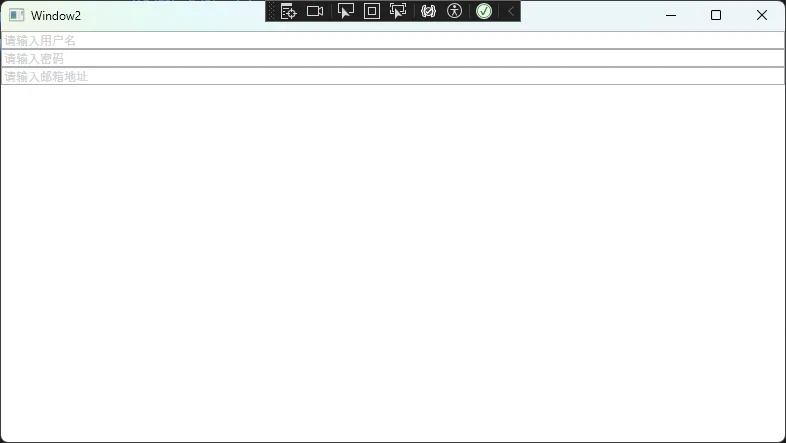
xml<TextBox local:WatermarkHelper.Watermark="请输入用户名"/>
<TextBox local:WatermarkHelper.Watermark="请输入密码"/>
<TextBox local:WatermarkHelper.Watermark="请输入邮箱地址"/>
🔥 开发经验与最佳实践
⚠️ 常见踩坑提醒
属性命名规范
c#// ✅ 正确:属性名 + Property 后缀
public static readonly DependencyProperty TitleProperty = ...

// ❌ 错误:缺少 Property 后缀
public static readonly DependencyProperty Title = ...
PropertyMetadata正确使用
c#// ✅ 推荐:提供默认值和变更回调
new PropertyMetadata(defaultValue, OnPropertyChanged)

// ⚠️ 注意:变更回调要处理空值情况
private static void OnPropertyChanged(DependencyObject d, DependencyPropertyChangedEventArgs e)
{
    if (d is MyControl control && e.NewValue != null)
    {
        // 安全的业务逻辑
    }
}
双向绑定支持
c#// ✅ 支持双向绑定
new FrameworkPropertyMetadata(0.0,
    FrameworkPropertyMetadataOptions.BindsTwoWayByDefault)
🏆 性能优化技巧
c#// 🔥 技巧1:使用 CoerceValueCallback 进行数值校验
public static readonly DependencyProperty AgeProperty =
    DependencyProperty.Register("Age", typeof(int), typeof(Person),
        new PropertyMetadata(0, null, CoerceAge));

private static object CoerceAge(DependencyObject d, object baseValue)
{
    int age = (int)baseValue;
    return Math.Max(0, Math.Min(150, age)); // 限制年龄范围
}

// 🔥 技巧2:使用 ValidateValueCallback 进行输入验证
public static readonly DependencyProperty EmailProperty =
    DependencyProperty.Register("Email", typeof(string), typeof(Person),
        new PropertyMetadata(""), IsValidEmail);

private static bool IsValidEmail(object value)
{
    string email = value as string;
    return !string.IsNullOrEmpty(email) && email.Contains("@");
}
🎯 总结与进阶
通过本文的3个实战案例,我们掌握了:
- 依赖属性基础:注册、访问器、属性元数据配置
- 属性变更处理:回调函数、业务逻辑集成、UI更新
- 附加属性应用:为现有控件扩展功能的强大机制
三个关键收获:
- 依赖属性是WPF数据绑定和样式系统的基础
- PropertyMetadata是控制属性行为的核心机制
- 附加属性让我们能够优雅地扩展现有控件功能
💬 互动交流
你在自定义依赖属性时遇到过哪些挑战?是属性绑定失效,还是性能优化问题?欢迎在评论区分享你的实战经验!
觉得这篇文章对你有帮助?请转发给更多需要的WPF开发同行! 🚀
本文作者:技术老小子
本文链接:
版权声明:本博客所有文章除特别声明外,均采用 BY-NC-SA 许可协议。转载请注明出处!
目录