
目录
Python定时任务神器:schedule库入门实战指南
在日常的Python开发中,我们经常需要让程序在特定时间执行某些任务:每天早上8点发送邮件提醒、每隔30分钟检查服务器状态、每周清理一次临时文件等等。虽然Windows有任务计划程序,Linux有cron,但作为Python开发者,我们更希望用纯Python的方式来解决这个问题。
schedule库就是为此而生的轻量级定时任务解决方案。它语法简洁、易于理解,特别适合Python初学者和中小型项目使用。本文将带你从零开始掌握schedule库,让你的Python程序拥有"时间感知"的能力。
📋 问题分析
🤔 为什么需要定时任务?
在实际的Python开发中,我们经常遇到这样的场景:
- 数据采集:定期爬取网站数据、API调用
- 系统监控:定时检查服务状态、资源使用情况
- 文件处理:定期清理日志、备份数据
- 消息推送:定时发送邮件、微信通知
- 上位机开发:定期读取设备数据、状态检查
💭 传统解决方案的痛点
Windows任务计划程序:
- 配置复杂,需要通过GUI操作
- 难以与Python程序集成
- 调试困难,错误信息不直观
time.sleep()循环:
pythonimport time

while True:
    # 执行任务
    do_something()
    time.sleep(3600)  # 休眠1小时
- 不够灵活,难以实现复杂的时间规则
- 程序阻塞,无法处理其他逻辑
- 时间精度问题,容易产生累积误差
💡 解决方案:schedule库
🚀 安装与基本使用
安装命令:
bashpip install schedule
基本语法结构:
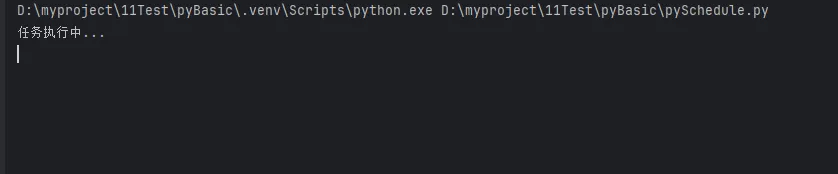
pythonimport schedule

def job():
    print("任务执行中...")

# 设置定时任务
schedule.every(10).seconds.do(job)
schedule.every().hour.do(job)
schedule.every().day.at("09:00").do(job)

# 保持程序运行
while True:
    schedule.run_pending()
    time.sleep(1)
🔥 三个实战案例
📝 代码实战
🕐 案例一:系统监控助手
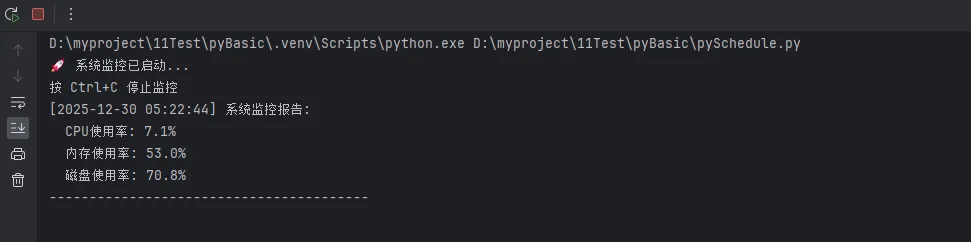
这个例子展示如何定期监控系统资源使用情况:
pythonimport schedule
import time
import psutil
from datetime import datetime

def system_monitor():
    """系统资源监控函数"""
    now = datetime.now().strftime("%Y-%m-%d %H:%M:%S")

    # 获取CPU和内存使用率
    cpu_percent = psutil.cpu_percent(interval=1)
    memory = psutil.virtual_memory()
    memory_percent = memory.percent

    # 获取磁盘使用情况
    disk = psutil.disk_usage('C:/')
    disk_percent = (disk.used / disk.total) * 100

    print(f"[{now}] 系统监控报告:")
    print(f"  CPU使用率: {cpu_percent}%")
    print(f"  内存使用率: {memory_percent}%")
    print(f"  磁盘使用率: {disk_percent:.1f}%")

    # 预警机制
    if cpu_percent > 80:
        print("⚠️  警告:CPU使用率过高!")
    if memory_percent > 80:
        print("⚠️  警告:内存使用率过高!")
    if disk_percent > 90:
        print("⚠️  警告:磁盘空间不足!")

    print("-" * 40)

def setup_monitoring():
    """设置监控任务"""
    # 每30秒检查一次系统状态
    schedule.every(30).seconds.do(system_monitor)

    print("🚀 系统监控已启动...")
    print("按 Ctrl+C 停止监控")

    try:
        while True:
            schedule.run_pending()
            time.sleep(1)
    except KeyboardInterrupt:
        print("\n📴 系统监控已停止")

if __name__ == "__main__":
    setup_monitoring()
实用技巧:
- 使用
psutil库获取系统信息,需要先安装:pip install psutil - 添加预警机制,当资源使用率超过阈值时发出警告
- 使用异常处理优雅地停止程序
📊 案例二:数据采集器
这个例子展示如何定期采集股票价格数据:
pythonimport schedule
import time
import requests
from datetime import datetime
import csv
import os

class StockDataCollector:
    def __init__(self, symbols):
        self.symbols = symbols
        self.data_file = "stock_data.csv"
        self.init_csv_file()

    def init_csv_file(self):
        """初始化CSV文件"""
        if not os.path.exists(self.data_file):
            with open(self.data_file, 'w', newline='', encoding='utf-8') as file:
                writer = csv.writer(file)
                writer.writerow(['时间', '股票代码', '当前价格', '涨跌幅'])

    def get_stock_price(self, symbol):
        """获取股票价格(模拟数据)"""
        # 这里使用模拟数据,实际项目中可以调用真实的股票API
        import random
        base_price = {"AAPL": 150, "GOOGL": 2800, "MSFT": 300}
        current_price = base_price.get(symbol, 100) * (1 + random.uniform(-0.05, 0.05))
        change_percent = random.uniform(-5, 5)
        return current_price, change_percent

    def collect_data(self):
        """采集股票数据"""
        timestamp = datetime.now().strftime("%Y-%m-%d %H:%M:%S")

        print(f"📈 [{timestamp}] 开始采集股票数据...")

        for symbol in self.symbols:
            try:
                price, change = self.get_stock_price(symbol)

                # 保存数据到CSV
                with open(self.data_file, 'a', newline='', encoding='utf-8') as file:
                    writer = csv.writer(file)
                    writer.writerow([timestamp, symbol, f"{price:.2f}", f"{change:.2f}%"])

                print(f"  {symbol}: ${price:.2f} ({change:+.2f}%)")

            except Exception as e:
                print(f"❌ 采集 {symbol} 数据失败: {e}")

        print("✅ 数据采集完成\n")

    def start_collecting(self):
        """启动数据采集"""
        # 工作日每5分钟采集一次(9:30-15:30)
        schedule.every(5).minutes.do(self.collect_data)

        # 可以添加更复杂的时间规则
        # schedule.every().monday.at("09:30").do(self.collect_data)

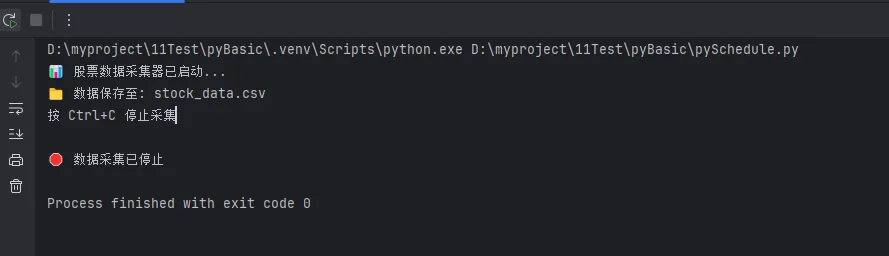
        print("📊 股票数据采集器已启动...")
        print(f"📁 数据保存至: {self.data_file}")
        print("按 Ctrl+C 停止采集")

        try:
            while True:
                schedule.run_pending()
                time.sleep(1)
        except KeyboardInterrupt:
            print("\n🛑 数据采集已停止")

if __name__ == "__main__":
    # 要监控的股票代码
    stocks = ["AAPL", "GOOGL", "MSFT"]

    collector = StockDataCollector(stocks)
    collector.start_collecting()
核心特点:
- 面向对象设计:便于扩展和维护
- 数据持久化:使用CSV文件保存采集的数据
- 异常处理:确保单个股票采集失败不影响整体流程
- 模块化:数据采集逻辑与调度逻辑分离
🧹 案例三:文件清理管家
这个例子展示如何定期清理临时文件和日志文件:
pythonimport schedule
import time
import os
import shutil
from datetime import datetime, timedelta
from pathlib import Path

class FileCleanupManager:
    def __init__(self, config):
        self.config = config
        self.log_file = "cleanup_log.txt"

    def log_message(self, message):
        """记录日志"""
        timestamp = datetime.now().strftime("%Y-%m-%d %H:%M:%S")
        log_entry = f"[{timestamp}] {message}\n"

        with open(self.log_file, 'a', encoding='utf-8') as f:
            f.write(log_entry)

        print(f"🧹 {log_entry.strip()}")

    def clean_old_files(self, directory, days_old, file_pattern="*"):
        """清理指定天数前的文件"""
        cleanup_count = 0
        total_size = 0
        cutoff_date = datetime.now() - timedelta(days=days_old)

        try:
            directory_path = Path(directory)
            if not directory_path.exists():
                self.log_message(f"目录不存在: {directory}")
                return

            for file_path in directory_path.glob(file_pattern):
                if file_path.is_file():
                    # 检查文件修改时间
                    file_time = datetime.fromtimestamp(file_path.stat().st_mtime)

                    if file_time < cutoff_date:
                        try:
                            file_size = file_path.stat().st_size
                            file_path.unlink()  # 删除文件

                            cleanup_count += 1
                            total_size += file_size

                        except Exception as e:
                            self.log_message(f"删除文件失败 {file_path}: {e}")

            if cleanup_count > 0:
                size_mb = total_size / (1024 * 1024)
                self.log_message(f"清理完成 - {directory}: 删除 {cleanup_count} 个文件,释放 {size_mb:.2f} MB")
            else:
                self.log_message(f"无需清理 - {directory}: 没有找到过期文件")

        except Exception as e:
            self.log_message(f"清理目录失败 {directory}: {e}")

    def clean_empty_directories(self, directory):
        """清理空目录"""
        try:
            directory_path = Path(directory)
            removed_count = 0

            # 从最深层开始检查
            for dir_path in sorted(directory_path.rglob('*'), key=lambda p: len(p.parts), reverse=True):
                if dir_path.is_dir() and dir_path != directory_path:
                    try:
                        if not any(dir_path.iterdir()):  # 检查目录是否为空
                            dir_path.rmdir()
                            removed_count += 1
                    except Exception:
                        pass  # 目录不为空或删除失败,继续下一个

            if removed_count > 0:
                self.log_message(f"删除空目录: {removed_count} 个")

        except Exception as e:
            self.log_message(f"清理空目录失败: {e}")

    def daily_cleanup(self):
        """每日清理任务"""
        self.log_message("========== 开始每日清理任务 ==========")

        for task in self.config['daily_tasks']:
            self.clean_old_files(
                directory=task['directory'],
                days_old=task['days_old'],
                file_pattern=task.get('pattern', '*')
            )

        self.log_message("========== 每日清理任务完成 ==========\n")

    def weekly_cleanup(self):
        """每周清理任务"""
        self.log_message("========== 开始每周清理任务 ==========")

        # 执行每日清理
        self.daily_cleanup()

        # 清理空目录
        for task in self.config['daily_tasks']:
            self.clean_empty_directories(task['directory'])

        # 清理自己的日志文件(保留30天)
        self.clean_old_files(".", 30, "cleanup_log*.txt")

        self.log_message("========== 每周清理任务完成 ==========\n")

    def start_cleanup_service(self):
        """启动清理服务"""
        # 每天凌晨2点执行清理
        schedule.every().day.at("02:00").do(self.daily_cleanup)

        # 每周日凌晨3点执行深度清理
        schedule.every().sunday.at("03:00").do(self.weekly_cleanup)

        self.log_message("文件清理服务已启动")
        print("⏰ 清理计划:")
        print("  • 每日 02:00 - 清理临时文件")
        print("  • 每周日 03:00 - 深度清理")
        print("按 Ctrl+C 停止服务")

        try:
            while True:
                schedule.run_pending()
                time.sleep(60)  # 每分钟检查一次
        except KeyboardInterrupt:
            self.log_message("文件清理服务已停止")
            print("\n🛑 清理服务已停止")

if __name__ == "__main__":
    # 清理配置
    cleanup_config = {
        'daily_tasks': [
            {
                'directory': 'C:/Temp',
                'days_old': 7,
                'pattern': '*'
            },
            {
                'directory': './logs',
                'days_old': 30,
                'pattern': '*.log'
            },
            {
                'directory': './cache',
                'days_old': 3,
                'pattern': '*.tmp'
            }
        ]
    }

    # 启动清理管家
    cleaner = FileCleanupManager(cleanup_config)

    # 可以立即执行一次测试
    print("🧪 执行测试清理...")
    cleaner.daily_cleanup()

    # 启动定时服务
    cleaner.start_cleanup_service()

高级特性:
- 配置驱动:通过配置字典控制清理规则
- 分级清理:日常清理和周度深度清理
- 安全机制:详细日志记录,异常处理
- 智能检测:根据文件修改时间判断是否需要清理
🎯 核心要点总结
通过本文的学习,你已经掌握了schedule库的核心用法和实战技巧。让我们回顾三个关键点:
1. 语法简洁直观:schedule库采用链式调用的方式,schedule.every(10).seconds.do(job)这样的语法几乎就是自然语言的表达,极大降低了学习成本,特别适合Python初学者快速上手。
2. 功能强大实用:从简单的定时执行到复杂的系统监控、数据采集、文件管理,schedule库都能胜任。配合Python的丰富生态,可以构建出功能完整的自动化解决方案,这正是Python开发的魅力所在。
3. 扩展性优秀:通过面向对象设计、异常处理、多线程等编程技巧,可以将schedule库打造成企业级的任务调度系统。在上位机开发等工业应用中,这种可靠性和扩展性尤为重要。
掌握了schedule库,你的Python程序将拥有"时间感知"的能力,无论是日常开发还是工业自动化项目,都能游刃有余。继续探索Python的更多可能性,让编程成为你解决实际问题的得力助手!
本文作者:技术老小子
本文链接:
版权声明:本博客所有文章除特别声明外,均采用 BY-NC-SA 许可协议。转载请注明出处!