
目录
在日常的Python开发工作中,XML文件处理是一个绕不开的话题。无论是配置文件读取、数据交换,还是Web服务调用,XML都扮演着重要角色。很多开发者在面对XML处理时总是感到困惑:应该选择哪个库?如何高效地读取和修改XML?如何避免常见的编码和格式问题?
本文将深入解析Python内置的xml.dom.minidom模块,通过丰富的实战案例,帮你掌握XML处理的核心技能。从基础的文件读写到复杂的数据结构操作,让你在实际项目中游刃有余地处理各种XML场景。
🔍 问题分析:为什么选择xml.dom.minidom?
内置优势,无需额外安装
与第三方库如lxml、BeautifulSoup相比,xml.dom.minidom是Python标准库的一部分,在任何Python环境中都可以直接使用,特别适合企业级项目和上位机开发场景。
DOM树结构,直观易懂
minidom采用DOM(Document Object Model)方式解析XML,将整个文档加载到内存中形成树状结构,便于理解和操作。
轻量级设计,性能稳定
对于中小型XML文件(通常小于100MB),minidom提供了足够的性能和稳定性,是工业控制和数据采集项目的理想选择。
💡 解决方案:核心API与最佳实践
🎯 核心导入和基本概念
Pythonfrom xml.dom.minidom import parse, parseString, Document
import xml.dom.minidom as minidom
关键对象类型:
Document:整个XML文档Element:XML元素节点Text:文本内容节点Attr:属性节点
🛠️ 代码实战:从基础到进阶
🔥 实战案例1:读取XML配置文件
假设我们有一个设备配置文件config.xml:
XML<?xml version="1.0" encoding="UTF-8"?>
<system>
    <database>
        <host>192.168.1.100</host>
        <port>5432</port>
        <username>admin</username>
        <password>123456</password>
    </database>
    <devices>
        <device id="001" type="sensor">
            <name>温度传感器</name>
            <location>车间A</location>
            <status>online</status>
        </device>
        <device id="002" type="actuator">
            <name>电机控制器</name>
            <location>车间B</location>
            <status>offline</status>
        </device>
    </devices>
</system>
完整读取解决方案:
Pythonimport xml.dom.minidom as minidom
from typing import Dict, List, Any

class XMLConfigReader:
    def __init__(self, xml_file: str):
        self.dom = minidom.parse(xml_file)
        self.root = self.dom.documentElement

    def get_database_config(self) -> Dict[str, str]:
        """获取数据库配置信息"""
        db_node = self.root.getElementsByTagName('database')[0]
        config = {}

        for child in db_node.childNodes:
            if child.nodeType == child.ELEMENT_NODE:
                config[child.nodeName] = child.firstChild.data.strip()

        return config

    def get_devices_info(self) -> List[Dict[str, Any]]:
        """获取所有设备信息"""
        devices = []
        device_nodes = self.root.getElementsByTagName('device')

        for device in device_nodes:
            device_info = {
                'id': device.getAttribute('id'),
                'type': device.getAttribute('type')
            }

            # 获取子元素信息
            for child in device.childNodes:
                if child.nodeType == child.ELEMENT_NODE:
                    device_info[child.nodeName] = child.firstChild.data.strip()

            devices.append(device_info)

        return devices

    def close(self):
        """释放DOM对象"""
        self.dom.unlink()

# 使用示例
if __name__ == "__main__":
    try:
        reader = XMLConfigReader('config.xml')

        # 读取数据库配置
        db_config = reader.get_database_config()
        print("数据库配置:")
        for key, value in db_config.items():
            print(f"  {key}: {value}")

        # 读取设备信息
        devices = reader.get_devices_info()
        print(f"\n发现 {len(devices)} 个设备:")
        for device in devices:
            print(f"  设备ID: {device['id']}")
            print(f"  设备类型: {device['type']}")
            print(f"  设备名称: {device['name']}")
            print(f"  位置: {device['location']}")
            print(f"  状态: {device['status']}")
            print("  ---")

    finally:
        reader.close()
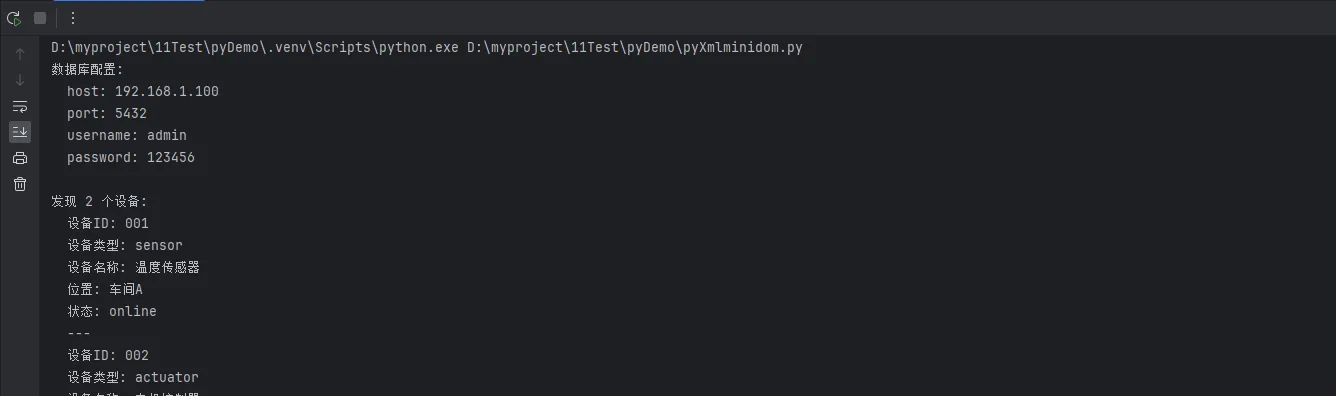
🎨 实战案例2:动态创建和修改XML文件
在上位机开发中,经常需要动态生成设备状态报告或操作日志:
Pythonimport xml.dom.minidom as minidom
from datetime import datetime
from typing import List, Dict

class XMLReportGenerator:
    def __init__(self):
        self.doc = minidom.Document()
        self.root = self.doc.createElement('report')
        self.root.setAttribute('generated', datetime.now().strftime('%Y-%m-%d %H:%M:%S'))
        self.doc.appendChild(self.root)

    def add_device_status(self, device_id: str, device_name: str,
                         status: str, parameters: Dict[str, str]):
        """添加设备状态信息"""
        device_node = self.doc.createElement('device')
        device_node.setAttribute('id', device_id)
        device_node.setAttribute('status', status)

        # 设备名称
        name_node = self.doc.createElement('name')
        name_node.appendChild(self.doc.createTextNode(device_name))
        device_node.appendChild(name_node)

        # 参数信息
        params_node = self.doc.createElement('parameters')
        for key, value in parameters.items():
            param_node = self.doc.createElement('parameter')
            param_node.setAttribute('name', key)
            param_node.appendChild(self.doc.createTextNode(str(value)))
            params_node.appendChild(param_node)

        device_node.appendChild(params_node)

        # 时间戳
        timestamp_node = self.doc.createElement('timestamp')
        timestamp_node.appendChild(
            self.doc.createTextNode(datetime.now().strftime('%Y-%m-%d %H:%M:%S'))
        )
        device_node.appendChild(timestamp_node)

        self.root.appendChild(device_node)

    def add_alarm_record(self, alarm_type: str, message: str, level: str = 'warning'):
        """添加报警记录"""
        alarm_node = self.doc.createElement('alarm')
        alarm_node.setAttribute('type', alarm_type)
        alarm_node.setAttribute('level', level)

        msg_node = self.doc.createElement('message')
        msg_node.appendChild(self.doc.createTextNode(message))
        alarm_node.appendChild(msg_node)

        time_node = self.doc.createElement('occurrence_time')
        time_node.appendChild(
            self.doc.createTextNode(datetime.now().strftime('%Y-%m-%d %H:%M:%S'))
        )
        alarm_node.appendChild(time_node)

        self.root.appendChild(alarm_node)

    def save_to_file(self, filename: str):
        """保存到文件,格式化输出"""
        with open(filename, 'w', encoding='utf-8') as f:
            self.doc.writexml(f, indent='', addindent='  ', newl='\n', encoding='utf-8')

    def get_pretty_xml(self) -> str:
        """获取格式化的XML字符串"""
        rough_string = self.doc.toprettyxml(indent="  ", encoding='utf-8')
        return rough_string.decode('utf-8')

# 实际应用示例
def generate_device_report():
    """生成设备状态报告"""
    generator = XMLReportGenerator()

    # 模拟设备数据
    devices_data = [
        {
            'id': '001',
            'name': '温度传感器A',
            'status': 'normal',
            'parameters': {
                'temperature': '25.6',
                'humidity': '45.2',
                'battery_level': '89'
            }
        },
        {
            'id': '002',
            'name': '压力传感器B',
            'status': 'warning',
            'parameters': {
                'pressure': '1.05',
                'vibration': '0.02',
                'temperature': '78.5'
            }
        }
    ]

    # 添加设备状态
    for device in devices_data:
        generator.add_device_status(
            device['id'],
            device['name'],
            device['status'],
            device['parameters']
        )

    # 添加报警信息
    generator.add_alarm_record('temperature_high', '设备002温度超过安全阈值', 'critical')
    generator.add_alarm_record('battery_low', '设备001电池电量不足', 'warning')

    # 保存报告
    filename = f"device_report_{datetime.now().strftime('%Y%m%d_%H%M%S')}.xml"
    generator.save_to_file(filename)

    print(f"设备状态报告已生成: {filename}")
    print("报告内容预览:")
    print(generator.get_pretty_xml())

# 执行生成报告
generate_device_report()

⚡ 实战案例3:XML文件内容修改和更新
在实际项目中,经常需要更新配置文件或修改现有数据:
Pythonimport xml.dom.minidom as minidom
import os
from typing import Optional

class XMLEditor:
    def __init__(self, xml_file: str):
        self.xml_file = xml_file
        self.dom = minidom.parse(xml_file)
        self.root = self.dom.documentElement
        self.modified = False

    def update_device_status(self, device_id: str, new_status: str) -> bool:
        """更新指定设备的状态"""
        devices = self.root.getElementsByTagName('device')

        for device in devices:
            if device.getAttribute('id') == device_id:
                status_nodes = device.getElementsByTagName('status')
                if status_nodes:
                    # 更新现有状态节点
                    status_nodes[0].firstChild.data = new_status
                    self.modified = True
                    return True
                else:
                    # 创建新的状态节点
                    status_node = self.dom.createElement('status')
                    status_node.appendChild(self.dom.createTextNode(new_status))
                    device.appendChild(status_node)
                    self.modified = True
                    return True
        return False

    def add_new_device(self, device_id: str, device_type: str,
                      name: str, location: str, status: str = 'offline'):
        """添加新设备"""
        devices_node = self.root.getElementsByTagName('devices')[0]

        # 创建新设备节点
        device_node = self.dom.createElement('device')
        device_node.setAttribute('id', device_id)
        device_node.setAttribute('type', device_type)

        # 添加设备详细信息
        elements = {
            'name': name,
            'location': location,
            'status': status
        }

        for tag_name, value in elements.items():
            element = self.dom.createElement(tag_name)
            element.appendChild(self.dom.createTextNode(value))
            device_node.appendChild(element)

        devices_node.appendChild(device_node)
        self.modified = True

    def remove_device(self, device_id: str) -> bool:
        """删除指定设备"""
        devices = self.root.getElementsByTagName('device')

        for device in devices:
            if device.getAttribute('id') == device_id:
                device.parentNode.removeChild(device)
                device.unlink()  # 释放内存
                self.modified = True
                return True
        return False

    def update_database_config(self, **config):
        """更新数据库配置"""
        db_node = self.root.getElementsByTagName('database')[0]

        for key, value in config.items():
            nodes = db_node.getElementsByTagName(key)
            if nodes:
                # 更新现有配置
                nodes[0].firstChild.data = str(value)
                self.modified = True
            else:
                # 添加新配置项
                new_node = self.dom.createElement(key)
                new_node.appendChild(self.dom.createTextNode(str(value)))
                db_node.appendChild(new_node)
                self.modified = True

    def save_changes(self, backup: bool = True):
        """保存修改,可选择是否备份原文件"""
        if not self.modified:
            print("没有修改需要保存")
            return

        if backup and os.path.exists(self.xml_file):
            backup_file = f"{self.xml_file}.backup"
            os.rename(self.xml_file, backup_file)
            print(f"原文件已备份为: {backup_file}")

        with open(self.xml_file, 'w', encoding='utf-8') as f:
            self.dom.writexml(f, indent='', addindent='  ', newl='\n', encoding='utf-8')

        print(f"修改已保存到: {self.xml_file}")
        self.modified = False

    def close(self):
        """释放DOM对象"""
        self.dom.unlink()

# 使用示例
def demonstrate_xml_editing():
    """演示XML编辑功能"""
    editor = XMLEditor('config.xml')

    try:
        # 更新设备状态
        if editor.update_device_status('001', 'maintenance'):
            print("✅ 设备001状态已更新为维护模式")

        # 添加新设备
        editor.add_new_device('003', 'controller', '新控制器', '车间C', 'testing')
        print("✅ 新设备003已添加")

        # 更新数据库配置
        editor.update_database_config(
            host='192.168.1.101',
            backup_enabled='true'
        )
        print("✅ 数据库配置已更新")

        # 删除设备
        if editor.remove_device('002'):
            print("✅ 设备002已删除")

        # 保存所有修改
        editor.save_changes(backup=True)

    finally:
        editor.close()

# 执行演示
demonstrate_xml_editing()
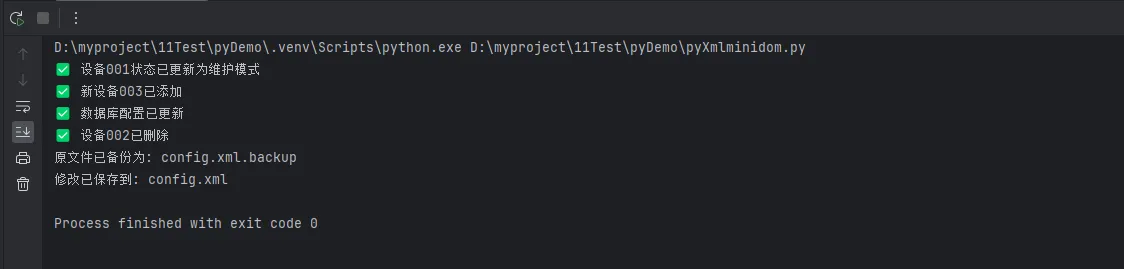
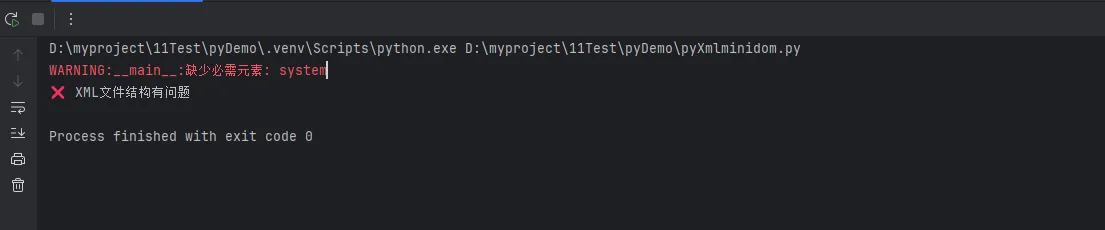
🔧 进阶技巧:错误处理和性能优化
Pythonimport xml.dom.minidom as minidom
import xml.parsers.expat
from contextlib import contextmanager
import logging

# 配置日志
logging.basicConfig(level=logging.INFO)
logger = logging.getLogger(__name__)

@contextmanager
def safe_xml_operation(xml_file: str):
    """安全的XML操作上下文管理器"""
    dom = None
    try:
        dom = minidom.parse(xml_file)
        yield dom
    except xml.parsers.expat.ExpatError as e:
        logger.error(f"XML解析错误: {e}")
        raise ValueError(f"无效的XML文件格式: {xml_file}")
    except FileNotFoundError:
        logger.error(f"文件未找到: {xml_file}")
        raise
    except Exception as e:
        logger.error(f"处理XML时发生错误: {e}")
        raise
    finally:
        if dom:
            dom.unlink()

def validate_xml_structure(xml_file: str, required_elements: list) -> bool:
    """验证XML文件结构"""
    try:
        with safe_xml_operation(xml_file) as dom:
            root = dom.documentElement

            for element in required_elements:
                nodes = root.getElementsByTagName(element)
                if not nodes:
                    logger.warning(f"缺少必需元素: {element}")
                    return False

            logger.info("XML结构验证通过")
            return True

    except Exception as e:
        logger.error(f"XML结构验证失败: {e}")
        return False

# 性能优化示例
class OptimizedXMLProcessor:
    """优化的XML处理器"""

    def __init__(self):
        self._element_cache = {}

    def get_cached_elements(self, dom, tag_name: str):
        """缓存元素查询结果"""
        if tag_name not in self._element_cache:
            self._element_cache[tag_name] = dom.getElementsByTagName(tag_name)
        return self._element_cache[tag_name]

    def clear_cache(self):
        """清除缓存"""
        self._element_cache.clear()

# 使用示例
if __name__ == "__main__":
    # 验证XML结构
    required_elements = ['system', 'database', 'devices']
    if validate_xml_structure('config.xml', required_elements):
        print("✅ XML文件结构正确")
    else:
        print("❌ XML文件结构有问题")
📊 实用工具函数集合
Pythondef xml_to_dict(element):
    """将XML元素转换为字典"""
    result = {}

    # 处理属性
    if element.attributes:
        result['@attributes'] = {}
        for i in range(element.attributes.length):
            attr = element.attributes.item(i)
            result['@attributes'][attr.name] = attr.value

    # 处理子元素
    children = [child for child in element.childNodes
                if child.nodeType == child.ELEMENT_NODE]

    if children:
        child_dict = {}
        for child in children:
            child_result = xml_to_dict(child)

            if child.nodeName in child_dict:
                # 处理同名元素,转换为列表
                if not isinstance(child_dict[child.nodeName], list):
                    child_dict[child.nodeName] = [child_dict[child.nodeName]]
                child_dict[child.nodeName].append(child_result)
            else:
                child_dict[child.nodeName] = child_result

        result.update(child_dict)
    else:
        # 叶子节点,获取文本内容
        text_content = ''.join([child.data for child in element.childNodes
                                if child.nodeType == child.TEXT_NODE]).strip()
        if text_content:
            result = text_content

    return result


def pretty_print_xml(dom_node, indent: int = 0):
    """美化打印XML结构"""
    indent_str = "  " * indent

    if dom_node.nodeType == dom_node.ELEMENT_NODE:
        print(f"{indent_str}<{dom_node.nodeName}>")

        # 打印属性
        if dom_node.attributes:
            for i in range(dom_node.attributes.length):
                attr = dom_node.attributes.item(i)
                print(f"{indent_str}  @{attr.name} = {attr.value}")

        # 递归打印子节点
        for child in dom_node.childNodes:
            if child.nodeType == child.ELEMENT_NODE:
                pretty_print_xml(child, indent + 1)
            elif child.nodeType == child.TEXT_NODE and child.data.strip():
                print(f"{indent_str}  文本: {child.data.strip()}")


# 示例用法
if __name__ == "__main__":
    from xml.dom.minidom import parseString

    xml_string = """<root>
    <child1 attr1="value1">Text1</child1>
    <child2 attr2="value2">
        <subchild>SubText</subchild>
    </child2>
    <child1 attr3="value3">Text2</child1>
</root>"""
    dom = parseString(xml_string)
    xml_dict = xml_to_dict(dom.documentElement)
    print("XML转换为字典:")
    print(xml_dict)
    print("\n美化打印XML结构:")
    pretty_print_xml(dom.documentElement)
    print("\nXML转换为字典:")
    print(xml_dict)
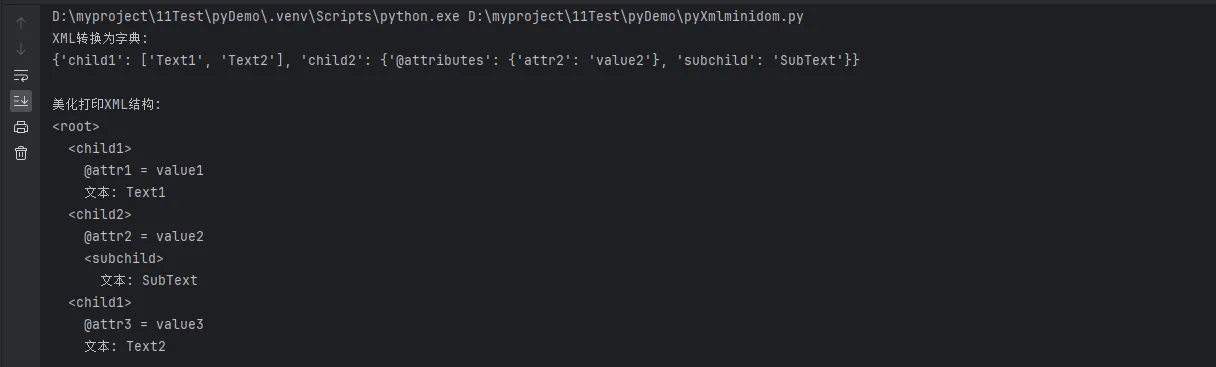
🎯 核心要点总结
通过本文的深入解析和实战演练,我们掌握了xml.dom.minidom的核心应用技能:
第一个关键点:结构化读取 - 掌握了DOM树的遍历方法,能够高效提取XML中的配置信息和数据内容,这是处理配置文件和数据交换的基础技能。
第二个关键点:动态创建和修改 - 学会了程序化生成XML文档和实时更新现有内容,这在报告生成、日志记录和配置管理中极为实用。
第三个关键点:工程化最佳实践 - 通过错误处理、性能优化和上下文管理,确保了代码在生产环境中的稳定性和可维护性。
xml.dom.minidom虽然不是最快的XML处理库,但其简洁的API和稳定的表现使其成为Python开发者处理中小型XML文件的理想选择。在上位机开发、数据采集和企业级应用中,这些技能将助你事半功倍。
记住,好的代码不仅仅是能运行,更要具备良好的异常处理和资源管理机制。继续实践这些技术要点,你将在XML处理领域游刃有余!
本文作者:技术老小子
本文链接:
版权声明:本博客所有文章除特别声明外,均采用 BY-NC-SA 许可协议。转载请注明出处!