
目录
你是否经常遇到这样的困扰:写了一大堆文件操作代码,结果忘记关闭文件,导致程序占用资源?或者在处理数据库连接时,异常发生后连接没有正确释放?作为Python开发者,这些问题在日常开发中屡见不鲜。
今天我们就来深入探讨Python上下文管理器(with语句),它能帮你彻底解决资源管理的烦恼。无论你是刚入门的新手,还是有经验的开发者,掌握上下文管理器都能让你的代码变得更加优雅、安全和专业。本文将从问题分析开始,通过丰富的代码实战,让你完全掌握这个强大的Python特性。
🔍 问题分析:为什么需要上下文管理器?
传统资源管理的痛点
在Python开发中,我们经常需要处理各种资源:文件、网络连接、数据库连接、线程锁等。传统的处理方式往往是这样的:
Python# 传统文件操作方式
def read_file_old_way():
    file = open('data.txt', 'r')
    content = file.read()
    file.close()  # 容易忘记关闭
    return content

# 数据库连接传统方式
def query_database_old_way():
    conn = sqlite3.connect('database.db')
    cursor = conn.cursor()
    cursor.execute('SELECT * FROM users')
    result = cursor.fetchall()
    cursor.close()  # 可能忘记关闭
    conn.close()   # 可能忘记关闭
    return result
这种方式存在三个主要问题:
- 容易忘记释放资源:开发者需要手动记住在适当的地方关闭资源
- 异常处理复杂:如果中间发生异常,资源可能无法正确释放
- 代码重复冗余:每次都要写相同的资源获取和释放逻辑
异常处理让问题更复杂
当加入异常处理后,代码变得更加复杂:
Pythondef read_file_with_exception():
    file = None
    try:
        file = open('data.txt', 'r')
        content = file.read()
        # 如果这里发生异常呢?
        result = process_content(content)
        return result
    except Exception as e:
        print(f"Error: {e}")
        return None
    finally:
        if file:
            file.close()  # 必须在finally中关闭
这样的代码不仅冗长,而且容易出错。每次处理资源都要写这样的try-finally结构,实在是太繁琐了。
💡 解决方案:上下文管理器的优雅登场
🌟 什么是上下文管理器?
上下文管理器是Python中一种特殊的对象,它定义了在with语句中使用时的运行时上下文。简单来说,它能够:
- 自动获取资源:在进入with块时自动获取所需资源
- 自动释放资源:在离开with块时自动释放资源(无论是否发生异常)
- 异常安全:即使发生异常,也能保证资源被正确释放
🔥 with语句的基本语法
Pythonwith 上下文管理器 as 变量名:
    # 使用资源的代码块
    pass
# 资源自动释放
让我们看看用with语句重写之前的文件操作:
Python# 使用with语句的优雅方式
def read_file_with_context():
    with open('file1.txt', 'r') as file:
        content = file.read()
        return content
    # 文件自动关闭,无需手动处理

read_file_with_context()
是不是简洁了很多?无论是否发生异常,文件都会被自动关闭!
🛠️ 代码实战:掌握上下文管理器的核心用法
📁 实战案例1:文件操作管理器
Python# 基础文件读取
from datetime import datetime


def read_config_file():
    """读取配置文件"""
    with open('config.txt', 'r', encoding='utf-8') as file:
        config = file.read()
        return config.strip()


# 文件写入操作
def write_log(message):
    """写入日志文件"""
    with open('app.log', 'a', encoding='utf-8') as file:
        timestamp = datetime.now().strftime('%Y-%m-%d %H:%M:%S')
        file.write(f"[{timestamp}] {message}\n")


# 处理多个文件
def merge_files(file1_path, file2_path, output_path):
    """合并两个文件"""
    with open(file1_path, 'r') as f1, \
            open(file2_path, 'r') as f2, \
            open(output_path, 'w') as output:
        content1 = f1.read()
        content2 = f2.read()
        output.write(content1 + '\n' + content2)
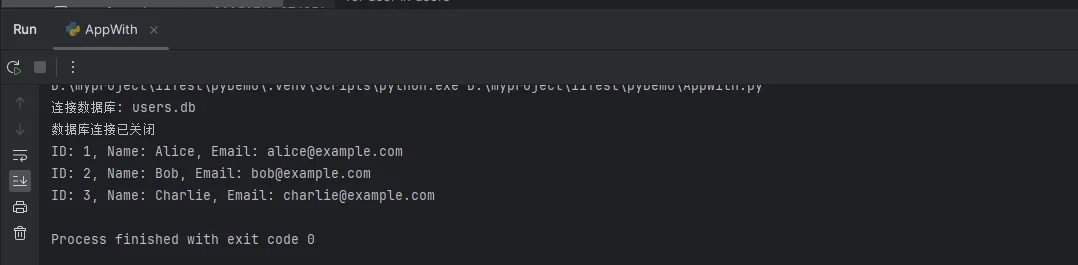
🗄️ 实战案例2:数据库连接管理器
Pythonimport sqlite3
from contextlib import contextmanager

@contextmanager
def database_connection(db_path):
    """自定义数据库连接上下文管理器"""
    conn = None
    try:
        print(f"连接数据库: {db_path}")
        conn = sqlite3.connect(db_path)
        yield conn
    except Exception as e:
        if conn:
            conn.rollback()
        print(f"数据库操作失败: {e}")
        raise
    finally:
        if conn:
            conn.close()
            print("数据库连接已关闭")

# 使用自定义的数据库上下文管理器
def query_users():
    """查询用户数据"""
    with database_connection('users.db') as conn:
        cursor = conn.cursor()
        cursor.execute('SELECT id, name, email FROM users')
        users = cursor.fetchall()
        return users

def create_user(name, email):
    """创建新用户"""
    with database_connection('users.db') as conn:
        cursor = conn.cursor()
        cursor.execute(
            'INSERT INTO users (name, email) VALUES (?, ?)',
            (name, email)
        )
        conn.commit()
        return cursor.lastrowid

def initialize_database():
    """初始化数据库并插入测试数据"""
    db_path = 'users.db'
    conn = sqlite3.connect(db_path)
    cursor = conn.cursor()

    # 创建表
    cursor.execute('''
        CREATE TABLE IF NOT EXISTS users (
            id INTEGER PRIMARY KEY AUTOINCREMENT,
            name TEXT NOT NULL,
            email TEXT NOT NULL
        )
    ''')

    # 插入测试数据
    test_data = [
        ('Alice', 'alice@example.com'),
        ('Bob', 'bob@example.com'),
        ('Charlie', 'charlie@example.com')
    ]
    cursor.executemany('INSERT INTO users (name, email) VALUES (?, ?)', test_data)

    conn.commit()
    conn.close()
    print(f"数据库 {db_path} 已初始化并插入测试数据")

# initialize_database()
users=query_users()
for user in users:
    print(f"ID: {user[0]}, Name: {user[1]}, Email: {user[2]}")
🔧 实战案例3:自定义资源管理器
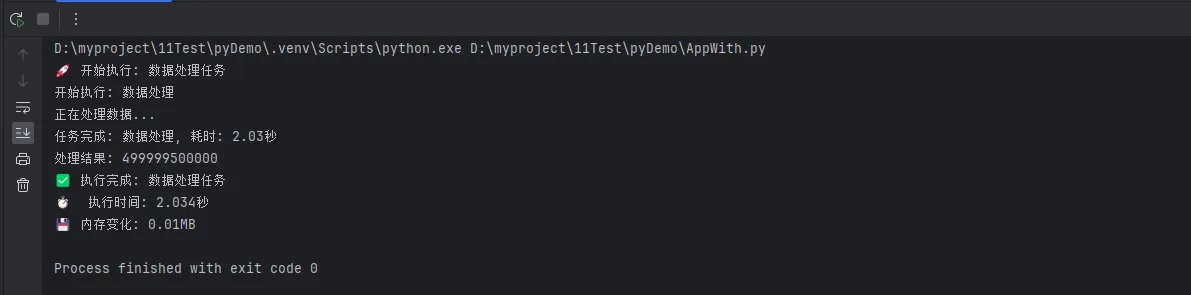
Pythonimport time

from contextlib import contextmanager


class TimerContext:
    """计时器上下文管理器类"""

    def __init__(self, task_name="Task"):
        self.task_name = task_name
        self.start_time = None

    def __enter__(self):
        print(f"开始执行: {self.task_name}")
        self.start_time = time.time()
        return self

    def __exit__(self, exc_type, exc_val, exc_tb):
        end_time = time.time()
        duration = end_time - self.start_time

        if exc_type is None:
            print(f"任务完成: {self.task_name}, 耗时: {duration:.2f}秒")
        else:
            print(f"任务异常: {self.task_name}, 耗时: {duration:.2f}秒")
            print(f"异常信息: {exc_val}")

        # 返回False表示不抑制异常
        return False


# 使用自定义计时器
def process_data():
    """数据处理示例"""
    with TimerContext("数据处理"):
        # 模拟数据处理
        time.sleep(2)
        print("正在处理数据...")
        # 可能的异常处理
        result = sum(range(1000000))
        return result


# 使用装饰器形式的上下文管理器
@contextmanager
def performance_monitor(operation_name):
    """性能监控上下文管理器"""
    start_memory = get_memory_usage()  # 假设有这个函数
    start_time = time.time()

    print(f"🚀 开始执行: {operation_name}")

    try:
        yield
    finally:
        end_time = time.time()
        end_memory = get_memory_usage()  # 假设有这个函数

        duration = end_time - start_time
        memory_diff = end_memory - start_memory

        print(f"✅ 执行完成: {operation_name}")
        print(f"⏱️  执行时间: {duration:.3f}秒")
        print(f"💾 内存变化: {memory_diff:.2f}MB")


def get_memory_usage():
    """获取内存使用量(示例函数)"""
    import psutil
    process = psutil.Process()
    return process.memory_info().rss / 1024 / 1024  # MB

# 使用性能监控上下文管理器
def main():
    """主函数"""
    with performance_monitor("数据处理任务"):
        result = process_data()
        print(f"处理结果: {result}")

if __name__ == "__main__":
    main()
🌐 实战案例4:网络请求管理器
Pythonimport requests

from contextlib import contextmanager


@contextmanager
def http_session(timeout=30, retries=3):
    """HTTP会话上下文管理器"""
    session = requests.Session()

    # 配置重试策略
    from requests.adapters import HTTPAdapter
    from urllib3.util.retry import Retry

    retry_strategy = Retry(
        total=retries,
        backoff_factor=1,
        status_forcelist=[429, 500, 502, 503, 504],
    )

    adapter = HTTPAdapter(max_retries=retry_strategy)
    session.mount("http://", adapter)
    session.mount("https://", adapter)

    # 设置超时
    session.timeout = timeout

    try:
        print("🌐 创建HTTP会话")
        yield session
    finally:
        session.close()
        print("🔐 HTTP会话已关闭")


# 使用网络请求管理器
def fetch_api_data(url):
    """获取API数据"""
    with http_session(timeout=10) as session:
        try:
            response = session.get(url)
            response.raise_for_status()
            return response.json()
        except requests.RequestException as e:
            print(f"请求失败: {e}")
            return None


def download_file(url, filename):
    """下载文件"""
    with http_session() as session, \
            open(filename, 'wb') as file:
        response = session.get(url, stream=True)
        response.raise_for_status()

        for chunk in response.iter_content(chunk_size=8192):
            file.write(chunk)

        print(f"文件下载完成: {filename}")

# 示例用法
if __name__ == "__main__":
    # 获取API数据示例
    api_url = "https://jsonplaceholder.typicode.com/posts"
    data = fetch_api_data(api_url)
    if data:
        print(f"获取到 {len(data)} 条数据")
        # 打印data
        for item in data[:5]:
            print(item)

🎯 高级技巧:上下文管理器的最佳实践
🔄 嵌套使用上下文管理器
Pythondef process_multiple_files(input_files, output_file):
    """处理多个输入文件,写入一个输出文件"""
    with open(output_file, 'w', encoding='utf-8') as output:
        for input_file in input_files:
            with open(input_file, 'r', encoding='utf-8') as infile:
                content = infile.read()
                output.write(f"=== {input_file} ===\n")
                output.write(content)
                output.write("\n\n")
🛡️ 异常处理与上下文管理器
Python@contextmanager
def safe_operation(operation_name):
    """安全操作上下文管理器"""
    print(f"🔧 准备执行: {operation_name}")

    try:
        yield
        print(f"✅ 操作成功: {operation_name}")
    except FileNotFoundError as e:
        print(f"❌ 文件未找到: {e}")
    except PermissionError as e:
        print(f"❌ 权限错误: {e}")
    except Exception as e:
        print(f"❌ 操作失败: {operation_name}, 错误: {e}")
        # 可以选择是否重新抛出异常
        # raise
    finally:
        print(f"🧹 清理工作完成: {operation_name}")

# 使用安全操作管理器
def risky_file_operation():
    """可能失败的文件操作"""
    with safe_operation("文件读取"):
        with open('might_not_exist.txt', 'r') as file:
            return file.read()
🚀 总结:让你的Python代码更专业
通过本文的深入学习,我们掌握了Python上下文管理器的核心技能。让我们回顾三个关键要点:
🎯 核心优势:上下文管理器通过with语句实现了资源的自动管理,彻底解决了手动释放资源容易遗忘的问题,让代码更加安全可靠。
💪 实战应用:从基础的文件操作到复杂的数据库连接、网络请求、线程锁管理,上下文管理器都能提供优雅的解决方案,大大简化了异常处理逻辑。
🔧 最佳实践:通过自定义上下文管理器(类方式或装饰器方式),我们可以将通用的资源管理逻辑封装起来,提高代码复用性和可维护性。
掌握上下文管理器不仅能让你的Python代码更加专业,还能显著提升开发效率和程序稳定性。在日常的Python开发中,无论是编程技巧的运用还是上位机开发的实践,上下文管理器都是不可或缺的利器。
现在就开始在你的项目中应用这些技巧吧!你会发现,优雅的代码不仅读起来舒服,维护起来也更加轻松。
💡 想要获取更多Python实战技巧?关注我们的公众号,每周分享最新的Python开发经验和最佳实践!
本文作者:技术老小子
本文链接:
版权声明:本博客所有文章除特别声明外,均采用 BY-NC-SA 许可协议。转载请注明出处!