作为一名C#开发者,你是否曾想过尝试Java开发,却被复杂的环境搭建步骤劝退?与C#的Visual Studio一站式体验不同,Java的开发环境需要我们手动配置JDK、选择IDE、熟悉构建工具。不用担心,本文将以C#开发者的视角,用最实用的方式带你快速搭建Java开发环境,让你在30分钟内写出第一个Java程序。无论你是想拓展技术栈,还是项目需要,这篇文章都能让你轻松上手Java开发。
🎯 为什么Java环境搭建对C#开发者是个挑战?
对于习惯了C#开发的我们来说,Java环境搭建确实存在几个痛点:
1. 概念差异大
- C#:.NET Framework/Core自带运行时,Visual Studio集成一切
- Java:需要单独安装JDK,IDE和构建工具分离(这块可能是新转型最不好接受的)
2. 版本选择困难
- JDK版本众多(8、11、17、21),每个都有不同特性
- IDE选择多样(IntelliJ IDEA、Eclipse、NetBeans)
3. 配置复杂
- 环境变量配置(JAVA_HOME、PATH)
- 构建工具学习成本(Maven vs Gradle)
Python Complete Guide to INI Configuration File Handling: Make Your App Configuration Management More Elegant
In Python development on the Windows platform, we often need to deal with various configuration files. Whether it's a desktop application, automation script, or HMI program, proper configuration management is key to project success. Today we'll dive into the most classic configuration file format in Python — the INI file — and its read/write operations. This article starts from real development needs and, through rich code examples, helps you master all INI file handling techniques to easily handle various configuration management scenarios.
🤔 Why Choose INI Configuration Files?
Among many configuration file formats, INI files have unique advantages:
Clear structure: Use sections and key-value pairs; even non-technical users can easily understand it
Strong compatibility: Native support on Windows; many legacy applications use this format
Good readability: Plain text format, supports comments, easy to maintain and debug
A typical INI file structure:
Ini; 这是注释
[database]
host = localhost
port = 3306
username = admin
password = 123456

[logging]
level = INFO
file_path = ./logs/app.log
max_size = 10MB
🛠️ Python Built-in Tool: configparser Module
The Python standard library provides the configparser module, the first-choice tool for handling INI files. Let's start from basic usage:
📖 Reading INI Configuration Files
Pythonimport configparser

def read_config():
    # Create ConfigParser object
    config = configparser.ConfigParser()

    # Read configuration file
    config.read('config.ini', encoding='utf-8')

    # Get all section names
    sections = config.sections()
    print(f"配置文件包含的节: {sections}")

    # Read all key-value pairs of a specific section
    db_config = dict(config['database'])
    print(f"数据库配置: {db_config}")

    # Read specific configuration items
    host = config.get('database', 'host')
    port = config.getint('database', 'port')  # Automatically converted to int

    print(f"数据库地址: {host}:{port}")

    return config

# Usage example
if __name__ == "__main__":
    config = read_config()
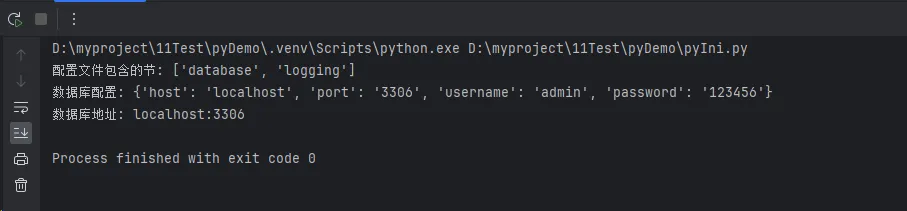
在Windows平台的Python开发中,我们经常需要处理各种配置文件。无论是桌面应用、自动化脚本还是上位机程序,合理的配置管理都是项目成功的关键。今天就来深入探讨Python中最经典的配置文件格式——ini文件的读写操作。本文将从实际开发需求出发,通过丰富的代码示例,让你掌握ini文件操作的所有技巧,轻松应对各种配置管理场景。
🤔 为什么选择ini配置文件?
在众多配置文件格式中,ini文件有着独特的优势:
结构清晰:采用节(section)和键值对的层次结构,即使非技术人员也能轻松理解
兼容性强:Windows系统原生支持,许多传统软件都使用这种格式
可读性好:纯文本格式,支持注释,便于维护和调试
典型的ini文件结构如下:
Ini; 这是注释
[database]
host = localhost
port = 3306
username = admin
password = 123456

[logging]
level = INFO
file_path = ./logs/app.log
max_size = 10MB
🛠️ Python内置工具:configparser模块
Python标准库提供了configparser模块,这是处理ini文件的首选工具。让我们从基础用法开始:
📖 读取ini配置文件
Pythonimport configparser

def read_config():
    # 创建ConfigParser对象
    config = configparser.ConfigParser()

    # 读取配置文件
    config.read('config.ini', encoding='utf-8')

    # 获取所有节名
    sections = config.sections()
    print(f"配置文件包含的节: {sections}")

    # 读取特定节的所有键值对
    db_config = dict(config['database'])
    print(f"数据库配置: {db_config}")

    # 读取具体的配置项
    host = config.get('database', 'host')
    port = config.getint('database', 'port')  # 自动转换为整数

    print(f"数据库地址: {host}:{port}")

    return config

# 使用示例
if __name__ == "__main__":
    config = read_config()
In Python development, environment variables are a concept that is both important and easily overlooked. Whether configuring database connections, API keys, or distinguishing between development and production environments, environment variables play a crucial role. However, many developers' operations with environment variables remain at a basic level, lacking systematic understanding and practical skills.
This article will take you deep into the methods of reading environment variables in Python, from basic operations to advanced techniques, and then to practical project applications, allowing you to thoroughly master this important programming skill. Whether you are a Python beginner or an experienced developer, you can gain practical knowledge and best practices from this.
🔍 Problem Analysis
What are Environment Variables?
Environment variables are dynamic named values used in operating systems to store system configuration information. In Python development, we commonly use environment variables to:
- Configuration Management: Store sensitive information such as database connection strings, API keys
- Environment Distinction: Differentiate between development, testing, and production environments
- Dynamic Configuration: Adjust program behavior without modifying code
- Security: Avoid hardcoding sensitive information in code
Characteristics of Windows Environment Variables
In Windows systems, environment variables have the following characteristics:
- Case-insensitive (but uppercase is recommended)
- Can be set through command line, system settings, or programmatically
- Divided into system-level and user-level scopes
💡 Solutions
🌟 Solution 1: Using os Module (Basic Method)
The os module is the basic tool for handling environment variables in Python's standard library:
Pythonimport os

# Read environment variables
def get_env_basic():
    # Method 1: Direct reading, will raise KeyError if not exists
    try:
        db_host = os.environ['DB_HOST']
        print(f"Database Host: {db_host}")
    except KeyError:
        print("DB_HOST environment variable not set")

    # Method 2: Use get method, provide default value
    db_port = os.environ.get('DB_PORT', '3306')
    print(f"Database Port: {db_port}")

    # Method 3: Get all environment variables
    all_env = os.environ
    print(f"Total environment variables: {len(all_env)}")
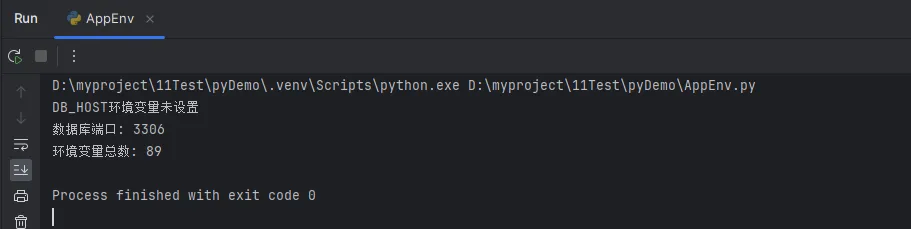
在Python开发中,环境变量是一个既重要又容易被忽视的概念。无论是配置数据库连接、API密钥,还是区分开发和生产环境,环境变量都扮演着至关重要的角色。但很多开发者对环境变量的操作还停留在基础层面,缺乏系统性的理解和实战技巧。
本文将带你深入了解Python中环境变量的读取方法,从基础操作到高级技巧,再到实际项目应用,让你彻底掌握这一重要的编程技巧。无论你是Python新手还是有经验的开发者,都能从中获得实用的知识和最佳实践。
🔍 问题分析
什么是环境变量?
环境变量是操作系统中用于存储系统配置信息的动态命名值。在Python开发中,我们常用环境变量来:
- 配置管理:存储数据库连接字符串、API密钥等敏感信息
- 环境区分:区分开发、测试、生产环境
- 动态配置:不修改代码就能调整程序行为
- 安全性:避免在代码中硬编码敏感信息
Windows环境变量的特点
在Windows系统中,环境变量具有以下特点:
- 不区分大小写(但建议使用大写)
- 可以通过命令行、系统设置或编程方式设置
- 分为系统级和用户级两种作用域
💡 解决方案
🌟 方案一:使用os模块(基础方法)
os模块是Python标准库中处理环境变量的基础工具:
Pythonimport os

# 读取环境变量
def get_env_basic():
    # 方法1:直接读取,不存在会抛出KeyError
    try:
        db_host = os.environ['DB_HOST']
        print(f"数据库主机: {db_host}")
    except KeyError:
        print("DB_HOST环境变量未设置")

    # 方法2:使用get方法,提供默认值
    db_port = os.environ.get('DB_PORT', '3306')
    print(f"数据库端口: {db_port}")

    # 方法3:获取所有环境变量
    all_env = os.environ
    print(f"环境变量总数: {len(all_env)}")